sentinel
43 TopicsSplitting single-tenant Microsoft Defender XDR Sentinel logs in multiple company scenarios
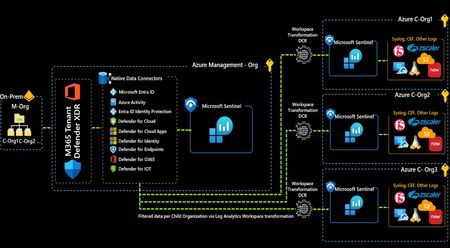
This article describes a simple, yet effective solution for the problem of segregating Microsoft Defender XDR and Entra ID Sentinel logs ingestion in a single-tenant with multiple companies scenario, leveraging Log Analytics workspace transformations and some simple KQL query statements.AMA: Microsoft SIEM & XDR: unified security operations
At Microsoft Ignite we announced that we are bringing our Microsoft Sentinel and Microsoft Defender XDR products together to deliver an optimized and unified security operations experience. We are combining the full power of these products into a single portal enhanced with more comprehensive features, automation, guided experiences, and Microsoft Security Copilot. Bring your questions to this Ask Microsoft Anything (AMA) as members of our Microsoft Security engineering team bring clarity and insights about this new experience. This session is part of the Microsoft Security Tech Accelerator. RSVP for event reminders, add it to your calendar, and post your questions and comments below! This session will also be recorded and available on demand shortly after conclusion of the live event.4.3KViews4likes41CommentsCMMC Compliance with Azure Sentinel
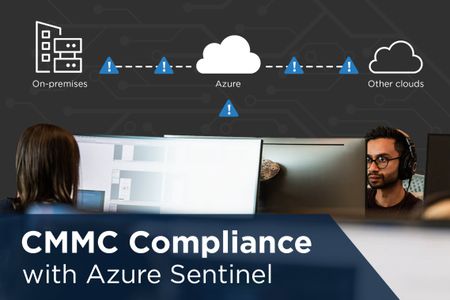
Often the purpose of a Security Information & Event Management software product (SIEM) like Microsoft's Azure Sentinel can be misunderstood. In this blog, Azure Sentinel will be discussed in terms of capabilities and importance for CMMC compliance and an ideal cloud security strategy. Azure Sentinel became generally available on March 13, 2020, and charges for the service started April 1, 2020. Sentinel can pull log data at no cost for Incident Response from AWS CloudTrail, Azure Activity Logs, Office 365/Microsoft 365 Audit Logs (all SharePoint activity and Exchange admin activity) and alerts from Microsoft Threat Protection products (Azure Security Center, Office 365 ATP, Azure ATP, Microsoft Defender ATP, Microsoft Cloud App Security, Azure Information Protection).6.4KViews3likes0Comments
Sentinel Notebook: Guided Hunting - Domain Generation Algorithm (DGA) Detection
Overview This notebook, titled “Guided Hunting - Domain Generation Algorithm (DGA) Detection”, provides a framework for investigating anomalous network activity by identifying domains generated by algorithms, which are often used by malware to evade detection. It integrates data from Log Analytics (DeviceNetworkEvents) and employs Python-based tools and libraries such as “msticpy”, “pandas”, and “scikit-learn” for analysis and visualization. DGA detection is crucial for cybersecurity as it helps identify and mitigate threats like botnets and malware that use dynamically generated domains for command-and-control communication, making it a key component in proactive threat hunting and network defense. Link: https://github.com/GonePhishing402/SentinelNotebooks/blob/main/DGA_Detection_ManagedIdentity.ipynb What is Domain Generation Algorithm and How to Detect it? A Domain Generation Algorithm (DGA) is a technique used by malware to create numerous domain names for communicating with Command and Control (C2) servers, ensuring continued operation even if some domains are blocked. DGAs evade static signature detection by dynamically generating unpredictable domain names, making it hard for traditional security methods to identify and blacklist them. Machine learning models can effectively detect DGAs by analyzing patterns and features in domain names, leveraging techniques like deep learning to adapt to new variants and identify anomalies that static methods may miss. How to Run the Notebook Log in with Managed Identity This notebook requires you to authenticate with a managed identity. The managed identity can be created from the Azure portal and must have the following RBAC: - Sentinel Contributor - Log Analytics Contributor - AzureML Data Scientist - AzureML Compute Operator Replace the [CLIENT_ID] with the client ID for your managed identity. This can be obtained from the Azure portal under Managed Identities -> Select the identity -> Overview. Note: This notebook will still work if you choose to authenticate with just an azure user using the CLI method as well. Import Libraries This code block is used to import the necessary libraries and label the “credential” variable to use the ManagedIdentityCredential() library. Setup msticpyconfig.yaml This section just pulls the msticpyconfig.yaml to use later on in the notebook. Ensure this is setup before running this notebook and in your current working directory. Setup QueryProvider The query provider is setup for Azure Sentinel. This does not need to be changed unless you want to use a different query provider from msticpy. Connect to Sentinel This code block is used to connect to Sentinel with the managed identity to the workspace specified in your msticpyconfig.yaml. You should see a “connected” after running this code block. DGA Model Creation This code block is designed to use CountVectorizer() and MultinomialNB() to create a model called dga_model.joblib and save it to the path specified in the “model_filename” variable. It is important to change this path specific to your environment. You must give the algorithm data to learn from in order to be effective. Download the domain.csv located here and upload to your current working directory on Azure Machine Learning Workspace: DGA_Detection/data/domain.csv at master · hmaccelerate/DGA_Detection You must also change line 10 in this code block to have the “labeled_domains_df” point to the domain.csv in your environment. Once you run the code block, you should see the model saved and the model accuracy. This number will vary depending on the data you are giving it. Apply dga_model.joblib to Sentinel Data This code block uses the model that we generated in the previous block and runs it against our data we specific in the “query” variable. This is using domain names from the “DeviceNetworkEvents” table in MDE events. The “parse_json” was used in our KQL to extract the appropriate sub-field needed for this search. When this model is run against the data, it will try to determine if any domains in our environment are associated with domain generation algorithms (DGA). If the “IsDGA” column contains a value of “True”, the model has determined that the characteristics of that domain matches a DGA. Here is what the output will look like: Output All Results to CSV This code block will output all the results above to a CSV called “dgaresults.csv”. Change the “output_path” variable to match your environment. Filter DGA Results to CSV This code block will output just the DGA results above to a CSV called “dgaresults2.csv”. Change the “output_path” variable to match your environment. How to Investigate these Results Further You can take the domain results that match DGA and find the correlating IP to see if it matches any threat intelligence. Correlate findings with other security logs, such as firewall or endpoint data, to uncover patterns of malicious behavior. This approach helps pinpoint potential threats and enables proactive mitigation. We can also create logic apps to automate follow-on analysis of these notebooks. This will be covered in a later blog.
Securing Enterprise AI Agents with Microsoft Sentinel
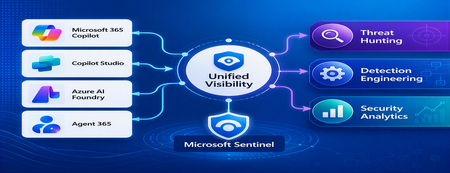
1. Introduction Enterprise adoption of Generative AI is accelerating rapidly through Microsoft 365 Copilot, Copilot Studio, Azure AI Foundry Agents, Security Copilot, and custom AI agents integrated with business applications. Unlike traditional SaaS applications, AI agents can: Access enterprise data Query internal knowledge repositories Invoke APIs and MCP tools Execute workflows Interact with business applications Make decisions on behalf of users While these capabilities improve productivity, they introduce a new attack surface that security teams must monitor and secure. Common AI threats include: Prompt Injection Cross Prompt Injection Attacks (XPIA) Jailbreak Attempts Unauthorized Tool Invocation Data Exfiltration through AI Agents Agent Identity Abuse Excessive Data Access Malicious MCP Tool Execution Traditional SOC monitoring platforms were designed for users, devices, applications and infrastructure—not autonomous AI systems. To address this challenge, Microsoft provides a comprehensive AI security monitoring framework built around: Agent 365 Observability Microsoft Agent Identities Microsoft Copilot Logs Defender XDR Defender for AI Microsoft Sentinel Together these components provide end-to-end observability of: User prompts Agent execution paths Tool invocations Safety signal detections Agent identities Security alerts 2. Reference Architecture AI Security Monitoring Architecture 3. Integration Architecture Microsoft provides multiple telemetry sources that complement one another. 3.1 Agent Runtime Telemetry Sentinel Data Connector Agent 365 Data Connector Table UnifiedAgentObservability Captures runtime behavior of AI agents including: User prompts Session IDs Conversation IDs Agent identities MCP tool invocations Connector invocations Tool arguments Tool responses Request payloads Response payloads Execution errors This dataset provides the forensic trail of everything an AI agent performed. 3.2 Agent Governance and Asset Inventory Sentinel Data Connector Microsoft Agent Identities Provides visibility into: Agent inventory Agent blueprint inventory Ownership Relationships Governance metadata Risk context This allows SOC teams to answer: Who owns this agent? What permissions does it have? Which business unit deployed it? Which related agents exist? 3.3 Copilot Audit and Usage Monitoring Sentinel Data Connector Microsoft Copilot Logs Connector Table CopilotActivity Provides: Copilot usage auditing Operational visibility User interaction tracking Useful for governance, compliance and adoption reporting. 3.4 AI Safety Telemetry Sentinel Data Connector Microsoft Defender XDR Connector Table CloudAppEvents CloudAppEvents provides AI safety signals such as: Prompt Shield detections Prompt Injection attempts Cross Prompt Injection Attacks (XPIA) Jailbreak-related verdicts Unsafe prompt classifications Think of CloudAppEvents as answering: "Was the prompt malicious?" 3.5 AI Security Alerts Sentinel Data Connectors Microsoft Defender XDR Microsoft Defender for Cloud Tables SecurityAlert SecurityIncident Used for: AI attack detections Security incidents Correlated investigation workflows 4. Understanding the Two Most Important AI Tables CloudAppEvents Focuses on AI Safety Questions answered: Was Prompt Shield triggered? Was this a jailbreak attempt? Was XPIA detected? Was the prompt suspicious? UnifiedAgentObservability Focuses on Agent Runtime Behavior Questions answered: What tool was invoked? Which connector executed? What arguments were passed? What data was returned? What actions did the agent perform? 5. Advanced Threat Hunting Scenarios The Agent365 Observability hunting guide contains several investigation scenarios that can be used directly in Microsoft Sentinel. Reference: Agent 365 Observability — AI Agent Telemetry Hunting https://github.com/SCStelz/security-investigator/blob/main/queries/cloud/agent365_observability.md 5.1 Prompt Injection Detection Detect prompts containing indicators such as: Ignore previous instructions Reveal system prompt Developer mode Disregard safety controls Investigation workflow: Review Tool Activity This allows analysts to determine whether a suspicious prompt resulted in downstream actions. 5.2 Session Reconstruction One of the most powerful capabilities of UnifiedAgentObservability is session reconstruction. Analysts can correlate: This creates complete forensic timelines. 5.3 MCP Tool Auditing Monitor all MCP activity including: query_lake Graph API tools ServiceNow connectors SharePoint connectors Custom enterprise tools Questions answered: Which tool was used? Who triggered it? What parameters were supplied? What data was returned? 5.4 Sensitive Data Access Monitoring Monitor AI agent interaction with: Employee records Customer data Financial information SharePoint repositories HR databases Useful for identifying: Data exfiltration attempts Excessive access patterns Sensitive data exposure 5.5 Query Lake Monitoring The GitHub hunting guide introduces monitoring of: query_lake RunAdvancedHuntingQuery Analysts can inspect: Actual KQL submitted Target workspaces Data sources queried Scope of access This provides visibility into AI-driven security investigations. 5.6 New Tool Detection Identify newly observed tool usage. Examples: Unauthorized MCP servers Newly registered connectors Unapproved tools Unexpected integrations This use case is particularly useful for governance programs. 5.7 Tool Failure Monitoring Monitor: Permission failures Connector failures Application errors Access-denied responses A sudden increase in failures may indicate: Reconnaissance activity Misconfiguration Privilege abuse attempts 6. Detection Engineering Opportunities Organizations can create Sentinel Analytics Rules for: 6.1 Prompt Injection Detection Developer Mode prompts Prompt Override attempts System Prompt disclosure requests 6.2 Jailbreak Attempt Detection Safety bypass attempts Role manipulation prompts Instruction override patterns 6.3 Unauthorized Tool Usage New MCP tools High-risk connectors Rare tool executions 6.4 Sensitive Data Access HR data queries Identity information retrieval Large-volume exports 6.5 Agent Identity Abuse Ownership changes Unexpected agent activity Agent-to-agent anomalies 7. Data Lake Exploration and Long-Term Analytics Because agent telemetry resides within Sentinel Data Lake, organizations can perform: Long-term AI investigations Historical AI attack analysis Agent baselining Governance reporting Trend analysis Tool inventory reporting Example dashboards include: Top Prompt Injection Attempts Most Active Agents High-Risk MCP Tools Agent Ownership Analysis AI Security Incidents Sensitive Data Access Trends 8. Summary AI agents represent the next major computing platform, but they also introduce a completely new attack surface. To effectively secure enterprise AI solutions, organizations require visibility across: User interactions Agent execution paths MCP tool usage Prompt safety signals Agent identities Security detections Microsoft Sentinel provides this unified view by integrating: Agent 365 Observability UnifiedAgentObservability Microsoft Agent Identities Microsoft Copilot Logs CloudAppEvents Defender XDR Defender for AI By combining AI runtime telemetry with AI safety signals and Defender detections, security teams can move beyond traditional monitoring and build a modern SOC capability for threat hunting, incident response, governance and forensic investigations across Microsoft 365 Copilot, Copilot Studio, Azure AI Foundry and future AI agent ecosystems. Reference: https://github.com/SCStelz/security-investigator/blob/main/queries/cloud/agent365_observability.md“Automating Export of Microsoft Sentinel Analytic Rules mapped to MITRE Tactics & Techniques”
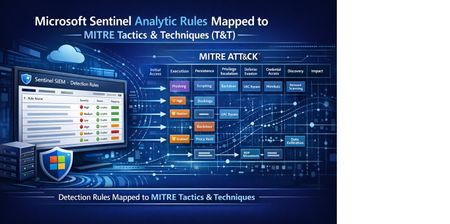
1. Introduction In modern Security Operations Centers (SOCs), mapping detections to the MITRE ATT&CK framework is critical. MITRE ATT&CK provides a structured, globally recognized model of adversary behavior, categorized into Tactics (goals) and Techniques (methods). Microsoft Sentinel analytic rules frequently include MITRE mappings, but viewing or exporting these at scale isn’t straightforward within the portal. Security teams often need: • A centralized view of existing detections mapped to MITRE ATT&CK • A CSV export for reporting, audits, and threat coverage assessments • Insights for SOC maturity, gap analysis, and threat-informed defense Having an automated way to extract this information ensures accuracy, consistency, and faster operational insights — all essential for high-performing SOCs. 2) Why This Script Is Required While Sentinel analytic rules individually display MITRE mappings, organizations typically need a workspace-wide export for: Detection Coverage & Gap Analysis Identify which Tactics & Techniques are covered. Highlight missing ATT&CK areas. Support threat modelling or purple team exercises. Security Operations Reporting Governance and oversight meetings Compliance documentation SOC KPI reporting and dashboards. Detection Engineering Lifecycle Maintaining a detection catalogue. Versioning and documentation Supporting change management and audits Exporting rules into a CSV using automation avoids manual errors, saves analyst time, and ensures accurate, up-to-date data. 3) Script to Export Microsoft Sentinel Analytic Rules with MITRE Tactics & Techniques (TO BE RUN FROM AZURE CLI) Important: This Bash script must be executed from Azure CLI, either: Azure Cloud Shell, or A workstation/server with Azure CLI installed (Linux, macOS, or WSL on Windows) The script uses az rest and jq to pull analytic rules and generate a CSV containing MITRE Tactics, Techniques, Severity, Enabled state, and KQL query. Bash Script (Run in Azure CLI) ------------------------------------------------------------------------------------------------------------------------ #!/bin/bash # Variables export SUB="99005f96-e572-4035-b476-836fd9d83d64" export RG="CyberSOC" export WS="CyberSOC" API="2024-03-01" # Step 1: Set subscription az account set --subscription "$SUB" # Step 2: Fetch alert rules echo "Fetching alert rules..." az rest \ --method GET \ --uri "https://management.azure.com/subscriptions/$SUB/resourceGroups/$RG/providers/Microsoft.OperationalInsights/workspaces/$WS/providers/Microsoft.SecurityInsights/alertRules?api-version=$API" \ --output json > rules.json # Step 3: Validate file if [ ! -s rules.json ]; then echo "Error: rules.json is empty or missing." exit 1 fi echo "Total rules found:" jq '.value | length' rules.json # Step 4: Generate CSV with MITRE mapping, severity, enabled echo "Generating CSV..." jq -r ' (["RuleName","Tactics","Techniques","MITRE_Map","Severity","Enabled","Query"] | @csv), ( .value[] | select(.kind == "Scheduled") | . as $r | ($r.properties // {}) as $p | [ ($p.displayName // $r.name // "N/A"), (( $p.tactics // $p.attackTactics // [] ) | join(";")), (( $p.techniques // $p.attackTechniqueIds // [] ) | join(";")), ( ( ($p.tactics // []) | map("TA" + (.[2:]? // "")) ) as $tacs | ( ($p.techniques // []) | map(.) ) as $techs | ( [$tacs[], $techs[]] | join(";")) ), ($p.severity // "N/A"), ($p.enabled | tostring), (( $p.query // "" ) | gsub("\\r?\\n"; " ")) ] | @csv ) ' rules.json > Scheduled_Rules_TTP_Query.csv ------------------------------------------------------------------------------------------------------------------------ 4) Summary Mapping detections to MITRE ATT&CK is a cornerstone of threat-informed defense. This script simplifies the process of exporting Microsoft Sentinel analytic rules with their MITRE mappings into a CSV — enabling SOC teams to: Analyze coverage across ATT&CK Identify detection gaps. Strengthen red–blue team collaboration. Build dashboards and ATT&CK heatmaps. Enhance SOC governance & reporting. Automating this export ensures faster insights, reduces manual workload, and supports a mature detection engineering program.Sentinel-Threat Intelligence Feeds Integration to strengthen Threat Detection & Proactive Hunting.
Combining threat intelligence feeds is important for detecting threats and identifying Indicators of Compromise (IOCs) in various scenarios. Here are some key situations where this approach is advantageous: Comprehensive Threat Detection Integrating multiple threat intelligence feeds can cover a wider range of threats. Different feeds may provide unique insights into malicious activities, IP addresses, domain names, and other IOCs. Reducing False Positives Combining feeds helps cross-verify data, decreasing the likelihood of false positives. This ensures that security teams focus on actual threats rather than inaccurate alerts. Enhanced Contextual Analysis Multiple feeds can offer richer context around threats, including tactics, techniques, and procedures (TTPs) used by attackers. This helps in understanding the threat landscape better and making informed decisions. Real-Time Threat Response Integrating feeds allows for real-time updates on emerging threats. This enables security teams to respond swiftly to new threats and mitigate potential damage. Proactive Threat Hunting Threat hunters can use combined feeds to identify patterns and anomalies that might indicate a threat. This proactive approach assists in detecting threats before they can cause significant harm. Improved Threat Intelligence Sharing Combining feeds from different sources, such as government agencies, commercial vendors, and open-source communities, enhances the overall quality and reliability of threat intelligence. Example Query in Microsoft Sentinel Here's an example of how you might combine two threat intelligence feeds using the coalesce function in KQL: _______________________________________________________________________________________ ThreatIntelFeed1 | extend CombinedIndicator = coalesce(ThreatIntelFeed1.Indicator, ThreatIntelFeed2.Indicator) | extend CombinedDescription = coalesce(ThreatIntelFeed1.Description, ThreatIntelFeed2.Description) | project CombinedIndicator, CombinedDescription _________________________________________________________________________________________ In the above example coalsce function is used. The coalesce function in Kusto Query Language (KQL) is used to evaluate a list of expressions and return the first non-null (or non-empty for strings) expression. This function is particularly useful in Microsoft Sentinel for handling data where some fields might be missing or null. Syntax coalesce(arg, arg_2, [arg_3, ...]) arg: The expression to be evaluated. All arguments must be of the same type. Maximum of 64 arguments is supported. Functions of coalesce in Sentinel Threat Intelligence Feeds Handling Missing Data: It helps in filling gaps where data might be missing by providing a fallback value. For example, if one threat intelligence feed lacks an IP address, coalesce can pull it from another feed. Data Normalization: Combines multiple fields into one, ensuring that you always have a value to work with. This is useful when different feeds provide similar data in different fields. Simplifying Queries: Reduces the need for complex conditional logic to handle null values, making queries more readable and maintainable. Let’s look at Threat Intelligence Analytic rule where caolsec function is used. The query combines threat intelligence indicators with DNS data to identify potential malicious activity. It ensures that only relevant and recent indicators are considered and matches them with DNS queries to detect suspicious behavior. This query ensures that you obtain the most comprehensive data by taking the first non-null value from either feed. Let's break down this KQL query step by step: Define Lookback Periods dt_lookBack: Sets a lookback period of 1 hour for DNS data. ioc_lookBack: Sets a lookback period of 14 days for threat intelligence indicators. Extract Relevant Threat Intelligence Indicators ThreatIntelligenceIndicator: Filters threat intelligence indicators generated within the last 14 days and not expired. arg_max(TimeGenerated, *) by IndicatorId: Summarizes to get the latest indicator for each IndicatorId. Active == true: Filters only active indicators. coalesce(NetworkIP, NetworkDestinationIP, NetworkSourceIP, EmailSourceIpAddress, "NO_IP"): Combines various IP fields into a single IoC field, defaulting to "NO_IP" if none are present. where IoC != "NO_IP": Filters out entries without valid IP addresses. Join with DNS Data join kind=innerunique: Joins the threat intelligence indicators with DNS data using an inner unique join to keep performance fast and result set low. _Im_Dns(starttime=ago(dt_lookBack)): Retrieves DNS data from the last hour. where isnotempty(DnsResponseName): Filters DNS records with non-empty response names. summarize imDns_mintime=min(TimeGenerated), imDns_maxtime=max(TimeGenerated) by SrcIpAddr, DnsQuery, DnsResponseName, Dvc, EventProduct, EventVendor: Summarizes DNS data by various fields. extract_all(@'(\d+\.\d+\.\d+\.\d+)', DnsResponseName): Extracts all IP addresses from the DNS response name. mv-expand IoC = addresses to typeof(string): Expands the extracted IP addresses into individual rows. Combined KQL looks like below _________________________________________________________________________________________ let dt_lookBack = 1h; let ioc_lookBack = 14d; let IP_TI = ThreatIntelligenceIndicator | where TimeGenerated >= ago(ioc_lookBack) and ExpirationDateTime > now() | summarize LatestIndicatorTime = arg_max(TimeGenerated, *) by IndicatorId | where Active == true | extend IoC = coalesce(NetworkIP, NetworkDestinationIP, NetworkSourceIP,EmailSourceIpAddress,"NO_IP") | where IoC != "NO_IP" ; IP_TI | join kind=innerunique // using innerunique to keep perf fast and result set low, we only need one match to indicate potential malicious activity that needs to be investigated ( _Im_Dns(starttime=ago(dt_lookBack)) | where isnotempty(DnsResponseName) | summarize imDns_mintime=min(TimeGenerated), imDns_maxtime=max(TimeGenerated) by SrcIpAddr, DnsQuery, DnsResponseName, Dvc, EventProduct, EventVendor | extend addresses = extract_all (@'(\d+\.\d+\.\d+\.\d+)', DnsResponseName) | mv-expand IoC = addresses to typeof(string) ) on IoC _________________________________________________________________________________________ Summary This article explores the importance of combining threat intelligence feeds to improve security operations. Key benefits include extending threat coverage, reducing false positives, and enhancing contextual analysis through detailed insights into attackers' tactics and techniques. The integration process also facilitates real-time threat updates and enables better collaboration between different intelligence sources. An example is provided using KQL (Kusto Query Language) to demonstrate how threat intelligence feeds can be combined effectively within Microsoft Sentinel. The query showcases steps like defining lookback periods, extracting relevant indicators, and correlating them with DNS data through an inner unique join. By leveraging this method, organizations can efficiently identify potential malicious activities and strengthen their threat response capabilities. The content emphasizes that integrating threat feeds is not just a technical function but a strategic necessity to fortify organizations against evolving cyber threats.