security
6480 TopicsWhose idea was it to show the Blue Screen of Death right after I saved nothing?
My PC displayed a Blue Screen of Death before I had a chance to save my work, and I'm worried about losing data or seeing the crash again. Could someone help me identify the likely cause, explain how to check the stop code and crash logs, and suggest safe troubleshooting steps? I can share my Windows version, hardware details, recent updates, and any error messages that appeared.30Views0likes1Comment
When will Windows stop asking me to "try the new Outlook"?
I'm getting tired of Windows repeatedly asking me to try the new Outlook, even though I already have an email setup that works perfectly fine for my daily needs. Every time the reminder appears, I wonder whether there is a permanent way to dismiss it instead of clicking away the same suggestion over and over, and I'm curious whether Microsoft plans to stop pushing this prompt or if there is a setting I have overlooked that can finally make it disappear.24Views1like1Comment
Microsoft account hacked
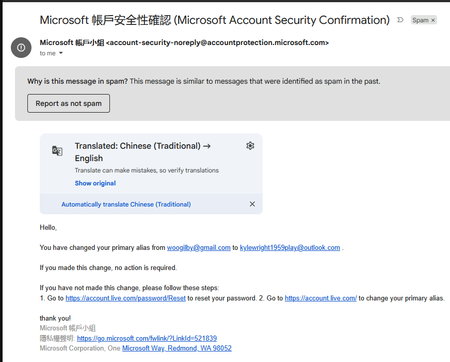
Hello everyone, unfortunately I fell victim to the infamous mrbeast infostealer hack. My original microsoft account (w*******@gmail.com) has its email, recovery email and password changed, so theres absolutely nothing i can do to proof my own identity. I do have access to my gmail (w*******@gmail.com), and i can even see the email notifications, the new email and the new recovery email. Picture 1: change in primary email. Picture 2: removal of my own email. This is very sad because this is already concrete proof, but theres no place to even upload screenshot in the hacked support. It just says insufficient evidence, whereas ea instantly changes back to my original email upon clicking a link, and steam allows locking up the email even though i have no evidence. What can I do? Also, support fails because it asks me to enter the email, but my email's already changed, so i cant receive the verification code. Thank you.69Views0likes2CommentsWhich key did I press to open the "ease of access" menu?
I was typing on my Windows computer when I somehow opened the Ease of Access menu, and now I cannot remember which key or keyboard shortcut I pressed to bring it up. I did not intend to change any accessibility settings, so I am wondering whether I accidentally triggered a built-in shortcut, perhaps by holding down a key for too long, and how I can identify the shortcut and prevent this from happening again while working.23Views0likes1CommentFamily Safety: child PC registered but not connected (Event ID 454, 0x86000002)
Hello, I am reporting a persistent Microsoft Family Safety device-association issue on a newly configured Windows 11 Home PC. Microsoft Support case reference: 7109577064 Microsoft Support has confirmed that the standard consumer-support troubleshooting path has been exhausted and specifically advised me to post the full technical scenario in Microsoft Tech Community. Environment Windows 11 Home 25H2 OS Build: 26200.9550 Update: KB5124010 Newly configured PC Child uses a Microsoft consumer account based on an external email domain: OP.pl No email addresses or personal account identifiers are included in this public post. Problem The PC is correctly registered under the child’s Microsoft account and is continuously visible at: account.microsoft.com/devices However, Microsoft Family Safety still shows: No connected Windows device So the Microsoft Account device registration works, but the Family Safety device association does not. Configuration already verified Child account is a Standard User, not Administrator. Child is correctly added to the Microsoft Family group. Parent account is the Family Organizer. Parental consent is correctly granted. Windows activity reporting is enabled. Windows Settings → Accounts → Family shows that the child can sign in. FamilySafetyRefreshTask exists and completes successfully with result 0x0. Manual execution of: schtasks /run /tn "\Microsoft\Windows\Shell\FamilySafetyRefreshTask" returns SUCCESS. WpcMonSvc is running. wlidsvc is running. AppIDSvc is running. dsregcmd /status reports: WamDefaultSet : YES WamDefaultAuthority : consumers and the Microsoft consumer account is correctly detected. Troubleshooting already completed Child Windows profile was switched temporarily to a local account and then reconnected to the same Microsoft account. Child Windows profile was later completely removed from the PC and recreated from scratch. Microsoft Family Safety for Windows was installed. Microsoft.Windows.CloudExperienceHost was reset with PowerShell. DNS cache was flushed. PC was tested using a different Internet connection / mobile hotspot. Windows was fully updated to 25H2 build 26200.9550. Child was completely removed from the Microsoft Family group. Parental consent was revoked. Child was invited again to the Family group. Parental consent was granted again. The recreated family relationship synchronized immediately between the Family Safety web interface and the mobile app. FamilySafetyRefreshTask was run again after recreating the family relationship. The issue persists. Additional symptom Under: Settings → Accounts → Connected devices the child profile behaves inconsistently. The PC appeared there once after recreating the Windows profile, but after restarting Windows the local Connected devices list became empty again. However, the PC remains continuously visible under the child account at account.microsoft.com/devices, which indicates that the cloud device registration itself is persistent. Event Viewer findings In: Microsoft-Windows-DeviceManagement-Enterprise-Diagnostics-Provider/Admin historical events from 27 September 2026 show: Event ID: 454 Enrollment Type: FamilySafety CSP: AppLocker Path: ./Vendor/MSFT/AppLocker/FamilySafety/FamilySafetyGroup Error: 0x86000002 After recreating the Microsoft Family relationship, granting parental consent again, and manually running FamilySafetyRefreshTask, no new FamilySafety-related events are generated in this log. What is confirmed to work Microsoft account authentication Windows user profile Microsoft Family group membership Parental consent Windows device registration under the child’s Microsoft account Family Safety activity reporting configuration Synchronization between Family Safety on the web and the mobile app The remaining failure appears to be specifically: child Microsoft account → Microsoft Family group → registered Windows device → Family Safety device association Microsoft Support could not escalate the case further through the consumer-support channel and instructed me to post the issue here. Microsoft Support case reference: 7109577064 I would appreciate input from Microsoft engineers, moderators, or anyone who has encountered this exact issue, especially in relation to: Event ID 454 error 0x86000002 AppLocker/FamilySafety/FamilySafetyGroup device visible in account.microsoft.com/devices but missing from Microsoft Family Safety I can provide additional Event Viewer logs, screenshots, dsregcmd /status output, or other diagnostic information if required.162Views0likes3CommentsWhat makes the "start menu" search find the app only on the second try?
When I search for an app in the Start menu, the first attempt often returns no result, but typing the exact same thing a second time finds it immediately. Why does the Start menu search only work on the second try, and what could be causing this inconsistent behavior?20Views0likes1Comment
Whose bright idea was it to make the "shutdown" button a slider?
Whose bright idea was it to turn the shutdown button into a slider? I keep sliding it the wrong way and ending up with sleep or restart instead of actually shutting down, which is honestly more frustrating than the old button ever was.17Views0likes0Comments