security
30 TopicsBuilding an Auditable Security Layer for Agentic AI
Most agent failures do not look like breaches. They look like a normal chat, a normal answer, and a normal tool call. Until the next morning, when a single question collapses the whole story: who authorized that action. You think you deployed an agent. In reality, you deployed an unbounded automation pipeline that happens to speak English. I’m Hazem Ali — Microsoft AI MVP, Distinguished AI & ML Architect, Founder & CEO at Skytells. For over 20 years, I’ve built secure, scalable enterprise AI across cloud and edge, with a focus on agent security and sovereign, governed AI architectures. My work on these systems is widely referenced by practitioners across multiple regions. Hazem Ali honored to receive an official speaker invitation under the patronage of H.H. Sheikh Dr. Sultan bin Muhammad Al Qasimi, Member of the UAE Supreme Council and Ruler of Sharjah, to speak at the Sharjah International Conference on Linguistic Intelligence (SICLI), organized by the American University of Sharjah (AUS) and the Emirates Scholar Center for Research and Studies. This piece is a collaboration with Hammad Atta a Practice Lead – AI Security & Cloud Strategy and Dr. Yasir Mehmood , Dr Muhammad Zeeshan Baig, Dr. Muhammad Aatif, Dr. MUHAMMAD AZIZ UL HAQ. We align on one core idea: agent security is not about making the model behave. It is about building enforceable boundaries around the model and proving every privileged step. This article is meant to sit next to my earlier Tech Community piece, Zero-Trust Agent Architecture: How To Actually Secure Your Agents, and go one level deeper into the mechanics you can implement on Azure today. Let me break it down. The Principle: The model is not your boundary Let me break it down in the way I’d explain it in a design review. A boundary is something that still holds when the component on the other side is adversarial, confused, or simply wrong. An LLM is none of those reliably. In an agent, the model is not just a generator. It becomes a planner and scheduler. It decides when to retrieve, which tool to call, how to shape arguments, and when to loop. That means your real attack surface is not “bad output.” It is the control-flow graph the model is allowed to traverse. So if your “security” lives inside the prompt, you are putting policy in the same token stream the attacker can influence. That is not a boundary. That is a suggestion. The only stable design is to treat the model like an untrusted proposer and the runtime like the verifier. Here is the chain I use. Each gate is external to the model and survives manipulation. Context Gate: Everything that enters the model is treated as executable influence, not “text.” Capability Gate: Tools are invoked as constrained capabilities, not free-form function calls. Evidence Gate: Every privileged step produces a verifiable artifact, not a story. Retrieval Control Plane: What the agent can see is governed by labels and identity, not prompt etiquette. Detection Layer: Drift and probing become alerts, not surprises. Now the rare part, the part most people miss: the boundary is not “block or allow.” The boundary is stateful. Once the runtime sees a suspicious signal, the entire session must transition into a degraded capability state, and every downstream gate must enforce that state. 1. Treat context as executable influence, and preserve provenance If you do RAG, your documents are not “supporting info.” They are an input channel. That makes the biggest prompt-injection risk not the user. It is your documents. Microsoft’s Prompt Shields covers user prompt attacks (scanned at the user input intervention point) and document attacks (scanned at the user input and tool response intervention points). When enabled, each request returns annotation results with detected and filtered values that your runtime can translate into a policy decision: block, degrade, or allow. Provenance Collapse. Most teams concatenate prompt + policy + retrieved chunks into one blob. The moment you do that, you lose the one thing you need for a defensible boundary: you can no longer reliably tell which tokens came from where. That is how “context” becomes “authority.” For indirect/document attacks, Microsoft guidance recommends delimiting context documents inside the prompt using """<documents> ... </documents>""" to improve indirect attack detection. That delimiter is not formatting. It is a provenance marker that improves indirect attack detection through Prompt Shields. Minimal, practical pattern: // Provenance-preserving prompt construction for indirect/document attack detection function buildPrompt(system: string, user: string, retrievedDocs: string[]): string { const docs = retrievedDocs.map((d) => `- ${d}`).join("\n"); return [ system, "", `User: ${user}`, "", `""" <documents>\n${docs}\n</documents> """`, ].join("\n"); } Then treat Prompt Shields output as a session security event, not a banner: type RiskState = "NORMAL" | "SUSPECT" | "BLOCK"; type FilterPolicy = "BLOCK_ON_FILTERED" | "DEGRADE_ON_FILTERED"; function computeRiskState( shields: { detected: boolean; filtered?: boolean }, labels: string[], policy: FilterPolicy = "DEGRADE_ON_FILTERED", ): RiskState { // detected => hard stop if (shields.detected) return "BLOCK"; // filtered is an annotation signal: block or degrade by policy if (shields.filtered) { return policy === "BLOCK_ON_FILTERED" ? "BLOCK" : "SUSPECT"; } // example: sensitivity-based degradation independent of shield hits const sensitive = labels.some((l) => ["Confidential", "HighlyConfidential", "Regulated"].includes(l), ); return sensitive ? "SUSPECT" : "NORMAL"; } When the signal is clear, you block and log. When it is suspicious, you do not warn. You downgrade authority. QSAF Alignment: Prompt Injection Protection (Domain 1): QSAF-PI-001 (static pattern blacklist), QSAF-PI-002 (dynamic LLM analysis), QSAF-PI-003 (semantic embedding comparison) All addressed by Prompt Shields and provenance marking. Context Manipulation (Domain 2): QSAF-RC-004 (context drift), QSAF-RC-007 (nested prompt injection) – mitigated by stateful risk calculation. 2. Tools are capabilities with constraints, not functions When the model proposes a tool call, your runtime should re-derive what is allowed from identity plus risk state, then enforce it at the gateway. type ToolRequest = { tool: string; args: unknown; }; type Capabilities = { allowWrite: boolean; allowedTools: Set<string>; }; function deriveCapabilities(risk: RiskState, roles: string[]): Capabilities { const baseAllowed = new Set(["search_kb", "get_profile", "summarize"]); const isAdmin = roles.includes("Admin"); if (risk === "SUSPECT") { return { allowWrite: false, allowedTools: baseAllowed }; } if (risk === "BLOCK") { return { allowWrite: false, allowedTools: new Set() }; } // NORMAL const tools = new Set([ ...baseAllowed, ...(isAdmin ? ["update_record", "issue_refund"] : []), ]); return { allowWrite: isAdmin, allowedTools: tools }; } function authorizeTool(req: ToolRequest, caps: Capabilities): void { if (!caps.allowedTools.has(req.tool)) throw new Error("ToolNotAllowed"); if (!caps.allowWrite && req.tool.startsWith("update_")) { throw new Error("WriteDenied"); } } The model can ask. It cannot grant itself permission. QSAF Alignment: Plugin Abuse Monitoring (Domain 3): QSAF-PL-001 (whitelist enforcement), QSAF-PL-003 (restrict sensitive plugins), QSAF-PL-006 (rate‑limiting) – implemented via capability derivation and gateway policies. Behavioral Anomaly Detection (Domain 5): QSAF-BA-006 (plugin execution pattern deviance) – detected by comparing actual calls against derived capabilities. The Integrity Gate: Hash-chain the authority, not the output Let me add the part that makes investigations clean. Most teams treat integrity like an audit log problem. That is not enough. Logs explain. Integrity proves. The hard truth is that agent authority is assembled out of pieces: the system instruction, the user prompt, retrieved chunks, risk annotations, and finally the tool intent. If you do not bind those pieces together cryptographically, an incident review becomes a story-telling session. This is why QSAF has an entire domain for payload integrity and signing, including prompt hash signing, nonce or replay protection, and a hash chain lineage that tracks how a session evolved. Here is how you can map that into the runtime verifies. You build a canonical “authority envelope” for every privileged hop, compute a digest, and then: link it to the previous hop (hash chain) include a nonce (replay control) sign the digest with Azure Key Vault (Key Vault signs digests, it does not hash your content for you) import crypto from "crypto"; type AuthorityEnvelope = { sessionId: string; turnId: number; policyVersion: string; // provenance-preserved components systemHash: string; userHash: string; documentsHash: string; // hash of structured retrieved chunks (not just rendered text) shields: { detected: boolean; filtered: boolean; }; riskState: "NORMAL" | "SUSPECT" | "BLOCK"; // proposed action (if any) tool?: { name: string; argsHash: string; }; // anti-replay + lineage nonce: string; prevDigest?: string; ts: string; }; function sha256(bytes: string): string { return crypto.createHash("sha256").update(bytes).digest("hex"); } // Canonicalization matters. JSON.stringify is OK if you control key order. // For cross-language, use RFC 8785 (JCS) canonical JSON. function canonicalJson(x: unknown): string { return JSON.stringify(x); } function buildEnvelope( input: Omit<AuthorityEnvelope, "nonce" | "ts">, ): AuthorityEnvelope { return { ...input, nonce: crypto.randomUUID(), ts: new Date().toISOString(), }; } function digestEnvelope(env: AuthorityEnvelope): string { return sha256(canonicalJson(env)); } Then you call Key Vault to sign that digest (REST sign), and optionally verify later (REST verify). The rare failure mode this blocks is subtle: authority splicing. Without a hash chain, it is possible for the runtime to correctly validate a tool call, but later be unable to prove which retrieved chunk, which Prompt Shields result, and which policy version were in force when that call was authorized. With the chain, every privileged hop becomes tamper-evident. This is the point: Prompt Shields tells you “this looks dangerous.” Document delimiters preserve provenance. The integrity gate makes the runtime able to say, later, with evidence: “This is exactly what I accepted as authority.” QSAF Alignment: Payload Integrity & Signing (Domain 6): QSAF-PY-001 (prompt hash signing), QSAF-PY-005 (nonce/replay control), QSAF-PY-006 (hash chain lineage) – directly implemented via the envelope and chaining. Tools must sit behind a wall that can say “no” Tool calls are where language becomes authority. If an agent can call APIs that mutate state, your security story is not about the response text. It is about whether the tool call is allowed under explicit policy. This is exactly where Azure API Management belongs: as the tool gateway that enforces authentication and authorization before any tool request reaches your backend. The validate-jwt policy is the canonical enforcement mechanism for validating JWTs at the gateway. The design goal is simple: The model can request a tool call. The gateway decides if it is permitted. A capability token approach keeps it clean: <!-- APIM inbound policy sketch --> <validate-jwt header-name="Authorization" failed-validation-httpcode="401"> <required-claims> <claim name="scp"> <value>tools.read</value> </claim> </required-claims> </validate-jwt> The claim name (scp, roles, or custom claims) depends on your token issuer; the point is enforcing authorization at the gateway, not inside model text. Now you can enforce “read-only mode” by issuing tokens that simply do not carry write scopes. The model can try to call a write tool. It still gets denied by policy. Evidence is not logs. Evidence is a signed chain. Logs help you debug. Evidence helps you prove. So you hash the session envelope and the tool intent, then sign the digest using Azure Key Vault Keys. Key Vault sign creates a signature from a digest, and verify verifies a signature against a digest. Key Vault does not hash your content for you. Hash locally, then sign the digest.), and Key Vault documentation is explicit that signing is sign-hash, not “sign arbitrary content.” You hash locally, then ask Key Vault to sign the hash. import crypto from "crypto"; const sha256 = (x: unknown): string => crypto.createHash("sha256").update(JSON.stringify(x)).digest("hex"); type IntentEnvelope = { sessionId: string; userId: string; promptHash: string; documentsHash: string; tool: string; argsHash: string; nonce: string; ts: string; policyVersion: string; }; function buildIntent( sessionId: string, userId: string, prompt: string, docs: unknown, tool: string, args: unknown, policyVersion: string, ): IntentEnvelope { return { sessionId, userId, promptHash: sha256(prompt), documentsHash: sha256(docs), tool, argsHash: sha256(args), nonce: crypto.randomUUID(), ts: new Date().toISOString(), policyVersion, }; } Once you do this, your system stops “explaining.” It starts proving. Govern what the agent can see, not only what it can say RAG without governance eventually becomes a data exposure feature. This is why I treat retrieval as a governed operation. Microsoft Purview sensitivity labels give you a practical way to classify content and build retrieval rules on top of that classification. Microsoft documents creating and configuring sensitivity labels in Purview. The pattern is simple: Label the corpus. Filter retrieval by label and identity policy. Log label distribution per completion. Alert when a low-privilege identity retrieves high-sensitivity labels. This is how you keep sovereignty real. Not in a slide deck. In the retrieval path. Operate it like a security system: posture and detection Inline gates reduce risk. They do not eliminate it. Systems drift. People add tools. Policies get loosened. Attacks evolve. Microsoft Defender for Cloud’s Defender CSPM plan includes AI security posture management for generative AI apps and AI agents (Preview), including discovery/inventory of AI agents deployed with Azure AI Foundry. Then you use Microsoft Sentinel to turn your telemetry into incidents, with scheduled analytics rules. Your detections should match the gates you built: Repeated Prompt Shields detections from the same identity or session. Tool-call spikes after a suspicious document signal. APIM denials for write endpoints from sessions in read-only mode. High-sensitivity label retrieval by identities that should never touch that tier. QSAF Alignment: Behavioral Anomaly Detection (Domain 5): QSAF-BA-001 (session entropy), QSAF-BA-004 (repeated intent mutation), QSAF-BA-007 (unified risk score) – detected via Sentinel rules. Cross‑Environment Defense (Domain 9): QSAF-CE-006 (coordinated alert response) – using Sentinel incidents and playbooks. Where the reference checklist fits, quietly Behind the scenes, we use a control checklist lens to ensure we cover prompt/context attacks, tool misuse, integrity, governance, and operational monitoring. The point is not to rename Microsoft features into framework terms. The point is to make the system enforceable and auditable using Azure-native gates. Closing Zero trust for agents is not a slogan. It is a build. Prompt Shields gives you a front gate for both user prompt attacks and document attacks, with clear annotations like detected and filtered. API Management gives you a tool boundary that can say “no” regardless of what the model tries, using validate-jwt. Signed intent gives you evidence, using Key Vault’s sign-hash semantics. Purview labels give you governed retrieval. Sentinel and Defender give you an operating model, not wishful thinking. If you want the conceptual spine and the architectural principles that frame this pipeline, start with my earlier Tech Community pieces, then come back here and implement the gates. Thanks for reading — Hazem Ali605Views1like0CommentsAI Didn’t Break Your Production — Your Architecture Did
Most AI systems don’t fail in the lab. They fail the moment production touches them. I’m Hazem Ali — Microsoft AI MVP, Principal AI & ML Engineer / Architect, and Founder & CEO of Skytells. With a strong foundation in AI and deep learning from low-level fundamentals to production-scale, backed by rigorous cybersecurity and software engineering expertise, I design and deliver enterprise AI systems end-to-end. I often speak about what happens after the pilot goes live: real users arrive, data drifts, security constraints tighten, and incidents force your architecture to prove it can survive. My focus is building production AI with a security-first mindset: identity boundaries, enforceable governance, incident-ready operations, and reliability at scale. My mission is simple: Architect and engineer secure AI systems that operate safely, predictably, and at scale in production. And here’s the hard truth: AI initiatives rarely fail because the model is weak. They fail because the surrounding architecture was never engineered for production reality. - Hazem Ali You see this clearly when teams bolt AI onto an existing platform. In Azure-based environments, the foundation can be solid—identity, networking, governance, logging, policy enforcement, and scale primitives. But that doesn’t make the AI layer production-grade by default. It becomes production-grade only when the AI runtime is engineered like a first-class subsystem with explicit boundaries, control points, and designed failure behavior. A quick moment from the field I still remember one rollout that looked perfect on paper. Latency was fine. Error rate was low. Dashboards were green. Everyone was relaxed. Then a single workflow started creating the wrong tickets, not failing or crashing. It was confidently doing the wrong thing at scale. It took hours before anyone noticed, because nothing was broken in the traditional sense. When we finally traced it, the model was not the root cause. The system had no real gates, no replayable trail, and tool execution was too permissive. The architecture made it easy for a small mistake to become a widespread mess. That is the gap I’m talking about in this article. Production Failure Taxonomy This is the part most teams skip because it is not exciting, and it is not easy to measure in a demo. When AI fails in production, the postmortem rarely says the model was bad. It almost always points to missing boundaries, over-privileged execution, or decisions nobody can trace. So if your AI can take actions, you are no longer shipping a chat feature. You are operating a runtime that can change state across real systems, that means reliability is not just uptime. It is the ability to limit blast radius, reproduce decisions, and stop or degrade safely when uncertainty or risk spikes. You can usually tell early whether an AI initiative will survive production. Not because the model is weak, but because the failure mode is already baked into the architecture. Here are the ones I see most often. 1. Healthy systems that are confidently wrong Uptime looks perfect. Latency is fine. And the output is wrong. This is dangerous because nothing alerts until real damage shows up. 2. The agent ends up with more authority than the user The user asks a question. The agent has tools and credentials. Now it can do things the user never should have been able to do in that moment. 3. Each action is allowed, but the chain is not Read data, create ticket, send message. All approved individually. Put together, it becomes a capability nobody reviewed. 4. Retrieval becomes the attack path Most teams worry about prompt injection. Fair. But a poisoned or stale retrieval layer can be worse, because it feeds the model the wrong truth. 5. Tool calls turn mistakes into incidents The moment AI can change state—config, permissions, emails, payments, or data—a mistake is no longer a bad answer. It is an incident. 6. Retries duplicate side effects Timeouts happen. Retries happen. If your tool calls are not safe to repeat, you will create duplicate tickets, refunds, emails, or deletes. Next, let’s talk about what changes when you inject probabilistic behavior into a deterministic platform. In the Field: Building and Sharing Real-World AI In December 2025, I had the chance to speak and engage with builders across multiple AI and technology events, sharing what I consider the most valuable part of the journey: the engineering details that show up when AI meets production reality. This photo captures one of those moments: real conversations with engineers, architects, and decision-makers about what it truly takes to ship production-grade AI. During my session, Designing Scalable and Secure Architecture at the Enterprise Scale I walked through the ideas in this article live on stage then went deeper into the engineering reality behind them: from zero-trust boundaries and runtime policy enforcement to observability, traceability, and safe failure design, The goal wasn’t to talk about “AI capability,” but to show how to build AI systems that operate safely and predictably at scale in production. Deterministic platforms, probabilistic behavior Most production platforms are built for deterministic behavior: defined contracts, predictable services, stable outputs. AI changes the physics. You introduce probabilistic behavior into deterministic pipelines and your failure modes multiply. An AI system can be confidently wrong while still looking “healthy” through basic uptime dashboards. That’s why reliability in production AI is rarely about “better prompts” or “higher model accuracy.” It’s about engineering the right control points: identity boundaries, governance enforcement, behavioral observability, and safe degradation. In other words: the model is only one component. The system is the product. Production AI Control Plane Here’s the thing. Once you inject probabilistic behavior into a deterministic platform, you need more than prompts and endpoints. You need a control plane. Not a fancy framework. Just a clear place in the runtime where decisions get bounded, actions get authorized, and behavior becomes explainable when something goes wrong. This is the simplest shape I have seen work in real enterprise systems. The control plane components Orchestrator Owns the workflow. Decides what happens next, and when the system should stop. Retrieval Brings in context, but only from sources you trust and can explain later. Prompt assembly Builds the final input to the model, including constraints, policy signals, and tool schemas. Model call Generates the plan or the response. It should never be trusted to execute directly. Policy Enforcement Point The gate before any high impact step. It answers: is this allowed, under these conditions, with these constraints. Tool Gateway The firewall for actions. Scopes every operation, validates inputs, rate-limits, and blocks unsafe calls. Audit log and trace store A replayable chain for every request. If you cannot replay it, you cannot debug it. Risk engine Detects prompt injection signals, anomalous sessions, uncertainty spikes, and switches the runtime into safer modes. Approval flow For the few actions that should never be automatic. It is the line between assistance and damage. If you take one idea from this section, let it be this. The model is not where you enforce safety. Safety lives in the control plane. Next, let’s talk about the most common mistake teams make right after they build the happy-path pipeline. Treating AI like a feature. The common architectural trap: treating AI like a feature Many teams ship AI like a feature: prompt → model → response. That structure demos well. In production, it collapses the moment AI output influences anything stateful tickets, approvals, customer messaging, remediation actions, or security decisions. At that point, you’re not “adding AI.” You’re operating a semi-autonomous runtime. The engineering questions become non-negotiable: Can we explain why the system responded this way? Can we bound what it’s allowed to do? Can we contain impact when it’s wrong? Can we recover without human panic? If those answers aren’t designed into the architecture, production becomes a roulette wheel. Governance is not a document It’s a runtime enforcement capability Most governance programs fail because they’re implemented as late-stage checklists. In production, governance must live inside the execution path as an enforceable mechanism, A Policy Enforcement Point (PEP) that evaluates every high-impact step before it happens. At the moment of execution, your runtime must answer a strict chain of authorization questions: 1. What tools is this agent attempting to call? Every tool invocation is a privilege boundary. Your runtime must identify the tool, the operation, and the intended side effect (read vs write, safe vs state-changing). 2. Does the tool have the right permissions to run for this agent? Even before user context, the tool itself must be runnable by the agent’s workload identity (service principal / managed identity / workload credentials). If the agent identity can’t execute the tool, the call is denied period. 3. If the tool can run, is the agent permitted to use it for this user? This is the missing piece in most systems: delegation. The agent might be able to run the tool in general, but not on behalf of this user, in this tenant, in this environment, for this task category. This is where you enforce: user role / entitlement tenant boundaries environment (prod vs staging) session risk level (normal vs suspicious) 4. If yes, which tasks/operations are permitted? Tools are too broad. Permissions must be operation-scoped. Not “Jira tool allowed.” But “Jira: create ticket only, no delete, no project-admin actions.” Not “Database tool allowed.” But “DB: read-only, specific schema, specific columns, row-level filters.” This is ABAC/RBAC + capability-based execution. 5. What data scope is allowed? Even a permitted tool operation must be constrained by data classification and scope: public vs internal vs confidential vs PII row/column filters time-bounded access purpose limitation (“only for incident triage”) If the system can’t express data scope at runtime, it can’t claim governance. 6. What operations require human approval? Some actions are inherently high risk: payments/refunds changing production configs emailing customers deleting data executing scripts The policy should return “REQUIRE_APPROVAL” with clear obligations (what must be reviewed, what evidence is required, who can approve). 7. What actions are forbidden under certain risk conditions? Risk-aware policy is the difference between governance and theater. Examples: If prompt injection signals are high → disable tool execution If session is anomalous → downgrade to read-only mode If data is PII + user not entitled → deny and redact If environment is prod + request is destructive → block regardless of model confidence The key engineering takeaway Governance works only when it’s enforceable, runtime-evaluated, and capability-scoped: Agent identity answers: “Can it run at all?” Delegation answers: “Can it run for this user?” Capabilities answer: “Which operations exactly?” Data scope answers: “How much and what kind of data?” Risk gates + approvals answer: “When must it stop or escalate?” If policy can’t be enforced at runtime, it isn’t governance. It’s optimism. Safe Execution Patterns Policy answers whether something is allowed. Safe execution answers what happens when things get messy. Because they will, Models time out, Retries happen, Inputs are adversarial. People ask for the wrong thing. Agents misunderstand. And when tools can change state, small mistakes turn into real incidents. These patterns are what keep the system stable when the world is not. 👈 Two-phase execution Do not execute directly from a model output. First phase: propose a plan and a dry-run summary of what will change. Second phase: execute only after policy gates pass, and approval is collected if required. Idempotency for every write If a tool call can create, refund, email, delete, or deploy, it must be safe to retry. Every write gets an idempotency key, and the gateway rejects duplicates. This one change prevents a huge class of production pain. Default to read-only when risk rises When injection signals spike, when the session looks anomalous, when retrieval looks suspicious, the system should not keep acting. It should downgrade. Retrieve, explain, and ask. No tool execution. Scope permissions to operations, not tools Tools are too broad. Do not allow Jira. Allow create ticket in these projects, with these fields. Do not allow database access. Allow read-only on this schema, with row and column filters. Rate limits and blast radius caps Agents should have a hard ceiling. Max tool calls per request. Max writes per session. Max affected entities. If the cap is hit, stop and escalate. A kill switch that actually works You need a way to disable tool execution across the fleet in one move. When an incident happens, you do not want to redeploy code. You want to stop the bleeding. If you build these in early, you stop relying on luck. You make failure boring, contained, and recoverable. Think for scale, in the Era of AI for AI I want to zoom out for a second, because this is the shift most teams still design around. We are not just adding AI to a product. We are entering a phase where parts of the system can maintain and improve themselves. Not in a magical way. In a practical, engineering way. A self-improving system is one that can watch what is happening in production, spot a class of problems, propose changes, test them, and ship them safely, while leaving a clear trail behind it. It can improve code paths, adjust prompts, refine retrieval rules, update tests, and tighten policies. Over time, the system becomes less dependent on hero debugging at 2 a.m. What makes this real is the loop, not the model. Signals come in from logs, traces, incidents, drift metrics, and quality checks. The system turns those signals into a scoped plan. Then it passes through gates: policy and permissions, safe scope, testing, and controlled rollout. If something looks wrong, it stops, downgrades to read-only, or asks for approval. This is why scale changes. In the old world, scale meant more users and more traffic. In the AI for AI world, scale also means more autonomy. One request can trigger many tool calls. One workflow can spawn sub-agents. One bad signal can cause retries and cascades. So the question is not only can your system handle load. The question is can your system handle multiplication without losing control. If you want self-improving behavior, you need three things to be true: The system is allowed to change only what it can prove is safe to change. Every change is testable and reversible. Every action is traceable, so you can replay why it happened. When those conditions exist, self-improvement becomes an advantage. When they do not, self-improvement becomes automated risk. And this leads straight into governance, because in this era governance is not a document. It is the gate that decides what the system is allowed to improve, and under which conditions. Observability: uptime isn’t enough — you need traceability and causality Traditional observability answers: Is the service up. Is it fast. Is it erroring. That is table stakes. Production AI needs a deeper truth: why did it do that. Because the system can look perfectly healthy while still making the wrong decision. Latency is fine. Error rate is fine. Dashboards are green. And the output is still harmful. To debug that kind of failure, you need causality you can replay and audit: Input → context retrieval → prompt assembly → model response → tool invocation → final outcome Without this chain, incident response becomes guesswork. People argue about prompts, blame the model, and ship small patches that do not address the real cause. Then the same issue comes back under a different prompt, a different document, or a slightly different user context. The practical goal is simple. Every high-impact action should have a story you can reconstruct later. What did the system see. What did it pull. What did it decide. What did it touch. And which policy allowed it. When you have that, you stop chasing symptoms. You can fix the actual failure point, and you can detect drift before users do. RAG Governance and Data Provenance Most teams treat retrieval as a quality feature. In production, retrieval is a security boundary. Because the moment a document enters the context window, it becomes part of the system’s brain for that request. If retrieval pulls the wrong thing, the model can behave perfectly and still lead you to a bad outcome. I learned this the hard way, I have seen systems where the model was not the problem at all. The problem was a single stale runbook that looked official, ranked high, and quietly took over the decision. Everything downstream was clean. The agent followed instructions, called the right tools, and still caused damage because the truth it was given was wrong. I keep repeating one line in reviews, and I mean it every time: Retrieval is where truth enters the system. If you do not control that, you are not governing anything. - Hazem Ali So what makes retrieval safe enough for enterprise use? Provenance on every chunk Every retrieved snippet needs a label you can defend later: source, owner, timestamp, and classification. If you cannot answer where it came from, you cannot trust it for actions. Staleness budgets Old truth is a real risk. A runbook from last quarter can be more dangerous than no runbook at all. If content is older than a threshold, the system should say it is old, and either confirm or downgrade to read-only. No silent reliance. Allowlisted sources per task Not all sources are valid for all jobs. Incident response might allow internal runbooks. Customer messaging might require approved templates only. Make this explicit. Retrieval should not behave like a free-for-all search engine. Scope and redaction before the model sees it Row and column limits, PII filtering, secret stripping, tenant boundaries. Do it before prompt assembly, not after the model has already seen the data. Citation requirement for high-impact steps If the system is about to take a high-impact action, it should be able to point to the sources that justified it. If it cannot, it should stop and ask. That one rule prevents a lot of confident nonsense. Monitor retrieval like a production dependency Track which sources are being used, which ones cause incidents, and where drift is coming from. Retrieval quality is not static. Content changes. Permissions change. Rankings shift. Behavior follows. When you treat retrieval as governance, the system stops absorbing random truth. It consumes controlled truth, with ownership, freshness, and scope. That is what production needs. Security: API keys aren’t a strategy when agents can act The highest-impact AI incidents are usually not model hacks. They are architectural failures: over-privileged identities, blurred trust boundaries, unbounded tool access, and unsafe retrieval paths. Once an agent can call tools that mutate state, treat it like a privileged service, not a chatbot. Least privilege by default Explicit authorization boundaries Auditable actions Containment-first design Clear separation between user intent and system authority This is how you prevent a prompt injection from turning into a system-level breach. If you want the deeper blueprint and the concrete patterns for securing agents in practice, I wrote a full breakdown here: Zero-Trust Agent Architecture: How to Actually Secure Your Agents What “production-ready AI” actually means Production-ready AI is not defined by a benchmark score. It’s defined by survivability under uncertainty. A production-grade AI system can: Explain itself with traceability. Enforce policy at runtime. Contain blast radius when wrong. Degrade safely under uncertainty. Recover with clear operational playbooks. If your system can’t answer “how does it fail?” you don’t have production AI yet.. You have a prototype with unmanaged risk. How Azure helps you engineer production-grade AI Azure doesn’t “solve” production-ready AI by itself, it gives you the primitives to engineer it correctly. The difference between a prototype and a survivable system is whether you translate those primitives into runtime control points: identity, policy enforcement, telemetry, and containment. 1. Identity-first execution (kill credential sprawl, shrink blast radius) A production AI runtime should not run on shared API keys or long-lived secrets. In Azure environments, the most important mindset shift is: every agent/workflow must have an identity and that identity must be scoped. Guidance Give each agent/orchestrator a dedicated identity (least privilege by default). Separate identities by environment (prod vs staging) and by capability (read vs write). Treat tool invocation as a privileged service call, never “just a function.” Why this matters If an agent is compromised (or tricked via prompt injection), identity boundaries decide whether it can read one table or take down a whole environment. 2. Policy as enforcement (move governance into the execution path) Your article’s core idea governance is runtime enforcement maps perfectly to Azure’s broader governance philosophy: policies must be enforceable, not advisory. Guidance Create an explicit Policy Enforcement Point (PEP) in your agent runtime. Make the PEP decision mandatory before executing any tool call or data access. Use “allow + obligations” patterns: allow only with constraints (redaction, read-only mode, rate limits, approval gates, extra logging). Why this matters Governance fails when it’s a document. It works when it’s compiled into runtime decisions. 3. Observability that explains behavior Azure’s telemetry stack is valuable because it’s designed for distributed systems: correlation, tracing, and unified logs. Production AI needs the same plus decision traceability. Guidance Emit a trace for every request across: retrieval → prompt assembly → model call → tool calls → outcome. Log policy decisions (allow/deny/require approval) with policy version + obligations applied. Capture “why” signals: risk score, classifier outputs, injection signals, uncertainty indicators. Why this matters When incidents happen, you don’t just debug latency — you debug behavior. Without causality, you can’t root-cause drift or containment failures. 4. Zero-trust boundaries for tools and data Azure environments tend to be strong at network segmentation and access control. That foundation is exactly what AI systems need because AI introduces adversarial inputs by default. Guidance Put a Tool Gateway in front of tools (Jira, email, payments, infra) and enforce scopes there. Restrict data access by classification (PII/secret zones) and enforce row/column constraints. Degrade safely: if risk is high, drop to read-only, disable tools, or require approval. Why this matters Prompt injection doesn’t become catastrophic when your system has hard boundaries and graceful failure modes. 5. Practical “production-ready” checklist (Azure-aligned, engineering-first) If you want a concrete way to apply this: Identity: every runtime has a scoped identity; no shared secrets PEP: every tool/data action is gated by policy, with obligations Traceability: full chain captured and correlated end-to-end Containment: safe degradation + approval gates for high-risk actions Auditability: policy versions and decision logs are immutable and replayable Environment separation: prod ≠ staging identities, tools, and permissions Outcome This is how you turn “we integrated AI” into “we operate AI safely at scale.” Operating Production AI A lot of teams build the architecture and still struggle, because production is not a diagram. It is a living system. So here is the operating model I look for when I want to trust an AI runtime in production. The few SLOs that actually matter Trace completeness For high-impact requests, can we reconstruct the full chain every time, without missing steps. Policy coverage What percentage of tool calls and sensitive reads pass through the policy gate, with a recorded decision. Action correctness Not model accuracy. Real-world correctness. Did the system take the right action, on the right target, with the right scope. Time to contain When something goes wrong, how fast can we stop tool execution, downgrade to read-only, or isolate a capability. Drift detection time How quickly do we notice behavioral drift before users do. The runbooks you must have If you operate agents, you need simple playbooks for predictable bad days: Injection spike → safe mode, block tool execution, force approvals Retrieval poisoning suspicion → restrict sources, raise freshness requirements, require citations Retry storm → enforce idempotency, rate limits, and circuit breakers Tool gateway instability → fail closed for writes, degrade safely for reads Model outage → fall back to deterministic paths, templates, or human escalation Clear ownership Someone has to own the runtime, not just the prompts. Platform owns the gates, tool gateway, audit, and tracing Product owns workflows and user-facing behavior Security owns policy rules, high-risk approvals, and incident procedures When these pieces are real, production becomes manageable. When they are not, you rely on luck and hero debugging. The 60-second production readiness checklist If you want a fast sanity check, here it is. Every agent has an identity, scoped per environment No shared API keys for privileged actions Every tool call goes through a policy gate with a logged decision Permissions are scoped to operations, not whole tools Writes are idempotent, retries cannot duplicate side effects Tool gateway validates inputs, scopes data, and rate-limits actions There is a safe mode that disables tools under risk There is a kill switch that stops tool execution across the fleet Retrieval is allowlisted, provenance-tagged, and freshness-aware High-impact actions require citations or they stop and ask Audit logs are immutable enough to trust later Traces are replayable end-to-end for any incident If most of these are missing, you do not have production AI yet. You have a prototype with unmanaged risk. A quick note In Azure-based enterprises, you already have strong primitives that mirror the mindset production AI requires: identity-first access control (Microsoft Entra ID), secure workload authentication patterns (managed identities), and deep telemetry foundations (Azure Monitor / Application Insights). The key is translating that discipline into the AI runtime so governance, identity, and observability aren’t external add-ons, but part of how AI executes and acts. Closing Models will keep evolving. Tooling will keep improving. But enterprise AI success still comes down to systems engineering. If you’re building production AI today, what has been the hardest part in your environment: governance, observability, security boundaries, or operational reliability? If you’re dealing with deep technical challenges around production AI, agent security, RAG governance, or operational reliability, feel free to connect with me on LinkedIn. I’m open to technical discussions and architecture reviews. Thanks for reading. — Hazem Ali1.6KViews0likes0CommentsMinecraft Education-Hour of AI- the First Night
Hello,I'm a Greek teacher of English (TESOL).Yesterday I tried the new Challenge, Hour of AI- the First Night. Playing with my student, I kind of "studied" the detailes of this world, and I would highly recommend it to language teachers,too, not only ITs or CSs. It can be used as part of reading,speaking, listening and writing skills development, as the core of a CLIL lesson and as general students' awareness raising of how we can use AI safely,ethically and to our benefit. Please note that safely,ethically and to our benefit aren't buzz or empty words,but have the whole issues that concern teachers ,parents and other members of society.Worth trying and taking seriously.670Views1like2CommentsBuilding Secure AI Chat Systems: Part 2 - Securing Your Architecture from Storage to Network
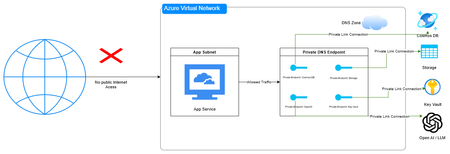
In Part 1 of this series, we tackled the critical challenge of protecting the LLM itself from malicious inputs. We implemented three essential security layers using Azure AI services: harmful content detection with Azure Content Safety, PII protection with Azure Text Analytics, and prompt injection prevention with Prompt Shields. These guardrails ensure that your AI model doesn't process harmful requests or leak sensitive information through cleverly crafted prompts. But even with a perfectly secured LLM, your entire AI chat system can still be compromised through architectural vulnerabilities. For example, the WotNot incident wasn't about prompt injection—it was 346,000 files sitting in an unsecured cloud storage bucket. Likewise the OmniGPT breach with 34 million lines of conversation logs due to backend database security failures. The global average cost of a data breach is now $4.44 million, and it takes organizations an average of 241 days to identify and contain an active breach. That's eight months where attackers have free reign in your systems. The financial cost is one thing, but the reputational damage and loss of customer is irreversible. This article focuses on the architectural security concerns I mentioned at the end of Part 1—the infrastructure that stores your chat histories, the networks that connect your services, and the databases that power your vector searches. We'll examine real-world breaches that happened in 2024 and 2025, understand exactly what went wrong, and implement Azure solutions that would have prevented them. By the end of this article, you'll have a production-ready, secure architecture for your AI chat system that addresses the most common—and most devastating—security failures we're seeing in the wild. Let's start with the most fundamental question: where is your data, and who can access it? 1. Preventing Exposed Storage with Network Isolation The Problem: When Your Database Is One Google Search Away Let me paint you a picture of what happened with two incidents in 2024-2025: WotNot AI Chatbot left 346,000 files completely exposed in an unsecured cloud storage bucket—passports, medical records, sensitive customer data, all accessible to anyone on the internet without even a password. Security researchers who discovered it tried for over two months to get the company to fix it. In May 2025, Canva Creators' data was exposed through an unsecured Chroma vector database operated by an AI chatbot company. The database contained 341 collections of documents including survey responses from 571 Canva Creators with email addresses, countries of residence, and comprehensive feedback. This marked the first reported data leak involving a vector database. The common thread? Public internet accessibility. These databases and storage accounts were accessible from anywhere in the world. No VPN required. No private network. Just a URL and you were in. Think about your current architecture. If someone found your Cosmos DB connection string or your Azure Storage account name, what's stopping them from accessing it? If your answer is "just the access key" or "firewall rules," you're one leaked credential away from being in the headlines. So what to do: Azure Private Link + Network Isolation The most effective way to prevent public exposure is simple: remove public internet access entirely. This is where Azure Private Link becomes your architectural foundation. With Azure Private Link, you can create a private endpoint inside your Azure Virtual Network (VNet) that becomes the exclusive gateway to your Azure services. Your Cosmos DB, Storage Accounts, Azure OpenAI Service, and other resources are completely removed from the public internet—they only respond to requests originating from within your VNet. Even if someone obtains your connection strings or access keys, they cannot use them without first gaining access to your private network. Implementation Overview: To implement Private Link for your AI chat system, you'll need to: Create an Azure Virtual Network (VNet) to host your private endpoints and application resources Configure private endpoints for each service (Cosmos DB, Storage, Azure OpenAI, Key Vault) Set up private DNS zones to automatically resolve service URLs to private IPs within your VNet Disable public network access on all your Azure resources Deploy your application inside the VNet using Azure App Service with VNet integration, Azure Container Apps, or Azure Kubernetes Service Verify isolation by attempting to access resources from outside the VNet (should fail) You can configure this through the Azure Portal, Azure CLI, ARM templates, or infrastructure-as-code tools like Terraform. The Azure documentation provides step-by-step guides for each service type. Figure 1: Private Link Architecture for AI Chat Systems Private endpoints ensure all data access occurs within the Azure Virtual Network, blocking public internet access to databases, storage, and AI services. 2. Protecting Conversation Data with Encryption at Rest The Problem: When Backend Databases Become Treasure Troves Network isolation solves the problem of external access, but what happens when attackers breach your perimeter through other means? What if a malicious insider gains access? What if there's a misconfiguration in your cloud environment? The data sitting in your databases becomes the ultimate prize. In February 2025, OmniGPT suffered a catastrophic breach where attackers accessed the backend database and extracted personal data from 30,000 users including emails, phone numbers, API keys, and over 34 million lines of conversation logs. The exposed data included links to uploaded files containing sensitive credentials, billing details, and API keys. These weren't prompt injection attacks. These weren't DDoS incidents. These were failures to encrypt sensitive data at rest. When attackers accessed the storage layer, they found everything in readable format—a goldmine of personal information, conversations, and credentials. Think about the conversations your AI chat system stores. Customer support queries that might include account numbers. Healthcare chatbots discussing symptoms and medications. HR assistants processing employee grievances. If someone gained unauthorized (or even authorized) access to your database today, would they be reading plaintext conversations? What to do: Azure Cosmos DB with Customer-Managed Keys The fundamental defense against data exposure is encryption at rest—ensuring that data stored on disk is encrypted and unreadable without the proper decryption keys. Even if attackers gain physical or logical access to your database files, the data remains protected as long as they don't have access to the encryption keys. But who controls those keys? With platform-managed encryption (the default in most cloud services), the cloud provider manages the encryption keys. While this protects against many threats, it doesn't protect against insider threats at the provider level, compromised provider credentials, or certain compliance scenarios where you must prove complete key control. Customer-Managed Keys (CMK) solve this by giving you complete ownership and control of the encryption keys. You generate, store, and manage the keys in your own key vault. The cloud service can only decrypt your data by requesting access to your keys—access that you control and can revoke at any time. If your keys are deleted or access is revoked, even the cloud provider cannot decrypt your data. Azure makes this easy with Azure Key Vault integrated with Azure Cosmos DB. The architecture uses "envelope encryption" where your data is encrypted with a Data Encryption Key (DEK), and that DEK is itself encrypted with your Key Encryption Key (KEK) stored in Key Vault. This provides layered security where even if the database is compromised, the data remains encrypted with keys only you control. While we covered PII detection and redaction using Azure Text Analytics in Part 1—which prevents sensitive data from being stored in the first place—encryption at rest with Customer-Managed Keys provides an additional, powerful layer of protection. In fact, many compliance frameworks like HIPAA, PCI-DSS, and certain government regulations explicitly require customer-controlled encryption for data at rest, making CMK not just a best practice but often a mandatory requirement for regulated industries. Implementation Overview: To implement Customer-Managed Keys for your chat history and vector storage: Create an Azure Key Vault with purge protection and soft delete enabled (required for CMK) Generate or import your encryption key in Key Vault (2048-bit RSA or 256-bit AES keys) Grant Cosmos DB access to Key Vault using a system-assigned or user-assigned managed identity Enable CMK on Cosmos DB by specifying your Key Vault key URI during account creation or update Configure the same for Azure Storage if you're storing embeddings or documents in Blob Storage Set up key rotation policies to automatically rotate keys on a schedule (recommended: every 90 days) Monitor key usage through Azure Monitor and set up alerts for unauthorized access attempts Figure 2: Envelope Encryption with Customer-Managed Keys User conversations are encrypted using a two-layer approach: (1) The AI Chat App sends plaintext messages to Cosmos DB, (2) Cosmos DB authenticates to Key Vault using Managed Identity to retrieve the Key Encryption Key (KEK), (3) Data is encrypted with a Data Encryption Key (DEK), (4) The DEK itself is encrypted with the KEK before storage. This ensures data remains encrypted even if the database is compromised, as decryption requires access to keys stored in your Key Vault. For AI chat systems in regulated industries (healthcare, finance, government), Customer-Managed Keys should be your baseline. The operational overhead is minimal with proper automation, and the compliance benefits are substantial. The entire process can be automated using Azure CLI, PowerShell, or infrastructure-as-code tools. For existing Cosmos DB accounts, enabling CMK requires creating a new account and migrating data. 3. Securing Vector Databases and Preventing Data Leakage The Problem: Vector Embeddings Are Data Too Vector databases are the backbone of modern RAG (Retrieval-Augmented Generation) systems. They store embeddings—mathematical representations of your documents, conversations, and knowledge base—that allow your AI to retrieve relevant context for every user query. But here's what most developers don't realize: those vectors aren't just abstract numbers. They contain your actual data. A critical oversight in AI chat architectures is treating vector databases—or in our case, Cosmos DB collections storing embeddings—as less sensitive than traditional data stores. Whether you're using a dedicated vector database or storing embeddings in Cosmos DB alongside your chat history, these mathematical representations need the same rigorous security controls as the original text. In documented cases, shared vector databases inadvertently mixed data between two corporate clients. One client's proprietary information began surfacing in response to the other client's queries, creating a serious confidentiality breach in what was supposed to be a multi-tenant system. Even more concerning are embedding inversion attacks, where adversaries exploit weaknesses to reconstruct original source data from its vector representation—effectively reverse-engineering your documents from the mathematical embeddings. Think about what's in your vector storage right now. Customer support conversations. Internal company documents. Product specifications. Medical records. Legal documents. If you're running a multi-tenant system, are you absolutely certain that Company A can't retrieve Company B's data? Can you guarantee that embeddings can't be reverse-engineered to expose the original text? What to do: Azure Cosmos DB for MongoDB with Logical Partitioning and RBAC The security of vector databases requires a multi-layered approach that addresses both storage isolation and access control. Azure Cosmos DB for MongoDB provides native support for vector search while offering enterprise-grade security features specifically designed for multi-tenant architectures. Logical partitioning creates strict data boundaries within your database by organizing data into isolated partitions based on a partition key (like tenant_id or user_id). When combined with Role-Based Access Control (RBAC), you create a security model where users and applications can only access their designated partitions—even if they somehow gain broader database access. Implementation Overview: To implement secure multi-tenant vector storage with Cosmos DB: Enable MongoDB RBAC on your Cosmos DB account using the EnableMongoRoleBasedAccessControl capability Design your partition key strategy based on tenant_id, user_id, or organization_id for maximum isolation Create collections with partition keys that enforce tenant boundaries at the storage level Define custom RBAC roles that grant access only to specific databases and partition key ranges Create user accounts per tenant or service principal with assigned roles limiting their scope Implement partition-aware queries in your application to always include the partition key filter Enable diagnostic logging to track all vector retrieval operations with user identity Configure cross-region replication for high availability while maintaining partition isolation Figure 3: Multi-Tenant Data Isolation with Partition Keys and RBAC Azure Cosmos DB enforces tenant isolation through logical partitioning and Role-Based Access Control (RBAC). Each tenant's data is stored in separate partitions (Partition A, B, C) based on the partition key (tenant_id). RBAC acts as a security gateway, validating every query to ensure users can only access their designated partition. Attempts to access other tenants' partitions are blocked at the RBAC layer, preventing cross-tenant data leakage in multi-tenant AI chat systems. Azure provides comprehensive documentation and CLI tools for configuring RBAC roles and partition strategies. The key is to design your partition scheme before loading data, as changing partition keys requires data migration. Beyond partitioning and RBAC, implement these AI-specific security measures: Validate embedding sources: Authenticate and continuously audit external data sources before vectorizing to prevent poisoned embeddings Implement similarity search thresholds: Set minimum similarity scores to prevent irrelevant cross-context retrieval Use metadata filtering: Add security labels (classification levels, access groups) to vector metadata and enforce filtering Monitor retrieval patterns: Alert on unusual patterns like one tenant making queries that correlate with another tenant's data Separate vector databases per sensitivity level: Keep highly confidential vectors (PII, PHI) in dedicated databases with stricter controls Hash document identifiers: Use hashed references instead of plaintext IDs in vector metadata to prevent enumeration attacks For production AI chat systems handling multiple customers or sensitive data, Cosmos DB with partition-based RBAC should be your baseline. The combination of storage-level isolation and access control provides defense in depth that application-layer filtering alone cannot match. Bonus: Secure Logging and Monitoring for AI Chat Systems During development, we habitually log everything—full request payloads, user inputs, model responses, stack traces. It's essential for debugging. But when your AI chat system goes to production and starts handling real user conversations, those same logging practices become a liability. Think about what flows through your AI chat system: customer support conversations containing account numbers, healthcare queries discussing medical conditions, HR chatbots processing employee complaints, financial assistants handling transaction details. If you're logging full conversations for debugging, you're creating a secondary repository of sensitive data that's often less protected than your primary database. The average breach takes 241 days to identify and contain. During that time, attackers often exfiltrate not just production databases, but also log files and monitoring data—places where developers never expected sensitive information to end up. The question becomes: how do you maintain observability and debuggability without creating a security nightmare? The Solution: Structured Logging with PII Redaction and Azure Monitor The key is to log metadata, not content. You need enough information to trace issues and understand system behavior without storing the actual sensitive conversations. Azure Monitor with Application Insights provides enterprise-grade logging infrastructure with built-in features for sanitizing sensitive data. Combined with proper application-level controls, you can maintain full observability while protecting user privacy. What to Log in Production AI Chat Systems: DO Log DON'T Log Request timestamps and duration Full user messages or prompts User IDs (hashed or anonymized) Complete model responses Session IDs (hashed) Raw embeddings or vectors Model names and versions used Personally identifiable information (PII) Token counts (input/output) Retrieved document content Embedding dimensions and similarity scores Database connection strings or API keys Retrieved document IDs (not content) Complete stack traces that might contain data Error codes and exception types Performance metrics (latency, throughput) RBAC decisions (access granted/denied) Partition keys accessed Rate limiting triggers Final Remarks: Building Compliant, Secure AI Systems Throughout this two-part series, we've addressed the complete security spectrum for AI chat systems—from protecting the LLM itself to securing the underlying infrastructure. But there's a broader context that makes all of this critical: compliance and regulatory requirements. AI chat systems operate within an increasingly complex regulatory landscape. The EU AI Act, which entered force on August 1, 2024, became the first comprehensive AI regulation by a major regulator, assigning applications to risk categories with high-risk systems subject to specific legal requirements. The NIS2 Directive further requires that AI model endpoints, APIs, and data pipelines be protected to prevent breaches and ensure secure deployment. Beyond AI-specific regulations, chat systems must comply with established data protection frameworks depending on their use case. GDPR mandates data minimization, user rights to erasure and data portability, 72-hour breach notification, and EU data residency for systems serving European users. Healthcare chatbots must meet HIPAA requirements including encryption, access controls, 6-year audit log retention, and Business Associate Agreements. Systems processing payment information fall under PCI-DSS, requiring cardholder data isolation, encryption, role-based access controls, and regular security testing. B2B SaaS platforms typically need SOC 2 Type II compliance, demonstrating security controls over data availability, confidentiality, continuous monitoring, and incident response procedures. Azure's architecture directly supports these compliance requirements through its built-in capabilities. Private Link enables data residency by keeping traffic within specified Azure regions while supporting network isolation requirements. Customer-Managed Keys provide the encryption controls and key ownership mandated by HIPAA and PCI-DSS. Cosmos DB's partition-based RBAC creates the access controls and audit trails required across all frameworks. Azure Monitor and diagnostic logging satisfy audit and monitoring requirements, while Azure Policy and Microsoft Purview automate compliance enforcement and reporting. The platform's certifications and compliance offerings (including HIPAA, PCI-DSS, SOC 2, and GDPR attestations) provide the documentation and third-party validation that auditors require, significantly reducing the operational burden of maintaining compliance. Further Resources: Azure Private Link Documentation Azure Cosmos DB Customer-Managed Keys Azure Key Vault Overview Azure Cosmos DB Role-Based Access Control Azure Monitor and Application Insights Azure Policy for Compliance Microsoft Purview Data Governance Azure Security Benchmark Stay secure, stay compliant, and build responsibly.950Views0likes0Comments
1000 Free Udemy Coupons on Microsoft Power Automate With AI Builder
<<BAKRI ID(Id-ul-Ad'ha) -- 1000 FREE UDEMY COUPONS ON RPA>> On the Occasion of BAKRI ID(Id-ul-Ad'ha), I am very happy to share 1000 Free udemy coupons on Microsoft Power Automate With AI Builder Title : Advanced RPA - Microsoft Power Automate With AI Builder https://www.udemy.com/course/microsoft-power-automate-with-ai-builder/?couponCode=LT-BAKRID <<Our other courses on Udemy and Udemy Business>> Title : PL-500 Microsoft Power Automate RPA Developer BootCamp Link: https://www.udemy.com/course/pl-500-microsoft-power-automate-rpa-developer-bootcamp/?referralCode=891491BAB7F20B865EE6 Title 1: Become RPA Master in MS Power Automate Desktop https://www.udemy.com/course/microsoft-power-automate-desktop-tutorials-for-beginners/?referralCode=03D49B549EE2193E79EE Title 2: RPA : Microsoft Power Automate Desktop - Zero to Expert : 2 https://www.udemy.com/course/microsoft-power-automate-desktop-course-zero-to-expert-2/?referralCode=783F39A1D0CDB4A70A7C Title 3: RPA:Microsoft Power Automate Desktop:Intelligent Automation https://www.udemy.com/course/power-automate-desktop-course-intelligent-automation/?referralCode=E8C51F3C27EA98FE100C Connect with me on LinkedIn : https://www.linkedin.com/in/ameer-basha-p-b44880262/ Youtube Channel : www.youtube.com/learningtechnologies716Views2likes1CommentGolden Path for Education - Part 1a
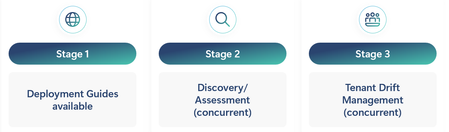
What is Golden Path Golden Path was developed to simplify and enhance the security of deploying a Microsoft 365 tenant solution in education. It consists of three stages: Stage 1: Deployment Guides are available online at Golden Path. This stage includes: Baseline - Stage 1a Standard - Stage 1b Advanced - Stage 1c Stage 2: A Discovery/Assessment AI tool is used to expose the tenant's configuration and analyze it against the tenant's license configurations, tenant and service settings, Microsoft's general education recommendations, and customer requirements. Stage 3: Drift Configuration management helps understand changes made against the established configuration in the tenant. These changes can be reversed or modified before any breaches or irregularities create problems. Goals and Objectives for Golden Path Goals Develop prescriptive deployment guides that provide a centralized resource with education-specific scenarios to assist organizations in defining, managing, and organizing their tenant and appropriate applications. Reduce the overall complexity of tenant and service deployment. Establish baseline recommended pathways to facilitate a common and agreed-upon configuration based on subject-matter experts. Utilize AI technology to uncover and compare recommended settings against user requirements based on documented configurations. Implement phased configurations to aid customers and partners in understanding what they may not know or should consider during discovery to meet customer expectations. Highlight unused features and products to ensure customers fully leverage the potential and benefits of their purchased product licenses. Identify opportunities for partner participation in achieving customer goals and expectations based on customer requirements and Golden Path findings. Create an easy pathway for customer change management to enhance control, security, compliance, and privacy of tenants. Develop custom assessments to evaluate product entry for items such as Copilot, Defender, Purview, Intune, Zero-Trust, and Microsoft Entra ID. Objectives Deliver information for features available (used/unused) to users based on license model. Prescriptive recommendations based on education scenarios. - Present upgrade license opportunities from A1 to A3 to A5. Security analysis exposing gaps and issues proactively to allow modifications before it's too late. Promote partner access to customers that have defined gaps based on assessments and are requesting partner assistance. Better discovery and assessment analysis with new tools. Designed to be more self-serving customer and partner access management. Speed up user adoption for educators and IT Admins alike. Baseline Stage 1a Baseline is stage 1a in the overall development of the Golden Path for Education. It is based on a majority of licenses within the tenant at the Microsoft 365 A1 for Education level. It also is a set of recommendations for ALL Microsoft Education tenants. Navigation Golden Path has three folders in the navigations. Golden Path Baseline References Golden Path folder consist of the Golden Path overall review. It goes over the entire program and the how and why it is built. Currently there are two pages, Golden Path overview and Baseline Overview. Golden Path overview menu Golden Path overview Stages (Deployment Guides, Discovery/Assessments, Drift Management) Modules (Setup, Identity, Applications, Security, and Devices) Phases (Baseline(A1), Standard(A3), Advanced(A5)) Baseline Overview Steps for each phase (Setup, Identity, Applications, Security, Devices) Licenses that are included General information links List of links for all applications and products included with A1 license List of links for all features included with A1 license Baseline menu Setup Tenant setup is key to establishing a secure and valid tenant. Setup goes through domain assignment, administration, and service management. Overview - Review all the steps that are part of the setup phase section Step 1 - Create your Office 365 tenant account Step 2 - Configure Security Center admin settings Step 3 - Secure and configure your network Step 4 - Sync your on-premises active directory Step 5 - Provision users Step 6 - Sync SIS with School Data Sync (SDS) Step 7 - License Users Identity Establishing an identity via Microsoft Entra ID and establishing authentication methods, Single Sign-On, and user procurement methodologies. Overview - Review all steps that are a part of the identity phase Step 1 - Understand identity definitions Step 2 - Configure Microsoft Entra ID basics Step 3 - Consider education identity steps Step 4 - Consider identity applications Step 5 - Set up access to operation services Step 6 - Set up identity lifecycle Step 7 - Configure security in identity Step 8 - Manage access controls Applications Applications like Microsoft Teams, SharePoint, OneDrive, Exchange Online are the core to a Microsoft tenant. Getting these applications setup are essential to allowing users in education to access services and apps like Learning Accelerators. Overview - Review all steps that are a part of the application phase Exchange Online o Step 1 - Design an Exchange Online environment o Step 2 - Set up Exchange Online o Step 3 - Configure compliance and security in Exchange Online o Step 4 - Configure address books, shared mailboxes, and clients Microsoft Teams o Overview - What is Microsoft Teams for Education o Step 1 - Configure Microsoft Teams for Education o Step 2 - Configure Microsoft Teams policies and settings for education organization OneDrive/SharePoint - Overview o Step 1 - Plan your OneDrive and SharePoint Deployment o Step 2 - Share within OneDrive and SharePoint o Step 3 - Configure security and access controls in OneDrive and SharePoint o Step 4 - Compliance considerations with OneDrive and SharePoint Security and Compliance Security via each phase is essential to maintaining order and blocking access for bad actors. Along with security compliance/privacy considerations that are established to adhere to a multitude of local and government requirements worldwide. Overview Step 1 - Security Considerations Devices Managed and unmanaged devices are another key to helping secure the network and potential cyber-security considerations that enter the network via these devices. Overview Step 1 - Review device management structure Step 2 - Plan device management Step 3 - Configure settings and applications Step 4 - Deploy and manage devices Windows 11 features and tips References menu Mulit-tenant solutions - Architectural recommendations base on multi or large tenant solutions. Accessibility Deploy Office 365 applications Pooled storage management How do you use Golden Path? Golden Path uses deployment guidelines content that contain education scenario specifics. Golden Path has a linked path for each modules based on the phase (Baseline,Standard,Advanced). Users can follow the deployment content to establish or redefine the tenant configuration in order to enable additional services and products. What’s Next Go to https://aka.ms/gp4edu to access the first part of Golden Path. Part 1b (Standard -A3 content) NEXT Part 1c (Advanced – A5 content) Part 2 - We will create a mechanism to discover the tenant configuration settings and allow customers and partners the ability to qualify what is set to standard recommendation. Using AI to deliver user requirements against the configuration will allow additional paths to enable services and features that allow the user/customer to achieve their objectives. Part 3 – Deliver drift management solution for management of unrealized or understood changes that need to be approved or modified.1.4KViews5likes1Comment¿Qué es Microsoft Entra y por qué deberías elegirla para proteger tus aplicaciones?
[Blog post original - en inglés] Microsoft Entra es una familia de productos de identidad y acceso a la red, diseñados para implementar una estrategia de seguridad de Zero Trust (Confianza Cero). Forma parte del portafolio de Microsoft Security, que también incluye: Microsoft Defender para la protección contra amenazas cibernéticas y la seguridad en la nube, Microsoft Sentinel para la información de seguridad y la administración de eventos (SIEM), Microsoft Purview para el cumplimiento, Microsoft Priva para privacidad y Microsoft Intune para la administración de endpoints. Estrategia de seguridad Zero Trust La estrategia de seguridad Zero Trust es un enfoque moderno de ciberseguridad que asume que no se debe confiar en ningún usuario o dispositivo, ya sea dentro o fuera de la red, de forma predeterminada. En su lugar, cada solicitud de acceso debe verificarse y autenticarse antes de conceder acceso a los recursos. Esta estrategia está diseñada para abordar las complejidades del entorno digital moderno, incluyendo el trabajo remoto, los servicios en la nube y los dispositivos móviles. ¿Por qué utilizar Entra? Microsoft Entra ID (anteriormente conocido como Azure AD) es una solución de administración de identidades y acceso en la nube que ofrece varias ventajas sobre las soluciones locales tradicionales: Gestión unificada de identidades: Entra ofrece una solución integral para la gestión de identidades y accesos, abarcando tanto entornos híbridos como en la nube. Esto permite administrar de manera unificada las identidades de los usuarios, sus derechos de acceso y permisos, simplificando la administración y mejorando la seguridad. Experiencias de usuario fluidas: Entra admite el inicio de sesión único (SSO), permitiendo a los usuarios acceder a múltiples aplicaciones con un solo conjunto de credenciales. Esto reduce la fatiga de contraseñas y mejora la experiencia del usuario. Políticas de acceso adaptables: Entra permite una autenticación robusta y políticas de acceso adaptativo en tiempo real basadas en riesgos, sin comprometer la experiencia del usuario. Esto ayuda a proteger de manera efectiva el acceso a los recursos y datos. Integración con identidades externas: Entra External ID permite a las organizaciones administrar y autenticar de forma segura a los usuarios que no forman parte de su fuerza laboral interna, como clientes, socios y otros colaboradores externos. Esto es particularmente útil para las empresas que necesitan colaborar de manera segura con socios externos. Desafío del mercado abordado: Entra enfrenta el desafío del mercado al proporcionar una solución integral de IAM en entornos híbridos y en la nube, garantizando la seguridad, simplificando la autenticación de usuarios y permitiendo el acceso seguro a los recursos. Escalabilidad: Las soluciones en la nube como Entra pueden escalar fácilmente para adaptarse a un número creciente de usuarios y aplicaciones sin necesidad de hardware o infraestructura adicional. Rentabilidad: Mediante el uso de una solución en la nube, las organizaciones pueden reducir los costes asociados al mantenimiento de la infraestructura local, como los servidores y los equipos de red. Flexibilidad: Entra ofrece flexibilidad en términos de implementación e integración con diversas aplicaciones y servicios, tanto dentro como fuera del ecosistema de Microsoft. Seguridad: Las soluciones en la nube suelen incluir funciones de seguridad integradas y actualizaciones periódicas para protegerse contra amenazas emergentes. Entra ofrece un soporte solido para el acceso condicional y la autenticación multifactor (MFA), esenciales para proteger los datos confidenciales. Como puedes ver, hay muchas razones para explorar Entra y su conjunto de productos. Más sobre los productos Entra Microsoft Entra está diseñado para proporcionar administración de identidades y accesos, gestión de infraestructura en la nube y verificación de identidad. Funciona en: Las instalaciones. A través de Azure, AWS, Google Cloud. Aplicaciones, sitios web y dispositivos de Microsoft y de terceros. Estos son los productos y soluciones clave dentro de la familia de productos Microsoft Entra. Microsoft Entra ID: Se trata de una solución integral de gestión de identidades y accesos que incluye características como el acceso condicional, el control de acceso basado en roles, la autenticación multifactor y la protección de la identidad. Entra ID ayuda a las organizaciones a administrar y proteger identidades, garantizando un acceso seguro a aplicaciones, dispositivos y datos. Microsoft Entra Domain Services: Este producto proporciona servicios de dominio administrados, como la unión a dominio, políticas de grupo, el Protocolo Ligero de Acceso a Directorios (LDAP) y la autenticación Kerberos/NTLM. Permite a las organizaciones ejecutar aplicaciones heredadas en la nube que no pueden usar métodos de autenticación modernos o en las que no se desea que las búsquedas de directorio vuelvan siempre a un entorno local de Servicios de Dominio de Active Directory (AD DS). Puedes migrar esas aplicaciones heredadas de tu entorno local a un dominio administrado, sin necesidad de administrar el entorno de AD DS en la nube. Microsoft Entra Private Access: proporciona a los usuarios, ya sea en la oficina o trabajando de forma remota, acceso seguro a recursos privados y corporativos. Permite a los usuarios remotos conectarse a los recursos internos desde cualquier dispositivo y red, sin necesidad de una red privada virtual (VPN). El servicio ofrece acceso adaptable por aplicación basado en directivas de acceso condicional, proporcionando una seguridad más granular que una VPN. Microsoft Entra Internet Access: asegura el acceso a los servicios de Microsoft, SaaS y aplicaciones públicas de Internet, mientras protege a los usuarios, dispositivos y datos frente a las amenazas de Internet. Esto se logra a través de la puerta de enlace web segura (SWG) de Microsoft Entra Internet Access, que está centrada en la identidad, es consciente de los dispositivos y se entrega en la nube. Microsoft Entra ID Governance es una solución de gobernanza de identidades que ayuda a garantizar que las personas adecuadas tengan el acceso adecuado a los recursos correctos en el momento oportuno. Esto se logra mediante la automatización de las solicitudes de acceso, las asignaciones y las revisiones a través de la administración del ciclo de vida de la identidad. Microsoft Entra ID Protection ayuda a las organizaciones a detectar, investigar y corregir los riesgos basados en la identidad. Estos riesgos pueden integrarse en herramientas como el acceso condicional para tomar decisiones de acceso, o retroalimentar una herramienta de administración de eventos e información de seguridad (SIEM) para una mayor investigación y correlación. 7. Microsoft Entra Verified ID es un servicio de verificación de credenciales basado en estándares abiertos de identidades descentralizadas (DID). Este producto está diseñado para la verificación y gestión de identidades, garantizando que las identidades de los usuarios se verifiquen de forma segura. Admite escenarios como la verificación de credenciales laborales en LinkedIn. 8. Microsoft Entra External ID se centra en la administración de identidades externas, como clientes, socios y otros colaboradores que no forman parte de la fuerza laboral interna. Permite a las organizaciones administrar y autenticar de forma segura a estos usuarios externos, proporcionando características como experiencias de registro personalizadas, flujos de registro de autoservicio y administración de usuarios. 9. Administración de permisos de Microsoft Entra: Este producto se ocupa de la administración de permisos y controles de acceso en varios sistemas y aplicaciones, garantizando que los usuarios tengan el nivel adecuado de acceso. Permite a las organizaciones detectar, ajustar automáticamente y supervisar continuamente los permisos excesivos y no utilizados en Microsoft Azure, Amazon Web Services (AWS) y Google Cloud Platform (GCP). 10. Microsoft Entra Workload ID: Este producto ayuda a las aplicaciones, contenedores y servicios a acceder de forma segura a los recursos en la nube, proporcionando administración de identidad y acceso para la carga de trabajo. ¿Qué producto Entra elegir? Hemos explicado algunos productos importantes, pero es posible que aún te preguntes cuál elegir. Veamos algunos escenarios para ayudarte a decidir Escenario: Integración de GitHub Actions Un equipo de desarrollo usa GitHub Actions para la integración continua y las canalizaciones de implementación continua (CI/CD). Necesitan acceder de forma segura a los recursos de Azure sin administrar secretos. Producto recomendado: Entra Workload ID ¿Por qué Entra Workload ID? El identificador de carga de trabajo de Microsoft Entra admite la federación de identidades de carga de trabajo, lo que permite a GitHub Actions acceder a los recursos de Azure de forma segura mediante la federación de identidades de GitHub. Esto elimina la necesidad de administrar secretos y reduce el riesgo de fugas de credenciales. Escenario: Gestión interna del acceso de los empleados Una gran empresa necesita gestionar el acceso a sus aplicaciones y recursos internos para miles de empleados. La organización desea implementar la autenticación multifactor (MFA), las directivas de acceso condicional y el control de acceso basado en roles (RBAC) para garantizar un acceso seguro. Producto recomendado: Entra ID ¿Por qué Entra ID? Microsoft Entra ID es ideal para este escenario, ya que proporciona soluciones completas de administración de identidades y acceso, como MFA, acceso condicional y RBAC. Estas características ayudan a garantizar que solo los empleados autorizados puedan acceder a recursos confidenciales, mejorando la seguridad y el cumplimiento. Escenario: Inicio de sesión único (SSO) para aplicaciones internas Una empresa quiere agilizar el proceso de inicio de sesión de sus empleados mediante la implementación de Single Sign-On (SSO) en todas las aplicaciones internas, incluidas Microsoft 365, Salesforce y aplicaciones personalizadas. Producto recomendado: Entra ID ¿Por qué Entra ID? Microsoft Entra ID admite SSO, lo que permite a los empleados usar un único conjunto de credenciales para acceder a varias aplicaciones. Esto mejora la experiencia del usuario, reduce la fatiga de las contraseñas y mejora la seguridad al centralizar la autenticación y la gestión del acceso. Escenario: Cargas de trabajo de Kubernetes Una organización ejecuta varias aplicaciones en clústeres de Kubernetes y necesita acceder de forma segura a los recursos de Azure desde estas cargas de trabajo. Producto recomendado: Entra Workload ID ¿Por qué Entra Workload ID? Entra Workload ID permite que las cargas de trabajo de Kubernetes accedan a los recursos de Azure sin administrar credenciales ni secretos. Al establecer una relación de confianza entre las cuentas de servicio de Azure y Kubernetes, las cargas de trabajo pueden intercambiar tokens de confianza por tokens de acceso de Microsoft Identity Platform. Escenario: Empresa de comercio electrónico, portal del cliente Una empresa de comercio electrónico quiere crear un portal de clientes en el que los usuarios puedan registrarse, iniciar sesión y gestionar sus cuentas. La empresa debe proporcionar una experiencia de registro e inicio de sesión segura y fluida para sus clientes. Producto recomendado: Entra External ID ¿Por qué Entra External ID? El identificador externo de Microsoft Entra está diseñado para administrar identidades externas, como los clientes. Ofrece características como experiencias de registro personalizadas, flujos de registro de autoservicio y autenticación segura, lo que lo convierte en la opción perfecta para crear un portal de clientes. Escenario: Colaboración de socios Una empresa de fabricación colabora con múltiples socios y proveedores externos. La empresa debe proporcionar acceso seguro a los recursos y aplicaciones compartidos y, al mismo tiempo, garantizar que solo los socios autorizados puedan acceder a datos específicos. Producto recomendado: Entra External ID ¿Por qué Entra External ID? El identificador externo de Microsoft Entra es ideal para administrar identidades externas, como asociados y proveedores. Permite a la empresa gestionar y autenticar de forma segura a los usuarios externos, proporcionando funciones como la colaboración B2B y la gestión de acceso, garantizando que solo los socios autorizados puedan acceder a los recursos necesarios. Primeros pasos con Entra ID Por último, te recomendamos algunos recursos estupendos. Microsoft Identity Platform Dev Center Plataforma con documentos, tutoriales, vídeos y más Microsoft identity platform Dev Center | Identity and access for a connected world | Microsoft Developer Aprendizaje sobre Microsoft Entra ID Aumenta tus habilidades en Microsoft Learn Introducción a Microsoft Entra ¿Qué es Microsoft Entra ID? Página de inicio con documentos oficiales que explican Entra ID: un gran lugar para comenzar ¿Qué es Microsoft Entra ID? Tutorial: Inicia sesión de usuario en Entra Node.js tutorial Tutorial: Inicio de sesión de usuarios y adquisición de un token para Microsoft Graph en una aplicación web de Node.js y Express Tutorial: Agregar inicio de sesión con Microsoft Entra Java tutorial Add sign-in with Microsoft Entra account to a Spring web app - Java on Azure | Microsoft Learn Tutorial: Registra una aplicación de Python con Entra Python tutorial Tutorial: Register a Python web app with the Microsoft identity platform - Microsoft identity platform | Microsoft Learn Tutorial: Registra una aplicación de .NET con Entra .NET Core Tutorial: Register an application with the Microsoft identity platform - Microsoft identity platform | Microsoft Learn Primeros pasos con Entra External ID One stop shop, Plataforma de identidad para programadores. Gran punto de comienzo para aprender sobre noticias, documentos, tutoriales, vídeos y más Microsoft Entra External ID | Simplify customer identity management | Microsoft Developer Tutorial: Añade autenticación a una aplicación Vanilla SPA JavaScript tutorial Tutorial: Create a Vanilla JavaScript SPA for authentication in an external tenant - Microsoft Entra External ID | Microsoft Learn Tutorial: Iniciar sesión de usuarios en Node.js aplicación JavaScript/Node.js tutorial Sign in users in a sample Node.js web application - Microsoft Entra External ID | Microsoft Learn Tutorial: Inicio de sesión de usuarios en ASP.NET Core .NET Core tutorial Sign in users to a sample ASP.NET Core web application - Microsoft Entra External ID | Microsoft Learn Iniciar sesión con usuarios en una aplicación Python Flask Python tutorial Sign in users in a sample Python Flask web application - Microsoft Entra External ID | Microsoft Learn Tutorial: Inicio de sesión de usuarios en una aplicación Node.js JavaScript/Node.js tutorial Tutorial: Prepare your external tenant to sign in users in a Node.js web app - Microsoft Entra External ID | Microsoft Learn Tutorial: Inicio de sesión de usuarios en una aplicación .NET Core .NET Core Tutorial Tutorial: Prepare your external tenant to authenticate users in an ASP.NET Core web app - Microsoft Entra External ID | Microsoft Learn Resumen y conclusiones En resumen, te presentamos Entra y algunos de sus productos dentro de una gran familia de soluciones. También te mostramos algunos escenarios y qué productos encajarían mejor en cada uno. Esperamos que hayas tenido un gran comienzo, ¡gracias por leer!403Views0likes0CommentsFree Microsoft Fundamentals certifications for worldwide students
Microsoft offers Fundamentals exam vouchers and practice resources to eligible students free through June 2023. Students will need to verify their enrollment at an accredited academic institution to claim the benefits. 596KViews4likes18Comments