security
307 Topics
¿Cómo comprobar que las actualizaciones se instalaron correctamente en Windows Server 2025?
Hola. Estoy usando Windows Server 2025 y quisiera saber qué pasos recomiendan para comprobar que las actualizaciones se instalaron correctamente. Después de reiniciar el servidor, ¿qué herramientas o registros puedo revisar para detectar errores y confirmar que los servicios siguen funcionando con normalidad?146Views0likes1Comment
Force a specific default lock screen and logon image
Dear, I currently have a DC deployed on Windows Server 2019. i want to configure a specific default image on lock screens on Windows 10 pro clients via group policy. Is this possible or is it only compatible with Enterprise or Education editions? Thanks in advance,2.3KViews0likes3Comments
RDS stops responding after Sept. 2026 security updates
Hi All, I have one last Windows Server 2012 R2 ESU VM in PROD, used for a legacy SQL Server / Video / Audio solution. Since installing KB5123066: RDP cannot connect to the VM The Windows Desktop is unstable File Explorer is unresponsive Windows Update services will not start As per: https://learn.microsoft.com/en-us/windows/release-health/resolved-issues-windows-8.1-and-windows-server-2012-r2#4981msgdesc Since Windows Update services won't start, we can't deploy the fix (KB5129243) through normal means. Attempts so far: KIR (Known Issue Rollback) via GPO — deployed the Windows 8.1 and Windows Server 2012 R2 KB5123066 260911_18477 Known Issue Rollback.msi, scoped a GPO to the VM with the corresponding policy set to Disabled, ran gpupdate /force. No change in behavior. Uninstall KB5123066 in Safe Mode with Networking — fails, Windows rolls back to KB5123066. Install KB5129243 in Safe Mode with Networking — fails, Windows rolls back. Offline DISM servicing from WinPE (booted from Server 2012 R2 ISO): DISM /Image:C:\ /Get-Packages shows several RollupFix package versions in inconsistent states — one Superseded, one Install Pending, one Staged, all dated the same day — suggesting a stuck servicing transaction from the repeated rollback attempts. DISM /Image:C:\ /Cleanup-Image /RevertPendingActions completes successfully and queues a revert for next boot. On reboot, the VM sits at "Getting Windows ready / Don't turn off your computer" and eventually returns to the same symptoms — no change. Re-running Get-Packages afterward returns Error 3017: The requested operation failed. A system reboot is required to roll back changes made — the offline image is apparently now stuck mid-transaction and won't let us query or modify it further. A second full boot cycle triggers the same "Getting Windows ready" screen again, but symptoms remain unchanged afterward and error 3017 persists. We do have backups of the VM prior to KB5123066, but it is not a straightforward rollback due to SQL Db/Transaction log restores as well for the AV solution (which is out of support). Given the CBS transaction now appears stuck (error 3017 not clearing even after two full boot/revert cycles), I suspect further offline DISM attempts risk making things worse rather than better. Before we escalate to Microsoft Support for Business as the KB suggests, has anyone resolved this same stuck-transaction state, or found a way to clear error 3017 on an offline 2012 R2 image without a pre-patch backup to fall back on? Thanks in advance. SteveSolved1.4KViews0likes1Comment
Resolving 'Login Credential Not Allowed' Error on Windows Server 2022 After STIGs Polcy
After applying Security Technical Implementation Guides (STIGs) policy on my Windows Server 2022, I've encountered an error stating 'the login credential you're trying to use isn't allowed' and am unable to sign in, effectively locking me out. This seems related to the sign-in options specified by the policy, possibly due to restrictions on certain login methods. Has anyone faced a similar issue or can offer guidance on bypassing this to regain access for troubleshooting and policy adjustment?698Views0likes1Comment
Certificate based Authentication and KB5014754
Hello community, we have an AD CS that issues certificates to users and computers. How do we achieve automatic certificate mapping? According to KB504754, strong certificate mapping is to be done. Currently, AD computer/user certificates are being used, and no mapping has been configured. Will this continue to work?153Views0likes1Comment
2026-04 Update Breaks Domain Logins
I have an Active Directory domain that is old (from 2000!) that has been upgraded and moved to newer versions of Windows Server and Active Directory. I have domain controller VMs running Windows Server 2025 Standard Edition. Unfortunately they installed the latest 2026-04 patches which my have changed the Kerberos encryption from RC4 to AES. This has resulted in my not being able to log into any Active Directory domain accounts and the domain controllers themselves. I can only log into workstations using the local account. Suffice to say this a nightmare. Any ideas how to fix it since I can't access the usual tools like Active Directory Users and Computers, Hyper-V won't connect to the VMs, etc. Thanks. SSolved6.1KViews2likes9CommentsPrnproc$ Share on Windows Print Server
Hi all, I was wondering if anyone had some information in regards to the pronproc$ share on Windows print servers? I am running a Windows Server 2019 instance and had the share flag as a potential vulnerability for allowing read & execute on the share. From what I can see the built-in users group has this permission on the share. Is this share something the can be locked down for privileges or will it break the functionality of the server's services?1.9KViews0likes2CommentsBLOG: CVE-2024-38063 - Disabling IPv6 binding = fix - or not?
Dear community, in today's LinkedIn Stream and other social media you might have noticed a recent CVE and the recommendation to disable IPv6 in Windows Server and Windows Client. We are talking about this one: https://msrc.microsoft.com/update-guide/vulnerability/CVE-2024-38063 Reading the advisory carefully, Microsoft, strictly speaking, does not directly recommend disabling (technically remove binding) of IPv6. Citing: "Mitigation refers to a setting, common configuration, or general best-practice, existing in a default state, that could reduce the severity of exploitation of a vulnerability. The following mitigating factors might be helpful in your situation: Systems are not affected if IPv6 is disabled on the target machine." Maybe I am a bit nitpicking here about old experiences and would greatly appreciate a refreshed Microsoft statement on the disablement (unbinding) of IPv6 and the side-effects in 2024. What we have learned in the past - do no disable IPv6 easily. - yes, you can face issues with IPv6 being on by default and unexpected or misconfiguration. Often caused by DHCPv6, especially in the combination of critical domain controllers, Dual Stack ISPs and SoHo routers messing up your DNS. What's the fuss about IPv6? I am not actively using it in corporate / at home. IPv6 is being used in Windows. More specifically non-routable fe80 addresses and loopback ::1 for internal purposes of Windows or other software. One may complain use cases are - unrightfully - not well and transparent documented. Have a read in the past Here are some references that Copilot brings up. Trust my memory, I've read more like this. https://techcommunity.microsoft.com/t5/core-infrastructure-and-security/ipv6-for-the-windows-administrator-why-you-need-to-care-about/ba-p/256251 https://community.spiceworks.com/t/is-it-a-bad-practice-to-disabe-ipv6/781811/9 https://learn.microsoft.com/en-us/troubleshoot/windows-server/networking/configure-ipv6-in-windows My personal conclusion Hold on, we need patches for this CVE, but we should not disable IPv6 easily. Please disable IPv6 temporarily, when you cannot patch this CVE immediately / in time. Take notes which system you have had to disable and consider re-enabling once patches have been tested and applied. If you are using IPv6 knowingly, note the NIC configs. They will be lost when using static settings rather DHCPv6. I am sad to see that NetSec people, undoubtedly experts in their area, jump on the bandwaggon esp. on Social Media to easily disgrace the IPv6 by default enablement of Windows Client and Windows Server, telling you the easier story: "Disable IPv6 and you are good / if you do not need it." Let me counter: You might not know you're "needing it" it in the first place. Whenever you are changing system defaults in Windows, mind that Microsoft and other software vendors may not consider these changes in their testing. And the Crowdstrike Black Friday showed us clearly how outlier system configs and unwell testing goes along. Not very well. IPv6 usage and defaults today One of the most recent example that Microsoft is using IPv6 can be found in the Azure Arc Agent (Connected Machine Agent) changelog: "Better handling when IPv6 local loopback is disabled" source: https://learn.microsoft.com/en-us/azure/azure-arc/servers/agent-release-notes How can I disable IPv6, if required? Many roads led to Rome. Windows + X > Terminal / PowerShell (Admin) #save current NIC config into a simple text file Get-NetAdapterBinding -ComponentID "ms_tcpip6" | where Enabled -eq $true | Out-File $env:temp\original-ipv6-config.txt #disable IPv6 on all adapters Get-NetAdapterBinding -ComponentID "ms_tcpip6" | where Enabled -eq $true | Disable-NetAdapterBinding And how to revert the change? Windows + X > Terminal / PowerShell (Admin) #enable IPv6 on all adapters (mind the text file) Get-NetAdapterBinding -ComponentID "ms_tcpip6" | where Enabled -eq $true | Enable-NetAdapterBinding TL:DR Microsoft is using fe80 addresses and loopback ::1 addresses for internal reasons. IPv6 is preferrably used over IPv4 when it is bound to a network adapter, including said special non- routable addresses. Please disable IPv6 temporarily, when you cannot patch this CVE immediately / in time. Take notes of current config. Please share the word and mind that disabling IPv6 can turn your OS into an outlier system, causing immediate or later issue due lack of testing by Microsoft or other software vendors, assuming the defaults, which is IPv6 being turned on.8.3KViews2likes2Comments
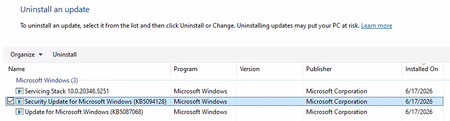
Unable to Uninstall Security Update (KB5094128) on Azure Hosted Windows Server 2022 VM
Hi All, I'm building up a system on Azure of Windows Server 2022 VMs for a PoC. Each Windows Server 2022 VM has been created using a company hardened golden image. After configuring the VM successfully, I am unable to run a software. Through research, the solution to run the software is to uninstall 'Security Update for Microsoft Windows (KB5094128)'. The issue is that I cannot uninstall the update normally. I have looked up various solutions and the following have been unsuccessful: Attempt #1 Powershell (Admin): sfc /scannow wusa /uninstall /kb:5094128 Result: Error 0x800f0905. Attempt #2 Powershell (Admin): Dism /Online /Cleanup-Image /CheckHealth Dism /Online /Cleanup-Image /ScanHealth Dism /Online /Cleanup-Image /RestoreHealth wusa /uninstall /kb:5094128 Result: No corruption detected, error 0x800f0905. Attempt #3 Powershell (Admin): net stop wuauserv net stop cryptSvc net stop bits net stop msiserver ren C:\Windows\SoftwareDistribution SoftwareDistribution.old ren C:\Windows\System32\catroot2 catroot2.old net start wuauserv net start cryptSvc net start bits net start msiserver wusa /uninstall /kb:5094128 Result: All services started and stopped. Error error 0x800f0905. Attempt #4 Windows Update Troubleshooter: Running the windows update troubleshooter gives the following output. The event viewer is suggesting there is a corrupted file error, but as seen above nothing is wanting to remove that file. Does anyone have any other options they could suggest? Or has anyone had success with this issue before? Is it a lost cause as we have to use company hardened golden images? Any suggestions would be appreciated!412Views0likes2CommentsHow to check RDP access to the server
Hello, I have a virtual machine running Windows Server 2019 Datacenter with Active Directory, and all users access it via RDP. No specific access configurations have been set up; I wanted to know if it is possible to check how many times a specific user has connected and from which IP address—is that possible? Also, I wanted to ask if it is possible to determine whether a specific user copied files to their local PC using copy/paste during a session. Thank you481Views0likes2Comments