security
18 Topics
My 25+ years Microsoft account got hacked by someone with bibimail, and I can't recover it
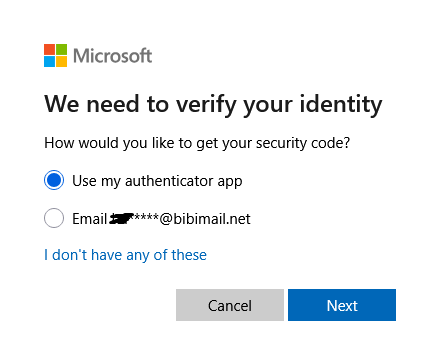
My main account got hacked this morning. I have been using it since about 2000 and it is the account I've used for almost every log-ins for sites since then. They changed my password and my recovery address (a gmail address), and they added a passkey and a new authenticator to it. I've tried the recommended method to recover my account, but it states that since two-factors authentication is activated, nothing can be done to recover it. And along the way, I've seen this, address: I've looked and dozens of people had the same problem sharing their experience on these forums and others such as Reddit, and ALL of them since the beginning of summer 2026 have been hacked by that bibimail address. I tried to connect to bibimail.net, but it's always down (except probably when they want to hack someone...), and every verification site says it's a high-risk address and almost certainly a scam, and I've been able to see that it has been created in June 19th 2026. I don't understand how Microsoft would accept something from such a sketchy site... How could it be possible for a hacker to bypass and change all my security setting, and Microsoft having no problem with them doing so, but now they bar me from trying to recover it??? Please, I've been using my main address for EVERYTHING online, I have close to a hundred sites connected with this address, I've spent thousand of dollars and hours spent on these sites (all of which I will probably lose access soon), and I also don't want to lose more than twenty years of mails, including some from my dead relatives. I only made this account to speak here, I've tried to call Microsoft, but the answering bot tells me to go to the exact site I've used that doesn't work as they've enabled two-factors authentication to block me off, and now the bot refuses to say anything else than "go to this site, bye" (it probably recognizes my phone number). I also have Microsoft 365 Family, and I don't want my family to have problems with that either... Please, I just want to talk to a human so I can get my account back.1.3KViews1like13Comments
Hacked account / lack of live agents
I’m extremely frustrated with the process of trying to recover my Microsoft account. My account was compromised, and the person who got into it changed the email address associated with the account. Because of that, my original email is no longer recognized, and I cannot sign in or use the normal password recovery process. I have tried the recovery form, the Sign-In Helper, Microsoft support pages, chat support, phone support, and multiple other suggested recovery routes. Every single option seems to send me back to another automated system, another bot, or another page that eventually circles me back to the same place I already started. I have also run into technical errors when trying to start support chat, including the system trying to use my phone number as a UPN and failing because it expects an email-format username. At this point, I feel like I am being blocked from even reaching a real person who can properly review what happened. This is becoming a serious issue for me because I am a college student and I rely on my personal Microsoft account for access to services, files, applications, logins, and other resources I need to complete my schoolwork. Not having access is actively interfering with my ability to work efficiently and keep up with my responsibilities. I understand that Microsoft has security procedures in place to protect accounts, and I am fully willing to verify ownership. I can provide previous account information, old passwords I remember, devices I have used, purchase information, and other identifying account details. What I need is an actual support representative who can review the situation instead of being continuously redirected through automated recovery tools that are not resolving the problem. I am not asking for security to be bypassed. I am asking for a legitimate way to speak with someone who can help me recover an account that was taken over and had its sign-in information changed. If anyone from Microsoft Support sees this, or if anyone has successfully recovered an account after the primary email/alias was changed by an attacker, I would greatly appreciate guidance on how to reach the correct department or escalation team.124Views0likes0CommentsSecure Boot Q&A opportunities continue in July
If you're still working through Secure Boot certificate update rollouts, Microsoft is continuing the conversation throughout July with three opportunities to get your questions answered by the people closest to the technology. Whether you're focused on Windows Server deployments, virtualization platforms, or OEM updates, these upcoming events are designed to help you navigate planning, validation, troubleshooting, and implementation questions in a live, interactive format. Microsoft engineers and subject matter experts will be available to respond directly to questions from the community. Coming up in July: July 1 - Windows Server Secure Boot AMA Ask Microsoft engineers about Secure Boot certificate updates in Windows Server environments, including deployment planning, monitoring, troubleshooting, and more. July 8 - Secure Boot Office Hours for virtualized environments Bring your questions about Hyper-V, Azure offerings, Windows 365, VMware, and other virtualization scenarios. July 15 - OEM Secure Boot Office Hours Connect with experts to discuss OEM-specific questions, such as firmware considerations, as you prepare for or validate Secure Boot certificate updates. Questions don't have to wait until the events start. With community events, you can post your questions and comments ahead of time, then join the discussion live or catch up when it's convenient for you. Hope you find these events helpful. You can also catch up on demand with the series of Secure Boot AMAs that have taken place over the past several months. Here are the three most recent editions: Ask Microsoft Anything: Secure Boot - June 2026 Ask Microsoft Anything: Secure Boot - May 2026 Ask Microsoft Anything: Secure Boot - April 2026201Views1like0Comments
SmartScreen false positives
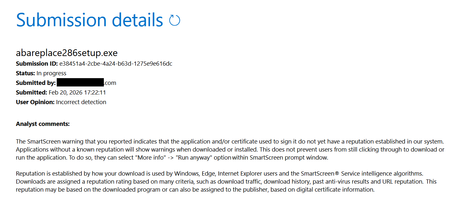
Hello, I'm a developer of https://www.abareplace.com/ Unfortunately, Microsoft SmartScreen blocks https://www.abareplace.com/download/ of my application and multiple attempts to contact Microsoft about this case were in vain. The app is clean on VirusTоtаl, has a valid digital signature, and is published to MS Store. However, users see the SmartScreen warning when trying to run the installer downloaded from my website: Windows protected your PC Windows Defender SmartScreen prevented an unrecognized app from starting. Running this app might put your PC at risk. Other developers report exactly the same problem and it https://www.reddit.com/r/Windows11/comments/1pz8qww/windows_code_signing_is_broken_for_indie/ It has no sense from the security point of view to block something that is already published on Microsoft Store. I submitted a ticket to https://www.microsoft.com/en-us/wdsi/filesubmission?persona=SoftwareDeveloper one month ago. The ticket was "In progress" for many weeks, then was silently closed. I opened a new ticket one week ago and it's still "in progress". I also submitted the file via Report this file as safe > I am the owner or representative of this website and I want to report an incorrect warning about it button in Microsoft Edge several times, but received no confirmation email that you should receive after submitting the form. I know that the times when Steve Ballmer shouted: "Developers! Developers! Developers!" are long gone, but can Microsoft make live at least a bit easier to independent software vendors? Thank you.1.1KViews1like4CommentsLocal user management password policy inconsistent behaviour
Hi all, Maybe some of you can enlighten me regarding the windows 10 + 11 local user password policy. The part that I want to question is "not contain parts of the user's full name". Then, let's say I want to create a new user with the following detail: Fullname: Max Mustermann Username: TESTUSER1 Pass: MaxPassword12345678 When I try to create that user via cmd or powershell, either using "net" or "New-LocalUser", it will not succeed and it will show the error "the password does not meet complexity....", which is expected. However, if I try to create the same user with the same credential via lusrmgr, it will be created without any error. So, why there is a different behaviour between lusrmgr and CLI? Then, if we have the existing user, and try to change the password of that user via lusrmgr, and the password contains the part of the user's full name, then the error will be thrown as expected. So, why is it only affect the lusrmgr and only when we create a new user? Is this a bug? Thanks!168Views0likes0Comments
WDAC: Unable to deploy Vulnerable driver blocklist
Hello, I tried to deploy the Microsoft Vulnerable driver blocklist with an Intune WDAC policy but i always faced an error using the XML provided by Microsoft : https://aka.ms/VulnerableDriverBlockList MS doc: https://learn.microsoft.com/en-us/windows/security/application-security/application-control/app-control-for-business/design/microsoft-recommended-driver-block-rules Thanks and regards557Views0likes2CommentsWDAC Managed Installer and Applocker Audit logs
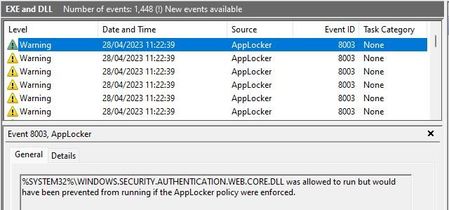
Hello, I am looking to deploy WDAC to Intune managed Windows 11 devices. In testing I have followed guidance (link below) to create the required supporting Applocker ManagedInstaller rule: https://learn.microsoft.com/en-us/windows/security/threat-protection/windows-defender-application-control/configure-authorized-apps-deployed-with-a-managed-installer#create-and-deploy-an-applocker-policy-that-defines-your-managed-installer-rules-and-enables-services-enforcement-for-executables-and-dlls In testing, whilst this appears to work (in that an app deployed by Intune is allowed, but the same app installed locally by an admin is not), I have noticed that the configuration results in a excessive amount of logging to the Applocker Microsoft-Windows-AppLocker/EXE and DLL log, i.e. a 8003 audit event for pretty much every DLL execution: Does anyone know if this is expected? Seems an obvious question as I see how the configuration of the Applocker ManagedInstaller rule collection in audit mode could cause this: Just looking for some clarification that this is expected as I had not anticipated the use of this (MDAC) option to result in such aggressive logging by Applocker (which I am otherwise not looking to use)? I have seen no mention of this in the documentation, so I guess it is either deemed obvious (which one could argue is the case!) or I have miss configured something? Does anyone else have this configured and if so, do you see the same? Many thanks, Phil1.7KViews0likes1Comment