security
5432 TopicsProblem creating a subfolder or modifying the contents of a folder
A problem happens to me that I already had and which seemed to have resolved itself more or less at the time. When I want to modify the contents of a folder (add a new subfolder, modify the name of a file,...) the modification does not appear. I am forced via the explorer to come out of my folder then enter it again to see that the subfolder is indeed created or that the name of a file has been modified. This is obviously very painful to use. When this happened to me a few months ago I saw people who had had the same problem and I tested proposals without success until one morning the problem disappeared. IT'S reappeared but I no longer know what I was asked to do. Does anyone on this forum know the issue and can explain it by suggesting a way to resolve it?56Views0likes1Comment
Vulnerabilities in Windows Web Experience Pack and C++ Application Develoment Framework
I am dealing with a hacker that is exploiting vulnerabilties in these 2 apps in windows. They were calling a location update using these apps and the NIC would drop out and come back. Im not in the know on how to report exploits. I personally dont have the knowledge to win this battle. I hope someone could help me out with this issue.17Views0likes1Comment
SmartScreen false positives
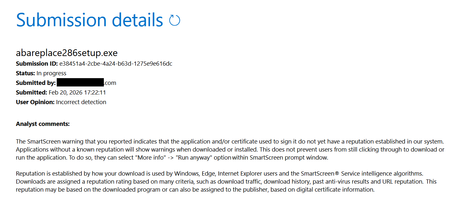
Hello, I'm a developer of https://www.abareplace.com/ Unfortunately, Microsoft SmartScreen blocks https://www.abareplace.com/download/ of my application and multiple attempts to contact Microsoft about this case were in vain. The app is clean on VirusTоtаl, has a valid digital signature, and is published to MS Store. However, users see the SmartScreen warning when trying to run the installer downloaded from my website: Windows protected your PC Windows Defender SmartScreen prevented an unrecognized app from starting. Running this app might put your PC at risk. Other developers report exactly the same problem and it https://www.reddit.com/r/Windows11/comments/1pz8qww/windows_code_signing_is_broken_for_indie/ It has no sense from the security point of view to block something that is already published on Microsoft Store. I submitted a ticket to https://www.microsoft.com/en-us/wdsi/filesubmission?persona=SoftwareDeveloper one month ago. The ticket was "In progress" for many weeks, then was silently closed. I opened a new ticket one week ago and it's still "in progress". I also submitted the file via Report this file as safe > I am the owner or representative of this website and I want to report an incorrect warning about it button in Microsoft Edge several times, but received no confirmation email that you should receive after submitting the form. I know that the times when Steve Ballmer shouted: "Developers! Developers! Developers!" are long gone, but can Microsoft make live at least a bit easier to independent software vendors? Thank you.32Views0likes3CommentsFind desktop files in full Windows 11 crash
So I have a big Windows 11 crash. I tried everything, impossible to get into the machine whatever the method used. - restoration - modification of elements at startup - repair integrated into windows - boot on DVD, boot on key - etc Even win11 repair via installation DVD does not work. I get an error message telling me that I cannot install Windows on the dedicated partition. So I give up, I've already wasted a lot of time. I got my Windows version back in cmd and as a last resort I will do a complete reinstallation via DVD or return to factory configuration. So I entered the machine in a Linux environment by booting from a key, and I was able to save the 800GB of files from one of the partitions to external HDDs. But... The only data I can't recover is that which was on the desktop; on the OS partition therefore. So yes normally we don't save anything important on the desktop, except that for convenience I have three/four small files which are there permanently... (in .txt and in .odt) Many times I figured I'd move them and create a shortcut, but I didn't... - As the machine does not start under Windows environment, I do not access the desktop. - and on linux I follow the path where the folder is normally located, but it's not there... C: /Users/name/ I tried c:/Users/public I also tried in C:/users/name/documents He's not there either I displayed the hidden folders. Nothing. Can this file be found elsewhere? Or the fact that Windows cannot start prevents you from finding the desktop folder and its files? I did a search on the name of one of the files, and I can't find it either. I just see it appear vaguely in a list of files that Linux shows me as recently opened: but these are only traces I have the impression, I don't have a physical file behind it. It's a sort of temporary file. I don't know if you can find anything in cmd? Or if anyone has an idea to get their hands on it or tell me it's definitely dead and I won't be able to find these files without Windows booting? Thank you so much!14Views0likes0CommentsWindows search bar problem - searching for updates creates a problem.
i bought a new laptop and i typed the word, up, in the search bar. i typed, up, because it auto completes usually to updates, and then i click on check for updates, and the computer opens the update panel. i found the following problem. i press up. the check for updates appears. then i press check for updates, the blue button. and then, after any updates get installed, the keyboard stops typing completely. i go in the browser, and i cannot type. the only thing i can do in that occassion, is i can go back to the search bar, and i press backspace one time. and then it auto completes the word, up. this does not work if i have typed any other word, including, update. it appears to happen, only if you search for the, check for updates, button, by typing, up, and waiting for the autocomplete. after the keyboard gets stuck, you press backscape in the search bar, in the bottom of windows, and it auto completes, up. and you cannot type, until you restart.67Views0likes2CommentsMicrosoft Technical Takeoff 2026: Windows + Intune
Mondays in March. Deep dives. AMAs. Windows, Intune, Windows 365, and Azure Virtual Desktop. Join us for Microsoft Technical Takeoff 2026 for Windows + Intune! This virtual technical skilling event takes you deep inside the latest features, capabilities, and scenarios for commercial organizations and the IT professionals that support them. Skill up and get answers to your questions from the engineering and product teams behind the features. How do I participate? Create your own agenda. Select “Add to Calendar” on a session page to save the date, then click the “Attend” button to save your spot, receive event reminders, and participate in the Q&A. If you can’t make the live session, don’t worry. You can post your questions in advance and catch up on the answers and insights later in the week. All sessions for Tech Takeoff will be recorded and available on demand immediately after airing. Don't see the "Attend" button or the ability to post Comments? Make sure to first sign in on the Tech Community! MONDAY MARCH 2 MONDAY MARCH 9 MONDAY MARCH 16 MONDAY MARCH 23 7:00 AM Let's talk Windows and Intune: 2026 edition 7:00 AM The latest in security for Windows 365 and Azure Virtual Desktop 7:00 AM Why smarter Windows management starts with Intune 7:00 AM AMA: The latest in Windows hardware security 7:30 AM The latest in Windows 11 security 7:30 AM Secure Boot certificate updates explained 7:30 AM Reporting at scale with Windows Autopatch update readiness 7:30 AM Zero Trust DNS: Securing Windows one connection at a time 8:00 AM Uplevel business continuity with Windows 365 Reserve 8:00 AM Feedback wanted: App management in the enterprise 8:00 AM User experience updates: Windows 365 Boot and more 8:00 AM AMA: Secure and manage AI and agentic capabilities in Windows 8:30 AM Hotpatch updates demystified: answers to real-world questions 8:30 AM Ready day one: how to get Windows users up and running fast 8:30 AM AI roundup: Intune agents for outcome-oriented innovation 8:30 AM Deploy and manage Windows 365 with Microsoft Intune 9:00 AM Zero Trust in action: securing endpoints with Intune 9:00 AM Making the most of your Intune data 9:00 AM AMA: Getting the most from Security Copilot in Intune 9:00 AM Unpacking Endpoint Management: Live from Tech Takeoff 2026 9:30 AM AMA: Windows Autopilot 9:30 AM Windows 365 reporting and monitoring updates 9:30 AM Manage Apple devices at scale: Intune security best practices 9:30 AM Azure Virtual Desktop for hybrid environments 10:00 AM The AI‑powered admin: emerging trends in endpoint management 10:00 AM Least privilege on Windows with Endpoint Privilege Management 10:00 AM Click less, manage more: simplify app deployment with Intune 10:00 AM Protect users, stop attacks: Passkeys on Windows 10:30 AM Eliminating NTLM in Windows 10:30 AM Windows 365 Frontline expands with Cloud Apps and more 10:30 AM App Control for Business: same roots, new playbook 10:30 AM AMA: AI and agentic features for Windows 365 11:00 AM One platform, many industries: smart Android management with Intune 11:00 AM From panic to productive: point-in-time restore in Windows 11:00 AM Intune timing demystified: what really happens behind the scenes 11:00 AM Transitioning to post-quantum cryptography 11:30 AM Resiliency with Windows 365 and Azure Virtual Desktop 11:30 AM The Intune playbook for iOS management at scale 11:30 AM Migrating from VDI to Windows 365 11:30 AM Resilience for the modern era: Windows quick machine recovery This event will feature AI-generated captions during the live broadcast. Human-generated captions will be available by the end of the week.19KViews6likes0Comments
Internal RDP vs Self-Hosted RustDesk
Hi everyone, I am looking for some guidance and real-world experiences around choosing the best approach for remote access in a Windows environment. Right now, we are considering two main options: - Continue using Microsoft Remote Desktop Protocol (RDP), but strictly for internal use only (no direct exposure to the public internet). - Deploy a self-hosted instance of RustDesk as an alternative or complement to RDP for remote access and remote support. Our main concern is security. RDP has historically been a common attack vector, especially when exposed externally or misconfigured, and we want to avoid introducing unnecessary risk to our endpoints. Even if we restrict RDP to internal networks or VPN-only access, we are still cautious about potential vulnerabilities, credential theft, lateral movement, and abuse of remote access. What we are trying to understand better is: 1. In environments where RDP is used only inside the LAN or over VPN (no open RDP from the internet), what are the recommended hardening practices and controls you would consider mandatory today? Examples might include: Network Level Authentication (NLA), strong account policies, just-in-time access, firewall restrictions, RDP Gateway, MFA, monitoring/logging, etc. 2. From a security and operational perspective, is it generally considered acceptable to keep RDP enabled only for internal administrative tasks, while avoiding using RDP for end-user remote support scenarios? 3. For those who have deployed self-hosted RustDesk (or similar remote support tools) in a Windows/Active Directory environment, how has it compared to RDP in terms of: - Security model (encryption, authentication, access control, exposure to the internet) - Ease of deployment and maintenance - User experience and performance - Logging, auditing, and integration with existing security monitoring 4. Are there any best practices or architectural patterns you would recommend when combining these approaches? For example: - Keeping RDP only on jump servers / bastion hosts inside the network - Using RustDesk (self-hosted) for remote support and helpdesk use cases - Enforcing least privilege, MFA, and strong authentication for all remote access paths - Segmentation and limiting which machines are even allowed to receive RDP connections 5. Have you encountered any specific security pitfalls, misconfigurations, or "gotchas" when relying on RDP internally or when rolling out RustDesk self-hosted that we should be aware of before committing to a design? Our goal is to design a remote access strategy that: - Minimizes attack surface and reduces the likelihood of compromise via remote access. - Separates administrative access from end-user remote support where it makes sense. - Remains manageable for a small IT/security team in terms of configuration, patching, and monitoring. If you have any references to Microsoft documentation, hardening guides, or community best practices for RDP (especially internal-only scenarios), as well as any detailed write-ups or lessons learned from using RustDesk self-hosted in production, those would be extremely helpful. Thank you in advance for any guidance, recommendations, or examples you can share. Best regards, Juan16Views0likes0Comments
Fingerprint Login No Longer Working
Login with Fingerprint is no longer working after the latest Windows 11, 25H2 update. It recognizes my fingerprint but immediately says "your pin is required to sign in". I have removed my fingerprint and PIN, restarted the computer, re-added the PIN and fingerprint, but continue to experience the same issue. The issue started after the most recent round of updates. KB5066835, KB5066128, and KB5068331 were installed. I removed KB5066835 and the functionality returned to normal. Anyone else experiencing this issue?372Views1like5CommentsMicrosoft finally admits almost all major Windows 11 core features are broken
A major new Windows 11 update has introduced widespread stability issues affecting core system functionality. Many users, including myself, are now experiencing frequent and disruptive problems like File Explorer crashes, slow performance, taskbar glitches, and Bluetooth failures, which together make the operating system frustratingly unreliable for daily use.51KViews5likes30Comments