security
307 Topics
¿Cómo comprobar que las actualizaciones se instalaron correctamente en Windows Server 2025?
Hola. Estoy usando Windows Server 2025 y quisiera saber qué pasos recomiendan para comprobar que las actualizaciones se instalaron correctamente. Después de reiniciar el servidor, ¿qué herramientas o registros puedo revisar para detectar errores y confirmar que los servicios siguen funcionando con normalidad?146Views0likes1Comment
RDS stops responding after Sept. 2026 security updates
Hi All, I have one last Windows Server 2012 R2 ESU VM in PROD, used for a legacy SQL Server / Video / Audio solution. Since installing KB5123066: RDP cannot connect to the VM The Windows Desktop is unstable File Explorer is unresponsive Windows Update services will not start As per: https://learn.microsoft.com/en-us/windows/release-health/resolved-issues-windows-8.1-and-windows-server-2012-r2#4981msgdesc Since Windows Update services won't start, we can't deploy the fix (KB5129243) through normal means. Attempts so far: KIR (Known Issue Rollback) via GPO — deployed the Windows 8.1 and Windows Server 2012 R2 KB5123066 260911_18477 Known Issue Rollback.msi, scoped a GPO to the VM with the corresponding policy set to Disabled, ran gpupdate /force. No change in behavior. Uninstall KB5123066 in Safe Mode with Networking — fails, Windows rolls back to KB5123066. Install KB5129243 in Safe Mode with Networking — fails, Windows rolls back. Offline DISM servicing from WinPE (booted from Server 2012 R2 ISO): DISM /Image:C:\ /Get-Packages shows several RollupFix package versions in inconsistent states — one Superseded, one Install Pending, one Staged, all dated the same day — suggesting a stuck servicing transaction from the repeated rollback attempts. DISM /Image:C:\ /Cleanup-Image /RevertPendingActions completes successfully and queues a revert for next boot. On reboot, the VM sits at "Getting Windows ready / Don't turn off your computer" and eventually returns to the same symptoms — no change. Re-running Get-Packages afterward returns Error 3017: The requested operation failed. A system reboot is required to roll back changes made — the offline image is apparently now stuck mid-transaction and won't let us query or modify it further. A second full boot cycle triggers the same "Getting Windows ready" screen again, but symptoms remain unchanged afterward and error 3017 persists. We do have backups of the VM prior to KB5123066, but it is not a straightforward rollback due to SQL Db/Transaction log restores as well for the AV solution (which is out of support). Given the CBS transaction now appears stuck (error 3017 not clearing even after two full boot/revert cycles), I suspect further offline DISM attempts risk making things worse rather than better. Before we escalate to Microsoft Support for Business as the KB suggests, has anyone resolved this same stuck-transaction state, or found a way to clear error 3017 on an offline 2012 R2 image without a pre-patch backup to fall back on? Thanks in advance. SteveSolved1.4KViews0likes1Comment
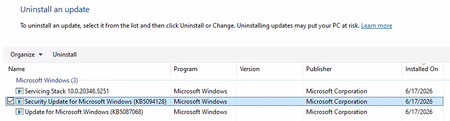
Unable to Uninstall Security Update (KB5094128) on Azure Hosted Windows Server 2022 VM
Hi All, I'm building up a system on Azure of Windows Server 2022 VMs for a PoC. Each Windows Server 2022 VM has been created using a company hardened golden image. After configuring the VM successfully, I am unable to run a software. Through research, the solution to run the software is to uninstall 'Security Update for Microsoft Windows (KB5094128)'. The issue is that I cannot uninstall the update normally. I have looked up various solutions and the following have been unsuccessful: Attempt #1 Powershell (Admin): sfc /scannow wusa /uninstall /kb:5094128 Result: Error 0x800f0905. Attempt #2 Powershell (Admin): Dism /Online /Cleanup-Image /CheckHealth Dism /Online /Cleanup-Image /ScanHealth Dism /Online /Cleanup-Image /RestoreHealth wusa /uninstall /kb:5094128 Result: No corruption detected, error 0x800f0905. Attempt #3 Powershell (Admin): net stop wuauserv net stop cryptSvc net stop bits net stop msiserver ren C:\Windows\SoftwareDistribution SoftwareDistribution.old ren C:\Windows\System32\catroot2 catroot2.old net start wuauserv net start cryptSvc net start bits net start msiserver wusa /uninstall /kb:5094128 Result: All services started and stopped. Error error 0x800f0905. Attempt #4 Windows Update Troubleshooter: Running the windows update troubleshooter gives the following output. The event viewer is suggesting there is a corrupted file error, but as seen above nothing is wanting to remove that file. Does anyone have any other options they could suggest? Or has anyone had success with this issue before? Is it a lost cause as we have to use company hardened golden images? Any suggestions would be appreciated!412Views0likes2CommentsHow to check RDP access to the server
Hello, I have a virtual machine running Windows Server 2019 Datacenter with Active Directory, and all users access it via RDP. No specific access configurations have been set up; I wanted to know if it is possible to check how many times a specific user has connected and from which IP address—is that possible? Also, I wanted to ask if it is possible to determine whether a specific user copied files to their local PC using copy/paste during a session. Thank you481Views0likes2CommentsSecure Boot update still pending on deadline day
After checking the registry keys on 2x VMs which run services for a number of important customers I found they both have: UEFICA2023Error 2147942750 Apparently this means they're pending a reboot. https://blog.mindcore.dk/2026/04/secure-boot-certificate-update-intune/ I can't reboot the VM inside working hours, can they be rebooted after the deadline or do I need to disable Secure Boot on the VMs? I'm concerned I'll have to disable Secure Boot before they're next rebooted for Windows updates.116Views0likes1CommentSave the date: Secure Boot Q&A in July
To help, Microsoft is continuing its Q&A series with several opportunities to connect directly with Microsoft experts. Whether you're managing physical servers, virtualized workloads, or working with your hardware partners on firmware readiness, you can get answers to the questions that matter most to your environment. Learn more and add the events to your calendar: 8:00 AM PDT July 1 - Windows Server Secure Boot AMA 8:00 AM PDT July 8 - Secure Boot Office Hours for virtualized environments 7:00 AM - 7:00 PM PDT July 15 - OEM Secure Boot Office Hours If there's a question that's been holding up your rollout—or one you simply want to validate before moving forward—this is a great opportunity to ask. Feel free to post questions ahead of time or join the conversation live. We look forward to seeing you there.264Views1like0Comments
Windows Server 2025 update with error 0x80073712
Hello Can I have some help? Windows Server 2025 Std, V 24H2, OS build: 26100.32522 The 2026-04 Security Update (KB5082063) (26100.32690) fails with the following error: Installation failed: Windows failed to install the following update with error 0x80073712: 2026-04 Security Update (KB5082063) (26100.32690). Thanks in advance MadUrantia431Views0likes2Comments
Phase 2 of Kerberos RC4 hardening begins with the April 2026 Windows security update
Windows updates released in April 2026 and later begin the second deployment phase of protections designed to address a Kerberos information disclosure vulnerability (CVE‑2026‑20833). This second phase continues the shift away from legacy encryption types such as RC4 by moving toward stronger default ticket behavior. After installing the April 2026 update, domain controllers default to supporting Advanced Encryption Standard (AES‑SHA1) encrypted tickets for accounts that do not have an explicit Kerberos encryption type configuration. If your organization relies on service accounts or applications that depend on RC4-based Kerberos service tickets, now is the time to address those dependencies to avoid authentication issues before the Enforcement phase begins in July 2026. Microsoft recommends continuing to monitor the System event log for Kerberos-related audit events and identify and address misconfigurations or remaining dependencies, then enabling enforcement when warning, blocking, or policy events are no longer logged. See How to manage Kerberos KDC usage of RC4 for service account ticket issuance changes related to CVE-2026-20833 and CVE‑2026‑20833 to learn more about the vulnerability, timelines, recommended preparation steps, and configuration options to ensure compliance before Enforcement mode begins in July 2026.8.8KViews1like1Comment2026-04 Update Breaks Domain Logins
I have an Active Directory domain that is old (from 2000!) that has been upgraded and moved to newer versions of Windows Server and Active Directory. I have domain controller VMs running Windows Server 2025 Standard Edition. Unfortunately they installed the latest 2026-04 patches which my have changed the Kerberos encryption from RC4 to AES. This has resulted in my not being able to log into any Active Directory domain accounts and the domain controllers themselves. I can only log into workstations using the local account. Suffice to say this a nightmare. Any ideas how to fix it since I can't access the usual tools like Active Directory Users and Computers, Hyper-V won't connect to the VMs, etc. Thanks. SSolved6.1KViews2likes9Comments
ntoskrnl.exe and build version not getting updated after applying KB5078740 on server 2025
I have installed the latest March patch kb5078740 on server 2025 which was upgraded from server 2022. the patch is showing installed but the ntoskrnl.exe and build version is still showing 10.0.26100.4652. Qualys is detecting it as patch not installed based on file version which should be 10.0.21600.32522. Please let me know how to fix this issue.868Views1like1Comment