security copilot
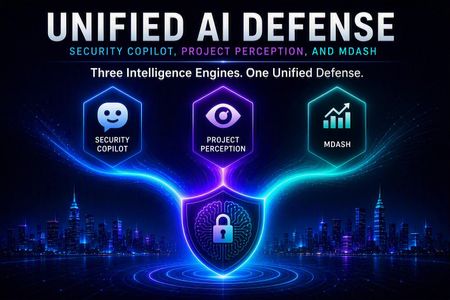
4 TopicsUnified AI Defense: Security Copilot, Project Perception, and MDASH
Executive Summary This triumvirate of tools present a cohesive and unified platform that tells a compelling story: Microsoft Security Copilot as the assistive AI experience and extensible agent platform for security and IT work; Project Perception as the coordinated multi-agent defense system that executes Red, Blue, and Green workflows. MDASH as the specialized multi-model agentic code-scanning harness for discovering, validating, proving, and helping remediate exploitable source-code vulnerabilities. Security Copilot helps analysts and teams ask, summarize, investigate, report, and extend workflows. Project Perception coordinates agents that reason and act across the defense lifecycle. MDASH feeds high-confidence vulnerability findings into broader security workflows, including Project Perception. Simple distinction Security Copilot assists the human. Project Perception coordinates the defense workflow. MDASH finds and validates software vulnerabilities. Platform Description Security Copilot AI that assists security and IT teams through natural-language investigation, summarization, promptbooks, plugins, embedded experiences, and extensible agents across Microsoft Security products. Project Perception AI that acts through coordinated multi-agent defense, using Red, Blue, and Green agents to expose gaps, investigate threats, remediate, and harden with humans in control of critical decisions. MDASH AI that finds and proves code vulnerabilities through a multi-model agentic scanning harness focused on source-code vulnerability discovery, validation, deduplication, proof, prioritization, and fix guidance. Relationship Model Security Copilot, Project Perception, and MDASH should not be positioned as interchangeable AI security tools. They sit at different layers of the security operating model: Security Copilot is the broad assistance and agent platform across Microsoft Security experiences; Project Perception is the coordinated multi-agent defense system for continuous defense; MDASH is the specialized code-security harness whose findings can feed Project Perception workflows. Layer Role How it connects Security Copilot Assistive AI and extensible agent platform Provides the user-facing experience, promptbooks, plugins, reporting, investigation help, and custom/Microsoft-built agents. Project Perception Coordinated multi-agent defense system Coordinates Red, Blue, and Green agents across exposure discovery, investigation, prioritization, remediation, and hardening. MDASH Specialized source-code vulnerability scanner Produces validated vulnerability findings and fix guidance that can inform broader Project Perception workflows. Detailed Comparison Matrix Category Security Copilot Project Perception MDASH Primary purpose Improve defender efficiency through generative AI assistance, embedded experiences, plugins, promptbooks, and agents. Coordinate specialized Red, Blue, and Green agents across the security lifecycle. Discover, validate, prove, prioritize, and help remediate exploitable source-code vulnerabilities. Core operating model Natural-language assistant and extensible agent platform. Coordinated agent playbooks and workflows with shared security context. Multi-model, multi-agent code-scanning pipeline. Primary users SOC analysts, threat hunters, IT admins, data security admins, identity teams, and teams building custom agents. Security operations, exposure management, posture, and incident response teams. AppSec, DevSecOps, product security, engineering, and authorized security teams. Inputs Prompts, incidents, alerts, logs, threat intelligence, plugins, policies, and product context. Security signals, threat intelligence, organizational context, sensors, models, agents, and approved actions. Source repositories or code folders, scan configuration, model outputs, code context, and vulnerability signals. Outputs Summaries, reports, investigations, KQL/query help, recommendations, and agent-generated results. Exposure findings, investigations, triage, detections, remediation/hardening recommendations, and approved actions. HTML/SARIF outputs, severity/confidence details, affected paths, proof details, and remediation suggestions. Strength Breadth and usability across Microsoft Security workflows. End-to-end coordinated defense across agent roles. Depth in software vulnerability discovery and exploitability validation. Best fit Productivity, explanation, reporting, analyst assistance, and workflow extension. Machine-speed coordinated defense for mature security operations. Deep application security and secure engineering workflows. Overlap Analysis Shared AI security reasoning All three use AI for security reasoning, but at different levels. Security Copilot grounds analyst-facing assistance through prompts, plugins, connectors, and organization context. Project Perception coordinates agents across security workflows. MDASH uses a specialized multi-model harness for code vulnerability analysis and proof-oriented validation. Investigation and analyst assistance Security Copilot and Project Perception overlap most clearly around investigations. The difference is the operating model: Security Copilot is optimized for human-assisted investigation; Project Perception is optimized for coordinated multi-agent workflows. Vulnerability discovery and remediation MDASH and Project Perception overlap around vulnerability discovery, exploitability validation, prioritization, and remediation. MDASH focuses on code vulnerabilities, while Project Perception can use MDASH findings with threat intelligence and broader security context to prioritize and drive remediation actions. Agent orchestration Security Copilot agents automate specific security and IT tasks. Project Perception coordinates Red, Blue, and Green defense agents across end-to-end workflows. MDASH orchestrates specialized scanning agents inside the code vulnerability pipeline. Scenario-Based Guidance Scenario Lead with Reason Faster SOC investigation, summarization, reporting, KQL help, and embedded assistance Security Copilot Best when the goal is analyst productivity and guided work inside existing Microsoft Security experiences. Deep source-code vulnerability discovery and exploitability validation MDASH Best when the organization has large code estates and needs richer AppSec analysis than traditional scanners alone. Coordinated Red/Blue/Green defense workflow across security domains Project Perception Best when the organization is ready for agentic defense workflows that identify, investigate, prioritize, and reduce risk. Organization asks whether Project Perception is just Security Copilot Clarify distinction Security Copilot assists; Project Perception coordinates agentic defense workflows. Organization asks whether MDASH is the same as Project Perception Clarify layered relationship MDASH produces code vulnerability findings; Project Perception operationalizes findings in broader defense workflows. Organization wants a complete agentic security story Combination Use Security Copilot for interaction and extensibility, Project Perception for coordinated defense, and MDASH for code vulnerability signals. How to position these AI offerings Lead with Security Copilot for analyst productivity, MDASH for source-code vulnerability discovery, and Project Perception for coordinated agentic defense. Project Perception is not a Security Copilot rebrand. Position the product as a distinct multi-agent defense system that complements Security Copilot. Each of these products complement each other rather than replace any of them. MDASH is not a general SOC platform. In essence, it is a specialized code vulnerability discovery and validation capability. Organization maturity Primary message Recommended offering Early AI/security productivity Use AI to help analysts and IT teams work faster inside the tools they already use. Security Copilot Mature SOC / Defender-centric operations Move from task assistance to coordinated defense workflows with agents that expose, investigate, and harden. Project Perception Strong engineering/AppSec focus Use AI to find, validate, prove, prioritize, and help remediate vulnerabilities in code repositories. MDASH Strategic AI-era security transformation Combine assistive AI, agentic defense, and deep code security. Combination Summary Security Copilot is a great entry point for organizations starting their Frontier journey and how AI can empower their security analysts, investigations and autonomous agent deployments. Project Perception is a coordinated agentic defense system. MDASH is a specialized code-security analysis engine. A simple, concise explanation would be: Copilot assists humans analyzing vast amount of security sources, MDASH discovers software vulnerabilities at machine speed level, and Project Perception coordinates security agents to determine what’s exploitable before an attacker does. Additional insights The newly updated documentation adds a clearer operating model for Project Perception: a continuous cycle to perceive risk, reason across security context, and act with human oversight. It also describes the underlying cyber stack and the role of the purpose-built MAI-Cyber-1-Flash model. Perceive, reason, and act Perceive: Continuously identify emerging risk across endpoints, identities, clouds, applications, and broader security signals. Reason: Apply threat intelligence, organizational context, and security signals to determine which risks are meaningful. Act: Help defenders move from findings to protective action faster, while retaining human judgment and approval for high-impact decisions. The new cyber stack Layer Role in Project Perception Field positioning cue Signals and sensors Provide visibility across endpoints, identities, clouds, applications, data, and AI. Start with the breadth of the digital estate. Security context Connect signals, threat intelligence, and organizational knowledge so agents can reason with operational context. Context turns raw signals into relevant understanding. Models Use a multi-model approach, including specialized cybersecurity reasoning. Select the right model for the task rather than relying on one model. Harness Orchestrate models and agents with the tools and controls required for reliable operation. The harness coordinates workflow, evaluation, and control. Agents Apply Red, Blue, and Green roles across discovery, investigation, response, remediation, and hardening. Agents are specialized roles working as one defense team. Actuators Translate decisions into real-world protective effects, not only recommendations. Actions remain governed and subject to the appropriate oversight. MAI-Cyber-1-Flash and the MDASH relationship MAI-Cyber-1-Flash is a Microsoft purpose-built cybersecurity model optimized for software vulnerability analysis. It operates as one model within the multi-model MDASH system, supporting selected stages of vulnerability discovery and analysis. MAI-Cyber-1-Flash provides specialized reasoning, while MDASH coordinates multiple models and scanning agents, and Project Perception connects those findings to broader defense workflows. Governance and human control Human oversight remains part of the operating model, especially for critical or high-impact actions. Agent activity should be positioned as governed, logged, auditable, and aligned to least-privilege access. Project Perception is designed to inherit enterprise security, governance, privacy, and compliance foundations rather than operate outside them. Appendix A: Project Perception Agent Roles and Relationship to Security Copilot and MDASH Understanding the Red, Blue, and Green Agents Project Perception is built around a coordinated virtual team of specialized AI agents. Just as human security organizations employ Red Teams, Blue Teams, and Security Engineering functions, Project Perception introduces AI agents that perform analogous activities at machine speed while maintaining human oversight for critical decisions. Red Agents Red Agents are responsible for identifying weaknesses before attackers can exploit them. Typical activities: Discover attack paths Identify exposed assets Detect privilege escalation opportunities Analyze risky configurations Correlate exposures across systems Surface previously unknown attack opportunities Business value: Red Agents help organizations move from reactive security to proactive exposure management by continuously searching for conditions that could enable compromise. Blue Agents Blue Agents investigate and validate risk. Once a potential exposure or threat is identified, Blue Agents determine whether it represents a meaningful security concern. Typical activities: Analyze alerts and incidents Correlate telemetry Validate exploitability Assess likelihood of attack Prioritize findings Evaluate business impact Generate investigative conclusions Business value: Blue Agents reduce alert fatigue and help security teams focus on the threats and vulnerabilities that present the highest operational risk. Green Agents Green Agents focus on remediation and hardening. After a risk has been identified and validated, Green Agents help eliminate or reduce that risk. Typical activities: Recommend fixes Validate remediation strategies Propose configuration changes Reduce attack surface Improve security posture Coordinate hardening activities Track remediation progress Business value: Green Agents help close the gap between identifying a problem and fixing it, accelerating risk reduction across the environment. Overlap with Security Copilot Security Copilot and Project Perception share some capabilities but are optimized for different operating models. Security Copilot is fundamentally an analyst-facing experience whose primary objective is to make humans more effective. Incident investigation Threat hunting Alert analysis Report generation Threat intelligence research Security summarization Security operations assistance Workflow automation through Security Copilot agents Positioning statement Security Copilot helps security professionals perform their jobs faster and more effectively. Area Security Copilot Project Perception agents Positioning Red overlap Assists analysts in understanding exposure data. Red Agents proactively discover exposures and attack opportunities. Security Copilot explains the exposure; Red Agents discover the exposure. Blue overlap Helps analysts investigate incidents and alerts. Blue Agents investigate as part of coordinated defense workflows. Security Copilot helps analysts investigate; Blue Agents investigate as part of the defense system. Green overlap Recommends remediation actions and implementation guidance. Green Agents coordinate remediation and hardening activities. Security Copilot recommends fixes; Green Agents drive remediation activities. Overlap with MDASH MDASH differs significantly from Security Copilot because it is focused specifically on software and source-code security. Its mission is vulnerability discovery, exploitability validation, and remediation guidance rather than general security operations. Area MDASH Project Perception agents Positioning Red overlap Identifies software weaknesses in source code. Red Agents evaluate broader attack surface across identity, endpoint, cloud, network, applications, and configuration weaknesses. MDASH identifies software weaknesses; Red Agents identify security weaknesses across the environment. Blue overlap Validates vulnerabilities and exploitability from a software perspective. Blue Agents validate operational risk using endpoint telemetry, identity exposure, threat intelligence, business impact, and attack paths. MDASH validates vulnerabilities; Blue Agents validate operational risk. Green overlap Provides code-level remediation guidance. Green Agents focus on broader environmental remediation and hardening. MDASH fixes code; Green Agents reduce organizational risk. Capability Comparison Matrix Capability Security Copilot Red Agents Blue Agents Green Agents MDASH Natural language interaction Primary No No No Limited Analyst assistance Primary No Limited Limited No Exposure discovery Limited Primary Limited No Code-focused Attack path analysis Limited Primary Yes No Limited Vulnerability discovery Limited Limited Limited No Primary Incident investigation Yes Limited Primary No Limited Alert triage Yes No Primary No No Risk prioritization Yes Limited Primary Limited Yes Exploitability validation Limited Limited Yes Limited Primary Remediation guidance Yes No Limited Primary Yes Code fix recommendations Limited No No Limited Primary Security hardening Limited No Limited Primary Limited Multi-agent orchestration Limited Yes Yes Yes Internal scanning agents End-to-end security lifecycle coverage Partial Partial Partial Partial No Final Takeaway Simple explanation In simple terms: Security Copilot assists humans. MDASH discovers software vulnerabilities. Project Perception coordinates security agent's activities and actions. Within Project Perception, Red Agents identify weaknesses, Blue Agents determine what matters, and Green Agents reduce risk. Technical Resources Getting started with Project Perception Project Perception FAQ Codename MDASH Overview Introducing MAI-Cyber-1-Flash inside MDASH Getting started with Security Copilot Security Copilot is now included for Microsoft 365 E5 and E7 organizations The AI Strategy Roadmap: Five drivers of successful AI transformation The AI Strategy Roadmap: How organizations are achieving Frontier Transformation (pdf)
Securing Enterprise AI Agents with Microsoft Sentinel
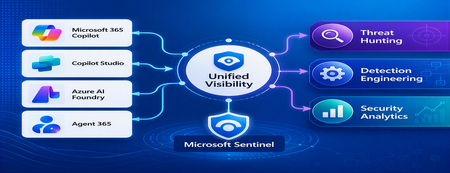
1. Introduction Enterprise adoption of Generative AI is accelerating rapidly through Microsoft 365 Copilot, Copilot Studio, Azure AI Foundry Agents, Security Copilot, and custom AI agents integrated with business applications. Unlike traditional SaaS applications, AI agents can: Access enterprise data Query internal knowledge repositories Invoke APIs and MCP tools Execute workflows Interact with business applications Make decisions on behalf of users While these capabilities improve productivity, they introduce a new attack surface that security teams must monitor and secure. Common AI threats include: Prompt Injection Cross Prompt Injection Attacks (XPIA) Jailbreak Attempts Unauthorized Tool Invocation Data Exfiltration through AI Agents Agent Identity Abuse Excessive Data Access Malicious MCP Tool Execution Traditional SOC monitoring platforms were designed for users, devices, applications and infrastructure—not autonomous AI systems. To address this challenge, Microsoft provides a comprehensive AI security monitoring framework built around: Agent 365 Observability Microsoft Agent Identities Microsoft Copilot Logs Defender XDR Defender for AI Microsoft Sentinel Together these components provide end-to-end observability of: User prompts Agent execution paths Tool invocations Safety signal detections Agent identities Security alerts 2. Reference Architecture AI Security Monitoring Architecture 3. Integration Architecture Microsoft provides multiple telemetry sources that complement one another. 3.1 Agent Runtime Telemetry Sentinel Data Connector Agent 365 Data Connector Table UnifiedAgentObservability Captures runtime behavior of AI agents including: User prompts Session IDs Conversation IDs Agent identities MCP tool invocations Connector invocations Tool arguments Tool responses Request payloads Response payloads Execution errors This dataset provides the forensic trail of everything an AI agent performed. 3.2 Agent Governance and Asset Inventory Sentinel Data Connector Microsoft Agent Identities Provides visibility into: Agent inventory Agent blueprint inventory Ownership Relationships Governance metadata Risk context This allows SOC teams to answer: Who owns this agent? What permissions does it have? Which business unit deployed it? Which related agents exist? 3.3 Copilot Audit and Usage Monitoring Sentinel Data Connector Microsoft Copilot Logs Connector Table CopilotActivity Provides: Copilot usage auditing Operational visibility User interaction tracking Useful for governance, compliance and adoption reporting. 3.4 AI Safety Telemetry Sentinel Data Connector Microsoft Defender XDR Connector Table CloudAppEvents CloudAppEvents provides AI safety signals such as: Prompt Shield detections Prompt Injection attempts Cross Prompt Injection Attacks (XPIA) Jailbreak-related verdicts Unsafe prompt classifications Think of CloudAppEvents as answering: "Was the prompt malicious?" 3.5 AI Security Alerts Sentinel Data Connectors Microsoft Defender XDR Microsoft Defender for Cloud Tables SecurityAlert SecurityIncident Used for: AI attack detections Security incidents Correlated investigation workflows 4. Understanding the Two Most Important AI Tables CloudAppEvents Focuses on AI Safety Questions answered: Was Prompt Shield triggered? Was this a jailbreak attempt? Was XPIA detected? Was the prompt suspicious? UnifiedAgentObservability Focuses on Agent Runtime Behavior Questions answered: What tool was invoked? Which connector executed? What arguments were passed? What data was returned? What actions did the agent perform? 5. Advanced Threat Hunting Scenarios The Agent365 Observability hunting guide contains several investigation scenarios that can be used directly in Microsoft Sentinel. Reference: Agent 365 Observability — AI Agent Telemetry Hunting https://github.com/SCStelz/security-investigator/blob/main/queries/cloud/agent365_observability.md 5.1 Prompt Injection Detection Detect prompts containing indicators such as: Ignore previous instructions Reveal system prompt Developer mode Disregard safety controls Investigation workflow: Review Tool Activity This allows analysts to determine whether a suspicious prompt resulted in downstream actions. 5.2 Session Reconstruction One of the most powerful capabilities of UnifiedAgentObservability is session reconstruction. Analysts can correlate: This creates complete forensic timelines. 5.3 MCP Tool Auditing Monitor all MCP activity including: query_lake Graph API tools ServiceNow connectors SharePoint connectors Custom enterprise tools Questions answered: Which tool was used? Who triggered it? What parameters were supplied? What data was returned? 5.4 Sensitive Data Access Monitoring Monitor AI agent interaction with: Employee records Customer data Financial information SharePoint repositories HR databases Useful for identifying: Data exfiltration attempts Excessive access patterns Sensitive data exposure 5.5 Query Lake Monitoring The GitHub hunting guide introduces monitoring of: query_lake RunAdvancedHuntingQuery Analysts can inspect: Actual KQL submitted Target workspaces Data sources queried Scope of access This provides visibility into AI-driven security investigations. 5.6 New Tool Detection Identify newly observed tool usage. Examples: Unauthorized MCP servers Newly registered connectors Unapproved tools Unexpected integrations This use case is particularly useful for governance programs. 5.7 Tool Failure Monitoring Monitor: Permission failures Connector failures Application errors Access-denied responses A sudden increase in failures may indicate: Reconnaissance activity Misconfiguration Privilege abuse attempts 6. Detection Engineering Opportunities Organizations can create Sentinel Analytics Rules for: 6.1 Prompt Injection Detection Developer Mode prompts Prompt Override attempts System Prompt disclosure requests 6.2 Jailbreak Attempt Detection Safety bypass attempts Role manipulation prompts Instruction override patterns 6.3 Unauthorized Tool Usage New MCP tools High-risk connectors Rare tool executions 6.4 Sensitive Data Access HR data queries Identity information retrieval Large-volume exports 6.5 Agent Identity Abuse Ownership changes Unexpected agent activity Agent-to-agent anomalies 7. Data Lake Exploration and Long-Term Analytics Because agent telemetry resides within Sentinel Data Lake, organizations can perform: Long-term AI investigations Historical AI attack analysis Agent baselining Governance reporting Trend analysis Tool inventory reporting Example dashboards include: Top Prompt Injection Attempts Most Active Agents High-Risk MCP Tools Agent Ownership Analysis AI Security Incidents Sensitive Data Access Trends 8. Summary AI agents represent the next major computing platform, but they also introduce a completely new attack surface. To effectively secure enterprise AI solutions, organizations require visibility across: User interactions Agent execution paths MCP tool usage Prompt safety signals Agent identities Security detections Microsoft Sentinel provides this unified view by integrating: Agent 365 Observability UnifiedAgentObservability Microsoft Agent Identities Microsoft Copilot Logs CloudAppEvents Defender XDR Defender for AI By combining AI runtime telemetry with AI safety signals and Defender detections, security teams can move beyond traditional monitoring and build a modern SOC capability for threat hunting, incident response, governance and forensic investigations across Microsoft 365 Copilot, Copilot Studio, Azure AI Foundry and future AI agent ecosystems. Reference: https://github.com/SCStelz/security-investigator/blob/main/queries/cloud/agent365_observability.mdSecurity Copilot RBAC for Embedded Experience in Unified Security Platform
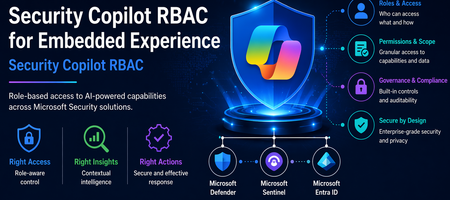
Introduction The evolution of Security Operations Centers (SOC) is increasingly driven by AI-powered capabilities that improve efficiency, accuracy, and response time. Microsoft Security Copilot represents a significant advancement in this space by embedding AI-driven assistance directly within security platforms such as Microsoft Defender XDR, Microsoft Sentinel, and Microsoft Entra. The concept of embedded experience is central to this transformation. Rather than operating as a standalone interface, Security Copilot is integrated within existing security tools, allowing analysts to invoke AI-generated insights directly during investigations. This reduces the need for tool switching and accelerates decision-making. The purpose of this document is to define and explain the Role-Based Access Control (RBAC) model required to securely enable this embedded experience. It provides a structured understanding of how access is governed across multiple layers, how these layers interact, and how organizations can align permissions with SOC workflows while maintaining a least-privilege security posture. Understanding Embedded Experience Security Copilot in embedded mode operates within the context of the host platform. When invoked from Defender or Sentinel, it does not function independently but instead consumes data already accessible to the user. This model ensures that Copilot enhances visibility without expanding access boundaries. This behavior is governed by an On-Behalf-Of (OBO) model, where Security Copilot leverages the permissions of the authenticated user. It does not introduce new entitlements or override existing RBAC configurations. As a result, the insights generated by Copilot are always limited to what the user is already authorized to see, reinforcing Zero Trust principles and preventing unauthorized data exposure. Prerequisites for Embedded Experience To enable Security Copilot in an embedded environment, organizations must establish foundational prerequisites that ensure seamless and secure operation. First, access to underlying platforms such as Microsoft Defender XDR, Microsoft Sentinel, and Microsoft Entra must already be provisioned. Since Copilot is not a standalone data source, it cannot function without these integrations. Second, RBAC alignment across identity, platform, and service layers must be configured correctly. Misalignment can lead to incomplete results, restricted functionality, or inconsistent analyst experiences. Finally, governance processes such as access review, monitoring, and adherence to least privilege principles should be implemented. These controls ensure that Copilot usage remains compliant, auditable, and aligned with organizational security policies. RBAC Framework for Security Copilot Security Copilot adopts a multi-layer RBAC model consisting of three tightly integrated layers. These layers collectively determine whether a user can access Copilot features and what data they can retrieve. RBAC Layer Mapping RBAC Layer Role Type Purpose Example Roles Access Impact Security Copilot Platform Feature access control Determines who can use Copilot capabilities Security Copilot Owner, Security Copilot Contributor Enables use of Copilot features but does not grant data access Microsoft Entra ID Identity and directory governance Controls access to identity data and reports Security Reader, Reports Reader, Security Administrator Governs identity insights and directory visibility Service-Specific RBAC Data access control Defines access to security data within services Defender Security Reader, Sentinel Reader Determines what Copilot can retrieve and present This layered approach ensures that no single role grants full access. All three layers must align for complete functionality. Security Copilot Platform Roles Security Copilot platform roles control who can interact with the Copilot interface and execute AI-driven workflows. The Security Copilot Owner role provides administrative control over Copilot configuration, including access management and platform-level settings. This role is typically assigned to administrators responsible for governance and operational enablement. The Security Copilot Contributor role enables analysts to run prompts, perform investigations, and interact with Copilot features during daily SOC operations. However, this role does not grant visibility into security data by itself. This clear separation ensures that Copilot remains a controlled interface layer rather than a source of privilege escalation. Microsoft Entra ID Roles Microsoft Entra roles govern access to identity-related data, which is critical for security operations involving user behavior, sign-in logs, and directory insights. Roles such as Security Reader provide read-only visibility into security data, while Reports Reader enables access to reporting and analytics capabilities. In certain advanced cases, the Security Administrator role may be required for configuration-level actions. The document emphasizes avoiding excessive privilege assignment, particularly the use of Global Administrator roles for daily operations, as this conflicts with least privilege principles. Service-Specific RBAC Roles Service-level roles determine the data sources that Security Copilot can access when embedded in platforms. In Microsoft Defender XDR, roles such as Security Reader allow access to alerts, incidents, and endpoint data. In Microsoft Sentinel, Sentinel Reader provides access to log data, analytics, and incidents. In Microsoft Entra, roles like Reports Reader provide access to identity insights. Copilot cannot retrieve or analyze data beyond what these roles permit. The output it generates is always constrained to the user’s effective permissions across these services. Unified RBAC Behavior in Embedded Experience In an embedded scenario, all three RBAC layers are evaluated simultaneously. When a SOC analyst invokes Copilot in Defender, the system validates whether the user has permission to use Copilot, access identity data, and retrieve Defender-specific insights. Only when all these conditions are satisfied does Copilot provide a comprehensive output. This ensures that Copilot responses are both contextually rich and access-compliant, eliminating the risk of unauthorized data exposure while maintaining operational efficiency. Security Copilot Core Use Cases Security Copilot enables a layered set of capabilities that span both analyst interaction patterns and agent-driven execution models. These use cases collectively enhance SOC efficiency, decision-making, and operational scalability. Use Case Mapping Table Use Case Description Embedded / Agent Example Value to SOC Summarization Transforms complex alerts, incidents, and telemetry into structured, human-readable insights by correlating signals across multiple sources Summarizing a Defender XDR incident involving endpoint, identity, and cloud alerts into a unified attack narrative Reduces analyst fatigue and significantly accelerates triage by eliminating manual data aggregation Guided Response Provides contextual, step-by-step investigative guidance and recommended remediation actions based on observed patterns and threat intelligence Suggesting investigation paths in Sentinel, including pivoting to identity logs, device timeline, and lateral movement indicators Improves consistency in investigations and enables less experienced analysts to operate effectively Script Analysis Evaluates scripts, queries, and command-line activities to identify malicious patterns, errors, or optimization opportunities Analyzing PowerShell scripts or KQL queries used in threat hunting scenarios to detect obfuscation or suspicious logic Enhances detection accuracy and reduces the risk of missing critical indicators Reporting Generates structured incident summaries, executive reports, and compliance-ready documentation with contextual insights Producing incident summaries for leadership or compliance teams with both technical and business context Improves communication, supports audit readiness, and reduces manual reporting overhead Agent-Driven SOC Use Cases (Expanded Capabilities) With the introduction of Security Copilot agents, the platform extends beyond assistance into orchestrated, intelligence-driven operations across SOC workflows. Agent-Based Use Case Description Real Agent Example SOC Impact Dynamic Threat Detection Continuously analyzes telemetry to identify previously undetected or weak signals across the attack surface Dynamic Threat Detection Agent correlates signals across Defender workload telemetry to surface hidden threats Improves detection coverage and reduces the likelihood of missed attacks Threat Intelligence Correlation & Briefing Aggregates internal and external intelligence sources to generate contextual threat insights aligned to organizational risk Threat Intelligence Briefing Agent produces structured intelligence reports based on attack patterns and exposure context Enhances situational awareness and supports proactive defense strategies Advanced Threat Hunting Enables hypothesis-driven and AI-assisted threat hunting by generating queries, exploring telemetry, and correlating historical data Advanced Threat Hunting Agent builds and executes queries across Defender and Sentinel datasets for proactive investigation and telemetry exploration Accelerates threat discovery and reduces reliance on manual query development Security Analysis & Threat Prioritization Performs AI-driven analysis of security telemetry to identify high-risk patterns, prioritize threats, assess risk exposure, and recommend investigative actions Security Analyst Agent analyses password spray attacks, ransomware activity, malware campaigns, identity abuse, and other security risks by generating telemetry-driven assessments and recommendations Improves analyst productivity, prioritizes high-impact threats, and enables faster decision making Security Triage Automation Automates alert prioritization and classification by adding contextual enrichment and reducing noise Security Triage Agent / Phishing Triage Agent evaluates alerts and distinguishes between real threats and false positives Reduces alert fatigue and improves prioritization accuracy in high-volume environments End-to-End Investigation Orchestration Performs multi-step investigation by gathering signals, correlating activity, and building attack timelines Security Analyst Agent investigates incidents across identity, endpoint, email, cloud, and data signals to produce a consolidated incident narrative Reduces Mean Time to Investigate (MTTI) and ensures consistent investigation outcomes Cross-Domain Threat Correlation Connects signals across identity, endpoint, cloud, email, and data domains to identify multi-stage attack chains Agents operating across Defender, Entra, Sentinel, and Security Copilot correlate activities such as phishing leading to identity compromise and lateral movement Breaks down silos and enables holistic threat visibility across the environment Remediation & Response Enablement Identifies vulnerable assets and supports remediation workflows through contextual recommendations Agents integrated with endpoint and policy systems suggest patching actions, containment actions, and configuration changes based on detected risks Improves response effectiveness and strengthens overall security posture Each of these use cases operates within the RBAC boundaries defined earlier, ensuring secure and context-aware outputs. Mapping Use Cases to SOC Processes The four core use cases align directly with SOC operational stages, enabling a consistent and repeatable analysis model. Summarization plays a significant role during the detection and triage phase, where analysts need quick clarity on incoming alerts. Instead of manually analyzing raw data, Copilot provides a structured overview, helping analysts determine priority and relevance. Guided response becomes critical during the investigation and response phase, where decision-making speed is essential. By suggesting next steps and correlating data points, Copilot assists analysts in navigating complex attack scenarios. Script analysis supports both threat hunting and investigation, allowing analysts to validate scripts, queries, or automation logic. This reduces the risk of overlooking malicious behavior embedded in scripts. Reporting aligns with the post-incident and compliance phase, where structured documentation is required. Copilot generates summaries that can be shared with leadership or compliance teams, ensuring clarity and consistency. Together, these use cases create a continuous cycle of detection, investigation, response, and reporting, fully integrated with SOC workflows. Summary Security Copilot’s embedded experience represents a transformative shift in how AI is integrated into security operations. By embedding intelligence directly within platforms such as Defender and Sentinel, it enhances analyst productivity while maintaining strict governance controls. The three-layer RBAC model, consisting of Security Copilot roles, Microsoft Entra roles, and service-specific roles, ensures that access is both secure and compliant with least privilege principles. The On-Behalf-Of model further guarantees that Copilot does not expand access beyond existing permissions. The inclusion of structured use cases such as summarization, guided response, script analysis, and reporting enables organizations to operationalize Copilot effectively across SOC processes. When RBAC is properly aligned and integrated with SOC workflows, Security Copilot becomes a powerful enabler of faster investigations, improved accuracy, and enhanced security posture—all while maintaining strict control over data access and governance.Best Practices for Investigating Phishing Incidents in Microsoft Defender for Office 365
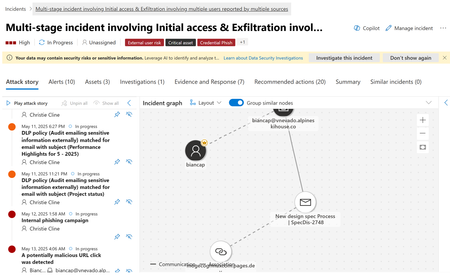
Discover best practices for investigating phishing incidents with Microsoft Defender for Office 365. Learn how to use the Incidents tab, analyze threats, and accelerate response with Security Copilot’s AI-powered guidance.