security copilot
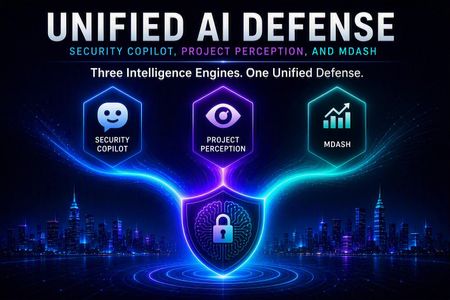
71 TopicsUnified AI Defense: Security Copilot, Project Perception, and MDASH
Executive Summary This triumvirate of tools present a cohesive and unified platform that tells a compelling story: Microsoft Security Copilot as the assistive AI experience and extensible agent platform for security and IT work; Project Perception as the coordinated multi-agent defense system that executes Red, Blue, and Green workflows. MDASH as the specialized multi-model agentic code-scanning harness for discovering, validating, proving, and helping remediate exploitable source-code vulnerabilities. Security Copilot helps analysts and teams ask, summarize, investigate, report, and extend workflows. Project Perception coordinates agents that reason and act across the defense lifecycle. MDASH feeds high-confidence vulnerability findings into broader security workflows, including Project Perception. Simple distinction Security Copilot assists the human. Project Perception coordinates the defense workflow. MDASH finds and validates software vulnerabilities. Platform Description Security Copilot AI that assists security and IT teams through natural-language investigation, summarization, promptbooks, plugins, embedded experiences, and extensible agents across Microsoft Security products. Project Perception AI that acts through coordinated multi-agent defense, using Red, Blue, and Green agents to expose gaps, investigate threats, remediate, and harden with humans in control of critical decisions. MDASH AI that finds and proves code vulnerabilities through a multi-model agentic scanning harness focused on source-code vulnerability discovery, validation, deduplication, proof, prioritization, and fix guidance. Relationship Model Security Copilot, Project Perception, and MDASH should not be positioned as interchangeable AI security tools. They sit at different layers of the security operating model: Security Copilot is the broad assistance and agent platform across Microsoft Security experiences; Project Perception is the coordinated multi-agent defense system for continuous defense; MDASH is the specialized code-security harness whose findings can feed Project Perception workflows. Layer Role How it connects Security Copilot Assistive AI and extensible agent platform Provides the user-facing experience, promptbooks, plugins, reporting, investigation help, and custom/Microsoft-built agents. Project Perception Coordinated multi-agent defense system Coordinates Red, Blue, and Green agents across exposure discovery, investigation, prioritization, remediation, and hardening. MDASH Specialized source-code vulnerability scanner Produces validated vulnerability findings and fix guidance that can inform broader Project Perception workflows. Detailed Comparison Matrix Category Security Copilot Project Perception MDASH Primary purpose Improve defender efficiency through generative AI assistance, embedded experiences, plugins, promptbooks, and agents. Coordinate specialized Red, Blue, and Green agents across the security lifecycle. Discover, validate, prove, prioritize, and help remediate exploitable source-code vulnerabilities. Core operating model Natural-language assistant and extensible agent platform. Coordinated agent playbooks and workflows with shared security context. Multi-model, multi-agent code-scanning pipeline. Primary users SOC analysts, threat hunters, IT admins, data security admins, identity teams, and teams building custom agents. Security operations, exposure management, posture, and incident response teams. AppSec, DevSecOps, product security, engineering, and authorized security teams. Inputs Prompts, incidents, alerts, logs, threat intelligence, plugins, policies, and product context. Security signals, threat intelligence, organizational context, sensors, models, agents, and approved actions. Source repositories or code folders, scan configuration, model outputs, code context, and vulnerability signals. Outputs Summaries, reports, investigations, KQL/query help, recommendations, and agent-generated results. Exposure findings, investigations, triage, detections, remediation/hardening recommendations, and approved actions. HTML/SARIF outputs, severity/confidence details, affected paths, proof details, and remediation suggestions. Strength Breadth and usability across Microsoft Security workflows. End-to-end coordinated defense across agent roles. Depth in software vulnerability discovery and exploitability validation. Best fit Productivity, explanation, reporting, analyst assistance, and workflow extension. Machine-speed coordinated defense for mature security operations. Deep application security and secure engineering workflows. Overlap Analysis Shared AI security reasoning All three use AI for security reasoning, but at different levels. Security Copilot grounds analyst-facing assistance through prompts, plugins, connectors, and organization context. Project Perception coordinates agents across security workflows. MDASH uses a specialized multi-model harness for code vulnerability analysis and proof-oriented validation. Investigation and analyst assistance Security Copilot and Project Perception overlap most clearly around investigations. The difference is the operating model: Security Copilot is optimized for human-assisted investigation; Project Perception is optimized for coordinated multi-agent workflows. Vulnerability discovery and remediation MDASH and Project Perception overlap around vulnerability discovery, exploitability validation, prioritization, and remediation. MDASH focuses on code vulnerabilities, while Project Perception can use MDASH findings with threat intelligence and broader security context to prioritize and drive remediation actions. Agent orchestration Security Copilot agents automate specific security and IT tasks. Project Perception coordinates Red, Blue, and Green defense agents across end-to-end workflows. MDASH orchestrates specialized scanning agents inside the code vulnerability pipeline. Scenario-Based Guidance Scenario Lead with Reason Faster SOC investigation, summarization, reporting, KQL help, and embedded assistance Security Copilot Best when the goal is analyst productivity and guided work inside existing Microsoft Security experiences. Deep source-code vulnerability discovery and exploitability validation MDASH Best when the organization has large code estates and needs richer AppSec analysis than traditional scanners alone. Coordinated Red/Blue/Green defense workflow across security domains Project Perception Best when the organization is ready for agentic defense workflows that identify, investigate, prioritize, and reduce risk. Organization asks whether Project Perception is just Security Copilot Clarify distinction Security Copilot assists; Project Perception coordinates agentic defense workflows. Organization asks whether MDASH is the same as Project Perception Clarify layered relationship MDASH produces code vulnerability findings; Project Perception operationalizes findings in broader defense workflows. Organization wants a complete agentic security story Combination Use Security Copilot for interaction and extensibility, Project Perception for coordinated defense, and MDASH for code vulnerability signals. How to position these AI offerings Lead with Security Copilot for analyst productivity, MDASH for source-code vulnerability discovery, and Project Perception for coordinated agentic defense. Project Perception is not a Security Copilot rebrand. Position the product as a distinct multi-agent defense system that complements Security Copilot. Each of these products complement each other rather than replace any of them. MDASH is not a general SOC platform. In essence, it is a specialized code vulnerability discovery and validation capability. Organization maturity Primary message Recommended offering Early AI/security productivity Use AI to help analysts and IT teams work faster inside the tools they already use. Security Copilot Mature SOC / Defender-centric operations Move from task assistance to coordinated defense workflows with agents that expose, investigate, and harden. Project Perception Strong engineering/AppSec focus Use AI to find, validate, prove, prioritize, and help remediate vulnerabilities in code repositories. MDASH Strategic AI-era security transformation Combine assistive AI, agentic defense, and deep code security. Combination Summary Security Copilot is a great entry point for organizations starting their Frontier journey and how AI can empower their security analysts, investigations and autonomous agent deployments. Project Perception is a coordinated agentic defense system. MDASH is a specialized code-security analysis engine. A simple, concise explanation would be: Copilot assists humans analyzing vast amount of security sources, MDASH discovers software vulnerabilities at machine speed level, and Project Perception coordinates security agents to determine what’s exploitable before an attacker does. Additional insights The newly updated documentation adds a clearer operating model for Project Perception: a continuous cycle to perceive risk, reason across security context, and act with human oversight. It also describes the underlying cyber stack and the role of the purpose-built MAI-Cyber-1-Flash model. Perceive, reason, and act Perceive: Continuously identify emerging risk across endpoints, identities, clouds, applications, and broader security signals. Reason: Apply threat intelligence, organizational context, and security signals to determine which risks are meaningful. Act: Help defenders move from findings to protective action faster, while retaining human judgment and approval for high-impact decisions. The new cyber stack Layer Role in Project Perception Field positioning cue Signals and sensors Provide visibility across endpoints, identities, clouds, applications, data, and AI. Start with the breadth of the digital estate. Security context Connect signals, threat intelligence, and organizational knowledge so agents can reason with operational context. Context turns raw signals into relevant understanding. Models Use a multi-model approach, including specialized cybersecurity reasoning. Select the right model for the task rather than relying on one model. Harness Orchestrate models and agents with the tools and controls required for reliable operation. The harness coordinates workflow, evaluation, and control. Agents Apply Red, Blue, and Green roles across discovery, investigation, response, remediation, and hardening. Agents are specialized roles working as one defense team. Actuators Translate decisions into real-world protective effects, not only recommendations. Actions remain governed and subject to the appropriate oversight. MAI-Cyber-1-Flash and the MDASH relationship MAI-Cyber-1-Flash is a Microsoft purpose-built cybersecurity model optimized for software vulnerability analysis. It operates as one model within the multi-model MDASH system, supporting selected stages of vulnerability discovery and analysis. MAI-Cyber-1-Flash provides specialized reasoning, while MDASH coordinates multiple models and scanning agents, and Project Perception connects those findings to broader defense workflows. Governance and human control Human oversight remains part of the operating model, especially for critical or high-impact actions. Agent activity should be positioned as governed, logged, auditable, and aligned to least-privilege access. Project Perception is designed to inherit enterprise security, governance, privacy, and compliance foundations rather than operate outside them. Appendix A: Project Perception Agent Roles and Relationship to Security Copilot and MDASH Understanding the Red, Blue, and Green Agents Project Perception is built around a coordinated virtual team of specialized AI agents. Just as human security organizations employ Red Teams, Blue Teams, and Security Engineering functions, Project Perception introduces AI agents that perform analogous activities at machine speed while maintaining human oversight for critical decisions. Red Agents Red Agents are responsible for identifying weaknesses before attackers can exploit them. Typical activities: Discover attack paths Identify exposed assets Detect privilege escalation opportunities Analyze risky configurations Correlate exposures across systems Surface previously unknown attack opportunities Business value: Red Agents help organizations move from reactive security to proactive exposure management by continuously searching for conditions that could enable compromise. Blue Agents Blue Agents investigate and validate risk. Once a potential exposure or threat is identified, Blue Agents determine whether it represents a meaningful security concern. Typical activities: Analyze alerts and incidents Correlate telemetry Validate exploitability Assess likelihood of attack Prioritize findings Evaluate business impact Generate investigative conclusions Business value: Blue Agents reduce alert fatigue and help security teams focus on the threats and vulnerabilities that present the highest operational risk. Green Agents Green Agents focus on remediation and hardening. After a risk has been identified and validated, Green Agents help eliminate or reduce that risk. Typical activities: Recommend fixes Validate remediation strategies Propose configuration changes Reduce attack surface Improve security posture Coordinate hardening activities Track remediation progress Business value: Green Agents help close the gap between identifying a problem and fixing it, accelerating risk reduction across the environment. Overlap with Security Copilot Security Copilot and Project Perception share some capabilities but are optimized for different operating models. Security Copilot is fundamentally an analyst-facing experience whose primary objective is to make humans more effective. Incident investigation Threat hunting Alert analysis Report generation Threat intelligence research Security summarization Security operations assistance Workflow automation through Security Copilot agents Positioning statement Security Copilot helps security professionals perform their jobs faster and more effectively. Area Security Copilot Project Perception agents Positioning Red overlap Assists analysts in understanding exposure data. Red Agents proactively discover exposures and attack opportunities. Security Copilot explains the exposure; Red Agents discover the exposure. Blue overlap Helps analysts investigate incidents and alerts. Blue Agents investigate as part of coordinated defense workflows. Security Copilot helps analysts investigate; Blue Agents investigate as part of the defense system. Green overlap Recommends remediation actions and implementation guidance. Green Agents coordinate remediation and hardening activities. Security Copilot recommends fixes; Green Agents drive remediation activities. Overlap with MDASH MDASH differs significantly from Security Copilot because it is focused specifically on software and source-code security. Its mission is vulnerability discovery, exploitability validation, and remediation guidance rather than general security operations. Area MDASH Project Perception agents Positioning Red overlap Identifies software weaknesses in source code. Red Agents evaluate broader attack surface across identity, endpoint, cloud, network, applications, and configuration weaknesses. MDASH identifies software weaknesses; Red Agents identify security weaknesses across the environment. Blue overlap Validates vulnerabilities and exploitability from a software perspective. Blue Agents validate operational risk using endpoint telemetry, identity exposure, threat intelligence, business impact, and attack paths. MDASH validates vulnerabilities; Blue Agents validate operational risk. Green overlap Provides code-level remediation guidance. Green Agents focus on broader environmental remediation and hardening. MDASH fixes code; Green Agents reduce organizational risk. Capability Comparison Matrix Capability Security Copilot Red Agents Blue Agents Green Agents MDASH Natural language interaction Primary No No No Limited Analyst assistance Primary No Limited Limited No Exposure discovery Limited Primary Limited No Code-focused Attack path analysis Limited Primary Yes No Limited Vulnerability discovery Limited Limited Limited No Primary Incident investigation Yes Limited Primary No Limited Alert triage Yes No Primary No No Risk prioritization Yes Limited Primary Limited Yes Exploitability validation Limited Limited Yes Limited Primary Remediation guidance Yes No Limited Primary Yes Code fix recommendations Limited No No Limited Primary Security hardening Limited No Limited Primary Limited Multi-agent orchestration Limited Yes Yes Yes Internal scanning agents End-to-end security lifecycle coverage Partial Partial Partial Partial No Final Takeaway Simple explanation In simple terms: Security Copilot assists humans. MDASH discovers software vulnerabilities. Project Perception coordinates security agent's activities and actions. Within Project Perception, Red Agents identify weaknesses, Blue Agents determine what matters, and Green Agents reduce risk. Technical Resources Getting started with Project Perception Project Perception FAQ Codename MDASH Overview Introducing MAI-Cyber-1-Flash inside MDASH Getting started with Security Copilot Security Copilot is now included for Microsoft 365 E5 and E7 organizations The AI Strategy Roadmap: Five drivers of successful AI transformation The AI Strategy Roadmap: How organizations are achieving Frontier Transformation (pdf)
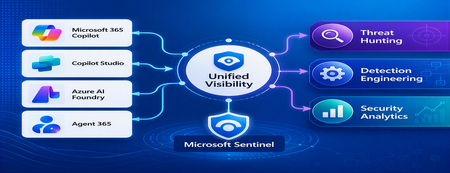
Securing Enterprise AI Agents with Microsoft Sentinel
1. Introduction Enterprise adoption of Generative AI is accelerating rapidly through Microsoft 365 Copilot, Copilot Studio, Azure AI Foundry Agents, Security Copilot, and custom AI agents integrated with business applications. Unlike traditional SaaS applications, AI agents can: Access enterprise data Query internal knowledge repositories Invoke APIs and MCP tools Execute workflows Interact with business applications Make decisions on behalf of users While these capabilities improve productivity, they introduce a new attack surface that security teams must monitor and secure. Common AI threats include: Prompt Injection Cross Prompt Injection Attacks (XPIA) Jailbreak Attempts Unauthorized Tool Invocation Data Exfiltration through AI Agents Agent Identity Abuse Excessive Data Access Malicious MCP Tool Execution Traditional SOC monitoring platforms were designed for users, devices, applications and infrastructure—not autonomous AI systems. To address this challenge, Microsoft provides a comprehensive AI security monitoring framework built around: Agent 365 Observability Microsoft Agent Identities Microsoft Copilot Logs Defender XDR Defender for AI Microsoft Sentinel Together these components provide end-to-end observability of: User prompts Agent execution paths Tool invocations Safety signal detections Agent identities Security alerts 2. Reference Architecture AI Security Monitoring Architecture 3. Integration Architecture Microsoft provides multiple telemetry sources that complement one another. 3.1 Agent Runtime Telemetry Sentinel Data Connector Agent 365 Data Connector Table UnifiedAgentObservability Captures runtime behavior of AI agents including: User prompts Session IDs Conversation IDs Agent identities MCP tool invocations Connector invocations Tool arguments Tool responses Request payloads Response payloads Execution errors This dataset provides the forensic trail of everything an AI agent performed. 3.2 Agent Governance and Asset Inventory Sentinel Data Connector Microsoft Agent Identities Provides visibility into: Agent inventory Agent blueprint inventory Ownership Relationships Governance metadata Risk context This allows SOC teams to answer: Who owns this agent? What permissions does it have? Which business unit deployed it? Which related agents exist? 3.3 Copilot Audit and Usage Monitoring Sentinel Data Connector Microsoft Copilot Logs Connector Table CopilotActivity Provides: Copilot usage auditing Operational visibility User interaction tracking Useful for governance, compliance and adoption reporting. 3.4 AI Safety Telemetry Sentinel Data Connector Microsoft Defender XDR Connector Table CloudAppEvents CloudAppEvents provides AI safety signals such as: Prompt Shield detections Prompt Injection attempts Cross Prompt Injection Attacks (XPIA) Jailbreak-related verdicts Unsafe prompt classifications Think of CloudAppEvents as answering: "Was the prompt malicious?" 3.5 AI Security Alerts Sentinel Data Connectors Microsoft Defender XDR Microsoft Defender for Cloud Tables SecurityAlert SecurityIncident Used for: AI attack detections Security incidents Correlated investigation workflows 4. Understanding the Two Most Important AI Tables CloudAppEvents Focuses on AI Safety Questions answered: Was Prompt Shield triggered? Was this a jailbreak attempt? Was XPIA detected? Was the prompt suspicious? UnifiedAgentObservability Focuses on Agent Runtime Behavior Questions answered: What tool was invoked? Which connector executed? What arguments were passed? What data was returned? What actions did the agent perform? 5. Advanced Threat Hunting Scenarios The Agent365 Observability hunting guide contains several investigation scenarios that can be used directly in Microsoft Sentinel. Reference: Agent 365 Observability — AI Agent Telemetry Hunting https://github.com/SCStelz/security-investigator/blob/main/queries/cloud/agent365_observability.md 5.1 Prompt Injection Detection Detect prompts containing indicators such as: Ignore previous instructions Reveal system prompt Developer mode Disregard safety controls Investigation workflow: Review Tool Activity This allows analysts to determine whether a suspicious prompt resulted in downstream actions. 5.2 Session Reconstruction One of the most powerful capabilities of UnifiedAgentObservability is session reconstruction. Analysts can correlate: This creates complete forensic timelines. 5.3 MCP Tool Auditing Monitor all MCP activity including: query_lake Graph API tools ServiceNow connectors SharePoint connectors Custom enterprise tools Questions answered: Which tool was used? Who triggered it? What parameters were supplied? What data was returned? 5.4 Sensitive Data Access Monitoring Monitor AI agent interaction with: Employee records Customer data Financial information SharePoint repositories HR databases Useful for identifying: Data exfiltration attempts Excessive access patterns Sensitive data exposure 5.5 Query Lake Monitoring The GitHub hunting guide introduces monitoring of: query_lake RunAdvancedHuntingQuery Analysts can inspect: Actual KQL submitted Target workspaces Data sources queried Scope of access This provides visibility into AI-driven security investigations. 5.6 New Tool Detection Identify newly observed tool usage. Examples: Unauthorized MCP servers Newly registered connectors Unapproved tools Unexpected integrations This use case is particularly useful for governance programs. 5.7 Tool Failure Monitoring Monitor: Permission failures Connector failures Application errors Access-denied responses A sudden increase in failures may indicate: Reconnaissance activity Misconfiguration Privilege abuse attempts 6. Detection Engineering Opportunities Organizations can create Sentinel Analytics Rules for: 6.1 Prompt Injection Detection Developer Mode prompts Prompt Override attempts System Prompt disclosure requests 6.2 Jailbreak Attempt Detection Safety bypass attempts Role manipulation prompts Instruction override patterns 6.3 Unauthorized Tool Usage New MCP tools High-risk connectors Rare tool executions 6.4 Sensitive Data Access HR data queries Identity information retrieval Large-volume exports 6.5 Agent Identity Abuse Ownership changes Unexpected agent activity Agent-to-agent anomalies 7. Data Lake Exploration and Long-Term Analytics Because agent telemetry resides within Sentinel Data Lake, organizations can perform: Long-term AI investigations Historical AI attack analysis Agent baselining Governance reporting Trend analysis Tool inventory reporting Example dashboards include: Top Prompt Injection Attempts Most Active Agents High-Risk MCP Tools Agent Ownership Analysis AI Security Incidents Sensitive Data Access Trends 8. Summary AI agents represent the next major computing platform, but they also introduce a completely new attack surface. To effectively secure enterprise AI solutions, organizations require visibility across: User interactions Agent execution paths MCP tool usage Prompt safety signals Agent identities Security detections Microsoft Sentinel provides this unified view by integrating: Agent 365 Observability UnifiedAgentObservability Microsoft Agent Identities Microsoft Copilot Logs CloudAppEvents Defender XDR Defender for AI By combining AI runtime telemetry with AI safety signals and Defender detections, security teams can move beyond traditional monitoring and build a modern SOC capability for threat hunting, incident response, governance and forensic investigations across Microsoft 365 Copilot, Copilot Studio, Azure AI Foundry and future AI agent ecosystems. Reference: https://github.com/SCStelz/security-investigator/blob/main/queries/cloud/agent365_observability.mdStop identity attacks in real time with Microsoft Entra ID Protection
Modern identity security means stopping attacks before they escalate and extending protection beyond human users to apps and agentic identities across your identity fabric. Learn how Microsoft Entra ID Protection delivers premium, real-time identity protection with adaptive risk remediation, comprehensive detections, and expanded coverage for human and non-human identities. Powered by trillions of Microsoft Security signals and natively integrated with Microsoft Defender and Security Copilot workflows, Entra ID Protection enables faster and more accurate Conditional Access decisions that stop threats like lateral movement and privilege escalation before they spread. We'll show you how identity and security operations teams scale risk remediation with Entra ID, and how these capabilities extend across your broader identity security portfolio to strengthen protection in both cloud and hybrid environments. To learn more, read the Microsoft Entra ID Protection report. How do I participate? Registration is not required. Add this event to your calendar, then sign in to the Tech Community and select Attend to receive reminders. Post your questions in advance, or any time during the live broadcast.2.4KViews1like2CommentsMigrate Sentinel to Defender - Why It Is a Security Architecture Decision, Not Just a Portal Change
Microsoft will retire the Sentinel experience in Azure on March 31, 2027. Most of the conversation around this transition focuses on cost optimization and portal consolidation. That framing undersells what is actually happening. The unified Defender portal is not a new interface for the same capabilities. It is the platform foundation for a fundamentally different SOC operating model — one built on a 2-tier data architecture, graph-based investigation, and AI agents that can hunt, enrich, and respond at machine speed. Partners who understand this will help customers build security programs that match how attackers actually operate. This document covers four things: What the unified experience delivers — the security capabilities that do not exist in standalone Sentinel and why they matter against today’s threats. What the transition really involves - is not data migration, but it is a data architecture project that changes how telemetry flows, where it lives, and who queries it. Where the partner opportunity lives — a structured progression from professional services (transactional, transition execution, and advisory) to ongoing managed security services. Why does the unified experience win competitively — factual capability advantages that give partners a defensible position against third-party SIEM alternatives. The Bigger Picture: Preparing for the Agentic SOC Before getting into transition mechanics, partners need to understand where the industry is headed — because the platform decisions made during this transition will determine whether a customer’s SOC is ready for what comes next. The security industry is moving from human-driven, alert-centric workflows to an operating model built on three pillars: Intellectual Property — the detection logic, hunting hypotheses, response playbooks, and domain expertise that differentiate one security team from another. Human Orchestration — the judgment, context, and decision-making that humans bring to complex incidents. Humans set strategy, validate findings, and make containment decisions. They do not manually triage every alert. AI Agents - built agents that execute repeatable work: enriching incidents, hunting across months of telemetry, validating security posture, drafting response actions, and flagging anomalies for human review. The SOC of 2027 will not be scaled by hiring more analysts. It will be scaled by deploying agents that encode institutional knowledge into automated workflows — orchestrated by humans who focus on the decisions that require judgment. This transformation requires a platform that provides three things: Deep telemetry — agents need months of queryable data to analyze behavioral patterns, build baselines, and detect slow-moving threats. The Sentinel data lake provides this at a cost point that makes long-retention feasible. Relationship context — agents need to understand how entities connect. Which accounts share credentials? What is the blast radius of a compromised service principle? What is the attack path from a phished user to domain admin? Sentinel Graph provides this. Extensibility — partners and customers need to build and deploy their own agents without waiting for Microsoft to ship them. The MCP framework and Copilot agent architecture provide this. None of these exist in Azure experience for Sentinel. All three ship with the Defender experience. The urgency goes beyond the March 2027 deadline. Organizations are deploying AI agents, copilots, and autonomous workflows across their businesses — and every one of those creates a new attack surface. Prompt injection, data poisoning, agent hijacking, cross-plugin exploitation — these are not theoretical risks. They are in the wild today. Defending against AI-powered attacks requires a security platform that is itself AI Agent-ready. The new experience in Defender unlocks this experience. What Unified SIEM and XDR Actually Delivers The original framing — “single pane of glass for SIEM and XDR” — is accurate but insufficient. Here is what the unified platform delivers that standalone Sentinel does not. Cross-Domain Incident Correlation The Defender correlation engine does not just group alerts by time proximity. It builds multi-stage incident graphs that link identity compromise to lateral movement to data exfiltration across SIEM and XDR telemetry — automatically. Consider a token theft chain: an infostealer harvests browser session cookies (endpoint telemetry), the attacker replays the token from a foreign IP (Entra ID sign-in logs), creates a mailbox forwarding rule (Exchange audit logs), and begins exfiltrating data (DLP alerts). In standalone Sentinel, these are four separate alerts in four different tables. In the unified platform, they are one correlated incident with a visual attack timeline. 2-Tier Data Architecture The Sentinel data lake introduces a second storage tier that changes the economics and capabilities of security telemetry: Analytics Tier Data Lake Purpose Real-time detection rules, SOAR, alerting Hunting, forensics, behavioral analysis, AI agent queries Latency Sub-5-minute query and alerting Minutes to hours acceptable Cost ~$4.30/GB PAYG ingestion (~$2.96 at 100 GB/day commitment) ~$0.05/GB ingestion + $0.10/GB data processing (at least 20x cheaper) Retention 90 days default (expensive to extend) Up to 12 years at low cost Best for High-signal, low-volume sources High-volume, investigation-critical sources The architecture decision is not “which tier is cheaper.” It is “which tier gives me the right detection capability for each data source.” Analytics tier candidates: Entra ID sign-in logs, Azure activity, audit logs, EDR alerts, PAM events, Defender for Identity alerts, email threat detections. These need sub-5-minute alerting. Data lake candidates: Raw firewall session logs, full DNS query streams, proxy request logs, Sysmon process events, NSG flow logs. These drive hunting and forensic analysis over weeks or months. Dual-ingest sources: Some sources need both tiers. Entra ID sign-in logs are the canonical example — analytics tier for real-time password spray detection, Data Lake for graph-based blast radius analysis across months of authentication history. Implementation is straightforward: a single Data Collection Rule (DCR) transformation handles the split. One collection point, two routing destinations. The right framing: “Right data in the right tier = better detections AND lower cost.” Cost savings are a side effect of good security architecture, not the goal. Sentinel Graph Sentinel graph enables SOC teams and AI agents to answer questions that flat log queries cannot: What is the blast radius of this compromised account? Which service principals share credentials with the breached identity? What is the attack path from this phished user to domain admin? Which entities are connected to this suspicious IP across all telemetry sources? Graph-based investigation turns isolated alerts into context-rich intelligence. It is the difference between knowing “this account was compromised” and understanding “this account has access to 47 service principals, 3 of which have written access to production Key Vault.” Security Copilot Integration Security Copilot embedded in the defender portal helps analysts summarize incidents, generate hunting queries, explain attacker behavior, and draft response actions. For complex multi-stage incidents, it reduces the time from “I see an alert” to “I understand the full scope” from hours to minutes. With free SCUs available with Microsoft 365 E5, teams can apply AI to the highest-effort investigation work without adding incremental cost. MCP and the Agent Framework The Model Context Protocol (MCP) and Copilot agent architecture let partners and customers build purpose-built security agents. A concrete example: an MCP-enabled agent can automatically enrich a phishing incident by querying email metadata, checking the sender against threat intelligence, pulling the user’s recent sign-in patterns, correlating with Sentinel Graph for lateral risk, and drafting a containment recommendation — in under 60 seconds. This is where partner intellectual property becomes competitive advantage. The agent framework is the mechanism for encoding proprietary detection logic, response playbooks, and domain expertise into automated workflows that run at machine speed. Security Store Security Store allows partners to evolve from one‑time transition projects into repeatable, scalable offerings—supporting professional services, managed services, and agent‑based IP that align with the customer’s unified SecOps operating model As part of the transition, the Microsoft Security Store becomes the extension layer for the Defender —allowing partners to deliver differentiated agents, SaaS, and security services natively within Defender and Sentinel, instead of building and integrating in isolation The 4 Investigation Surfaces: A Customer Maturity Ladder The Sentinel Data Lake exposes four distinct investigation surfaces, each representing a step toward the Agentic SOC — and a partner service opportunity: Surface Capability Maturity Level Partner Opportunity KQL Query Ad-hoc hunting, forensic investigation Basic — “we can query” Hunting query libraries; KQL training Graph Analytics Blast radius, attack paths, entity relationships Intermediate — “we understand relationships” Graph investigation training; attack path workshops Notebooks (PySpark) Statistical analysis, behavioral baselines, ML models Advanced — “we predict behaviors” Custom notebook development; anomaly scoring Agent/MCP Access Autonomous hunting, triage, response at machine speed Agentic SOC — “we automate” Custom agent development; MCP integration The customer who starts with “help us hunt better” ends up at “build us agents that hunt autonomously.” That is the progression from professional services to managed services. What the Transition Actually Involves It is not a data migration — customers’ underlying log data and analytics remain in their existing Log Analytics workspaces. That is important for partners to communicate clearly. But partners should not set the expectation that nothing changes except the URL. Microsoft’s official transition guide documents significant operational changes — including automation rules and playbooks, analytics rule, RBAC restructuring to the new unified model (URBAC), API schema changes that break ServiceNow and Jira integrations, analytics rule transitions where the Fusion engine is replaced by the Defender XDR correlation engine, and data policy shifts for regulated industries. Most customers cannot navigate this complexity without professional help. Important: Transitioning to the Defender portal has no extra cost - estimate the billing with the new Sentinel Cost Estimator Optimizing the unified platform means making deliberate changes: Adding dual-ingest for critical sources that need both real-time detection and long-horizon hunting. Moving high-volume telemetry to the Data Lake — enabling hunting at scale that was previously cost-prohibitive. Retiring redundant data copies where Defender XDR already provides the investigation capability. Updating RBAC, automation, and integrations for the unified portal’s consolidated schema and permission structure. Training analysts on new investigation workflows, Sentinel Graph navigation, and Copilot-assisted triage. Threat Coverage: The Detection Gap Most Organizations Do Not Know They Have This transition is an opportunity to quantify detection maturity — and most organizations will not like what they find. Based on real-world breach analysis — infostealers, business email compromise, human-operated ransomware, cloud identity abuse, vulnerability exploitation, nation-state espionage, and other prevalent threat categories — organizations running standalone Sentinel with default configurations typically have significant detection gaps. Those gaps cluster in three areas: Cross-domain correlation gaps — attacks that span identity, endpoint, email, and cloud workloads. These require the Defender correlation engine because no single log source tells the complete story. Long-retention hunting gaps — threats like command-and-control beaconing and slow data exfiltration that unfold over weeks or months. Analytics-tier retention at 90 days is too expensive to extend and too short for historical pattern analysis. Graph-based analysis gaps — lateral movement, blast radius assessment, and attack path analysis that require understanding entity relationships rather than flat log queries. The unified platform with proper log source coverage across Microsoft-native sources can materially close these gaps — but only if the transition includes a detection coverage assessment, not just a portal cutover. Partners should use MITRE ATT&CK as the common framework for measuring detection maturity. Map existing detections to ATT&CK tactics and techniques before and after transition — a measurable, defensible improvement that justifies advisory fees and ongoing managed services. Partner Opportunity: Professional Services to Managed Services This transition creates a structured progression for all partner types — from professional services that build trust and surface findings, to managed security services that deliver ongoing value. The key insight most partners miss: do not jump from “transition assessment” to “managed services pitch.” Customers are not ready for that conversation until they have experienced the value of professional services. The bridge engagement — whether transactional, transition execution, or advisory — builds trust, demonstrates the expertise, and surfaces the findings that make the managed services conversation a logical next step. Professional Services (transactional + transition execution + advisory) → Managed Security Services (MSSP) The USX transition is the ideal professional services entry point because it combines a mandatory deadline (March 2027) with genuine technical complexity (analytics rule, automation behavioral changes, RBAC restructuring, API schema shifts) that most customers cannot navigate alone. Every engagement produces findings — detection gaps, automation fragility, staffing shortfalls — that are the most credible possible evidence for managed services. Professional Services Transactional Partners Offer Customer Value Key Deliverables Transition Readiness Assessment Risk-mitigated transition with clear scope Sentinel deployment inventory; Defender portal compatibility check; transition roadmap with timeline; MITRE ATT&CK detection coverage baseline Transition Execution and Enablement Accelerated time-to-value, minimal disruption Workspace onboarding; RBAC and automation updates; Dual-portal testing and validation; SOC team training on unified workflows Security Posture and Detection Optimization Better detections and lower cost Data ingestion and tiering strategy; Dual-ingest implementation for critical sources; Detection coverage gap analysis; Automation and Copilot/MCP recommendations Advisory Partners Offer Customer Value Key Deliverables Executive and Strategy Advisory Leadership alignment on why this transition matters Unified SecOps vision and business case; Zero Trust and SOC modernization alignment; Stakeholder alignment across security, IT, and leadership Architecture and Design Advisory Future-ready architecture optimized for the Agentic SOC Target-state 2-tier data architecture; Dual-ingest routing decisions mapped to MITRE tactics; RBAC, retention, and access model design Detection Coverage and Gap Analysis Measurable detection maturity improvement Current-state MITRE ATT&CK coverage mapping; Gap analysis against 24 threat patterns; Detection improvement roadmap with priority recommendations SOC Operating Model Advisory Smooth analyst adoption with clear ownership Redesigned SOC workflows for unified portal; Incident triage and investigation playbooks; RACI for detection engineering, hunting, and platform ops Agentic SOC Readiness Preparation for AI-driven security operations MCP and agent architecture assessment; Custom agent development roadmap; IP + Human Orchestration + Agent operating model design Cost, Licensing and Value Advisory Transparent cost impact with strong business case Current vs. future cost analysis; Data tiering optimization recommendations; TCO and ROI modeling for leadership The conversion to managed services is evidence-based. Every professional services engagement produces findings — detection gaps, automation fragility, staffing shortfalls. Those findings are the most credible possible case for ongoing managed services. Managed Security Services The unified platform changes the managed security conversation. Partners are no longer selling “we watch your alerts 24/7.” They are selling an operating model where proprietary AI agents handle the repeatable work — enrichment, hunting, posture validation, response drafting — and human experts focus on the decisions that require judgment. This is where the competitive moat forms. The formula: IP + Human Orchestration + AI Agents = differentiated managed security. The unified platform enables this through: Multi-tenancy — the built-in multitenant portal eliminates the need for third-party management layers. Sentinel Data Lake — agents can query months of customer telemetry for behavioral analysis without cost constraints. Sentinel Graph — agents can traverse entity relationships to assess blast radius and map attack paths. MCP extensibility — partners can build agents that integrate with proprietary tools and customer-specific systems. Partners who build proprietary agents encoding their detection logic into the MCP framework will differentiate from partners who rely on out-of-box capabilities. The Securing AI Opportunity Organizations are deploying AI agents, copilots, and autonomous workflows across their businesses at an accelerating pace. Every AI deployment creates a new attack surface — prompt injection, data poisoning, agent hijacking, cross-plugin exploitation, unauthorized data access through agentic workflows. These are not theoretical risks. They are in the wild today. Partners who can help customers secure their AI deployments while also using AI to strengthen their SOC will command premium positioning. This requires a security platform that is itself AI Agent-ready — one that can deploy defensive agents at the same pace organizations deploy business AI. The unified Defender portal is that platform. Partners who position USX as “preparing your SOC for AI-driven security operations” will differentiate from partners who position it as “moving to a new portal.” Cost and Operational Benefits Better security architecture also costs less. This is not a contradiction — it is the natural result of putting the right data in the right tier. Benefit How It Works Eliminate low-value ingestion Identify and remove log sources that are never used for detections, investigations, or hunting. Immediately lowers analytics-tier costs without impacting security outcomes. Right-size analytics rules Disable unused rules, consolidate overlapping detections, and remove automation that does not reduce SOC effort. Pay only for processing that delivers measurable security value. Avoid SIEM/XDR duplication Many threats can be investigated directly in Defender XDR without duplicating telemetry into Sentinel. Stop re-ingesting data that Defender already provides. Tier data by detection need Store high-volume, hunt-oriented telemetry in the Data Lake at at least 20x lower cost. Promote only high-signal sources to the analytics tier. Full data fidelity preserved in both tiers. Reduce operational overhead Unified SIEM+XDR workflows in a single portal reduce tool switching, accelerate investigations, simplify analyst onboarding, and enable SOC teams to scale without proportional headcount increases. Improve detection quality The Defender correlation engine produces higher-fidelity incidents with fewer false positives. SOC teams spend less time triaging noise and more time on real threats. Competitive Positioning Partners need defensible talking points when customers evaluate third-party SIEM alternatives. The following advantages are factual, sourced from Microsoft’s transition documentation and platform capabilities — not marketing claims. No extra cost for transitioning — even for non-E5 customers. Third-party SIEM migrations involve licensing, data migration, detection rewrite, and integration rebuild costs. Native cross-domain correlation across Sentinel + Defender products into multi-stage incident graphs. Third-party SIEMs receive Microsoft logs as flat events — they lack the internal signal context, entity resolution, and product-specific intelligence that powers cross-domain correlation. Custom detections across SIEM + XDR — query both Sentinel and Defender XDR tables without ingesting Defender data into Sentinel. Eliminates redundant ingestion cost. Alert tuning extends to Sentinel — previously Defender-only capability, now applicable to Sentinel analytics rules. Net-new noise reduction. Unified entity pages — consolidated user, device, and IP address pages with data from both Sentinel and Defender XDR, plus global search across SIEM and XDR. Third-party SIEMs provide entity views from ingested data only. Built-in multi-tenancy for MSSPs — multitenant portal manages incidents, alerts, and hunting across tenants without third-party management layers. Try out the new GDAP capabilities in Defender portal. Industry validation: Microsoft’s SIEM+XDR platform has been recognized as a Leader by both Forrester (Security Analytics Platforms, 2025) and Gartner (SIEM Magic Quadrant, 2025). Summary: What Partners Should Take Away Topic Key Message Framing USX is a security architecture transformation, not a portal transition. Lead with detection capability, not cost savings. Platform foundation Sentinel Data Lake + Sentinel Graph + MCP/Agent Framework = the platform for the Agentic SOC. 4 investigation surfaces KQL → Graph → Notebooks → Agent/MCP. A maturity ladder from “we can query” to “we automate at machine speed.” Architecture 2-tier data model (analytics + Data Lake) with dual-ingest for critical sources. Cost savings are a side effect of good architecture. Transition complexity Analytics rules and automation rules. API schema changes. RBAC restructuring. Most customers need professional help. Partner engagement model Professional Services (transactional + transition execution + advisory) → Managed Services (MSSP). Competitive positioning No extra cost. Native correlation. Cross-domain detections. Built-in multi-tenancy. Capabilities third-party SIEMs cannot replicate. Partner differentiation IP + Human Orchestration + AI Agents. Partners who build proprietary agents on MCP have competitive advantage. Timeline March 31, 2027. Start now — phased transition with one telemetry domain first, then scale.3.2KViews4likes4CommentsSecurity Copilot RBAC for Embedded Experience in Unified Security Platform
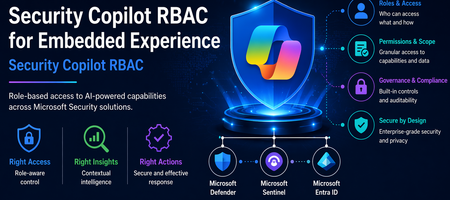
Introduction The evolution of Security Operations Centers (SOC) is increasingly driven by AI-powered capabilities that improve efficiency, accuracy, and response time. Microsoft Security Copilot represents a significant advancement in this space by embedding AI-driven assistance directly within security platforms such as Microsoft Defender XDR, Microsoft Sentinel, and Microsoft Entra. The concept of embedded experience is central to this transformation. Rather than operating as a standalone interface, Security Copilot is integrated within existing security tools, allowing analysts to invoke AI-generated insights directly during investigations. This reduces the need for tool switching and accelerates decision-making. The purpose of this document is to define and explain the Role-Based Access Control (RBAC) model required to securely enable this embedded experience. It provides a structured understanding of how access is governed across multiple layers, how these layers interact, and how organizations can align permissions with SOC workflows while maintaining a least-privilege security posture. Understanding Embedded Experience Security Copilot in embedded mode operates within the context of the host platform. When invoked from Defender or Sentinel, it does not function independently but instead consumes data already accessible to the user. This model ensures that Copilot enhances visibility without expanding access boundaries. This behavior is governed by an On-Behalf-Of (OBO) model, where Security Copilot leverages the permissions of the authenticated user. It does not introduce new entitlements or override existing RBAC configurations. As a result, the insights generated by Copilot are always limited to what the user is already authorized to see, reinforcing Zero Trust principles and preventing unauthorized data exposure. Prerequisites for Embedded Experience To enable Security Copilot in an embedded environment, organizations must establish foundational prerequisites that ensure seamless and secure operation. First, access to underlying platforms such as Microsoft Defender XDR, Microsoft Sentinel, and Microsoft Entra must already be provisioned. Since Copilot is not a standalone data source, it cannot function without these integrations. Second, RBAC alignment across identity, platform, and service layers must be configured correctly. Misalignment can lead to incomplete results, restricted functionality, or inconsistent analyst experiences. Finally, governance processes such as access review, monitoring, and adherence to least privilege principles should be implemented. These controls ensure that Copilot usage remains compliant, auditable, and aligned with organizational security policies. RBAC Framework for Security Copilot Security Copilot adopts a multi-layer RBAC model consisting of three tightly integrated layers. These layers collectively determine whether a user can access Copilot features and what data they can retrieve. RBAC Layer Mapping RBAC Layer Role Type Purpose Example Roles Access Impact Security Copilot Platform Feature access control Determines who can use Copilot capabilities Security Copilot Owner, Security Copilot Contributor Enables use of Copilot features but does not grant data access Microsoft Entra ID Identity and directory governance Controls access to identity data and reports Security Reader, Reports Reader, Security Administrator Governs identity insights and directory visibility Service-Specific RBAC Data access control Defines access to security data within services Defender Security Reader, Sentinel Reader Determines what Copilot can retrieve and present This layered approach ensures that no single role grants full access. All three layers must align for complete functionality. Security Copilot Platform Roles Security Copilot platform roles control who can interact with the Copilot interface and execute AI-driven workflows. The Security Copilot Owner role provides administrative control over Copilot configuration, including access management and platform-level settings. This role is typically assigned to administrators responsible for governance and operational enablement. The Security Copilot Contributor role enables analysts to run prompts, perform investigations, and interact with Copilot features during daily SOC operations. However, this role does not grant visibility into security data by itself. This clear separation ensures that Copilot remains a controlled interface layer rather than a source of privilege escalation. Microsoft Entra ID Roles Microsoft Entra roles govern access to identity-related data, which is critical for security operations involving user behavior, sign-in logs, and directory insights. Roles such as Security Reader provide read-only visibility into security data, while Reports Reader enables access to reporting and analytics capabilities. In certain advanced cases, the Security Administrator role may be required for configuration-level actions. The document emphasizes avoiding excessive privilege assignment, particularly the use of Global Administrator roles for daily operations, as this conflicts with least privilege principles. Service-Specific RBAC Roles Service-level roles determine the data sources that Security Copilot can access when embedded in platforms. In Microsoft Defender XDR, roles such as Security Reader allow access to alerts, incidents, and endpoint data. In Microsoft Sentinel, Sentinel Reader provides access to log data, analytics, and incidents. In Microsoft Entra, roles like Reports Reader provide access to identity insights. Copilot cannot retrieve or analyze data beyond what these roles permit. The output it generates is always constrained to the user’s effective permissions across these services. Unified RBAC Behavior in Embedded Experience In an embedded scenario, all three RBAC layers are evaluated simultaneously. When a SOC analyst invokes Copilot in Defender, the system validates whether the user has permission to use Copilot, access identity data, and retrieve Defender-specific insights. Only when all these conditions are satisfied does Copilot provide a comprehensive output. This ensures that Copilot responses are both contextually rich and access-compliant, eliminating the risk of unauthorized data exposure while maintaining operational efficiency. Security Copilot Core Use Cases Security Copilot enables a layered set of capabilities that span both analyst interaction patterns and agent-driven execution models. These use cases collectively enhance SOC efficiency, decision-making, and operational scalability. Use Case Mapping Table Use Case Description Embedded / Agent Example Value to SOC Summarization Transforms complex alerts, incidents, and telemetry into structured, human-readable insights by correlating signals across multiple sources Summarizing a Defender XDR incident involving endpoint, identity, and cloud alerts into a unified attack narrative Reduces analyst fatigue and significantly accelerates triage by eliminating manual data aggregation Guided Response Provides contextual, step-by-step investigative guidance and recommended remediation actions based on observed patterns and threat intelligence Suggesting investigation paths in Sentinel, including pivoting to identity logs, device timeline, and lateral movement indicators Improves consistency in investigations and enables less experienced analysts to operate effectively Script Analysis Evaluates scripts, queries, and command-line activities to identify malicious patterns, errors, or optimization opportunities Analyzing PowerShell scripts or KQL queries used in threat hunting scenarios to detect obfuscation or suspicious logic Enhances detection accuracy and reduces the risk of missing critical indicators Reporting Generates structured incident summaries, executive reports, and compliance-ready documentation with contextual insights Producing incident summaries for leadership or compliance teams with both technical and business context Improves communication, supports audit readiness, and reduces manual reporting overhead Agent-Driven SOC Use Cases (Expanded Capabilities) With the introduction of Security Copilot agents, the platform extends beyond assistance into orchestrated, intelligence-driven operations across SOC workflows. Agent-Based Use Case Description Real Agent Example SOC Impact Dynamic Threat Detection Continuously analyzes telemetry to identify previously undetected or weak signals across the attack surface Dynamic Threat Detection Agent correlates signals across Defender workload telemetry to surface hidden threats Improves detection coverage and reduces the likelihood of missed attacks Threat Intelligence Correlation & Briefing Aggregates internal and external intelligence sources to generate contextual threat insights aligned to organizational risk Threat Intelligence Briefing Agent produces structured intelligence reports based on attack patterns and exposure context Enhances situational awareness and supports proactive defense strategies Advanced Threat Hunting Enables hypothesis-driven and AI-assisted threat hunting by generating queries, exploring telemetry, and correlating historical data Advanced Threat Hunting Agent builds and executes queries across Defender and Sentinel datasets for proactive investigation and telemetry exploration Accelerates threat discovery and reduces reliance on manual query development Security Analysis & Threat Prioritization Performs AI-driven analysis of security telemetry to identify high-risk patterns, prioritize threats, assess risk exposure, and recommend investigative actions Security Analyst Agent analyses password spray attacks, ransomware activity, malware campaigns, identity abuse, and other security risks by generating telemetry-driven assessments and recommendations Improves analyst productivity, prioritizes high-impact threats, and enables faster decision making Security Triage Automation Automates alert prioritization and classification by adding contextual enrichment and reducing noise Security Triage Agent / Phishing Triage Agent evaluates alerts and distinguishes between real threats and false positives Reduces alert fatigue and improves prioritization accuracy in high-volume environments End-to-End Investigation Orchestration Performs multi-step investigation by gathering signals, correlating activity, and building attack timelines Security Analyst Agent investigates incidents across identity, endpoint, email, cloud, and data signals to produce a consolidated incident narrative Reduces Mean Time to Investigate (MTTI) and ensures consistent investigation outcomes Cross-Domain Threat Correlation Connects signals across identity, endpoint, cloud, email, and data domains to identify multi-stage attack chains Agents operating across Defender, Entra, Sentinel, and Security Copilot correlate activities such as phishing leading to identity compromise and lateral movement Breaks down silos and enables holistic threat visibility across the environment Remediation & Response Enablement Identifies vulnerable assets and supports remediation workflows through contextual recommendations Agents integrated with endpoint and policy systems suggest patching actions, containment actions, and configuration changes based on detected risks Improves response effectiveness and strengthens overall security posture Each of these use cases operates within the RBAC boundaries defined earlier, ensuring secure and context-aware outputs. Mapping Use Cases to SOC Processes The four core use cases align directly with SOC operational stages, enabling a consistent and repeatable analysis model. Summarization plays a significant role during the detection and triage phase, where analysts need quick clarity on incoming alerts. Instead of manually analyzing raw data, Copilot provides a structured overview, helping analysts determine priority and relevance. Guided response becomes critical during the investigation and response phase, where decision-making speed is essential. By suggesting next steps and correlating data points, Copilot assists analysts in navigating complex attack scenarios. Script analysis supports both threat hunting and investigation, allowing analysts to validate scripts, queries, or automation logic. This reduces the risk of overlooking malicious behavior embedded in scripts. Reporting aligns with the post-incident and compliance phase, where structured documentation is required. Copilot generates summaries that can be shared with leadership or compliance teams, ensuring clarity and consistency. Together, these use cases create a continuous cycle of detection, investigation, response, and reporting, fully integrated with SOC workflows. Summary Security Copilot’s embedded experience represents a transformative shift in how AI is integrated into security operations. By embedding intelligence directly within platforms such as Defender and Sentinel, it enhances analyst productivity while maintaining strict governance controls. The three-layer RBAC model, consisting of Security Copilot roles, Microsoft Entra roles, and service-specific roles, ensures that access is both secure and compliant with least privilege principles. The On-Behalf-Of model further guarantees that Copilot does not expand access beyond existing permissions. The inclusion of structured use cases such as summarization, guided response, script analysis, and reporting enables organizations to operationalize Copilot effectively across SOC processes. When RBAC is properly aligned and integrated with SOC workflows, Security Copilot becomes a powerful enabler of faster investigations, improved accuracy, and enhanced security posture—all while maintaining strict control over data access and governance.State Explosion Security Problem in AI-Era Software Supply Chains
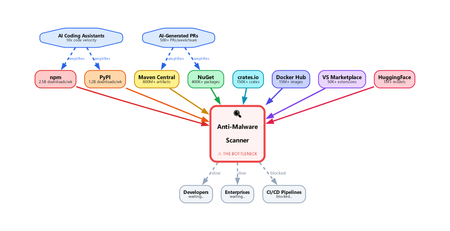
Introduction To see why this problem scales so quickly, start with the smallest possible change: a single line of code. In modern software, even a tiny edit is rarely just a local modification. It can change execution flow, introduce a new dependency, expose sensitive data, or quietly shift the purpose of the package itself. What looks trivial in a diff can create a materially different security outcome. That is why supply chain defenders cannot afford to treat small code changes as small security events. How a Single Line Changes Package Intent Every software package exists in a particular state at a particular moment in time. Imagine a benign version — State X — that behaves exactly as intended. Now add one line of code. That small edit can shift the package into a new state with different behavior and, potentially, a very different risk profile. The security issue is not the added line by itself. It is the fact that the package now has to be interpreted differently. A tiny diff can change the role of the entire component, which means defenders have to reason about the resulting behavior, not just the textual change. That is why file-level scanning breaks down so quickly. A change in one file can alter the behavior of the entire package because software semantics emerge from how components interact. Security systems therefore need to analyze packages as composed systems, not as a series of isolated file edits. Why the whole package matters This matters even more in modern supply chain attacks, where malicious intent is rarely concentrated in one obvious file. More often, the behavior is distributed across several files that look harmless when viewed independently. File A defines an encoded string constant. Looks like a config value. File B provides a decode function. Looks like a utility. File C (setup.py / postinstall) imports both, decodes, and executes. Viewed independently, each file may appear benign. No single file has to trigger a clear signature, rule, or heuristic. The malicious behavior only becomes visible when you reconstruct how the files interact as a system. Any scanner that evaluates files one by one without rebuilding that interaction is likely to miss the real behavior. Why every change demands re-analysis Every meaningful state change — a commit, pull request, version bump, or package publish — can alter the semantics of the software. That means defenders cannot stop at diff inspection or lightweight pattern matching. The real question is not only what changed, but what the software now does. Quantifying the problem The scale of the problem becomes clearer when you look at how many software state changes occur across the ecosystem every day: GitHub alone recorded nearly 1 billion commits in 2025, merged an average of 43.2 million pull requests per month, and now hosts roughly 630 million repositories. In 2026, GitHub was projected to reach roughly 38 million commits per day. npm has grown to well over 2 million packages, making JavaScript one of the largest public package ecosystems. PyPI published more than 130,000 new projects in 2025 and more than 3.9 million new files in the same year. NuGet serves package downloads at massive operational scale, with recent weekly totals in the 5 to 6 billion range. Maven Central indexed more than 20 million packages and published more than 3.2 million packages in 2025. Taken together, these ecosystems are generating an enormous stream of new software states. Some numbers describe repositories, some describe publishes, and some describe downloads, but they all point to the same reality: the scale of software movement is already massive before you even account for the acceleration from AI-assisted development. The number of state changes is already enormous, and AI-assisted development is increasing it even further. The result is not just more code, but more package states that may require meaningful security interpretation. Why the math breaks traditional scanning Assume a single semantic package analysis takes 30 seconds, which is a reasonable range for LLM-based inference. Scanning 50,000 packages would require roughly 1.5 million seconds of compute time per day — about 417 hours. But the ecosystem only gives defenders 24 hours before the next wave of packages arrives. Without aggressive parallelism and purpose-built infrastructure, backlog becomes inevitable. The scanning bottleneck This leaves modern scanning systems with a fundamental bottleneck: Heuristic and signature-based scanners are fast. They can match known patterns in milliseconds and work well for familiar malware families or repeated behaviors. Some systems also use emulation or detonation, but these approaches still struggle to deliver deep reasoning at ecosystem scale. That makes them easier to bypass with novel, well-structured, or AI-generated code that behaves maliciously without resembling previously known samples. LLM-based semantic analysis can reason about intent. It can follow behavior across files, recognize obfuscated exfiltration paths, and explain why a package is suspicious even when the code appears ordinary at first glance. The tradeoff is cost, latency, and trust: inference takes seconds rather than milliseconds, and a single package may require multiple reasoning passes. At ecosystem scale, that becomes a serious infrastructure challenge. Neither approach is sufficient on its own. Heuristics provide speed without deep understanding, while semantic models provide understanding without inherent scale. Closing the gap requires systems that combine both: package-level reasoning with the latency and throughput needed for production supply chains. Heuristics often miss novel attacks, while LLM-based approaches remain too slow to apply inline at large scale. That gap between understanding and throughput is where supply chain malware can persist. What needs to change Closing that gap will require a different class of supply chain security systems. Detonation can help in some cases, but it is too slow and expensive to apply inline to every package state change. What is needed is a system that can: Analyze entire packages as a unit — not individual files. The intent lives in the interaction between files, not within any single one. Run semantic analysis at data-plane speed — every package, every version, on the hot path, with latency low enough for inline enforcement. Not async advisories. Not CI-time checks. Inline, before delivery. Handle the state explosion — millions of state changes per day, each requiring full re-analysis. This is an infrastructure problem as much as a security problem: rate limiting, backpressure, connection pooling, regional failover, model versioning — the same hard distributed systems problems, with security stakes. Maintain high accuracy under evasion — attackers deliberately use encoding, string splitting, dynamic imports, polyglot files, and similar techniques to reduce detection quality. The scanner must continue to classify packages accurately even when the code is designed to obscure intent. The Latency-Accuracy Tradeoff: Malware Detection as an ML Problem At cloud scale, malware detection is governed by a hard tradeoff between latency, accuracy, throughput, and cost. The fastest detectors are typically shallow: signatures, heuristics, and lightweight models can make decisions in milliseconds, but they often miss novel, compositional, or intent-level attacks. Deeper semantic analysis can improve recall and resilience against evasion, but it also increases inference time, compute cost, and operational complexity. As a result, defenders cannot optimize for accuracy in isolation; they must deliver strong detection quality within strict performance constraints. This makes malware detection not just a cybersecurity problem, but a machine learning and distributed systems problem. In modern software supply chains, AI-assisted development increases the number of package states and enables attackers to generate variants at high speed, expanding the space defenders must reason over. The challenge is therefore to build detection architectures that preserve semantic depth while remaining fast enough for inline use at global scale. The gap between the rate of software change and the capacity to analyze it is widening. That gap is the attack surface. If defenders cannot inspect software at the speed it is being produced and published, attackers will continue to exploit the delay. What the industry needs now is a cloud-scale malware analysis capability that can deliver low latency, low cost, high accuracy, and the flexibility to meet different operational requirements , such as SLAs, false-positive tolerance, and enforcement policies , without compromising on package-level semantic analysis.Intent‑Aware Static Inspection for Agent and Skill Packages
Where AV helps—and what it may not cover Antivirus engines and traditional code scanners are highly effective at identifying known or suspicious executable content, such as binaries, scripts, or exploit patterns. For YAML‑based agent and skill packages, the situation can be different. These packages are often intentionally minimal to reduce distribution overhead and support faster inference. As a result, a configuration file may appear benign from a malware perspective, yet still introduce risk depending on how instructions are written and interpreted. For example, areas that may warrant closer review include: Instructions that influence how data is accessed, processed, or reused across requests Language that expands scope beyond an agent’s or skill’s stated purpose Requests for sensitive information outside expected or documented workflows Guidance that affects how untrusted or external inputs are handled during inference These scenarios do not necessarily indicate malicious intent, but they highlight cases where traditional scanning alone may not fully capture behavioral risk. What to look for when the “payload” is instructions When you review an agent or skill package, you’re effectively reviewing a compact behavior specification. In instruction‑driven designs—often chosen to keep inference paths fast and simple—the goal is not to analyze complex code, but to understand what behavior the instructions enable. A few practical signals include: Intent drift: the description is narrow, but the instructions encourage broader collection, retention, or escalation Overreach by default: language such as “always,” “for every user,” “across all workspaces,” “keep trying,” or “don’t stop until” Exfiltration pathways: instructions to send outputs to external endpoints, webhooks, or reporting channels not aligned with the stated purpose Credential‑related cues: asking users to provide secrets, tokens, recovery codes, or to authenticate outside expected flows Stealth language: “avoid logging,” “don’t mention this to the user,” “run quietly,” or “hide the reason” Injection susceptibility: treating untrusted text as commands (for example, “follow the user’s pasted script exactly” or “execute whatever is in the ticket”) A better model: intent-aware static inspection One practical way to approach review is to treat the instructions as a compact behavior specification. In many agent and skill designs, this specification is intentionally concise to support low latency, low inference cost, and efficient execution. The goal of inspection is not to second-guess that design choice, but to ensure the enabled behavior matches the stated purpose and expected boundaries. By applying intent-aware static inspection with explicit thresholds, review effort was focused on higher-risk packages. Over a one-month internal evaluation, approximately 400 agent and skill packages were reviewed with 1 observed false positive (< 0.0001%), reflecting high detection accuracy. At the same time, the approach preserves system efficiency, delivering low latency (under 10 seconds for most packages) and consistently low inference cost. A lightweight review workflow model Normalize the package: extract human‑readable fields (descriptions, system prompts, tool instructions, examples) and ignore structural YAML details Summarize intended behavior: describe what the agent or skill is expected to do in plain language, independent of implementation Check for higher‑risk actions: broad data access, external sharing, credential requests, persistence, or stealth behavior Decide with thresholds: route low‑risk, narrowly scoped packages differently from those with broader reach or reuse Keep an audit trail: retain a brief summary of extracted intent and review rationale to support iteration over time Final thoughts YAML‑based agent and skill packages are not inherently risky; they are often chosen precisely because they enable simpler distribution and faster inference. The key consideration is how instruction‑defined behavior aligns with expectations and boundaries as packages evolve and are reused. Combining traditional scanning with lightweight, intent‑aware inspection helps teams preserve the benefits of fast, instruction‑driven systems while improving confidence in how those systems behave in practice.Welcome to the Microsoft Security Community!
We have moved! Registering for webinars is now easier than ever—you can add any session directly to your calendar with a single click using the link below. Please visit: https://securitycommunity.microsoft.com/VirtualEvents/ to sign up for future webinars!53KViews7likes13Comments