security and compliance center
122 Topics
adding emails or domains to a Phish Whitelist
Hello, I am been searching for a way to whitelist emails or domains that are getting caught by the Phishing Net LOL. The emails are confirmed to be legit. I try to spot check the quarantine, but some days I forget to. I know how to whitelist for Spam not for Phish. Thank you.1.1KViews0likes0Comments
Best practices for container sensitivity labels
Hi all, My company is trying to leverage Sensitivity labels for Teams and hoping to help Teams external sharing (currently not allow guest access). There are couple concerns: 1. Should we use the same set of label names as File Sensitivity labels? The concern is that in the future if container labels inherit to files inside then it will be too complicated for my users to understand how it works. 2. The thoughts is to have three container labels (Public, Non-public and Confidential). The concern is how to deal with users add highly confidential files (with File label) to Public Teams and share externally. I don't see any alerts we can use nor use DLP to block it (from what I understand container labels doesn't work in DLP). Is there any alerting system to inform users/admins or prevent it happens? Want to see how everyone uses container labels for Teams. Any information you may share/suggest is greatly appreciated! Sally1.8KViews0likes0Comments
Questions on controlling SKIP UPN behavior on office apps such as Teams.
Hi Community, Customer has below user flow/setup User signs in to physical/virtual device which is domain joined to edu.lcl. Their edu.lcl identity is synced to an Azure AD Tenant via AD Connect (ABC.com). Office, Teams, OneDrive then tries to SSO in to apps using mailto:username@ABC.com The ABC.com account is not licensed for Office services, they need to use mailto:username@XYZ.com – The customer has no control over the XYZ.com tenant, its there for licensing purposes. We need a solution that allows the users to SSO into apps using mailto:username@XYZ.com every time. If this is not possible we need to mask hide and stop login prompts to office services for the ABC.com domain Example for OneDrive on each login, how do we get it to remember @XYZ.com credentials? Teams is prepopulated as below (mailto:User@ABC.com Note: There are registry keys to control a lot of these settings but its unclear to customer that what the optimal setup with dual identities setup in this way. The SkipUpnPrefill option mentioned https://nam06.safelinks.protection.outlook.com/?url=https%3A%2F%2Fdocs.microsoft.com%2Fen-us%2Fmicrosoftteams%2Fsign-in-teams%23how-modern-authentication-works&data=04%7C01%7Cbalgan%40microsoft.com%7C5a18f37f2bf64f748df908d9881a2689%7C72f988bf86f141af91ab2d7cd011db47%7C1%7C0%7C637690468210124979%7CUnknown%7CTWFpbGZsb3d8eyJWIjoiMC4wLjAwMDAiLCJQIjoiV2luMzIiLCJBTiI6Ik1haWwiLCJXVCI6Mn0%3D%7C1000&sdata=bM6VBK99T4TI5f%2BZ04TQcwNY%2B466uz36%2Bn9Ww38lQHU%3D&reserved=0 seems temperamental for example. Any guidance would be of great help!1.3KViews0likes0CommentsMCAS or 365 Security
Hey all, I'm relatively new into the industry and been tasked with championing some of our E5 platforms. We have both MCAS and MS 365 Security which I'm going to call MDE... My questions are: 1. Which one should I be using to manage alerts? a. Why can't I manage alert policies in MDE and I can in MCAS. 2. What are the differences between the two? 3. Should we even be using both of them?2.8KViews0likes3CommentsRegarding Exact Data Matches (EDM)
Hi All, We have configured EDM sensitive types. We have got a couple of questions regarding the hash file of customer data that us uploaded using thr EDM Upload Agent. 1. Where are the hash files stored in M365 2.What happens to the old hash file once a new is uploaded 3. Can the EDM upload agent work in presence of a proxy like Zscaler or MWG 4.Can we access the uploaded hash file on M365 Compliance portal 5. What is the best location (on-premise) to deploy the EDM Upload Agent VM Please provide help ASAP as I need to provide info on this to my team by the end of this week.New Blog Post | What's New: Azure Sentinel - SOC Process Framework 8 Part Video Series!
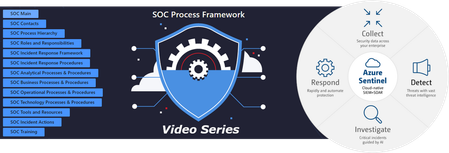
What's New: Azure Sentinel - SOC Process Framework 8 Part Video Series! - Microsoft Tech Community In this 8 part video series learn how to use the SOC Process Framework to manage your security team or Security Operations Center. You will hear expert level conversations about the development and implementation of security processes and procedures. This SOC-in-a-box approach provides easy to customize workflows and a standards-based framework to help you implement and continuously improve the multiple processes and procedures required by any modern security operations team.Using the eDiscovery tool for content search in the Microsoft 365 Compliance Center!
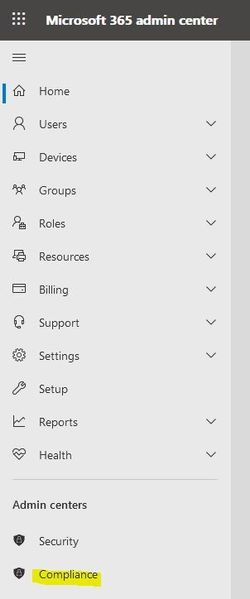
Dear Microsoft 365 Friends, This article is about the eDiscovery (content search) tool in Microsoft 365. Before we start, a quick word about licenses. In order to work with the tool, you need the necessary licenses. Please have a look at the following link: https://docs.microsoft.com/en-us/microsoft-365/compliance/get-started-core-ediscovery?view=o365-worldwide In my case I had to clarify the question, would emails with certain words be sent or received. To clarify this, I created a content search with eDiscovery. How this is done exactly, I will explain in the next steps. We start our investigation in the Microsoft 365 Admin Center. On the left side click on "Show All" (if not everything is displayed) and select the Complicane Center. In order to work with eDiscovery we need the necessary permissions. Click on Permissions. In the "Compliance Center" category, click "Roles". Search for eDiscovery Manager and click on this Role Group. This will give you the details of this Role Group. Navigate down and you will see "eDiscovery Manager" and "eDiscovery Administrator". For this demo, I added my account to the "eDiscovery Administrator". This is not necessarily following the concept of "working with the least privileges" (but absolutely OK for this demo). In a Productive environment, you can assign a person the role of "eDiscovery Manager" in an eDiscovery case (we'll get to that in a moment). Thus, this person only gets access to this one eDiscovery case. Click on "edit". Click on "edit" again. Find the user and click on "add" and then on "done". In the "Compliance Center", navigate to eDiscovery and select "Core". Click on "Create a case". Enter a name and if you want a description and click "save". We have now only created the "container" but not configured anything yet. We will change that in a moment. Navigate to "Searches" and click on "New search". Specify a name and description. Then click on "next". Now select the locations. This selection depends very much on your search. Then click on "next". For keyword I use as search term "Testversion". The goal is to find emails that contain this word. If you want you can work with conditions to limit this search. I like to start very general to get an overview, narrowing can be done later. Then click on "next". And now "Submit". Depending on the size of the organization and the number of objects that need to be examined, it can take a very long time until the status "Completed" is reached. Allow yourself time. If the status is "Completed", click on your search and you will get a "Summary". At the bottom click on "Review sample". Bingo! We see a list of emails, and in the first email we already see our keyword. Sure this wasn't super exciting, but I still wanted to share this information with you. I hope this article was helpful for you? Thank you for taking the time to read this article. Best regards, Tom WechslerWebinar Announcement: Leverage M365 sensitivity labels to improve your Power BI deployment
Session overview Power BI is an industry leading business intelligence platform adopted by the world's largest enterprises (2021 Gartner Magic Quadrant I Microsoft Power BI). Power BI is the only BI product with built in data protection through Microsoft Information Protection. In this webinar you’ll learn how you can leverage M365 sensitivity labels to classify sensitive content, inherit sensitivity labels from source systems and protect data when it leaves Power BI. US & EMEA Session Leverage M365 sensitivity labels to improve your Power BI deployment compliance and protect sensitive business data. July 7, 2021: 8:00 AM PDT, 11:00 AM EDT, 4:00 PM UK Register here Presented by: Anton Fritz Principal Program Manager, Power BI R&D Microsoft
Where is Block Sender listing stored?
Hi, In O365 exchange online, under Quarantine mails; if I were to select to "Block sender" in the quarantine mail option (refer screenshot). Where will this blocking happened? Is this email goes to a global block list? Or is blocked under the specific user account? Thanks.800Views0likes0Comments