securing ai
75 TopicsUnderstanding and mitigating security risks in MCP implementations
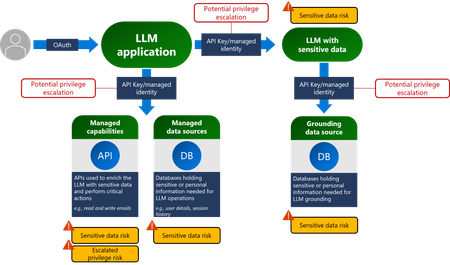
Introducing any new technology can introduce new security challenges or exacerbate existing security risks. In this blog post, we’re going to look at some of the security risks that could be introduced to your environment when using Model Context Protocol (MCP), and what controls you can put in place to mitigate them. MCP is a framework that enables seamless integration between LLM applications and various tools and data sources. MCP defines: A standardized way for AI models to request external actions through a consistent API Structured formats for how data should be passed to and from AI systems Protocols for how AI requests are processed, executed, and returned MCP allows different AI systems to use a common set of tools and patterns, ensuring consistent behavior when AI models interact with external systems. MCP architecture MCP follows a client-server architecture that allows AI models to interact with external tools efficiently. Here’s how it works: MCP Host – The AI model (e.g., Azure OpenAI GPT) requesting data or actions. MCP Client – An intermediary service that forwards the AI model's requests to MCP servers. MCP Server – Lightweight applications that expose specific capabilities (APIs, databases, files, etc.). Data Sources – Various backend systems, including local storage, cloud databases, and external APIs. MCP security controls Any system which has access to important resources has implied security challenges. Security challenges can generally be addressed through correct application of fundamental security controls and concepts. As MCP is only newly defined, the specification is changing very rapidly and as the protocol evolves. Eventually the security controls within it will mature, enabling a better integration with enterprise and established security architectures and best practices. Research published in the Microsoft Digital Defense Report states that 98% of reported breaches would be prevented by robust security hygiene and the best protection against any kind of breach is to get your baseline security hygiene, secure coding best practices and supply chain security right – those tried and tested practices that we already know about still make the most impact in reducing security risk. Let's look at some of the ways that you can start to address security risks when adopting MCP. MCP server authentication (if your MCP implementation was before 26th April 2025) Problem statement: The original MCP specification assumed that developers would write their own authentication server. This requires knowledge of OAuth and related security constraints. MCP servers acted as OAuth 2.0 Authorization Servers, managing the required user authentication directly rather than delegating it to an external service such as Microsoft Entra ID. As of 26 April 2025, an update to the MCP specification allows for MCP servers to delegate user authentication to an external service. Risks: Misconfigured authorization logic in the MCP server can lead to sensitive data exposure and incorrectly applied access controls. OAuth token theft on the local MCP server. If stolen, the token can then be used to impersonate the MCP server and access resources and data from the service that the OAuth token is for. Mitigating controls: Thoroughly review your MCP server authorization logic, here some posts discussing this in more detail - Azure API Management Your Auth Gateway For MCP Servers | Microsoft Community Hub and Using Microsoft Entra ID To Authenticate With MCP Servers Via Sessions · Den Delimarsky Implement best practices for token validation and lifetime Use secure token storage and encrypt tokens Excessive permissions for MCP servers Problem statement: MCP servers may have been granted excessive permissions to the service/resource they are accessing. For example, an MCP server that is part of an AI sales application connecting to an enterprise data store should have access scoped to the sales data and not allowed to access all the files in the store. Referencing back to the principle of least privilege (one of the oldest security principles), no resource should have permissions in excess of what is required for it to execute the tasks it was intended for. AI presents an increased challenge in this space because to enable it to be flexible, it can be challenging to define the exact permissions required. Risks: Granting excessive permissions can allow for exfiltration or amending data that the MCP server was not intended to be able to access. This could also be a privacy issue if the data is personally identifiable information (PII). Mitigating controls: Clearly define the permissions that the MCP server has to access the resource/service it connects to. These permissions should be the minimum required for the MCP server to access the tool or data it is connecting to. Indirect prompt injection attacks Problem statement: Researchers have shown that the Model Context Protocol (MCP) is vulnerable to a subset of Indirect Prompt Injection attacks known as Tool Poisoning Attacks. Tool poisoning is a scenario where an attacker embeds malicious instructions within the descriptions of MCP tools. These instructions are invisible to users but can be interpreted by the AI model and its underlying systems, leading to unintended actions that could ultimately lead to harmful outcomes. Risks: Unintended AI actions present a variety of security risks that include data exfiltration and privacy breaches. Mitigating controls: Implement AI prompt shields: in Azure AI Foundry, you can follow these steps to implement AI prompt shields. Implement robust supply chain security: you can read more about how Microsoft implements supply chain security internally here. Established security best practices that will uplift your MCP implementation’s security posture Any MCP implementation inherits the existing security posture of your organization's environment that it is built upon, so when considering the security of MCP as a component of your overall AI systems it is recommended that you look at uplifting your overall existing security posture. The following established security controls are especially pertinent: Secure coding best practices in your AI application - protect against the OWASP Top 10, the OWASP Top 10 for LLMs, use of secure vaults for secrets and tokens, implementing end-to-end secure communications between all application components, etc. Server hardening – use MFA where possible, keep patching up to date, integrate the server with a third party identity provider for access, etc. Keep devices, infrastructure and applications up to date with patches Security monitoring – implementing logging and monitoring of an AI application (including the MCP client/servers) and sending those logs to a central SIEM for detection of anomalous activities Zero trust architecture – isolating components via network and identity controls in a logical manner to minimize lateral movement if an AI application were compromised. Conclusion MCP is a promising development in the AI space that enables rich data and context access. As developers embrace this new approach to integrating their organization's APIs and connectors into LLMs, they need to be aware of security risks and how to implement controls to reduce those risks. There are mitigating security controls that can be put in place to reduce the risks inherent in the current specification, but as the protocol develops expect that some of the risks will reduce or disappear entirely. We encourage you to contribute to and suggest security related MCP RFCs to make this protocol even better! With thanks to OrinThomas, dasithwijes, dendeli and Peter Marcu for their inputs and collaboration on this post.Secure your AI transformation with Microsoft Security
Microsoft Security is at the forefront of AI security to support our customers on their AI journey by being the first security solution provider to offer threat protection for AI workloads and providing comprehensive security to secure and govern AI usage and applications.Microsoft Copilot Studio vs. Microsoft Foundry: Building AI Agents and Apps
Microsoft Copilot Studio and Microsoft Foundry (often referred to as Azure AI Foundry) are two key platforms in Microsoft’s AI ecosystem that allow organizations to create custom AI agents and AI-enabled applications. While both share the goal of enabling businesses to build intelligent, task-oriented “copilot” solutions, they are designed for different audiences and use cases. To help you decide which path suits your organization, this blog provides an educational comparison of Copilot Studio vs. Azure AI Foundry, focusing on their unique strengths, feature parity and differences, and key criteria like control requirements, preferences, and integration needs. By understanding these factors, technical decision-makers, developers, IT admins, and business leaders can confidently select the right platform or even a hybrid approach for their AI agent projects. Copilot Studio and Azure AI Foundry: At a Glance Copilot Studio is designed for business teams, pro‑makers, and IT admins who want a managed, low‑code SaaS environment with plug‑and‑play integrations. Microsoft Foundry is built for professional developers who need fine‑grained control, customization, and integration into their existing application and cloud infrastructure. And the good news? Organizations often use both and they work together beautifully. Feature Parity and Key Differences While both platforms can achieve similar outcomes, they do so via different means. Here’s a high-level comparison of Copilot Studio and Azure AI Foundry: Factor Copilot Studio (SaaS, Low-Code) Microsoft (Azure) AI Foundry (PaaS, Pro-Code) Target Users & Skills Business domain experts, IT pros, and “pro-makers” comfortable with low-code tools. Little to no coding is required for building agents. Ideal for quick solutions within business units. Professional developers, software engineers, and data scientists with coding/DevOps expertise. Deep programming skills needed for custom code, DevOps, and advanced AI scenarios. Suited for complex, large-scale AI projects. Platform Model Software-as-a-Service – fully managed by Microsoft. Agents and tools are built and run in Microsoft’s cloud (M365/Copilot service) with no infrastructure to manage. Simplified provisioning, automatic updates, and built-in compliance with Microsoft 365 environment. Platform-as-a-Service, runs in your Azure subscription. You deploy and manage the agent’s infrastructure (e.g. Azure compute, networking, storage) in your cloud. Offers full control over environment, updates, and data residency. Integration & Data Out-of-box connectors & data integrations for Microsoft 365 (SharePoint, Outlook, Teams) and 3rd-party SaaS via Power Platform connectors. Easy integration with business systems without coding, ideal for leveraging existing M365 and Power Platform assets. Data remains in Microsoft’s cloud (with M365 compliance and Purview governance) by default. Deep custom integration with any system or data source via code. Natively works with Azure services (Azure SQL, Cosmos DB, Functions, Kubernetes, Service Bus, etc.) and can connect to on-prem or multi-cloud resources via custom connectors. Suitable when data/code must stay in your network or cloud for compliance or performance reasons. Development Experience Low-code, UI-driven development. Build agents with visual designers and prompt editors. No-code orchestration through Topics (conversational flows) and Agent Flows (Power Automate). Rich library of pre-built components (tools/capabilities) that are auto-managed and continuously improved by Microsoft (e.g. Copilot connectors for M365, built-in tool evaluations). Emphasizes speed and simplicity over granular control. Code-first development. Offers web-based studio plus extensive SDKs, CLI, and VS Code integration for coding agents and custom tools. Supports full DevOps: you can use GitHub/Azure DevOps for CI/CD, custom testing, version control, and integrate with your existing software development toolchain. Provides maximum flexibility to define bespoke logic, but requires more time and skill, sacrificing immediate simplicity for long-term extensibility. Control & Governance Managed environment – minimal configuration needed. Governance is handled via Microsoft’s standard M365 admin centers: e.g. Admin Center, Entra ID, Microsoft Purview, Defender for identity, access, auditing, and compliance across copilots. Updates and performance optimizations (e.g. tool improvements) are applied automatically by Microsoft. Limited need (or ability) to tweak infrastructure or model behavior under the hood – fits organizations that want Microsoft to manage the heavy lifting. Microsoft Foundry provides a pro‑code, Azure‑native environment for teams that need full control over the agent runtime, integrations, and development workflow. Full stack control – you manage how and where agents run. Customizable governance using Azure’s security & monitoring tools: Azure AD (identity/RBAC), Key Vault, network security (private endpoints, VNETs), plus integrated logging and telemetry via Azure Monitor, App Insights, etc. Foundry includes a developer control plane for observing, debugging, and evaluating agents during development and runtime. This is ideal for organizations requiring fine-grained control, custom compliance configurations, and rigorous LLMOps practices. Deployment Channels One-click publishing to Microsoft 365 experiences (Teams, Outlook), web chat, SharePoint, email, and more – thanks to native support for multiple channels in Copilot Studio. Everything runs in the cloud; you don’t worry about hosting the bot. Flexible deployment options. Foundry agents can be exposed via APIs or the Activity Protocol, and integrated into apps or custom channels using the M365 Agents SDK. Foundry also supports deploying agents as web apps, containers, Azure Functions, or even private endpoints for internal use, giving teams freedom to run agents wherever needed (with more setup). Control and customization Copilot Studio trades off fine-grained control for simplicity and speed. It abstracts away infrastructure and handles many optimizations for you, which accelerates development but limits how deeply you can tweak the agent’s behavior. Azure Foundry, by contrast, gives you extensive control over the agent’s architecture, tools and environment – at the cost of more complex setup and effort. Consider your project’s needs: Does it demand custom code, specialized model tuning or on-premises data? If yes, Foundry provides the necessary flexibility. Common Scenarios · HR or Finance teams building departmental AI assistants · Sales operations automating workflows and knowledge retrieval · Fusion teams starting quickly without developer-heavy resources Copilot Studio gives teams a powerful way to build agents quickly without needing to set up compute, networking, identity or DevOps pipeline · Embedding agents into production SaaS apps · If team uses professional developer frameworks (Semantic Kernel, LangChain, AutoGen, etc.) · Building multi‑agent architectures with complex toolchains · You require integration with existing app code or multi-cloud architecture. · You need full observability, versioning, instrumentation or custom DevOps. Foundry is ideal for software engineering teams who need configurability, extensibility and industrial-grade DevOps. Benefits of Combined Use: Embracing Hybrid approach One important insight is that Copilot Studio and Foundry are not mutually exclusive. In fact, Microsoft designed them to be interoperable so that organizations can use both in tandem for different parts of a solution. This is especially relevant for large projects or “fusion teams” that include both low-code creators and pro developers. The pattern many enterprises land on: Developers build specialized tools / agents in Foundry Makers assemble user-facing workflow experience in Copilot Studio Agents can collaborate via agent-to-agent patterns (including A2A, where applicable) Using both platforms together unlocks the best of both worlds: Seamless User Experience: Copilot Studio provides a polished, user-friendly interface for end-users, while Azure AI Foundry handles complex backend logic and data processing. Advanced AI Capabilities: Leverage Azure AI Foundry’s extensive model library and orchestration features to build sophisticated agents that can reason, learn, and adapt. Scalability & Flexibility: Azure AI Foundry’s cloud-native architecture ensures scalability for high-demand scenarios, while Copilot Studio’s low-code approach accelerates development cycles. For the customers who don’t want to decide up front, Microsoft introduced a unified approach for scaling agent initiatives: Microsoft Agent Pre-Purchase Plan (P3) as part of the broader Agent Factory story, designed to reduce procurement friction across both platforms. Security & Compliance using Microsoft Purview Microsoft Copilot Studio: Microsoft Purview extends enterprise-grade security and compliance to agents built with Microsoft Copilot Studio by bringing AI interaction governance into the same control plane you use for the rest of Microsoft 365. With Purview, you can apply DSPM for AI insights, auditing, and data classification to Copilot Studio prompts and responses, and use familiar compliance capabilities like sensitivity labels, DLP, Insider Risk Management, Communication Compliance, eDiscovery, and Data Lifecycle Management to reduce oversharing risk and support investigations. For agents published to non-Microsoft channels, Purview management can require pay-as-you-go billing, while still using the same Purview policies and reporting workflows teams already rely on. Microsoft Foundry: Microsoft Purview integrates with Microsoft Foundry to help organizations secure and govern AI interactions (prompts, responses, and related metadata) using Microsoft’s unified data security and compliance capabilities. Once enabled through the Foundry Control Plane or through Microsoft Defender for Cloud in Microsoft Azure Portal, Purview can provide DSPM for AI posture insights plus auditing, data classification, sensitivity labels, and enforcement-oriented controls like DLP, along with downstream compliance workflows such as Insider Risk, Communication Compliance, eDiscovery, and Data Lifecycle Management. This lets security and compliance teams apply consistent policies across AI apps and agents in Foundry, while gaining visibility and governance through the same Purview portal and reports used across the enterprise. Conclusion When it comes to Copilot Studio vs. Azure AI Foundry, there is no universally “best” choice – the ideal platform depends on your team’s composition and project requirements. Copilot Studio excels at enabling functional business teams and IT pros to build AI assistants quickly in a managed, compliant environment with minimal coding. Azure AI Foundry shines for developer-centric projects that need maximal flexibility, custom code, and deep integration with enterprise systems. The key is to identify what level of control, speed, and skill your scenario calls for. Use both together to build end-to-end intelligent systems that combine ease of use with powerful backend intelligence. By thoughtfully aligning the platform to your team’s strengths and needs, you can minimize friction and maximize momentum on your AI agent journey delivering custom copilot solutions that are both quick to market and built for the long haul Resources to explore Copilot Studio Overview Microsoft Foundry Use Microsoft Purview to manage data security & compliance for Microsoft Copilot Studio Use Microsoft Purview to manage data security & compliance for Microsoft Foundry Optimize Microsoft Foundry and Copilot Credit costs with Microsoft Agent pre-purchase plan Accelerate Innovation with Microsoft Agent FactorySecurity Dashboard for AI - Now Generally Available
AI proliferation in the enterprise, combined with the emergence of AI governance committees and evolving AI regulations, leaves CISOs and AI risk leaders needing a clear view of their AI risks, such as data leaks, model vulnerabilities, misconfigurations, and unethical agent actions across their entire AI estate, spanning AI platforms, apps, and agents. 53% of security professionals say their current AI risk management needs improvement, presenting an opportunity to better identify, assess and manage risk effectively. 1 At the same time, 86% of leaders prefer integrated platforms over fragmented tools, citing better visibility, fewer alerts and improved efficiency. 2 To address these needs, we are excited to announce the Security Dashboard for AI, previously announced at Microsoft Ignite, is now generally available. This unified dashboard aggregates posture and real-time risk signals from Microsoft Defender, Microsoft Entra, and Microsoft Purview - enabling users to see left-to-right across purpose-built security tools from within a single pane of glass. The dashboard equips CISOs and AI risk leaders with a governance tool to discover agents and AI apps, track AI posture and drift, and correlate risk signals to investigate and act across their entire AI ecosystem. Security teams can continue using the tools they trust while empowering security leaders to govern and collaborate effectively. Gain Unified AI Risk Visibility Consolidating risk signals from across purpose-built tools can simplify AI asset visibility and oversight, increase security teams’ efficiency, and reduce the opportunity for human error. The Security Dashboard for AI provides leaders with unified AI risk visibility by aggregating security, identity, and data risk across Defender, Entra, Purview into a single interactive dashboard experience. The Overview tab of the dashboard provides users with an AI risk scorecard, providing immediate visibility to where there may be risks for security teams to address. It also assesses an organization's implementation of Microsoft security for AI capabilities and provides recommendations for improving AI security posture. The dashboard also features an AI inventory with comprehensive views to support AI assets discovery, risk assessments, and remediation actions for broad coverage of AI agents, models, MCP servers, and applications. The dashboard provides coverage for all Microsoft AI solutions supported by Entra, Defender and Purview—including Microsoft 365 Copilot, Microsoft Copilot Studio agents, and Microsoft Foundry applications and agents—as well as third-party AI models, applications, and agents, such as Google Gemini, OpenAI ChatGPT, and MCP servers. This supports comprehensive visibility and control, regardless of where applications and agents are built. Prioritize Critical Risk with Security Copilots AI-Powered Insights Risk leaders must do more than just recognize existing risks—they also need to determine which ones pose the greatest threat to their business. The dashboard provides a consolidated view of AI-related security risks and leverages Security Copilot’s AI-powered insights to help find the most critical risks within an environment. For example, Security Copilot natural language interaction improves agent discovery and categorization, helping leaders identify unmanaged and shadow AI agents to enhance security posture. Furthermore, Security Copilot allows leaders to investigate AI risks and agent activities through prompt-based exploration, putting them in the driver’s seat for additional risk investigation. Drive Risk Mitigation By streamlining risk mitigation recommendations and automated task delegation, organizations can significantly improve the efficiency of their AI risk management processes. This approach can reduce the potential hidden AI risk and accelerate compliance efforts, helping to ensure that risk mitigation is timely and accurate. To address this, the Security Dashboard for AI evaluates how organizations put Microsoft’s AI security features into practice and offers tailored suggestions to strengthen AI security posture. It leverages Microsoft’s productivity tools for immediate action within the practitioner portal, making it easy for administrators to delegate recommendation tasks to designated users. With the Security Dashboard for AI, CISOs and risk leaders gain a clear, consolidated view of AI risks across agents, apps, and platforms—eliminating fragmented visibility, disconnected posture insights, and governance gaps as AI adoption scales. Best of all, the Security Dashboard for AI is included with eligible Microsoft security products customers already use. If an organization is already using Microsoft security products to secure AI, they are already a Security Dashboard for AI customer. Getting Started Existing Microsoft Security customers can start using Security Dashboard for AI today. It is included when a customer has the Microsoft Security products—Defender, Entra and Purview—with no additional licensing required. To begin using the Security Dashboard for AI, visit http://ai.security.microsoft.com or access the dashboard from the Defender, Entra or Purview portals. Learn more about the Security Dashboard for AI at Microsoft Security MS Learn. 1AuditBoard & Ascend2 Research. The Connected Risk Report: Uniting Teams and Insights to Drive Organizational Resilience. AuditBoard, October 2024. 2Microsoft. 2026 Data Security Index: Unifying Data Protection and AI Innovation. Microsoft Security, 2026Accelerate AI adoption with next-gen security and governance capabilities
Generative AI adoption is accelerating across industries, and organizations are looking for secure ways to harness its potential. Today, we are excited to introduce new capabilities designed to drive AI transformation with strong security and governance tools.