securing ai
75 Topics
Building Secure, Enterprise Ready AI Agents with Purview SDK and Agent Framework
At Microsoft Ignite, we announced the public preview of Purview integration with the Agent Framework SDK—making it easier to build AI agents that are secure, compliant, and enterprise‑ready from day one. AI agents are quickly moving from demos to production. They reason over enterprise data, collaborate with other agents, and take real actions. As that happens, one thing becomes non‑negotiable: Governance has to be built in. That’s where Purview SDK comes in. Agentic AI Changes the Security Model Traditional apps expose risks at the UI or API layer. AI agents are different. Agents can: Process sensitive enterprise data in prompts and responses Collaborate with other agents across workflows Act autonomously on behalf of users Without built‑in controls, even a well‑designed agent can create compliance gaps. Purview SDK brings Microsoft’s enterprise data security and compliance directly into the agent runtime, so governance travels with the agent—not after it. What You Get with Purview SDK + Agent Framework This integration delivers a few key things developers and enterprises care about most: Inline Data Protection Evaluate prompts and responses against Data Loss Prevention (DLP) policies in real time. Content can be allowed or blocked automatically. Built‑In Governance Send AI interactions to Purview for audit, eDiscovery, communication compliance, and lifecycle management—without custom plumbing. Enterprise‑Ready by Design Ship agents that meet enterprise security expectations from the start, not as a follow‑up project. All of this is done natively through Agent Framework middleware, so governance feels like part of the platform—not an add‑on. How Enforcement Works (Quickly) When an agent runs: Prompts and responses flow through the Agent Framework pipeline Purview SDK evaluates content against configured policies A decision is returned: allow, redact, or block Governance signals are logged for audit and compliance This same model works for: User‑to‑agent interactions Agent‑to‑agent communication Multi‑agent workflows Try It: Add Purview SDK in Minutes Here’s a minimal Python example using Agent Framework: That’s it! From that point on: Prompts and responses are evaluated against Purview policies setup within the enterprise tenant Sensitive data can be automatically blocked Interactions are logged for governance and audit Designed for Real Agent Systems Most production AI apps aren’t single‑agent systems. Purview SDK supports: Agent‑level enforcement for fine‑grained control Workflow‑level enforcement across orchestration steps Agent‑to‑agent governance to protect data as agents collaborate This makes it a natural fit for enterprise‑scale, multi‑agent architectures. Get Started Today You can start experimenting right away: Try the Purview SDK with Agent Framework Follow the Microsoft Learn docs to configure Purview SDK with Agent Framework. Explore the GitHub samples See examples of policy‑enforced agents in Python and .NET. Secure AI, Without Slowing It Down AI agents are quickly becoming production systems—not experiments. By integrating Purview SDK directly into the Agent Framework, Microsoft is making governance a default capability, not a deployment blocker. Build intelligent agents. Protect sensitive data. Scale with confidence.Secure and govern AI apps and agents with Microsoft Purview
The Microsoft Purview family is here to help you secure and govern data across third party IaaS and Saas, multi-platform data environment, while helping you meet compliance requirements you may be subject to. Purview brings simplicity with a comprehensive set of solutions built on a platform of shared capabilities, that helps keep your most important asset, data, safe. With the introduction of AI technology, Purview also expanded its data coverage to include discovering, protecting, and governing the interactions of AI apps and agents, such as Microsoft Copilots like Microsoft 365 Copilot and Security Copilot, Enterprise built AI apps like Chat GPT enterprise, and other consumer AI apps like DeepSeek, accessed through the browser. To help you view, investigate interactions with all those AI apps, and to create and manage policies to secure and govern them in one centralized place, we have launched Purview Data Security Posture Management (DSPM) for AI. You can learn more about DSPM for AI here with short video walkthroughs: Learn how Microsoft Purview Data Security Posture Management (DSPM) for AI provides data security and compliance protections for Copilots and other generative AI apps | Microsoft Learn Purview capabilities for AI apps and agents To understand our current set of capabilities within Purview to discover, protect, and govern various AI apps and agents, please refer to our Learn doc here: Microsoft Purview data security and compliance protections for Microsoft 365 Copilot and other generative AI apps | Microsoft Learn Here is a quick reference guide for the capabilities available today: Note that currently, DLP for Copilot and adhering to sensitivity label are currently designed to protect content in Microsoft 365. Thus, Security Copilot and Copilot in Fabric, along with Copilot studio custom agents that do not use Microsoft 365 as a content source, do not have these features available. Please see list of AI sites supported by Microsoft Purview DSPM for AI here Conclusion Microsoft Purview can help you discover, protect, and govern the prompts and responses from AI applications in Microsoft Copilot experiences, Enterprise AI apps, and other AI apps through its data security and data compliance solutions, while allowing you to view, investigate, and manage interactions in one centralized place in DSPM for AI. Follow up reading Check out the deployment guides for DSPM for AI How to deploy DSPM for AI - https://aka.ms/DSPMforAI/deploy How to use DSPM for AI data risk assessment to address oversharing - https://aka.ms/dspmforai/oversharing Address oversharing concerns with Microsoft 365 blueprint - aka.ms/Copilot/Oversharing Explore the Purview SDK Microsoft Purview SDK Public Preview | Microsoft Community Hub (blog) Microsoft Purview documentation - purview-sdk | Microsoft Learn Build secure and compliant AI applications with Microsoft Purview (video) References for DSPM for AI Microsoft Purview data security and compliance protections for Microsoft 365 Copilot and other generative AI apps | Microsoft Learn Considerations for deploying Microsoft Purview AI Hub and data security and compliance protections for Microsoft 365 Copilot and Microsoft Copilot | Microsoft Learn Block Users From Sharing Sensitive Information to Unmanaged AI Apps Via Edge on Managed Devices (preview) | Microsoft Learn as part of Scenario 7 of Create and deploy a data loss prevention policy | Microsoft Learn Commonly used properties in Copilot audit logs - Audit logs for Copilot and AI activities | Microsoft Learn Supported AI sites by Microsoft Purview for data security and compliance protections | Microsoft Learn Where Copilot usage data is stored and how you can audit it - Microsoft 365 Copilot data protection and auditing architecture | Microsoft Learn Downloadable whitepaper: Data Security for AI Adoption | Microsoft Explore the roadmap for DSPM for AI Public roadmap for DSPM for AI - Microsoft 365 Roadmap | Microsoft 365PMPurUnderstanding and mitigating security risks in MCP implementations
Introducing any new technology can introduce new security challenges or exacerbate existing security risks. In this blog post, we’re going to look at some of the security risks that could be introduced to your environment when using Model Context Protocol (MCP), and what controls you can put in place to mitigate them. MCP is a framework that enables seamless integration between LLM applications and various tools and data sources. MCP defines: A standardized way for AI models to request external actions through a consistent API Structured formats for how data should be passed to and from AI systems Protocols for how AI requests are processed, executed, and returned MCP allows different AI systems to use a common set of tools and patterns, ensuring consistent behavior when AI models interact with external systems. MCP architecture MCP follows a client-server architecture that allows AI models to interact with external tools efficiently. Here’s how it works: MCP Host – The AI model (e.g., Azure OpenAI GPT) requesting data or actions. MCP Client – An intermediary service that forwards the AI model's requests to MCP servers. MCP Server – Lightweight applications that expose specific capabilities (APIs, databases, files, etc.). Data Sources – Various backend systems, including local storage, cloud databases, and external APIs. MCP security controls Any system which has access to important resources has implied security challenges. Security challenges can generally be addressed through correct application of fundamental security controls and concepts. As MCP is only newly defined, the specification is changing very rapidly and as the protocol evolves. Eventually the security controls within it will mature, enabling a better integration with enterprise and established security architectures and best practices. Research published in the Microsoft Digital Defense Report states that 98% of reported breaches would be prevented by robust security hygiene and the best protection against any kind of breach is to get your baseline security hygiene, secure coding best practices and supply chain security right – those tried and tested practices that we already know about still make the most impact in reducing security risk. Let's look at some of the ways that you can start to address security risks when adopting MCP. MCP server authentication (if your MCP implementation was before 26th April 2025) Problem statement: The original MCP specification assumed that developers would write their own authentication server. This requires knowledge of OAuth and related security constraints. MCP servers acted as OAuth 2.0 Authorization Servers, managing the required user authentication directly rather than delegating it to an external service such as Microsoft Entra ID. As of 26 April 2025, an update to the MCP specification allows for MCP servers to delegate user authentication to an external service. Risks: Misconfigured authorization logic in the MCP server can lead to sensitive data exposure and incorrectly applied access controls. OAuth token theft on the local MCP server. If stolen, the token can then be used to impersonate the MCP server and access resources and data from the service that the OAuth token is for. Mitigating controls: Thoroughly review your MCP server authorization logic, here some posts discussing this in more detail - Azure API Management Your Auth Gateway For MCP Servers | Microsoft Community Hub and Using Microsoft Entra ID To Authenticate With MCP Servers Via Sessions · Den Delimarsky Implement best practices for token validation and lifetime Use secure token storage and encrypt tokens Excessive permissions for MCP servers Problem statement: MCP servers may have been granted excessive permissions to the service/resource they are accessing. For example, an MCP server that is part of an AI sales application connecting to an enterprise data store should have access scoped to the sales data and not allowed to access all the files in the store. Referencing back to the principle of least privilege (one of the oldest security principles), no resource should have permissions in excess of what is required for it to execute the tasks it was intended for. AI presents an increased challenge in this space because to enable it to be flexible, it can be challenging to define the exact permissions required. Risks: Granting excessive permissions can allow for exfiltration or amending data that the MCP server was not intended to be able to access. This could also be a privacy issue if the data is personally identifiable information (PII). Mitigating controls: Clearly define the permissions that the MCP server has to access the resource/service it connects to. These permissions should be the minimum required for the MCP server to access the tool or data it is connecting to. Indirect prompt injection attacks Problem statement: Researchers have shown that the Model Context Protocol (MCP) is vulnerable to a subset of Indirect Prompt Injection attacks known as Tool Poisoning Attacks. Tool poisoning is a scenario where an attacker embeds malicious instructions within the descriptions of MCP tools. These instructions are invisible to users but can be interpreted by the AI model and its underlying systems, leading to unintended actions that could ultimately lead to harmful outcomes. Risks: Unintended AI actions present a variety of security risks that include data exfiltration and privacy breaches. Mitigating controls: Implement AI prompt shields: in Azure AI Foundry, you can follow these steps to implement AI prompt shields. Implement robust supply chain security: you can read more about how Microsoft implements supply chain security internally here. Established security best practices that will uplift your MCP implementation’s security posture Any MCP implementation inherits the existing security posture of your organization's environment that it is built upon, so when considering the security of MCP as a component of your overall AI systems it is recommended that you look at uplifting your overall existing security posture. The following established security controls are especially pertinent: Secure coding best practices in your AI application - protect against the OWASP Top 10, the OWASP Top 10 for LLMs, use of secure vaults for secrets and tokens, implementing end-to-end secure communications between all application components, etc. Server hardening – use MFA where possible, keep patching up to date, integrate the server with a third party identity provider for access, etc. Keep devices, infrastructure and applications up to date with patches Security monitoring – implementing logging and monitoring of an AI application (including the MCP client/servers) and sending those logs to a central SIEM for detection of anomalous activities Zero trust architecture – isolating components via network and identity controls in a logical manner to minimize lateral movement if an AI application were compromised. Conclusion MCP is a promising development in the AI space that enables rich data and context access. As developers embrace this new approach to integrating their organization's APIs and connectors into LLMs, they need to be aware of security risks and how to implement controls to reduce those risks. There are mitigating security controls that can be put in place to reduce the risks inherent in the current specification, but as the protocol develops expect that some of the risks will reduce or disappear entirely. We encourage you to contribute to and suggest security related MCP RFCs to make this protocol even better! With thanks to OrinThomas, dasithwijes, dendeli and Peter Marcu for their inputs and collaboration on this post.Microsoft Copilot Studio vs. Microsoft Foundry: Building AI Agents and Apps
Microsoft Copilot Studio and Microsoft Foundry (often referred to as Azure AI Foundry) are two key platforms in Microsoft’s AI ecosystem that allow organizations to create custom AI agents and AI-enabled applications. While both share the goal of enabling businesses to build intelligent, task-oriented “copilot” solutions, they are designed for different audiences and use cases. To help you decide which path suits your organization, this blog provides an educational comparison of Copilot Studio vs. Azure AI Foundry, focusing on their unique strengths, feature parity and differences, and key criteria like control requirements, preferences, and integration needs. By understanding these factors, technical decision-makers, developers, IT admins, and business leaders can confidently select the right platform or even a hybrid approach for their AI agent projects. Copilot Studio and Azure AI Foundry: At a Glance Copilot Studio is designed for business teams, pro‑makers, and IT admins who want a managed, low‑code SaaS environment with plug‑and‑play integrations. Microsoft Foundry is built for professional developers who need fine‑grained control, customization, and integration into their existing application and cloud infrastructure. And the good news? Organizations often use both and they work together beautifully. Feature Parity and Key Differences While both platforms can achieve similar outcomes, they do so via different means. Here’s a high-level comparison of Copilot Studio and Azure AI Foundry: Factor Copilot Studio (SaaS, Low-Code) Microsoft (Azure) AI Foundry (PaaS, Pro-Code) Target Users & Skills Business domain experts, IT pros, and “pro-makers” comfortable with low-code tools. Little to no coding is required for building agents. Ideal for quick solutions within business units. Professional developers, software engineers, and data scientists with coding/DevOps expertise. Deep programming skills needed for custom code, DevOps, and advanced AI scenarios. Suited for complex, large-scale AI projects. Platform Model Software-as-a-Service – fully managed by Microsoft. Agents and tools are built and run in Microsoft’s cloud (M365/Copilot service) with no infrastructure to manage. Simplified provisioning, automatic updates, and built-in compliance with Microsoft 365 environment. Platform-as-a-Service, runs in your Azure subscription. You deploy and manage the agent’s infrastructure (e.g. Azure compute, networking, storage) in your cloud. Offers full control over environment, updates, and data residency. Integration & Data Out-of-box connectors & data integrations for Microsoft 365 (SharePoint, Outlook, Teams) and 3rd-party SaaS via Power Platform connectors. Easy integration with business systems without coding, ideal for leveraging existing M365 and Power Platform assets. Data remains in Microsoft’s cloud (with M365 compliance and Purview governance) by default. Deep custom integration with any system or data source via code. Natively works with Azure services (Azure SQL, Cosmos DB, Functions, Kubernetes, Service Bus, etc.) and can connect to on-prem or multi-cloud resources via custom connectors. Suitable when data/code must stay in your network or cloud for compliance or performance reasons. Development Experience Low-code, UI-driven development. Build agents with visual designers and prompt editors. No-code orchestration through Topics (conversational flows) and Agent Flows (Power Automate). Rich library of pre-built components (tools/capabilities) that are auto-managed and continuously improved by Microsoft (e.g. Copilot connectors for M365, built-in tool evaluations). Emphasizes speed and simplicity over granular control. Code-first development. Offers web-based studio plus extensive SDKs, CLI, and VS Code integration for coding agents and custom tools. Supports full DevOps: you can use GitHub/Azure DevOps for CI/CD, custom testing, version control, and integrate with your existing software development toolchain. Provides maximum flexibility to define bespoke logic, but requires more time and skill, sacrificing immediate simplicity for long-term extensibility. Control & Governance Managed environment – minimal configuration needed. Governance is handled via Microsoft’s standard M365 admin centers: e.g. Admin Center, Entra ID, Microsoft Purview, Defender for identity, access, auditing, and compliance across copilots. Updates and performance optimizations (e.g. tool improvements) are applied automatically by Microsoft. Limited need (or ability) to tweak infrastructure or model behavior under the hood – fits organizations that want Microsoft to manage the heavy lifting. Microsoft Foundry provides a pro‑code, Azure‑native environment for teams that need full control over the agent runtime, integrations, and development workflow. Full stack control – you manage how and where agents run. Customizable governance using Azure’s security & monitoring tools: Azure AD (identity/RBAC), Key Vault, network security (private endpoints, VNETs), plus integrated logging and telemetry via Azure Monitor, App Insights, etc. Foundry includes a developer control plane for observing, debugging, and evaluating agents during development and runtime. This is ideal for organizations requiring fine-grained control, custom compliance configurations, and rigorous LLMOps practices. Deployment Channels One-click publishing to Microsoft 365 experiences (Teams, Outlook), web chat, SharePoint, email, and more – thanks to native support for multiple channels in Copilot Studio. Everything runs in the cloud; you don’t worry about hosting the bot. Flexible deployment options. Foundry agents can be exposed via APIs or the Activity Protocol, and integrated into apps or custom channels using the M365 Agents SDK. Foundry also supports deploying agents as web apps, containers, Azure Functions, or even private endpoints for internal use, giving teams freedom to run agents wherever needed (with more setup). Control and customization Copilot Studio trades off fine-grained control for simplicity and speed. It abstracts away infrastructure and handles many optimizations for you, which accelerates development but limits how deeply you can tweak the agent’s behavior. Azure Foundry, by contrast, gives you extensive control over the agent’s architecture, tools and environment – at the cost of more complex setup and effort. Consider your project’s needs: Does it demand custom code, specialized model tuning or on-premises data? If yes, Foundry provides the necessary flexibility. Common Scenarios · HR or Finance teams building departmental AI assistants · Sales operations automating workflows and knowledge retrieval · Fusion teams starting quickly without developer-heavy resources Copilot Studio gives teams a powerful way to build agents quickly without needing to set up compute, networking, identity or DevOps pipeline · Embedding agents into production SaaS apps · If team uses professional developer frameworks (Semantic Kernel, LangChain, AutoGen, etc.) · Building multi‑agent architectures with complex toolchains · You require integration with existing app code or multi-cloud architecture. · You need full observability, versioning, instrumentation or custom DevOps. Foundry is ideal for software engineering teams who need configurability, extensibility and industrial-grade DevOps. Benefits of Combined Use: Embracing Hybrid approach One important insight is that Copilot Studio and Foundry are not mutually exclusive. In fact, Microsoft designed them to be interoperable so that organizations can use both in tandem for different parts of a solution. This is especially relevant for large projects or “fusion teams” that include both low-code creators and pro developers. The pattern many enterprises land on: Developers build specialized tools / agents in Foundry Makers assemble user-facing workflow experience in Copilot Studio Agents can collaborate via agent-to-agent patterns (including A2A, where applicable) Using both platforms together unlocks the best of both worlds: Seamless User Experience: Copilot Studio provides a polished, user-friendly interface for end-users, while Azure AI Foundry handles complex backend logic and data processing. Advanced AI Capabilities: Leverage Azure AI Foundry’s extensive model library and orchestration features to build sophisticated agents that can reason, learn, and adapt. Scalability & Flexibility: Azure AI Foundry’s cloud-native architecture ensures scalability for high-demand scenarios, while Copilot Studio’s low-code approach accelerates development cycles. For the customers who don’t want to decide up front, Microsoft introduced a unified approach for scaling agent initiatives: Microsoft Agent Pre-Purchase Plan (P3) as part of the broader Agent Factory story, designed to reduce procurement friction across both platforms. Security & Compliance using Microsoft Purview Microsoft Copilot Studio: Microsoft Purview extends enterprise-grade security and compliance to agents built with Microsoft Copilot Studio by bringing AI interaction governance into the same control plane you use for the rest of Microsoft 365. With Purview, you can apply DSPM for AI insights, auditing, and data classification to Copilot Studio prompts and responses, and use familiar compliance capabilities like sensitivity labels, DLP, Insider Risk Management, Communication Compliance, eDiscovery, and Data Lifecycle Management to reduce oversharing risk and support investigations. For agents published to non-Microsoft channels, Purview management can require pay-as-you-go billing, while still using the same Purview policies and reporting workflows teams already rely on. Microsoft Foundry: Microsoft Purview integrates with Microsoft Foundry to help organizations secure and govern AI interactions (prompts, responses, and related metadata) using Microsoft’s unified data security and compliance capabilities. Once enabled through the Foundry Control Plane or through Microsoft Defender for Cloud in Microsoft Azure Portal, Purview can provide DSPM for AI posture insights plus auditing, data classification, sensitivity labels, and enforcement-oriented controls like DLP, along with downstream compliance workflows such as Insider Risk, Communication Compliance, eDiscovery, and Data Lifecycle Management. This lets security and compliance teams apply consistent policies across AI apps and agents in Foundry, while gaining visibility and governance through the same Purview portal and reports used across the enterprise. Conclusion When it comes to Copilot Studio vs. Azure AI Foundry, there is no universally “best” choice – the ideal platform depends on your team’s composition and project requirements. Copilot Studio excels at enabling functional business teams and IT pros to build AI assistants quickly in a managed, compliant environment with minimal coding. Azure AI Foundry shines for developer-centric projects that need maximal flexibility, custom code, and deep integration with enterprise systems. The key is to identify what level of control, speed, and skill your scenario calls for. Use both together to build end-to-end intelligent systems that combine ease of use with powerful backend intelligence. By thoughtfully aligning the platform to your team’s strengths and needs, you can minimize friction and maximize momentum on your AI agent journey delivering custom copilot solutions that are both quick to market and built for the long haul Resources to explore Copilot Studio Overview Microsoft Foundry Use Microsoft Purview to manage data security & compliance for Microsoft Copilot Studio Use Microsoft Purview to manage data security & compliance for Microsoft Foundry Optimize Microsoft Foundry and Copilot Credit costs with Microsoft Agent pre-purchase plan Accelerate Innovation with Microsoft Agent FactoryHow to deploy Microsoft Purview DSPM for AI to secure your AI apps
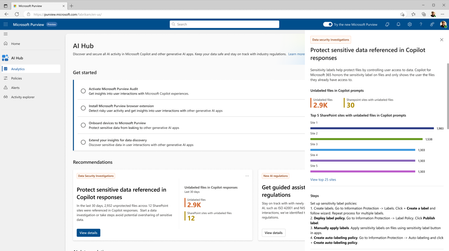
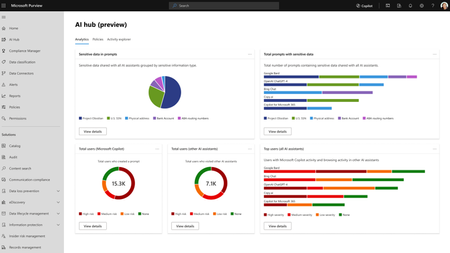
Microsoft Purview Data Security Posture Management (DSPM for AI) is designed to enhance data security for the following AI applications: Microsoft Copilot experiences, including Microsoft 365 Copilot. Enterprise AI apps, including ChatGPT enterprise integration. Other AI apps, including all other AI applications like ChatGPT consumer, Microsoft Copilot, DeepSeek, and Google Gemini, accessed through the browser. In this blog, we will dive into the different policies and reporting we have to discover, protect and govern these three types of AI applications. Prerequisites Please refer to the prerequisites for DSPM for AI in the Microsoft Learn Docs. Login to the Purview portal To begin, start by logging into Microsoft 365 Purview portal with your admin credentials: In the Microsoft Purview portal, go to the Home page. Find DSPM for AI under solutions. 1. Securing Microsoft 365 Copilot Be sure to check out our blog on How to use the DSPM for AI data assessment report to help you address oversharing concerns when you deploy Microsoft 365 Copilot. Discover potential data security risks in Microsoft 365 Copilot interactions In the Overview tab of DSPM for AI, start with the tasks in “Get Started” and Activate Purview Audit if you have not yet activated it in your tenant to get insights into user interactions with Microsoft Copilot experiences In the Recommendations tab, review the recommendations that are under “Not Started”. Create the following data discovery policy to discover sensitive information in AI interactions by clicking into it. Detect risky interactions in AI apps - This public preview Purview Insider Risk Management policy helps calculate user risk by detecting risky prompts and responses in Microsoft 365 Copilot experiences. Click here to learn more about Risky AI usage policy. With the policies to discover sensitive information in Microsoft Copilot experiences in place, head back to the Reports tab of DSPM for AI to discover any AI interactions that may be risky, with the option to filter to Microsoft Copilot Experiences, and review the following for Microsoft Copilot experiences: Total interactions over time (Microsoft Copilot) Sensitive interactions per AI app Top unethical AI interactions Top sensitivity labels references in Microsoft 365 Copilot Insider Risk severity Insider risk severity per AI app Potential risky AI usage Protect sensitive data in Microsoft 365 Copilot interactions From the Reports tab, click on “View details” for each of the report graphs to view detailed activities in the Activity Explorer. Using available filters, filter the results to view activities from Microsoft Copilot experiences based on different Activity type, AI app category and App type, Scope, which support administrative units for DSPM for AI, and more. Then drill down to each activity to view details including the capability to view prompts and response with the right permissions. To protect the sensitive data in interactions for Microsoft 365 Copilot, review the Not Started policies in the Recommendations tab and create these policies: Information Protection Policy for Sensitivity Labels - This option creates default sensitivity labels and sensitivity label policies. If you've already configured sensitivity labels and their policies, this configuration is skipped. Protect sensitive data referenced in Microsoft 365 Copilot - This guides you through the process of creating a Purview Data Loss Prevention (DLP) policy to restrict the processing of content with specific sensitivity labels in Copilot interactions. Click here to learn more about Data Loss Prevention for Microsoft 365 Copilot. Protect sensitive data referenced in Copilot responses - Sensitivity labels help protect files by controlling user access to data. Microsoft 365 Copilot honors sensitivity labels on files and only shows users files they already have access to in prompts and responses. Use Data assessments to identify potential oversharing risks, including unlabeled files. Stay tuned for an upcoming blog post on using DSPM for AI data assessments! Use Copilot to improve your data security posture - Data Security Posture Management combines deep insights with Security Copilot capabilities to help you identify and address security risks in your org. Once you have created policies from the Recommendations tab, you can go to the Policies tab to review and manage all the policies you have created across your organization to discover and safeguard AI activity in one centralized place, as well as edit the policies or investigate alerts associated with those policies in solution. Note that additional policies not from the Recommendations tab will also appear in the Policies tab when DSPM for AI identifies them as policies to Secure and govern all AI apps. Govern the prompts and responses in Microsoft 365 Copilot interactions Understand and comply with AI regulations by selecting “Guided assistance to AI regulations” in the Recommendations tab and walking through the “Actions to take”. From the Recommendations tab, create a Control unethical behavior in AI Purview Communications Compliance policy to detect sensitive information in prompts and responses and address potentially unethical behavior in Microsoft Copilot experiences and ChatGPT for Enterprise. This policy covers all users and groups in your organization. To retain and/or delete Microsoft 365 Copilot prompts and responses, setup a Data Lifecycle policy by navigating to Microsoft Purview Data Lifecycle Management and find Retention Policies under the Policies header. You can also preserve, collect, analyze, review, and export Microsoft 365 Copilot interactions by creating an eDiscovery case. 2. Securing Enterprise AI apps Please refer to this amazing blog on Unlocking the Power of Microsoft Purview for ChatGPT Enterprise | Microsoft Community Hub for detailed information on how to integrate with ChatGPT for enterprise, the Purview solutions it currently supports through Purview Communication Compliance, Insider Risk Management, eDiscovery, and Data Lifecycle Management. Learn more about the feature also through our public documentation. 3. Securing other AI Microsoft Purview DSPM for AI currently supports the following list of AI sites. Be sure to also check out our blog on the new Microsoft Purview data security controls for the browser & network to secure other AI apps. Discover potential data security risks in prompts sent to other AI apps In the Overview tab of DSPM for AI, go through these three steps in “Get Started” to discover potential data security risk in other AI interactions: Install Microsoft Purview browser extension For Windows users: The Purview extension is not necessary for the enforcement of data loss prevention on the Edge browser but required for Chrome to detect sensitive info pasted or uploaded to AI sites. The extension is also required to detect browsing to other AI sites through an Insider Risk Management policy for both Edge and Chrome browser. Therefore, Purview browser extension is required for both Edge and Chrome in Windows. For MacOS users: The Purview extension is not necessary for the enforcement of data loss prevention on macOS devices, and currently, browsing to other AI sites through Purview Insider Risk Management is not supported on MacOS, therefore, no Purview browser extension is required for MacOS. Extend your insights for data discovery – this one-click collection policy will setup three separate Purview detection policies for other AI apps: Detect sensitive info shared in AI prompts in Edge – a Purview collection policy that detects prompts sent to ChatGPT consumer, Micrsoft Copilot, DeepSeek, and Google Gemini in Microsoft Edge and discovers sensitive information shared in prompt contents. This policy covers all users and groups in your organization in audit mode only. Detect when users visit AI sites – a Purview Insider Risk Management policy that detects when users use a browser to visit AI sites. Detect sensitive info pasted or uploaded to AI sites – a Purview Endpoint Data loss prevention (eDLP) policy that discovers sensitive content pasted or uploaded in Microsoft Edge, Chrome, and Firefox to AI sites. This policy covers all users and groups in your org in audit mode only. With the policies to discover sensitive information in other AI apps in place, head back to the Reports tab of DSPM for AI to discover any AI interactions that may be risky, with the option to filter by Other AI Apps, and review the following for other AI apps: Total interactions over time (other AI apps) Total visits (other AI apps) Sensitive interactions per AI app Insider Risk severity Insider risk severity per AI app Protect sensitive info shared with other AI apps From the Reports tab, click on “View details” for each of the report graphs to view detailed activities in the Activity Explorer. Using available filters, filter the results to view activities based on different Activity type, AI app category and App type, Scope, which support administrative units for DSPM for AI, and more. To protect the sensitive data in interactions for other AI apps, review the Not Started policies in the Recommendations tab and create these policies: Fortify your data security – This will create three policies to manage your data security risks with other AI apps: 1) Block elevated risk users from pasting or uploading sensitive info on AI sites – this will create a Microsoft Purview endpoint data loss prevention (eDLP) policy that uses adaptive protection to give a warn-with-override to elevated risk users attempting to paste or upload sensitive information to other AI apps in Edge, Chrome, and Firefox. This policy covers all users and groups in your org in test mode. Learn more about adaptive protection in Data loss prevention. 2) Block elevated risk users from submitting prompts to AI apps in Microsoft Edge – this will create a Microsoft Purview browser data loss prevention (DLP) policy, and using adaptive protection, this policy will block elevated, moderate, and minor risk users attempting to put information in other AI apps using Microsoft Edge. This integration is built-in to Microsoft Edge. Learn more about adaptive protection in Data loss prevention. 3) Block sensitive info from being sent to AI apps in Microsoft Edge - this will create a Microsoft Purview browser data loss prevention (DLP) policy to detect inline for a selection of common sensitive information types and blocks prompts being sent to AI apps while using Microsoft Edge. This integration is built-in to Microsoft Edge. Once you have created policies from the Recommendations tab, you can go to the Policies tab to review and manage all the policies you have created across your organization to discover and safeguard AI activity in one centralized place, as well as edit the policies or investigate alerts associated with those policies in solution. Note that additional policies not from the Recommendations tab will also appear in the Policies tab when DSPM for AI identifies them as policies to Secure and govern all AI apps. Conclusion Microsoft Purview DSPM for AI can help you discover, protect, and govern the interactions from AI applications in Microsoft Copilot experiences, Enterprise AI apps, and other AI apps. We recommend you review the Reports in DSPM for AI routinely to discover any new interactions that may be of concern, and to create policies to secure and govern those interactions as necessary. We also recommend you utilize the Activity Explorer in DSPM for AI to review different Activity explorer events while users interacting with AI, including the capability to view prompts and response with the right permissions. We will continue to update this blog with new features that become available in DSPM for AI, so be sure to bookmark this page! Follow-up Reading Check out this blog on the details of each recommended policies in DSPM for AI: Microsoft Purview – Data Security Posture Management (DSPM) for AI | Microsoft Community Hub Address oversharing concerns with Microsoft 365 blueprint - aka.ms/Copilot/Oversharing Microsoft Purview data security and compliance protections for Microsoft 365 Copilot and other generative AI apps | Microsoft Learn Considerations for deploying Microsoft Purview AI Hub and data security and compliance protections for Microsoft 365 Copilot and Microsoft Copilot | Microsoft Learn Commonly used properties in Copilot audit logs - Audit logs for Copilot and AI activities | Microsoft Learn Supported AI sites by Microsoft Purview for data security and compliance protections | Microsoft Learn Where Copilot usage data is stored and how you can audit it - Microsoft 365 Copilot data protection and auditing architecture | Microsoft Learn Downloadable whitepaper: Data Security for AI Adoption | Microsoft Public roadmap for DSPM for AI - Microsoft 365 Roadmap | Microsoft 365Graph RAG for Security: Insights from a Microsoft Intern
As a software engineering intern at Microsoft Security, I had the exciting opportunity to explore how Graph Retrieval-Augmented Generation (Graph RAG) can enhance data security investigations. This blog post shares my learning journey and insights from working with this evolving technology.
The Microsoft AI and Agent Platform — The Platform Behind Intelligent Agents
Why the platform around the model is the real enterprise differentiator Enterprise AI has reached a turning point. Beyond answering questions, it can now reason over business context, retrieve knowledge, use tools, coordinate workflows, and act across enterprise systems. This shift raises a critical question: How can organizations build agents intelligent enough to transform work while ensuring they remain trusted, governed, and ready to operate at enterprise scale? The answer is not a single model, chatbot, or orchestration framework. Foundation models are advancing quickly and increasingly becoming a commodity input — Azure AI Foundry alone provides access to more than 11,000 models. What determines enterprise value is not the model alone, but the platform around the model: the data that grounds it, the tools it can use, the experiences where people engage it, the runtime where it operates, and the enterprise foundation that gives it identity, context, governance, and operational control. The Microsoft AI and Agent platform enables organizations to build, ground, govern, and operate AI apps and agents at scale, bringing together the full agent lifecycle with open development, built-in intelligence, and consistent security, compliance, and policy controls. One ecosystem, multiple experiences, shared intelligence, flexible build paths, multiple runtime choices, and an enterprise foundation that carries security, governance, compliance, and Responsible AI across the stack. The reference mental model below expresses this as a layered platform — Users → Experiences → Agents → Intelligence → Runtime → Foundation with security, governance, compliance, and Responsible AI applied across every layer. An agent that is brilliant but ungoverned never leaves the pilot stage. An agent that is locked down but context-blind never delivers real value. Impact compounds only when both dimensions advance together, on the same platform, so that intelligence and control share one identity model, one data plane, and one control plane. Part 1 — Intelligence (this post): dives into how Microsoft's platform helps organizations build agents that understand work, reason over trusted context, and act through business systems to deliver real business value. Part 2 — Trust: will go deeper on how those agents are secured, governed, monitored, and managed across their lifecycle. Intelligence + Trust = Frontier Transformation Part 1: Intelligence Most enterprise AI programs begin with model experimentation - prompts, model comparisons, prototypes, accuracy evaluations. That is necessary but not sufficient. A model alone does not know your organization, your processes, your permissions, your systems of record, your compliance obligations, or your operating model. Experience layer: meet users where work already happens Agents deliver value only when they reach people in the flow of work. Enterprise AI adoption rarely happens through a single interface or experience. A sales leader, financial analyst, security operator, developer, field technician, and HR specialist do not need the same interface they need agents surfaced in the tools and workflows they already use. Microsoft's approach is not to force every agent into one portal. The platform supports multiple experiences over a shared foundation: Microsoft 365 Copilot for productivity and business users. Security Copilot for security operations. Azure Copilot for IT operations, cloud, and infrastructure. GitHub Copilot for developers. Dynamics 365 experiences for sales, service, finance, and supply chain workflows. Power Platform and Copilot Studio experiences for business applications and low-code extensions. Custom experiences for line-of-business apps, portals, websites, and industry-specific workflows. Regardless of where users engage, the underlying intelligence, governance, and runtime capabilities remain consistent across experiences. Agent layer: specialize by domain, tools, and autonomy Specialization with a shared substrate Generic agents often fail because enterprise work is domain specific. A security agent must understand incidents, alerts, identities, and threat intelligence. A finance agent must understand reconciliations, receivables, approvals, and controls. A developer agent must understand repositories, branches, pull requests, tests, and pipelines. Microsoft's platform supports both prebuilt domain agents and custom agents. Organizations should leverage the domain specific agents where possible and focus custom development on capabilities that create unique business value. Whether an agent is out of the box or custom, it inherits the same governance, so built-in and custom are never two different compliance islands. Agent systems form an autonomy spectrum, allowing organizations to progressively increase capability while maintaining appropriate levels of human oversight. Assistive: The agent recommends; a human decides. Example - A finance agent drafts a reconciliation for review. Supervised autonomy: the agent acts within bounded authority and escalates exceptions. Example - An SRE agent auto-remediates known alert classes and escalates novel incidents. Multi-agent orchestration: A coordinating agent decomposes a goal and delegates to specialist agents. Example - One agent retrieves data, another analyzes it, another drafts a response, and another executes an approved action. Intelligence layer: grounding as a first-class platform tier An agent is only as good as the context it can reason over. The hardest part of building a useful enterprise agent is not calling a model. It is giving the agent the right context. Without trusted context, agents produce generic answers. The IQ Platform is the intelligence fabric that separates enterprise-grade agents from generic AI assistants. A generic model can answer questions based on its training data or a narrow retrieval source. A Microsoft agent, by contrast, can be grounded in multiple dimensions of your organizational intelligence: how people work, what business data means, which knowledge is authoritative, and what external signals matter. With the right intelligence fabric, agents become role-aware, process-aware, data-aware, and policy-aware. Microsoft's IQ model treats grounding as a reusable platform capability rather than per-project plumbing. IQ layer What it gives agents Why it matters Work IQ Collaboration context: people, skills, meetings, documents, decisions, workflows, and organizational relationships. Helps agents understand how work actually happens, not just what content exists. Fabric IQ Governed business data, metrics, semantic models, and analytical context. Helps agents reason over trusted enterprise data with consistent business definitions. Foundry IQ Models, curated knowledge, retrieval assets, memory, guardrails, and AI development capabilities delivered from Microsoft Foundry with plug-and-play memory, knowledge, and tool integrations. Helps teams build reliable, purpose-built agents with governed model and knowledge choices. Web IQ Public web, current external signals, research, news, and external context. Helps agents augment internal context with timely external intelligence. In a conventional application, data access is deterministic queries against known schemas. In an agentic system, the equivalent tier must serve retrieval for reasoning, semantically matching an ambiguous natural-language intent to the right passages, records, and metrics across unstructured collaboration content, structured business data, curated knowledge, and the live web. The four IQ sources correspond to those four retrieval modalities, and the IQ Platform gives agents a composable intelligence model. Each IQ layer adds a distinct signal, and together they allow agents to move from simple assistance to informed action. Intelligence is more than model capability. It emerges from the combination of grounding, memory, model selection, orchestration, and guardrails working together as a coordinated system. Grounding, fine-tuning, and adaptation Microsoft gives teams multiple adaptation levers within a governed environment rather than forcing every use case into one technique. Grounding is not a sidecar retrieval capability; it is an enterprise intelligence layer. Because the model layer is a platform tier rather than a single endpoint, adaptation techniques fine-tuning, distillation into smaller task models, and retrieval-augmented grounding are first-class options selected per workload. The common pattern: prefer grounding (RAG) for freshness and provenance, reserve fine-tuning for durable behavior, format, or domain-tone requirements, and distill to smaller models where latency and cost dominate. Memory In addition to retrieval and reasoning, enterprise agents increasingly rely on memory to preserve context across conversations, tasks, and workflows. Memory enables agents to maintain continuity, learn from prior interactions, and provide more personalized, adaptive, and goal-oriented experiences over time. Multi-model choice Agent workloads are not uniform. Some steps require simple classification. Others require complex reasoning, synthesis, code generation, or tool orchestration. Model choice is becoming a strategic architecture decision, balancing quality, latency, cost, sovereignty, and specialization requirements. Microsoft Foundry supports model choice as part of the platform rather than forcing all workloads through one endpoint with a curated catalog of leading foundation, open-source, and partner models spanning capabilities, performance trade-offs, and use cases so teams can move from experimentation to production confidently. Model routing Microsoft Foundry's Model Router selects the optimal LLM for each agent request per turn, not per session — a simple greeting can route to a fast, inexpensive model, while a complex tool-calling chain can route to a frontier model, all through one endpoint with zero routing logic. Model selection becomes a runtime policy, not hard-coded application logic providing automatic failover when an upstream provider is unavailable, prompt caching across models for identical inputs, and consistent tool-use semantics regardless of which underlying model handles a call. Key routing capabilities include per-request optimization, complexity-aware model selection, tool-aware routing, multi-agent support, resiliency, and cost optimization. Orchestration Orchestration transforms individual model interactions into coordinated agentic and multi-agent workflows. An LLM-driven planning layer that interprets user intent, breaks down complex requests, selects the right tools and knowledge, and executes multi-step plans and multi-agent workflows with guardrails for safety and compliance. Guardrails A guardrail is a named collection of controls; each control defines a risk to be detected, intervention points to scan the risk, and the response action to take when the risk is detected. Guardrails help ensure that agent behavior remains aligned with organizational policies, safety requirements, and business objectives. How agents are built: one continuum from no-code to pro-code Different builders. Different depth. One platform. The progression from no-code to low-code to pro-code is more than a tooling choice; it reflects increasing levels of customization, control, and organizational maturity. Different teams need different levels of control. A business user may need a simple knowledge agent. A process owner may need a workflow agent with connectors and approvals. An engineering team may need a custom multi-agent system with model routing, evaluation, tool use, and deployment automation. Organizations can start with simple productivity agents, evolve into governed workflow agents, and eventually build deeply integrated agentic systems. No-code - M365 Agent Builder: create simple agents from natural language and your organizational data. This is useful for lightweight departmental workflows, knowledge assistants, and task-specific copilots. Low-code - Copilot Studio: design, extend, and orchestrate agents with connectors, workflows, and enterprise governance. This is where business technologists and app makers can build more sophisticated agents that integrate with systems, automate processes, and enforce organizational rules. Pro-code - Microsoft Foundry: enables developers to build custom AI systems with full control over models, orchestration, infrastructure, and code. This is where organizations can build highly specialized agents with advanced reasoning patterns, custom retrieval, tool use, evaluation pipelines, and deployment strategies. The key principle is continuity; moving from no-code to low-code to pro-code should not require rethinking the architecture. Identity, grounding, governance, policy, and operational controls should carry forward including centralized identity and policy enforcement. Regardless of the development approach, the same intelligence, runtime, governance, and operational capabilities can be reused across the platform. Where agents run: one platform, multiple runtime choices Match the runtime to the requirement A mature enterprise platform must support more than one runtime pattern. Some agents need elastic cloud scale. Others need local execution because of latency, data sensitivity, offline operation, or regulated environments. Some need to interact with legacy applications that do not expose APIs. Runtime should be selected based on business, operational, and regulatory requirements rather than tooling limitations. Build path and runtime path should vary independently over a shared foundation. The ability to deploy the same agent architecture across multiple runtime environments helps organizations balance performance, compliance, and operational flexibility. Local / edge (Foundry Local, Windows AI): Local or edge execution supports scenarios where data sensitivity, latency, offline access, regulatory requirements, disconnected operation or device-specific context matter. Examples include on-device models, Windows AI capabilities, and local execution for regulated or disconnected environments. Cloud runtime (Azure / Copilot stack): supports scalable, API-driven agents with multi-agent orchestration running in Azure and Copilot with the default for enterprise workflows, multi-agent orchestration, connected systems, and data-connected scenarios that need elasticity. Cloud PC (Windows 365 agents): enables agents to operate in managed desktop environments. agents run on a Windows 365 Cloud PC using a check-out/check-in model, driving UI automation, browsers, and legacy apps as a human operator would in a managed and governed environment. This is the bridge to systems that expose no API, the agent operates the actual application UI in a governed, isolated desktop. Foundation layer: shared trust fabric The enterprise foundation for intelligence and trust The same enterprise services that secure, govern, and operate modern organizations now extend to agents, creating a shared foundation for both intelligence and trust. This inheritance model allows organizations to extend existing investments in identity, governance, security, compliance, and operations directly to agent systems rather than introducing a separate control model for AI. Key foundation services include: Microsoft Graph – Provides agents the context across users, groups, files, meetings, messages, relationships, and activity signals. It gives agents a permission-aware understanding of work, not just isolated documents. Microsoft Entra – Agents are governed using the same identity fabric that governs users, devices, apps, and resources enabling role-based and attribute-based access control plus risk-based Conditional Access policies. Microsoft Fabric - Governed data, analytics, semantic models, and business metrics. Foundry includes SharePoint and Microsoft Fabric among its built-in tools. Agents reason over trusted business definitions instead of disconnected raw tables. Microsoft Purview - Data protection, sensitivity labeling, DLP, compliance, and governance. Agent 365 uses Microsoft Purview for data protection and compliance controls on agent activity and data, complementing Microsoft Defender for threat detection and behavior monitoring. Agent interactions inherit enterprise compliance expectations. Azure - Provides enterprise-grade cloud infrastructure and operational maturity. Foundry emphasizes centralized observability, traces, evaluated runs, and production performance monitoring with full traceability for enterprise-scale security, audit, and compliance requirements. Microsoft 365 - Brings agents into the tools where employees already work. Agents can be surfaced in the productivity tools users already leverage. Dynamics 365 - Business application context for sales, service, finance, supply chain, and operations. Grounds agents in business processes and systems of record. Power Platform - Low-code apps, automation, connectors, and business process integration — reachable via Foundry through Azure Logic Apps integration with more than 1,400 connectors. Business technologists can extend agent workflows without building everything in code. GitHub - Developer workflows, repositories, pull requests, code context, and DevOps integration. Extends agentic assistance into software development lifecycle. Windows & Windows 365 - Endpoint and Cloud PC environments for local, desktop, and legacy app scenarios. Extends agent reach beyond APIs into managed desktop execution patterns. Alongside these services, Agent 365 and the Foundry Control Plane provide the trust layer for enterprise agents, combining security, governance, compliance, and Responsible AI with centralized visibility, policy enforcement, lifecycle management, and secure AI operations from development through production. End-to-end request journey: how the layers work together The true value of the platform emerges when all the layers work together as a coordinated system. Intelligence emerges from the combined effect of experience, domain specialization, grounding, memory, models, orchestration, runtime, and foundation. An example request, from a user - “Reconcile last month's receivables and flag anomalies for my region." Experience - The user asks from Microsoft 365 Copilot or a finance workflow surface, the agent is reached through the same stable endpoint used across Microsoft 365 and Teams. Identity context - The platform attaches user identity, and, for the agent, its Microsoft Entra Agent ID assigned in Foundry. Agent selection - A finance agent interprets the goal. If the request spans domains, Copilot Studio generative orchestration decomposes it into a plan, choosing tools, topics, knowledge sources, or connected agents. Grounding - Fabric IQ provides receivables data and metric definitions; Work IQ provides relevant approvals and prior decisions; Foundry IQ provides reconciliation rules and policy knowledge; Web IQ can add external signals when needed. Model routing - The Foundry Model Router selects the model per turn. A simple classification step goes to a nano-tier model; anomaly reasoning routes to a mid-tier model; multi-document synthesis routes to a frontier model, all through one endpoint with zero routing logic. Guardrails - Foundry guardrails scan user input, tool calls, tool responses, and final output for defined risks and take the configured action (annotate or annotate-and-block). Tool use - The agent queries systems, invokes reconciliation logic, runs anomaly detection, or calls another specialist agent via Copilot Studio connected agents or Foundry's MCP integration. Runtime execution - The workflow runs in cloud, local, or Windows 365 Cloud PC environments depending on system access, data sensitivity, latency, and legacy application constraints. Response - The agent returns a reconciled view, flagged anomalies, rationale, and recommended next steps — with citations pulled from the knowledge layer for transparency. Bridge to Trust - Every action generated by the agent remains observable, governable, and auditable through the platform's trust capabilities, which are explored further in Part 2. Conclusion The hard problem in enterprise AI was never obtaining a capable model; it was grounding that model in governed enterprise context, enabling it to act through governed tools, and doing so within the security, compliance, and operational controls organizations already rely on. Microsoft's answer is a platform approach: a dedicated grounding tier through the IQ Platform, a flexible intelligence layer spanning models, memory, routing, orchestration, and guardrails, specialized agent families aligned to business domains, a build-to-run continuum spanning no-code to pro-code, and a shared trust foundation that every agent inherits. Integrate once with this fabric, and the payoff compounds: one identity model, one grounding tier, and one governance spine become reusable across every persona surface, every agent family, every build-and-run target. Coming next — Part 2: Trust Intelligence is only half the equation. In Part 2 we turn to the other axis: how Microsoft secures and governs every component of an agent - models, tools, MCP connectors, memory, and orchestration across the full lifecycle.