secure boot
8 Topics
Windows 11 Pluton TPM AIK Enrollment Fails with HTTP 404 — The authority does not exist
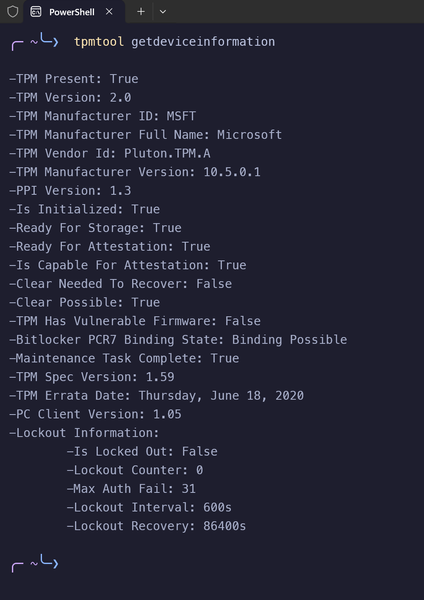
Hello everyone, I'm experiencing a Windows TPM/AIK certificate enrollment issue on my ASUS TUF Gaming A14 (FA401WV), and I'm looking for guidance from someone familiar with Windows TPM attestation. System information Laptop: ASUS TUF Gaming A14 FA401WV CPU: AMD Ryzen AI 9 HX 370 OS: Windows 11 Home Single Language, 64-bit, build 26300.9711 BIOS: Version 322, confirmed by ASUS as the latest available for my model TPM: Microsoft Pluton TPM 2.0 Secure Boot: Enabled and active Problem Call of Duty's Secure Attestation Wizard passes the TPM 2.0 and Secure Boot checks but fails to generate the required attestation key. It reports a BIOS firmware update requirement even though my BIOS is already up to date. To investigate the underlying issue, I ran the Windows command below from an elevated Command Prompt: certreq -enrollaik -config "" The request fails during GetCACaps with: HTTP status: 404 Not Found Windows error: 0x80190194 Message: "The authority does not exist." The request is directed to a device-specific Microsoft AIK enrollment endpoint under microsoftaik.azure.net. The failure happens before certificate enrollment completes. Troubleshooting already performed Verified that Windows detects the TPM and reports it as ready. Confirmed that Secure Boot is enabled and active. Checked with ASUS and confirmed that BIOS version 322 is the latest available. Retried AIK enrollment using my phone's mobile hotspot; the same HTTP 404 error persists. Tried the game's enrollment utility, which also produced 0x80072EFD (WinHTTP cannot connect) on a separate attempt. Another laptop using a Microsoft Pluton TPM successfully completed the same certreq -enrollaik -config "" command. I understand that this comparison does not establish the root cause, but I am including it as potentially useful context. Questions Is this a known issue with Windows AIK certificate enrollment for Microsoft Pluton TPMs? What supported diagnostics can help determine why the device-specific AIK enrollment authority returns HTTP 404? Is there an official Microsoft support or Feedback Hub route for getting this investigated by the appropriate Windows TPM/AIK enrollment engineering team? The laptop manufacturer confirmed that BIOS version 322 is the latest available for my device. I can provide the full command output and diagnostic logs through an appropriate support channel. I have intentionally left out device-specific identifiers from this public post. Thank you for any guidance.49Views1like4CommentsSecure Boot Q&A opportunities continue in July
If you're still working through Secure Boot certificate update rollouts, Microsoft is continuing the conversation throughout July with three opportunities to get your questions answered by the people closest to the technology. Whether you're focused on Windows Server deployments, virtualization platforms, or OEM updates, these upcoming events are designed to help you navigate planning, validation, troubleshooting, and implementation questions in a live, interactive format. Microsoft engineers and subject matter experts will be available to respond directly to questions from the community. Coming up in July: July 1 - Windows Server Secure Boot AMA Ask Microsoft engineers about Secure Boot certificate updates in Windows Server environments, including deployment planning, monitoring, troubleshooting, and more. July 8 - Secure Boot Office Hours for virtualized environments Bring your questions about Hyper-V, Azure offerings, Windows 365, VMware, and other virtualization scenarios. July 15 - OEM Secure Boot Office Hours Connect with experts to discuss OEM-specific questions, such as firmware considerations, as you prepare for or validate Secure Boot certificate updates. Questions don't have to wait until the events start. With community events, you can post your questions and comments ahead of time, then join the discussion live or catch up when it's convenient for you. Hope you find these events helpful. You can also catch up on demand with the series of Secure Boot AMAs that have taken place over the past several months. Here are the three most recent editions: Ask Microsoft Anything: Secure Boot - June 2026 Ask Microsoft Anything: Secure Boot - May 2026 Ask Microsoft Anything: Secure Boot - April 2026210Views1like0Comments
Applying the fix for KB5025885 (CVE-2023-24932)
In reference to this article: https://support.microsoft.com/en-us/topic/kb5025885-how-to-manage-the-windows-boot-manager-revocations-for-secure-boot-changes-associated-with-cve-2023-24932-41a975df-beb2-40c1-99a3-b3ff139f832d In late August, I created a series of scripts that perform the steps described in the article. This worked fine for 30 to 40 PCs over the next few weeks. I stopped as I had other tasks to attend to. Today, I decided to resume. A Surface Go 2 and a Lenovo E590 both fail to apply it. Both machines have the latest 2024-10 Cumulative Update (newer than is required). Both machines are Secure Boot enabled. Both machines are rebooted twice before proceeding to the next step (e.g. making a registry change). Both machines return "false" to both Get-SecureBootUEFI commands (which verify whether applying the fix was successful), for a total of 8 reboots. Machines in which my scripts were successful still return "true" for both Get-SecureBootUEFI commands. Has something changed?7.4KViews0likes0Comments
Unexpected behavior of Set-SecureBootUEFI with the -ContentFilePath parameter
I'm using the following 3 commands to add a new key to my Secure Boot db: $CurrentTime=Get-Date -Format "yyyy-MM-ddTHH:mm:ssZ";Format-SecureBootUEFI -Name db -SignatureOwner 12345678-1234-1234-1234-123456789abc -FormatWithCert -Certificate .\dbKey.cer -ContentFilePath .\FormattedContent.bin -SignableFilePath GeneratedFileToSign.bin -Time $CurrentTime -AppendWrite .\signtool.exe sign /fd sha256 /p7 .\ /p7co 1.2.840.113549.1.7.1 /p7ce DetachedSignedData /a /f PrivateKey.pfx /p thePassword GeneratedFileToSign.bin Set-SecureBootUEFI -ContentFilePath .\FormattedContent.bin -SignedFilePath GeneratedFileToSign.bin.p7 The first two commands succeeds but Set-SecureBootUEFI unexpectedly produces the following prompt: Supply values for the following parameters: Name: Shouldn't it be able to obtain the name from FormattedContent.bin? This behavior isn't described anywhere in the https://docs.microsoft.com/en-us/powershell/module/secureboot/set-securebootuefi?view=windowsserver2022-ps and is contrary to the behavior shown in example 2 where the command succeeds without any further prompt. I entered "db", and then it prompted: Time: Again this should have been obtained from `FormattedContent.bin`, and the behavior isn't documented anywhere. When I repeated everything in the same session with a slight modification, Set-SecureBootUEFI succeeds immediately: $CurrentTime=Get-Date -Format "yyyy-MM-ddTHH:mm:ssZ";$ObjectFromFormat=Format-SecureBootUEFI -Name db -SignatureOwner 12345678-1234-1234-1234-123456789abc -FormatWithCert -Certificate .\dbKey.cer -SignableFilePath GeneratedFileToSign.bin -Time $CurrentTime -AppendWrite .\signtool.exe sign /fd sha256 /p7 .\ /p7co 1.2.840.113549.1.7.1 /p7ce DetachedSignedData /a /f PrivateKey.pfx /p thePassword GeneratedFileToSign.bin $ObjectFromFormat | Set-SecureBootUEFI -SignedFilePath GeneratedFileToSign.bin.p7 The only different between the two sets of commands is that the first outputs the formatted data to a file which is then supplied as a parameter to Set-SecureBootUEFI while the second outputs the formatted data to a PowerShell object which is then piped to Set-SecureBootUEFI. Functionally both are identical and it is puzzling why they have different behavior.1.4KViews0likes1Comment
Is it safe to disable secure boot in the UEFI for installing Linux OS?
I needed to install Debian wheezy a couple of years ago and the computer wouldn't boot to Linux SSD (Solid State Drive) separate hard drive unless I disabled secure boot in the UEFI (Unified Extended Firmware Interface). So I disabled it. Does it make Windows 10 less secure? I read somewhere that without this option enabled malicious software, adware, spyware, virus, rootkit, trojan, keylogger, ransomware, worm, etc. can gain control of my PC like in other legacy and deprecated Windows. So now when I boot into Linux I disable the option and when I am working on Windows enable this option. It's kind of annoying. So this question.Solved6.9KViews0likes1Comment
Error P2V with UEFI Secure Boot to Hyper-V
NEED YOUR HELP! We are failing to convert a few physical machine to Hyper-V (W2012 R2) due to UEFI Secure Boot on the physical machine. The physical machines are running Windows 2008 R2 Server or Windows 2012 Server. During the conversion process, we got the error showed in the attached image. -- Could someone help us to resolve this issue? -- How can the secure boot be disabled? -- How can we convert the physical machines to Hyper-V based on Generation 2? -- Any converter tool that support the convertion to Hyper-V on Windows 2012 R2 or 2016?1.7KViews0likes0Comments