search
127 TopicsMicrosoft 365 & Power Platform product updates call
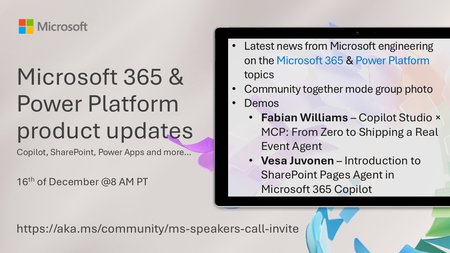
💡Microsoft 365 & Power Platform product updates call concentrates on the different use cases and features within the Microsoft 365 and in Power Platform. Call includes topics like Microsoft 365 Copilot, Copilot Studio, Microsoft Teams, Power Platform, Microsoft Graph, Microsoft Viva, Microsoft Search, Microsoft Lists, SharePoint, Power Automate, Power Apps and more. 👏 Weekly Tuesday call is for all community members to see Microsoft PMs, engineering and Cloud Advocates showcasing the art of possible with Microsoft 365 and Power Platform. 📅 On the 16th of December we'll have following agenda: News and updates from Microsoft Together mode group photo Fabian Williams – Copilot Studio × MCP: From Zero to Shipping a Real Event Agent Vesa Juvonen – Introduction to SharePoint Pages Agent in Microsoft 365 Copilot 📞 & 📺 Join the Microsoft Teams meeting live at https://aka.ms/community/ms-speakers-call-join 👋 See you in the call! 🎅🎄 Notice that this call is on a holiday break after 16th of December call and back on 13th of January 2026. 💡 Building something cool for Microsoft 365 or Power Platform? We are always looking for presenters - Volunteer for a community call demo at https://aka.ms/community/request/demo 📖 Resources: Previous community call recordings and demos from the Microsoft Community Learning YouTube channel at https://aka.ms/community/youtube Microsoft 365 & Power Platform samples from Microsoft and community - https://aka.ms/community/samples Microsoft 365 & Power Platform community details - https://aka.ms/community/home156Views0likes0CommentsMicrosoft 365 & Power Platform Community call - Community demos
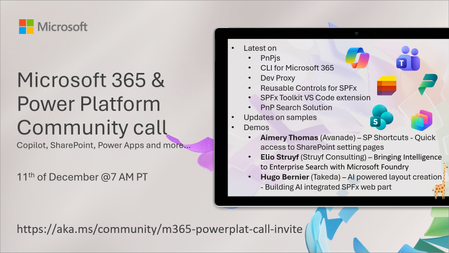
💡 Microsoft 365 & Power Platform Development bi-weekly community call focuses on different use cases and features within the Microsoft 365 and Power Platform - across Microsoft 365 Copilot, Copilot Studio, SharePoint, Power Apps and more. 👏 Looking to catch up on the latest news and updates, including cool community demos, this call is for you! 📅 On 11th of December we'll have following agenda: Copilot prompt of the week SharePoint Framework roadmap update from Microsoft Latest on PnPjs project Latest on CLI for Microsoft 365 Latest on Dev Proxy Latest on reusable controls for SPFx Latest on SPFx Toolkit VS Code extension Latest on PnP Search solution for enterprise search Latest on SPFx samples Picture time with the Together Mode! Aimery Thomas (Avanade) – SP Shortcuts - Quick access to SharePoint setting pages Elio Struyf (Struyf Consulting) – Bringing Intelligence to Enterprise Search with Microsoft Foundry Hugo Bernier (Takeda) – AI powered layout creation - Building AI integrated SPFx web part 📅 Download recurrent invite from https://aka.ms/community/m365-powerplat-dev-call-invite 📞 & 📺 Join the Microsoft Teams meeting live at https://aka.ms/community/m365-powerplat-dev-call-join 👋 See you in the call! 📖 Resources: Previous community call recordings and demos from the Microsoft Community Learning YouTube channel at https://aka.ms/community/youtube Microsoft 365 & Power Platform samples from Microsoft and community - https://aka.ms/community/samples Microsoft 365 & Power Platform community details - https://aka.ms/community/home 🧡 Sharing is caring!250Views0likes0CommentsConfigure modern search results to search all of your organization (rather than the current site)
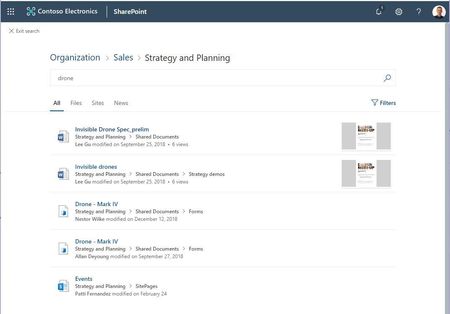
Hey everyone, We heard from many of you the need to be able to change the scope of your modern search results pages. When you create a new communication site or team site in SharePoint Online today, and type into the search box, you are taken to the modern search results page. This page shows results from your current site by default, and allows you to expand the scope of your search to the hub that the current site is associated with (if there is one), or to the whole organization. But there is a desire for being able to change the behavior to always search over the whole organization, or across the hub a site is associated with, without needing an additional click, especially if the site in question will be used as a modern landing page for your organization. I'm happy to say that with the latest version of the SharePoint PnP PowerShell extensions, it is possible to run a simple command as the site owner, and make your site use the organization, or the hub scope by default. To change this setting: 1. Start PowerShell in administrator mode as you will be installing the PnP extensions. 2. Run the following commands to in this order: PS C:\WINDOWS\system32> Install-Module SharePointPnPPowerShellOnline # If you previously had installed this module, you may need to use the "-Force" parameter to install the newer version. PS C:\WINDOWS\system32> Connect-PnPOnline -Url https://contosodemosg.sharepoint.com/sites/Strategy -UseWebLogin # this will prompt you to sign into your site. Use the site owner credentials to sign in PS C:\WINDOWS\system32> $web = Get-PnPWeb PS C:\WINDOWS\system32> $web.SearchScope = 1 # 1 for Tenant, 2 for Hub, 3 for Site, 0 for default behavior PS C:\WINDOWS\system32> $web.Update() PS C:\WINDOWS\system32> Invoke-PnPQuery After running these commands, the site will start to show results from the whole organization. To go back to the default setting, run the commands again with the value provided to "SearchScope" parameter to 0. To search across the Hub, use 2 as the SearchScope value. We will be providing a way to set this setting using the UI in a future release as well. Updated in April 2020 to reflect the ability to search across Hubs.Solved103KViews22likes78Comments
Limiting Search Box Results to Wiki Page Library
I have created a Wiki Page Library for a knowledge base our team uses and added a search box. I would like the search box to only bring back results from the library, not the entire site, but this doesn't seem to be possible. I've looked at 'edit web part' including in the advanced section but am none the wiser.799Views0likes2Comments
Custom search to search pdf files in certain librarys
Hi! I have set up document system with three different document librarys. Togheter they hold about 32000 pdf documents. I have implement the custom search module on my site and created a custom search resultspage. I have redirected the search to resultspage and defined the document librarys. I have also tried to define the SharePoint result source and search terms but with no luck. I have tried many different combinations like path:https://sharepoint document url like below with no luck. The results find my document librarys, but doesnt search in them for the files. It only shows a link to the document library instead of the files. Is ther something i missing or isnt this possbile to achieve? Do I have to create a Scope? Crawl? I really dont understand those features. Please help! 🙂 {SearchBoxQuery}( (Path:http://sharepoint/sites/demo/dev/DocLib1 (FileExtension:pdf)) OR (Path:http://sharepoint/sites/demo/dev/DocLib2 (FileExtension:pdf)) OR (Path:http://sharepoint/sites/demo/dev/DocLib3(FileExtension:pdf)) )1.3KViews0likes1CommentHide Results (files and folders) from User's OneDrive when using top Search Bar
Hey All, When a user enters a keyword in the top bar of on SharePoint-based Intranet, the results show files and folders from specific people's OneDrive. Is there a way to have that NEVER show as a result when using the top search bar on any page throughout our Intranet? We're not using a custom search results page. Thanks, Scott761Views0likes1Comment
Search per column in libraries or lists
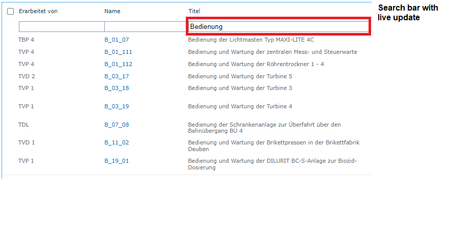
Hello, in our old Sharepoint 2013 we added kind of a "live search bar" under every column with a script. Is there any way to add or configure something similar in SharePoint Online? Or any Apps that would provide something like this? The search bar with KQL syntax is not very comfortable for the average PC user.563Views0likes2Commentsexclude from site search but allow library search
I have a site with several libraries. One has legacy content, a few others have current content. I want the "Search this site" search to exclude the legacy library, but I also need to be able to navigate to the legacy library and use the "search this library". How do I configure this? When I exclude the legacy library from the search results via "Library Settings > Advanced Settings > Allow items from this document library to appear in search results > No" -- then I don't get any results when I search inside the library. Any ideas? This is for the MODERN experience. Please no suggestions about classic pages.Solved3.9KViews0likes5Comments
Auto-append trailing * wildcard to search for substrings in modern sharepoint
I have a modern communication site and if I search a list for 'can', it will not return Canada, or Canadian in my results. but if I search for can*, both items will be returned. I believe it is possible to program classic search to append this wildcard automatically, so I don't need to type the * every time. But does anyone know how I can achieve this with modern search? And please no one reply with, "this isn't possible". It seems to me, that if this isn't possible, why hasn't Microsoft fixed this yet? I've never seen another intranet search engine work this way. Or am I missing a simple solution to this? Any help would be greatly appreciated. It is not natural for end users to have to remember to type a * at the end of their search string, which consequently returns poor results for their searches..2.8KViews0likes5Comments