schema
20 TopicsMGDC for SharePoint: New Columns in September 2026
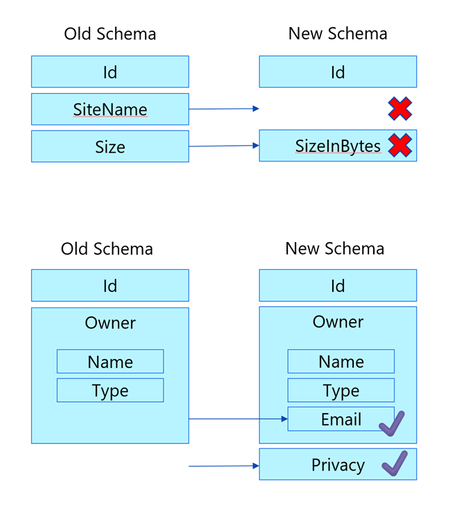
The MGDC for SharePoint team continues to improve the available datasets. This time around, we are introducing additional columns to some of our existing datasets. Here is a summary based on the different scenarios they support: Archive – Extends support for the SharePoint Archive feature. Includes a site property for size of archived files and a file property to indicate that the file is archived. E-signature – Supports the E-signature by adding a file to indicate there is a digital signature and the provider’s name. Filtering – The RootWebTemplateId was added to SharePoint Groups and SharePoint Permission dataset to facilitate filter by type of site, like it is currently available for Sites, Files and File Actions. Hub Site – Extends support for Hub Sites, introducing a column for ParentHubSiteId, to represent a hub site hierarchy. Restricted – Multiple columns indicating restricted flags in sites, including Restricted Access Control (RAC), Restricted Content Discovery (RCD) and Restricted Content Org-wide Search Policy. Retention – Support a set of file properties about Retention Labels, including label name, type, who applied it and when it was applied. Sharing – Extends the SharePoint Permissions properties to support the new sharing model. This includes information about the Main Link and Variants. Versions – Extends support for versions, including version storage metrics and version history policy. Here is a summary of all 26 columns in 4 datasets (Sites, Groups, Permissions and Files): Dataset Column Data type Description Sites ArchiveStorageUsed Number Total size of all archived storage in bytes Sites IsRestrictContentOrgWide SearchPolicyEnforcedOnSite Boolean Restricted Content Org-wide Search Policy Sites IsRestrictedAccess ControlPolicyEnabled Boolean Restricted Access Control Sites IsRestrictedContentDiscovery forCopilotAndAgentsEnabled Boolean Restricted Content Discovery Sites ParentHubSiteId String, GUID Parent hub site for this hub site Sites StorageMetrics, VersionCount Number Number of versions Sites StorageMetrics, VersionSize Number Total size of versions in bytes Sites StorageMetrics, VersionMetadataSize Number Total size of version metadata in bytes Sites VersionHistoryPolicy String Version history policy. Possible values: None, Automatic, Manual. If manual, uses “major version limit”. Sites MajorVersionLimit Number Limit for number of major versions Groups RootWebTemplateId Number Root web template id Groups Description String Description of the group Permissions RootWebTemplateId Number Root web template id Permissions SharingVariant String Sharing link variant. Possible values include: None, PasswordProtected, TrackLinkUsers, Embeddable, Ephemeral, RestrictToExistingRelationships, MainLink, NonDurableRedeem. Multiple values can be set at once. Permissions MainLinkAudience String Main link audience. Possible values include: Organization, Empty (people with existing access). Permissions MainLinkRole String Main link role. Possible values include View, Edit, others. Files RetentionLabel Object Retention label Files RetentionLabel, AppliedByEmail String Email of user who applied retention label Files RetentionLabel, AppliedByName String Name of user who applied retention label Files RetentionLabel, AppliedTime DateTme Time when retention label was applied Files RetentionLabel, Name String Name of retention label Files RetentionLabel, Type String Type of retention label. Possible values: Normal, Record or Regulatory Record Files HasDigitalSignature Boolean File has a digital signature Files DigitalSignatureProvider String Name of digital signature provider if digital Signature exist Files IsFileArchived Boolean File is Archived These changes are non-breaking, which means that your existing pipelines will continue to run. We also let this change sit for 21 days, so that delta datasets are also not impacted. Anyone starting fresh with MGDC for SharePoint will automatically get the new columns in their pipelines. If you have existing pipelines and want to use the new columns, you will need to update your MGDC application, get that update approved and then update your pipeline to pull the new schema. For more details about updating your pipelines to include new columns, or to see how these can be leveraged in specific scenarios, see these articles: Helpful blog on schema changes: MGDC for SharePoint FAQ: How to deal with schema changes Main MGDC for SharePoint article: https://aka.ms/SharePointData Updated schema for SharePoint datasets in MGDC: https://aka.ms/SharePointDatasetsMGDC for SharePoint: New Columns in Q1 CY2025
The MGDC for SharePoint team continues to improve the available datasets. This time around, we are introducing additional columns to some of our existing datasets. 2 new archive-related properties in the Sites dataset 2 new storage-related properties in the Sites dataset 4 new owner and member properties in the Groups dataset 1 new sharee property in the Permissions dataset Here is a summary of the 9 changes in the 3 datasets (Sites, Groups and Permissions): Dataset Column Type Description Sites SiteArchivedBy String Who archived the site. Null if not archived Sites SiteArchivedTime DateTime When the site was archived. Null if not archived Sites LastContentChange DateTime When the site contents were last changed (in UTC) Sites StorageMetrics. AdditionalFileStreamSize int64 Total size of additional file streams in bytes, excluding the latest version, previous versions and metadata Groups Owner. LoginName String Login name of group owner. If ending with _o, this should be expanded using the owners of the group, not the members Groups Owner. UPN String User Principal Name of group owner Groups Member. LoginName String Login name of group member. If ending with _o, this should be expanded using the owners of the group, not the members Groups Member. UPN String User Principal Name of group member Permissions SharedWith. UserLoginName String Login name for the sharee. If ending with _o, this should be expanded using the owners of the group, not the members * When the LoginName ends with _o, that means that this group should be expanded using the owners of the group, not the members of the group. These changes are non-breaking, which means that your existing pipelines will continue to run. We also let this change sit for 21 days, so that delta datasets are also not impacted. Anyone starting fresh with MGDC for SharePoint will automatically get the new columns in their pipelines. If you have existing pipelines and want to use the new columns, you will need to update your MGDC application, get that update approved and then update your pipeline to pull the new schema. For more details about updating your pipelines to include new columns, or to see how these can be leveraged in specific scenarios, see these articles: How can I track the lifecycle of a SharePoint site? How are SharePoint Groups and Security Groups used together? MGDC for SharePoint FAQ: How to deal with schema changes Main MGDC for SharePoint article: https://aka.ms/SharePointData To view the complete schema for all SharePoint datasets in MGDC, visit https://aka.ms/SharePointDatasets
Problem with in-place upgrade of windows server 2016 to 2022
Hello, I am having issues while trying to upgrade the servers. We have two Windows Server 2016 Domain Controllers. AD, DNS, NPAS roles are installed on the DCs. I have built a new 2022 Server. I was trying to upgrade the schema by running ADprep /forestprep and ADprep /domainprep on Primary DC that holds the schema master role. I am constantly getting this error. I have tried everything and checked all the permissions. Here is the output of my ADprep execution: PS D:\support\adprep> .\adprep.exe /forestprep ADPREP WARNING: Before running adprep, all Windows Active Directory Domain Controllers in the forest must run Windows Server 2003 or later. You are about to upgrade the schema for the Active Directory forest named 'amii.ca', using the Active Directory domain controller (schema master) 'AVMVPRDMFT ADS01.amii.ca'. This operation cannot be reversed after it completes. [User Action] If all domain controllers in the forest run Windows Server 2003 or later and you want to upgrade the schema, confirm by typing 'C' and then press ENTER to co ntinue. Otherwise, type any other key and press ENTER to quit. C Current Schema Version is 87 Upgrading schema to version 88 Verifying file signature Connecting to "AVMVPRDMFTADS01.amii.ca" Logging in as current user using SSPI Importing directory from file "D:\support\adprep\sch88.ldf" Loading entries... Add error on entry starting on line 26: Insufficient Rights The server side error is: 0x2098 Insufficient access rights to perform the operation. The extended server error is: 00002098: SecErr: DSID-031514A0, problem 4003 (INSUFF_ACCESS_RIGHTS), data 0 2 entries modified successfully. An error has occurred in the program ERROR: Import from file D:\support\adprep\sch88.ldf failed. Error file is saved in C:\Windows\debug\adprep\logs\20240416200415\ldif.err.88. If the error is "Insufficient Rights" (Ldap error code 50), please make sure the specified user has rights to read/write objects in the schema and configurat ion containers, or log off and log in as an user with these rights and rerun forestprep. In most cases, being a member of both Schema Admins and Enterprise A dmins is sufficient to run forestprep. Adprep was unable to upgrade the schema on the schema master. [Status/Consequence] The schema will not be restored to its original state. [User Action] Check the Ldif.err log file in the C:\Windows\debug\adprep\logs\20240416200415 directory for detailed information. Adprep was unable to update forest information. [Status/Consequence] Adprep requires access to existing forest-wide information from the schema master in order to complete this operation. [User Action] Check the log file, ADPrep.log, in the C:\Windows\debug\adprep\logs\20240416200415 directory for more information. Please advise. Thank you3.1KViews0likes1CommentGet SSO Schema or Provisioning Schema with PowerShell
Hi there, I am looking for a way to get SSO SCHEMA or Provisioning Schema ( for Azure -> Enterprise Applications ) thru PowerShell? This helps me to easily sift through all enterprise apps to see which ones are using specific extensions or attributes. Thanks1.4KViews0likes2CommentsGet SSO Schema or Provisioning Schema with Graph API
Hi there, I am looking for a way to get SSO SCHEMA or Provisioning Schema ( for Azure -> Enterprise Applications ) thru Graph API? This helps me to easily sift through all enterprise apps to see which ones are using specific extensions or attributes. Thanks606Views0likes0Comments
Help with schema (Access 2010)
Hello, I’m going round in circles trying to design a schema to allow me to build a database for a series of medical studies. (In access 2010) For each study I will receive an excel table like the two examples below (simplified version of a real one). For now I’m not thinking about how I will import it into Access but will do once I’ve got the Access principle sorted. I know that I will have to split the tables into normal form. Every patient who is recruited to each study WILL attend all the appointment (cycles) and all the specified Activities that pertain (ie the Y’s) to that appointment (the ‘Y’s will be represented in tbl_Patient_study_appointment_activity). Each study could have a different number of appointments and activities. For example, every patient who is recruited to the Diabetes study will have all 7 appointments (cycles) and at appointment 3 will undergo ‘Medical History’ and ‘ECOG Status’. Each patient could be on more than one study. I have used a variety of junction tables to achieve what I think does the job for me, although I do wonder if I am over complicating it. Could anyone help or give feedback? (I have been reading up about ternary relationships but don’t fully understand how they work. Maybe these could work?) Once I am satisfied that this schema does will work. I need to find a way of when I add a patient to a study, that they inherit the pre-determined appointments and activities. Am I right in saying that this would be a series of append queries? Or could I use a form which when I add a patient to a study they automatically get populated in the ‘tbl_Patient_Study_Appointment’ and ‘tbl_Patient_Study_Appointment_Activity’ Once I’ve done that I need to work out how I will upload a new study and schedule into the database. If anyone could help I would be most grateful. I know there are some gapping holes in my understanding of Access.705Views0likes0Comments