scaling
7 TopicsAnnouncing the Public Preview of Reader Endpoint for Azure Database for MySQL
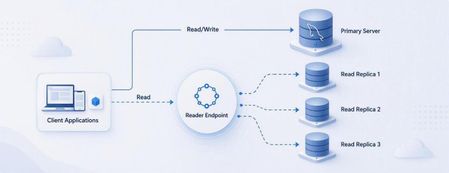
We are excited to announce the Public Preview of Reader Endpoint for Azure Database for MySQL. Read replicas help applications scale read-intensive workloads by moving read traffic away from the primary server. This can include traditional applications, analytics and reporting workloads, and AI-powered applications that retrieve structured context from MySQL. However, as the number of replicas grows, applications traditionally need to maintain separate replica hostnames and implement their own connection-routing logic. Reader Endpoint simplifies that experience. It provides a single DNS endpoint for read replicas and automatically distributes new read connections across eligible replicas. Applications can use one connection endpoint instead of managing every replica individually. Simplified read scaling through one endpoint Reader Endpoint uses connection-level routing and continuously monitors replica availability and replication lag. If a replica becomes unavailable or exceeds the configured replication-lag threshold, Reader Endpoint automatically excludes it from routing. Reader Endpoint does not inspect individual queries and does not route write traffic. Applications should continue directing writes to the primary server. Choose the routing method that fits your workload Reader Endpoint supports two routing methods: Rotational routing: Distributes connections across eligible replicas in a round-robin pattern. Performance routing: Uses geographic proximity to route connections to eligible replicas in the region closest to the client. This gives application teams the flexibility to distribute connections evenly or prioritize geographic proximity. Configure routing for your application’s needs Reader Endpoint allows you to configure: The read replicas that participate in routing The maximum acceptable replication lag for an eligible replica DNS time to live, including a TTL value of 0 Whether the primary server can serve reads when no eligible replica is available Whether newly created replicas are automatically attached to the endpoint Configure the Reader Endpoint name, routing method, DNS TTL, and replication-lag threshold. Select participating replicas and configure fallback and automatic replica attachment. You can also create multiple Reader Endpoints for the same source server. This enables different applications or workloads to use their own replica selections, routing methods, lag thresholds, and DNS TTL settings. For example, an operational application could use one endpoint with a strict replication-lag threshold, while a reporting workload could use another endpoint with a different set of replicas and routing configuration. What is new in Public Preview? Building on the Private Preview, the Public Preview introduces several enhancements: Support for multiple Reader Endpoints per source server The new Performance routing method, alongside Rotational routing Support for configuring DNS TTL to 0 An option to allow the primary server to serve reads when no eligible replica is available Automatic attachment of newly created replicas Scale data retrieval for AI-powered applications AI-powered applications can generate significant read traffic when retrieving structured context, such as product, customer, or application data, from MySQL. Reader Endpoint helps scale these read-intensive operations by distributing new connections across eligible read replicas through a single endpoint. Applications can also use a separate Reader Endpoint for AI workloads, with their own replica selection, routing method, and replication-lag threshold. Other common scenarios Reader Endpoint can simplify connection management for several read-intensive scenarios: Applications that need to scale read traffic across multiple replicas Business intelligence, analytics, and reporting workloads Read-only microservices Applications that need to avoid routing new connections to unavailable or lagging replicas Different workloads requiring independent replica and routing configurations Public Preview considerations The following limitations currently apply: Support for changing the routing method after endpoint creation will be added in an upcoming update. Azure CLI is not yet supported for Reader Endpoint. You can't use SSL connections that use VERIFY_IDENTITY mode through the reader endpoint. Other SSL modes are supported. Reader Endpoint incurs an additional charge. Use the Azure Pricing Calculator to estimate applicable costs. Get started To learn more about routing behaviour, configuration options, pricing, and current limitations, see Read replicas in Azure Database for MySQL. We encourage you to try Reader Endpoint with your read-intensive workloads and share your feedback as we continue improving the experience toward general availability. We invite you to share your experiences or suggestions at AskAzureDBforMySQL@service.microsoft.com Thank you for choosing Azure Database for MySQL!224Views0likes0CommentsScaling Write Throughput in Azure Database for MySQL Using Application-Level Sharding
This blog post walks through scaling write throughput in Azure Database for MySQL using application level sharding. It starts with the why behind sharding and then builds a complete C# implementation that spreads writes across three Azure Database for MySQL Flexible Servers. Why Shard in the First Place? This post focuses specifically on scaling write throughput. A well-tuned single primary node can take you remarkably far, and techniques such as indexing strategies, write batching, redo log optimization, and vertical compute scaling each deliver real, lasting value. For many workloads, these optimizations are all you will ever need. That said, as write volume continues to grow, a single primary eventually approaches its practical capacity, and at that point the most durable way to keep scaling is to distribute the write workload across multiple primary instances. This architecture is what we call sharding. When you reach this inflection point, there are two primary patterns for managing multiple write nodes: Proxy or Middleware Layer Sharding: A sharding aware proxy sits between the application and a pool of Azure Database for MySQL instances, routing queries based on a shard key. While this abstracts the underlying topology from the application layer, it introduces an additional, complex component to operate, secure, scale, and patch. Application Layer Sharding: The application itself resolves the destination shard key and determines which of the N Azure Database for MySQL instances should receive a write before ever opening a database connection. Each backend target remains a completely standard, independent Azure Database for MySQL instance. This post explores the second approach. The core appeal of application layer sharding is architectural simplicity: it introduces zero infrastructure overhead and eliminates an extra network hop. Every shard behaves exactly like a standalone instance, meaning your existing backup, restore, monitoring pipelines, and the Azure portal function seamlessly without modification. The explicit tradeoff is that you forgo cross shard joins and distributed transactions in exchange for absolute predictability and control over data access patterns. The Plan We will build a small order management service that distributes its data across three Azure Database for MySQL instances that already exist. The application, written in C# on .NET 8, owns the partitioning logic. The premise: the three servers are already provisioned, the firewalls are configured, the network paths are established, and each server has its own administrative credentials. We are not provisioning infrastructure in this post. we are writing the application code that consumes it. mysql-shard-0.mysql.database.azure.com user: shard0_admin pwd: <secret-0> mysql-shard-1.mysql.database.azure.com user: shard1_admin pwd: <secret-1> mysql-shard-2.mysql.database.azure.com user: shard2_admin pwd: <secret-2> Each server hosts an identical appdb database with the same schema: CREATE TABLE users ( user_id BIGINT NOT NULL PRIMARY KEY, email VARCHAR(255) NOT NULL, created_at DATETIME NOT NULL DEFAULT CURRENT_TIMESTAMP, UNIQUE KEY uq_email (email) ); CREATE TABLE orders ( order_id BIGINT NOT NULL PRIMARY KEY, user_id BIGINT NOT NULL, amount_cents INT NOT NULL, created_at DATETIME NOT NULL DEFAULT CURRENT_TIMESTAMP, KEY ix_user (user_id) ); Two design decisions in this schema warrant explanation: No AUTO_INCREMENT for user_id or order_id. Two shards would otherwise generate the same value 42 independently. Instead, we assign identifiers in the application, using a scheme such as Snowflake, ULID, or UUIDv7. orders carries user_id, and we route by it. This is the single most important rule of sharding: choose a shard key that keeps related data colocated, so that the common queries remain on a single shard. A note on UNIQUE KEY uq_email. A unique index enforces uniqueness only within a single physical shard. Because we route by user_id, two users with different IDs and the same email may land on different shards, and both inserts will succeed. If you require globally unique emails, two options exist: (a) maintain a separate email → user_id lookup table on a single "directory" server and write to it first within an idempotent flow, or (b) shard the users table by a hash of email instead. We retain user_id routing throughout this post because it is the correct choice for orders, and we treat per shard email uniqueness as a best effort guard rather than a hard global invariant. How the Partitioning Works The naive approach to sharding is shard = hash(key) % N. This works until you need to add a fourth server, at which point roughly 75% of your data must move. In any system of meaningful size, that is prohibitively expensive. The established solution is virtual buckets. You hash the key into a large, fixed bucket space (here, 1024), then map buckets to physical shards. When you add capacity, you relocate only buckets; you never rehash the entire dataset. In production, the bucket_to_shard_map typically resides in a system such as Azure App Configuration or etcd, so that you can rebalance without redeploying. For this post, we keep it as an in-memory array seeded at startup, which is straightforward to replace later. The Project ShardingDemo/ ├── ShardingDemo.csproj ├── appsettings.json ├── Models.cs ├── ShardRouter.cs ├── UserRepository.cs └── Program.cs ShardingDemo.csproj <Project Sdk="Microsoft.NET.Sdk"> <PropertyGroup> <OutputType>Exe</OutputType> <TargetFramework>net8.0</TargetFramework> <Nullable>enable</Nullable> <ImplicitUsings>enable</ImplicitUsings> </PropertyGroup> <ItemGroup> <PackageReference Include="MySqlConnector" Version="2.6.0" /> <PackageReference Include="Microsoft.Extensions.Hosting" Version="8.0.0" /> <PackageReference Include="Microsoft.Extensions.Configuration.Binder" Version="8.0.0" /> </ItemGroup> <ItemGroup> <Content Include="appsettings.json" CopyToOutputDirectory="PreserveNewest" /> </ItemGroup> </Project> appsettings.json Shards is an ordered list, and a shard's position in the array is its logical ID. { "Shards": [ { "Host": "mysql-shard-0.mysql.database.azure.com", "Database": "appdb", "User": "shard0_admin", "Password": "REPLACE_ME_0" }, { "Host": "mysql-shard-1.mysql.database.azure.com", "Database": "appdb", "User": "shard1_admin", "Password": "REPLACE_ME_1" }, { "Host": "mysql-shard-2.mysql.database.azure.com", "Database": "appdb", "User": "shard2_admin", "Password": "REPLACE_ME_2" } ] } Models.cs namespace ShardingDemo; public sealed record User(long UserId, string Email, DateTime CreatedAt); public sealed record Order(long OrderId, long UserId, int AmountCents, DateTime CreatedAt); public sealed class ShardConfig { public required string Host { get; init; } public required string Database { get; init; } public required string User { get; init; } public required string Password { get; init; } } ShardRouter.cs using System.Security.Cryptography; using System.Text; using MySqlConnector; namespace ShardingDemo; public sealed class Shard : IAsyncDisposable { public int Id { get; } public MySqlDataSource DataSource { get; } public Shard(int id, ShardConfig cfg) { Id = id; var csb = new MySqlConnectionStringBuilder { Server = cfg.Host, Port = 3306, Database = cfg.Database, UserID = cfg.User, Password = cfg.Password, SslMode = MySqlSslMode.Required, Pooling = true, MinimumPoolSize = 2, MaximumPoolSize = 100, ConnectionTimeout = 10, DefaultCommandTimeout = 30, }; DataSource = new MySqlDataSourceBuilder(csb.ConnectionString).Build(); } public ValueTask DisposeAsync() => DataSource.DisposeAsync(); } public sealed class ShardRouter : IAsyncDisposable { private const int VirtualBuckets = 1024; private readonly IReadOnlyList<Shard> _shards; private readonly int[] _bucketToShardId; public ShardRouter(IEnumerable<ShardConfig> configs) { _shards = configs.Select((c, i) => new Shard(i, c)).ToList(); // Even distribution. Replace with a map loaded from your control plane for live rebalancing. _bucketToShardId = new int[VirtualBuckets]; for (int i = 0; i < VirtualBuckets; i++) _bucketToShardId[i] = i % _shards.Count; } public IReadOnlyList<Shard> AllShards => _shards; private static int BucketFor(long shardKey) { byte[] hash = MD5.HashData(Encoding.ASCII.GetBytes(shardKey.ToString())); // Use the first byte pair as an unsigned value, then map it into the bucket space. int value = (hash[0] << 8) | hash[1]; return value % VirtualBuckets; } public Shard ShardForKey(long shardKey) { int bucket = BucketFor(shardKey); return _shards[_bucketToShardId[bucket]]; } public async ValueTask DisposeAsync() { foreach (var s in _shards) await s.DisposeAsync(); } } UserRepository.cs Observe that every per user method calls ShardForKey(userId), even when inserting an order. This is the colocation rule at work. An order and its owning user always reside on the same shard, so queries for a single user only ever reach one shard. Only the cross-shard aggregate (TotalRevenueCentsAsync) must fan out. using MySqlConnector; namespace ShardingDemo; public sealed class UserRepository { private readonly ShardRouter _router; public UserRepository(ShardRouter router) { _router = router; } public async Task CreateUserAsync(long userId, string email, CancellationToken ct = default) { var shard = _router.ShardForKey(userId); await using var conn = await shard.DataSource.OpenConnectionAsync(ct); await using var cmd = conn.CreateCommand(); cmd.CommandText = "INSERT INTO users (user_id, email) VALUES (@id, Email)"; cmd.Parameters.AddWithValue("@id", userId); cmd.Parameters.AddWithValue("@email", email); await cmd.ExecuteNonQueryAsync(ct); } public async Task<User?> GetUserAsync(long userId, CancellationToken ct = default) { var shard = _router.ShardForKey(userId); await using var conn = await shard.DataSource.OpenConnectionAsync(ct); await using var cmd = conn.CreateCommand(); cmd.CommandText = "SELECT user_id, email, created_at FROM users WHERE user_id = ID"; cmd.Parameters.AddWithValue("@id", userId); await using var reader = await cmd.ExecuteReaderAsync(ct); if (!await reader.ReadAsync(ct)) return null; return new User(reader.GetInt64(0), reader.GetString(1), reader.GetDateTime(2)); } public async Task AddOrderAsync(long orderId, long userId, int amountCents, CancellationToken ct = default) { // Routed by user_id, so orders colocate with their owning user. var shard = _router.ShardForKey(userId); await using var conn = await shard.DataSource.OpenConnectionAsync(ct); await using var cmd = conn.CreateCommand(); cmd.CommandText = """ INSERT INTO orders (order_id, user_id, amount_cents) VALUES (@oid, @uid, amt) """; cmd.Parameters.AddWithValue("@oid", orderId); cmd.Parameters.AddWithValue("@uid", userId); cmd.Parameters.AddWithValue("@amt", amountCents); await cmd.ExecuteNonQueryAsync(ct); } public async Task<IReadOnlyList<Order>> GetOrdersForUserAsync(long userId, CancellationToken ct = default) { var shard = _router.ShardForKey(userId); await using var conn = await shard.DataSource.OpenConnectionAsync(ct); await using var cmd = conn.CreateCommand(); cmd.CommandText = """ SELECT order_id, user_id, amount_cents, created_at FROM orders WHERE user_id = @uid """; cmd.Parameters.AddWithValue("@uid", userId); var list = new List<Order>(); await using var reader = await cmd.ExecuteReaderAsync(ct); while (await reader.ReadAsync(ct)) { list.Add(new Order( reader.GetInt64(0), reader.GetInt64(1), reader.GetInt32(2), reader.GetDateTime(3))); } return list; } /// <summary>Cross shard fanout.</summary> public async Task<long> TotalRevenueCentsAsync(CancellationToken ct = default) { var tasks = _router.AllShards.Select(async shard => { await using var conn = await shard.DataSource.OpenConnectionAsync(ct); await using var cmd = conn.CreateCommand(); cmd.CommandText = "SELECT COALESCE(SUM(amount_cents), 0) FROM orders"; var result = await cmd.ExecuteScalarAsync(ct); return Convert.ToInt64(result); }); var perShard = await Task.WhenAll(tasks); return perShard.Sum(); } } Program.cs using Microsoft.Extensions.Configuration; using Microsoft.Extensions.DependencyInjection; using Microsoft.Extensions.Hosting; using ShardingDemo; var builder = Host.CreateApplicationBuilder(args); // Bind Shards:[] from appsettings.json (override with user-secrets / env vars / Key Vault) var shardConfigs = builder.Configuration .GetSection("Shards") .Get<List<ShardConfig>>() ?? throw new InvalidOperationException("No 'Shards' section configured."); if (shardConfigs.Count == 0) throw new InvalidOperationException("At least one shard must be configured."); builder.Services.AddSingleton(_ => new ShardRouter(shardConfigs)); builder.Services.AddSingleton<UserRepository>(); using var host = builder.Build(); var repo = host.Services.GetRequiredService<UserRepository>(); var router = host.Services.GetRequiredService<ShardRouter>(); (long Id, string Email)[] users = { (1001, "ada@example.com"), (2002, "linus@example.com"), (3003, "grace@example.com"), (4004, "alan@example.com"), }; foreach (var (id, email) in users) { await repo.CreateUserAsync(id, email); Console.WriteLine($"user {id} -> shard {router.ShardForKey(id).Id}"); } await repo.AddOrderAsync(orderId: 9001, userId: 1001, amountCents: 4999); await repo.AddOrderAsync(orderId: 9002, userId: 1001, amountCents: 1299); await repo.AddOrderAsync(orderId: 9003, userId: 2002, amountCents: 8800); Console.WriteLine($"\nAda: {await repo.GetUserAsync(1001)}"); Console.WriteLine($"Ada's orders: {(await repo.GetOrdersForUserAsync(1001)).Count}"); Console.WriteLine($"\nTotal revenue across 3 shards: " + $"${await repo.TotalRevenueCentsAsync() / 100m:F2}"); await router.DisposeAsync(); Tracing One Request End to End Consider GetOrdersForUserAsync(1001): ShardForKey(1001) → MD5("1001") → first two bytes as a number → % 1024 → a bucket in the range 0..1023. bucket % 3 → a physical shard → for example mysql-shard-2.mysql.database.azure.com. The MySqlDataSource provides a pooled, TLS encrypted connection authenticated as shard2_admin. The query runs against shard 2's local ix_user index, with no fan out and at single server speed. Every call with userId = 1001, whether GetUser, AddOrder, or GetOrdersForUser, lands on the same shard. That is why orders JOIN users ON orders.user_id = users.user_id WHERE user_id = 1001 executes within a single shard, with no cross-shard traffic. Conclusion The essential point is this. Once a single primary can no longer absorb your write load, sharding becomes a durable answer, and implementing it at the application layer keeps every part of the system explicit and comprehensible. When write volume or dataset size outgrows a single primary, application layer sharding provides several benefits. N independent Azure Database for MySQL instances, each absorbing 1/N of the write traffic. Queries by user that remain on a single shard and behave like an ordinary, modestly sized database. A bucket map approach that allows you to add a fourth, fifth, or Nth shard later by relocating slices of data rather than rehashing the entire dataset. A failure of one shard that affects 1/N of your users rather than all of them. These benefits come at a genuine cost. You must generate identifiers in the application, global uniqueness requires a secondary lookup table, and aggregate queries fan out across shards. A cross shard write, one that must atomically update data on two different shards, can no longer rely on a single database transaction. Instead it needs an orchestrated sequence of local transactions, where each step carries a compensating action that undoes its effect if a later step fails. None of these are insurmountable. They are simply responsibilities you now assume. Sharding is a deliberate step to take only once a single primary has genuinely exhausted its write headroom. When you reach that point, the implementation in this post is a representative blueprint. Stay Connected We welcome your feedback and invite you to share your experiences or suggestions at AskAzureDBforMySQL@service.microsoft.com Thank you for choosing Azure Database for MySQL!360Views2likes0CommentsTeams video quality around 1 Mbps in the EMEA region
Since Corona we have noticed very poor video quality (1Mbps). We understand you had a capacity issue and had to set this limit. The limit has been lifted in other regions but not in EMEA. We are paying for this service and use it a lot. We have large meeting rooms based on this and we are getting a lot of negative feedback from our users because if the low video quality. People are now pushing us towards Cisco Webex and we will be installing the first couple of Webex meeting rooms next month. You owe your customers a deadline and some more details about this. And no this is not an issue in our end, we have had support cases with Microsoft and have had this verified.1.7KViews0likes3CommentsJuly 2025 Recap: Azure Database for PostgreSQL
Hello Azure Community, July delivered a wave of exciting updates to Azure Database for PostgreSQL! From Fabric mirroring support for private networking to cascading read replicas, these new features are all about scaling smarter, performing faster, and building better. This blog covers what’s new, why it matters, and how to get started. Catch Up on POSETTE 2025 In case you missed POSETTE: An Event for Postgres 2025 or couldn't watch all of the sessions live, here's a playlist with the 11 talks all about Azure Database for PostgreSQL. And, if you'd like to dive even deeper, the Ultimate Guide will help you navigate the full catalog of 42 recorded talks published on YouTube. Feature Highlights Upsert and Script activity in ADF and Azure Synapse – Generally Available Power BI Entra authentication support – Generally Available New Regions: Malaysia West & Chile Central Latest Postgres minor versions: 17.5, 16.9, 15.13, 14.18 and 13.21 Cascading Read Replica – Public Preview Private Endpoint and VNet support for Fabric Mirroring - Public Preview Agentic Web with NLWeb and PostgreSQL PostgreSQL for VS Code extension enhancements Improved Maintenance Workflow for Stopped Instances Upsert and Script activity in ADF and Azure Synapse – Generally Available We’re excited to announce the general availability of Upsert method and Script activity in Azure Data Factory and Azure Synapse Analytics for Azure Database for PostgreSQL. These new capabilities bring greater flexibility and performance to your data pipelines: Upsert Method: Easily merge incoming data into existing PostgreSQL tables without writing complex logic reducing overhead and improving efficiency. Script Activity: Run custom SQL scripts as part of your workflows, enabling advanced transformations, procedural logic, and fine-grained control over data operations. Together, these features streamline ETL and ELT processes, making it easier to build scalable, declarative, and robust data integration solutions using PostgreSQL as either a source or sink. Visit our documentation guide for Upsert Method and script activity to know more. Power BI Entra authentication support – Generally Available You can now use Microsoft Entra ID authentication to connect to Azure Database for PostgreSQL from Power BI Desktop. This update simplifies access management, enhances security, and helps you support your organization’s broader Entra-based authentication strategy. To learn more, please refer to our documentation. New Regions: Malaysia West & Chile Central Azure Database for PostgreSQL has now launched in Malaysia West and Chile Central. This expanded regional presence brings lower latency, enhanced performance, and data residency support, making it easier to build fast, reliable, and compliant applications, right where your users are. This continues to be our mission to bring Azure Database for PostgreSQL closer to where you build and run your apps. For the full list of regions visit: Azure Database for PostgreSQL Regions. Latest Postgres minor versions: 17.5, 16.9, 15.13, 14.18 and 13.21 PostgreSQL latest minor versions 17.5, 16.9, 15.13, 14.18 and 13.21 are now supported by Azure Database for PostgreSQL flexible server. These minor version upgrades are automatically performed as part of the monthly planned maintenance in Azure Database for PostgreSQL. This upgrade automation ensures that your databases are always running on the most secure and optimized versions without requiring manual intervention. This release fixes two security vulnerabilities and over 40 bug fixes and improvements. To learn more, please refer PostgreSQL community announcement for more details about the release. Cascading Read Replica – Public Preview Azure Database for PostgreSQL supports cascading read replica in public preview capacity. This feature allows you to scale read-intensive workloads more effectively by creating replicas not only from the primary database but also from existing read replicas, enabling two-level replication chains. With cascading read replicas, you can: Improve performance for read-heavy applications. Distribute read traffic more efficiently. Support complex deployment topologies. Data replication is asynchronous, and each replica can serve as a source for additional replicas. This setup enhances scalability and flexibility for your PostgreSQL deployments. For more details read the cascading read replicas documentation. Private Endpoint and VNET Support for Fabric Mirroring - Public Preview Microsoft Fabric now supports mirroring for Azure Database for PostgreSQL flexible server instances deployed with Virtual Network (VNET) integration or Private Endpoints. This enhancement broadens the scope of Fabric’s real-time data replication capabilities, enabling secure and seamless analytics on transactional data, even within network-isolated environments. Previously, mirroring was only available for flexible server instances with public endpoint access. With this update, organizations can now replicate data from Azure Database for PostgreSQL hosted in secure, private networks, without compromising on data security, compliance, or performance. This is particularly valuable for enterprise customers who rely on VNETs and Private Endpoints for database connectivity from isolated networks. For more details visit fabric mirroring with private networking support blog. Agentic Web with NLWeb and PostgreSQL We’re excited to announce that NLWeb (Natural Language Web), Microsoft’s open project for natural language interfaces on websites now supports PostgreSQL. With this enhancement, developers can leverage PostgreSQL and NLWeb to transform any website into an AI-powered application or Model Context Protocol (MCP) server. This integration allows organizations to utilize a familiar, robust database as the foundation for conversational AI experiences, streamlining deployment and maximizing data security and scalability. For more details, read Agentic web with NLWeb and PostgreSQL blog. PostgreSQL for VS Code extension enhancements PostgreSQL for VS Code extension is rolling out new updates to improve your experience with this extension. We are introducing key connections, authentication, and usability improvements. Here’s what we improved: SSH connections - You can now set up SSH tunneling directly in the Advanced Connection options, making it easier to securely connect to private networks without leaving VS Code. Clearer authentication setup - A new “No Password” option eliminates guesswork when setting up connections that don’t require credentials. Entra ID fixes - Improved default username handling, token refresh, and clearer error feedback for failed connections. Array and character rendering - Unicode and PostgreSQL arrays now display more reliably and consistently. Azure Portal flow - Reuses existing connection profiles to avoid duplicates when launching from the portal. Don’t forget to update to the latest version in the Marketplace to take advantage of these enhancements and visit our GitHub to learn more about this month’s release. Improved Maintenance Workflow for Stopped Instances We’ve improved how scheduled maintenance is handled for stopped or disabled PostgreSQL servers. Maintenance is now applied only when the server is restarted - either manually or through the 7-day auto-restart rather than forcing a restart during the scheduled maintenance window. This change reduces unnecessary disruptions and gives you more control over when updates are applied. You may notice a slightly longer restart time (5–8 minutes) if maintenance is pending. For more information, refer Applying Maintenance on Stopped/Disabled Instances. Azure Postgres Learning Bytes 🎓 Set Up HA Health Status Monitoring Alerts This section will talk about setting up HA health status monitoring alerts using Azure Portal. These alerts can be used to effectively monitor the HA health states for your server. To monitor the health of your High Availability (HA) setup: Navigate to Azure portal and select your Azure Database for PostgreSQL flexible server instance. Create an Alert Rule Go to Monitoring > Alerts > Create Alert Rule Scope: Select your PostgreSQL Flexible Server Condition: Choose the signal from the drop down (CPU percentage, storage percentage etc.) Logic: Define when the alert should trigger Action Group: Specify where the alert should be sent (email, webhook, etc.) Add tags Click on “Review + Create” Verify the Alert Check the Alerts tab in Azure Monitor to confirm the alert has been triggered. For deeper insight into resource health: Go to Azure Portal > Search for Service Health > Select Resource Health. Choose Azure Database for PostgreSQL Flexible Server from the dropdown. Review the health status of your server. For more information, check out the HA Health status monitoring documentation guide. Conclusion That’s a wrap for our July 2025 feature updates! Thanks for being part of our journey to make Azure Database for PostgreSQL better with every release. We’re always working to improve, and your feedback helps us do that. 💬 Got ideas, questions, or suggestions? We’d love to hear from you: https://aka.ms/pgfeedback 📢 Want to stay on top of Azure Database for PostgreSQL updates? Follow us here for the latest announcements, feature releases, and best practices: Azure Database for PostgreSQL Blog Stay tuned for more updates in our next blog!805Views2likes0CommentsLesson Learned #323: Cannot perform creation/scaling of the managed instance due to not enough IPs
We worked on a service request where our customer faced the following error message: Cannot perform creation/scaling of the managed instance as there are not enough available IP addresses in the subnet for performing the operation. For more details visit 'https://aka.ms/determine-subnet-size' and error code: ManagedInstanceIpAddressRangeLimit, scaling their managed instance from General Purpose to Business Critical2.7KViews0likes0CommentsLesson Learned #317: Update to service objective for Hub DBs
Today, we worked on a service request where our customer got the following error message scaling database error from General Purpose to Hyperscale "Error message: 'Update to service objective 'xyz' for Hub DBs' is not supported for entity 'DatabaseName'. Following, I would like to share with you our findings.
500 Gateway errors with Teams Chat Bot
Hi, We have a Teams chat bot (aka root bot) that is currently connected to a Skill Dialog bot. When we deploy the root bot and the skill dialog bot to the same app service plan with instance count set to 1, both bots perform per expectations. When we deploy the root bot to its own app service plan with instance count set to 1 and the skill dialog bot with instance count set to 1, both bots perform per expectations. When we deploy the root bot to its own app service plan with instance count set to 2 and the skill dialog bot with instance count set to 2, we start seeing 500 gateway errors. We enabled App Insights and the visualization showed us that communication from the root bot to the skill dialog bot and vice versa would break down and throw the 500 errors. When we deploy the root bot and the skill dialog bot to the same app service plan but have the instance count set to 2, we are also seeing 500 gateway errors. Internally, we suspected that load balancing amongst the instances could be why we are getting the 500 errros. We found a post on Stack Overflow ( https://nam04.safelinks.protection.outlook.com/?url=https%3A%2F%2Fstackoverflow.com%2Fquestions%2F49651539%2Fhow-azure-load-balances-scaled-out-app-service-plan&data=02%7C01%7CVoonSiong.Lum%40ihsmarkit.com%7C30530c54b6394b44861108d85becd022%7Cc1156c2fa3bb4fc4ac073eab96da8d10%7C0%7C0%7C637360419945083026&sdata=T7wR2Vz%2FYCNOseGITgR4S5V245DKfKRvjCFO7gx0UlQ%3D&reserved=0) which seemed to be related to our problem. Since ARR is enabled by default for our web app services, session affinity does not seem to be the issue here. Has anyone come across the same behavior? Any advice? Thank You1.1KViews0likes0Comments