s
3 Topics
Renaming Call Queue or Auto Attendant
Hi, we created our Teams phone system and gave the auto attendant and Call Queue technical names (ex: Voice_AA_Ci_IVR ) once we are in production i realised that these names who up when users receive calls from either an Auto Attendant or a Queue. I tried renaming them but the old name still shows up (its been more than 48 hours) - is there a place where the original name is stored? (cause i realise that each AA has a name, then has a tied in ressource account (also has a name) and then a User with a license (also has a name and email) ...Solved3KViews0likes5Comments
Pinned Apps Won't Automatically Show in Teams Side Panel for Users.
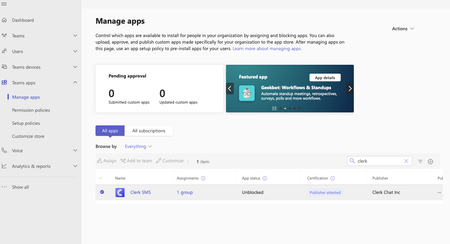
Hello, We just integrated the Clerk SMS app for our users to sync their Teams phone numbers with SMS capabilities, but for some reason the app is not appearing like we want it to on the Teams app side panel that lists all the other apps. The app is unblocked and has been assigned to a group. We are only wanting this app to be available and installed for roughly 50 of our users at this time, so we assigned those specific users to a new group created in MS 365 Admin Center. Then, in the Teams Admin Center --> Manage apps tab, the app shows it is assigned to the "Clerk SMS" group that our targeted users are in who are supposed to be receiving the Clerk SMS app. Despite waiting over 36 hours and attempting to quit Teams, sign out/in again, and all the other potential solutions I found through digging on the internet, the Clerk SMS app still is not appearing on the side panel in Teams. Could someone please help provide another possible solution for this scenario or other options to try that I'm missing? Thank you very much! Nate Greenwood Manage apps view Setup policies view Clerk SMS app page view638Views0likes0CommentsFolders or Channels [Sync]
Hello Bubble. We are small company with about 30 employees. We use OneDrive for our project. We are active in the sewer inspection industry. Since we sometimes exchange small projects, we have the problem that when we do it via the “Main Channel”, the files/folders are synchronized for all workers. This is rather suboptimal. Hence my question. Would you create a separate channel for each employee or a “project handover” channel and the employees' sub-folders in it, with approvals only for the correct colleague? The aim should be that when employee 1 uploads the project, it should not be synchronized with everyone, but only with the colleagues who either have the approval for this folder or channel. Thank you in advance.447Views0likes0Comments