responsible ai
17 TopicsMicrosoft Foundry: Unlock Adaptive, Personalized Agents with User-Scoped Persistent Memory
From Knowledgeable to Personalized: Why Memory Matters Most AI agents today are knowledgeable — they ground responses in enterprise data sources and rely on short‑term, session‑based memory to maintain conversational coherence. This works well within a single interaction. But once the session ends, the context disappears. The agent starts fresh, unable to recall prior interactions, user preferences, or previously established context. In reality, enterprise users don’t interact with agents exclusively in one‑off sessions. Conversations can span days, weeks, evolving across multiple interactions rather than isolated sessions. Without a way to persist and safely reuse relevant context across interactions, AI agents remain efficient in the short term be being stateful within a session, but lose continuity over time due to their statelessness across sessions. Bridging this gap between short-term efficiency and long‑term adaptation exposes a deeper challenge. Persisting memory across sessions is not just a technical decision; in enterprise environments, it introduces legitimate concerns around privacy, data isolation, governance, and compliance — especially when multiple users interact with the same agent. What seems like an obvious next step quickly becomes a complex architectural problem, requiring organizations to balance the ability for agents to learn and adapt over time with the need to preserve trust, enforce isolation boundaries, and meet enterprise compliance requirements. In this post, I’ll walk through a practical design pattern for user‑scoped persistent memory, including a reference architecture and a deployable sample implementation that demonstrates how to apply this pattern in a real enterprise setting while preserving isolation, governance, and compliance. The Challenge of Persistent Memory in Enterprise AI Agents Extending memory beyond a single session seems like a natural way to make AI agents more adaptive. Retaining relevant context over time — such as preferences, prior decisions, or recurring patterns — would allow an agent to progressively tailor its behavior to each user, moving from simple responsiveness toward genuine adaptation. In enterprise environments, however, persistence introduces a different class of risk. Storing and reusing user context across interactions raises questions of privacy, data isolation, governance, and compliance — particularly when multiple users interact with shared systems. Without clear ownership and isolation boundaries, naïvely persisted memory can lead to cross‑user data leakage, policy violations, or unclear retention guarantees. As a result, many systems default to ephemeral, session‑only memory. This approach prioritizes safety and simplicity — but does so at the cost of long‑term personalization and continuity. The challenge, then, is not whether agents should remember, but how memory can be introduced without violating enterprise trust boundaries. Persistent Memory: Trade‑offs Between Abstraction and Control As AI agents evolve toward more adaptive behavior, several approaches to agent memory are emerging across the ecosystem. Each reflects a different set of trade-offs between abstraction, flexibility, and control — making it useful to briefly acknowledge these patterns before introducing the design presented here. Microsoft Foundry Agent Service includes a built‑in memory capability (currently in Preview) that enables agents to retain context beyond a single interaction. This approach integrates tightly with the Foundry runtime and abstracts much of the underlying memory management, making it well suited for scenarios that align closely with the managed agent lifecycle. Another notable approach combines Mem0 with Azure AI Search, where memory entries are stored and retrieved through vector search. In this model, memory is treated as an embedding‑centric store that emphasizes semantic recall and relevance. Mem0 is intentionally opinionated, defining how memory is structured, summarized, and retrieved to optimize for ease of use and rapid iteration. Both approaches represent meaningful progress. At the same time, some enterprises require an approach where user memory is explicitly owned, scoped, and governed within their existing data architecture — rather than implicitly managed by an agent framework or memory library. These requirements often stem from stricter expectations around data isolation, compliance, and long‑term control. User-Scoped Persistent Memory with Azure Cosmos DB The solution presented in this post provides a practical reference implementation for organizations that require explicit control over how user memory is stored, scoped, and governed. Rather than embedding long‑term memory implicitly within the agent runtime, this design models memory as a first‑class system component built on Azure Cosmos DB. At a high level, the architecture introduces user‑scoped persistent memory: a durable memory layer in which each user’s context is isolated and managed independently. Persistent memory is stored in Azure Cosmos DB containers partitioned by user identity and consists of curated, long‑lived signals — such as preferences, recurring intent, or summarized outcomes from prior interactions — rather than raw conversational transcripts. This keeps memory intentional, auditable, and easy to evolve over time. Short‑term, in‑session conversation state remains managed by Microsoft Foundry on the server side through its built‑in conversation and thread model. By separating ephemeral session context from durable user memory, the system preserves conversational coherence while avoiding uncontrolled accumulation of long‑term state within the agent runtime. This design enables continuity and personalization across sessions while deliberately avoiding the risks associated with shared or global memory models, including cross‑user data leakage, unclear ownership, and unintended reuse of context. Azure Cosmos DB provides enterprises with direct control over memory isolation, data residency, retention policies, and operational characteristics such as consistency, availability, and scale. In this architecture, knowledge grounding and memory serve complementary roles. Knowledge grounding ensures correctness by anchoring responses in trusted enterprise data sources. User‑scoped persistent memory ensures relevance by tailoring interactions to the individual user over time. Together, they enable trustworthy, adaptive AI agents that improve with use — without compromising enterprise boundaries. Architecture Components and Responsibilities Identity and User Scoping Microsoft Entra ID (App Registrations) — provides the frontend a client ID and tenant ID so the Microsoft Authentication Library (MSAL) can authenticate users via browser redirect. The oid (Object ID) claim from the ID token is used as the user identifier throughout the system. Agent Runtime and Orchestration Microsoft Foundry — serves as the unified AI platform for hosting models, managing agents, and maintaining conversation state. Foundry manages in‑session and thread‑level memory on the server side, preserving conversational continuity while keeping ephemeral context separate from long‑term user memory. Backend Agent Service — implements the AI agent using Microsoft Foundry’s agent and conversation APIs. The agent is responsible for reasoning, tool‑calling decisions, and response generation, delegating memory and search operations to external MCP servers. Memory and Knowledge Services MCP‑Memory — MCP server that hosts tools for extracting structured memory signals from conversations, generating embeddings, and persisting user‑scoped memories. Memories are written to and retrieved from Azure Cosmos DB, enforcing strict per‑user isolation. MCP‑Search — MCP server exposing tools for querying enterprise knowledge sources via Azure AI Search. This separation ensures that knowledge grounding and memory retrieval remain distinct concerns. Azure Cosmos DB for NoSQL — provides the durable, serverless document store for user‑scoped persistent memory. Memory containers are partitioned by user ID, enabling isolation, auditable access, configurable retention policies, and predictable scalability. Vector search is used to support semantic recall over stored memory entries. Azure AI Search — supplies hybrid retrieval (keyword and vector) with semantic reranking over the enterprise knowledge index. An integrated vectorizer backed by an embedding model is used for query‑time vectorization. Models text‑embedding‑3‑large — used for generating vector embeddings for both user‑scoped memories and enterprise knowledge search. gpt‑5‑mini — used for lightweight analysis tasks, such as extracting structured memory facts from conversational context. gpt‑5.1 — powers the AI agent, handling multi‑turn conversations, tool invocation, and response synthesis. Application and Hosting Infrastructure Frontend Web Application — a React‑based web UI that handles user authentication and presents a conversational chat interface. Azure Container Apps Environment — provides a shared execution environment for all services, including networking, scaling, and observability. Azure Container Apps — hosts the frontend, backend agent service, and MCP servers as independently scalable containers. Azure Container Registry — stores container images for all application components. Try It Yourself Demonstration of user‑scoped persistent memory across sessions. To make these concepts concrete, I’ve published a working reference implementation that demonstrates the architecture and patterns described above. The complete solution is available in the Agent-Memory GitHub repository. The repository README includes prerequisites, environment setup notes, and configuration details. Start by cloning the repository and moving into the project directory: git clone https://github.com/mardianto-msft/azure-agent-memory.git cd azure-agent-memory Next, sign in to Azure using the Azure CLI: az login Then authenticate the Azure Developer CLI: azd auth login Once authenticated, deploy the solution: azd up After deployment is complete, sign in using the provided demo users and interact with the agent across multiple sessions. Each user’s preferences and prior context are retained independently, the interaction continues seamlessly after signing out and returning later, and user context remains fully isolated with no cross‑identity leakage. The solution also includes a knowledge index initialized with selected Microsoft Outlook Help documentation, which the agent uses for knowledge grounding. This index can be easily replaced or extended with your own publicly accessible URLs to adapt the solution to different domains. Looking Ahead: Personalized Memory as a Foundation for Adaptive Agents As enterprise AI agents evolve, many teams are looking beyond larger models and improved retrieval toward human‑centered personalization at scale — building agents that adapt to individual users while operating within clearly defined trust boundaries. User‑scoped persistent memory enables this shift. By treating memory as a first‑class, user‑owned component, agents can maintain continuity across sessions while preserving isolation, governance, and compliance. Personalization becomes an intentional design choice, aligning with Microsoft’s human‑centered approach to AI, where users retain control over how systems adapt to them. This solution demonstrates how knowledge grounding and personalized memory serve complementary roles. Knowledge grounding ensures correctness by anchoring responses in trusted enterprise data. Personalized memory ensures relevance by tailoring interactions to the individual user. Together, they enable context‑aware, adaptive, and personalized agents — without compromising enterprise trust. Finally, this solution is intentionally presented as a reference design pattern, not a prescriptive architecture. It offers a practical starting point for enterprises designing adaptive, personalized agents, illustrating how user‑scoped memory can be modeled, governed, and integrated as a foundational capability for scalable enterprise AI.853Views1like1CommentHow Do We Know AI Isn’t Lying? The Art of Evaluating LLMs in RAG Systems
🔍 1. Why Evaluating LLM Responses is Hard In classical programming, correctness is binary. Input Expected Result 2 + 2 4 ✔ Correct 2 + 2 5 ✘ Wrong Software is deterministic — same input → same output. LLMs are probabilistic. They generate one of many valid word combinations, like forming sentences from multiple possible synonyms and sentence structures. Example: Prompt: "Explain gravity like I'm 10" Possible responses: Response A Response B Gravity is a force that pulls everything to Earth. Gravity bends space-time causing objects to attract. Both are correct. Which is better? Depends on audience. So evaluation needs to look beyond text similarity. We must check: ✔ Is the answer meaningful? ✔ Is it correct? ✔ Is it easy to understand? ✔ Does it follow prompt intent? Testing LLMs is like grading essays — not checking numeric outputs. 🧠 2. Why RAG Evaluation is Even Harder RAG introduces an additional layer — retrieval. The model no longer answers from memory; it must first read context, then summarise it. Evaluation now has multi-dimensions: Evaluation Layer What we must verify Retrieval Did we fetch the right documents? Understanding Did the model interpret context correctly? Grounding Is the answer based on retrieved data? Generation Quality Is final response complete & clear? A simple story makes this intuitive: Teacher asks student to explain Photosynthesis. Student goes to library → selects a book → reads → writes explanation. We must evaluate: Did they pick the right book? → Retrieval Did they understand the topic? → Reasoning Did they copy facts correctly without inventing? → Faithfulness Is written explanation clear enough for another child to learn from? → Answer Quality One failure → total failure. 🧩 3. Two Types of Evaluation 🔹 Intrinsic Evaluation — Quality of the Response Itself Here we judge the answer, ignoring real-world impact. We check: ✔ Grammar & coherence ✔ Completeness of explanation ✔ No hallucination ✔ Logic flow & clarity ✔ Semantic correctness This is similar to checking how well the essay is written. Even if the result did not solve the real problem, the answer could still look good — that’s why intrinsic alone is not enough. 🔹 Extrinsic Evaluation — Did It Achieve the Goal? This measures task success. If a customer support bot writes a beautifully worded paragraph, but the user still doesn’t get their refund — it failed extrinsically. Examples: System Type Extrinsic Goal Banking RAG Bot Did user get correct KYC procedure? Medical RAG Was advice safe & factual? Legal search assistant Did it return the right section of the law? Technical summariser Did summary capture key meaning? Intrinsic = writing quality. Extrinsic = impact quality. A production-grade RAG system must satisfy both. 📏 4. Core RAG Evaluation Metrics (Explained with Very Simple Analogies) Metric Meaning Analogy Relevance Does answer match question? Ask who invented C++? → model talks about Java ❌ Faithfulness No invented facts Book says started 2004, response says 1990 ❌ Groundedness Answer traceable to sources Claims facts that don’t exist in context ❌ Completeness Covers all parts of question User asks Windows vs Linux → only explains Windows Context Recall / Precision Correct docs retrieved & used Student opens wrong chapter Hallucination Rate Degree of made-up info “Taj Mahal is in London” 😱 Semantic Similarity Meaning-level match “Engine died” = “Car stopped running” 💡 Good evaluation doesn’t check exact wording. It checks meaning + truth + usefulness. 🛠 5. Tools for RAG Evaluation 🔹 1. RAGAS — Foundation for RAG Scoring RAGAS evaluates responses based on: ✔ Faithfulness ✔ Relevance ✔ Context recall ✔ Answer similarity Think of RAGAS as a teacher grading with a rubric. It reads both answer + source documents, then scores based on truthfulness & alignment. 🔹 2. LangChain Evaluators LangChain offers multiple evaluation types: Type What it checks String or regex Basic keyword presence Embedding based Meaning similarity, not text match LLM-as-a-Judge AI evaluates AI (deep reasoning) LangChain = testing toolbox RAGAS = grading framework Together they form a complete QA ecosystem. 🔹 3. PyTest + CI for Automated LLM Testing Instead of manually validating outputs, we automate: Feed preset questions to RAG Capture answers Run RAGAS/LangChain scoring Fail test if hallucination > threshold This brings AI closer to software-engineering discipline. RAG systems stop being experiments — they become testable, trackable, production-grade products. 🚀 6. The Future: LLM-as-a-Judge The future of evaluation is simple: LLMs will evaluate other LLMs. One model writes an answer. Another model checks: ✔ Was it truthful? ✔ Was it relevant? ✔ Did it follow context? This enables: Benefit Why it matters Scalable evaluation No humans needed for every query Continuous improvement Model learns from mistakes Real-time scoring Detect errors before user sees them This is like autopilot for AI systems — not only navigating, but self-correcting mid-flight. And that is where enterprise AI is headed. 🎯 Final Summary Evaluating LLM responses is not checking if strings match. It is checking if the machine: ✔ Understood the question ✔ Retrieved relevant knowledge ✔ Avoided hallucination ✔ Provided complete, meaningful reasoning ✔ Grounded answer in real source text RAG evaluation demands multi-layer validation — retrieval, reasoning, grounding, semantics, safety. Frameworks like RAGAS + LangChain evaluators + PyTest pipelines are shaping the discipline of measurable, reliable AI — pushing LLM-powered RAG from cool demo → trustworthy enterprise intelligence. Useful Resources What is Retrieval-Augmented Generation (RAG) : https://azure.microsoft.com/en-in/resources/cloud-computing-dictionary/what-is-retrieval-augmented-generation-rag/ Retrieval-Augmented Generation concepts (Azure AI) : https://learn.microsoft.com/en-us/azure/ai-services/content-understanding/concepts/retrieval-augmented-generation RAG with Azure AI Search – Overview : https://learn.microsoft.com/en-us/azure/search/retrieval-augmented-generation-overview Evaluate Generative AI Applications (Microsoft Learn – Learning Path) : https://learn.microsoft.com/en-us/training/paths/evaluate-generative-ai-apps/ Evaluate Generative AI Models in Microsoft Foundry Portal : https://learn.microsoft.com/en-us/training/modules/evaluate-models-azure-ai-studio/ RAG Evaluation Metrics (Relevance, Groundedness, Faithfulness) : https://learn.microsoft.com/en-us/azure/ai-foundry/concepts/evaluation-evaluators/rag-evaluators RAGAS – Evaluation Framework for RAG Systems : https://docs.ragas.io/605Views0likes0CommentsGenerally Available: Evaluations, Monitoring, and Tracing in Microsoft Foundry
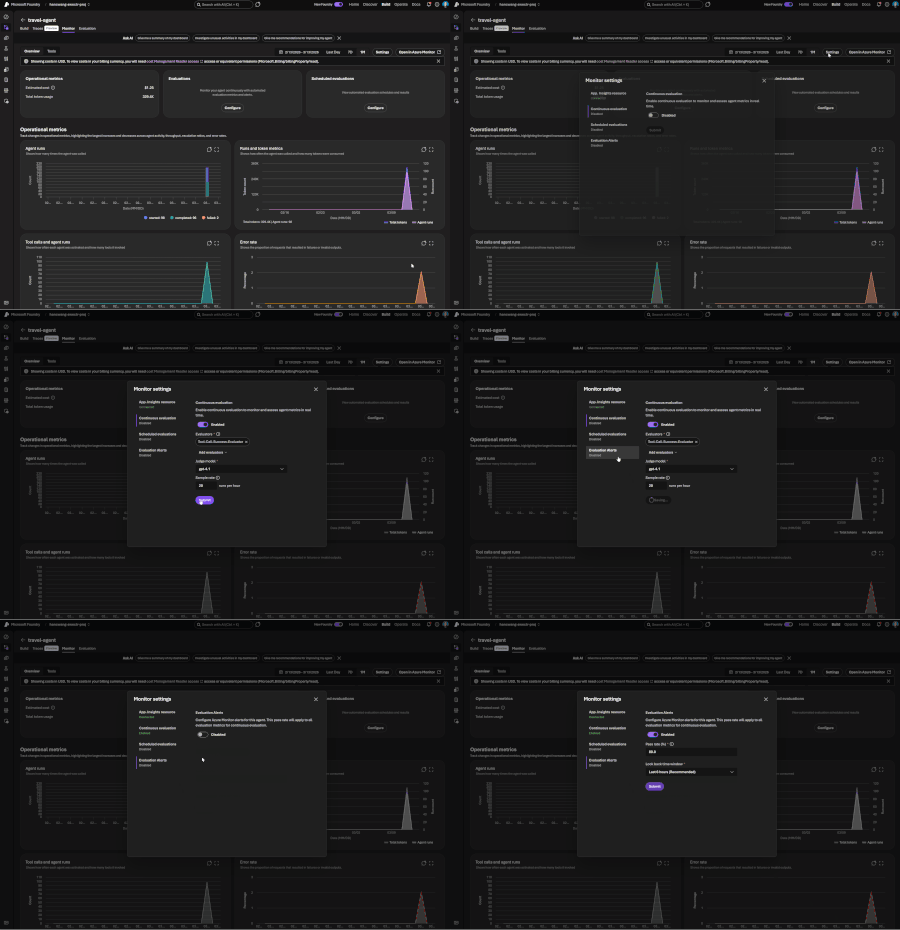
If you've shipped an AI agent to production, you've likely run into the same uncomfortable realization: the hard part isn't getting the agent to work - it's keeping it working. Models get updated, prompts get tweaked, retrieval pipelines drift, and user traffic surfaces edge cases that never appeared in your eval suite. Quality isn't something you establish once. It's something you have to continuously measure. Today, we're making that continuous measurement a first-class operational capability. Evaluations, Monitoring, and Tracing in Microsoft Foundry are now generally available through Foundry Control Plane. These aren't standalone tools bolted onto the side of the platform - they're deeply integrated with Azure Monitor, which means AI agent observability now lives in the same operational plane as the rest of your infrastructure. The Problem With Point-in-Time Evaluation Most evaluation workflows are designed around a pre-deployment gate. You build a test dataset, run your evals, review the scores, and ship. That approach has real value - but it has a hard ceiling. In production, agent behavior is a function of many things that change independently of your code: Foundation model updates ship continuously and can shift output style, reasoning patterns, and edge case handling in ways that don't always surface on your benchmark set. Prompt changes can have nonlinear effects downstream, especially in multi-step agentic flows. Retrieval pipeline drift changes what context your agent actually sees at inference time. A document index fresh last month may have stale or subtly different content today. Real-world traffic distribution is never exactly what you sampled for your test set. Production surfaces long-tail inputs that feel obvious in hindsight but were invisible during development. The implication is straightforward: evaluation has to be continuous, not episodic. You need quality signals at development time, at every CI/CD commit, and continuously against live production traffic - all using the same evaluator definitions so results are comparable across environments. That's the core design principle behind Foundry Observability. Continuous Evaluation Across the Full AI Lifecycle Built-In Evaluators Foundry's built-in evaluators cover the most critical quality and safety dimensions for production agent systems: Coherence and Relevance measure whether responses are internally consistent and on-topic relative to the input. These are table-stakes signals for any conversational or task-completion agent. Groundedness is particularly important for RAG-based architectures. It measures whether the model's output is actually supported by the retrieved context - as opposed to plausible-sounding content the model generated from its parametric memory. Groundedness failures are a leading indicator of hallucination risk in production, and they're often invisible to human reviewers at scale. Retrieval Quality evaluates the retrieval step independently from generation. Groundedness failures can originate in two places: the model may be ignoring good context, or the retrieval pipeline may not be surfacing relevant context in the first place. Splitting these signals makes it much easier to pinpoint root cause. Safety and Policy Alignment evaluates whether outputs meet your deployment's policy requirements - content safety, topic restrictions, response format compliance, and similar constraints. These evaluators are designed to run at every stage of the AI lifecycle: Local development - run evals inline as you iterate on prompts, retrieval config, or orchestration logic CI/CD pipelines - gate every commit against your quality baselines; catch regressions before they reach production Production traffic monitoring - continuously evaluate sampled live traffic and surface trends over time Because the evaluators are identical across all three contexts, a score in CI means the same thing as a score in production monitoring. See the Practical Guide to Evaluations and the Built-in Evaluators Reference for a deeper walkthrough. Custom Evaluators - Encoding Your Own Definition of Quality Built-in evaluators cover common signals well, but production agents often need to satisfy criteria specific to a domain, regulatory environment, or internal standard. Foundry supports two types of custom evaluators (currently in public preview): LLM-as-a-Judge evaluators let you configure a prompt and grading rubric, then use a language model to apply that rubric to your agent's outputs. This is the right approach for quality dimensions that require reasoning or contextual judgment - whether a response appropriately acknowledges uncertainty, whether a customer-facing message matches your brand tone, or whether a clinical summary meets documentation standards. You write a judge prompt with a scoring scale (e.g., 1–5 with criteria for each level) that evaluates a given {input} / {response} pair. Foundry runs this at scale and aggregates scores into your dashboards alongside built-in results. Code-based evaluators are Python functions that implement any evaluation logic you can express programmatically - regex matching, schema validation, business rule checks, compliance assertions, or calls to external systems. If your organization has documented policies about what a valid agent response looks like, you can encode those policies directly into your evaluation pipeline. Custom and built-in evaluators compose naturally - running against the same traffic, producing results in the same schema, feeding into the same dashboards and alert rules. Monitoring and Alerting - AI Quality as an Operational Signal All observability data produced by Foundry - evaluation results, traces, latency, token usage, and quality metrics - is published directly to Azure Monitor. This is where the integration pays off for teams already on Azure. What this enables that siloed AI monitoring tools can't: Cross-stack correlation. When your groundedness score drops, is it a model update, a retrieval pipeline issue, or an infrastructure problem affecting latency? With AI quality signals and infrastructure telemetry in the same Azure Monitor Application Insights workspace, you can answer that in minutes rather than hours of manual correlation across disconnected systems. Unified alerting. Configure Azure Monitor alert rules on any evaluation metric - trigger a PagerDuty incident when groundedness drops below threshold, send a Teams notification when safety violations spike, or create automated runbook responses when retrieval quality degrades. These are the same alert mechanisms your SRE team already uses. Enterprise governance by default. Azure Monitor's RBAC, retention policies, diagnostic settings, and audit logging apply automatically to all AI observability data. You inherit the governance framework your organization has already built and approved. Grafana and existing dashboards. If your team uses Azure Managed Grafana, evaluation metrics can flow into existing dashboards alongside your other operational metrics - a single pane of glass for application health, infrastructure performance, and AI agent quality. The Agent Monitoring Dashboard in the Foundry portal provides an AI-native view out of the box - evaluation metric trends, safety threshold status, quality score distributions, and latency breakdowns. Everything in that dashboard is backed by Azure Monitor data, so SRE teams can always drill deeper. End-to-End Tracing: From Quality Signal to Root Cause A groundedness score tells you something is wrong. A trace tells you exactly where the failure occurred and what the agent actually did. Foundry provides OpenTelemetry-based distributed tracing that follows each request through your entire agent system: model calls, tool invocations, retrieval steps, orchestration logic, and cross-agent handoffs. Traces capture the full execution path - inputs, outputs, latency at each step, tool call parameters and responses, and token usage. The key design decision: evaluation results are linked directly to traces. When you see a low groundedness score in your monitoring dashboard, you navigate directly to the specific trace that produced it - no manual timestamp correlation, no separate trace ID lookup. The connection is made automatically. Foundry auto-collects traces across the frameworks your agents are likely already built on: Microsoft Agent Framework Semantic Kernel LangChain and LangGraph OpenAI Agents SDK For custom or less common orchestration frameworks, the Azure Monitor OpenTelemetry Distro provides an instrumentation path. Microsoft is also contributing upstream to the OpenTelemetry project - working with Cisco Outshift, we've contributed semantic conventions for multi-agent trace correlation, standardizing how agent identity, task context, and cross-agent handoffs are represented in OTel spans. Note: Tracing is currently in public preview, with GA shipping by end of March. Prompt Optimizer (Public Preview) One persistent friction point in agent development is the iteration loop between writing prompts and measuring their effect. You make a change, run your evals, look at the delta, try to infer what about the change mattered, and repeat. Prompt Optimizer tightens this loop. It analyzes your existing prompt and applies structured prompt engineering techniques - clarifying ambiguous instructions, improving formatting for model comprehension, restructuring few-shot examples, making implicit constraints explicit - with paragraph-level explanations for every change it makes. The transparency is deliberate. Rather than producing a black-box "optimized" prompt, it shows you exactly what it changed and why. You can add constraints, trigger another optimization pass, and iterate until satisfied. When you're done, apply it with one click. The value compounds alongside continuous evaluation: run your eval suite against the current prompt, optimize, run evals again, see the measured improvement. That feedback loop - optimize, measure, optimize - is the closest thing to a systematic approach to prompt engineering that currently exists. What Makes our Approach to Observability Different There are other evaluation and observability tools in the AI ecosystem. The differentiation in Foundry's approach comes down to specific architectural choices: Unified lifecycle coverage, not just pre-deployment testing. Most existing evaluation tools are designed for offline, pre-deployment use. Foundry's evaluators run in the same form at development time, in CI/CD, and against live production traffic. Your quality metrics are actually comparable across the lifecycle - you can tell whether production quality matches what you saw in testing, rather than operating two separate measurement systems that can't be compared. No separate observability silo. Publishing all observability data to Azure Monitor means you don't operate a separate system for AI quality alongside your existing infrastructure monitoring. AI incidents route through your existing on-call rotations. AI quality data is subject to the same retention and compliance controls as the rest of your telemetry. Framework-agnostic tracing. Auto-instrumentation across Semantic Kernel, LangChain, LangGraph, and the OpenAI Agents SDK means you're not locked into a specific orchestration framework. The OpenTelemetry foundation means trace data is portable to any compatible backend, protecting your investment as the tooling landscape evolves. Composable evaluators. Built-in and custom evaluators run in the same pipeline, against the same traffic, producing results in the same schema, feeding into the same dashboards and alert rules. You don't choose between generic coverage and domain-specific precision - you get both. Evaluation linked to traces. Most systems treat evaluation and tracing as separate concerns. Foundry treats them as two views of the same event - closing the loop between detecting a quality problem and diagnosing it. Getting Started If you're building agents on Microsoft Foundry, or using Semantic Kernel, LangChain, LangGraph, or the OpenAI Agents SDK and want to add production observability, the entry point is Foundry Control Plane. Try it You'll need a Foundry project with an agent and an Azure OpenAI deployment. Enable observability by navigating to Foundry Control Plane and connecting your Azure Monitor workspace. Then walk through the Practical Guide to Evaluations, explore the Built-in Evaluators Reference, and set up end-to-end tracing for your agents.4.5KViews1like0Comments
Now in Foundry: VibeVoice-ASR, MiniMax M2.5, Qwen3.5-9B
This week's Model Mondays edition features two models that have just arrived in Microsoft Foundry: Microsoft's VibeVoice-ASR, a unified speech-to-text model that handles 60-minute audio files in a single pass with built-in speaker diarisation and timestamps, and MiniMaxAI's MiniMax-M2.5, a frontier agentic model that leads on coding and tool-use benchmarks with performance comparable to the strongest proprietary models at a fraction of their cost; and Qwen's Qwen3.5-9B, the largest of the Qwen3.5 Small Series. All three represent a shift toward long-context, multi-step capability: VibeVoice-ASR processes up to an hour of continuous audio without chunking; MiniMax-M2.5 handles complex, multi-phase agentic tasks more efficiently than its predecessor—completing SWE-Bench Verified 37% faster than M2.1 with 20% fewer tool-use rounds; and Qwen3.5-9B brings multimodal reasoning on consumer hardware that outperforms much larger models. Models of the week VibeVoice-ASR Model Specs Parameters / size: ~8.3B Primary task: Automatic Speech Recognition with diarisation and timestamps Why it's interesting 60-minute single-pass with full speaker attribution: VibeVoice-ASR processes up to 60 minutes of continuous audio without chunk-based segmentation—yielding structured JSON output with start/end timestamps, speaker IDs, and transcribed content for each segment. This eliminates the speaker-tracking drift and semantic discontinuities that chunk-based pipelines introduce at segment boundaries. Joint ASR, diarisation, and timestamps in one model: Rather than running separate systems for transcription, speaker separation, and timing, VibeVoice-ASR produces all three outputs in a single forward pass. Users can also inject customized hot words—proper nouns, technical terms, or domain-specific phrases—to improve recognition accuracy on specialized content without fine-tuning. Multilingual with native code-switching: Supports 50+ languages with no explicit language configuration required and handles code-switching within and across utterances natively. This makes it suitable for multilingual meetings and international call center recordings without pre-routing audio by language. Benchmarks: On the Open ASR Leaderboard, VibeVoice-ASR achieves an average WER of 7.77% across 8 English datasets (RTFx 51.80), including 2.20% on LibriSpeech Clean and 2.57% on TED-LIUM. On the MLC-Challenge multi-speaker benchmark: DER 4.28%, cpWER 11.48%, tcpWER 13.02%. Try it Use case What to build Best practices Long-form, multi-speaker transcription for meetings + compliance A transcription service that ingests up to 60 minutes of audio per request and returns structured segments with speaker IDs + start/end timestamps + transcript text (ready for search, summaries, or compliance review). Keep audio un-chunked (single-pass) to preserve speaker coherence and avoid stitching drift; rely on the model’s joint ASR, diarisation, and timestamping so you don’t need separate diarisation/timestamp pipelines or postprocessing. Multilingual + domain-specific transcription (global support, technical reviews) A global transcription workflow for multilingual meetings or call center recordings that outputs “who/when/what,” and supports vocabulary injection for product names, acronyms, and technical terms. Provide customized hot words (names / technical terms) in the request to improve recognition on specialized content; don’t require explicit language configuration—VibeVoice-ASR supports 50+ languages and code-switching, so you can avoid pre-routing audio by language. Read more about the model and try out the playground Microsoft for Hugging Face Spaces to try the model for yourself. MiniMax-M2.5 Model Specs Parameters / size: ~229B (FP8, Mixture of Experts) Primary task: Text generation (agentic coding, tool use, search) Why it's interesting? Leading coding benchmark performance: Scores 80.2% on SWE-Bench Verified and 51.3% on Multi-SWE-Bench across 10+ programming languages (Go, C, C++, TypeScript, Rust, Python, Java, and others). In evaluations across different agent harnesses, M2.5 scores 79.7% on Droid and 76.1% on OpenCode—both ahead of Claude Opus 4.6 (78.9% and 75.9% respectively). The model was trained across 200,000+ real-world coding environments covering the full development lifecycle: system design, environment setup, feature iteration, code review, and testing. Expert-level search and tool use: M2.5 achieves industry-leading performance in BrowseComp, Wide Search, and Real-world Intelligent Search Evaluation (RISE), laying a solid foundation for autonomously handling complex tasks. Professional office work: Achieves a 59.0% average win rate against other mainstream models in financial modeling, Word, and PowerPoint tasks, evaluated via the GDPval-MM framework with pairwise comparison by senior domain professionals (finance, law, social sciences). M2.5 was co-developed with these professionals to incorporate domain-specific tacit knowledge—rather than general instruction-following—into the model's training. Try it Use case What to build Best practices Agentic software engineering Multi‑file code refactors, CI‑gated patch generation, long‑running coding agents working across large repositories Start prompts with a clear architecture or refactor goal. Let the model plan before editing files, keep tool calls sequential, and break large changes into staged tasks to maintain state and coherence across long workflows. Autonomous productivity agents Research assistants, web‑enabled task agents, document and spreadsheet generation workflows Be explicit about intent and expected output format. Decompose complex objectives into smaller steps (search → synthesize → generate), and leverage the model’s long‑context handling for multi‑step reasoning and document creation. With these use cases and best practices in mind, the next step is translating them into a clear, bounded prompt that gives the model a specific goal and the right tools to act. The example below shows how a product or engineering team might frame an automated code review and implementation task, so the model can reason through the work step by step and return results that map directly back to the original requirement: “You're building an automated code review and feature implementation system for a backend engineering team. Deploy MiniMax-M2.5 in Microsoft Foundry with access to your repository's file system tools and test runner. Given a GitHub issue describing a new API endpoint requirement, have the model first write a functional specification decomposing the requirement into sub-tasks, then implement the endpoint across the relevant service files, write unit tests with at least 85% coverage, and return a pull request summary explaining each code change and its relationship to the original requirement. Flag any implementation decisions that deviate from the patterns found in the existing codebase.” Qwen3.5-9B Model Specs Parameters / size: 9B Context length: 262,144 tokens natively; extensible to 1,010,000 tokens Primary task: Image-text-to-text (multimodal reasoning) Why it’s interesting High intelligence density at small sizes: Qwen 3.5 Small models show large reasoning gains relative to parameter count, with the 4B and 9B variants outperforming other sub‑10B models on public reasoning benchmarks. Long‑context by default: Support for up to 262K tokens enables long‑document analysis, codebase review, and multi‑turn workflows without chunking. Native multimodal architecture: Vision is built into the model architecture rather than added via adapters, allowing small models (0.8B, 2B) to handle image‑text tasks efficiently. Open and deployable: Apache‑2.0 licensed models designed for local, edge, or cloud deployment scenarios. Benchmarks AI Model & API Providers Analysis | Artificial Analysis Try it Use case When to use Best‑practice prompt pattern Long‑context reasoning Analyzing full PDFs, long research papers, or large code repositories where chunking would lose context Set a clear goal and scope. Ask the model to summarize key arguments, surface contradictions, or trace decisions across the entire document before producing an output. Lightweight multimodal document understanding OCR‑driven workflows using screenshots, scanned forms, or mixed image‑text inputs Ground the task in the artifact. Instruct the model to first describe what it sees, then extract structured information, then answer follow‑up questions. With these best practices in mind, Qwen 3.5-9B demonstrates how compact, multimodal models can handle complex reasoning tasks without chunking or manual orchestration. The prompt below shows how an operations analyst might use the model to analyze a full report end‑to‑end: "You are assisting an operations analyst. Review the attached PDF report and extracted tables. Identify the three largest cost drivers, explain how they changed quarter‑over‑quarter, and flag any anomalies that would require follow‑up. If information is missing, state what data would be needed." Getting started You can deploy open-source Hugging Face models directly in Microsoft Foundry by browsing the Hugging Face collection in the Foundry model catalog and deploying to managed endpoints in just a few clicks. You can also start from the Hugging Face Hub. First, select any supported model and then choose "Deploy on Microsoft Foundry", which brings you straight into Azure with secure, scalable inference already configured. Learn how to discover models and deploy them using Microsoft Foundry documentation. Follow along the Model Mondays series and access the GitHub to stay up to date on the latest Read Hugging Face on Azure docs Learn about one-click deployments from the Hugging Face Hub on Microsoft Foundry Explore models in Microsoft Foundry1.2KViews0likes0Comments
Introducing Phi-4-Reasoning-Vision to Microsoft Foundry
Vision reasoning models unlock a critical capability for developers: the ability to move beyond passive perception toward systems that can understand, reason over, and act on visual information. Instead of treating images, diagrams, documents, or UI screens as unstructured inputs, vision reasoning models enable developers to build applications that can interpret visual structure, connect it with textual context, and perform multi-step reasoning to reach actionable conclusions. Today, we are excited to announce Phi-4-Reasoning-Vision-15B is available in Microsoft Foundry and Hugging Face. This model brings high‑fidelity vision to the reasoning‑focused Phi‑4 family, extending small language models (SLMs) beyond perception into structured, multi‑step visual reasoning for agents, analytical tools, and scientific workflows. What’s new? The Phi model family has advanced toward combining efficient visual understanding with strong reasoning in small language models. Earlier Phi‑4 models demonstrated reliable perception and grounding across images and text, while later iterations introduced structured reasoning to improve performance on complex tasks. Phi‑4‑reasoning-vision-15B brings these threads together, pairing high‑resolution visual perception with selective, task‑aware reasoning. As a result, the model can reason deeply when needed while remaining fast and efficient for perception‑focused scenarios—making it well suited for interactive, real‑world applications. Key capabilities Reasoning behavior is explicitly enabled via prompting: Developers can explicitly enable or disable reasoning to balance latency and accuracy at runtime. Optimized for vision reasoning and can be used for: diagram-based math, document, chart, and table understanding, GUI interpretations and grounding for agent scenarios to interpret screens and actions, Computer-use agent scenarios, and General image chat and answering questions Benchmarks The following results summarize Phi-4-reasoning-vision-15B performance across a set of established multimodal reasoning, mathematics, and computer use benchmarks. The following benchmarks are the result of internal evaluations. Benchmark Phi-4-reasoning-vision-15B Phi-4-reasoning-vision-15B – force no think Phi-4-mm-instruct Kimi-VL-A3B-Instruct gemma-3-12b-it Qwen3-VL-8B-Instruct-4K Qwen3-VL-8B-Instruct-32K Qwen3-VL-32B-Instruct-4K Qwen3-VL-32B-Instruct-32K AI2D _TEST 84.8 84.7 68.6 84.6 80.4 82.7 83 84.8 85 ChartQA _TEST 83.3 76.5 23.5 87 39 83.1 83.2 84.3 84 HallusionBench 64.4 63.1 56 65.2 65.3 73.5 74.1 74.4 74.9 MathVerse _MINI 44.9 43.8 32.4 41.7 29.8 54.5 57.4 64.2 64.2 MathVision _MINI 36.2 34.2 20 28.3 31.9 45.7 50 54.3 60.5 MathVista _MINI 75.2 68.7 50.5 67.1 57.4 77.1 76.4 82.5 81.8 MMMU _VAL 54.3 52 42.3 52 50 60.7 64.6 68.6 70.6 MMStar 64.5 63.3 45.9 60 59.4 68.9 69.9 73.7 74.3 OCRBench 76 75.6 62.6 86.5 75.3 89.2 90 88.5 88.5 ScreenSpot _v2 88.2 88.3 28.5 89.8 3.5 91.5 91.5 93.7 93.9 Table 1: Accuracy comparisons relative to popular open-weight, non-thinking models Benchmark Phi-4-reasoning-vision-15B Phi-4-reasoning-vision-15B - force thinking Kimi-VL-A3B-Thinking gemma-3-12b-it Qwen3-VL-8B-Thinking-4K Qwen3-VL-8B-Thinking-40K Qwen3-VL-32B-Thiking-4K Qwen3-VL-32B-Thinking-40K AI2D_TEST 84.8 79.7 81.2 80.4 83.5 83.9 86.9 87.2 ChartQA _TEST 83.3 82.9 73.3 39 78 78.6 78.5 79.1 HallusionBench 64.4 63.9 70.6 65.3 71.6 73 76.4 76.6 MathVerse _MINI 44.9 53.1 61 29.8 67.3 73.3 78.3 78.2 MathVision _MINI 36.2 36.2 50.3 31.9 43.1 50.7 60.9 58.6 MathVista _MINI 75.2 74.1 78.6 57.4 77.7 79.5 83.9 83.8 MMMU _VAL 54.3 55 60.2 50 59.3 65.3 72 72.2 MMStar 64.5 63.9 69.6 59.4 69.3 72.3 75.5 75.7 OCRBench 76 73.7 79.9 75.3 81.2 82 83.7 85 ScreenSpot _v2 88.2 88.1 81.8 3.5 93.3 92.7 83.1 83.1 Table 2: Accuracy comparisons relative to popular open-weight, thinking models All results were obtained using a consistent evaluation setup and prompts across models; numbers are provided for comparison and analysis rather than as leaderboard claims. For more information regarding benchmarks and evaluations, please read the technical paper on the Microsoft Research hub. Suggested use cases and applications Phi‑4‑Reasoning-Vision-15B supports applications that require both high‑fidelity visual perception and structured inference. Two representative scenarios include scientific and mathematical reasoning over visual inputs, and computer‑using agents (CUAs) that operate directly on graphical user interfaces. In both cases, the model provides grounded visual understanding paired with controllable, low‑latency reasoning suitable for interactive systems. Computer use agents in retail scenarios For computer use agents, Phi‑4‑Reasoning-Vision-15B provides the perception and grounding layer required to understand and act within live ecommerce interfaces. For example, in an online shopping experience, the model interprets screen content—products, prices, filters, promotions, buttons, and cart state—and produces grounded observations that agentic models like Fara-7B can use to select actions. Its compact size and low latency inference make it well suited for CUA workflows and agentic applications. Visual reasoning for education Another practical use of visual reasoning models is education. A developer could build a K‑12 tutoring app with Phi‑4‑Reasoning‑Vision‑15B where students upload photos of worksheets, charts, or diagrams to get guided help—not answers. The model can understand the visual content, identify where the student went wrong, and explain the correct steps clearly. Over time, the app can adapt by serving new examples matched to the student’s learning level, turning visual problem‑solving into a personalized learning experience. Microsoft Responsible AI principles At Microsoft, our mission to empower people and organizations remains constant—especially in the age of AI, where the potential for human achievement is greater than ever. We recognize that trust is foundational to AI adoption, and earning that trust requires a commitment to transparency, safety, and accountability. As with other Phi models, Phi-4-Reasoning-Vision-15B was developed with safety as a core consideration throughout training and evaluation. The model was trained on a mixture of public safety datasets and internally generated examples designed to elicit behaviors the model should appropriately refuse, in alignment with Microsoft’s Responsible AI Principles. These safety focused training signals help the model recognize and decline requests that fall outside intended or acceptable use. Additional details on the model’s safety considerations, evaluation approach, and known limitations are provided in the accompanying technical blog and model card. Getting started Start using Phi‑4‑Reasoning-Vision-15B in Microsoft Foundry today. Microsoft Foundry provides a unified environment for model discovery, evaluation, and deployment, making it straightforward to move from initial experimentation to production use while applying appropriate safety and governance practices. Deploy the new model on Microsoft Foundry. Learn more about the Phi family on Foundry Labs and in the Phi Cookbook Connect to the Microsoft Developer Community on Discord Read the technical paper on Microsoft Research Read more use cases on the Educators Developer blog1.7KViews0likes0Comments
Cybersecurity in the Age of Digital Acceleration: Securing Intelligence, Assets, and Trust
Over the past four decades, Information Technology has evolved from modest on-premise systems with limited storage to a boundless, cloud-driven ecosystem that powers global commerce, governance, defense, and daily life. What began in the mid-1980s as hardware-centric computing has transformed into an intelligent, distributed, always-on digital universe. Today, storage is virtually infinite. Processing is instantaneous. Markets operate 24/7. Transactions occur across continents in milliseconds. Physical boundaries have dissolved into digital connectivity. But in this era of extraordinary progress, one discipline has become indispensable: Cybersecurity. From Digitization to Intelligence The early waves of digital transformation converted manual processes into electronic systems—banking, records, communications, and trade. The second wave connected everything, linking enterprises, governments, devices, and supply chains into global digital ecosystems. We are now in the third wave: intelligent systems powered by artificial intelligence. AI is no longer a supporting tool; it is becoming a decision engine, shaping outcomes across financial markets, healthcare diagnostics, defense systems, logistics optimization, and enterprise automation. As intelligence increases, so does risk. Human intelligence built digital infrastructure; artificial intelligence now operates within it. Without responsible governance, AI systems can amplify bias, automate vulnerabilities, and accelerate systemic risk at unprecedented scale. Cybersecurity, therefore, is no longer just about protecting networks and systems. It is about protecting intelligence itself. From Intelligence to Orchestration: The Rise of AI Platforms As artificial intelligence matures, the challenge is no longer building models. It is operationalizing intelligence safely and at scale across complex enterprises. Organizations now run ecosystems of intelligence—multiple models, agents, data sources, and automated decisions spanning business units, geographies, and regulations. Managing this complexity requires more than tools; it requires orchestration. Microsoft Foundry marks this shift—from isolated AI capabilities to a governed, enterprise‑grade AI operating fabric. It is not about generating intelligence, but about controlling how intelligence is created, grounded, deployed, monitored, and trusted. Just as cloud platforms abstracted infrastructure complexity, AI platforms now abstract cognitive complexity—embedding security, governance, and accountability by design. Intelligence at Scale Requires Structure Unstructured intelligence introduces enterprise risk. Models drift without governance. Agents hallucinate without oversight. Poorly controlled data grounding exposes sensitive information. At scale, these failures are not theoretical—they are operational, financial, and reputational risks. As organizations embed AI into financial decisioning, customer engagement, supply chain optimization, healthcare diagnostics, and critical infrastructure, intelligence must operate within clear and enforceable guardrails. Reliability, security, and accountability are prerequisites for adoption at enterprise scale. Foundry provides a disciplined approach to enterprise AI. Intelligence is managed as production‑grade projects, not isolated experiments. Models are intentionally selected, benchmarked, and upgraded without disrupting live systems. Agents are empowered to act, but only within clearly defined permissions and policies. Enterprise knowledge remains grounded in trusted data, with identity, access controls, and compliance preserved end‑to‑end. Observability, evaluation, and auditability are built in by design—enabling leaders to understand, govern, and stand behind AI‑driven outcomes. This progression mirrors the evolution of cybersecurity itself: from fragmented, reactive controls to a unified, systemic architecture designed for scale, trust, and resilience. AI Agents: Automation with Accountability The next phase of AI is not conversational—it is agentic. Foundry introduces controlled autonomy: agents that are capable by design, but constrained by enforceable guardrails. These include identity boundaries, role‑based access control, data permissions, policy enforcement, and continuous monitoring. This applies a core cybersecurity principle directly to AI systems: least privilege, extended to intelligence itself. In this model, AI agents function as digital employees—highly capable and always on—but governed by the same trust, access, and accountability frameworks that secure human operators in production environments. The Evolution of Threats As technology advanced, threats evolved in parallel. Physical theft gave way to digital fraud, bank robberies became ransomware attacks, espionage shifted into data exfiltration, and counterfeiting transformed into identity theft. Crime adapted as systems digitized. Policing adapted in response. Ethical hacking, penetration testing, zero‑trust architectures, and advanced threat intelligence emerged to counter increasingly sophisticated adversaries. Cybersecurity evolved from static perimeter defense into predictive, AI‑driven protection models capable of identifying threats before exploitation occurs. The battlefield has now shifted decisively—from physical borders to cloud infrastructure. Digital Assets, Digital Wealth, Digital Risk Money itself has transformed. Physical currency evolved into digital banking, digital banking into real‑time payments, and cryptographic systems introduced decentralized finance. Today, tokenized assets and their underlying digital representations increasingly influence global markets. Platforms such as Foundry provide the resilient, scalable infrastructure required to support this shift—from financial services modernization to blockchain integration. As cryptocurrencies like Bitcoin and Ethereum redefine asset ownership and value exchange, economic systems are becoming dependent on cryptographic trust models rather than institutional intermediaries alone. Trade now happens at the tap of a screen. Assets reside in invisible vaults—cloud environments. Markets operate continuously, unconstrained by geography or time zones. Where wealth is digital, security must be digital. Where identity is virtual, trust must be algorithmic. And where assets are tokenized, integrity must be cryptographically enforced. Blockchain and National Security Blockchain technology introduces transparency, immutability, and distributed trust. Beyond cryptocurrencies, it is increasingly shaping critical domains such as cross‑border trade finance, defense supply‑chain traceability, secure digital identity frameworks, and smart contracts that enable automated compliance. For national economies and defense ecosystems, the convergence of AI and blockchain is powerful—but highly sensitive. A vulnerability in decentralized infrastructure can cascade globally, while a compromised AI model can influence economic or defense decisions at machine speed. Scale and autonomy magnify both impact and risk. Cybersecurity must therefore operate across three critical layers. Infrastructure security ensures cloud, network, and endpoint resilience. Data and identity protection enforce encryption, zero‑trust access, and secure authentication. AI governance and integrity safeguard models through adversarial defense, policy controls, and ethical AI compliance. Together, these layers form the foundation for securing intelligent, decentralized systems in an increasingly automated world. Responsible AI: Security Beyond Code As AI integrates into economic systems, financial markets, defense analytics, and public infrastructure, the responsibility associated with its deployment grows exponentially. Intelligence at scale amplifies both capability and consequence. Unmonitored AI systems can amplify misinformation, manipulate financial signals, expose sensitive defense intelligence, and automate systemic vulnerabilities. At machine speed, these failures propagate faster than traditional controls can respond. Responsible AI, therefore, is not merely an ethical aspiration—it is a cybersecurity mandate. Security must be embedded end‑to‑end, spanning data pipelines, training datasets, model validation, deployment environments, and continuous monitoring systems. AI governance is no longer a parallel concern. It is inseparable from modern cybersecurity architecture. Zero-Trust in a Borderless World Geographical boundaries no longer define risk exposure. Enterprises operate across jurisdictions, workforces are increasingly remote, and supply chains are fully digital. As a result, trust assumptions based on location or network perimeter no longer hold. The modern security model is zero trust: never assume, always verify. Every access request must be authenticated, every transaction validated, and every anomaly analyzed in real time—regardless of where it originates. Security is no longer reactive. It is predictive, adaptive, and continuously enforced across identity, data, and systems. The Economic Imperative The growth of digital currencies, tokenized commodities, and algorithm‑driven markets introduces both innovation and systemic complexity. Assets that were once physical or institutionally mediated—gold, securities, and identity—are now increasingly represented as digital, cryptographic constructs. Digital gold. Digital silver. Digital securities. Digital identity. Each reflects a broader shift: underlying economic value is now encoded, transferred, and settled through cryptographic systems rather than physical custody or manual processes. The integrity of these systems underpins economic stability itself. As a result, cybersecurity is no longer just an IT concern: it functions as an economic stabilizer, protecting trust, value, and market confidence in a fully digital financial world. The Road Ahead If the past four decades transformed hardware into intelligence, the decades ahead will transform intelligence into autonomy. Autonomous finance, logistics, defense systems, and AI agents will increasingly plan, decide, and act without continuous human intervention. The question is not whether this evolution will continue—it will. The question is whether security evolves faster than risk. In an autonomous world, cybersecurity must lead innovation, not follow it. In an era defined by AI, blockchain, digital currencies, and cloud‑native economies, security becomes the silent architecture of trust. Foundry represents one step in this evolution—where intelligence, security, and governance converge into a unified operational fabric. Without such foundations, digital transformation collapses under its own risk. With them, digital evolution becomes sustainable. Cybersecurity is no longer a protective layer. It is the foundation of the digital future.294Views1like0CommentsBuilding Knowledge-Grounded Conversational AI Agents with Azure Speech Photo Avatars
From Chat to Presence: The Next Step in Conversational AI Chat agents are now embedded across nearly every industry, from customer support on websites to direct integrations inside business applications designed to boost efficiency and productivity. As these agents become more capable and more visible, user expectations are also rising: conversations should feel natural, trustworthy, and engaging. While text‑only chat agents work well for many scenarios, voice‑enabled agents take a meaningful step forward by introducing a clearer persona and a stronger sense of presence, making interactions feel more human and intuitive (see healow Genie success story). In domains such as Retail, Healthcare, Education, and Corporate Training, adding a visual dimension through AI avatars further elevates the experience. Pairing voice with a lifelike visual representation improves inclusiveness, reduces interaction friction, and helps users better contextualize conversations—especially in scenarios that rely on trust, guidance, or repeated engagement. To support these experiences, Microsoft offers two AI avatar options through Azure Speech: Video Avatars, which are generally available and provide full‑ or partial‑body immersive representations, and Photo Avatars, currently in public preview, which deliver a headshot‑style visual well suited for web‑based agents and digital twin scenarios. Both options support custom avatars, enabling organizations to reflect their brand identity rather than relying solely on generic representations (see W2M custom video avatar). Choosing between Video Avatars and Photo Avatars is less about preference and more about intent. Video Avatars offer higher visual fidelity and immersion but require more extensive onboarding, such as high-quality recorded video of an avatar talent. Photo Avatars, by contrast, can be created from a single image, enabling a lighter‑weight onboarding process while still delivering a human‑centered experience. The right choice depends on the desired interaction style, visual presence, and target deployment scenario. What this solution demonstrates In this post, I walk through how to integrate Azure Speech Photo Avatars — powered by Microsoft Research's VASA-1 model — into a knowledge‑grounded conversational AI agent built on Azure AI Search. The goal is to show how voice, visuals, and retrieval‑augmented generation (RAG) can come together to create a more natural and engaging agent experience. The solution exposes a web‑based interface where users can speak naturally to the AI agent using their voice. The agent responds in real time using synthesized speech, while live transcriptions of the conversation are displayed in the UI to improve clarity and accessibility. To help compare different interaction patterns, the sample application supports three modes: 1) Photo Avatar mode, which adds a lifelike visual presence. 2) Video Avatar mode, which provides a more immersive, full‑motion experience. 3) Voice‑only mode, which focuses purely on speech‑to‑speech interaction. Key architectural components An end‑to‑end architecture for the solution is shown in the diagram below. The solution is composed of the following core services and building blocks: Microsoft Foundry — provides the platform for deploying, managing, and accessing the foundation models used by the application. Azure OpenAI — provides the Realtime API for speech‑to‑speech interaction in the voice‑only mode and the Chat Completions API used by backend services for reasoning and conversational responses. gpt‑4.1 — LLM used for reasoning tasks such as deciding when to invoke tool calls and summarizing responses. gpt-realtime-mini — LLM used for speech-to-speech interaction in the Voice-only mode. text‑embedding‑3‑large — LLM used for generating vector embeddings used in retrieval‑augmented generation. Azure Speech — delivers the real‑time speech‑to‑text (STT), text‑to‑speech (TTS), and AI avatars capabilities for both Photo Avatar and Video Avatar experiences. Azure Document Intelligence — extracts structured text, layout, and key information from source documents used to build the knowledge base. Azure AI Search — provides vector‑based retrieval to ground the language model with relevant, context‑aware content. Azure Container Apps — hosts the web UI frontend, backend services, and MCP server within a managed container runtime. Azure Container Apps Environment — defines a secure and isolated boundary for networking, scaling, and observability of the containerized workloads. Azure Container Registry — stores and manages Docker images used by the container applications. How you can try it yourself The complete sample implementation is available in the LiveChat AI Voice Assistant repository, which includes instructions for deploying the solution into your Azure environment. The repository uses Infrastructure as Code (IaC) deployment via Azure Developer CLI (azd) to orchestrate Azure resource provisioning and application deployment. Prerequisites: An Azure subscription with appropriate services and models' quota is required to deploy the solution. Getting the solution up and running in just three simple steps: Clone the repository and navigate to the project git clone https://github.com/mardianto-msft/azure-speech-ai-avatars.git cd azure-speech-ai-avatars Authenticate with Azure azd auth login Initialize and deploy the solution azd up Once deployed, you can access the sample application by opening the frontend service URL in a web browser. To demonstrate knowledge grounding, the sample includes source documents derived from Microsoft’s 2025 Annual Report and Shareholder Letter. These grounding documents can optionally be replaced with your own data, allowing the same architecture to be reused for domain‑specific or enterprise scenarios. When using the provided sample documents, you can ask questions such as: “How much was Microsoft’s net income in 2025?”, “What are Microsoft’s priorities according to the shareholder letter?”, “Who is Microsoft’s CEO?” Bringing Conversational AI Agents to Life This implementation of Azure Speech Photo Avatars serves as a practical starting point for building more engaging, knowledge‑grounded conversational AI agents. By combining voice interaction, visual presence, and retrieval‑augmented generation, Photo Avatars offer a lightweight yet powerful way to make AI agents feel more approachable, trustworthy, and human‑centered — especially in web‑based and enterprise scenarios. From here, the solution can be extended over time with capabilities such as long‑term memory, richer personalization, or more advanced multi‑agent orchestration. Whether used as a reference architecture or as the foundation for a production system, this approach demonstrates how Azure Speech Photo Avatars can help bridge the gap between conversational intelligence and meaningful user experience. By emphasizing accessibility, trust, and human‑centered design, it reflects Microsoft’s broader mission to empower every person and every organization on the planet to achieve more.767Views0likes0CommentsBeyond the Model: Empower your AI with Data Grounding and Model Training
Discover how Microsoft Foundry goes beyond foundational models to deliver enterprise-grade AI solutions. Learn how data grounding, model tuning, and agentic orchestration unlock faster time-to-value, improved accuracy, and scalable workflows across industries.1.1KViews6likes4CommentsFoundry Agent Service at Ignite 2025: Simple to Build. Powerful to Deploy. Trusted to Operate.
The upgraded Foundry Agent Service delivers a unified, simplified platform with managed hosting, built-in memory, tool catalogs, and seamless integration with Microsoft Agent Framework. Developers can now deploy agents faster and more securely, leveraging one-click publishing to Microsoft 365 and advanced governance features for streamlined enterprise AI operations.11KViews3likes1CommentThe Future of AI: Structured Vibe Coding - An Improved Approach to AI Software Development
In this post from The Future of AI series, the author introduces structured vibe coding, a method for managing AI agents like a software team using specs, GitHub issues, and pull requests. By applying this approach with GitHub Copilot, they automated a repetitive task—answering Microsoft Excel-based questionnaires—while demonstrating how AI can enhance developer workflows without replacing human oversight. The result is a scalable, collaborative model for AI-assisted software development.4.6KViews0likes0Comments