reporting services
50 Topics
Open reportserver webservice URL with https leads to an ERR_HTTP2_PROTOCOL_ERROR
We have installed on a Windows Server 2022 the latest version of PowerBI Reporting Server. We have bound a wild card certificate to the PBRS webservice and PBRS portal site. We have also added the FQDN cname to the PBRS reportingserver config file. We have used to deploy any reports by URL's like https://reports.contoso.com/ReportServer/Pages/ReportViewer.aspx?/Invoice/InvoiceReport. Opening with Microsoft Edge we get the error: Hmmm… can't reach this page It looks like the webpage at https://reports.contoso.com/ReportServer/Pages/ReportViewer.aspx?/Invoice/InvoiceReport might be having issues or it may have moved permanently to a new web address. ERR_HTTP2_PROTOCOL_ERROR On the other hand when opening the URL https://reports.contoso.com/Reports/Invoice/InvoiceReport we will be asked to login with the user credentials. Afterwards calling the webservice runs fine. Does anybody had already the same error and how we can avoid it?8.8KViews3likes11Comments
SSRS 2022 not able to connect SQL Server 2022
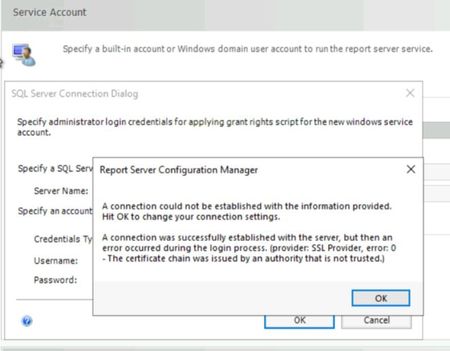
Hi, on SQL Reporting Service Configuration Manager 2022, when i try to connect SQL 2022 instance, its enforcing encryption. However, during the SQL 2022 i just installed by default and haven't configured any SSL certificate or activated encryption. Moreover, MSSQLSERVER service account also default account which comes with installer. How can i disable or bypass this issue in order to configure SQL Reporting Service ? Regards,2.4KViews2likes7Comments2609 issue with Reporting Services Point
I updated our Config Manager site last night to version 2609 and I'm seeing an issue with the Reporting Services Point. Every minute in the srsrp.log I'm getting the below error (I replaced the actual server name with Server FQDN), yet reporting services is functioning perfectly fine. I tried removing and re-adding the role this morning and it went right back to this error. The role is functioning properly and everything else that gets written in this log before these lines seems normal. This seems like it may be a bug. (!) InitializeSrsWhenNeeded error = The system cannot find the file specified. Failures reported during periodic health check by the SRS Server (Server FQDN).655Views1like11Comments