report templates
18 Topics
Ways of working filters.
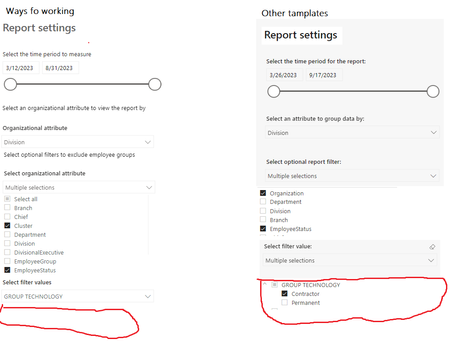
Hi Viva Insights Team! We are experiencing filter issues on WOW template. Not sure if there is anyone with the same issue. We want to filter out contractors and permanent employees for a specific department or division. We can select the division under attribute to group data by then move to optional report filter then we select (organization and employee status). lastly, we select filter value and see only the organization not employee status as on other templates we can see organization and expand the drop down then we have an option to choose perm or contractors. we have checked the slicer settings on powerBI are the same on all reports. Thank youSolved849Views1like3CommentsMetrics Removed
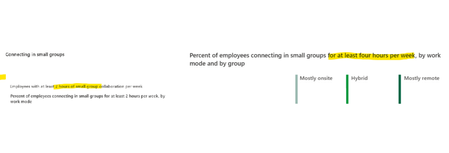
Hi Viva Insights Team! I was re-running hybrid and wellbeing template last week and we saw that same metrics have been removed from the template. 1. This will not have an impact with our dashboards that we shared with business? 2. Is the any reason the metrics have been removed on the reports? Thank you. NontlahlaSolved800Views1like2Comments
Does the attended metric take into account double booked meetings?
A client stumped me with this question: If I am triple booked for an hour on my calendar, and I've accepted all three meetings, and they all show as busy on my calendar, do I count as an attendee for all three simultaneously occurring meetings? My response based on the definitions below was yes, but I wanted to double check and confirm. Attended A person attended a meeting if they either accepted the meeting and their meeting shows as “Busy” in Outlook, joined on Teams, or were the organizer. Attendee A person who was invited and attended the meeting. After spending a few hours with the documentation, I can't find anything that would say there is some sort of control to account for this. I imagine it's a limitation of measuring attendance for in-person meetings. Is that the case?Solved699Views0likes3Comments
Issue with Wellbeing - Balance and flexibility PowerBI Dashboard
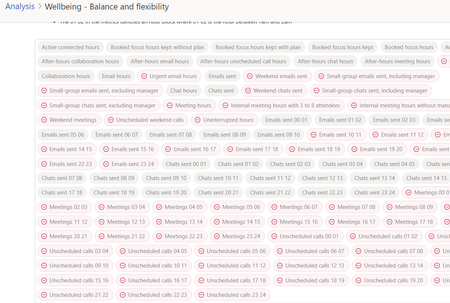
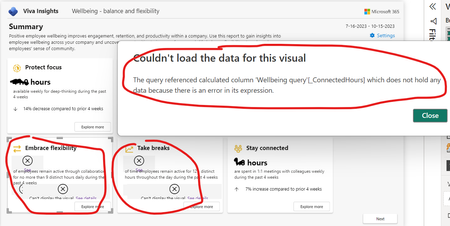
Hi all, I tried to run the "Wellbeing - Balance and flexibility" PowerBI Dashboard, but I found some errors, I attach the screenshot: I also found that in the query there are some warnings that I show you in the next screenshot: May you suggest me how to proceed? Is there some ways to fix it? Thank you in advance, PietroSolved669Views0likes3Comments
Company reporting on Praise
HI, I've been tasked with evaluating Viva to potentially displace a few products we currently use. One of those is TinyPulse. I can see that Viva Pulse absolutely replaces the survey function, but we have a particular requirement of the Praise function that I can't find. Once a month we do a 'spin the wheel' of everyone who has sent praise, and another of everyone who receives praise. If your name is picked then you get a small prize - wine, beer or chocolate, or an Amazon voucher if none of that appeals. To do that, the leadership need to know who has sent and who has received praise. They don't necessarily need to know what the praise was (although that would be nice). Is there any way to do this with Viva Insights Praise?Solved600Views0likes2CommentsViva Insights and Power BI AMA
We are excited to announce the Viva Insights and Power BI AMA on Wednesday, September 27th at 11:00AM Pacific! Join us to discuss the recently updated PBI dashboards in Viva Insights with our resident Power BI and Viva Insights expert Lucas Hogner. Lucas will be able to help answer questions like: how do we get started with Power BI templates? How do we set up Power BI templates? Which Power BI templates should we use? And more! Bring your burning Power BI and Viva Insights questions and we’ll get you all squared away. RSVP and add your questions now and get them answered during the AMA!535Views0likes1Comment
Bad results - Ways of working
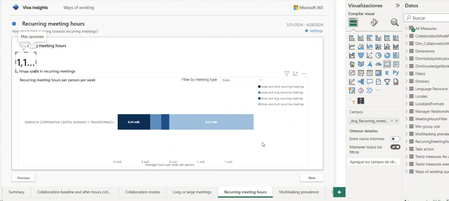
Hi team I've just recently saw an specific case with one of our clients that has some issues creating the WoW report and I hope you can help us to identify if this is a problem that came after the April 2024 update. As you can see the working hours are being showed like thousands and in some cases even the slide appears to have an error. We even regenerate a previous report (march) that was ok a month ago and right now it also broken.506Views0likes1CommentManager Effectiveness PowerBI report (No Manager 1:1 definition)
Can someone from microsoft help me understand why the Powerbi report which calculates a rolling four week average only uses 2 weeks to calculate if a person has met with their manager in the code below. Is the intent to show %of people not meeting with their manager at least once a week? So if an organization wants to show how many people met with their managers at least once in the last four week I would need to adjust the base metric ([_Meetings with manager 1 on 1 last 2 weeks]) to look at last 4 weeks instead of 2 weeks correct? % of employees with no 1:1 with their manager - rolling 4 weeks = VAR LogicTest = '_All Measures'[BT_Slicer_4w_Rolling_Average] VAR __REPORT_FIRST_DATE = '_All Measures'[First date all] VAR __date = SELECTEDVALUE ( 'Manager effectiveness query'[MetricDate] ) VAR __last_4_week = DATESINPERIOD ( 'Manager effectiveness query'[MetricDate], __date, -28, DAY ) VAR metric = AVERAGEX ( __last_4_week, VAR __numerator = CALCULATE ( COUNT ( 'Manager effectiveness query'[PersonId] ), 'Manager effectiveness query'[_Meetings with manager 1 on 1 last 2 weeks] = 0 ) VAR __denominator = CALCULATE ( COUNT ( 'Manager effectiveness query'[PersonId] ) ) RETURN DIVIDE ( __numerator, __denominator, 0 ) ) RETURN IF ( LogicTest && __date >= __REPORT_FIRST_DATE + 21, IF ( [Num Of Employees] >= SELECTEDVALUE ( 'Minimum group size'[Minimum group size] ), metric ), BLANK () )Solved500Views0likes1Comment