remote work
51 Topics
How much of your Microsoft 365 environment can you actually see at once?
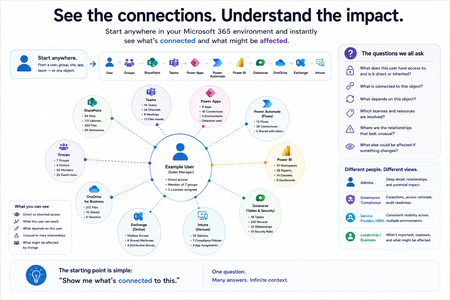
Not how many users you have. Not how many sites, teams, apps or flows you have. How much of it can you actually see connected together? I've been working across Microsoft 365 environments for a while, and I kept running into the same thing. There is no shortage of information. If anything, there is probably too much of it. Users, groups, permissions, SharePoint, Teams, Power Apps, Power Automate, Power BI, Dataverse, OneDrive, Exchange, Intune, licensing, configuration... It's all there. But when you're actually trying to understand how everything fits together, it can be a different story. You open one blade. Find something. Open another. Cross-check it. Go back. Open something else. Before long, you're jumping between different parts of the tenant trying to build the bigger picture in your head. And if you're working with larger environments, that gets difficult pretty quickly. The information isn't necessarily missing. The relationships between the information are what can be difficult to see. That got me thinking about a slightly different question: Instead of "where do I find this information?" "Show me what's connected to this." That's where VisibleState started. Start anywhere. Follow the connections. Imagine starting with a single user. Instead of seeing that user simply as a record with a list of properties, imagine being able to explore the relationships around them: User → Groups → SharePoint → Teams → Power Apps → Power Automate → Power BI → Dataverse → OneDrive → Exchange → Intune Then the questions become different: What does this user have access to? Is that access direct or coming through a group? What resources are connected to them? What depends on something they're associated with? Which licenses are involved? Are there relationships that look unusual? If something changes, what else might be affected? Those questions aren't necessarily about finding another piece of information. They're about putting information that already exists into context. A report can tell you that something exists. A connected view helps you understand what it is connected to. Illustrative example below — not a real customer environment. I'm not suggesting Microsoft 365 doesn't already give us this information Quite the opposite. Microsoft 365 already gives administrators an incredible amount of information and tooling. The thing I've been thinking about is what happens when you want to look across those boundaries. Sometimes I don't want another export. I don't want another list. I don't necessarily want another dashboard. I want to start with something I'm looking at and ask: "What's connected to this?" And then keep following the trail. That's the idea I'm exploring with VisibleState. The interesting part is what happens when you change the viewpoint The same relationships can be useful for completely different reasons. For example: Administrators may want to understand access, permissions and dependencies. Security and governance teams may want to find unusual relationships or exceptions. Compliance teams may need to understand who can access something and why. People managing multiple environments may want a consistent way to understand what's there without rebuilding the picture manually every time. Leadership may not need to see the graph at all. They may simply want to know what's important, what's exposed and what could be affected. It's still the same underlying environment. You're just looking at it from a different angle. And that's where I think things get interesting. Where I'm at with it VisibleState started as something I was building to make my own work easier. I was spending a lot of time investigating environments, tracing access and putting information together for reports. The individual tasks weren't necessarily difficult. It was the jumping between different places and reconstructing the bigger picture that took the time. So I started building something that would let me approach the environment through the relationships instead. It's grown quite a bit from where it started, and I'm continuing to build it. I'm not posting this as a product launch, and I'm not looking for people to sign up. I'm genuinely interested in whether the problem I'm seeing is familiar to other people working with Microsoft 365. So I'm curious... If you could start with any object in your Microsoft 365 environment and immediately see what it's connected to, where would you start? Would it be: Users and access Groups and permissions SharePoint and Teams Power Apps, Power Automate, Power BI and Dataverse Licensing and resources Governance and unusual relationships Something completely different Maybe you've already got a good way of doing this. Maybe you still find yourself jumping between different services and piecing things together manually. Or maybe I'm looking at the problem from the wrong direction. What's the one relationship in your Microsoft 365 environment that you wish you could see instantly?213Views0likes0Comments
Peer recognition program in M365. Has anyone done this without a third-party tool?
HR wants to launch a peer recognition program where employees can give kudos to each other. They want it visible to the team, maybe tied to company values, and ideally something that feeds into performance reviews at year end. I looked at Viva Engage but its more of a social feed and theres no way to categorize recognitions by company values or pull them into reviews. Has anyone built something like this using M365 tools or found an app that handles it?128Views0likes3Comments
Best way to enforce manager check-ins across the org using M365 tools?
Our CHRO wants every manager to have at least bi-weekly check-ins with directs and wants visibility into whether its actually happening. Right now theres zero tracking. Some managers do it, some dont, and leadership has no idea. I looked at Viva Insights but it only shows meeting frequency, not whether there was an actual structured conversation. Is there a way to get reporting on this through admin center or do we need something separate?128Views0likes2CommentsHello from New Hampshire 👋
Hi everyone, I’m Lissette. I work in enterprise HR technology and project delivery, with a strong focus on using Microsoft 365 and AI to help teams work more efficiently and scale what’s working. A lot of my day‑to‑day work sits at the intersection of technology, structure, and enablement, translating complex requirements into practical solutions, and using AI and automation to accelerate delivery and reduce friction for teams. I’m here to learn from the community, share practical experiences, and exchange ideas around modern ways of working. Looking forward to learning from you all and contributing where I can. I’m especially interested in real‑world M365 practices that improve collaboration, governance, and adoption at scale.168Views2likes1Comment
Is there no way to allow people to comment on my word document?
I am trying to share something I am working on with beta readers and some friends but the only options are "can edit" or "can view". There is no option for "can comment" or to let them viewers use the review function. I asked for help with the issue and got told that because my account is personal OneDrive and not business that there is no review only feature. Was that a mistake or is Microsoft really this behind on basic features? Google Drive has allowed giving people access with "comment only" for years.Solved1.8KViews1like2Comments
Microsoft 365 Subscriptions
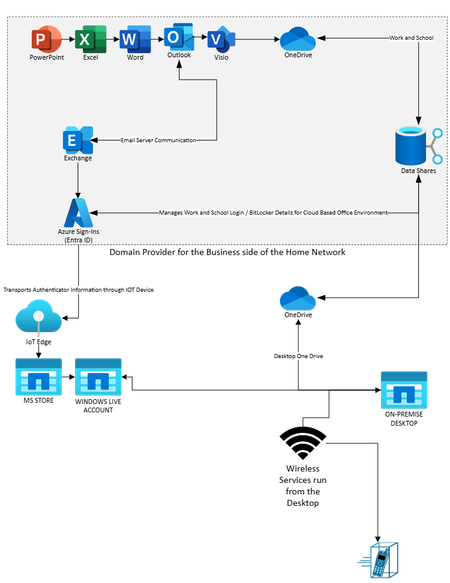
In fourth quarter of 2024, I decided to upgrade my machine and tried out a web only version (freeware) of Microsoft 365. After some time, I found out that I was not getting the qualities I needed for documentation to be presentable as Microsoft Word and Excel were not usable for print formats. I decided to buy a Microsoft 365 Business subscription (bought through my domain provider) which allowed me to use my email address attached to me and my website domain. This allowed me to also download desktop copies of Word and Excel. However, I ran into problems with old accounts colliding with my new ones..., for example, Skype for Business, Microsoft Store, and Microsoft Live would constantly appear in my installation admins. If I attempted to install them, the installation would fail and get stuck i.e, I could not remove them. Microsoft message pop-ups would state, "You cannot install this on a 'work' account." I thought to myself, "Okay, I installed my Windows OS as a "Work Account on my new machine." This made sense, because I could go to my browser on my new machine and I could go to my old laptop that had absolutely no Microsoft 365 on it and access my Office from my browser profile. My old laptop is the only machine that accepts the Windows Live email address i.e., it acts as a Windows Live access service via the 'free' outlook account to which it is attached. However, now that all these items are separated by Work or Home classification, I keep getting messages that state, "We cannot renew your Microsoft 365 account." But my Work account should not be attached to Microsoft Live accounts...should it? After all, it uses Entra ID for access and the subscription is bought through my domain vendor. Why is Microsoft Support sending me these emails? My original setup accessed Microsoft Live accounts via the web through my old laptop using my free Outlook email and looked something like the graphic below:408Views0likes1CommentMicrosoft 365 Cloud vs Desktop Applications
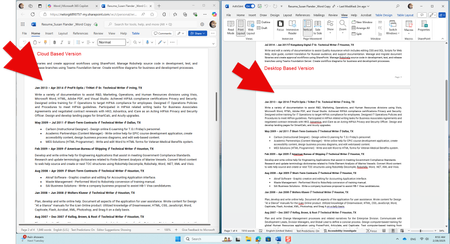
I am having issues with the Microsoft 365 Professional version which supposedly should display the documents as a replica on the Cloud when edited using the Desktop version of the same application. Shown below is what a Microsoft Word document looks like side-by-side Cloud vs Desktop: It would seem that spacing and page breaks would hold properly in the Cloud version (shown on the left), but do not. My understanding is that Microsoft Office products have always had an XML base, so technically, what is produced using a Desktop version of an application should display as a replica when opened in a Cloud version of an application. However, what I am seeing is that I lose page numbering and properly spacing in my Cloud version of the same exact document which is pulled from the same exact file location. I am constantly doing double the work to create a perfect document. Are there any suggestions from Microsoft 365 support that might help remedy these formatting issues?822Views0likes1Comment