reliability
130 Topics
Support Live Session Migration for Windows 11 Enterprise Multi-Session AVD Hosts
Description Azure Virtual Desktop administrators regularly encounter maintenance scenarios where a Windows 11 Enterprise Multi-Session session host must be removed from service to apply urgent patches, investigate platform issues, replace a host, or perform emergency maintenance. The current approach requires placing the session host into drain mode and waiting for active user sessions to disconnect or forcing user logoff, which can disrupt productivity and user experience. It would be valuable if Azure Virtual Desktop supported live migration of active user sessions between Windows 11 Enterprise Multi-Session hosts within the same host pool, similar to the way virtual machine live migration minimises downtime during infrastructure maintenance. This capability would allow administrators to move active sessions from one session host to another without requiring user disconnection or application interruption. This feature would provide significant operational benefits, including: Reduced user disruption during planned and emergency maintenance. Faster remediation of unhealthy or degraded session hosts. Improved patching and update operations. Reduced dependency on large maintenance windows. Improved service availability for business-critical AVD environments. Better support for future hot patching and rolling maintenance scenarios. While Windows 11 Enterprise Multi-Session differs significantly from Windows Server and traditional VM live migration technologies, the ability to seamlessly relocate active user sessions between healthy hosts in a host pool would be a major enhancement for enterprise Azure Virtual Desktop deployments operating at scale.158Views5likes0CommentsSimpler, private connectivity between Azure and AWS with Azure Multicloud Interconnect
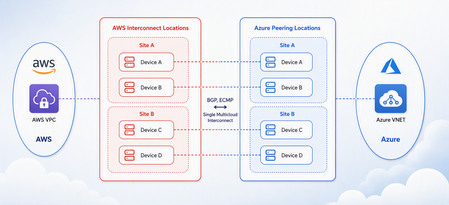
Multicloud is no longer the exception — it is how most enterprises operate. Teams run analytics in one cloud and applications in another, place workloads to meet data-residency requirements, and increasingly move large volumes of data between clouds to train and serve AI models. Yet the network that connects these environments has remained one of the hardest parts of a multicloud strategy to get right. Connecting Azure and AWS privately has traditionally meant stitching together Azure ExpressRoute, AWS Direct Connect, a connectivity provider or colocation footprint, customer-managed routers, BGP sessions, and link-layer encryption — then owning the resiliency design and day-to-day operations across all of it. The result is often slow to deliver, difficult to troubleshoot, and inconsistent in performance. Today, Microsoft and AWS are together introducing Azure Multicloud Interconnect, a jointly engineered, fully managed service that delivers private, high-throughput connectivity between Azure and AWS through a single logical resource. Both clouds coordinate provisioning, resiliency, encryption, and lifecycle operations, so the connection between your environments simply works — end to end. The challenge with connecting clouds today For most organizations, cross-cloud connectivity has been a build-it-yourself exercise. Establishing a private link between Azure and AWS typically requires provisioning an ExpressRoute circuit on one side and a Direct Connect circuit on the other, engaging a connectivity provider or securing space in a colocation facility to bridge them, and then configuring and maintaining the routers, BGP peering, and encryption that tie the two clouds together. Each of those pieces is owned by a different team or vendor, which makes the end-to-end path only as reliable as its least-managed component. When something breaks, isolating the root cause means coordinating across Microsoft, AWS, a network provider, and your own operations team — and mean time to resolution suffers as a result. Capacity planning is equally difficult: bandwidth is often provisioned for peak demand and left underused, while scaling up to meet a new AI or data initiative can take weeks. The outcome is a connectivity layer that is slow to stand up, expensive to operate, and hard to reason about — exactly the opposite of what a multicloud strategy is meant to deliver. Azure Multicloud Interconnect removes that complexity by turning cross-cloud connectivity into a managed service. What is Azure Multicloud Interconnect? Azure Multicloud Interconnect is a provider-managed, private intercloud connectivity service built on the proven foundations of Azure ExpressRoute and AWS Direct Connect. Instead of assembling and operating the underlying components yourself, you establish one interconnect resource and consume a private, dedicated path between your Azure and AWS environments. Under the covers, Microsoft and AWS coordinate the circuits, routing, and encryption on your behalf. You get the outcome you want — a reliable private connection between clouds — without becoming the systems integrator for it. Because the service builds on ExpressRoute and Direct Connect, it fits naturally into the connectivity models, tooling, and operational practices your teams already use in each cloud. One managed resource replaces a stack of circuits, routers, BGP sessions, and encryption you would otherwise build and operate yourself. Figure 1. Azure Multicloud Interconnect provides a single, managed private path between Azure and AWS, built on ExpressRoute and Direct Connect with a quad-redundant, 400G-class design and MACsec encryption. How it works Azure Multicloud Interconnect is engineered for the performance and availability that production and AI-scale workloads demand: A single logical connection. You provision and manage one interconnect resource. There are no customer-owned routers to rack, configure, or patch between the clouds. Quad-redundant, multi-site design. The data path is built across redundant devices and diverse sites — four Azure Microsoft Enterprise Edge (MSEE) routers and four AWS routers — so there is no single point of failure. High bandwidth backbone. A high-capacity LAG-based design provides the headroom needed for large-scale data movement and distributed AI traffic. Elastic bandwidth. Scale capacity up or down as demand changes, rather than provisioning for peak and paying for it year-round. Encryption by default. MACsec link-layer encryption is enabled automatically, so traffic between clouds is protected without extra configuration. Enterprise-ready networking. The service is IPv6-ready, supports APIPA addressing, and targets a 99.99% availability SLA. Routing and provisioning are coordinated by the platform, which removes the most common sources of cross-cloud connectivity errors — mismatched BGP configuration, inconsistent encryption settings, and asymmetric or fragile failover paths. A foundation you can trust Azure Multicloud Interconnect is not a new, unproven path — it extends two connectivity services that enterprises already rely on: Azure ExpressRoute and AWS Direct Connect. Both are private connectivity backbones trusted for mission-critical hybrid and cloud workloads, and the interconnect inherits their carrier-grade capacity, global edge presence, and operational maturity from day one. It also means your teams do not have to learn a separate model. The interconnect appears as a first-class resource governed by the identity, access, and monitoring controls each cloud already provides, and it can be automated with the tooling you use today. Extending trusted services, rather than introducing a parallel one, is what allows Microsoft and AWS to offer intercloud connectivity as a managed experience with confidence. Why this matters for your team Azure Multicloud Interconnect is designed to change the economics and the experience of running across clouds. Taken together, these benefits shift cross-cloud networking from a specialized, high-effort project to a repeatable, on-demand capability. Instead of dedicating senior engineers to build and babysit intercloud links, your team can direct that expertise toward the applications and data platforms that differentiate your business — while trusting that the connective tissue between clouds is reliable, secure, and ready to scale. Faster time to value. Turn up private Azure–AWS connectivity through a guided, managed workflow instead of a multi-week integration project spanning several vendors. Lower operational burden. Microsoft manages the infrastructure, resiliency, and lifecycle, so your networking team is freed from patching routers and diagnosing cross-cloud faults. Predictable, high performance. A dedicated, private path with high capacity that delivers the consistent throughput and low latency that public-internet or VPN paths cannot guarantee. Security you don’t have to assemble. Private connectivity plus default MACsec encryption keeps intercloud traffic off the public internet and protected in transit. A consistent experience in both clouds. Provision, monitor, and manage the interconnect using the native constructs and tooling your teams already rely on in Azure and AWS alike. Built for the way enterprises use multicloud “I've heard a very consistent message across many years of customer engagements - we are multi-cloud enterprise by design. With this announcement we are taking a burden on connecting clouds away from the customers." Igor Sakhnov, CVP Azure Networking Customers have told us where dedicated, managed intercloud connectivity makes the biggest difference. Azure Multicloud Interconnect is designed for scenarios such as: Distributed AI workloads. Move training data and model outputs between clouds at high throughput to feed pipelines wherever the compute lives. Large-scale data movement. Replicate datasets, back up across clouds, and support analytics that span Azure and AWS. Cross-cloud disaster recovery. Use a second cloud as a resilient recovery target over a private, reliable link. Hybrid and best-of-breed architectures. Run each application on the cloud that suits it best while keeping the connection between them private and performant. Regulated and sovereign workloads. Keep intercloud traffic on a private path to help meet data-residency and compliance requirements. Workload migration. Rehost or rebalance workloads between clouds without re-engineering connectivity for each move. Availability and what’s next Azure Multicloud Interconnect is launching first for Azure and AWS connectivity, the pairing customers ask about most often. Microsoft and AWS are starting with a preview so that you can validate the experience against your own architectures, with general availability to follow. This is the beginning of a broader journey. Building on existing multicloud connectivity capabilities, we plan to extend the managed interconnect model to additional clouds — including Google Cloud (coming soon)— so that a consistent, provider-managed experience can span your entire multicloud estate. As always, the roadmap will be guided by customer demand and real-world use. Our shared goal is simple: make the network the easiest part of your multicloud strategy, not the hardest. By delivering intercloud connectivity as a managed service, Microsoft and AWS want every organization — from a team moving its first dataset between clouds to an enterprise operating at AI scale — to connect Azure and AWS privately, securely, and with confidence, and to do it in minutes rather than months. Get started Learn more about Azure Multicloud Interconnect, Azure ExpressRoute, and AWS Direct Connect from Microsoft and AWS documentation, talk with your Microsoft or AWS account team about joining the preview, and tell us which cloud pairings and scenarios matter most for your organization. We are building this with your feedback. Azure Multicloud Interconnect is jointly delivered by Microsoft and AWS, built on Azure ExpressRoute and AWS Direct Connect. Feature availability, performance targets, and timelines may evolve as the service moves from preview to general availability.6.1KViews3likes0CommentsAzure Front Door edge actions: programmable compute for a secure, resilient, AI-ready edge
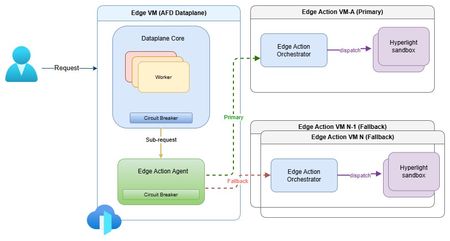
The need for secure edge programmability As modern web applications increasingly move decision-making closer to users, programmable compute at the edge is becoming a foundational capability for delivering low-latency, personalized, and intelligent experiences. Azure Front Door edge actions introduces lightweight customer-defined logic that executes close to users at Microsoft's global edge (https://aka.ms/edgeactionsblog). The engineering challenge extends well beyond moving code closer to the request path. It is about enabling edge programmability while preserving the core guarantees customers expect from a global edge platform: hyperscale performance and acceleration, strong security and tenant isolation, resiliency, and fast, controlled recovery. That sets up a much higher engineering bar than simply bringing a serverless runtime to the edge. Programmability introduces customer code, new execution paths, runtime dependencies, and additional failure modes directly into the critical request path. Architecture therefore must make flexibility a first-class capability without compromising the operational characteristics of a hyperscale edge platform. Preserving performance at hyperscale The first architectural challenge was preserving the performance characteristics of Azure Front Door while introducing programmable execution into the request path. Every additional execution step has the potential to increase latency, amplify failures, or reduce throughput at global scale. Edge actions was therefore designed to add programmability without changing the fundamental performance profile customers already expect from Azure Front Door. At request time, Azure Front Door evaluates the request, determines whether an edge action should be executed based on the associated rule, invokes the edge actions runtime, and applies the result inline. Because the runtime sits directly in the request path, every design decision was guided by a common principle: keep execution local whenever possible, bound latency when dependencies degrade, and ensure optional compute never becomes a platform-wide latency amplifier. Performance design principles Node-local execution keeps request processing on the same machine whenever possible, minimizing cross-node communications and preserving low latency. Minimized inter-node hops keep the common path compact while still enabling cluster-level fallback when local dependencies deteriorate. Connection reuse through Edge Action Agent reduces gRPC invocation overhead and improves hot path efficiency. Lightweight Hyperlight isolation provides strong tenant isolation with an execution model suitable for latency-sensitive edge workloads. Fast-fail and circuit-breaker protects latency by bounding waits on degraded dependencies and preventing cascading pressure. Together, these architectural choices introduce programmable compute without turning the Azure Front Door data plane into a distributed orchestration layer. The hot path remains local, predictable, and bounded, with fallback used only when necessary to preserve performance across the global edge. Security and tenant isolation by design Running customer-defined code on a shared global edge fundamentally changes the security model. Unlike traditional request processing, programmable execution introduces untrusted customer code directly into the request path, making strong isolation a foundational architectural requirement rather than an operational safeguard. For Azure Front Door edge actions, every execution is designed to run within a dedicated Hyperlight micro-VM, providing hardware-enforced isolation between customer workloads, the Azure Front Door data plane, and the underlying host environment. Security design principles Hypervisor-backed isolation ensures customer code executes within dedicated Hyperlight micro-VM boundaries rather than shared execution environments. Data plane separation isolates edge actions execution from Azure Front Door's core traffic-processing path. Minimal host surface area reduces the attack surface and limits privileged interactions. Restricted execution context exposes only the request information required to process a request. Reduced operational blast radius helps contain compromised or misbehaving workloads. These architectural boundaries extend beyond workload isolation. Azure Front Door's data plane remains physically separated from the edge actions orchestration service, while each execution receives only the minimum context required to perform its task. This defense-in-depth approach reduces both security risk and operational blast radius without compromising performance. Hyperlight: Security without sacrificing performance A key differentiator of Azure Front Door edge actions is its use of Hyperlight micro-VMs to provide hardware-backed isolation without introducing the traditional performance penalties associated with virtual machines. Hyperlight was designed to make VM-level protection practical for high-throughput function execution, enabling strong tenant isolation while remaining suitable for latency-sensitive edge workloads. Edge actions builds this foundation through the edge action orchestrator, which maintains a pool of warm Hyperlight sandboxes ready to serve requests. By reusing pre-initialized sandboxes instead of creating a new execution environment for every request, edge actions minimizes initialization overhead, reduces request latency, and sustains higher throughput under load. The result is a security model based on VM isolation that remains compatible with the performance expectations of a hyperscale edge platform. Critically, performance optimizations do not weaken isolation guarantees. After each execution, sandbox state is cleaned before reuse, ensuring that subsequent invocations cannot access data from prior executions while preserving the efficiency benefits of warm sandboxing. In internal benchmarking, lightweight edge actions executed in less than 2 ms inside Hyperlight, with approximately 1.27 ms of total sandbox overhead, demonstrating that strong isolation and high-performance edge execution can coexist. Security enables resiliency Security and resiliency are closely related architectural goals. Isolation helps contain malformed inputs, unexpected behavior, and execution failures, preventing individual workloads from affecting the broader platform. In a multitenant edge service, isolation is not only a security requirement; it is also a key resiliency mechanism. Resiliency built into the platform Strong isolation is not only a security property, but also a foundational resiliency mechanism. By containing malformed inputs, unexpected behavior, and execution failures within dedicated execution boundaries, the platform prevents individual workloads from affecting neighboring tenants or the broader service. At hyperscale, robust isolation is essential for maintaining customer trust and predictable platform reliability. Building on that foundation, Azure Front Door edge actions was designed around a simple operating principle: failures are inevitable, but their impact must be predictable, bounded, and recoverable. Because programmable compute introduces additional execution paths and runtime dependencies into the request path, resiliency must be built into the control points that determine when to execute, stop waiting, or fall back. The platform incorporates lessons learned from operating Azure services at a global scale, with a focus on minimizing blast radius, maintaining service continuity, and enabling controlled recovery when dependencies fail, overload, or time out. Resiliency principles Bound failure impact through isolation and containment. Recover predictably using health-aware routing and fallback paths. Protect customer availability first through graceful degradation. Fail fast rather than fail slowly to avoid latency amplification. Continuously validate assumptions through Game Days and fault injections. These principles translate into request-time behavior through deadlines, circuit breakers, fail-open behavior, and health-based fallback. Together, they ensure that optional programmable execution enhances application capabilities without compromising the stability of Azure Front Door's core request-processing pipeline. Continuous validation of resiliency assumptions Resilient architecture is credible only when validation becomes part of the operating model. For edge actions, Game Days and Fault Injections provide recurring opportunities to verify that architectural assumptions continue to hold under production-like stress. Validation includes chaos and failure injections, timeout and dependency-loss exercises, overload and queue-growth scenarios, mixed-workload testing, and interface fuzzing. These exercises answer practical production questions: Does fail-open behavior protect the request path? Do circuit breakers engage early enough? Does fallback routing preserve service continuity? Do malformed inputs remain contained? Repeated validation also strengthens operations. Detection improves, mitigation becomes more predictable, and recovery evolves from architectural intent into demonstrated operational capability. Built for future intelligent & modern workloads Edge actions is designed for lightweight programmable execution today, but the underlying architecture is intended to support increasingly intelligent decision-making over time. The engineering requirement remains unchanged: future intelligence workloads must operate within the same architectural constraints that govern today's request processing - bounded execution, strong isolation, predictable fallback, and protection of the common request path. Architectural implications for intelligence workloads Real-time AI inferencing for request classification and policy evaluation. Intelligent bot, abuse, and fraud detection closer to users. AI-assisted origin selection and traffic-routing decisions. Application-specific SLM-powered decision making at the edge. In that model, the objective is not simply to introduce more intelligence at the edge, but to ensure that intelligence inherits the same platform guarantees as every other component of the request path. Closing thoughts Programmable edge execution is becoming a foundational capability for modern distributed applications. The engineering challenge, however, extends far beyond running customer code closer to users. It is about preserving the system properties that customers already depend on while introducing a new execution surface into the critical request path. Edge actions demonstrates that edge programmability, performance, security, tenant isolation, and resiliency are not independent design goals - they are a single architectural problem that must be solved together. By keeping the common path protected, failures bounded, tenants strongly isolated, and recovery predictable, Azure Front Door edge actions extends the platform's capabilities without compromising the engineering principles that underpin a global hyperscale edge service. Learn more Introducing Hyperlight Edge actions samples: JavaScript request context665Views1like0CommentsAzure Front Door: Resiliency Series – Part 3: Tenant isolation
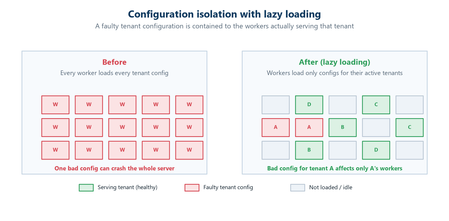
Abhishek Tiwari, Vice President of Engineering, Azure Networking Amit Srivastava, Partner Director of PM, Azure Networking Varun Chawla, Partner Director of Engineering, Azure Networking Azure Front Door serves hundreds of thousands of tenants from hundreds of edge locations, densely sharing the globally distributed edge fleet. That density is exactly what allows us to deliver global scale, performance, and cost efficiency. It also means that, without strong isolation, a single tenant’s incompatible configuration or anomalous traffic can, in the worst case, affect many other tenants. The October 2025 incidents reinforced how important it is to contain this class of risk. Our goal for this tenant isolation is simple to state and hard to achieve: no single tenant’s configuration or traffic should be able to impact any other tenant. In Part 1 of our three part mini blog series, we outlined our four‑pillar strategy for improving the resiliency of Azure Front Door: configuration resiliency, data plane resiliency, tenant isolation, and accelerated Recovery Time Objective (RTO). Part 1 detailed how we would make configuration propagation safer and how the data plane keeps serving from a ‘last‑known‑good’ (LKG) configuration, even if an incompatible configuration change is propagated to the data plane. Part 2 turned to recovery, showing how we bring the system back to full operation in an accelerated, predictable, and in a bounded timeframe. In this final part, we turn to the tenant isolation pillar that ensures that any single tenant configuration or traffic issues are limited in scope to that tenant alone and do not impact other tenants. We will also show how Azure Front Door achieves single-tenant containment through configuration isolation, lazy loading, and a micro-cellular layered ingress-sharding architecture. Repair status: all outstanding items now complete Before we dive into tenant isolation, here is a final update on the overall repair items from the two October 2025 incidents (you can review the details in our Azure Incident Retrospective sessions for the October 9th and October 29th incidents). We are pleased to report that all outstanding work across every pillar is now complete and fully deployed in production – including the tenant isolation work described in this post. With these safeguards in place, we have also returned configuration propagation latency to pre‑incident levels while keeping platform stability our top priority. In the table below, “Completed” means broadly deployed in production. Learning category Goal Repairs Status Safe customer configuration deployment Incompatible configuration never propagates beyond ‘EUAP or canary regions’ Control plane and data plane defect fixes; forced synchronous configuration processing; additional stages with extended bake time; early detection of crash state Completed Data plane resiliency Configuration processing cannot impact data plane availability Manage data‑plane lifecycle to prevent outages caused by configuration‑processing defects; isolated work‑process in every data plane server to process and load the configuration Completed 100% Azure Front Door resiliency posture for Microsoft internal services Microsoft operates an isolated, independent Active/Active fleet with automatic failover for critical Azure services Phase 1: onboarded critical services batch impacted on Oct 29th outage running on a day‑old configuration; Phase 2: automation & hardening of operations, auto‑failover and self‑management of onboarding for additional services Completed Recovery improvements Data plane crash recovery in under 10 minutes Data plane boot‑up time optimized via local cache; recovery time accelerated to under 10 minutes Completed Tenant isolation No configuration or traffic regression can impact other tenants Micro‑cellular Azure Front Door with ingress layered shards Completed Why isolation at edge scale is deceptively hard Traditional isolation techniques such as dedicating separate hardware to each tenant or running every tenant inside its own virtual machine are impractical at the edge. Edge sites are constrained on space, power, and capacity. The entire premise of a modern, multi-tenant application delivery platform is that any tenant can be served from any site closest to the user. We cannot simply partition hundreds of thousands of tenants onto dedicated machines without giving up either proximity, scale, or the efficiency that make the edge fast and cost efficient. Isolation therefore, must be achieved in software, inside a multi-tenant fleet. What we already do today Azure Front Door already includes several layers of tenant isolation and partitioning. However, the incidents in October clearly highlighted that these techniques were not enough. Prior to the incidents, our protection mechanisms included: Infrastructure partitioning. Edge sites were organized into physically isolated primary and fallback traffic rings. Noisy‑neighbor protection. Fair‑share resource allocation, rate limiting, and anomaly-based load protection kept any single tenant from monopolizing shared resources such as CPU, memory, or network bandwidth on an Azure Front Door server. Circuit breakers. Circuit breakers shed costly work first and can disable a risky per‑tenant feature before it exhausts shared resources on a server. Real‑time crash protection. A crash‑analysis system correlates crash signatures across machines and can pinpoint and block crash patterns caused by tenant IPs or traffic patterns. While these protections are valuable, many of them are reactive and proved insufficient during the October incidents. The next generation of isolation makes single‑tenant containment a fundamental part of the platform which governs how configurations are loaded, and how traffic is served. Configuration isolation: loading only what is needed Part 2 introduced ‘lazy loading’ as a recovery optimization technique. It is also an important configuration‑isolation mechanism. Historically, every worker on every edge server had to be ready to serve any tenant, which meant each worker loaded a large set of tenant configurations. A single incompatible configuration could therefore ripple across many workers. With lazy loading, a worker loads a tenant’s configuration and its TLS certificates only when it actually receives traffic for that tenant. The practical consequence for isolation is powerful: a faulty configuration can only affect the workers that have loaded that specific tenant, never the entire server or fleet. Combined with per‑tenant validation on load, and the Food Taster safeguard from Part 1 (a sacrificial process that pretests every configuration change in isolation), configuration problems are caught early and contained to the smallest possible footprint. Figure 1: With lazy loading, an incompatible configuration is contained to the workers serving that tenant, instead of poisoning the whole server. Tenant isolation: a micro-cellular, layered ingress sharding architecture Configuration isolation limits the blast radius of an incompatible configuration. Traffic isolation addresses the other half of the problem: a tenant whose anomalous traffic incident, like a sudden surge, a pathological request pattern, or malicious activity, could degrade a shared worker. Our approach is a micro‑cellular architecture that combines multiple concepts working together. Worker‑process isolation. Each edge server already runs many independent worker processes. Instead of letting every worker serve every tenant, we assign tenants to specific groups of workers. Those worker group (shards) become the unit of isolation: if a tenant destabilizes its shard, the impact is contained to that shard’s workers while the rest of the server keeps serving normally. Ingress sharding. Rather than a handful of fixed shards, we compose shards from overlapping subsets of a server’s workers. Even a modest number of workers can be combined into an enormous number of distinct, overlapping shards – giving us a very large number of fine‑grained fault domains without dedicating hardware to every tenant. Figure 2: Tenants are randomly assigned to different shards on each server (layer). Even when a good tenant shares the noisy tenant’s shard on one layer, routing steers its traffic to healthy shards on the others. Multi‑layer ingress sharding. This is where ‘layered’ comes in. Each edge server is treated as an independent layer, and each tenant is assigned to a different, randomly chosen shard on every server. Because assignments are independent from one server to the next, two tenants that happen to share a shard on one server are extremely unlikely to share a shard again on another server. The chance of any good tenant repeatedly colliding with a noisy tenant across many servers becomes vanishingly small. Intelligent ingress routing. Tying it together is a routing layer that terminates each incoming connection, identifies the tenant, and steers the request to that tenant’s assigned, healthy shard. If a shard is unhealthy or saturated, traffic is directed to the tenant’s healthy shards on other layers. Figure 3: Intelligent Ingress Routing The combined effect is that when a noisy tenant overwhelms or crashes its shard on one server, only that shard is affected. Because every other tenant is spread across a different, randomized set of shards, they continue to find healthy paths, and the routing layer moves their traffic accordingly. A worst-case availability problem is downgraded to, at most, a small and redistributable capacity problem, that the routing layer smooths over. An in-depth technical analysis of layered ingress sharding is available here for reference. Shrinking the blast radius Taken together, these mechanisms fundamentally change the shape of failure. In a uniform, fully shared fleet, an incompatible tenant can, in the worst case, affect a large share of the tenants on a machine, in an edge location, or beyond. With configuration isolation and layered ingress sharding, the same failure is confined to a subset of workers serving the offending tenant. Our target for this tenant isolation pillar is effectively single‑tenant containment: a configuration or traffic anomaly caused by one tenant should never cause issues to any other tenants. Figure 4: From a shared fleet where a single tenant can affect many, to micro‑cellular shards that confine impact to the offending tenant. Validating isolation in practice As with our recovery work, we don’t simply design these boundaries and assume they hold, we test them. Through deliberate fault‑injections, we have pushed noisy and faulty tenants into the system and confirmed that impact stayed contained to the offending shard, that healthy tenants kept serving, and that the routing layer steered around unhealthy shards as intended. This turns isolation from a design claim into a well-drilled, and repeatable outcome. Closing This post concludes our three-part mini blog series on Azure Front Door resiliency. We have shared how we are making configuration propagation safer (Part 1), recovering faster when failures do occur (Part 2), and containing the blast radius stemming from any single tenant through configuration isolation and a micro‑cellular, layered‑sharding architecture (Part 3). Resiliency, however, is not a project with an end date. It is an ongoing commitment. While this series concludes the blog series of our response to the October 2025 incidents, our investments in Azure Front Door’s resiliency, isolation, and recovery will continue. As we make further improvements, we will keep sharing them with you. We deeply value our customers’ trust in Azure Front Door. We remain committed to exceeding expectations for security, reliability, and transparency.1.9KViews5likes0Comments
AVD Forced log off by user
My suggestion for a feature request is to add a logoff/force-logoff option in both the web client and AVD client at a minimum. Right now, if a user logs into a host and they hit a black screen or any other type of error they are stuck to that host until the session is force logged off by an admin or they hit the logoff timeout that an admin sets. This would save frustration and productivity loss for a user that would have to wait for an admin to help. This is especially needed for companies that support around the clock teams.
MacOS Windows App Dynamic Resolution not working
When using MacOS Windows App 11.0.5, if the AVD icon settings are left un-customised, the App does not honour the host pool setting to enable Dynamic Resolution. Dynamic Resolution only seems to work if it's explicitly enabled on each AVD icon within the Windows App on the client device. Our users expect Dynamic Resolution to work by default. It's enabled in the host pool and it previously worked on the RD Client.
Windows App - Account Picker During Startup
Windows App is showing additional improvements to the overall VDI experience. As an Architect working for a consulting company, I have multiple clients with AVD environments I have to log into. One of the major benefits of Remote Desktop is that when opening, the window provides visibility to all signed in accounts. With Windows App, when opening the application, I'm in the most recent account. To benefit us that work in multiple environments, allow us the capability to choose which account I want to work in when opening the application. If Windows App only has one account associated, it can default to that account. But if there are two accounts present, allow the user to choose which one they want to go into at the onset.397Views2likes3CommentsSomething is preventing you from using Windows App right now.
After being auto-updated from Windows App version 2.0.327.0 to version 2.0.328.0, some of our users can't launch their Windows App anymore and get an error message says: "Something is preventing you from using Windows App right now." Since there is no way to control the update process, we could only let our desk users use MSRDC instead, as a temporary solution. For the frontline users, I could only pray that this problem will not take place until weekend. If any Microsoft person sees this post, please let the Windows App team know about this and fix this problem ASAP.3KViews2likes7CommentsFrequent AVD Deployment Failures
Since June 2024, we have experienced occasional failures in AVD deployments. While most deployments succeed through adding session hosts to the host pool, there are instances where the deployment fails. Given this situation, we would like to request a change in behavior to reduce the burden of recreating AVDs when deployment fails.
Microsoft Remote Desktop for Mac repeatedly forgets Windows 365 workspace
In the last week or so, I have repeatedly had to re-add the workspace URL for Windows 365 (the "subscription URL" collected from windows365.microsoft.com) to Microsoft Remote Desktop for Mac. The issue started with the previous version of the app, but has continued to happen about once-a-day since installing the latest version (10.9.0 build 2140) from the Mac App Store. Every time the workspace is re-added, it needs to be reauthorized by signing in via OAuth again and any custom settings for the workspace need to be reconfigured. Is this a known issue or am I the lone recipient of this particular cosmic annoyance? 😂8.6KViews21likes19Comments