registration
85 Topics
Branching in Registration Not Working Properly
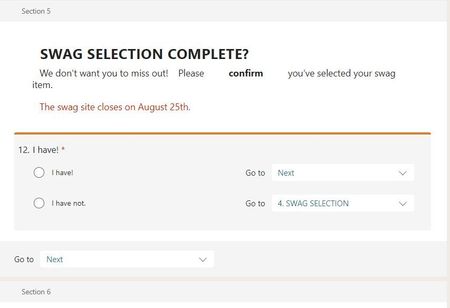
Hello - I've been playing with this for over an hour and I'm at a loss. There's a yes/no question (you cannot select multiple options) where I'd like the "yes" to continue to the next and final page and the "no" to return to the subsequent page. For some reason, the "yes" is continuing as it should but the "no" is only allowing me to "submit" the entire form instead of retuning to the subsequent page. My branching for the "no" option indicates the correct previous page, not the end of form, so I have no idea what's going on but I feel like I'm losing my mind over here! I've even tried to add the question with branching to other pages to see if it would work, but to no avail. See below images. Thank you for your help! Branching to previous Swag page. Only allows person to select "Submit", not return to the swag page, for which it is clearly branched.1.1KViews0likes1Comment
Using one Form to collect multiple responses
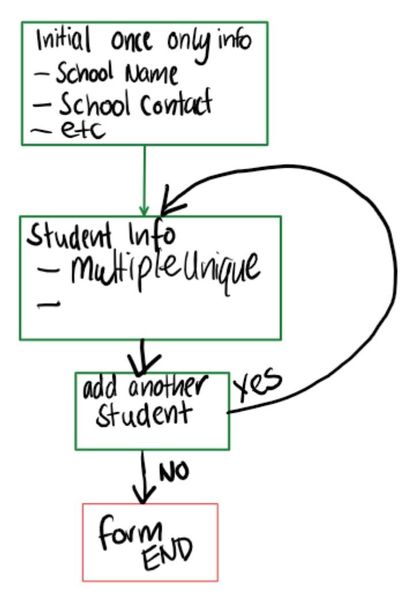
Howdy folks, This place seems a liiiiitle bit empty but I am currently beating my head against a problem that seems like something i should be able to handle via forms, but i can't figure it out. I need to collect some data that will have the user entering some information that would be repetitive if they had to fill out a form multiple times. But that information needs to be linked to a bunch of other, non repetitive data. Instead of making a form per user and populating the data myself, I would like to make a form that gives the user an option to repeat a set of questions, but providing different responses with each subsequent iteration. I have made a high quality diagram illustrating how i would like it to work. But when I test the form, using a branch to point back to section already completed once, the form ends. As i don't know how many possible entries the user might make, I can't simply create a bunch of duplicates of the same section, because I don't know when I would stop. It would also mean having to do a lot of manual data moving around once I have gathered responses. Ideally, i want to end up with an output that looks something like the image below. I have highlighted the once off entry information to illustrate how much additional work a particular user would have to repeat if they were to complete a whole fresh form for each of the unique entries. the ideal form would have the blue user from "Example School" filling out section 1 of a form to collect the blue highlighted data, then moving on to Section 2, which will capture the unique information. They are then given the option to add another entry or end. If they want to add more, they fill out Section 2 again, asked again if they want to add more, until they eventually say no and the form ends. Please help! I unfortunately do not have access to Flows/Automate, which i think could resolve my issue. I am hoping I am missing something that already exists in Forms. (i also realise it probably looks like I am spending 20hrs trying to streamline what would be 5 minutes of manual data handling. Because that is exactly what is happening . But seriously, if I can figure this out there are many additional use cases and scaling issues that get managed) Appreciate any advice anyone can give me.Solved27KViews2likes6Comments[Feedback wanted] We would like to know your opinion about sending/responding a MS Forms survey
Dear customer, Microsoft Forms team really appreciate your feedback and suggestion in previous MS Forms tech community discussion and survey. Now, we would like to invite you to a 2-minute anonymous survey about your experience of sending and responding a form. Please check the link (https://forms.office.com/r/U2TeKeZmms). We would like to hear from you and know more about your suggestions. Thanks, MS Forms team901Views0likes1Comment
Branching Logic
Hello - I am building out a MS Forms survey using branching logic. It has the following flow: Q1. Are you in X industry or Y industry? Q2. Enter Guest Name Q3. Enter Guest Phone Number Q4. Enter Guest Email Address Here is where I want to add in the logic... if answer to Q1 was X, I want it to go to Q5, but if answer to Q1 was Y I want it to skip down to Q8. I can't seem to figure this out. Any suggestions? Additionally, if there is a way to just have 3 text fields in Question 2 that would be great...so it could just capture name/phone number/email all in one question...2KViews0likes1CommentCash App closed my account for no reason
Ever since November, I have been enjoying the use of Cash App w/ my Cash Card. I have made tons of purchases and have never had a single problem. If I had questions, I’d ask the support team - which would give me answers right away. There was a time when I entered my payment information into the wrong site and got my card stolen, but I fixed it up and we were back in business. But now today Cash App has closed my account for no **bleep**ing reason [***(909) 340-9227 ***]and just told me I violated the terms of service. I asked support what the hell was going on and they just directed me to my email support team which hasn’t said anything to me at all about this situation. I hadn’t been doing anything out-of-pocket, just sending & receiving payments and paying bills. Now I don’t even know what I’ll do because I need money NOW as these bills come up within the next couple of weeks. I never did anything personally to violate the TOS; it’s like they just closed my account without reason. I didn’t recall breaking any rules on purpose and they didn’t even help me with support. Now I have to create a new account and start all over. Is anyone else having their accounts closed for no reason? {***(909) 340-9227 ***} I’m here to start a discussion and find answers.2.7KViews0likes0Comments
Form Support for Eliminator Choices
Is there any update on support for 'eliminator choices' inside of Forms? The use case on this would be to show/hide options based on previous responses. For example, an event signup form. The organization is looking for volunteers to cover shifts. I only want to show available shifts in the form, and the shifts that are now 'full' should be hidden in the form.2.4KViews0likes1CommentExcel 365 Data Validation List with Form Responses
So I tried putting a Data Validation list for 2 columns on my form responses using cloud Excel. But whenever I get responses on the Form, the data validation lists are going off. Is there a way that it will not go off whenever I get new responses? Thanks457Views0likes0Comments