records management
66 TopicsThe CISO Cheat Sheet to Microsoft Digital Defense Report 2026
I know we’re all busy, so I’ve pulled the most important data from this year’s Microsoft Digital Defense Report into one short read. The full report is well worth exploring, but this article focuses on the numbers and trends most relevant to security leaders. This year’s edition shows that AI is lowering the time, expertise and cost required to discover and exploit weaknesses, enabling attackers to operate with greater speed, scale and autonomy. The report describes this as AI “changing the physics of cybersecurity”: attack timelines are compressing and agentic systems are beginning to automate more of the attack lifecycle. Trend 1: Time has collapsed The clearest finding is about speed. Vulnerability discovery is increasingly running ahead of remediation, while the time from discovery to weaponisation is shrinking. In the AI era, weaponisation can follow in hours. Vulnerability discovery and weaponisation now often needs only a well-written prompt. The median time from discovery in the wild to weaponisation is below 24 hours. Vulnerabilities were on track for a record estimated 72,000 CVEs in 2026. The report expects a multi-year period in which the number of known but unpatched vulnerabilities rises sharply before eventually declining. The median time from container start to first exploit attempt is 5.3 hours. The ransomware actor Storm-1175 moved from web-facing exploitation to deploying Medusa ransomware in as little as 24 hours. CISA added over 110 CVEs to its Known Exploited Vulnerabilities catalogue between November 2025 and May 2026, most within a week of disclosure. The mismatch with enterprise reality is the uncomfortable part. The report says the disclosure-to-exploitation window has shrunk to single-digit days. Between November 2025 and May 2026, CISA added more than 110 vulnerabilities to its Known Exploited Vulnerabilities catalogue, most within a week of disclosure. In one example, Storm-1175 moved from exploiting a web-facing vulnerability to deploying Medusa ransomware in as little as 24 hours. Microsoft’s Red Team makes an important point: a patch is also a disclosure. Every fix points attackers towards the flaw it closes. As AI-assisted analysis makes reversing patches faster and more reliable, the report argues that patch velocity, not simply patch availability, becomes the control that matters. Trend 2: Attack chains are gaining autonomy The report charts a clear progression: September–November 2025: AI assists in orchestrating a campaign, as in the Anthropic-reported espionage case. April–June 2026: Full-chain autonomy is demonstrated in labs. July 2026: Real-world autonomous attacks of increasing complexity appear. Two frontier models, Mythos and GPT-5.5, completed a 32-step attack chain against an emulated enterprise with no human help. The test environment had no defenders. The UK AI Security Institute reached a similar finding independently. GPT-5.5 was the second model to solve its end-to-end corporate network attack simulation, a task AISI estimates would take a human about 20 hours. Open-weight models lag closed models at orchestrating attacks by about seven months. In the wild, early July 2026 saw the first documented automated ransomware extortion attack, named JADEPUFFER by Sysdig. Microsoft has seen AI-orchestrated intrusions that share elements with it. Initial access consistently came from internet-exposed services running known-vulnerable software. The report is measured on this point. Volumes of AI-orchestrated activity remain low. In most observed real-world operations, complex end-to-end intrusions still retain meaningful human direction. The Red Team's framing is the most useful one: AI doesn't create a new class of attack, it collapses the effort needed to find and exploit existing attack paths. Trend 3: AI has become an attack surface The report's second takeaway is that attackers are already targeting AI itself. The adoption numbers explain why. 88% of enterprises are experimenting with agents, and 82% of leaders plan broader rollouts within 12–18 months. The report cites industry projections of roughly 1.3 billion agents in production by 2028. What attackers are doing to AI systems: Four techniques accounted for roughly 90% of observed attack activity in telemetry from Azure AI workloads: malicious link injection (52%), jailbreaks (16%), tool and agent abuse (12%), and identity and credential abuse (10%). Memory poisoning: An attacker who can place content anywhere an agent reads can often place it where the agent remembers. Email is the dominant pathway the Red Team has observed. Human-in-the-loop isn't a complete control: Red team testing saw approval prompts ignored, or bypassed by a policy stored in poisoned memory. Developer tools turned against their owners: The "s1ngularity" malware hijacked locally installed AI command-line tools to hunt for secrets. It leaked about 2,000 secrets and 20,000 files across 225 victims. AI browsers: In daily use at more than 40% of organisations in Microsoft's dataset, they were the initial infection vector in incidents involving 57 malware families in a May 2026 analysis. Chat histories as a target: Malicious AI-assistant extensions reached nearly 900,000 installs and more than 20,000 enterprise tenants, harvesting AI chat histories that often contain code, architecture and credentials. The identity implications are direct. Each agent needs its own identity, not one borrowed from an employee, and a named human sponsor. The report also treats revocation latency, the time to cut off a compromised agent, as a measured outcome. Trend 4: The front door is still identity AI changes the speed and personalisation of social engineering. It hasn't changed where attacks start. Initial access in Defender Experts data: User execution: 30% Valid accounts: 20% Malicious copy-and-paste: 13% Phishing: 11% Together, user execution and valid accounts account for over half of observed activity. In incident response engagements, phishing as an initial access vector jumped from 7% to 23% year on year. The standout numbers: ClickFix: Defender saw user-pasted malicious commands on more than 1.1 million unique devices between February and early May 2026, roughly an 8x increase. AiTM: URLs accounted for 45% of the identified phishing techniques in the report’s breakdown. Separately, the share of AiTM phishing and token-theft attacks more than doubled during the first six months of 2026, although the report notes that their overall share remained comparatively small. Teams vishing: Weekly confirmed malicious volume increased 502% year on year. Per attempt, 48% of vishing calls kept the victim engaged for more than 20 seconds, and 30% lasted more than one minute. When a call succeeds, attackers can persuade the victim to install a remote-management tool and complete reconnaissance in two minutes or less. Business contact impersonation (BCI): The report introduces this term for conversations that start with a trusted-looking contact. Microsoft detected more than 46 million attacks in 12 months, with a 121% spike in April 2026. The share of first-contact messages that explicitly asked for money or documents fell from 17% to 3%. The first message is deliberately bland, like "Are you at your desk?" Password attacks declined 26% year on year, which the report describes as strong evidence that MFA and passkeys are forcing attackers to pivot. That pivot includes techniques such as fatigue attacks, AiTM phishing and token theft designed to circumvent conventional MFA. Trend 5: Attackers are inheriting trust rather than breaking in The report's headline theme is that risk is increasingly interconnected. Threats travel through the trusted relationships between identities, software supply chains, partners and cloud platforms. The numbers: Supply chain: Major open-source ecosystems saw attacks roughly every ten days, accelerating through Q2 2026. Shai-Hulud 2.0 affected 25,000 repositories. Megalodon backdoored 5,561 GitHub repositories in under six hours. Trusted signing: In May 2026, Microsoft disrupted Fox Tempest, a "malware-signing-as-a-service" operation that obtained genuine certificates for ransomware loaders and infostealers. Microsoft revoked over a thousand fraudulent code-signing certificates. Legitimate access: An unsanctioned remote monitoring tool is now one of the most reliable mid-stage indicators of a human-operated intrusion. Cloud identity: Cloud identity abuse was the most observed technique against critical infrastructure, representing 78% of the technique mix in Microsoft’s data for March to June 2026. Hybrid intrusions: The Storm-2885 case showed an attacker using a privileged cloud identity to close and downgrade security alerts. The report says identity governance and alert-handling workflows deserve Tier 0 treatment. Dwell time: DART data shows a statistically significant increase in dwell time year on year, meaning organisations took longer to detect intrusions. Ransomware shows the same ecosystem pattern. Qilin led leak-site data with 16.4% of victims, up 386%. Defender detections tell a different story, with Akira at 22%. Trend 6: Defence works best when it's connected The report is not only a catalogue of threats. The strongest defensive evidence: Disruption works. Following the March 2026 disruption, Tycoon2FA activity had fallen 95% from its November 2025 peak by June. Its share of CAPTCHA-gated phishing declined from 76% in December 2025 to 12% in June 2026. Correlation is the highest-leverage variable. The report argues that how well defenders share and correlate signals across endpoint, identity, cloud, email and network is one of the highest-leverage strategic variables under their control. AI is also changing defensive operations. The report describes AI-assisted triage, incident summarisation, hunting-query generation and detection engineering as ways to accelerate investigations and allow analysts to concentrate on higher-value work. Automated disruption can compress response time. The report says that when a correlated incident reaches a defined confidence threshold, defensive systems can automatically isolate devices, disable compromised accounts, revoke sessions or quarantine affected cloud resources. It also stresses the importance of appropriate governance and human oversight for high-risk AI actions. The report also recommends changing what leaders measure. It suggests moving from patches deployed to exposure reduced, detection coverage increased and time-to-mitigate compressed. What the MDDR recommends: ten security priorities The report starts its recommendations with the foundations: Secure by Design, Secure by Default and Secure Operations, applied through identity-centric Zero Trust. Microsoft says these keep the priorities below durable as AI adds more identities, applications, agents and dependencies to govern. Govern cyber risk at leadership level. Report identity exposure, patch latency, agent permissions, critical dependencies, dwell time and recovery readiness to the board. Defend identity as the primary control plane. Deploy passkeys and phishing-resistant MFA, reduce privilege and govern human and non-human identities. Invalidate and rotate tokens and session credentials quickly. Establish governance, visibility and data controls for AI. Keep visibility of approved AI tools, services and agents, and monitor for unauthorised or unmanaged use. Apply sensitivity-aware access and data protection to the data those systems can reach. Reduce exposure and edge risk. Continuously discover internet-facing assets and patch edge devices quickly. Centralise high-fidelity logging, enforce strong authentication and combine network visibility with threat intelligence. Focus on cross-signal correlation. Correlate endpoint, identity, cloud, application, email and network signals to detect intrusions earlier. Correlation also helps defenders anticipate attack paths and likely targets. Enact a continuous threat and vulnerability management model. Combine asset visibility, vulnerability identification, threat detection and AI-accelerated insight into a single continuous programme. Validate exposure through proactive testing. Run assume-breach exercises on cloud services, SaaS platforms, APIs and workflow automation. Prioritise them by where your highest-value data is stored, accessed or aggregated. Secure software dependencies. Harden software installation, keep a software inventory and validate provenance. Monitor packages and prepare for rapid containment. Participate in collective defence. Share actionable threat indicators and victim-informed intelligence with trusted partners and law enforcement. This supports coordinated tracking, investigation and disruption. Prepare for long-horizon technology transitions. Build a cryptographic inventory and advance post-quantum planning alongside AI governance. Read together, the numbers tell one story: the attacker’s workflow is becoming faster and less expensive. AI can shorten vulnerability discovery, exploitation, secret discovery and lateral movement, while organisations still face the slower operational work of testing, coordinating and deploying safe changes across complex environments. At the same time, agent identities can proliferate faster than organisations can inventory, govern and revoke them The defining question for boards today is not whether disruption will occur, but whether the organization can continue operating, contain harm, recover quickly, and maintain trust when it does. Source: Microsoft Digital Defense Report 2026, Version 1.1. Reporting period: July 2025–June 2026.Registration Open: Community-Led Purview Lightning Talks
Get ready for an electrifying event! The Microsoft Security Community proudly presents Purview Lightning Talks; an action-packed series featuring your fellow Microsoft users, partners and passionate Microsoft Security community members of all sorts. Each 3-12 minute talk cuts straight to the chase, delivering expert insights, real-world use cases, and even a few game-changing tips and tricks. Don’t miss this opportunity to learn, connect, and be inspired! Secure your spot now for the big day: April 30th at 8am Redmond Time. See agenda details below and follow this blog post (sign in and click the "follow" heart in the upper right) to receive notifications. ❗UPDATE❗This event is expected to last around 2 hours and 15 minutes, due to the incredible number of community sessions that were submitted! 💖 Please see the timing table below broken out into sections of four talks each, and plan to arrive 10 minutes before the section that interests you, OR stay for the whole time! Speakers will be available in the chat to answer your questions; please ask your questions during their session. Spillover Q&A forum links will also be shared. The full session recording will be indexed and posted to Microsoft Security Community YouTube within 24 hours after the event. Bookmark this page or follow this blog post for updates! Agenda Legend ↩️ Data Lifecycle Management 🔐 Information Protection 🚫 Data Loss Prevention (DLP) 🦾 Data Security Posture Management (DSPM) for AI 🤖 Purview for AI 👁️ Insider Risk Management (IRM) 🔍 eDiscovery 📊 Governance 🗒️ Compliance Manager 🛡️ Data Security All times are listed in US Pacific/Redmond Time. Session lengths are rounded to the nearest minute. AGENDA Section 1 - approximately 8:00 am - 8:43 am ↩️ The Day Offboarding Exposed Infinite Retention — Nikki Chapple Length: 10 minutes | Topic: Data Lifecycle Management A routine Purview request led to an unexpected discovery: more than 9,000 orphaned OneDrives and thousands of inactive mailboxes still storing content long after employees had left. This talk explains how a retain-only policy created hidden retention debt and how Adaptive Scopes can help organisations separate active users from leavers to avoid similar pitfalls. 🔐 The Purview Label Engine: Automated Classification, Translation, and co-Documentation for Enterprise Tenants — Michael Kirst-Neshva Length: 12 minutes | Topic: Information Protection Global enterprises face the challenge of implementing uniform data protection standards across borders and languages. In this talk, I’ll present a framework that makes Microsoft Purview labels truly scalable. Discover how to roll out parent and child label logics automatically, manage priorities with a single click, and generate instant compliance documentation for every business unit. 🗒️ What's In My Compliance Manager Toolbox: A Cloud Security Architect's Perspective — Jerrad Dahlager Length: 8 minutes | Topic: Compliance Manager A practical walkthrough of how I use Compliance Manager across real client engagements to map controls, track improvement actions, and simplify multi-framework compliance. No theory, just what works in the field. 🛡️ Stop, Think, Protect: Data Security in Real Life with Purview — Oliver Sahlmann Length: 8 minutes | Topic: Data Security With simple labels and matching DLP policies, Purview offers a practical and accessible way to approach data security. This lightning talk uses a real-life traffic light concept to show how a low barrier to adoption can still drive meaningful protection and awareness. Section 2 - approximately 8:44 am - 9:15 am 🔐 Using Purview to prevent oversharing with AI services — Viktor Hedberg Length: 10 minutes | Topic: Information Protection In this day and age, AI is the big thing. However, Copilot has access to everything you can access, including potentially sensitive data. In this session we will look at how to prevent Copilot to access highly sensitive data, using Information Protection. 🦾 How I Helped My Customers Understand their AI Usage (and protect their sensitive data) — Bram de Jager Length: 5 minutes | Topic: Data Security Posture Management (DSPM) for AI As AI tools explode across the web, many organizations still have no idea what’s actually happening in the browser—where employees type prompts, paste sensitive data, or visit public AI sites outside corporate governance. In this lightning talk, I’ll share how I helped customers shine a light on this issue. We’ll explore how Purview Data Security Posture Management (DSPM) can reveal which AI tools employees use, what types of data they input, and where sensitive information may leak through prompts. I’ll walk through real customer scenario where we detected risky AI usage patterns—such as employees pasting confidential documents into public chatbots. 🔐 Four Labels Max for Daily Use: Which Ones & Why? — Romain Dalle Length: 8 minutes | Topic: Information Protection Sensitivity labels are one of the most critical parts of a Purview Risk and compliance deployment, if not the most critical, because it directly impacts how end-users and business units should allow or restrict themselves to share their business data, internally and externally, on a daily basis. Labels have not other options than being precise, meaningful, and balanced in terms of embedded data security. Setting the right taxonomy is core to success, and is everything but a one-time project. 🚫 Data-driven Endpoint DLP Solution with Advanced Hunting — Tatu Seppälä Length: 8 minutes | Topic: Data Loss Prevention (DLP) This lightning talk shows you how to use KQL queries in advanced hunting to easily build initial sensitive service domain groups for authorized and unauthorized domains based on your organization's usage patterns. The same approach can be used for numerous other similar solution refinement and design purposes. Section 3 - approximately 9:16 am - 9:46 am 🔐 The Purview Hack No One Talks About: Container Sensitivity Labels That Fix Oversharing Fast — Nikki Chapple Length: 10 minutes | Topic: Information Protection Most organizations tackle oversharing with manual fixes, but the fastest solution is often overlooked. In this lightning talk, I show how container sensitivity labels automatically apply the right sharing and collaboration controls, ensuring every new Group, Team or SharePoint site starts secure by default. 🔍 Does M365 Support eDiscovery? — Julian Kusenberg Length: 11 minutes | Topic: eDiscovery A myth-busting session that separates perception from reality when it comes to Microsoft 365 eDiscovery capabilities. 📊 Improving Discovery, Trust, and Reuse of Analytics with Purview Data Products — Craig Wyndowe Length: 5 minutes | Topic: Governance This talk shows how bringing Power BI and Fabric assets into Microsoft Purview Governance Domains and Data Products creates a single, trusted view of enterprise analytics. By connecting reports, semantic models, and underlying data with shared metadata, ownership, and business context, organizations can make existing assets easy to discover and safe to reuse. 🔐 Why You Should Create Your Own Sensitive Information Types (SITs) — Niels Jakobsen Length: 5 minutes | Topic: Information Protection An in depth analysis of why Microsoft SITs are not one-size-fits-all, and how to create your own using what Microsoft has already built for you. Section 4 - approximately 9:47 am-10:30 am 👁️ From Zero to First Signal: Insider Risk Management Prerequisites That Actually Matter — Sathish Veerapandian Length: 8 minutes | Topic: Insider Risk Management (IRM) A focused live demo showing the real world prerequisites required for Microsoft Purview Insider Risk Management to work effectively. This session highlights the critical Entra ID, Intune, Microsoft Defender for Endpoint, and Purview DLP configurations that must be in place before creating IRM policies. 🤖 Securing data in the age of AI — Júlio César Gonçalves Vasconcelos Length: 11 minutes | Topic: Purview for AI AI will transform business as we know it; but without proper governance, it can introduce serious risks. We’ll show you how Microsoft Purview enables organizations to accelerate AI adoption while maintaining security, compliance, and transparency. 🔍 Beyond eDiscovery - Purview DSI for Security Investigation — Susantha Silva Length: 11 minutes | Topic: eDiscovery Most people hear “Microsoft Purview” and immediately think compliance, eDiscovery, or legal holds. But this session highlights Data Security Investigations, showing how DSI lets you take a DLP alert or insider risk signal and turn it into a structured investigation. 🚫 Elevating Purview DLP with a real world use case — Victor Wingsing Length: 14 minutes | Topic: Data Loss Prevention (DLP) Learn how I hardened Microsoft Purview DLP beyond out of the box defaults—closing real world data loss gaps, tuning policies to actual user behavior, and turning noisy alerts into protection that really blocks exfiltration. - Quick Closing/ Resource Sharing2.8KViews7likes2Comments
Microsoft Leads a New Era of Software Supply Chain Transparency
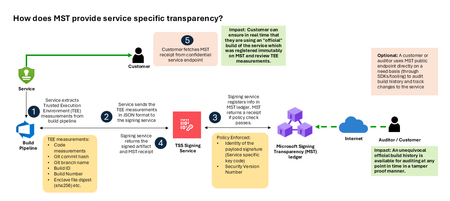
Today, Microsoft announces the general availability of Microsoft’s Signing Transparency (MST) – a first-of-its-kind capability that brings unprecedented visibility and trust to our software supply chain. With this release, Microsoft is leading the industry by recording the build of critical cloud services into a publicly readable and verifiable SCITT standard (Supply Chain Integrity, Transparency, and Trust) compliant blockchain ledger. This means every production software build for in scope services like Azure Attestation and Azure Managed HSM (Hardware Security Module), Azure confidential ledger, Microsoft Signing Transparency itself (and others over time) – is now logged in an immutable, tamper-evident record. Only builds that are in the MST ledger are deployed to production; this gives customers confidence that the supply chain for these critical services can be audited at anytime. Notably, the MST ledger is fully open source and built to align with the emerging IETF SCITT standard. By embracing SCITT’s principles and open protocols, Microsoft ensures that MST not only secures our own ecosystem but also contributes to a broader industry movement toward standardized supply chain transparency. The open-source MST ledger serves as a verifiable trust anchor that any organization or researcher can inspect, audit, or even integrate with their own tooling. MST itself meets the highest levels of transparency, backed by a tamper-proof confidential ledger, open-source, and independently verified. Specifically, we are making the foundation of our trust model transparent and accessible to everyone – reinforcing that trust must be earned through proof, not just promises. This launch marks a major milestone in our commitment to Zero Trust principles, extending “never trust, always verify” all the way into the build itself. Building on a public preview introduced late last year, MST’s general availability delivers verifiable transparency at the software level. It transforms traditional code signing with an additive trust layer that is accessible via an open verification model. Every new software update is accompanied by a publicly auditable proof of integrity, enabling security teams to proactively confirm that each update is authentic and unaltered. To help organizations get the most out of this capability, we are also introducing a free tool to explore the contents – Ledger Explorer – an offline tool that allows security teams to examine MST ledger entries, verify cryptographic proofs, and even validate the ledger’s integrity independently. This tool, combined with MST’s open design, ensures that every Microsoft customer – and the broader community – can hold us accountable in real time for the software we run on their behalf. Key Benefits of Microsoft’s Signing Transparency (MST) Verified Code Integrity – Every software release is cryptographically logged in MST’s ledgers. This makes each build tamper-evident and traceable. If an attacker attempts to inject malicious code or sign an unauthorized update, it will be evident through the well-defined validation step built into the SCITT standard. Organizations gain the assurance that code integrity can be independently confirmed at any time. Independent Verification & Zero Trust – MST enables customers and auditors to verify software authenticity on their own, without having to solely rely on vendor attestations. For each update, Microsoft provides a transparency “receipt” (proof of logging) that you can use to prove the update was officially published and unaltered. This fosters a “don’t just trust, verify” approach, empowering security teams to double-check everything running in their environment aligns with what Microsoft intended. Audit-Trail & Compliance – The transparency ledger creates a permanent, auditable timeline of code deployments. Every entry is a record of what was released and when, backed by cryptographic proofs. This simplifies compliance reporting and accelerates forensic analysis. In the event of an incident, you can quickly audit the ledger to see if any unexpected code was introduced. For highly regulated industries, MST offers concrete evidence of software integrity and policy compliance over time. Leadership & Open Standards – We are delivering real transparency now, encouraging a future where all critical software is released with verifiable integrity. MST’s open source implementation and SCITT-compliant design exemplify our commitment to openness and collaboration. We believe widespread adoption of these standards will strengthen supply chain security for everyone, making trust verification a universal practice. Next Steps Microsoft’s Signing Transparency is more than a new security feature and shapes the advances in trust technology. As threats grow more sophisticated, we must evolve the way we assure our customers about the software they depend on. With MST now generally available, we are leading by example: proving that it is possible to open up the traditionally opaque process of software deployment and turn it into a source of strength and trust, i.e., empowering each person with verifiable transparency. We invite the industry to join us on this journey and get started by reading the documentation and exploring Ledger Explorer today! Together, by embracing transparency and open standards, we can turn “trust but verify” from a slogan into an everyday reality for digital infrastructure.2.9KViews2likes3CommentsHow to deploy Microsoft Purview DSPM for AI to secure your AI apps
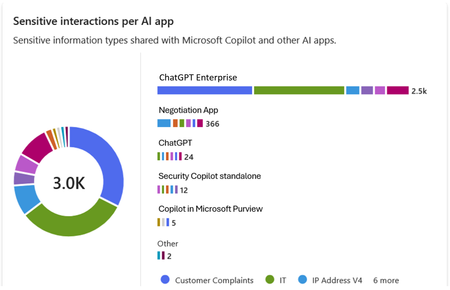
Microsoft Purview Data Security Posture Management (DSPM for AI) is designed to enhance data security for the following AI applications: Microsoft Copilot experiences, including Microsoft 365 Copilot. Enterprise AI apps, including ChatGPT enterprise integration. Other AI apps, including all other AI applications like ChatGPT consumer, Microsoft Copilot, DeepSeek, and Google Gemini, accessed through the browser. In this blog, we will dive into the different policies and reporting we have to discover, protect and govern these three types of AI applications. Prerequisites Please refer to the prerequisites for DSPM for AI in the Microsoft Learn Docs. Login to the Purview portal To begin, start by logging into Microsoft 365 Purview portal with your admin credentials: In the Microsoft Purview portal, go to the Home page. Find DSPM for AI under solutions. 1. Securing Microsoft 365 Copilot Be sure to check out our blog on How to use the DSPM for AI data assessment report to help you address oversharing concerns when you deploy Microsoft 365 Copilot. Discover potential data security risks in Microsoft 365 Copilot interactions In the Overview tab of DSPM for AI, start with the tasks in “Get Started” and Activate Purview Audit if you have not yet activated it in your tenant to get insights into user interactions with Microsoft Copilot experiences In the Recommendations tab, review the recommendations that are under “Not Started”. Create the following data discovery policy to discover sensitive information in AI interactions by clicking into it. Detect risky interactions in AI apps - This public preview Purview Insider Risk Management policy helps calculate user risk by detecting risky prompts and responses in Microsoft 365 Copilot experiences. Click here to learn more about Risky AI usage policy. With the policies to discover sensitive information in Microsoft Copilot experiences in place, head back to the Reports tab of DSPM for AI to discover any AI interactions that may be risky, with the option to filter to Microsoft Copilot Experiences, and review the following for Microsoft Copilot experiences: Total interactions over time (Microsoft Copilot) Sensitive interactions per AI app Top unethical AI interactions Top sensitivity labels references in Microsoft 365 Copilot Insider Risk severity Insider risk severity per AI app Potential risky AI usage Protect sensitive data in Microsoft 365 Copilot interactions From the Reports tab, click on “View details” for each of the report graphs to view detailed activities in the Activity Explorer. Using available filters, filter the results to view activities from Microsoft Copilot experiences based on different Activity type, AI app category and App type, Scope, which support administrative units for DSPM for AI, and more. Then drill down to each activity to view details including the capability to view prompts and response with the right permissions. To protect the sensitive data in interactions for Microsoft 365 Copilot, review the Not Started policies in the Recommendations tab and create these policies: Information Protection Policy for Sensitivity Labels - This option creates default sensitivity labels and sensitivity label policies. If you've already configured sensitivity labels and their policies, this configuration is skipped. Protect sensitive data referenced in Microsoft 365 Copilot - This guides you through the process of creating a Purview Data Loss Prevention (DLP) policy to restrict the processing of content with specific sensitivity labels in Copilot interactions. Click here to learn more about Data Loss Prevention for Microsoft 365 Copilot. Protect sensitive data referenced in Copilot responses - Sensitivity labels help protect files by controlling user access to data. Microsoft 365 Copilot honors sensitivity labels on files and only shows users files they already have access to in prompts and responses. Use Data assessments to identify potential oversharing risks, including unlabeled files. Stay tuned for an upcoming blog post on using DSPM for AI data assessments! Use Copilot to improve your data security posture - Data Security Posture Management combines deep insights with Security Copilot capabilities to help you identify and address security risks in your org. Once you have created policies from the Recommendations tab, you can go to the Policies tab to review and manage all the policies you have created across your organization to discover and safeguard AI activity in one centralized place, as well as edit the policies or investigate alerts associated with those policies in solution. Note that additional policies not from the Recommendations tab will also appear in the Policies tab when DSPM for AI identifies them as policies to Secure and govern all AI apps. Govern the prompts and responses in Microsoft 365 Copilot interactions Understand and comply with AI regulations by selecting “Guided assistance to AI regulations” in the Recommendations tab and walking through the “Actions to take”. From the Recommendations tab, create a Control unethical behavior in AI Purview Communications Compliance policy to detect sensitive information in prompts and responses and address potentially unethical behavior in Microsoft Copilot experiences and ChatGPT for Enterprise. This policy covers all users and groups in your organization. To retain and/or delete Microsoft 365 Copilot prompts and responses, setup a Data Lifecycle policy by navigating to Microsoft Purview Data Lifecycle Management and find Retention Policies under the Policies header. You can also preserve, collect, analyze, review, and export Microsoft 365 Copilot interactions by creating an eDiscovery case. 2. Securing Enterprise AI apps Please refer to this amazing blog on Unlocking the Power of Microsoft Purview for ChatGPT Enterprise | Microsoft Community Hub for detailed information on how to integrate with ChatGPT for enterprise, the Purview solutions it currently supports through Purview Communication Compliance, Insider Risk Management, eDiscovery, and Data Lifecycle Management. Learn more about the feature also through our public documentation. 3. Securing other AI Microsoft Purview DSPM for AI currently supports the following list of AI sites. Be sure to also check out our blog on the new Microsoft Purview data security controls for the browser & network to secure other AI apps. Discover potential data security risks in prompts sent to other AI apps In the Overview tab of DSPM for AI, go through these three steps in “Get Started” to discover potential data security risk in other AI interactions: Install Microsoft Purview browser extension For Windows users: The Purview extension is not necessary for the enforcement of data loss prevention on the Edge browser but required for Chrome to detect sensitive info pasted or uploaded to AI sites. The extension is also required to detect browsing to other AI sites through an Insider Risk Management policy for both Edge and Chrome browser. Therefore, Purview browser extension is required for both Edge and Chrome in Windows. For MacOS users: The Purview extension is not necessary for the enforcement of data loss prevention on macOS devices, and currently, browsing to other AI sites through Purview Insider Risk Management is not supported on MacOS, therefore, no Purview browser extension is required for MacOS. Extend your insights for data discovery – this one-click collection policy will setup three separate Purview detection policies for other AI apps: Detect sensitive info shared in AI prompts in Edge – a Purview collection policy that detects prompts sent to ChatGPT consumer, Micrsoft Copilot, DeepSeek, and Google Gemini in Microsoft Edge and discovers sensitive information shared in prompt contents. This policy covers all users and groups in your organization in audit mode only. Detect when users visit AI sites – a Purview Insider Risk Management policy that detects when users use a browser to visit AI sites. Detect sensitive info pasted or uploaded to AI sites – a Purview Endpoint Data loss prevention (eDLP) policy that discovers sensitive content pasted or uploaded in Microsoft Edge, Chrome, and Firefox to AI sites. This policy covers all users and groups in your org in audit mode only. With the policies to discover sensitive information in other AI apps in place, head back to the Reports tab of DSPM for AI to discover any AI interactions that may be risky, with the option to filter by Other AI Apps, and review the following for other AI apps: Total interactions over time (other AI apps) Total visits (other AI apps) Sensitive interactions per AI app Insider Risk severity Insider risk severity per AI app Protect sensitive info shared with other AI apps From the Reports tab, click on “View details” for each of the report graphs to view detailed activities in the Activity Explorer. Using available filters, filter the results to view activities based on different Activity type, AI app category and App type, Scope, which support administrative units for DSPM for AI, and more. To protect the sensitive data in interactions for other AI apps, review the Not Started policies in the Recommendations tab and create these policies: Fortify your data security – This will create three policies to manage your data security risks with other AI apps: 1) Block elevated risk users from pasting or uploading sensitive info on AI sites – this will create a Microsoft Purview endpoint data loss prevention (eDLP) policy that uses adaptive protection to give a warn-with-override to elevated risk users attempting to paste or upload sensitive information to other AI apps in Edge, Chrome, and Firefox. This policy covers all users and groups in your org in test mode. Learn more about adaptive protection in Data loss prevention. 2) Block elevated risk users from submitting prompts to AI apps in Microsoft Edge – this will create a Microsoft Purview browser data loss prevention (DLP) policy, and using adaptive protection, this policy will block elevated, moderate, and minor risk users attempting to put information in other AI apps using Microsoft Edge. This integration is built-in to Microsoft Edge. Learn more about adaptive protection in Data loss prevention. 3) Block sensitive info from being sent to AI apps in Microsoft Edge - this will create a Microsoft Purview browser data loss prevention (DLP) policy to detect inline for a selection of common sensitive information types and blocks prompts being sent to AI apps while using Microsoft Edge. This integration is built-in to Microsoft Edge. Once you have created policies from the Recommendations tab, you can go to the Policies tab to review and manage all the policies you have created across your organization to discover and safeguard AI activity in one centralized place, as well as edit the policies or investigate alerts associated with those policies in solution. Note that additional policies not from the Recommendations tab will also appear in the Policies tab when DSPM for AI identifies them as policies to Secure and govern all AI apps. Conclusion Microsoft Purview DSPM for AI can help you discover, protect, and govern the interactions from AI applications in Microsoft Copilot experiences, Enterprise AI apps, and other AI apps. We recommend you review the Reports in DSPM for AI routinely to discover any new interactions that may be of concern, and to create policies to secure and govern those interactions as necessary. We also recommend you utilize the Activity Explorer in DSPM for AI to review different Activity explorer events while users interacting with AI, including the capability to view prompts and response with the right permissions. We will continue to update this blog with new features that become available in DSPM for AI, so be sure to bookmark this page! Follow-up Reading Check out this blog on the details of each recommended policies in DSPM for AI: Microsoft Purview – Data Security Posture Management (DSPM) for AI | Microsoft Community Hub Address oversharing concerns with Microsoft 365 blueprint - aka.ms/Copilot/Oversharing Microsoft Purview data security and compliance protections for Microsoft 365 Copilot and other generative AI apps | Microsoft Learn Considerations for deploying Microsoft Purview AI Hub and data security and compliance protections for Microsoft 365 Copilot and Microsoft Copilot | Microsoft Learn Commonly used properties in Copilot audit logs - Audit logs for Copilot and AI activities | Microsoft Learn Supported AI sites by Microsoft Purview for data security and compliance protections | Microsoft Learn Where Copilot usage data is stored and how you can audit it - Microsoft 365 Copilot data protection and auditing architecture | Microsoft Learn Downloadable whitepaper: Data Security for AI Adoption | Microsoft Public roadmap for DSPM for AI - Microsoft 365 Roadmap | Microsoft 365
Unlocking the Power of Microsoft Purview for ChatGPT Enterprise
In today's rapidly evolving technology landscape, data security and compliance are key. Microsoft Purview offers a robust solution for managing and securing interactions with AI based solutions. This integration not only enhances data governance but also ensures that sensitive information is handled with the appropriate controls. Let's dive into the benefits of this integration and outline the steps to integrate with ChatGPT Enterprise in specific. The integration works for Entra connected users on the ChatGPT workspace, if you have needs that goes beyond this, please tell us why and how it impacts you. Important update 1: Effective May 1, these capabilities require you to enable pay-as-you-go billing in your organization. Important update 2: From May 19, you are required to create a collection policy to ingest ChatGPT Enterprise information. In DSPM for AI you will find this one click process. Benefits of Integrating ChatGPT Enterprise with Microsoft Purview Enhanced Data Security: By integrating ChatGPT Enterprise with Microsoft Purview, organizations can ensure that interactions are securely captured and stored within their Microsoft 365 tenant. This includes user text prompts and AI app text responses, providing a comprehensive record of communications. Compliance and Governance: Microsoft Purview offers a range of compliance solutions, including Insider Risk Management, eDiscovery, Communication Compliance, and Data Lifecycle & Records Management. These tools help organizations meet regulatory requirements and manage data effectively. Customizable Detection: The integration allows for the detection of built in can custom classifiers for sensitive information, which can be customized to meet the specific needs of the organization. To help ensures that sensitive data is identified and protected. The audit data streams into Advanced Hunting and the Unified Audit events that can generate visualisations of trends and other insights. Seamless Integration: The ChatGPT Enterprise integration uses the Purview API to push data into Compliant Storage, ensuring that external data sources cannot access and push data directly. This provides an additional layer of security and control. Step-by-Step Guide to Setting Up the Integration 1. Get Object ID for the Purview account in Your Tenant: Go to portal.azure.com and search for "Microsoft Purview" in the search bar. Click on "Microsoft Purview accounts" from the search results. Select the Purview account you are using and copy the account name. Go to portal.azure.com and search for “Enterprise" in the search bar. Click on Enterprise applications. Remove the filter for Enterprise Applications Select All applications under manage, search for the name and copy the Object ID. 2. Assign Graph API Roles to Your Managed Identity Application: Assign Purview API roles to your managed identity application by connecting to MS Graph utilizing Cloud Shell in the Azure portal. Open a PowerShell window in portal.azure.com and run the command Connect-MgGraph. Authenticate and sign in to your account. Run the following cmdlet to get the ServicePrincipal ID for your organization for the Purview API app. (Get-MgServicePrincipal -Filter "AppId eq '9ec59623-ce40-4dc8-a635-ed0275b5d58a'").id This command provides the permission of Purview.ProcessConversationMessages.All to the Microsoft Purview Account allowing classification processing. Update the ObjectId to the one retrieved in step 1 for command and body parameter. Update the ResourceId to the ServicePrincipal ID retrieved in the last step. $bodyParam= @{ "PrincipalId"= "{ObjectID}" "ResourceId" = "{ResourceId}" "AppRoleId" = "{a4543e1f-6e5d-4ec9-a54a-f3b8c156163f}" } New-MgServicePrincipalAppRoleAssignment -ServicePrincipalId '{ObjectId}' -BodyParameter $bodyParam It will look something like this from the command line We also need to add the permission for the application to read the user accounts to correctly map the ChatGPT Enterprise user with Entra accounts. First run the following command to get the ServicePrincipal ID for your organization for the GRAPH app. (Get-MgServicePrincipal -Filter "AppId eq '00000003-0000-0000-c000-000000000000'").id The following step adds the permission User.Read.All to the Purview application. Update the ObjectId with the one retrieved in step 1. Update the ResourceId with the ServicePrincipal ID retrieved in the last step. $bodyParam= @{ "PrincipalId"= "{ObjectID}" "ResourceId" = "{ResourceId}" "AppRoleId" = "{df021288-bdef-4463-88db-98f22de89214}" } New-MgServicePrincipalAppRoleAssignment -ServicePrincipalId '{ObjectId}' -BodyParameter $bodyParam 3. Store the ChatGPT Enterprise API Key in Key Vault The steps for setting up Key vault integration for Data Map can be found here Create and manage credentials for scans in the Microsoft Purview Data Map | Microsoft Learn When setup you will see something like this in Key vault. 4. Integrate ChatGPT Enterprise Workspace to Purview: Create a new data source in Purview Data Map that connects to the ChatGPT Enterprise workspace. Go to purview.microsoft.com and select Data Map, search if you do not see it on the first screen. Select Data sources Select Register Search for ChatGPT Enterprise and select Provide your ChatGPT Enterprise ID Create the first scan by selecting Table view and filter on ChatGPT Add your key vault credentials to the scan Test the connection and once complete click continue When you click continue the following screen will show up, if everything is ok click Save and run. Validate the progress by clicking on the name, completion of the first full scan may take an extended period of time. Depending on size it may take more than 24h to complete. If you click on the scan name you expand to all the runs for that scan. When the scan completes you can start to make use of the DSPM for AI experience to review interactions with ChatGPT Enterprise. The mapping to the users is based on the ChatGPT Enterprise connection to Entra, with prompts and responses stored in the user's mailbox. 5. Review and Monitor Data: Please see this article for required permissions and guidance around Microsoft Purview Data Security Posture Management (DSPM) for AI, Microsoft Purview data security and compliance protections for Microsoft 365 Copilot and other generative AI apps | Microsoft Learn Use Purview DSPM for AI analytics and Activity Explorer to review interactions and classifications. You can expand on prompts and responses in ChatGPT Enterprise 6. Microsoft Purview Communication Compliance Communication Compliance (here after CC) is a feature of Microsoft Purview that allows you to monitor and detect inappropriate or risky interactions with ChatGPT Enterprise. You can monitor and detect requests and responses that are inappropriate based on ML models, regular Sensitive Information Types, and other classifiers in Purview. This can help you identify Jailbreak and Prompt injection attacks and flag them to IRM and for case management. Detailed steps to configure CC policies and supported configurations can be found here. 7. Microsoft Purview Insider Risk Management We believe that Microsoft Purview Insider Risk Management (here after IRM) can serve a key role in protecting your AI workloads long term. With its adaptive protection capabilities, IRM dynamically adjusts user access based on evolving risk levels. In the event of heightened risk, IRM can enforce Data Loss Prevention (DLP) policies on sensitive content, apply tailored Entra Conditional Access policies, and initiate other necessary actions to effectively mitigate potential risks. This strategic approach will help you to apply more stringent policies where it matters avoiding a boil the ocean approach to allow your team to get started using AI. To get started use the signals that are available to you including CC signals to raise IRM tickets and enforce adaptive protection. You should create your own custom IRM policy for this. Do include Defender signals as well. Based on elevated risk you may select to block users from accessing certain assets such as ChatGPT Enterprise. Please see this article for more detail Block access for users with elevated insider risk - Microsoft Entra ID | Microsoft Learn. 8. eDiscovery eDiscovery of AI interactions is crucial for legal compliance, transparency, accountability, risk management, and data privacy protection. Many industries must preserve and discover electronic communications and interactions to meet regulatory requirements. Including AI interactions in eDiscovery ensures organizations comply with these obligations and preserves relevant evidence for litigation. This process also helps maintain trust by enabling the review of AI decisions and actions, demonstrating due diligence to regulators. Microsoft Purview eDiscovery solutions | Microsoft Learn 9. Data Lifecycle Management Microsoft Purview offers robust solutions to manage AI data from creation to deletion, including classification, retention, and secure disposal. This ensures that AI interactions are preserved and retrievable for audits, litigation, and compliance purposes. Please see this article for more information Automatically retain or delete content by using retention policies | Microsoft Learn. Closing By following these steps, organizations can leverage the full potential of Microsoft Purview to enhance the security and compliance of their ChatGPT Enterprise interactions. This integration not only provides peace of mind but also empowers organizations to manage their data more effectively. We are still in preview some of the features listed are not fully integrated, please reach out to us if you have any questions or if you have additional requirements.Secure and govern AI apps and agents with Microsoft Purview
The Microsoft Purview family is here to help you secure and govern data across third party IaaS and Saas, multi-platform data environment, while helping you meet compliance requirements you may be subject to. Purview brings simplicity with a comprehensive set of solutions built on a platform of shared capabilities, that helps keep your most important asset, data, safe. With the introduction of AI technology, Purview also expanded its data coverage to include discovering, protecting, and governing the interactions of AI apps and agents, such as Microsoft Copilots like Microsoft 365 Copilot and Security Copilot, Enterprise built AI apps like Chat GPT enterprise, and other consumer AI apps like DeepSeek, accessed through the browser. To help you view, investigate interactions with all those AI apps, and to create and manage policies to secure and govern them in one centralized place, we have launched Purview Data Security Posture Management (DSPM) for AI. You can learn more about DSPM for AI here with short video walkthroughs: Learn how Microsoft Purview Data Security Posture Management (DSPM) for AI provides data security and compliance protections for Copilots and other generative AI apps | Microsoft Learn Purview capabilities for AI apps and agents To understand our current set of capabilities within Purview to discover, protect, and govern various AI apps and agents, please refer to our Learn doc here: Microsoft Purview data security and compliance protections for Microsoft 365 Copilot and other generative AI apps | Microsoft Learn Here is a quick reference guide for the capabilities available today: Note that currently, DLP for Copilot and adhering to sensitivity label are currently designed to protect content in Microsoft 365. Thus, Security Copilot and Copilot in Fabric, along with Copilot studio custom agents that do not use Microsoft 365 as a content source, do not have these features available. Please see list of AI sites supported by Microsoft Purview DSPM for AI here Conclusion Microsoft Purview can help you discover, protect, and govern the prompts and responses from AI applications in Microsoft Copilot experiences, Enterprise AI apps, and other AI apps through its data security and data compliance solutions, while allowing you to view, investigate, and manage interactions in one centralized place in DSPM for AI. Follow up reading Check out the deployment guides for DSPM for AI How to deploy DSPM for AI - https://aka.ms/DSPMforAI/deploy How to use DSPM for AI data risk assessment to address oversharing - https://aka.ms/dspmforai/oversharing Address oversharing concerns with Microsoft 365 blueprint - aka.ms/Copilot/Oversharing Explore the Purview SDK Microsoft Purview SDK Public Preview | Microsoft Community Hub (blog) Microsoft Purview documentation - purview-sdk | Microsoft Learn Build secure and compliant AI applications with Microsoft Purview (video) References for DSPM for AI Microsoft Purview data security and compliance protections for Microsoft 365 Copilot and other generative AI apps | Microsoft Learn Considerations for deploying Microsoft Purview AI Hub and data security and compliance protections for Microsoft 365 Copilot and Microsoft Copilot | Microsoft Learn Block Users From Sharing Sensitive Information to Unmanaged AI Apps Via Edge on Managed Devices (preview) | Microsoft Learn as part of Scenario 7 of Create and deploy a data loss prevention policy | Microsoft Learn Commonly used properties in Copilot audit logs - Audit logs for Copilot and AI activities | Microsoft Learn Supported AI sites by Microsoft Purview for data security and compliance protections | Microsoft Learn Where Copilot usage data is stored and how you can audit it - Microsoft 365 Copilot data protection and auditing architecture | Microsoft Learn Downloadable whitepaper: Data Security for AI Adoption | Microsoft Explore the roadmap for DSPM for AI Public roadmap for DSPM for AI - Microsoft 365 Roadmap | Microsoft 365PMPurSurvey: Microsoft Purview Retention Labels in Outlook Mobile (iOS/Andriod)
We need your input! Today, in Outlook for Windows, Outlook for the Web, and (currently rolling out) Outlook for Mac, end-users can manually apply Microsoft Purview retention labels and MRM personal tags to individual emails and non-default (user-created) folders. The Outlook and Data Lifecycle Management product groups are interested in learning from our customers how important that same functionality would be in Outlook for Mobile (iOS/Android). Please consider filling out and sharing the following survey to let us know how this feature would or would not be useful to you and your organization: https://aka.ms/RetentionLabels-OutlookMobile Please note that your responses will remain anonymous unless you choose to provide contact information at the end of the survey.Dispositions Orphaned ?
We setup retentionlabels with a disposition. All was working properly except some B2B could not finalize the disposition. During testing one of the engineers accidently removed the mail enabled security group and after that we could not see anything anymore. We re-created the group with same emailadress (slightly different name we corrected a typo) and this was automatically picked up by the labels. We however do still not see any dispositions. Even with the complaince admin , global admin with recordmanagement role and having the high level role for dispositions. My assumption is the item ~450 docs are no in a twilight zone but not sure how to get them back. Ticket is logged with microsoft but allready running for 50 days without a resolution. Any tips would be really helpfull we setup a few tenants for testing allthough we have to wait for all to be provisioned.425Views0likes2CommentsGetting Contextual Summary from SIT(Sensitive info types) via PowerShell cmd
Hi, I am using a PowerShell command(Export-ContentExplorerData) to extract data from an SIT. In the response, I am getting most of the data but I am interested in getting the matching primary element from Contextual summary(Content explorer) https://learn.microsoft.com/en-us/powershell/module/exchange/export-contentexplorerdataRethinking Data Security and Governance in the Era of AI
The era of AI is reshaping industries, enabling unprecedented innovations, and presenting new opportunities for organizations worldwide. But as organizations accelerate AI adoption, many are focused on a growing concern: their current data security and governance practices are not effectively built for the fast-paced AI innovation and ever-evolving regulatory landscape. At Microsoft, we recognize the critical need for an integrated approach to address these risks. In our latest findings, Top 3 Challenges in Securing and Governing Data for the Era of AI, we uncovered critical gaps in how organizations manage data risk. The findings exemplify the current challenges: 91% of leaders are not prepared to manage risks posed by AI 1 and 85% feel unprepared to comply with AI regulations 2 . These gaps not only increase non-compliance but also put innovation at risk. Microsoft Purview has the tools to tackle these challenges head on, helping organizations move to an approach that protects data, meets compliance regulations, and enables trusted AI transformation. We invite you to take this opportunity to evaluate your current practices, platforms, and responsibilities, and to understand how to best secure and govern your organization for growing data risks in the era of AI. Platform fragmentation continues to weaken security outcomes Organizations often rely on fragmented tools across security, compliance, and data teams, leading to a lack of unified visibility and insufficient data hygiene. Our findings reveal the effects of fragmented platforms, leading to duplicated data, inconsistent classification, redundant alerts, and siloed investigations, which ultimately is causing data exposure incidents related to AI to be on the rise 3 . Microsoft Purview offers centralized visibility across your organization’s data estate. This allows teams to break down silos, streamline workflows, and mitigate data leakage and oversharing. With Microsoft Purview, capabilities like data health management and data security posture management are designed to enhance collaboration and deliver enriched insights across your organization to help further protect your data and mitigate risks faster. Microsoft Purview offers the following: Unified insights across your data estate, breaking down silos between security, compliance, and data teams. Microsoft Purview Data Security Posture Management (DSPM) for AI helps organizations gain unified visibility into GenAI usage across users, data, and apps to address the heightened risk of sensitive data exposure from AI. Built-in capabilities like classification, labeling, data loss prevention, and insider risk insights in one platform. In addition, newly launched solutions like Microsoft Purview Data Security Investigations accelerate investigations with AI-powered deep content analysis, which helps data security teams quickly identify and mitigate sensitive data and security risks within impacted data. Organizations like Kern County historically relied on many fragmented systems but adopted Microsoft Purview to unify their organization’s approach to data protection in preparation for increasing risks associated with deploying GenAI. “We have reduced risk exposure, [Microsoft] Purview helped us go from reaction to readiness. We are catching issues proactively instead of retroactively scrambling to contain them.” – Aaron Nance, Deputy Chief Information Security Officer, Kern County Evolving regulations require continuous compliance AI-driven innovation is creating a surge in regulations, resulting in over 200 daily updates across more than 900 regulatory agencies 4 , as highlighted in our research. Compliance has become increasingly difficult, with organizations struggling to avoid fines and comply with varying requirements across regions. To navigate these challenges effectively, security leaders’ responsibilities are expanding to include oversight across governance and compliance, including oversight of traditional data catalog and governance solutions led by the central data office. Leaders also cite the need for regulation and audit readiness. Microsoft Purview enables compliance and governance by: Streamlining compliance with Microsoft Purview Compliance Manager templates, step-by-step guidance, and insights for region and industry-specific regulations, including GDPR, HIPAA, and AI-specific regulation like the EU AI Act. Supporting legal matters such as forensic and internal investigations with audit trail records in Microsoft Purview eDiscovery and Audit. Activating and governing data for trustworthy analytics and AI with Microsoft Purview Unified Catalog, which enables visibility across your data estate and data confidence via data quality, data lineage, and curation capabilities for federated governance. Microsoft Purview’s suite of capabilities provides visibility and accountability, enabling security leaders to meet stringent compliance demands while advancing AI initiatives with confidence. Organizations need a unified approach to secure and govern data Organizations are calling for an integrated platform to address data security, governance, and compliance collectively. Our research shows that 95% of leaders agree that unifying teams and tools is a top priority 5 and 90% plan to adopt a unified solution to mitigate data related risks and maximize impact 6 . Integration isn't just about convenience, it’s about enabling innovation with trusted data protection. Microsoft Purview enables a shared responsibility model, allowing individual business units to own their data while giving central teams oversight and policy control. As organizations adopt a unified platform approach, our findings reveal the upside potential not only being reduced risk but also cost savings. With AI-powered copilots such as Security Copilot in Microsoft Purview, data protection tasks are simplified with natural-language guidance, especially for under resourced teams. Accelerating AI transformation with Microsoft Purview Microsoft Purview helps security, compliance, and governance teams navigate the complexities of AI innovation while implementing effective data protection and governance strategies. Microsoft partner EY highlights the results they are seeing: “We are seeing 25%–30% time savings when we build secure features using [Microsoft] Purview SDK. What was once fragmented is now centralized. With [Microsoft] Purview, everything comes together on one platform, giving a unified foundation to innovate and move forward with confidence.” – Prashant Garg, Partner of Data and AI, EY We invite you to explore how you can propel your organization toward a more secure future by reading the full research paper at https://aka.ms/SecureAndGovernPaper. Visit our website to learn more about Microsoft Purview. 1 Forbes, Only 9% Of Surveyed Companies Are Ready To Manage Risks Posed By AI, 2023 2 SAP LeanIX, AI Survey Results, 2024 3 Microsoft, Data Security Index Report, 2024 4 Forbes, Cost of Compliance, Thomson Reuters, 2021 5 Microsoft, Audience Research, 2024 6 Microsoft, Customer Requirements Research, 20248.1KViews3likes0Comments