read aloud
9 Topics[FIXED] Read Aloud doesn't work when I choose any Online voices
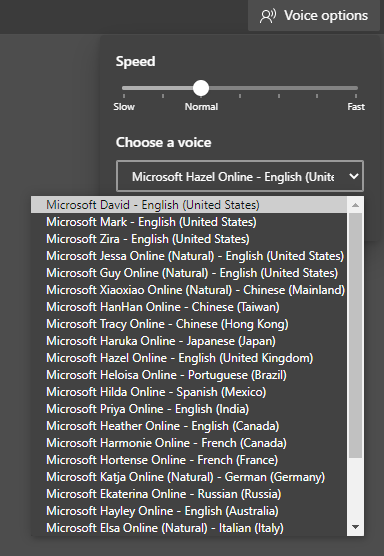
It works with the first 3 voices that are offline (David, Mark, Zira) but the rest of the voices which are Online are having problems. I can select them and the Read Aloud animation starts playing but there is no sound. for example I tried Read Aloud right now in this page and selected Hazel online UK both in Immersive reader mode and normal mode, but no sound at all, I even wait 1 minute for it to start. it's been like this for a couple of weeks actually but right now that I'm reporting Edge is Version 80.0.320.0 (Official build) canary (64-bit) Windows 10 insider build 19013 I have no other sound problem in Windows nor in any websites.23KViews0likes20Comments
Edge features list
While I appreciate the effort the developers put into expanding the Edge functionality, I also get frustrated when functionality doesn't have proper policies to turn it on/off. A few examples: - Read Aloud msedge.exe --disable-features=msReadAloud,msShowReadAloudIconInAddressBar Currently this works, but there is no policy equivalent - Citations msedge.exe --disable-features=msEdgeCitations Currently this works, but there is no policy equivalent - Sharing Setting policy 'configure the share experience' to disabled does a good job of hiding the newer sharing hub flyout menu. Sadly enough, when selecting the address from the address bar (omnibox) you are presented with a 'Create QR code for this page' button instead. I have not found a way to turn off the QR Code Generator. - Window Naming No policy or command line parameter exists to turn off this feature as far as I know - Bookmarks toolbar button No policy or command line parameter exists to turn off this feature as far as I know. The only way this is configurable at the moment is by specifying 'show_toolbar_bookmarks_button' in the initial_preferences file, which doesn't work well in combination with ephemeral profiles. (only works one time - and many others... Just to be clear: I'm already running edge in kiosk (public browsing) mode. You would expect a minimal UI with a titlebar, optionally a (read-only) addressbar,... But instead you're presented with all that clutter. Even access to the ellipsis menu button, task manager, breakouts to other websites through 'Help and Feedback' > 'What's new', 'Report unsafe website',... are still available in kiosk mode. The only other option that exists is to run the browser in digital signage kiosk mode, but then the user gets a full-screen experience with no access to other applications in Windows. So that's useless if you want to give the user access to more than 1 application. I understand Edge works like Chrome with prefs, settings, features, switches and flags. But I really hope that https://learn.microsoft.com/en-us/deployedge/microsoft-edge-policies are going to be put in place for every feature open to the main public. Customizability is key for large enterprise environments. Now that I got that off my chest... Does anybody know if Microsoft has documented the different prefs, settings, features, switches and flags somewhere? Some of it I can find by reading the https://source.chromium.org/, but Microsoft changes to Edge are of course not there.9.3KViews2likes5Comments
Read Aloud function not available in Microsoft Edge browser on Android
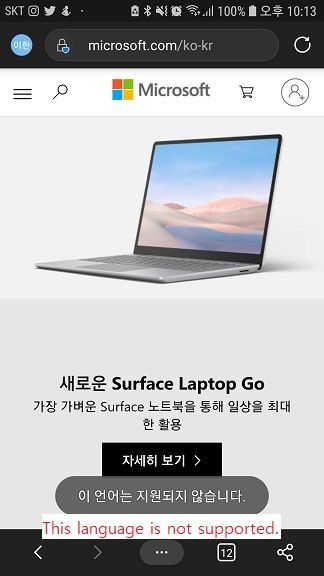
The Read Aloud feature is available in a variety of languages in the Microsoft Edge browser in Windows 10. My native language is Korean and this year's improved artificial neural network TTS voice was newly provided and used it well. However, the Read Aloud function is not available in the Microsoft Edge browser for Android. Pages in English can be used in English and Korean, but pages in Korean are not available. It says 'This language is not supported.' and it is not available. I am wondering if this is a bug or if only English (US) is supported. I used google translator.5.8KViews1like5Comments[FIXED] Read Aloud's voice appears in the Global Media Controls
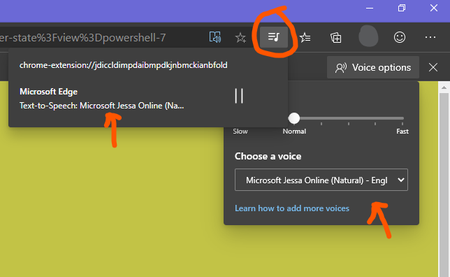
When Read Aloud is reading something, its audio track shows up in the Global Media Control panel, but it's missing a proper thumbnail and its name is "chrome-extension://....." which doesn't look useful for userSolved2.6KViews0likes16CommentsPersistent issues with Read Aloud in Edge
I have Windows 11. Today I began having an issue wherein the Read Aloud feature built into Edge doesn't work. I was initially trying to use a similar function on Internet Archive, and noticed that while all the Microsoft voices seemed to be available in the onsite dropdown, the only voices that made any sound were David, Mark, and Zira---none of the "Online (Natural)" voices. I tried to use Read Aloud as a workaround, and found all the buttons greyed out completely. Mind you, everything worked fine yesterday, and I made no changes to my computer in the intervening time. I've opened up two support tickets, but neither live chat agent was able to resolve the issue. Here are the things I've tried with their help: trying the feature on different websites updating & restarting Edge resetting Edge settings to defaults updating & restarting computer switching wifi networks connecting to a hotspot using InPrivate mode using a new Edge profile (rule out interference from extensions) checking that English tts is downloaded in Time & language > Language & region turning Online speech recognition off and back on again resetting experimental features checking sound systems (they work, but just in case) doing a system reset (?) to 24 hours ago, which took about an hour and undid all the updates I just mentioned maybe something else I don't remember? The next thing I am going to try is give my computer a long nap. It's been a while, so maybe it just needs some shut eye. Otherwise, help????1.8KViews0likes2CommentsNew Feature: Read Aloud for PDF is now available in Edge canary
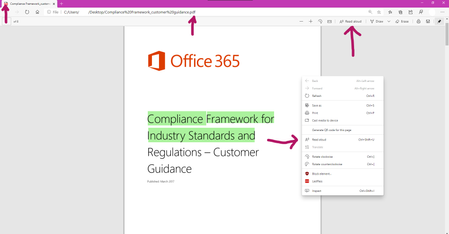
This is from the Top feedback list: Planned Support read aloud of PDF files 10 weeks Now available in Microsoft Edge Version 83.0.477.0 (Official build) canary (64-bit) [Controlled feature rollout], meaning not available to everyone just yet.1.8KViews5likes1Comment[Suggestion] Enable "Read aloud" in new email composition windows
It's super helpful to listen to draft emails read aloud by the web browser. On 79.0.308.1, when I select text in an email draft and right click, there's no "Read aloud" option. I can click on the hamburger menu and read the text. It would be more convenient activate this feature from a right click The right-click read aloud option is missing in Outlook.com, Office 365 Outlook, and Gmail. The read aloud is also missing from a right click in this text box too. Perhaps it's disabled in all text boxes. Thanks for listening and for your development efforts. You and your team have won me over to Microsoft.1.1KViews0likes1Comment
Edge Read Aloud feature fails on landscape PDF documents with tables.
I've encountered an issue with the Read Aloud feature in Microsoft Edge when opening PDF documents in landscape orientation that contain tables. The Read Aloud option is available and can be activated, but it gets stuck loading indefinitely and never starts reading. No error message is shown. In contrast, the same feature works perfectly with portrait-oriented PDFs, even when those PDFs include tables. I tested this on both Windows and macOS with up-to-date Edge versions. The issue appears to be consistent and not OS-specific. My clients use tables in landscape PDFs for better readability and formatting. It’s unclear whether the problem is due to the landscape orientation alone or the combination of landscape + tables. However, tables in portrait PDFs do not cause any issues. Has anyone else experienced this behavior? Is there a known fix or workaround? Would appreciate any feedback or confirmation from the Edge team.99Views0likes0Comments