rag
13 Topics
🎉 Announcing General Availability of AI & RAG Connectors in Logic Apps (Standard)
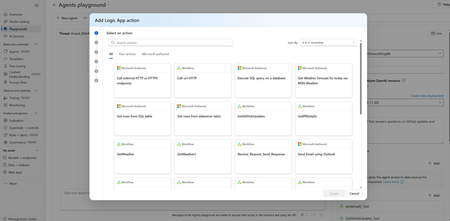
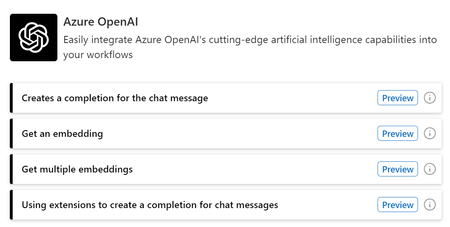
We’re excited to share that a comprehensive set of AI and Retrieval-Augmented Generation (RAG) capabilities is now Generally Available in Azure Logic Apps (Standard). This release brings native support for document processing, semantic retrieval, embeddings, and grounded reasoning directly into the Logic Apps workflow engine. 🔌 Available AI Connectors in Logic Apps Standard Logic Apps (Standard) had previously previewed four AI-focused connectors that open the door for a new generation of intelligent automation across the enterprise. Whether you're processing large volumes of documents, enriching operational data with intelligence, or enabling employees to interact with systems using natural language, these connectors provide the foundation for building solutions that are smarter, faster, and more adaptable to business needs. These are now in GA. They allow teams to move from routine workflow automation to AI-assisted decisioning, contextual responses, and multi-step orchestration that reflects real business intent. Below is the full set of built-in connectors and their actions as they appear in the designer. 1. Azure OpenAI Actions Get an embedding Get chat completions Get chat completions using Prompt Template Get completion Get multiple chat completions Get multiple embeddings What this unlocks Bring natural language reasoning and structured AI responses directly into workflows. Common scenarios include guided decisioning, user-facing assistants, classification and routing, or preparing embeddings for semantic search and RAG workflows. 2. Azure AI Search Actions Delete a document Delete multiple documents Get agentic retrieval output (Preview) Index a document Index multiple documents Merge document Search vectors Search vectors with natural language What this unlocks Add vector, hybrid semantic, and natural language search directly to workflow logic. Ideal for retrieving relevant content from enterprise data, powering search-driven workflows, and grounding AI responses with context from your own documents. 3. Azure AI Document Intelligence Action Analyze document What this unlocks Document Intelligence serves as the entry point for document-heavy scenarios. It extracts structured information from PDFs, images, and forms, allowing workflows to validate documents, trigger downstream processes, or feed high-quality data into search and embeddings pipelines. 4. AI Operations Actions Chunk text with metadata Parse document with metadata What this unlocks Transform unstructured files into enriched, structured content. Enables token-aware chunking, page-level metadata, and clean preparation of content for embeddings and semantic search at scale. 🤖 Advanced AI & Agentic Workflows with AgentLoop Logic Apps (Standard) also supports AgentLoop (also Generally Available), allowing AI models to use workflow actions as tools and iterate until the task is complete. Combined with chunking, embeddings, and natural language search, this opens the door to advanced agentic scenarios such as document intelligence agents, RAG-based assistants, and iterative evaluators. Conclusion With these capabilities now built into Logic Apps Standard, teams can bring AI directly into their integration workflows without additional infrastructure or complexity. Whether you’re streamlining document-heavy processes, enabling richer search experiences, or exploring more advanced agentic patterns, these capabilities provide a strong foundation to start building today.1.1KViews1like0Comments📢 Agent Loop Ignite Update - New Set of AI Features Arrive in Public Preview
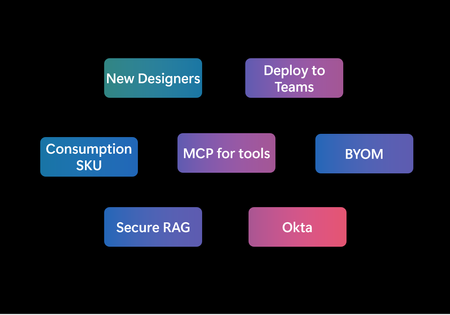
Today at Ignite, we announced the General Availability of Agent Loop in Logic Apps Standard—bringing production-ready agentic automation to every customer. But GA is just the beginning. We’re also releasing a broad set of new and powerful AI-first capabilities in Public Preview that dramatically expand what developers can build: run agents in the Consumption SKU ,bring your own models through APIM AI Gateway, call any tool through MCP, deploy agents directly into Teams, secure RAG with document-level permissions, onboard with Okta, and build in a completely redesigned workflow designer. With these preview features layered on top of GA, customers can build AI applications that bring together secure tool calling, user identity, governance, observability, and integration with their existing systems—whether they’re running in Standard, Consumption, or the Microsoft 365 ecosystem. Here’s a closer look at the new capabilities now available in Public Preview. Public Preview of Agentic Workflows in Consumption SKU Agent Loop is now available in Azure Logic Apps Consumption, bringing autonomous and conversational AI agents to everyone through a fully serverless, pay-as-you-go experience. You can now turn any workflow into an intelligent workflow using the agent loop action—without provisioning infrastructure or managing AI models. This release provides instant onboarding, simple authentication, and a frictionless entry point for building agentic automation. Customers can also tap into Logic Apps’ ecosystem of 1,400+ connectors for tool calling and system integrations. This update makes AI-powered automation accessible for rapid prototyping while still offering a clear path to scale and production-ready deployments in Logic Apps Standard, including BYOM, VNET integration, and enterprise-grade controls. Preview limitations include limited regions, no VS Code local development, and no nested agents or MCP tools yet. Read more about this in our announcement blog! Bring your Own Model We’re excited to introduce Bring Your Own Model (BYOM) support in Agent Loop for Logic Apps Standard - making it possible to use any AI model in your agentic workflows from Foundry, and even on-prem or private cloud models. The key highlight of this feature is the deep integration with the Azure API Management (APIM) AI Gateway, which now serves as the control plane for how Agent Loop connects to models. Instead of wiring agents directly to individual endpoints, AI Gateway creates a single, governed interface that manages authentication, keys, rate limits, and quotas in one place. It provides built-in monitoring, logging, and observability, giving you full visibility into every request. It also ensures a consistent API shape for model interactions, so your workflows remain stable even as backends evolve. With AI Gateway in front, you can test, upgrade, and refine your model configuration without changing your Logic Apps, making model management safer, more predictable, and easier to operate at scale. Beyond AI Gateway, Agent Loop also supports: Direct external model integration when you want lightweight, point-to-point access to a third-party model API. Local/VNET model integration for on-prem, private cloud, or custom fine-tuned models that require strict data residency and private networking. Together, these capabilities let you treat the model as a pluggable component - start with the model you have today, bring in specialized or cost-optimized models as needed, and maintain enterprise-grade governance, security, and observability throughout. This makes Logic Apps one of the most flexible platforms for building model-agnostic, production-ready AI agent workflows. Ready to try this out? Go to http://aka.ms/agentloop/byom to learn more and get started. MCP support for Agent Loop in Logic Apps Standard Agent Loop in Azure Logic Apps Standard now supports the Model Context Protocol (MCP), enabling agents to discover and call external tools through an open, standardized interface. This brings powerful, flexible tool extensibility to both conversational and autonomous agents. Agent Loop offers three ways to bring MCP tools into your workflows: Bring Your Own MCP connector – Point to any external MCP server using its URL and credentials, instantly surfacing its published tools in your agent. Managed MCP connector – Access Azure-hosted MCP servers through the familiar managed connector experience, with shared connections and Azure-managed catalogs. Custom MCP connector – Build and publish your own OpenAPI-based MCP connector to expose private or tenant-scoped MCP servers. Idea for reusability of MCPs across organization. Managed and Custom MCP connectors support on-behalf-of (OBO) authentication, allowing agents to call MCP tools using the end user’s identity. This provides user-context-aware, permission-sensitive tool access across your intelligent workflows. Want to learn more – check out our announcement blog and how-to documents. Deploy Conversational Agents to Teams/M365 Workflows with conversational agents in Logic Apps can now be deployed directly into Microsoft Teams, so your agentic workflows show up where your users already live all day. Instead of going to a separate app or portal, employees can ask the agent questions, kick off approvals, check order or incident status, or look up internal policies right from a Teams chat or channel. The agent becomes just another teammate in the conversation—joining stand-ups, project chats, and support rooms as a first-class participant. Because the same Logic Apps agent can also be wired into other Microsoft 365 experiences that speak to Bots and web endpoints, this opens the door to a consistent and personalized “organization copilot” that follows users across the M365 ecosystem: Teams for chat, meetings, and channels today, and additional surfaces over time. Azure Bot Service and your proxy handle identity, tokens, and routing, while Logic Apps takes care of reasoning, tools, and back-end systems. The result is an agent that feels native to Teams and Microsoft 365—secure, governed, and always just one @mention away. Ready to bring your agentic workflows into Teams? Here’s how to get started. Secure Knowledge Retrieval for AI Agents in Logic Apps We’ve added native document-level authorization to Agent Loop by integrating Azure AI Search ACLs. This ensures AI agents only retrieve information the requesting user is permitted to access—making RAG workflows secure, compliant, and permission-aware by default. Documents are indexed with user or group permissions, and Agent Loop automatically applies those permissions during search using the caller’s principal ID or group memberships. Only authorized documents reach the LLM, preventing accidental exposure of sensitive data. This simplifies development, removes custom security code, and allows a single agent to safely serve users with different access levels—whether for HR, IT, or internal knowledge assistants. Here is our blogpost to learn more about this feature. Okta Agent Loop now supports Okta as an identity provider for conversational agents, alongside Microsoft Entra ID. This makes it easy for organizations using Okta for workforce identity to pass authenticated user context—including user attributes, group membership, and permissions—directly into the agent at runtime. Agents can now make user-aware decisions, enforce access rules, personalize responses, and execute tools with proper user context. This update helps enterprises adopt Agent Loop without changing their existing identity architecture and enables secure, policy-aligned AI interactions across both Okta and Entra environments. Setting up Okta as the identity provider requires a few steps and they are all explained in details here at Logic Apps Labs. Designer makeover! We’ve introduced a major redesign of the Azure Logic Apps designer, now in Public Preview for Standard workflows. This release marks the beginning of a broader modernization effort to make building, testing, and operating workflows faster, cleaner, and more intuitive. The new designer focuses on reducing friction and streamlining the development loop. You now land directly in the designer when creating a workflow, with plans to remove early decisions like stateful/stateless or agentic setup. The interface has been simplified into a single unified view, bringing together the visual canvas, code view, settings, and run history so you no longer switch between blades. A major addition is Draft Mode with auto-save, which preserves your work every few seconds without impacting production. Drafts can be tested safely and only go live when you choose to publish—without restarting the app during editing. Search has also been completely rebuilt for speed and accuracy, powered by backend indexing instead of loading thousands of connectors upfront. The designer now supports sticky notes and markdown, making it easy to document workflows directly on the canvas. Monitoring is integrated into the same page, letting you switch between runs instantly and compare draft and published results. A new hierarchical timeline view improves debugging by showing every action executed in order. This release is just the start—many more improvements and a unified designer experience across Logic Apps are on the way as we continue to iterate based on your feedback. Learn more about the designer updates in our announcement blog ! What's Next We’d love your feedback. Which capabilities should we prioritize, and what would create the biggest impact for your organization?1.4KViews1like0Comments🎉Announcing General Availability of Agent Loop in Azure Logic Apps
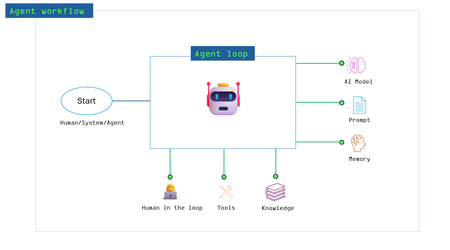
Transforming Business Automation with Intelligent, Collaborative Multi-Agentic workflows! Agent Loop is now Generally Available in Azure Logic Apps Standard, turning Logic Apps platform into a complete multi-agentic automation system. Build AI agents that work alongside workflows and humans, secured with enterprise-grade identity and access controls, deployed using your existing CI/CD pipelines. Thousands of customers have already built tens of thousands of agents—now you can take them to production with confidence. Get Started | Workshop | Demo Videos | Ignite 2025 Session | After an incredible journey since we introduced Agent Loop at Build earlier this year, we're thrilled to announce that Agent Loop is now generally available in Azure Logic Apps. This milestone represents more than just a feature release—it's the culmination of learnings from thousands of customers who have been pushing the boundaries of what's possible with agentic workflows. Agent Loop transforms Azure Logic Apps into a complete multi-agentic business process automation platform, where AI agents, automated workflows, and human expertise collaborate seamlessly to solve complex business challenges. With GA, we're delivering enterprise-grade capabilities that organizations need to confidently deploy intelligent automation at scale. The Journey to GA: Proven by Customers, Built for Production Since our preview launch at Build, the response has been extraordinary. Thousands of customers—from innovative startups to Fortune 500 enterprises—have embraced Agent Loop, building thousands of active agents that have collectively processed billions of tokens every month for the past six months. The growth of agents, executions, and token usage has accelerated significantly, doubling month over month. Since the launch of Conversational Agents in September, they already account for nearly 30% of all agentic workflows. Across the platform, agentic workflows now consume billions of tokens, with overall token usage increasing at nearly 3× month over month. Cyderes: 5X Faster Security Investigation Cycles Cyderes leveraged Agent Loop to automate triage and handling of security alerts, leading to faster investigation cycles and significant cost savings. "We were drowning in data—processing over 10,000 alerts daily while analysts spent more time chasing noise than connecting narratives. Agent Loop changed everything. By empowering our team to design and deploy their own AI agents through low-code orchestration, we've achieved 5X faster investigation cycles and significant cost savings, all while keeping pace with increasingly sophisticated cyber threats that now leverage AI to operate 25X faster than traditional attacks." – Eric Summers, Engineering Manager - AI & SOAR Vertex Pharmaceuticals: Hours Condensed to Minutes Vertex Pharmaceuticals unlocked knowledge trapped across dozens of systems via a team of agents. VAIDA, built with Logic Apps and Agent Loop, orchestrates multiple AI agents and helps employees find information faster, while maintaining compliance and supporting multiple languages. "We had knowledge trapped across dozens of systems—ServiceNow, documentation, training materials—and teams were spending valuable time hunting for answers. Logic Apps Agent Loop changed that. VAIDA now orchestrates multiple AI agents to summarize, search, and analyze this knowledge, then routes approvals right in Teams and Outlook. We've condensed hours into minutes while maintaining compliance and delivering content in multiple languages." – Pratik Shinde, Director, Digital Infrastructure & GenAI Platforms Where Customers Are Deploying Agent Loop Customers across industries are using Agent Loop to build AI applications that power both everyday tasks and mission-critical business processes across Healthcare, Retail, Energy, Financial Services, and beyond. These applications drive impact across a wide range of scenarios: Developer Productivity: Write code, generate unit tests, create workflows, map data between systems, automate source control, deployment and release pipelines IT Operations: Incident management, ticket and issue handling, policy review and enforcement, triage, resource management, cost optimization, issue remediation Business Process Automation: Empower sales specialists, retail assistants, order processing/approval flows, and healthcare assistants for intake and scheduling Customer & Stakeholder Support: Project planning and estimation, content generation, automated communication, and streamlined customer service workflows Proven Internally at Microsoft Agent Loop is also powering Microsoft and Logic Apps team's own operations, demonstrating its versatility and real-world impact: IcM Automation Team: Transforming Microsoft's internal incident automation platform into an agent studio that leverages Logic Apps' Agent Loop, enabling teams across Microsoft to build agentic live site incident automations Logic Apps Team Use Cases: Release & Deployment Agent: Streamlines deployment and release management for the Logic Apps platform Incident Management Agent: An extension of our SRE Agent, leveraging Agent Loop to accelerate incident response and remediation Analyst Agent: Assists teams in exploring product usage and health data, generating insights directly from analytics What's Generally Available Today Core Agent Loop Capabilities (GA) Agent Loop in Logic Apps Standard SKU - Support for both Autonomous and Conversational workflows Autonomous workflows run agents automatically based on triggers and conditions Conversational workflows use A2A to enable interactive chat experiences with agents On-Behalf-Of Authentication - Per-user authentication for 1st-party and 3rd-party connectors Agent Hand-Off - Enable seamless collaboration in multi-agent workflows Python Code Interpreter - Execute Python code dynamically for data analysis and computation Nested Agent Action - Use agents as tools within other agents for sophisticated orchestration User ACLs Support - Fine-grained document access control for knowledge Exciting New Agent Loop Features in Public Preview We've also released several groundbreaking features in Public Preview: New Designer Experience - Redesigned interface optimized for building agentic workflows Agent Loop in Consumption SKU - Deploy agents in the serverless Consumption tier MCP Support - Integrate Model Context Protocol servers as tools, enabling agents to access standardized tool ecosystems AI Gateway Integration - Use Azure AI Gateway as a model source for unified governance and monitoring Teams/M365 Deployment - Deploy conversational agents directly in Microsoft Teams and Microsoft 365 Okta Identity Provider - Use Okta as the identity provider for conversational agents Here’s our Announcement Blog for these new capabilities Built on a Platform You Already Trust Azure Logic Apps is already a proven iPaaS platform with thousands of customers using it for automation – ranging from startups to 100% of Fortune 500 companies. Agent Loop doesn't create a separate "agentic workflow automation platform" you have to learn and operate. Instead, it makes Azure Logic Apps itself your agentic platform: Workflows orchestrate triggers, approvals, retries, and branching Agent Loop, powered by LLMs, handle reasoning, planning, and tool selection Humans stay in control through approvals, exceptions, and guided hand-offs Agent Loop runs inside your Logic Apps Standard environment, so you get the same benefits you already know: enterprise SLAs, VNET integration, data residency controls, hybrid hosting options, and integration with your existing deployment pipelines and governance model. Enterprise Ready - Secure, User-Aware Agents by Design Bringing agents into the enterprise only works if security and compliance are first-class. With Agent Loop in Azure Logic Apps, security is built into every layer of the stack. Per-User Actions with On-Behalf-Of (OBO) and Delegated Permissions Many agent scenarios require tools to act in the context of the signed-in user. Agent Loop supports the OAuth 2.0 On-Behalf-Of (OBO) flow so that supported connector actions can run with delegated, per-user connections rather than a broad app-only identity. That means when an agent sends mail, reads SharePoint, or updates a service desk system, it does so as the user (where supported), respecting that user's licenses, permissions, and data boundaries. This is critical for scenarios like IT operations, HR requests, and finance approvals where "who did what" must be auditable. Document-Level Security with Microsoft Entra-Based Access Control Agents should only see the content a user is entitled to see. With Azure AI Search's Entra-based document-level security, your retrieval-augmented workflows can enforce ACLs and RBAC directly in the index so that queries are automatically trimmed to documents the user has access to. Secured Chat Entry Point with Easy Auth and Entra ID The built-in chat client and your custom clients can be protected using App Service Authentication (Easy Auth) and Microsoft Entra ID, so only authorized users and apps can invoke your conversational endpoints. Together, OBO, document-level security, and Easy Auth give you end-to-end identity and access control—from the chat surface, through the agent, down to your data and systems. An Open Toolbox: Connectors, Workflows, MCP Servers, and External Agents Agent Loop inherits the full power of the Logic Apps ecosystem and more - 1,400+ connectors for SaaS, on-premises, and custom APIs Workflows and agents as tools - compose sophisticated multi-step capabilities MCP server support - integrate with the Model Context Protocol for standardized tool access (Preview) A2A protocol support - enable agent-to-agent communication across platforms Multi-model flexibility - use Azure OpenAI, Azure AI Foundry hosted models, or bring your own model on any endpoint via AI gateway You're not locked into a single vendor or model provider. Agent Loop gives you an open, extensible framework that works with your existing investments and lets you choose the right tools for each job. Run Agents Wherever You Run Logic Apps Agent Loop is native to Logic Apps Standard, so your agentic workflows run consistently across cloud, on-premises, or hybrid environments. They inherit the same deployment, scaling, and networking capabilities as your workflows, bringing adaptive, AI-driven automation to wherever your systems and data live. Getting Started with Agent Loop We're in very exciting times, and we can't wait to see our customers go to production and realize the benefits of these capabilities for their business outcomes and success. Here are some useful links to get started on your AI journey with Logic Apps! Logic Apps Labs - https://aka.ms/LALabs Workshop - https://aka.ms/la-agent-in-a-day Demos - https://aka.ms/agentloopdemos1.9KViews3likes0Comments🤖 Agent Loop Demos 🤖
We announced the public preview of agent loop at Build 2025. Agent Loop is a new feature in Logic Apps to build AI Agents for use cases that span across industry domains and patterns. Here are some resources to learn more about them Logic Apps Labs - https://aka.ms/lalabs Agent in a day workshop - https://aka.ms/la-agent-in-a-day In this article, share with you use cases implemented in Logic Apps using agent loop and other features. This video shows a conversational agent that answers questions about Health Plans and their coverage. The demo features document ingestion of policy documents in AI Search and then retrieving them in Agent loop using natural language This video shows an autonomous agent that generates sales report. The demo features Python Code Interpreter which analyzed excel data and aggregates it for the LLM to reason on it This video shows a conversational agent that helps recruiters with candidate screening and interview scheduling. The demo features OBO (On-Behalf-Of) where agent uses tools in the security context of user. This video shows a conversational agent for a Utility company. The demo features multi agent orchestration using handoff, and a native chat client that supports multi turn conversations and streaming, and is secured via Entra for user authentication This video shows an autonomous Loan Approval Agent specifically that handles auto loans for a bank. The demo features an AI Agent that uses an Azure Open AI model, company's policies, and several tools to process loan application. For edge cases, huma in involved via Teams connector. This video shows an autonomous Product Return Agent for Fourth Coffee company. The returns are processed by agent based on company policy, and other criterions. In this case also, a human is involved when decisions are outside the agent's boundaries This video shows a commercial agent that grants credits for purchases of groceries and other products, for Northwind Stores. The Agent extracts financial information from an IBM Mainframe and an IBM i system to assess each requestor and updates the internal Northwind systems with the approved customers information. Multi-Agent scenario including both a codeful and declarative method of implementation. Note: This is pre-release functionality and is subject to change. If you are interested in further discussing Logic Apps codeful Agents, please fill out the following feedback form. Operations Agent (part 1): In this conversational agent, we will perform Logic Apps operations such as repair and resubmit to ensure our integration platform is healthy and processing transactions. To ensure of compliance we will ensure all operational activities are logged in ServiceNow. Operations Agent (part 2): In this autonomous agent, we will perform Logic Apps operations such as repair and resubmit to ensure our integration platform is healthy and processing transactions. To ensure of compliance we will ensure all operational activities are logged in ServiceNow.5KViews4likes2CommentsLogic Apps Aviators Newsletter - November 2025
In this issue: Ace Aviator of the Month News from our product group News from our community Ace Aviator of the Month Novembers’s Ace Aviator: Al Ghoniem What's your role and title? What are your responsibilities? As a Senior Integration Consultant, I design and deliver enterprise-grade integration on Microsoft Azure, primarily using Logic Apps Standard, API Management, Service Bus, Event Grid and Azure Functions. My remit covers reference architectures, “golden” templates, governance and FinOps guardrails, CI/CD automation (Bicep and YAML), and production-ready patterns for reliability, observability and cost efficiency. Alongside my technical work, I lead teams of consultants and engineers, helping them adopt standardised delivery models, mentor through code reviews and architectural walkthroughs, and ensure we deliver consistent, high-quality outcomes across projects. I also help teams apply decisioning patterns (embedded versus external rules) and integrate AI responsibly within enterprise workflows. Can you give us some insights into your day-to-day activities and what a typical day in your role looks like? Architecture and patterns: refining solution designs, sequence diagrams and rules models for new and existing integrations. Build and automation: evolving reusable Logic App Standard templates, Bicep modules and pipelines, embedding monitoring, alerts and identity-first security. Problem-solving: addressing performance tuning, transient fault handling, poison/DLQ flows and “design for reprocessing.” Leadership and enablement: mentoring consultants, facilitating technical discussions, and ensuring knowledge is shared across teams. Community and writing: publishing articles and examples to demystify real-world integration trade-offs. What motivates and inspires you to be an active member of the Aviators/Microsoft community? The community continuously turns hard-won lessons into reusable practices. Sharing patterns (and anti-patterns) saves others time and incidents, while learning from peers strengthens my own work. Microsoft’s product teams also listen closely, and seeing customer feedback directly shape the platform is genuinely rewarding. Looking back, what advice do you wish you had been given earlier that you'd now share with those looking to get into STEM/technology? Optimise for learning speed, not titles. Choose problems that stretch you and deliver in small, measurable increments. Master the fundamentals. Naming, idempotency, retries and observability are not glamorous but make systems dependable. Document everything. Diagrams, runbooks and ADRs multiply your impact. Understand trade-offs. Every decision buys something and costs something; acknowledge both sides clearly. Value collaboration over heroics. Ask questions, share knowledge and give credit freely. What has helped you grow professionally? Reusable scaffolding: creating golden templates and reference repositories that capture best practice once and reuse it everywhere. Feedback loops: leveraging telemetry, post-incident reviews and peer critique to improve. Teaching and mentoring: explaining concepts to others brings clarity and strengthens leadership. Cross-disciplinary curiosity: combining architecture, DevOps, FinOps and AI to address problems holistically. If you had a magic wand that could create a feature in Logic Apps, what would it be and why? "Stateful Sessions and Decisions” as a first-class capability: Built-in session state across multiple workflows, durable correlation and resumable orchestrations without external storage. A native decisioning activity with versioned decision tables and rule auditing (“why this rule fired”). A local-first developer experience with fast testing and contract validation for confident iteration. This would simplify complex, human-in-the-loop and event-driven scenarios, reduce custom plumbing, and make advanced orchestration patterns accessible to a wider audience. News from our product group Logic Apps Community Day 2025 Did you miss or want to catch up again on your favorite Logic Apps Community Day videos – jump back into action on this four hours long learning session, with 10 sessions from our Community Experts. And stay tuned for individual sessions being shared throughout the week. Announcing Parse & Chunk with Metadata in Logic Apps: Build Context-Aware RAG Agents New Parse & Chunk actions add metadata like page numbers and sentence completeness—perfect for context-aware document Q&A using Azure AI Search and Agent Loop. Introducing the RabbitMQ Connector (Public Preview) The new connector (Public Preview) lets you send and receive messages with RabbitMQ in Logic Apps Standard and Hybrid—ideal for scalable, reliable messaging across industries. News from our community EventGrid And Entra Auth In Logic Apps Standard Post by Riccardo Viglianisi Learn how to use Entra Auth for webhook authentication, ditch SAS tokens, and configure private endpoints with public access rules—perfect for secure, scalable integrations. Debugging XSLT Made Easy in VS Code: .NET-Based Debugging for Logic Apps Post by Daniel Jonathan A new .NET-based extension brings real debugging to XSLT for Logic Apps. Set breakpoints, step through transformations, and inspect variables—making XSLT development clear and productive. This is the 3 rd post in a 5 part series, so worth checking out the other posts too. Modifying the Logic App Azure Workbook: Custom Views for Multi Workflow Monitoring Post by Jeff Wessling Learn how to tailor dashboards with KQL, multi-workflow views, and context panes—boosting visibility, troubleshooting speed, and operational efficiency across your integrations. Azure AI Agents in Logic Apps: A Guide to Automate Decisions Post by Imashi Kinigama Discover how GPT-powered agents, created using Logic Apps Agent Loop, automate decisions, extract data, and adapt in real time. Build intelligent workflows with minimal effort—no hardcoding, just instructions and tools. How to Turn Logic App Connectors into MCP Servers (Step-by-Step Guide) Post by Stephen W. Thomas Learn how to expose connectors like Google Drive or Salesforce as MCP endpoints using Azure API Center—giving AI agents secure, real-time access to 1,400+ services directly from VS Code. Custom SAP MCP Server with Logic Apps Post by Sebastian Meyer Learn how to turn Logic Apps into AI-accessible tools using MCP. From workflow descriptions to Easy Auth setup and VS Code integration—this guide unlocks SAP automation with Copilot. How Azure Logic Apps as MCP Servers Accelerate AI Agent Development Post by Monisha S Turn 1,400+ connectors into AI tools with Logic Apps Standard. Build agents fast, integrate with legacy systems, and scale intelligent workflows across your organization. Designing Business Rules in Azure Logic Apps: When to Go Embedded vs External Post by Al Ghoniem Learn when to use Logic Apps' native Rules Engine or offload to Azure Functions with NRules or JSON RulesEngine. Discover hybrid patterns for scalable, testable decision automation. Syncing SharePoint with Azure Blob Storage using Logic Apps & Azure Functions for Azure AI Search Post by Daniel Jonathan Solve folder delete issues by tagging blobs with SharePoint metadata. Use Logic Apps and a custom Azure Function to clean up orphaned files and keep Azure AI Search in sync. Step-by-Step Guide: Building a Conversational Agent in Azure Logic Apps Post by Stephen W. Thomas Use Azure AI Foundry and Logic Apps Standard to create chatbots that shuffle cards, answer questions, and embed into websites—no code required, just smart workflows and EasyAuth. You can hide sensitive data from the Logic App run history Post by Francisco Leal Learn how to protect sensitive data like authentication tokens, credentials, and personal information in Logic App, so this data don’t appear in the run history, which could pose security and privacy risks.2.2KViews0likes0Comments🚀 Announcement: Azure Logic Apps Document Indexer in Azure Cosmos DB
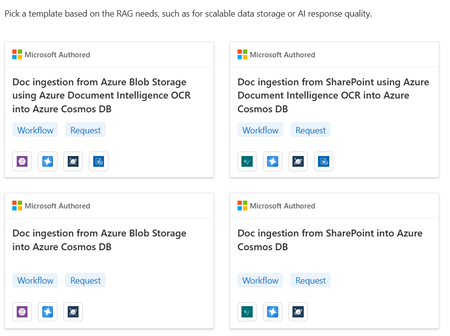
We’re excited to announce the public preview of Azure Logic Apps as a document indexer for Azure Cosmos DB! With this release, you can now use Logic Apps connectors and templates to ingest documents directly into Cosmos DB’s vector store—powering AI workloads like Retrieval-Augmented Generation (RAG) with ease. This new capability orchestrates the full ingestion pipeline—from fetching documents to parsing, chunking, embedding, and indexing—allowing you to unlock insights from unstructured content across your enterprise systems. Check out the announcement from Azure Cosmos team about this capability! How It Works Here’s how Logic Apps powers the ingestion flow: Connect to Source Systems While Logic Apps has more than 1400+ prebuilt connectors to pull documents from various systems, this experience streamlines the entire process via out of box templates to pull data from sources like Azure Blob Storage. Parse and Chunk Documents AI-powered parsing actions extract raw text. Then, the Chunk Document action: Tokenizes content into language model-friendly units Splits it into semantically meaningful chunks This ensures optimal size and quality for embedding and retrieval. Generate Embeddings with Azure OpenAI The chunks are passed to Azure OpenAI via connector to generate embeddings (e.g., using text-embedding-3-small). These vectors capture the meaning of your content for precise semantic search. Write to Azure Cosmos DB Vector Store Embeddings and metadata (like title, tags, and timestamps) are indexed in Cosmos DB’s, using a schema optimized for filtering, semantic ranking, and retrieval. Logic Apps Templates: Fast Start, Full Flexibility We’ve created ready-to-use templates to help you get started fast: 📄 Blob Storage – Simple Text Parsing 🧾 Blob Storage – OCR with Azure Document Intelligence 📁 SharePoint – Simple Text Parsing 🧠 SharePoint – OCR with Azure Document Intelligence Each template is customizable—so you can adapt it to your business needs or expand it with additional steps. We’d Love Your Feedback We’re just getting started—and we’re building this with you. Tell us: What data sources should we support next? Are there specific formats or verticals you need (e.g., legal docs, invoices, contracts)? What enhancements would make ingestion even easier? 👉 Reply to this post or share feedback through this form. Your input shapes the future of AI-powered document indexing in Cosmos DB.726Views0likes1Comment🎙️ Announcement: Logic Apps connectors in Azure AI Search for Integrated Vectorization
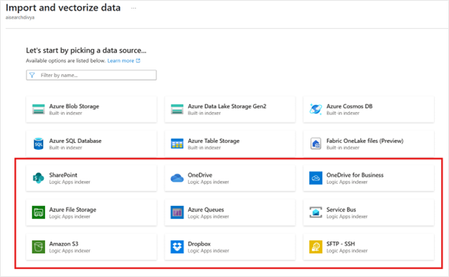
We’re excited to announce that Azure Logic Apps connectors are now supported within AI Search as data sources for ingestion into Azure AI Search vector stores. This unlocks the ability to ingest unstructured documents from a variety of systems—including SharePoint, Amazon S3, Dropbox and many more —into your vector index using a low-code experience. This new capability is powered by Logic Apps templates, which orchestrate the entire ingestion pipeline—from extracting documents to embedding generation and indexing—so you can build Retrieval-Augmented Generation (RAG) applications with ease. Grounding AI with RAG: Why Document Ingestion Matters Retrieval-Augmented Generation (RAG) has become a cornerstone technique for building grounded and trustworthy AI systems. Instead of generating answers from the model’s pretraining alone, RAG applications fetch relevant information from external knowledge bases—giving LLMs access to accurate and up-to-date enterprise data. To power RAG, enterprises need a scalable way to ingest and index documents into a vector store. Whether you're working with policy documents, legal contracts, support tickets, or financial reports, getting this content into a searchable, semantic format is step one. Simplified Ingestion with Integrated Vectorization Azure AI Search’s Integrated Vectorization capability automates the process of turning raw content into semantically indexed vectors: Chunking: Documents are split into meaningful text segments Embedding: Each chunk is transformed into a vector using an embedding model like text-embedding-3-small or a custom model Indexing: Vectors and associated metadata are written into a searchable vector store Projection: Metadata is preserved to enable filtering, ranking, and hybrid queries This eliminates the need to build or maintain custom pipelines, making it significantly easier to adopt RAG in production environments. Ingest from Anywhere: Logic Apps + AI Search With today’s release, we’re extending ingestion to a variety of new data sources by integrating Logic Apps connectors directly with AI Search. This allows you to retrieve unstructured content from enterprise systems and seamlessly ingest it into the vector store. Here’s how the ingestion process works with Logic Apps: Connect to Source Systems Using prebuilt connectors, Logic Apps can fetch content from various data sources including Sharepoint document libraries, messages from Service Bur or Azure Queues, files from OneDrive or SFTP Server and more. You can trigger ingestion on demand or at schedule. Parse and Chunk Documents Next, Logic Apps uses built-in AI-powered document parsing actions to extract raw text. This is followed by the “Chunk Document” action, which: Tokenizes the document based on language model-friendly units Splits the content into semantically coherent chunks This ensures optimal chunk size for downstream embedding and retrieval. Note – Currently we default to a chunk size of 5000 in the workflows created for document ingestion. We’ll be updating the default chunk size to a smaller number in our next release. Meanwhile, you can update it in the workflow if you need a smaller chunk size. Generate Embeddings with Azure OpenAI The chunked text is then passed to the Azure OpenAI connector, where the text-embedding-3-small or another configured embedding model is used to generate high-dimensional vector representations. These vectors capture the semantic meaning of the content and are key to enabling accurate retrieval in RAG applications. Write to Azure AI Search Finally, the embeddings, along with any relevant metadata (e.g., document title, tags, timestamps), are written into the AI Search index. The index schema is created for you ——and can include fields for filtering, sorting, and semantic ranking. Logic Apps Templates: Fast Start, Flexible Design To help you get started, we’ve created Logic Apps templates specifically for RAG ingestion. These templates: Include all the steps mentioned above Are customizable if you want to update the default configuration Whether you’re ingesting thousands of PDFs from SharePoint or syncing files from Amazon S3 bucket, these templates provide a production-grade foundation for building your pipeline. Getting Started Here is step by step detailed documentation to get started using Integrated Vectorization with Logic Apps data sources 👉 Get started with Logic Apps data sources for AI Search ingestion 👉 Learn more about Integrated Vectorization in Azure AI Search We'd Love Your Feedback We're just getting started. Tell us: What other data sources would you like to ingest? What enhancements would make ingestion easier for your use case? Are there specific industry templates or formats we should support? 👉 Reply to this post or share your ideas through our feedback form We’re building this with you—so your feedback helps shape the future of AI-powered automation and RAG.1.3KViews1like0Comments📢Announcement: Power your Agents in Azure AI Foundry Agent Service with Azure Logic Apps
We’re excited to announce the Public Preview of two major integrations that bring the power of Azure Logic Apps to AI Agents in Foundry: Logic Apps as tools: You can now use Logic Apps workflows—and their 1400+ connectors—as tools within the Azure Foundry AI Agent Service. This unlocks seamless integration between AI agents and enterprise-grade automation—enabling agents to reason and act through Logic Apps. AI Agent Service connector: A new Logic Apps connector for the AI Agent Service is now available, allowing you to build workflows that can trigger agents based on events across hundreds of applications. This enables your agents to respond proactively and continuously—bringing event-driven autonomy to your AI solutions. Checkout the blogpost for these announcements from Foundry as well. Logic Apps as tool for Agents in Foundry Logic Apps now powers the tool layer for AI Agents in Foundry Agent Service —bringing together the strengths of business process automation and intelligent reasoning. AI agents need more than powerful models to be effective—they need the ability to act and the context to act appropriately. Tools play a critical role in this: they don’t just let agents perform actions—they provide the inputs, signals, and structure that anchor the agent’s reasoning and guide consistent behavior. Well-designed tools help ensure that agents make decisions based on reliable, real-world data and aligned business rules. With over 1400+ connectors, Logic Apps lets agents tap into real-world enterprise systems—such as reading records from a SQL database, retrieving order data from an ERP system like SAP, managing support tickets in ServiceNow, or triggering actions in CRM platforms like Dynamics or Salesforce. This integration transforms agents from passive responders into intelligent actors that can take meaningful, context-aware action across your organization. Requirements for using Logic Apps as Tools To use a Logic App as a tool within the AI Agent Service, your workflow must meet the following criteria: Consumption SKU: Currently, only Logic Apps in Consumption plan are supported. Request Trigger: The workflow must begin with a Request trigger so that it can be invoked by the agent via a REST call. Tool Description: Each workflow should include a clear, concise description to help the agent understand its purpose and appropriate usage. Getting Started with Logic Apps in AI Foundry There are two ways to bring Logic Apps into your agents’ toolset. You can find step by step instructions in the docs here. To summarize, Use prebuilt Microsoft authored templates Select from a library of curated Logic Apps templates designed for agent scenarios. After selecting a template: Configure the tool’s name and description Authenticate any services used in the workflow Set required parameters Once configured, the workflow will be deployed to your selected subscription and resource group, ready to be used by your agent. Import existing workflows If you already have Logic Apps powering key operations in your business, you can import them directly: Go to the Your Actions tab Select your existing workflow Provide a name and description for agent usage This makes it easy to extend your existing APIs and business logic to AI agents—no need to start from scratch. Tool Calling Demo In this demo video we build an AI Agent that can respond to any questions about GitHub issues and send an email report about them. The opportunities to unlock scenarios are endless and we can’t wait to hear from you. Logic Apps as a trigger for Agents in Foundry We’re excited to launch the AI Agent Service connector in Logic Apps—making it easier than ever to bring autonomy to your business processes. With this connector, you can now use any Logic Apps trigger—from HTTP requests to Service Bus messages, file drops, or scheduled events—to kick off a workflow that invokes an AI agent. This means your agents can now respond to real-world events in near real time, making decisions and taking actions based on dynamic context. Whether it’s processing a new order, reviewing a document, or triaging support tickets, Logic Apps + AI Agent Service gives you the power to build truly autonomous, intelligent workflows. Start Building Ready to try it out? Check out the documentation for step-by-step guidance on using Logic Apps as tools in the AI Agent Service. We’d love to hear what you build! Try the feature and share your feedback—your input helps shape the future of AI-powered automation in Azure.1.3KViews0likes0Comments🤖 AI Procurement assistant using prompt templates in Standard Logic Apps
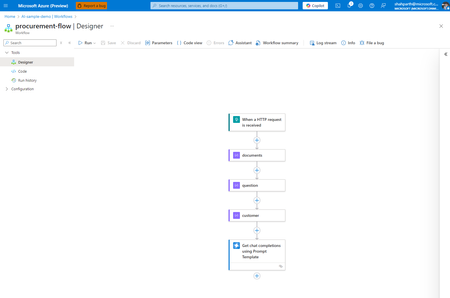
📘 Introduction Answering procurement-related questions doesn't have to be a manual process. With the new Chat Completions using Prompt Template action in Logic Apps (Standard), you can build an AI-powered assistant that understands context, reads structured data, and responds like a knowledgeable teammate. 🏢 Scenario: AI assistant for IT procurement Imagine an employee wants to know: "When did we last order laptops for new hires in IT?" Instead of forwarding this to the procurement team, a Logic App can: Accept the question Look up catalog details and past orders Pass all the info to a prompt template Generate a polished, AI-powered response 🧠 What Are Prompt Templates? Prompt Templates are reusable text templates that use Jinja2 syntax to dynamically inject data at runtime. In Logic Apps, this means you can: Define a prompt with placeholders like {{ customer.orders }} Automatically populate it with outputs from earlier actions Generate consistent, structured prompts with minimal effort ✨ Benefits of Using Prompt Templates in Logic Apps Consistency: Centralized prompt logic instead of embedding prompt strings in each action. Reusability: Easily apply the same prompt across multiple workflows. Maintainability: Tweak prompt logic in one place without editing the entire flow. Dynamic control: Logic Apps inputs (e.g., values from a form, database, or API) flow right into the template. This allows you to create powerful, adaptable AI-driven flows without duplicating effort — making it perfect for scalable enterprise automation. 💡 Try it Yourself Grab the sample prompt template and sample inputs from our GitHub repo and follow along. 👉 Sample logic app 🧰 Prerequisites To get started, make sure you have: A Logic App (Standard) resource in Azure An Azure OpenAI resource with a deployed GPT model (e.g., GPT-3.5 or GPT-4) 💡 You’ll configure your OpenAI API connection during the workflow setup. 🔧 Build the Logic App workflow Here’s how to build the flow in Logic Apps using the Prompt Template action. This setup assumes you're simulating procurement data with test inputs. 📌 Step 0: Start by creating a Stateful Workflow in your Logic App (Standard) resource. Choose "Stateful" when prompted during workflow creation. This allows the run history and variables to be preserved for testing. 📸 Creating a new Stateful Logic App (Standard) workflow Here’s how to build the flow in Logic Apps using the Prompt Template action. This setup assumes you're simulating procurement data with test inputs. 📌 Trigger: "When an HTTP request is received" 📌 Step 1: Add three Compose actions to store your test data. documents: This stores your internal product catalog entries [ { "id": "1", "title": "Dell Latitude 5540 Laptop", "content": "Intel i7, 16GB RAM, 512GB SSD, standard issue for IT new hire onboarding" }, { "id": "2", "title": "Docking Station", "content": "Dell WD19S docking stations for dual monitor setup" } ] 📸 Compose action for documents input question: This holds the employee’s natural language question. [ { "role": "user", "content": "When did we last order laptops for new hires in IT?" } ] 📸 Compose action for question input customer: This includes employee profile and past procurement orders { "firstName": "Alex", "lastName": "Taylor", "department": "IT", "employeeId": "E12345", "orders": [ { "name": "Dell Latitude 5540 Laptop", "description": "Ordered 15 units for Q1 IT onboarding", "date": "2024/02/20" }, { "name": "Docking Station", "description": "Bulk purchase of 20 Dell WD19S docking stations", "date": "2024/01/10" } ] } 📸 Compose action for customer input 📌 Step 2: Add the "Chat Completions using Prompt Template" action 📸 OpenAI connector view 💡Tip: Always prefer the in-app connector (built-in) over the managed version when choosing the Azure OpenAI operation. Built-in connectors allow better control over authentication and reduce latency by running natively inside the Logic App runtime. 📌 Step 3: Connect to Azure OpenAI Navigate to your Azure OpenAI resource and click on Keys and Endpoint for connecting using key-based authentication 📸 Create Azure OpenAI connection 📝 Prompt template: Building the message for chat completions Once you've added the Get chat completions using Prompt Template action, here's how to set it up: 1. Deployment Identifier Enter the name of your deployed Azure OpenAI model here (e.g., gpt-4o). 📌 This should match exactly with what you configured in your Azure OpenAI resource. 2. Prompt Template This is the structured instruction that the model will use. Here’s the full template used in the action — note that the variable names exactly match the Compose action names in your Logic App: documents, question, and customer. system: You are an AI assistant for Contoso's internal procurement team. You help employees get quick answers about previous orders and product catalog details. Be brief, professional, and use markdown formatting when appropriate. Include the employee’s name in your response for a personal touch. # Product Catalog Use this documentation to guide your response. Include specific item names and any relevant descriptions. {% for item in documents %} Catalog Item ID: {{item.id}} Name: {{item.title}} Description: {{item.content}} {% endfor %} # Order History Here is the employee's procurement history to use as context when answering their question. {% for item in customer.orders %} Order Item: {{item.name}} Details: {{item.description}} — Ordered on {{item.date}} {% endfor %} # Employee Info Name: {{customer.firstName}} {{customer.lastName}} Department: {{customer.department}} Employee ID: {{customer.employeeId}} # Question The employee has asked the following: {% for item in question %} {{item.role}}: {{item.content}} {% endfor %} Based on the product documentation and order history above, please provide a concise and helpful answer to their question. Do not fabricate information beyond the provided inputs. 📸 Prompt template action view 3. Add your prompt template variables Scroll down to Advanced parameters → switch the dropdown to Prompt Template Variable. Then: Add a new item for each Compose action and reference it dynamically from previous outputs: documents question customer 📸 Prompt template variable references 🔍 How the template works Template element What it does {{ customer.firstName }} {{ customer.lastName }} Displays employee name {{ customer.department }} Adds department context {{ question[0].content }} Injects the user’s question from the Compose action named question {% for doc in documents %} Loops through catalog data from the Compose action named documents {% for order in customer.orders %} Loops through employee’s order history from customer Each of these values is dynamically pulled from your Logic App Compose actions — no code, no external services needed. You can apply the exact same approach to reference data from any connector, like a SharePoint list, SQL row, email body, or even AI Search results. Just map those outputs into the Prompt Template and let Logic Apps do the rest. ✅ Final Output When you run the flow, the model might respond with something like: "The last order for Dell Latitude 5540 laptops was placed on February 20, 2024 — 15 units were procured for IT new hire onboarding." This is based entirely on the structured context passed in through your Logic App — no extra fine-tuning required. 📸 Output from run history 💬 Feedback Let us know what other kinds of demos and content you would like to see using this form1.5KViews1like3CommentsAnnouncing AI building blocks in Logic Apps (Consumption)
We’re thrilled to announce that the Azure OpenAI and AI Search connectors, along with the Parse Document and Chunk Text actions, are now available in the Logic Apps Consumption SKU! These capabilities, already available in the Logic Apps Standard SKU, can now be leveraged in serverless, pay-as-you-go workflows to build powerful AI-driven applications providing cost-efficiency and flexibility. What’s new in Consumption SKU? This release brings almost all the advanced AI capabilities from Logic Apps Standard to Consumption SKU, enabling lightweight, event-driven workflows that automatically scale with your needs. Here’s a summary of the operations now available: Azure OpenAI connector operations Get Completions: Generate text with Azure OpenAI’s GPT models for tasks such as summarization, content creation, and more. Get Embeddings: Generate vector embeddings from text for advanced scenarios like semantic search and knowledge mining. AI Search connector operations Index Document: Add or update a single document in an AI Search index. Index Multiple Documents: Add or update multiple documents in an AI Search index in one operation. *Note: The Vector Search operation for enabling retrieval pattern will be highlighted in an upcoming release in December.* Parse Document and Chunk Text Actions Under the Data operations connector: Parse Document: Extract structured data from uploaded files like PDFs or images. Chunk Text: Split large text blocks into smaller chunks for downstream processing, such as generating embeddings or summaries. Demo workflow: Automating document ingestion with AI To showcase these capabilities, here’s an example workflow that automates document ingestion, processing, and indexing: Trigger: Start the workflow with an HTTP request or an event like a file upload to Azure Blob Storage. Get Blob Content: Retrieve the document to be processed. Parse Document: Extract structured information, such as key data points from a service agreement. Chunk Text: Split the document content into smaller, manageable text chunks. Generate Embeddings: Use the Azure OpenAI connector to create vector embeddings for the text chunks. Select array: To compose the inputs being passed to Index documents operation Index Data: Store the embeddings and metadata for downstream applications, like search or analytics Why choose Consumption SKU? With this release, Logic Apps Consumption SKU allows you to: - Build smarter, scalable workflows: Leverage advanced AI capabilities without upfront infrastructure costs. - Pay only for what you use: Ideal for event-driven workloads where cost-efficiency is key. - Integrate seamlessly: Combine AI capabilities with hundreds of existing Logic Apps connectors. What’s next? In December, we’ll be announcing the Vector Search operation for the AI Search connector, enabling retrieval capability in Logic Apps Consumption SKU to bring feature parity with Standard SKU. This will allow you to perform advanced search scenarios by matching queries with contextually similar content. Stay tuned for updates!932Views3likes0Comments