rag
29 TopicsBuilding your own copilot – yes, but how? (Part 1 of 2)
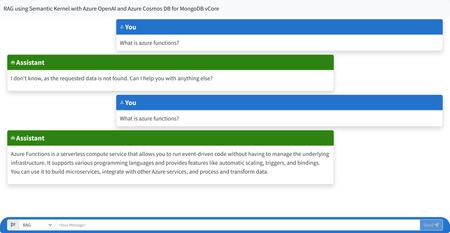
Are you interested in building your own AI co-pilot? Check out the first of a two-part blog post from Carlotta Castelluccio that covers the basics of creating a virtual assistant that can help you with tasks like scheduling, email management, and more. Learn about the tools and technologies involved, including Microsoft's Bot Framework and Language Understanding Intelligent Service (LUIS). Whether you're a software developer or just curious about the possibilities of AI, this post is a great introduction to building your own co-pilot.33KViews3likes2CommentsBuilding Intelligent Applications with Local RAG in .NET and Phi-3: A Hands-On Guide
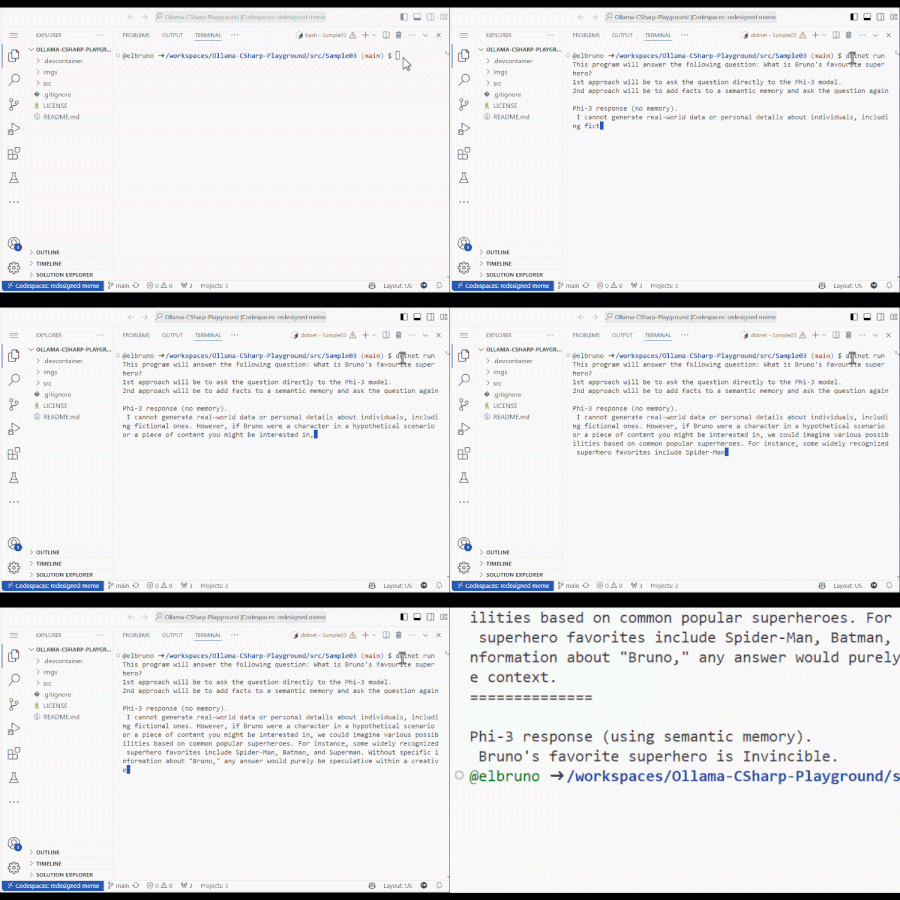
Let's learn how to do Retrieval Augmented Generation (RAG) using local resources in .NET! In this post, we’ll show you how to combine the Phi-3 language model, Local Embeddings, and Semantic Kernel to create a RAG scenario.19KViews5likes13CommentsMake your own private ChatGPT
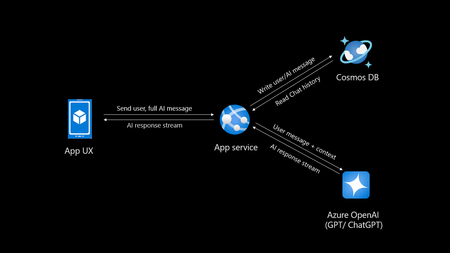
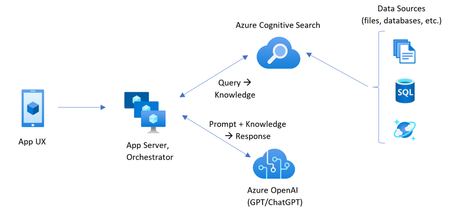
Introduction Creating your own private ChatGPT allows you to leverage AI capabilities while ensuring data privacy and security. This guide walks you through building a secure, customized chatbot using tools like Azure OpenAI, Cosmos DB and Azure App service. Why Build a Private ChatGPT? With the rise of AI-driven applications, organizations, people often face challenges related to data privacy, customization, and integration. Building a private ChatGPT addresses these concerns by: Maintaining Data Privacy: Keep sensitive information within your infrastructure. Customizing Responses: Tailor the chatbot’s behavior and language to suit your requirements. Ensuring Security: Leverage enterprise-grade security protocols. Avoiding Data Sharing: Prevent your data from being used to train external models. If organizations do not take these measures their data may go into future model training and can leak your sensitive data to public. Eg: Chatgpt collects personal data mentioned in their privacy policy Prerequisites Before you begin, ensure you have: Access to Azure OpenAI Service. A development environment set up with Python. Basic knowledge of FastAPI and MongoDB. An Azure account with necessary permissions. If you do not have Azure subscription, try Azure for students for FREE. Step 1: Set Up Azure OpenAI Log in to the Azure Portal and create an Azure OpenAI resource. Deploy a model, such as GPT-4o (multimodal), and note down the endpoint and API key. Note there is also an option of keyless authentication. Configure permissions to control access. Step 2: Use Chatgpt like app sample You can select any repository to be as base template for your app, in this I will be using the third option AOAIchat. It is developed by me. GitHub - mckaywrigley/chatbot-ui: AI chat for any model. Azure-Samples/azure-search-openai-demo: A sample app for the Retrieval-Augmented Generation pattern running in Azure, using Azure AI Search for retrieval and Azure OpenAI large language models to power ChatGPT-style and Q&A experiences. sourabhkv/AOAIchat: Azure OpenAI chat This architecture diagram represents a typical flow for a private ChatGPT application with the following components: App UX (User Interface): This is the front-end application (mobile, web, or desktop) where users interact with the chatbot. It sends the user's input (prompt) and displays the AI's responses. App Service: Acts as the backend application, handling user requests and coordinating with other services. Functions: Receives user inputs and prepares them for processing by the Azure OpenAI service. Streams AI responses back to the App UX. Reads from and writes to Cosmos DB to manage chat history. Azure OpenAI Service: This is the core AI service, processing the user input and generating responses using models like GPT-4o. The App Service sends the user input (along with context) to this service and receives the AI-generated responses. Cosmos DB: A NoSQL database used to store and manage chat history. Operations: Writes user messages and AI-generated responses for future reference or analysis. Reads chat history to provide context for AI responses, enabling more intelligent and contextual conversations. Data Flow: User inputs are sent from the App UX to the App Service. The App Service forwards the input (with additional context, if needed) to Azure OpenAI. Azure OpenAI generates a response, which is streamed back to the App UX via the App Service. The App Service writes user inputs and AI responses to Cosmos DB for persistence. This architecture ensures scalability, secure data handling, and the ability to provide contextual responses by integrating database and AI services. What can you do with my template? AOAIchat supports personal, enterprise chat enabled by RAG People can enable RAG mode if they want to search within their database, else it behaves like normal ChatGPT. It supports multimodality, (supports image, text input) also depends on model deployed in Azure AI foundry. Step 3: Deploy to Azure Deploy a Cosmos DB account in nearest region Deploy Azure OpenAI model (gpt-4o, gpt-4o-mini recommended) Deploy Azure App service, try using container I would recommend B1plan to your nearest region, select docker registry sourabhkv/aoaichatdb:0.1 startup command uvicorn app:app --host 0.0.0.0 --port 80 After app service starts, put all environment variables The application requires the following environment variables to be set for proper configuration: Environment Variable Description AZURE_OPENAI_ENDPOINT The endpoint for Azure OpenAI API. AZURE_OPENAI_API_KEY API key for accessing Azure OpenAI. DEPLOYMENT_NAME Azure OpenAI deployment name. API_VERSION API version for Azure OpenAI. MAX_TOKENS Maximum tokens for API responses. MONGO_DETAILS MongoDB connection string. AZURE_OPENAI_ENDPOINT=<your_azure_openai_endpoint> AZURE_OPENAI_API_KEY=<your_azure_openai_api_key> DEPLOYMENT_NAME=<your_deployment_name> API_VERSION=<your_api_version> MAX_TOKENS=<max_tokens> MONGO_DETAILS=<your_mongo_connection_string> Optional feature: implement authentication to secure access. Within app service select Authentication and select service providers. I went with Entra based authentication with single tenant. There is option of multi-tenant, personal accounts as well. Restart App service and within 2 minutes your private ChatGPT is ready. Pricing Pricing may depend on the plan you have deployed resources and region. Check Azure calculator for price estimation. My estimate for pricing I deployed all my resources in Sweden central Cosmos DB config - Cosmos DB for MongoDB (RU) serverless config with single write master, 2 GB transactional storage, 2 backup plan (FREE) ~ 0.75$ Azure OpenAI service - plan S0, model gpt-4o-mini global deployment, Input 20000 tokens, Output 10000 tokens ~ 9.00$ App service plan - OS Linux, Tier B1, instance count 1 ~13.14$ Total monthly cost = 22.89$ This price may vary in future, in region I calculated my configuration in Azure calculator Governance Azure OpenAI provides content filters to block any kind of input that violates responsible AI practices. Categories include Hate and Fairness Sexual Violence Self-harm User Prompt Attacks (direct and indirect) The content filtering system detects and takes action on specific categories of potentially harmful content in both input prompts and output completions. Azure OpenAI Service includes default safety settings applied to all models set as medium. Content filters can be modified to different level depending on use case. It supports RAG, I have provided detailed solution for it in my GitHub. Practical implementation GE Aerospace, in partnership with Microsoft and Accenture, has launched a company-wide generative AI platform, leveraging Microsoft Azure and Azure OpenAI Service. This solution aims to transform asset tracking and compliance in aviation, enabling quick access to maintenance records and reducing manual processing time from days to minutes. It supports informed decision-making by providing insights into aircraft leasing, compliance gaps, and asset health. For enterprises implementing private ChatGPT solutions, this illustrates the potential of generative AI for streamlining document-intensive processes while ensuring data security and compliance through cloud-based infrastructure like Azure. GE Aerospace Launches Company-wide Generative AI Platform for Employees | GE Aerospace News Build your own private ChatGPT style app with enterprise-ready architecture - By Microsoft Mechanics How to make private ChatGPT for FREE? It can be FREE if all of the setup is running locally on your hardware. Cosmos DB <-> MongoDB. Azure OpenAI <-> Ollama / LM studio Refer this NOTE : I have used gpt-4o, gpt-4o-mini these values are hardcoded in webpage, if you are using other models, you might have to change them in index.html. App Service <-> Local machine Register for Github models to access API for FREE. Note: GitHub models have rate limit for different models. Useful links sourabhkv/AOAIchat: Azure OpenAI chat What is RAG? Get started with Azure OpenAI API Chat with Azure OpenAI models using your own data16KViews1like1CommentLevel up your Python + AI skills with our complete series
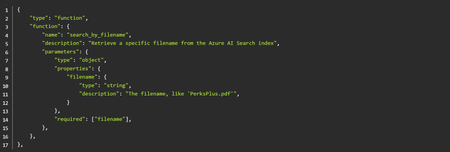
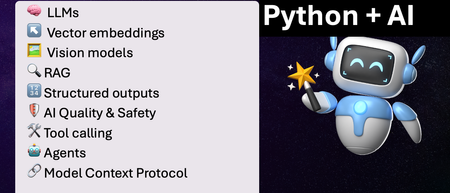
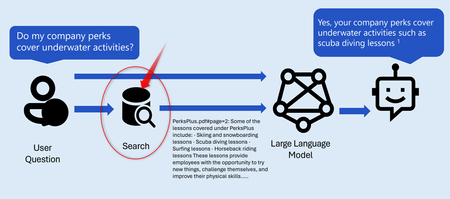
We've just wrapped up our live series on Python + AI, a comprehensive nine-part journey diving deep into how to use generative AI models from Python. The series introduced multiple types of models, including LLMs, embedding models, and vision models. We dug into popular techniques like RAG, tool calling, and structured outputs. We assessed AI quality and safety using automated evaluations and red-teaming. Finally, we developed AI agents using popular Python agents frameworks and explored the new Model Context Protocol (MCP). To help you apply what you've learned, all of our code examples work with GitHub Models, a service that provides free models to every GitHub account holder for experimentation and education. Even if you missed the live series, you can still access all the material using the links below! If you're an instructor, feel free to use the slides and code examples in your own classes. If you're a Spanish speaker, check out the Spanish version of the series. Python + AI: Large Language Models 📺 Watch recording In this session, we explore Large Language Models (LLMs), the models that power ChatGPT and GitHub Copilot. We use Python to interact with LLMs using popular packages like the OpenAI SDK and LangChain. We experiment with prompt engineering and few-shot examples to improve outputs. We also demonstrate how to build a full-stack app powered by LLMs and explain the importance of concurrency and streaming for user-facing AI apps. Slides for this session Code repository with examples: python-openai-demos Python + AI: Vector embeddings 📺 Watch recording In our second session, we dive into a different type of model: the vector embedding model. A vector embedding is a way to encode text or images as an array of floating-point numbers. Vector embeddings enable similarity search across many types of content. In this session, we explore different vector embedding models, such as the OpenAI text-embedding-3 series, through both visualizations and Python code. We compare distance metrics, use quantization to reduce vector size, and experiment with multimodal embedding models. Slides for this session Code repository with examples: vector-embedding-demos Python + AI: Retrieval Augmented Generation 📺 Watch recording In our third session, we explore one of the most popular techniques used with LLMs: Retrieval Augmented Generation. RAG is an approach that provides context to the LLM, enabling it to deliver well-grounded answers for a particular domain. The RAG approach works with many types of data sources, including CSVs, webpages, documents, and databases. In this session, we walk through RAG flows in Python, starting with a simple flow and culminating in a full-stack RAG application based on Azure AI Search. Slides for this session Code repository with examples: python-openai-demos Python + AI: Vision models 📺 Watch recording Our fourth session is all about vision models! Vision models are LLMs that can accept both text and images, such as GPT-4o and GPT-4o mini. You can use these models for image captioning, data extraction, question answering, classification, and more! We use Python to send images to vision models, build a basic chat-with-images app, and create a multimodal search engine. Slides for this session Code repository with examples: openai-chat-vision-quickstart Python + AI: Structured outputs 📺 Watch recording In our fifth session, we discover how to get LLMs to output structured responses that adhere to a schema. In Python, all you need to do is define a Pydantic BaseModel to get validated output that perfectly meets your needs. We focus on the structured outputs mode available in OpenAI models, but you can use similar techniques with other model providers. Our examples demonstrate the many ways you can use structured responses, such as entity extraction, classification, and agentic workflows. Slides for this session Code repository with examples: python-openai-demos Python + AI: Quality and safety 📺 Watch recording This session covers a crucial topic: how to use AI safely and how to evaluate the quality of AI outputs. There are multiple mitigation layers when working with LLMs: the model itself, a safety system on top, the prompting and context, and the application user experience. We focus on Azure tools that make it easier to deploy safe AI systems into production. We demonstrate how to configure the Azure AI Content Safety system when working with Azure AI models and how to handle errors in Python code. Then we use the Azure AI Evaluation SDK to evaluate the safety and quality of output from your LLM. Slides for this session Code repository with examples: ai-quality-safety-demos Python + AI: Tool calling 📺 Watch recording In the final part of the series, we focus on the technologies needed to build AI agents, starting with the foundation: tool calling (also known as function calling). We define tool call specifications using both JSON schema and Python function definitions, then send these definitions to the LLM. We demonstrate how to properly handle tool call responses from LLMs, enable parallel tool calling, and iterate over multiple tool calls. Understanding tool calling is absolutely essential before diving into agents, so don't skip over this foundational session. Slides for this session Code repository with examples: python-openai-demos Python + AI: Agents 📺 Watch recording In the penultimate session, we build AI agents! We use Python AI agent frameworks such as the new agent-framework from Microsoft and the popular LangGraph framework. Our agents start simple and then increase in complexity, demonstrating different architectures such as multiple tools, supervisor patterns, graphs, and human-in-the-loop workflows. Slides for this session Code repository with examples: python-ai-agent-frameworks-demos Python + AI: Model Context Protocol 📺 Watch recording In the final session, we dive into the hottest technology of 2025: MCP (Model Context Protocol). This open protocol makes it easy to extend AI agents and chatbots with custom functionality, making them more powerful and flexible. We demonstrate how to use the Python FastMCP SDK to build an MCP server running locally and consume that server from chatbots like GitHub Copilot. Then we build our own MCP client to consume the server. Finally, we discover how easy it is to connect AI agent frameworks like LangGraph and Microsoft agent-framework to MCP servers. With great power comes great responsibility, so we briefly discuss the security risks that come with MCP, both as a user and as a developer. Slides for this session Code repository with examples: python-mcp-demo11KViews6likes0CommentsOptimizing Retrieval for RAG Apps: Vector Search and Hybrid Techniques
In this blog we are going to dive into optimizing our search strategy with Hybrid search techniques. Common practices for implementing the retrieval step in retrieval-augmented generation (RAG) applications are; Keyword search Vector Search Hybrid search (Keyword + Vector) Hybrid + Semantic ranker10KViews3likes0Comments