rag
31 TopicsBuild AI RAG Apps with LangChain, Azure DocumentDB and Microsoft Foundry: Step-by-Step Guide
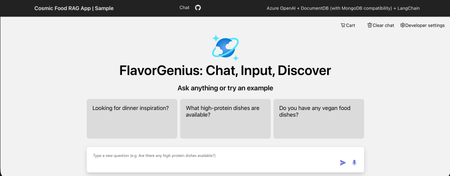
Scenario Imagine you are building your company’s RAG chat application using Microsoft Foundry - Azure OpenAI and orchestrating the flow with LangChain. The chat experience works, but now it needs to be grounded in your company’s data. You generate embeddings and want to store and query them without adding another database or complex sync pipeline. Instead of stitching services together, you use Azure DocumentDB (with MongoDB compatibility) with built-in vector search to store your JSON data and embeddings in one place. You deploy the app to Azure App Service and quickly compare vector search alone versus a full RAG pipeline, sharing it with your team for testing. What will you learn? In this blog, you'll learn to: Create an Azure DocumentDB (with MongoDB compatibility) resource. Create an embeddings and a chat deployment in Microsoft Foundry Azure OpenAI portal. Create an Azure App Service website with continuous deployment from GitHub. Configure Azure App Service application settings to enable communication between Azure resources. Configure GitHub workflow to work successfully. What is the main objective? Build AI Powered RAG Application using LangChain, Microsoft Foundry Azure OpenAI, and Azure DocumentDB (with MongoDB compatibility): Step-by-Step Guide Prerequisites An Azure subscription. If you don’t already have one, you can sign up for an Azure free account. For students, you can use the free Azure for Students offer which doesn’t require a credit card only your school email. A GitHub account. Summary of the steps: Step 1: Create an Azure DocumentDB (with MongoDB compatibility) resource Step 2: Create a Microsoft Foundry - Azure OpenAI resource and Deploy chat and embedding Models Step 3: Create an Azure App Service and Deploy the RAG Chat Application Step 1: Create an Azure DocumentDB (with MongoDB compatibility) resource In this step, you'll: Open the Azure Portal. Create an Azure DocumentDB (with MongoDB compatibility) resource. Open the Azure Portal 1. Visit the Azure Portal https://portal.azure.com in your browser and sign in. Now you are inside the Azure portal! Create a new Azure DocumentDB (with MongoDB compatibility) resource In this step, you create an Azure DocumentDB (with MongoDB compatibility) resource to store your data, vector embedding, and perform vector search. 1. Type documentdb in the search bar at the top of the portal page and select Azure DocumentDB (with MongoDB compatibility) from the available options. 2. Select Create from the toolbar to start provisioning your new cluster. 3. Add the following information to create a resource: What Value Subscription Use your preferred subscription. It's advised to use the same subscription across all the resources that communicate with each other on Azure. Resource group Select Create new to create a new resource group. Enter a unique name for the resource group. Cluster name Enter a globally unique name. Location Select a region close to you for the best response time. For example, Select UK South. MongoDB version Select the latest available version of MongoDB 4. Select Configure to configure your cluster tier. 5. Add the following information to configure the cluster tier. You can scale it up later: What Value Cluster tier Select M25 tier, 2 (Burstable) vCores. Storage Select 32 GiB. 6. Select Save. 7. Enter the cluster Admin Username and Password and store them in a secure location. 8. Select Next to configure the networking settings. 9. Select Allow Public Access from Azure services and resources within the Azure to this cluster. 10. Select Add current IP address to the firewall rules to allow local access to the cluster. 11. Select Review + create. 12. Confirm your configuration settings and select Create to start provisioning the resource. Note: The cluster creation can take up to 10 minutes. It's recommended to move on with the rest of the steps and get back to it later. Step 2: Create a Microsoft Foundry - Azure OpenAI resource and Deploy chat and embedding Models In this step, you'll: Create a Microsoft Foundry Azure OpenAI resource. Create chat and embedding model deployments. Create an Azure OpenAI resource In this step, you create an Azure OpenAI Service resource that enables you to interact with different large language models (LLMs). 1. Type openai in the search bar at the top of the portal page and select Azure OpenAI from the available options. 2. Select Create from the toolbar then select Azure OpenAI to provision a new Azure OpenAI resource. 3. Add the following information to create a resource: What Value Subscription Use the same subscription you used to apply for Azure OpenAI access. Resource group Use the resource group you created in the previous step. Region Select a region close to you for the best response time. For example, Select UK South. Name Enter a globally unique name. Pricing tier Select S0. Currently, this is the only available pricing tier. 4. Now that the basic information is added, select Next to confirm your details and proceed to the next page. 5. Select Next to confirm your network details. 6. Select Next to confirm your tag details. 7. Confirm your configuration settings and select Create to start provisioning the resource. Wait for the deployment to finish. 8. After the deployment finishes, select Go to resource to inspect your created resource. Here, you can manage your resource and find important information like the endpoint URL and API keys. Create chat and embedding model deployments In this step, you create an Azure OpenAI embedding model deployment and a chat model deployment. Creating a deployment on your previously provisioned resource allows you to generate text embeddings (i.e. numerical representation for text) and have a natural language conversation with your data. 1. Select Go to Foundry portal from the toolbar to open the studio. 2. Select Deployments from the Shared resources left side menu to go to the deployments tab. 3. Select + Deploy model from the toolbar then select Deploy base model from the options. A Deploy model window opens. 4. Type gpt-4o-mini to search for the model then select it then select Use model. 5. Select Continue with existing setup to proceed to next step. 6. Refresh page and repeat previous steps to select the model then select Confirm. 7. Review selected options then select Deploy. 8. Select + Deploy model from the toolbar then select Deploy base model from the options. A Deploy model window opens. 9. Type text-embedding-3-small to search for the model then select it then select Confirm. 10. Review selected options then select Deploy. Step 3: Create an Azure App Service and Deploy the RAG Chat Application In this step, you'll: Fork the sample repository on GitHub. Create an Azure App Service resource with a deployment from GitHub. Modify Azure App Service Application settings in the Azure portal. Configure the workflow to deploy your application from GitHub. Test the website before and after adding the data. Fork the Sample Repository on GitHub In this step, you create a copy from the source code on your GitHub account to be able to edit it and use it later. 1. Visit the sample github.com/Azure-Samples/Cosmic-Food-RAG-app in your browser and sign in. 2. Select Fork from the top of the sample page. 3. Select an owner for the fork then, select Create fork. Create an Azure App Service resource with a deployment from GitHub In this step, you create an Azure App service resource and connect it with your GitHub account to deploy a Python application. 1. Type app service in the search bar at the top of the portal page and select App Services from the available options. 2. Select Create Web App from the toolbar to start provisioning a new web application. 3. Add the following information to fill in the basic configuration of the application: What Value Subscription Use the same subscription you used to apply for Azure OpenAI access. Resource group Use the same resource group you created before. Name Enter a unique name for your website. For example, cosmic-food-rag. Publish? Select Code. This option specifies whether your deployment consists of code or a container. Runtime stack Select Python 3.12. Operating System Select Linux. Region Select UK South. This is the region where the rest of the resources you created reside. 4. Add the following information to create the app service plan. You can scale it up later: What Value Linux Plan Select a pre-existing plan or create a new plan. Pricing Plan Select Basic B1. 5. Select Deployment from the toolbar to move to the deployment configuration tab. 6. Add the following information to enable continuous deployment from GitHub: What Value Continuous deployment Select Enable. GitHub account Select your GitHub account. Organization Select your organization. If you are using your personal account then select it. Repository Select Cosmic-Food-RAG-app. Branch Select main. 7. Select Review + create. 8. Confirm your configuration settings and select Create to start provisioning the resource. Wait for the deployment to finish. 9. After the deployment finishes, select Go to resource to inspect your created resource. Here, you can manage your resource and find important information like the application settings and logs. Modify Azure App service Application settings in the Azure portal In this step, you configure the Application settings to make the website able to communicate with other cloud resources. 1. In the Web App resource, select Environment variables from the left side menu. 2. Select + Add to add new environment variables to the function configuration. 3. Add the following names and values one by one and select Ok. Make sure to add your own values. These application settings are for the Azure OpenAI resources that you created: What Value OPENAI_API_VERSION 2024-10-21 AZURE_OPENAI_CHAT_DEPLOYMENT_NAME gpt-4o-mini AZURE_OPENAI_CHAT_MODEL_NAME gpt-4o-mini AZURE_OPENAI_EMBEDDINGS_DEPLOYMENT_NAME text-embedding-3-small AZURE_OPENAI_EMBEDDINGS_MODEL_NAME text-embedding-3-small AZURE_OPENAI_EMBEDDINGS_DIMENSIONS 1536 AZURE_OPENAI_DEPLOYMENT_NAME <azureOpenAiResourceName> AZURE_OPENAI_ENDPOINT https://<azureOpenAiResourceName>.openai.azure.com/ AZURE_OPENAI_API_KEY <azureOpenAiResourceKey> You can get the Azure OpenAI key from the Azure OpenAI resource page. Select Keys and Endpoint from the Resource Management section and copy any of the available keys. These application settings are for Azure DocumentDB (with MongoDB compatibility): AZURE_COSMOS_USERNAME <documentUsername> AZURE_COSMOS_PASSWORD <documentPassword> AZURE_COSMOS_CONNECTION_STRING mongodb+srv://<user>:<password>@<clusterName>.global.mongocluster.cosmos.azure.com/?tls=true&authMechanism=SCRAM-SHA-256&retrywrites=false&maxIdleTimeMS=120000 You can get the DocumentDB connection string from the Azure DocumentDB (with MongoDB compatibility) resource page. Select Connection strings and copy the connection string. Make sure to replace the user and password with the ones you created. These application settings are new and are used for resources that will be created when the application starts you can use any value for them: AZURE_COSMOS_DATABASE_NAME <documentDatabaseName> ex. CosmicDB AZURE_COSMOS_COLLECTION_NAME <documentContainerName> ex. CosmicFoodCollection AZURE_COSMOS_INDEX_NAME <documentIndexName> ex. CosmicIndex 4. Select Apply to save your newly added environment variables. 5. Select Configuration then Stack settings to edit the application startup command. 6. Type entrypoint.sh in the startup command field then select Apply. Configure the Workflow to deploy your application from GitHub In this step, you modify the GitHub deployment workflow to point to the folder that contains the application. 1. Visit your forked repository on GitHub and notice the failing workflow. 2. Open the workflow file .github/workflows/main_cosmic-food-rag.yml. 3. Open the file and select the pen icon to edit it. 4. Modify line 41 from . to src/. 5. Remove the optional Local Build Section since the application already has tests that cover this part. 6. Add this section to Install Node 22 and build the static frontend. 7. Select Commit changes, and review your commit message and description. Select Commit changes. The final workflow file should look like this: # Docs for the Azure Web Apps Deploy action: https://github.com/Azure/webapps-deploy # More GitHub Actions for Azure: https://github.com/Azure/actions # More info on Python, GitHub Actions, and Azure App Service: https://aka.ms/python-webapps-actions name: Build and deploy Python app to Azure Web App - cosmic-food-rag on: push: branches: - main workflow_dispatch: jobs: build: runs-on: ubuntu-latest permissions: contents: read #This is required for actions/checkout steps: - uses: actions/checkout@v4 - name: Set up Node 22 uses: actions/setup-node@v6 with: node-version: 22 - name: Install Node Packages & Build Static Site run: cd frontend && npm install && npm run build # By default, when you enable GitHub CI/CD integration through the Azure portal, the platform automatically sets the SCM_DO_BUILD_DURING_DEPLOYMENT application setting to true. This triggers the use of Oryx, a build engine that handles application compilation and dependency installation (e.g., pip install) directly on the platform during deployment. Hence, we exclude the antenv virtual environment directory from the deployment artifact to reduce the payload size. - name: Upload artifact for deployment jobs uses: actions/upload-artifact@v4 with: name: python-app path: | src/ !antenv/ # 🚫 Opting Out of Oryx Build # If you prefer to disable the Oryx build process during deployment, follow these steps: # 1. Remove the SCM_DO_BUILD_DURING_DEPLOYMENT app setting from your Azure App Service Environment variables. # 2. Refer to sample workflows for alternative deployment strategies: https://github.com/Azure/actions-workflow-samples/tree/master/AppService deploy: runs-on: ubuntu-latest needs: build permissions: id-token: write #This is required for requesting the JWT contents: read #This is required for actions/checkout steps: - name: Download artifact from build job uses: actions/download-artifact@v4 with: name: python-app - name: Login to Azure uses: azure/login@v2 with: client-id: ${{ secrets.AZUREAPPSERVICE_CLIENTID_5672547ED09F46D59DD431ACF5A29F28 }} tenant-id: ${{ secrets.AZUREAPPSERVICE_TENANTID_0059913572C8467882D3999D0E0DD5B8 }} subscription-id: ${{ secrets.AZUREAPPSERVICE_SUBSCRIPTIONID_7C42E3352C5D47F084CB0CD14F549D27 }} - name: 'Deploy to Azure Web App' uses: azure/webapps-deploy@v3 id: deploy-to-webapp with: app-name: 'cosmic-food-rag' slot-name: 'Production' 8. Select Actions to review the workflow run status. Test the website before and After adding the data In this step, you test the application before adding the data, add the data, and test again. 1. Select the workflow name to open it and get the website URL. 2. Select any of the suggested messages or type your own and it should respond with No results found. 3. Navigate to your Azure App Service resource page and select SSH then select Go to open a new SSH page. 4. In the SSH terminal, run these commands: uv sync --active uv run --active ./scripts/add_data.py --file="./data/food_items.json" 5. Navigate back to the live website and type in the chat message Do you have any vegan food dishes? and it should respond with the correct answer now. Congratulations!! You successfully built the full application. Clean Up Once you finish experimenting on Microsoft Azure you might want to delete the resources to not consume any more money from your subscription. You can delete the resource group and it will delete everything inside it or delete the resources one by one that's totally up to you. Conclusion Congratulations! You've learned how to create an Azure DocumentDB (with MongoDB compatibility) cluster, how to create a Microsoft Foundry - Azure OpenAI resource, how to deploy an embedding model and a chat model from the Foundry portal, how to create an Azure App Service and configure continuous deployment with GitHub, and how to modify application settings to enable the communication across Azure resources. By using these technologies, you can build a RAG chat application with the option to perform vector search too over your own data and provide grounded (relevant) responses. Next steps Documentation Azure OpenAI in Microsoft Foundry models Understand embeddings in Azure OpenAI in Microsoft Foundry Models (classic) Azure DocumentDB (with MongoDB compatibility) documentation Integrated vector store in Azure DocumentDB LangChain Python documentation Training Content Develop generative AI apps in Azure Found this useful? Share it with others and follow me to get updates on: Twitter (twitter.com/john00isaac) LinkedIn (linkedin.com/in/john0isaac) Feel free to share your comments and/or inquiries in the comment section below.. See you in future demos!522Views1like1CommentGetting Started with Foundry Local: A Student Guide to the Microsoft Foundry Local Lab
If you want to start building AI applications on your own machine, the Microsoft Foundry Local Lab is one of the most useful places to begin. It is a practical workshop that takes you from first-time setup through to agents, retrieval, evaluation, speech transcription, tool calling, and a browser-based interface. The material is hands-on, cross-language, and designed to show how modern AI apps can run locally rather than depending on a cloud service for every step. This blog post is aimed at students, self-taught developers, and anyone learning how AI applications are put together in practice. Instead of treating large language models as a black box, the lab shows you how to install and manage local models, connect to them with code, structure tasks into workflows, and test whether the results are actually good enough. If you have been looking for a learning path that feels more like building real software and less like copying isolated snippets, this workshop is a strong starting point. What Is Foundry Local? Foundry Local is a local runtime for downloading, managing, and serving AI models on your own hardware. It exposes an OpenAI-compatible interface, which means you can work with familiar SDK patterns while keeping execution on your device. For learners, that matters for three reasons. First, it lowers the barrier to experimentation because you can run projects without setting up a cloud account for every test. Second, it helps you understand the moving parts behind AI applications, including model lifecycle, local inference, and application architecture. Third, it encourages privacy-aware development because the examples are designed to keep data on the machine wherever possible. The Foundry Local Lab uses that local-first approach to teach the full journey from simple prompts to multi-agent systems. It includes examples in Python, JavaScript, and C#, so you can follow the language that fits your course, your existing skills, or the platform you want to build on. Why This Lab Works Well for Learners A lot of AI tutorials stop at the moment a model replies to a prompt. That is useful for a first demo, but it does not teach you how to build a proper application. The Foundry Local Lab goes further. It is organised as a sequence of parts, each one adding a new idea and giving you working code to explore. You do not just ask a model to respond. You learn how to manage the service, choose a language SDK, construct retrieval pipelines, build agents, evaluate outputs, and expose the result through a usable interface. That sequence is especially helpful for students because the parts build on each other. Early labs focus on confidence and setup. Middle labs focus on architecture and patterns. Later labs move into more advanced ideas that are common in real projects, such as tool calling, evaluation, and custom model packaging. By the end, you have seen not just what a local AI app looks like, but how its different layers fit together. Before You Start The workshop expects a reasonably modern machine and at least one programming language environment. The core prerequisites are straightforward: install Foundry Local, clone the repository, and choose whether you want to work in Python, JavaScript, or C#. You do not need to master all three. In fact, most learners will get more value by picking one language first, completing the full path in that language, and only then comparing how the same patterns look elsewhere. If you are new to AI development, do not be put off by the number of parts. The early sections are accessible, and the later ones become much easier once you have completed the foundations. Think of the lab as a structured course rather than a single tutorial. What You Learn in Each Lab https://github.com/microsoft-foundry/foundry-local-lab Part 1: Getting Started with Foundry Local The first part introduces the basics of Foundry Local and gets you up and running. You learn how to install the CLI, inspect the model catalogue, download a model, and run it locally. This part also introduces practical details such as model aliases and dynamic service ports, which are small but important pieces of real development work. For students, the value of this part is confidence. You prove that local inference works on your machine, you see how the service behaves, and you learn the operational basics before writing any application code. By the end of Part 1, you should understand what Foundry Local does, how to start it, and how local model serving fits into an application workflow. Part 2: Foundry Local SDK Deep Dive Once the CLI makes sense, the workshop moves into the SDK. This part explains why application developers often use the SDK instead of relying only on terminal commands. You learn how to manage the service programmatically, browse available models, control model download and loading, and understand model metadata such as aliases and hardware-aware selection. This is where learners start to move from using a tool to building with a platform. You begin to see the difference between running a model manually and integrating it into software. By the end of this section, you should understand the API surface you will use in your own projects and know how to bootstrap the SDK in Python, JavaScript, or C#. Part 3: SDKs and APIs Part 3 turns the SDK concepts into a working chat application. You connect code to the local inference server and use the OpenAI-compatible API for streaming chat completions. The lab includes examples in all three supported languages, which makes it especially useful if you are comparing ecosystems or learning how the same idea is expressed through different syntax and libraries. The key learning outcome here is not just that you can get a response from a model. It is that you understand the boundary between your application and the local model service. You learn how messages are structured, how streaming works, and how to write the sort of integration code that becomes the foundation for every later lab. Part 4: Retrieval-Augmented Generation This is where the workshop starts to feel like modern AI engineering rather than basic prompting. In the retrieval-augmented generation lab, you build a simple RAG pipeline that grounds answers in supplied data. You work with an in-memory knowledge base, apply retrieval logic, score matches, and compose prompts that include grounded context. For learners, this part is important because it demonstrates a core truth of AI app development: a model on its own is often not enough. Useful applications usually need access to documents, notes, or structured information. By the end of Part 4, you understand why retrieval matters, how to pass retrieved context into a prompt, and how a pipeline can make answers more relevant and reliable. Part 5: Building AI Agents Part 5 introduces the concept of an agent. Instead of a one-off prompt and response, you begin to define behaviour through system instructions, roles, and conversation state. The lab uses the ChatAgent pattern and the Microsoft Agent Framework to show how an agent can maintain a purpose, respond with a persona, and return structured output such as JSON. This part helps learners understand the difference between a raw model call and a reusable application component. You learn how to design instructions that shape behaviour, how multi-turn interaction differs from single prompts, and why structured output matters when an AI component has to work inside a broader system. Part 6: Multi-Agent Workflows Once a single agent makes sense, the workshop expands the idea into a multi-agent workflow. The example pipeline uses roles such as researcher, writer, and editor, with outputs passed from one stage to the next. You explore sequential orchestration, shared configuration, and feedback loops between specialised components. For students, this lab is a very clear introduction to decomposition. Instead of asking one model to do everything at once, you break a task into smaller responsibilities. That pattern is useful well beyond AI. By the end of Part 6, you should understand why teams build multi-agent systems, how hand-offs are structured, and what trade-offs appear when more components are added to a workflow. Part 7: Zava Creative Writer Capstone Application The Zava Creative Writer is the capstone project that brings the earlier ideas together into a more production-style application. It uses multiple specialised agents, structured JSON hand-offs, product catalogue search, streaming output, and evaluation-style feedback loops. Rather than showing an isolated feature, this part shows how separate patterns combine into a complete system. This is one of the most valuable parts of the workshop for learner developers because it narrows the gap between tutorial code and real application design. You can see how orchestration, agent roles, and practical interfaces fit together. By the end of Part 7, you should be able to recognise the architecture of a serious local AI app and understand how the earlier labs support it. Part 8: Evaluation-Led Development Many beginner AI projects stop once the output looks good once or twice. This lab teaches a much stronger habit: evaluation-led development. You work with golden datasets, rule-based checks, and LLM-as-judge scoring to compare prompt or agent variants systematically. The goal is to move from anecdotal testing to repeatable assessment. This matters enormously for students because evaluation is one of the clearest differences between a classroom demo and dependable software. By the end of Part 8, you should understand how to define success criteria, compare outputs at scale, and use evidence rather than intuition when improving an AI component. Part 9: Voice Transcription with Whisper Part 9 broadens the workshop beyond text generation by introducing speech-to-text with Whisper running locally. You use the Foundry Local SDK to download and load the model, then transcribe local audio files through the compatible API surface. The emphasis is on privacy-first processing, with audio kept on-device. This section is a useful reminder that local AI development is not limited to chatbots. Learners see how a different modality fits into the same ecosystem and how local execution supports sensitive workloads. By the end of this lab, you should understand the transcription flow, the relevant client methods, and how speech features can be integrated into broader applications. Part 10: Using Custom or Hugging Face Models After learning the standard path, the workshop shows how to work with custom or Hugging Face models. This includes compiling models into optimised ONNX format with ONNX Runtime GenAI, choosing hardware-specific options, applying quantisation strategies, creating configuration files, and adding compiled models to the Foundry Local cache. For learner developers, this part opens the door to model engineering rather than simple model consumption. You begin to understand that model choice, optimisation, and packaging affect performance and usability. By the end of Part 10, you should have a clearer picture of how models move from an external source into a runnable local setup and why deployment format matters. Part 11: Tool Calling with Local Models Tool calling is one of the most practical patterns in current AI development, and this lab covers it directly. You define tool schemas, allow the model to request function calls, handle the multi-turn interaction loop, execute the tools locally, and return results back to the model. The examples include practical scenarios such as weather and population tools. This lab teaches learners how to move beyond generation into action. A model is no longer limited to producing text. It can decide when external data or a function is needed and incorporate that result into a useful answer. By the end of Part 11, you should understand the tool-calling flow and how AI systems connect reasoning with deterministic software behaviour. Part 12: Building a Web UI for the Zava Creative Writer Part 12 adds a browser-based front end to the capstone application. You learn how to serve a shared interface from Python, JavaScript, or C#, stream updates to the browser, consume NDJSON with the Fetch API and ReadableStream, and show live agent status as content is produced in real time. This part is especially good for students who want to build portfolio projects. It turns backend orchestration into something visible and interactive. By the end of Part 12, you should understand how to connect a local AI backend to a web interface and how streaming changes the user experience compared with waiting for one final response. Part 13: Workshop Complete The final part is a summary and extension point. It reviews what you have built across the previous sections and suggests ways to continue. Although it is not a new technical lab in the same way as the earlier parts, it plays an important role in learning. It helps you consolidate the architecture, the terminology, and the development patterns you have encountered. For learners, reflection matters. By the end of Part 13, you should be able to describe the full stack of a local AI application, from model management to user interface, and identify which area you want to deepen next. What Students Gain from the Full Workshop Taken together, these labs do more than teach Foundry Local itself. They teach how AI applications are built. You learn operational basics such as model setup and service management. You learn application integration through SDKs and APIs. You learn system design through RAG, agents, multi-agent orchestration, and web interfaces. You learn engineering discipline through evaluation. You also see how text, speech, custom models, and tool calling all fit into one local-first development workflow. That breadth makes the workshop useful in several settings. A student can use it as a self-study path. A lecturer can use it as source material for practical sessions. A learner developer can use it to build portfolio pieces and to understand which AI patterns are worth learning next. Because the repository includes Python, JavaScript, and C#, it also works well for comparing how architectural ideas transfer across languages. How to Approach the Lab as a Beginner If you are starting from scratch, the best route is simple. Complete Parts 1 to 3 in your preferred language first. That gives you the essential setup and integration skills. Then move into Parts 4 to 6 to understand how AI application patterns are composed. After that, use Parts 7 and 8 to learn how larger systems and evaluation fit together. Finally, explore Parts 9 to 12 based on your interests, whether that is speech, tooling, model customisation, or front-end work. It is also worth keeping notes as you go. Record what each part adds to your understanding, what code files matter, and what assumptions each example makes. That habit will help you move from following the labs to adapting the patterns in your own projects. Final Thoughts The Microsoft Foundry Local Lab is a strong introduction to local AI development because it treats learners like developers rather than spectators. You install, run, connect, orchestrate, evaluate, and present working systems. That makes it far more valuable than a short demo that only proves a model can answer a question. If you are a student or learner developer who wants to understand how AI applications are really built, this lab gives you a clear path. Start with the basics, pick one language, and work through the parts in order. By the time you finish, you will not just have used Foundry Local. You will have a practical foundation for building local AI applications with far more confidence and much better judgement.786Views0likes0CommentsBuild an Offline Hybrid RAG Stack with ONNX and Foundry Local
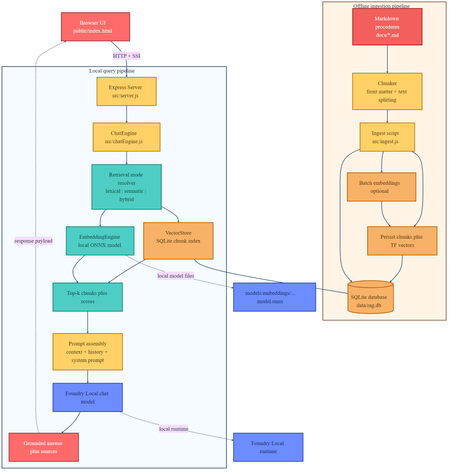
If you are building local AI applications, basic retrieval augmented generation is often only the starting point. This sample shows a more practical pattern: combine lexical retrieval, ONNX based semantic embeddings, and a Foundry Local chat model so the assistant stays grounded, remains offline, and degrades cleanly when the semantic path is unavailable. Why this sample is worth studying Many local RAG samples rely on a single retrieval strategy. That is usually enough for a proof of concept, but it breaks down quickly in production. Exact keywords, acronyms, and document codes behave differently from natural language questions and paraphrased requests. This repository keeps the original lexical retrieval path, adds local ONNX embeddings for semantic search, and fuses both signals in a hybrid ranking mode. The generation step runs through Foundry Local, so the entire assistant can remain on device. Lexical mode handles exact terms and structured vocabulary. Semantic mode handles paraphrases and more natural language phrasing. Hybrid mode combines both and is usually the best default. Lexical fallback protects the user experience if the embedding pipeline cannot start. Architectural overview The sample has two main flows: an offline ingestion pipeline and a local query pipeline. The architecture splits cleanly into offline ingestion at the top and runtime query handling at the bottom. Offline ingestion pipeline Read Markdown files from docs/ . Parse front matter and split each document into overlapping chunks. Generate dense embeddings when the ONNX model is available. Store chunks in SQLite with both sparse lexical features and optional dense vectors. Local query pipeline The browser posts a question to the Express API. ChatEngine resolves the requested retrieval mode. VectorStore retrieves lexical, semantic, or hybrid results. The prompt is assembled with the retrieved context and sent to a Foundry Local chat model. The answer is returned with source references and retrieval metadata. The sequence diagram shows the difference between lexical retrieval and hybrid retrieval. In hybrid mode, the query is embedded first, then lexical and semantic scores are fused before prompt assembly. Repository structure and core components The implementation is compact and readable. The main files to understand are listed below. src/config.js : retrieval defaults, paths, and model settings. src/embeddingEngine.js : local ONNX embedding generation through Transformers.js. src/vectorStore.js : SQLite storage plus lexical, semantic, and hybrid ranking. src/chatEngine.js : retrieval mode resolution, prompt assembly, and Foundry Local model execution. src/ingest.js : document ingestion and embedding generation during indexing. src/server.js : REST endpoints, streaming endpoints, upload support, and health reporting. Getting started To run the sample, you need Node.js 20 or newer, Foundry Local, and a local ONNX embedding model. The default model path is models/embeddings/bge-small-en-v1.5 . cd c:\Users\leestott\local-hybrid-retrival-onnx npm install huggingface-cli download BAAI/bge-small-en-v1.5 --local-dir models/embeddings/bge-small-en-v1.5 npm run ingest npm start Ingestion writes the local SQLite database to data/rag.db . If the embedding model is available, each chunk gets a dense vector as well as lexical features. If the embedding model is missing, ingestion still succeeds and the application remains usable in lexical mode. Best practice: local AI applications should treat model files, SQLite data, and native runtime compatibility as part of the deployable system, not as optional developer conveniences. Code walkthrough 1. Retrieval configuration The sample makes its retrieval behaviour explicit in configuration. That is useful for testing and for operator visibility. export const config = { model: "phi-3.5-mini", docsDir: path.join(ROOT, "docs"), dbPath: path.join(ROOT, "data", "rag.db"), chunkSize: 200, chunkOverlap: 25, topK: 3, retrievalMode: process.env.RETRIEVAL_MODE || "hybrid", retrievalModes: ["lexical", "semantic", "hybrid"], fallbackRetrievalMode: "lexical", retrievalWeights: { lexical: 0.45, semantic: 0.55, }, }; Those defaults tell you a lot about the intended operating profile. Chunks are small, the number of returned chunks is low, and the fallback path is explicit. 2. Local ONNX embeddings The embedding engine disables remote model loading and only uses local files. That matters for privacy, repeatability, and air gapped operation. env.allowLocalModels = true; env.allowRemoteModels = false; this.extractor = await pipeline("feature-extraction", resolvedPath, { local_files_only: true, }); const output = await this.extractor(text, { pooling: "mean", normalize: true, }); The mean pooling and normalisation step make the vectors suitable for cosine similarity based ranking. 3. Hybrid storage and ranking in SQLite Instead of adding a separate vector database, the sample stores lexical and semantic representations in the same SQLite table. That keeps the local footprint low and the implementation easy to debug. searchHybrid(query, queryEmbedding, topK = 5, weights = { lexical: 0.45, semantic: 0.55 }) { const lexicalResults = this.searchLexical(query, topK * 3); const semanticResults = this.searchSemantic(queryEmbedding, topK * 3); if (semanticResults.length === 0) { return lexicalResults.slice(0, topK).map((row) => ({ ...row, retrievalMode: "lexical", })); } const fused = [...combined.values()].map((row) => ({ ...row, score: (row.lexicalScore * lexicalWeight) + (row.semanticScore * semanticWeight), })); fused.sort((a, b) => b.score - a.score); return fused.slice(0, topK); } The important point is not just the weighted fusion. It is the fallback behaviour. If semantic retrieval cannot provide results, the user still gets lexical grounding instead of an empty context window. 4. Retrieval mode resolution in ChatEngine ChatEngine keeps the runtime behaviour predictable. It validates the requested mode and falls back to lexical search when semantic retrieval is unavailable. resolveRetrievalMode(requestedMode) { const desiredMode = config.retrievalModes.includes(requestedMode) ? requestedMode : config.retrievalMode; if ((desiredMode === "semantic" || desiredMode === "hybrid") && !this.semanticAvailable) { return config.fallbackRetrievalMode; } return desiredMode; } This is a sensible production design because local runtime failures are common. Missing model files or native dependency mismatches should reduce quality, not crash the entire assistant. 5. Foundry Local model management The sample uses FoundryLocalManager to discover, download, cache, and load the configured chat model. const manager = FoundryLocalManager.create({ appName: "gas-field-local-rag" }); const catalog = manager.catalog; this.model = await catalog.getModel(config.model); if (!this.model.isCached) { await this.model.download((progress) => { const pct = Math.round(progress * 100); this._emitStatus("download", `Downloading ${this.modelAlias}... ${pct}%`, progress); }); } await this.model.load(); this.chatClient = this.model.createChatClient(); this.chatClient.settings.temperature = 0.1; This gives the app a better local startup experience. The server can expose a status stream while the model initialises in the background. User experience and screenshots The client is intentionally simple, which makes it useful during evaluation. You can switch retrieval mode, test questions quickly, and inspect the retrieved sources. The landing page exposes retrieval mode directly in the UI. That makes it easy to compare lexical, semantic, and hybrid behaviour during testing. The sources panel shows grounding evidence and retrieval scores, which is useful when validating whether better answers are coming from better retrieval or just model phrasing. Best practices for ONNX RAG and Foundry Local Keep lexical fallback alive. Exact identifiers and runtime failures both make this necessary. Persist sparse and dense features together where possible. It simplifies debugging and operational reasoning. Use small chunks and conservative topK values for local context budgets. Expose health and status endpoints so users can see when the model is still loading or embeddings are unavailable. Test retrieval quality separately from generation quality. Pin and validate native runtime dependencies, especially ONNX Runtime, before tuning prompts. Practical warning: this repository already shows why runtime validation matters. A local app can ingest documents successfully and still fail at model initialisation if the native runtime stack is misaligned. How this compares with RAG and CAG The strongest value in this sample comes from where it sits between a basic local RAG baseline and a curated CAG design. Dimension Classic local RAG This hybrid ONNX RAG sample CAG Context assembly Retrieve chunks at query time, often lexically, then inject them into the prompt. Retrieve chunks at query time with lexical, semantic, or fused scoring, then inject the strongest results into the prompt. Use a prepared or cached context pack instead of fresh retrieval for every request. Main strength Easy to implement and easy to explain. Better recall for paraphrases without giving up exact match behaviour or offline execution. Predictable prompts and low query time overhead. Main weakness Misses synonyms and natural language reformulations. More moving parts, larger local asset footprint, and native runtime compatibility to manage. Coverage depends on curation quality and goes stale more easily. Failure behaviour Weak retrieval leads to weak grounding. Semantic failure can degrade to lexical retrieval if designed properly, which this sample does. Prepared context can be too narrow for new or unexpected questions. Best fit Simple local assistants and proof of concept systems. Offline copilots and technical assistants that need stronger recall across varied phrasing. Stable workflows with tightly bounded, curated knowledge. Samples Related samples: - Foundry Local RAG - https://github.com/leestott/local-rag - Foundry Local CAG - https://github.com/leestott/local-cag - Foundry Local hybrid-retrival-onnx https://github.com/leestott/local-hybrid-retrival-onnx Specific benefits of this hybrid approach over classic RAG It captures paraphrased questions that lexical search would often miss. It still preserves exact match performance for codes, terms, and product names. It gives operators a controlled degradation path when the semantic stack is unavailable. It stays local and inspectable without introducing a separate hosted vector service. Specific differences from CAG CAG shifts effort into context curation before the request. This sample retrieves evidence dynamically at runtime. CAG can be faster for fixed workflows, but it is usually less flexible when the document set changes. This hybrid RAG design is better suited to open ended knowledge search and growing document collections. What to validate before shipping Measure retrieval quality in each mode using exact term, acronym, and paraphrase queries. Check that sources shown in the UI reflect genuinely distinct evidence, not repeated chunks. Confirm the application remains usable when semantic retrieval is unavailable. Verify ONNX Runtime compatibility on the real target machines, not only on the development laptop. Test model download, cache, and startup behaviour with a clean environment. Final take For developers getting started with ONNX RAG and Foundry Local, this sample is a good technical reference because it demonstrates a realistic local architecture rather than a minimal demo. It shows how to build a grounded assistant that remains offline, supports multiple retrieval modes, and fails gracefully. Compared with classic local RAG, the hybrid design provides better recall and better resilience. Compared with CAG, it remains more flexible for changing document sets and less dependent on pre curated context packs. If you want a practical starting point for offline grounded AI on developer workstations or edge devices, this is the most balanced pattern in the repository set.526Views0likes0CommentsBuild a Fully Offline RAG App with Foundry Local: No Cloud Required
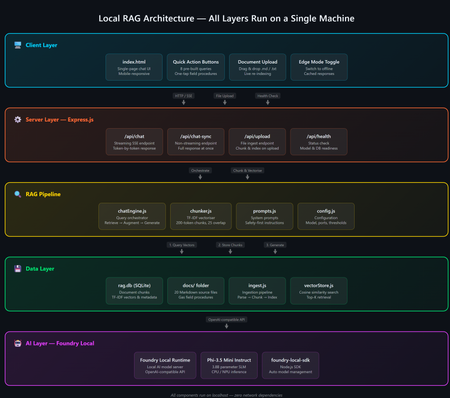
A practical guide to building an on-device AI support agent using Retrieval-Augmented Generation, JavaScript, and Microsoft Foundry Local. The Problem: AI That Can't Go Offline Most AI-powered applications today are firmly tethered to the cloud. They assume stable internet, low-latency API calls, and the comfort of a managed endpoint. But what happens when your users are in an environment with zero connectivity a gas pipeline in a remote field, a factory floor, an underground facility? That's exactly the scenario that motivated this project: a fully offline RAG-powered support agent that runs entirely on a laptop. No cloud. No API keys. No outbound network calls. Just a local model, a local vector store, and domain-specific documents all accessible from a browser on any device. The Gas Field Support Agent - running entirely on-device What is RAG and Why Should You Care? Retrieval-Augmented Generation (RAG) is a pattern that makes language models genuinely useful for domain-specific tasks. Instead of hoping the model "knows" the answer from pre-training, you: Retrieve relevant chunks from your own documents Augment the model's prompt with those chunks as context Generate a response grounded in your actual data The result: fewer hallucinations, traceable answers, and an AI that works with your content. If you're building internal tools, customer support bots, field manuals, or knowledge bases, RAG is the pattern you want. Why fully offline? Data sovereignty, air-gapped environments, field operations, latency-sensitive workflows, and regulatory constraints all demand AI that doesn't phone home. Running everything locally gives you complete control over your data and eliminates any external dependency. The Tech Stack This project is deliberately simple — no frameworks, no build steps, no Docker: Layer Technology Why AI Model Foundry Local + Phi-3.5 Mini Runs locally, OpenAI-compatible API, no GPU needed Backend Node.js + Express Lightweight, fast, universally known Vector Store SQLite via better-sqlite3 Zero infrastructure, single file on disk Retrieval TF-IDF + cosine similarity No embedding model required, fully offline Frontend Single HTML file with inline CSS No build step, mobile-responsive, field-ready The total dependency footprint is just four npm packages: express , openai , foundry-local-sdk , and better-sqlite3 . Architecture Overview The system has five layers — all running on a single machine: Five-layer architecture: Client → Server → RAG Pipeline → Data → AI Model Client Layer — A single HTML file served by Express, with quick-action buttons and responsive chat Server Layer — Express.js handles API routes for chat (streaming + non-streaming), document upload, and health checks RAG Pipeline — The chat engine orchestrates retrieval and generation; the chunker handles TF-IDF vectorization Data Layer — SQLite stores document chunks and their TF-IDF vectors; source docs live as .md files AI Layer — Foundry Local runs Phi-3.5 Mini Instruct on CPU/NPU, exposing an OpenAI-compatible API Getting Started in 5 Minutes You need two prerequisites: Node.js 20+ — nodejs.org Foundry Local — Microsoft's on-device AI runtime: Terminal winget install Microsoft.FoundryLocal Then clone, install, ingest, and run: git clone https://github.com/leestott/local-rag.git cd local-rag npm install npm run ingest # Index the 20 gas engineering documents npm start # Start the server + Foundry Local Open http://127.0.0.1:3000 and start chatting. Foundry Local auto-downloads Phi-3.5 Mini (~2 GB) on first run. How the RAG Pipeline Works Let's trace what happens when a user asks: "How do I detect a gas leak?" RAG query flow: Browser → Server → Vector Store → Model → Streaming response Step 1: Document Ingestion Before any queries happen, npm run ingest reads every .md file from the docs/ folder, splits each into overlapping chunks (~200 tokens, 25-token overlap), computes a TF-IDF vector for each chunk, and stores everything in SQLite. Chunking example docs/01-gas-leak-detection.md → Chunk 1: "Gas Leak Detection – Safety Warnings: Ensure all ignition..." → Chunk 2: "...sources are eliminated. Step-by-step: 1. Perform visual..." → Chunk 3: "...inspection of all joints. 2. Check calibration date..." The overlap ensures no information falls between chunk boundaries — a critical detail in any RAG system. Step 2: Query → Retrieval When the user sends a question, the server converts it into a TF-IDF vector, compares it against every stored chunk using cosine similarity, and returns the top-K most relevant results. For 20 documents (~200 chunks), this executes in under 10ms. src/vectorStore.js /** Retrieve top-K most relevant chunks for a query. */ search(query, topK = 5) { const queryTf = termFrequency(query); const rows = this.db.prepare("SELECT * FROM chunks").all(); const scored = rows.map((row) => { const chunkTf = new Map(JSON.parse(row.tf_json)); const score = cosineSimilarity(queryTf, chunkTf); return { ...row, score }; }); scored.sort((a, b) => b.score - a.score); return scored.slice(0, topK).filter((r) => r.score > 0); } Step 3: Prompt Construction The retrieved chunks are injected into the prompt alongside system instructions: Prompt structure System: You are an offline gas field support agent. Safety-first... Context: [Chunk 1: Gas Leak Detection – Safety Warnings...] [Chunk 2: Gas Leak Detection – Step-by-step...] [Chunk 3: Purging Procedures – Related safety...] User: How do I detect a gas leak? Step 4: Generation + Streaming The prompt is sent to Foundry Local via the OpenAI-compatible API. The response streams back token-by-token through Server-Sent Events (SSE) to the browser: Safety-first response with structured guidance Expandable sources with relevance scores Foundry Local: Your Local AI Runtime Foundry Local is what makes the "offline" part possible. It's a runtime from Microsoft that runs small language models (SLMs) on CPU or NPU — no GPU required. It exposes an OpenAI-compatible API and manages model downloads, caching, and lifecycle automatically. The integration code is minimal if you've used the OpenAI SDK before, this will feel instantly familiar: src/chatEngine.js import { FoundryLocalManager } from "foundry-local-sdk"; import { OpenAI } from "openai"; // Start Foundry Local and load the model const manager = new FoundryLocalManager(); const modelInfo = await manager.init("phi-3.5-mini"); // Use the standard OpenAI client — pointed at the local endpoint const client = new OpenAI({ baseURL: manager.endpoint, apiKey: manager.apiKey, }); // Chat completions work exactly like the cloud API const stream = await client.chat.completions.create({ model: modelInfo.id, messages: [ { role: "system", content: "You are a helpful assistant." }, { role: "user", content: "How do I detect a gas leak?" } ], stream: true, }); Portability matters Because Foundry Local uses the OpenAI API format, any code you write here can be ported to Azure OpenAI or OpenAI's cloud API with a single config change. You're not locked in. Why TF-IDF Instead of Embeddings? Most RAG tutorials use embedding models for retrieval. We chose TF-IDF for this project because: Fully offline — no embedding model to download or run Zero latency — vectorization is instantaneous (just math on word frequencies) Good enough — for a curated collection of 20 domain-specific documents, TF-IDF retrieves the right chunks reliably Transparent — you can inspect the vocabulary and weights, unlike neural embeddings For larger collections (thousands of documents) or when semantic similarity matters more than keyword overlap, you'd swap in an embedding model. But for this use case, TF-IDF keeps the stack simple and dependency-free. Mobile-Responsive Field UI Field engineers use this app on phones and tablets often wearing gloves. The UI is designed for harsh conditions with a dark, high-contrast theme, large touch targets (minimum 48px), and horizontally scrollable quick-action buttons. Desktop view Mobile view The entire frontend is a single index.html file — no React, no build step, no bundler. This keeps the project accessible and easy to deploy anywhere. Runtime Document Upload Users can upload new documents without restarting the server. The upload endpoint receives markdown content, chunks it, computes TF-IDF vectors, and inserts the chunks into SQLite — all in memory, immediately available for retrieval. Drag-and-drop document upload with instant indexing Adapt This for Your Own Domain This project is a scenario sample designed to be forked and customized. Here's the three-step process: 1. Replace the Documents Delete the gas engineering docs in docs/ and add your own .md files with optional YAML front-matter: docs/my-procedure.md --- title: Troubleshooting Widget Errors category: Support id: KB-001 --- # Troubleshooting Widget Errors ...your content here... 2. Edit the System Prompt Open src/prompts.js and rewrite the instructions for your domain: src/prompts.js export const SYSTEM_PROMPT = `You are an offline support agent for [YOUR DOMAIN]. Rules: - Only answer using the retrieved context - If the answer isn't in the context, say so - Use structured responses: Summary → Details → Reference `; 3. Tune the Retrieval Adjust chunking and retrieval parameters in src/config.js : src/config.js export const config = { model: "phi-3.5-mini", chunkSize: 200, // smaller = more precise, less context per chunk chunkOverlap: 25, // prevents info from falling between chunks topK: 3, // chunks per query (more = richer context, slower) }; Extending to Multi-Agent Architectures Once you have a working RAG agent, the natural next step is multi-agent orchestration where specialized agents collaborate to handle complex workflows. With Foundry Local's OpenAI-compatible API, you can compose multiple agent roles on the same machine: Multi-agent concept // Each agent is just a different system prompt + RAG scope const agents = { safety: { prompt: safetyPrompt, docs: "safety/*.md" }, diagnosis: { prompt: diagnosisPrompt, docs: "faults/*.md" }, procedure: { prompt: procedurePrompt, docs: "procedures/*.md" }, }; // Router determines which agent handles the query function route(query) { if (query.match(/safety|warning|hazard/i)) return agents.safety; if (query.match(/fault|error|code/i)) return agents.diagnosis; return agents.procedure; } // Each agent uses the same Foundry Local model endpoint const response = await client.chat.completions.create({ model: modelInfo.id, messages: [ { role: "system", content: selectedAgent.prompt }, { role: "system", content: `Context:\n${retrievedChunks}` }, { role: "user", content: userQuery } ], stream: true, }); This pattern lets you build specialized agent pipelines a triage agent routes to the right specialist, each with its own document scope and system prompt, all running on the same local Foundry instance. For production multi-agent systems, explore Microsoft Foundry for cloud-scale orchestration when connectivity is available. Local-first, cloud-ready Start with Foundry Local for development and offline scenarios. When your agents need cloud scale, swap to Azure AI Foundry with the same OpenAI-compatible API your agent code stays the same. Key Takeaways 1 RAG = Retrieve + Augment + Generate Ground your AI in real documents — dramatically reducing hallucination and making answers traceable. 2 Foundry Local makes local AI accessible OpenAI-compatible API running on CPU/NPU. No GPU required. No cloud dependency. 3 TF-IDF + SQLite is viable For small-to-medium document collections, you don't need a dedicated vector database. 4 Same API, local or cloud Build locally with Foundry Local, deploy with Azure OpenAI — zero code changes. What's Next? Embedding-based retrieval — swap TF-IDF for a local embedding model for better semantic matching Conversation memory — persist chat history across sessions Multi-agent routing — specialized agents for safety, diagnostics, and procedures PWA packaging — make it installable as a standalone app on mobile devices Hybrid retrieval — combine keyword search with semantic embeddings for best results Get the code Clone the repo, swap in your own documents, and start building: git clone https://github.com/leestott/local-rag.git github.com/leestott/local-rag — MIT licensed, contributions welcome. Open source under the MIT License. Built with Foundry Local and Node.js.1.7KViews1like0CommentsLevel up your Python + AI skills with our complete series
We've just wrapped up our live series on Python + AI, a comprehensive nine-part journey diving deep into how to use generative AI models from Python. The series introduced multiple types of models, including LLMs, embedding models, and vision models. We dug into popular techniques like RAG, tool calling, and structured outputs. We assessed AI quality and safety using automated evaluations and red-teaming. Finally, we developed AI agents using popular Python agents frameworks and explored the new Model Context Protocol (MCP). To help you apply what you've learned, all of our code examples work with GitHub Models, a service that provides free models to every GitHub account holder for experimentation and education. Even if you missed the live series, you can still access all the material using the links below! If you're an instructor, feel free to use the slides and code examples in your own classes. If you're a Spanish speaker, check out the Spanish version of the series. Python + AI: Large Language Models 📺 Watch recording In this session, we explore Large Language Models (LLMs), the models that power ChatGPT and GitHub Copilot. We use Python to interact with LLMs using popular packages like the OpenAI SDK and LangChain. We experiment with prompt engineering and few-shot examples to improve outputs. We also demonstrate how to build a full-stack app powered by LLMs and explain the importance of concurrency and streaming for user-facing AI apps. Slides for this session Code repository with examples: python-openai-demos Python + AI: Vector embeddings 📺 Watch recording In our second session, we dive into a different type of model: the vector embedding model. A vector embedding is a way to encode text or images as an array of floating-point numbers. Vector embeddings enable similarity search across many types of content. In this session, we explore different vector embedding models, such as the OpenAI text-embedding-3 series, through both visualizations and Python code. We compare distance metrics, use quantization to reduce vector size, and experiment with multimodal embedding models. Slides for this session Code repository with examples: vector-embedding-demos Python + AI: Retrieval Augmented Generation 📺 Watch recording In our third session, we explore one of the most popular techniques used with LLMs: Retrieval Augmented Generation. RAG is an approach that provides context to the LLM, enabling it to deliver well-grounded answers for a particular domain. The RAG approach works with many types of data sources, including CSVs, webpages, documents, and databases. In this session, we walk through RAG flows in Python, starting with a simple flow and culminating in a full-stack RAG application based on Azure AI Search. Slides for this session Code repository with examples: python-openai-demos Python + AI: Vision models 📺 Watch recording Our fourth session is all about vision models! Vision models are LLMs that can accept both text and images, such as GPT-4o and GPT-4o mini. You can use these models for image captioning, data extraction, question answering, classification, and more! We use Python to send images to vision models, build a basic chat-with-images app, and create a multimodal search engine. Slides for this session Code repository with examples: openai-chat-vision-quickstart Python + AI: Structured outputs 📺 Watch recording In our fifth session, we discover how to get LLMs to output structured responses that adhere to a schema. In Python, all you need to do is define a Pydantic BaseModel to get validated output that perfectly meets your needs. We focus on the structured outputs mode available in OpenAI models, but you can use similar techniques with other model providers. Our examples demonstrate the many ways you can use structured responses, such as entity extraction, classification, and agentic workflows. Slides for this session Code repository with examples: python-openai-demos Python + AI: Quality and safety 📺 Watch recording This session covers a crucial topic: how to use AI safely and how to evaluate the quality of AI outputs. There are multiple mitigation layers when working with LLMs: the model itself, a safety system on top, the prompting and context, and the application user experience. We focus on Azure tools that make it easier to deploy safe AI systems into production. We demonstrate how to configure the Azure AI Content Safety system when working with Azure AI models and how to handle errors in Python code. Then we use the Azure AI Evaluation SDK to evaluate the safety and quality of output from your LLM. Slides for this session Code repository with examples: ai-quality-safety-demos Python + AI: Tool calling 📺 Watch recording In the final part of the series, we focus on the technologies needed to build AI agents, starting with the foundation: tool calling (also known as function calling). We define tool call specifications using both JSON schema and Python function definitions, then send these definitions to the LLM. We demonstrate how to properly handle tool call responses from LLMs, enable parallel tool calling, and iterate over multiple tool calls. Understanding tool calling is absolutely essential before diving into agents, so don't skip over this foundational session. Slides for this session Code repository with examples: python-openai-demos Python + AI: Agents 📺 Watch recording In the penultimate session, we build AI agents! We use Python AI agent frameworks such as the new agent-framework from Microsoft and the popular LangGraph framework. Our agents start simple and then increase in complexity, demonstrating different architectures such as multiple tools, supervisor patterns, graphs, and human-in-the-loop workflows. Slides for this session Code repository with examples: python-ai-agent-frameworks-demos Python + AI: Model Context Protocol 📺 Watch recording In the final session, we dive into the hottest technology of 2025: MCP (Model Context Protocol). This open protocol makes it easy to extend AI agents and chatbots with custom functionality, making them more powerful and flexible. We demonstrate how to use the Python FastMCP SDK to build an MCP server running locally and consume that server from chatbots like GitHub Copilot. Then we build our own MCP client to consume the server. Finally, we discover how easy it is to connect AI agent frameworks like LangGraph and Microsoft agent-framework to MCP servers. With great power comes great responsibility, so we briefly discuss the security risks that come with MCP, both as a user and as a developer. Slides for this session Code repository with examples: python-mcp-demo11KViews6likes0CommentsMake your own private ChatGPT
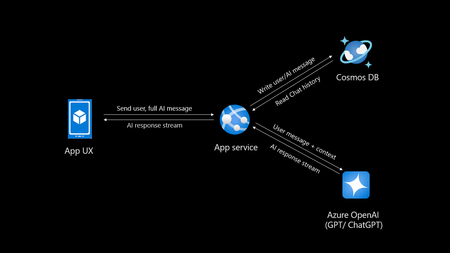
Introduction Creating your own private ChatGPT allows you to leverage AI capabilities while ensuring data privacy and security. This guide walks you through building a secure, customized chatbot using tools like Azure OpenAI, Cosmos DB and Azure App service. Why Build a Private ChatGPT? With the rise of AI-driven applications, organizations, people often face challenges related to data privacy, customization, and integration. Building a private ChatGPT addresses these concerns by: Maintaining Data Privacy: Keep sensitive information within your infrastructure. Customizing Responses: Tailor the chatbot’s behavior and language to suit your requirements. Ensuring Security: Leverage enterprise-grade security protocols. Avoiding Data Sharing: Prevent your data from being used to train external models. If organizations do not take these measures their data may go into future model training and can leak your sensitive data to public. Eg: Chatgpt collects personal data mentioned in their privacy policy Prerequisites Before you begin, ensure you have: Access to Azure OpenAI Service. A development environment set up with Python. Basic knowledge of FastAPI and MongoDB. An Azure account with necessary permissions. If you do not have Azure subscription, try Azure for students for FREE. Step 1: Set Up Azure OpenAI Log in to the Azure Portal and create an Azure OpenAI resource. Deploy a model, such as GPT-4o (multimodal), and note down the endpoint and API key. Note there is also an option of keyless authentication. Configure permissions to control access. Step 2: Use Chatgpt like app sample You can select any repository to be as base template for your app, in this I will be using the third option AOAIchat. It is developed by me. GitHub - mckaywrigley/chatbot-ui: AI chat for any model. Azure-Samples/azure-search-openai-demo: A sample app for the Retrieval-Augmented Generation pattern running in Azure, using Azure AI Search for retrieval and Azure OpenAI large language models to power ChatGPT-style and Q&A experiences. sourabhkv/AOAIchat: Azure OpenAI chat This architecture diagram represents a typical flow for a private ChatGPT application with the following components: App UX (User Interface): This is the front-end application (mobile, web, or desktop) where users interact with the chatbot. It sends the user's input (prompt) and displays the AI's responses. App Service: Acts as the backend application, handling user requests and coordinating with other services. Functions: Receives user inputs and prepares them for processing by the Azure OpenAI service. Streams AI responses back to the App UX. Reads from and writes to Cosmos DB to manage chat history. Azure OpenAI Service: This is the core AI service, processing the user input and generating responses using models like GPT-4o. The App Service sends the user input (along with context) to this service and receives the AI-generated responses. Cosmos DB: A NoSQL database used to store and manage chat history. Operations: Writes user messages and AI-generated responses for future reference or analysis. Reads chat history to provide context for AI responses, enabling more intelligent and contextual conversations. Data Flow: User inputs are sent from the App UX to the App Service. The App Service forwards the input (with additional context, if needed) to Azure OpenAI. Azure OpenAI generates a response, which is streamed back to the App UX via the App Service. The App Service writes user inputs and AI responses to Cosmos DB for persistence. This architecture ensures scalability, secure data handling, and the ability to provide contextual responses by integrating database and AI services. What can you do with my template? AOAIchat supports personal, enterprise chat enabled by RAG People can enable RAG mode if they want to search within their database, else it behaves like normal ChatGPT. It supports multimodality, (supports image, text input) also depends on model deployed in Azure AI foundry. Step 3: Deploy to Azure Deploy a Cosmos DB account in nearest region Deploy Azure OpenAI model (gpt-4o, gpt-4o-mini recommended) Deploy Azure App service, try using container I would recommend B1plan to your nearest region, select docker registry sourabhkv/aoaichatdb:0.1 startup command uvicorn app:app --host 0.0.0.0 --port 80 After app service starts, put all environment variables The application requires the following environment variables to be set for proper configuration: Environment Variable Description AZURE_OPENAI_ENDPOINT The endpoint for Azure OpenAI API. AZURE_OPENAI_API_KEY API key for accessing Azure OpenAI. DEPLOYMENT_NAME Azure OpenAI deployment name. API_VERSION API version for Azure OpenAI. MAX_TOKENS Maximum tokens for API responses. MONGO_DETAILS MongoDB connection string. AZURE_OPENAI_ENDPOINT=<your_azure_openai_endpoint> AZURE_OPENAI_API_KEY=<your_azure_openai_api_key> DEPLOYMENT_NAME=<your_deployment_name> API_VERSION=<your_api_version> MAX_TOKENS=<max_tokens> MONGO_DETAILS=<your_mongo_connection_string> Optional feature: implement authentication to secure access. Within app service select Authentication and select service providers. I went with Entra based authentication with single tenant. There is option of multi-tenant, personal accounts as well. Restart App service and within 2 minutes your private ChatGPT is ready. Pricing Pricing may depend on the plan you have deployed resources and region. Check Azure calculator for price estimation. My estimate for pricing I deployed all my resources in Sweden central Cosmos DB config - Cosmos DB for MongoDB (RU) serverless config with single write master, 2 GB transactional storage, 2 backup plan (FREE) ~ 0.75$ Azure OpenAI service - plan S0, model gpt-4o-mini global deployment, Input 20000 tokens, Output 10000 tokens ~ 9.00$ App service plan - OS Linux, Tier B1, instance count 1 ~13.14$ Total monthly cost = 22.89$ This price may vary in future, in region I calculated my configuration in Azure calculator Governance Azure OpenAI provides content filters to block any kind of input that violates responsible AI practices. Categories include Hate and Fairness Sexual Violence Self-harm User Prompt Attacks (direct and indirect) The content filtering system detects and takes action on specific categories of potentially harmful content in both input prompts and output completions. Azure OpenAI Service includes default safety settings applied to all models set as medium. Content filters can be modified to different level depending on use case. It supports RAG, I have provided detailed solution for it in my GitHub. Practical implementation GE Aerospace, in partnership with Microsoft and Accenture, has launched a company-wide generative AI platform, leveraging Microsoft Azure and Azure OpenAI Service. This solution aims to transform asset tracking and compliance in aviation, enabling quick access to maintenance records and reducing manual processing time from days to minutes. It supports informed decision-making by providing insights into aircraft leasing, compliance gaps, and asset health. For enterprises implementing private ChatGPT solutions, this illustrates the potential of generative AI for streamlining document-intensive processes while ensuring data security and compliance through cloud-based infrastructure like Azure. GE Aerospace Launches Company-wide Generative AI Platform for Employees | GE Aerospace News Build your own private ChatGPT style app with enterprise-ready architecture - By Microsoft Mechanics How to make private ChatGPT for FREE? It can be FREE if all of the setup is running locally on your hardware. Cosmos DB <-> MongoDB. Azure OpenAI <-> Ollama / LM studio Refer this NOTE : I have used gpt-4o, gpt-4o-mini these values are hardcoded in webpage, if you are using other models, you might have to change them in index.html. App Service <-> Local machine Register for Github models to access API for FREE. Note: GitHub models have rate limit for different models. Useful links sourabhkv/AOAIchat: Azure OpenAI chat What is RAG? Get started with Azure OpenAI API Chat with Azure OpenAI models using your own data16KViews1like1CommentBuilding Custom Chat AI: A Comprehensive Guide for Developers
In today's rapidly evolving digital landscape, the integration of artificial intelligence (AI) into business operations has become a pivotal strategy for companies aiming to enhance their customer engagement and streamline their processes. This article delves into the foundational steps and considerations for developers embarking on the journey of building a custom chat AI for their company website. From understanding the core concepts of AI to selecting the right models and implementing effective prompt engineering techniques, this guide provides a comprehensive overview to help developers navigate the complexities of AI development. Whether you are a beginner or have some experience in the field, the insights shared here will equip you with the knowledge and tools needed to create a robust and efficient chat AI tailored to your business needs. A discussion will be held with Nitya Narasimhan, Senior Cloud Advocate at Microsoft specializing in AI, and Wey Gu, a Chinese AI MVP, to delve into these critical topics. What are the first steps a developer should take when starting to build a custom chat AI for their company website? Nitya: If you are new to AI, start by familiarizing yourself with the core concepts and usage of AI models. A course like Generative AI for Beginnerscan be a great starting point. Next, get hands-on experience with models by trying out GitHub Models, which are free to use with just a GitHub account. This will help you build your intuition for model selection and prompt engineering. If you already have some experience, the initial steps to building a custom chat AI are as follows: Identify the use case and requirements (e.g., typical questions asked and valid responses). Choose a model to start prototyping (test the question with various models and compare results). If your chat AI is grounded in your data, identify the data sources and formats (where and what). Select an AI app template to jumpstart development and customize it with your model and data choices. How does understanding model choice impact the development of a custom chat AI? Nitya: Understanding model choice is crucial for developing a custom chat AI. It involves evaluating models based on three key factors: cost, customization, and performance. Customization: Start by identifying the task you want to execute (e.g., chat, image, embeddings, agents). Filter models that support this capability and validate them with a test prompt to ensure they fit your requirements. This process will narrow down your options from thousands to a few suitable models. Cost: Consider whether the model supports serverless deployments (pay-as-you-go, per token) or managed deployments (subscription-based, per VM). Evaluate costs not just for usage (chat completion) but also for end-to-end development (evaluations, iterative ideation). Performance: Assess models based on latency (e.g., chat completions vs. reasoning models) and the quality and safety of responses. Understand default model characteristics (model card) and perform custom evaluations to ensure quality for your desired prompts dataset. Can you explain the concept of prompt engineering and how it can be applied using GitHub models? Nitya: Prompt engineering involves guiding the model on how to process questions and generate responses to improve quality. Think of developers as teachers and models as students being taught to answer exam questions. Prompt engineering provides a rubric to guide models in giving relevant answers. This includes providing examples, creating personas (e.g., "answer politely using formal language"), defining output formats (e.g., "answer in 1-2 sentences", "reply with results in JSON format"), and configuring model parameters (e.g., temperature, stop-words, top-p, max tokens). When working with GitHub models, you can configure models using the Playground (UI) or move to an IDE with the Azure AI Inference API, offering both low-code and code-first options for prompt engineering. What is retrieval augmented generation (RAG), and how does it enhance the ability to chat with data? Wei: RAG involves grounding user questions in retrieved knowledge from private data sources to ensure responses are relevant to the application scenario. It works by wrapping the initial user prompt in a prompt template to create the final model prompt sent to the model. The RAG workflow includes retrieval of knowledge, augmentation of the prompt, and generation of the response. This dynamic process provides relevant grounding data and instructions to contextualize user questions for app-required responses. What are some practical tips for developers to streamline their end-to-end journey from catalog to cloud? Nitya: Here are three tips to get started: Model Selection: Use GitHub Models with diverse test prompts to build intuition for prompt engineering and model capabilities. Compare models side-by-side. Copilot Development: Start with an Azure AI app template. Deploy it to understand the application and its architecture before customizing it to your needs. Validate your development environment and get familiar with tools. Safety & Evaluation: Explore built-in content safety filters and evaluators in the Azure AI platform to understand metrics and effectiveness of your prompt engineering or RAG strategy. Use tracing and App Insights to monitor performance and cost. What are some common challenges developers might face when building a custom chat AI, and how can they overcome them? Nitya and Wei: There are many challenges we can think of - here are three that are important: App Architecture: Understand the app architecture for your scenario (e.g., RAG, multi-agent). Explore existing AI app templates to build intuition and customize one that fits your requirements. Model Choice: Choose models based on cost, quota availability, and flexibility for future configuration. Use the Azure AI model inference API to abstract provider-specific SDKs and decouple your code from your choice, allowing for easier model swaps later. Observability: Debug issues in app development or execution performance. Use platforms and tools that bring observability to the end-to-end workflow. Activate App Insights and use tracing tools to generate telemetry for insights locally or in production. What resources and samples are available for further exploration into this subject? Wei: Explore Azure AI App Templates, For Beginners Curricula, RAG Chat Workshop, AI Tour Workshops and Generative AI for Beginners. For more workshops and talks, visit https://aka.ms/aitour/repos. Feel free to check out opensource projects like AutoGen, LlamaIndex, LangChain, and CamelAI's documentation. As we conclude this exploration into building a custom chat AI for your company website, it's clear that the journey is both challenging and rewarding. By understanding the core concepts of AI, selecting the right models, and mastering prompt engineering, developers can create a powerful tool that enhances customer engagement and streamlines business operations. The insights and practical tips shared in this article provide a solid foundation for embarking on this journey. Remember, the key to success lies in continuous learning and adaptation. As AI technology evolves, you should also adapt your approach to developing and refining your chat AI. Stay curious, stay innovative, and most importantly, stay committed to delivering the best possible experience for your users.407Views1like0CommentsAI Agents: Metacognition for Self-Aware Intelligence - Part 9
This blog post, Part 9 in a series on AI agents, introduces the concept of metacognition, or "thinking about thinking," and its application to AI agents. It explains how metacognition enables agents to self-evaluate, adapt, and improve their performance. The post outlines the key components of an AI agent and illustrates metacognition with a travel agent example, demonstrating how it can enhance planning, error correction, and personalization. The post also discusses the Corrective RAG approach and demonstrates code snippets.1.3KViews0likes0CommentsAI Agents: Mastering Agentic RAG - Part 5
This blog post, Part 5 of a series on AI agents, explores Agentic RAG (Retrieval-Augmented Generation), a paradigm shift in how LLMs interact with external data. Unlike traditional RAG, Agentic RAG allows LLMs to autonomously plan their information retrieval process through an iterative loop of actions and evaluations. The post highlights the importance of the LLM "owning" the reasoning process, dynamically selecting tools and refining queries. It covers key implementation details, including iterative loops, tool integration, memory management, and handling failure modes. Practical use cases, governance considerations, and code examples demonstrating Agentic RAG with AutoGen, Semantic Kernel, and Azure AI Agent Service are provided. The post concludes by emphasizing the transformative potential of Agentic RAG and encourages further exploration through linked resources and previous blog posts in the series.4KViews1like0CommentsCreate your own QA RAG Chatbot with LangChain.js + Azure OpenAI Service
Demo: Mpesa for Business Setup QA RAG Application In this tutorial we are going to build a Question-Answering RAG Chat Web App. We utilize Node.js and HTML, CSS, JS. We also incorporate Langchain.js + Azure OpenAI + MongoDB Vector Store (MongoDB Search Index). Get a quick look below. Note: Documents and illustrations shared here are for demo purposes only and Microsoft or its products are not part of Mpesa. The content demonstrated here should be used for educational purposes only. Additionally, all views shared here are solely mine. What you will need: An active Azure subscription, get Azure for Student for free or get started with Azure for 12 months free. VS Code Basic knowledge in JavaScript (not a must) Access to Azure OpenAI, click here if you don't have access. Create a MongoDB account (You can also use Azure Cosmos DB vector store) Setting Up the Project In order to build this project, you will have to fork this repository and clone it. GitHub Repository link: https://github.com/tiprock-network/azure-qa-rag-mpesa . Follow the steps highlighted in the README.md to setup the project under Setting Up the Node.js Application. Create Resources that you Need In order to do this, you will need to have Azure CLI or Azure Developer CLI installed in your computer. Go ahead and follow the steps indicated in the README.md to create Azure resources under Azure Resources Set Up with Azure CLI. You might want to use Azure CLI to login in differently use a code. Here's how you can do this. Instead of using az login. You can do az login --use-code-device OR you would prefer using Azure Developer CLI and execute this command instead azd auth login --use-device-code Remember to update the .env file with the values you have used to name Azure OpenAI instance, Azure models and even the API Keys you have obtained while creating your resources. Setting Up MongoDB After accessing you MongoDB account get the URI link to your database and add it to the .env file along with your database name and vector store collection name you specified while creating your indexes for a vector search. Running the Project In order to run this Node.js project you will need to start the project using the following command. npm run dev The Vector Store The vector store used in this project is MongoDB store where the word embeddings were stored in MongoDB. From the embeddings model instance we created on Azure AI Foundry we are able to create embeddings that can be stored in a vector store. The following code below shows our embeddings model instance. //create new embedding model instance const azOpenEmbedding = new AzureOpenAIEmbeddings({ azureADTokenProvider, azureOpenAIApiInstanceName: process.env.AZURE_OPENAI_API_INSTANCE_NAME, azureOpenAIApiEmbeddingsDeploymentName: process.env.AZURE_OPENAI_API_DEPLOYMENT_EMBEDDING_NAME, azureOpenAIApiVersion: process.env.AZURE_OPENAI_API_VERSION, azureOpenAIBasePath: "https://eastus2.api.cognitive.microsoft.com/openai/deployments" }); The code in uploadDoc.js offers a simple way to do embeddings and store them to MongoDB. In this approach the text from the documents is loaded using the PDFLoader from Langchain community. The following code demonstrates how the embeddings are stored in the vector store. // Call the function and handle the result with await const storeToCosmosVectorStore = async () => { try { const documents = await returnSplittedContent() //create store instance const store = await MongoDBAtlasVectorSearch.fromDocuments( documents, azOpenEmbedding, { collection: vectorCollection, indexName: "myrag_index", textKey: "text", embeddingKey: "embedding", } ) if(!store){ console.log('Something wrong happened while creating store or getting store!') return false } console.log('Done creating/getting and uploading to store.') return true } catch (e) { console.log(`This error occurred: ${e}`) return false } } In this setup, Question Answering (QA) is achieved by integrating Azure OpenAI’s GPT-4o with MongoDB Vector Search through LangChain.js. The system processes user queries via an LLM (Large Language Model), which retrieves relevant information from a vectorized database, ensuring contextual and accurate responses. Azure OpenAI Embeddings convert text into dense vector representations, enabling semantic search within MongoDB. The LangChain RunnableSequence structures the retrieval and response generation workflow, while the StringOutputParser ensures proper text formatting. The most relevant code snippets to include are: AzureChatOpenAI instantiation, MongoDB connection setup, and the API endpoint handling QA queries using vector search and embeddings. There are some code snippets below to explain major parts of the code. Azure AI Chat Completion Model This is the model used in this implementation of RAG, where we use it as the model for chat completion. Below is a code snippet for it. const llm = new AzureChatOpenAI({ azTokenProvider, azureOpenAIApiInstanceName: process.env.AZURE_OPENAI_API_INSTANCE_NAME, azureOpenAIApiDeploymentName: process.env.AZURE_OPENAI_API_DEPLOYMENT_NAME, azureOpenAIApiVersion: process.env.AZURE_OPENAI_API_VERSION }) Using a Runnable Sequence to give out Chat Output This shows how a runnable sequence can be used to give out a response given the particular output format/ output parser added on to the chain. //Stream response app.post(`${process.env.BASE_URL}/az-openai/runnable-sequence/stream/chat`, async (req,res) => { //check for human message const { chatMsg } = req.body if(!chatMsg) return res.status(201).json({ message:'Hey, you didn\'t send anything.' }) //put the code in an error-handler try{ //create a prompt template format template const prompt = ChatPromptTemplate.fromMessages( [ ["system", `You are a French-to-English translator that detects if a message isn't in French. If it's not, you respond, "This is not French." Otherwise, you translate it to English.`], ["human", `${chatMsg}`] ] ) //runnable chain const chain = RunnableSequence.from([prompt, llm, outPutParser]) //chain result let result_stream = await chain.stream() //set response headers res.setHeader('Content-Type','application/json') res.setHeader('Transfer-Encoding','chunked') //create readable stream const readable = Readable.from(result_stream) res.status(201).write(`{"message": "Successful translation.", "response": "`); readable.on('data', (chunk) => { // Convert chunk to string and write it res.write(`${chunk}`); }); readable.on('end', () => { // Close the JSON response properly res.write('" }'); res.end(); }); readable.on('error', (err) => { console.error("Stream error:", err); res.status(500).json({ message: "Translation failed.", error: err.message }); }); }catch(e){ //deliver a 500 error response return res.status(500).json( { message:'Failed to send request.', error:e } ) } }) To run the front end of the code, go to your BASE_URL with the port given. This enables you to run the chatbot above and achieve similar results. The chatbot is basically HTML+CSS+JS. Where JavaScript is mainly used with fetch API to get a response. Thanks for reading. I hope you play around with the code and learn some new things. Additional Reads Introduction to LangChain.js Create an FAQ Bot on Azure Build a basic chat app in Python using Azure AI Foundry SDK734Views0likes0Comments