rag
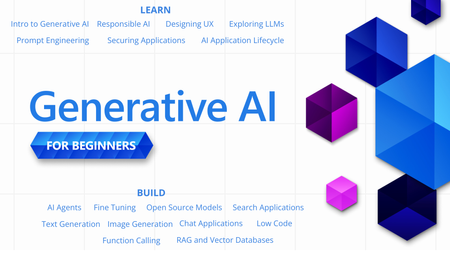
45 TopicsGenerative AI for Beginners - Full Videos Series Released!
With so many new technologies, tools and terms in the world of Generative AI, it can be hard to know where to start or what to learn next. "Generative AI for Beginners" is designed to help you on your learning journey no matter where you are now. We are happy announce that the "Generative AI for Beginners" course has received a major refresh - 18 new videos for each lesson.Essential Microsoft Resources for MVPs & the Tech Community from the AI Tour
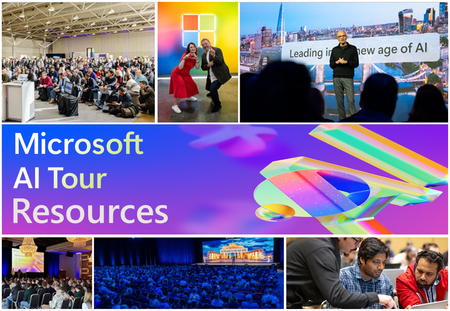
Unlock the power of Microsoft AI with redeliverable technical presentations, hands-on workshops, and open-source curriculum from the Microsoft AI Tour! Whether you’re a Microsoft MVP, Developer, or IT Professional, these expertly crafted resources empower you to teach, train, and lead AI adoption in your community. Explore top breakout sessions covering GitHub Copilot, Azure AI, Generative AI, and security best practices—designed to simplify AI integration and accelerate digital transformation. Dive into interactive workshops that provide real-world applications of AI technologies. Take it a step further with Microsoft’s Open-Source AI Curriculum, offering beginner-friendly courses on AI, Machine Learning, Data Science, Cybersecurity, and GitHub Copilot—perfect for upskilling teams and fostering innovation. Don’t just learn—lead. Access these resources, host impactful training sessions, and drive AI adoption in your organization. Start sharing today! Explore now: Microsoft AI Tour Resources.Building the Ultimate Nerdland Podcast Chatbot with RAG and LLM: Step-by-Step Guide
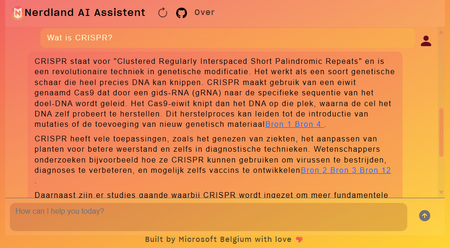
Large Language Models (LLMs) are popular in tech. In Belgium and the Netherlands, the podcast "Nerdland" is a favorite for tech and science fans. It covers topics like bioscience, space, robotics, and AI. With over 100 episodes, "Nerdland" is a goldmine of information. So, why not create a chatbot for "Nerdland" fans? This chatbot uses podcast content to engage and inform users. It allows the "Nerdland" community to interact with the content in new ways and makes the information accessible in many languages, thanks to LLMs' multi-language capabilities. This blog post explains the project's technical details, including the LLMs used, integration process, and deployment on Azure.
Building Agentic Systems on Azure: Microsoft Foundry Agents SDK vs Microsoft Agent Framework
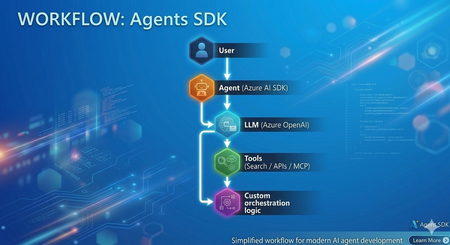
In my recent experience as a Senior Consultant at Microsoft, I’ve been actively involved in designing and delivering AI-driven solutions, with a strong focus on building intelligent agents using modern frameworks. Along the way, I've built agents using both Microsoft Foundry Agents SDK (hereafter "Agents SDK") and Microsoft Agent Framework (MAF) Both approaches are powerful and capable. However, once you move beyond simple proofs of concept, the developer experience and architectural patterns start to differ significantly. This article provides a practical comparison based on real implementation experience and aims to help developers choose the right approach. Approach 1: Agents SDK Agents SDK provides a straightforward way to create agents with integrated tools and models. Example: Creating an Agent from azure.ai.projects import AIProjectClient from azure.ai.agents.models import AzureAISearchTool, AzureAISearchQueryType from azure.identity import DefaultAzureCredential client = AIProjectClient(credential=DefaultAzureCredential(), endpoint=os.getenv("AZURE_AI_PROJECT_ENDPOINT")) # Configure tools ai_search = AzureAISearchTool( index_connection_id=conn_id, index_name="my-index", query_type=AzureAISearchQueryType.SEMANTIC, ) # Create agent (persisted in Foundry portal) agent = client.agents.create_agent( model=os.getenv("AZURE_AI_AGENT_DEPLOYMENT_NAME"), name="MyAgent", instructions="You are a helpful assistant.", tool_resources=ai_search.resources, tools=ai_search.definitions, ) # Run conversation thread = client.agents.threads.create() client.agents.messages.create(thread_id=thread.id, role="user", content="Hello") run = client.agents.runs.create(thread_id=thread.id, agent_id=agent.id) What this approach provides Native integration with Azure AI services (OpenAI, AI Search, MCP) Managed execution environment Simple and quick agent setup Conceptually, this approach can be summarized as: Model + Tools + Execution Strengths ✅ Rapid development and onboarding ✅ Strong integration within the Azure ecosystem ✅ Well-suited for single-agent or tool-driven use cases ✅ Minimal infrastructure overhead Challenges observed in practice As the complexity of scenarios increases, certain limitations become more visible: Multi-agent workflows require custom orchestration logic Agent handoffs must be implemented manually Context sharing across agents requires additional design effort While this approach offers flexibility, it shifts orchestration complexity to the developer. Approach 2: Microsoft Agent Framework (MAF) Microsoft Agent Framework introduces a higher-level abstraction, focused on agent orchestration and system design. Creating an Agent from agent_framework import Agent, WorkflowBuilder, Message from agent_framework.foundry import FoundryChatClient from azure.identity import DefaultAzureCredential client = FoundryChatClient( project_endpoint=os.getenv("FOUNDRY_PROJECT_ENDPOINT"), model=os.getenv("FOUNDRY_MODEL_DEPLOYMENT_NAME"), credential=DefaultAzureCredential(), ) # Create agents (in-process only, not persisted in portal) researcher = Agent(client, name="ResearcherAgent", instructions="Research topics thoroughly.") writer = Agent(client, name="WriterAgent", instructions="Write concise summaries.") # Build and run multi-agent workflow workflow = WorkflowBuilder(start_executor=researcher).add_edge(researcher, writer).build() async for event in workflow.run(Message("user", "Summarize migration best practices"), stream=True): print(event.content) What this approach provides Built-in orchestration capabilities Native support for multi-agent workflows Structured agent lifecycle management Context and memory handling Conceptually, this can be viewed as: Agents + Orchestration + System Design Observations from implementation When implementing similar use cases using MAF: Agent responsibilities became clearly defined Routing and delegation patterns were significantly simplified Overall system architecture became easier to maintain and scale This approach encourages thinking in terms of agent ecosystems rather than isolated agents. Architecture Comparison Agents SDK Microsoft Agent Framework (MAF) Choosing the Right Approach Use Agents SDK when: You need rapid development for a single-agent use case The workflow is relatively straightforward You prefer flexibility and lower-level control Use Microsoft Agent Framework when: You are designing multi-agent systems Your solution requires routing, delegation, or handoffs Long-term scalability and maintainability are essential Pros and Cons Summary Agents SDK Pros Easy to get started Strong Azure integration Flexible design Cons Manual orchestration required Limited native multi-agent support Complexity increases as scenarios grow Microsoft Agent Framework (MAF) Pros Built-in orchestration Native multi-agent support Scalable and structured architecture Cons Learning curve for new developers More opinionated framework design Reduced low-level control compared to SDK-based approach References and Repositories 🔗 Microsoft Agent Framework (MAF) Microsoft Agent Framework – GitHub Repository Microsoft Agent Framework Samples – Tutorials & Examples Workflow Samples (Multi-agent patterns) FoundryChatClient sample (Python) Agent Framework demos - GitHub Source 📘 Documentation Microsoft Agent Framework Overview (Microsoft Learn) Agent Framework + Microsoft Foundry provider docs 🔗 Azure AI Projects / Agents SDK Azure AI Projects SDK – Python (GitHub Source) Azure AI Projects Agents (.NET SDK repo) 📘 Documentation Azure AI Projects SDK (Python) – Microsoft Learn Azure AI Agents SDK – Microsoft Learn Conclusion Azure AI Projects and Microsoft Agent Framework both play important roles in the modern agent development landscape. Agents SDK enables quick and flexible agent development Microsoft Agent Framework enables structured, scalable agent systems In practice, the choice depends on whether you are building a single agent feature or a multi-agent system. Final Thought Agents SDK helps you get started quickly. Microsoft Agent Framework helps you scale with confidence In a follow-up blog, I’ll dive into how the M365 Agents SDK compares with Microsoft Agent Framework, especially in the context of enterprise productivity and Copilot experiences.Vectorless Reasoning-Based RAG: A New Approach to Retrieval-Augmented Generation
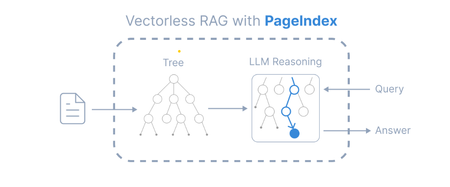
Introduction Retrieval-Augmented Generation (RAG) has become a widely adopted architecture for building AI applications that combine Large Language Models (LLMs) with external knowledge sources. Traditional RAG pipelines rely heavily on vector embeddings and similarity search to retrieve relevant documents. While this works well for many scenarios, it introduces challenges such as: Requires chunking documents into small segments Important context can be split across chunks Embedding generation and vector databases add infrastructure complexity A new paradigm called Vectorless Reasoning-Based RAG is emerging to address these challenges. One framework enabling this approach is PageIndex, an open-source document indexing system that organizes documents into a hierarchical tree structure and allows Large Language Models (LLMs) to perform reasoning-based retrieval over that structure. Vectorless Reasoning-Based RAG Instead of vectors, this approach uses structured document navigation. User Query ->Document Tree Structure ->LLM Reasoning ->Relevant Nodes Retrieved ->LLM Generates Answer This mimics how humans read documents: Look at the table of contents Identify relevant sections Read the relevant content Answer the question Core features No Vector Database: It relies on document structure and LLM reasoning for retrieval. It does not depend on vector similarity search. No Chunking: Documents are not split into artificial chunks. Instead, they are organized using their natural structure, such as pages and sections. Human-like Retrieval: The system mimics how human experts read documents. It navigates through sections and extracts information from relevant parts. Better Explainability and Traceability: Retrieval is based on reasoning. The results can be traced back to specific pages and sections. This makes the process easier to interpret. It avoids opaque and approximate vector search, often called “vibe retrieval.” When to Use Vectorless RAG Vectorless RAG works best when: Data is structured or semi-structured Documents have clear metadata Knowledge sources are well organized Queries require reasoning rather than semantic similarity Examples: enterprise knowledge bases internal documentation systems compliance and policy search healthcare documentation financial reporting Implementing Vectorless RAG with Azure AI Foundry Step 1 : Install Pageindex using pip command, from pageindex import PageIndexClient import pageindex.utils as utils # Get your PageIndex API key from https://dash.pageindex.ai/api-keys PAGEINDEX_API_KEY = "YOUR_PAGEINDEX_API_KEY" pi_client = PageIndexClient(api_key=PAGEINDEX_API_KEY) Step 2 : Set up your LLM Example using Azure OpenAI: from openai import AsyncAzureOpenAI client = AsyncAzureOpenAI( api_key=AZURE_OPENAI_API_KEY, azure_endpoint=AZURE_OPENAI_ENDPOINT, api_version=AZURE_OPENAI_API_VERSION ) async def call_llm(prompt, temperature=0): response = await client.chat.completions.create( model=AZURE_DEPLOYMENT_NAME, messages=[{"role": "user", "content": prompt}], temperature=temperature ) return response.choices[0].message.content.strip() Step 3: Page Tree Generation import os, requests pdf_url = "https://arxiv.org/pdf/2501.12948.pdf" //give the pdf url for tree generation, here given one for example pdf_path = os.path.join("../data", pdf_url.split('/')[-1]) os.makedirs(os.path.dirname(pdf_path), exist_ok=True) response = requests.get(pdf_url) with open(pdf_path, "wb") as f: f.write(response.content) print(f"Downloaded {pdf_url}") doc_id = pi_client.submit_document(pdf_path)["doc_id"] print('Document Submitted:', doc_id) Step 4 : Print the generated pageindex tree structure if pi_client.is_retrieval_ready(doc_id): tree = pi_client.get_tree(doc_id, node_summary=True)['result'] print('Simplified Tree Structure of the Document:') utils.print_tree(tree) else: print("Processing document, please try again later...") Step 5 : Use LLM for tree search and identify nodes that might contain relevant context import json query = "What are the conclusions in this document?" tree_without_text = utils.remove_fields(tree.copy(), fields=['text']) search_prompt = f""" You are given a question and a tree structure of a document. Each node contains a node id, node title, and a corresponding summary. Your task is to find all nodes that are likely to contain the answer to the question. Question: {query} Document tree structure: {json.dumps(tree_without_text, indent=2)} Please reply in the following JSON format: {{ "thinking": "<Your thinking process on which nodes are relevant to the question>", "node_list": ["node_id_1", "node_id_2", ..., "node_id_n"] }} Directly return the final JSON structure. Do not output anything else. """ tree_search_result = await call_llm(search_prompt) Step 6 : Print retrieved nodes and reasoning process node_map = utils.create_node_mapping(tree) tree_search_result_json = json.loads(tree_search_result) print('Reasoning Process:') utils.print_wrapped(tree_search_result_json['thinking']) print('\nRetrieved Nodes:') for node_id in tree_search_result_json["node_list"]: node = node_map[node_id] print(f"Node ID: {node['node_id']}\t Page: {node['page_index']}\t Title: {node['title']}") Step 7: Answer generation node_list = json.loads(tree_search_result)["node_list"] relevant_content = "\n\n".join(node_map[node_id]["text"] for node_id in node_list) print('Retrieved Context:\n') utils.print_wrapped(relevant_content[:1000] + '...') answer_prompt = f""" Answer the question based on the context: Question: {query} Context: {relevant_content} Provide a clear, concise answer based only on the context provided. """ print('Generated Answer:\n') answer = await call_llm(answer_prompt) utils.print_wrapped(answer) When to Use Each Approach Both vector-based RAG and vectorless RAG have their strengths. Choosing the right approach depends on the nature of the documents and the type of retrieval required. When to Use Vector Database–Based RAG Vector-based retrieval works best when dealing with large collections of unrelated or loosely structured documents. In such cases, semantic similarity is often sufficient to identify relevant information quickly. Use vector RAG when: Searching across many independent documents Semantic similarity is sufficient to locate relevant content Real-time retrieval is required over very large datasets Common use cases include: Customer support knowledge bases Conversational chatbots Product and content search systems When to Use Vectorless RAG Vectorless approaches such as PageIndex are better suited for long, structured documents where understanding the logical organization of the content is important. Use vectorless RAG when: Documents contain clear hierarchical structure Logical reasoning across sections is required High retrieval accuracy is critical Typical examples include: Financial filings and regulatory reports Legal documents and contracts Technical manuals and documentation Academic and research papers In these scenarios, navigating the document structure allows the system to identify the exact section that logically contains the answer, rather than relying only on semantic similarity. Conclusion Vector databases significantly advanced RAG architectures by enabling scalable semantic search across large datasets. However, they are not the optimal solution for every type of document. Vectorless approaches such as PageIndex introduce a different philosophy: instead of retrieving text that is merely semantically similar, they retrieve text that is logically relevant by reasoning over the structure of the document. As RAG architectures continue to evolve, the future will likely combine the strengths of both approaches. Hybrid systems that integrate vector search for broad retrieval and reasoning-based navigation for precision may offer the best balance of scalability and accuracy for enterprise AI applications.Building Your First Local RAG Application with Foundry Local
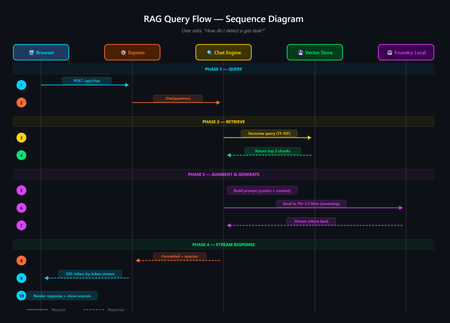
A developer's guide to building an offline, mobile-responsive AI support agent using Retrieval-Augmented Generation, the Foundry Local SDK, and JavaScript. Imagine you are a gas field engineer standing beside a pipeline in a remote location. There is no Wi-Fi, no mobile signal, and you need a safety procedure right now. What do you do? This is the exact problem that inspired this project: a fully offline RAG-powered support agent that runs entirely on your machine. No cloud. No API keys. No outbound network calls. Just a local language model, a local vector store, and your own documents, all accessible from a browser on any device. In this post, you will learn how it works, how to build your own, and the key architectural decisions behind it. If you have ever wanted to build an AI application that runs locally and answers questions grounded in your own data, this is the place to start. The finished application: a browser-based AI support agent that runs entirely on your machine. What Is Retrieval-Augmented Generation? Retrieval-Augmented Generation (RAG) is a pattern that makes AI models genuinely useful for domain-specific tasks. Rather than hoping the model "knows" the answer from its training data, you: Retrieve relevant chunks from your own documents using a vector store Augment the model's prompt with those chunks as context Generate a response grounded in your actual data The result is fewer hallucinations, traceable answers with source attribution, and an AI that works with your content rather than relying on general knowledge. If you are building internal tools, customer support bots, field manuals, or knowledge bases, RAG is the pattern you want. RAG vs CAG: Understanding the Trade-offs If you have explored AI application patterns before, you have likely encountered Context-Augmented Generation (CAG). Both RAG and CAG solve the same core problem: grounding an AI model's answers in your own content. They take different approaches, and each has genuine strengths and limitations. RAG (Retrieval-Augmented Generation) How it works: Documents are split into chunks, vectorised, and stored in a database. At query time, the most relevant chunks are retrieved and injected into the prompt. Strengths: Scales to thousands or millions of documents Fine-grained retrieval at chunk level with source attribution Documents can be added or updated dynamically without restarting Token-efficient: only relevant chunks are sent to the model Supports runtime document upload via the web UI Limitations: More complex architecture: requires a vector store and chunking strategy Retrieval quality depends on chunking parameters and scoring method May miss relevant content if the retrieval step does not surface it CAG (Context-Augmented Generation) How it works: All documents are loaded at startup. The most relevant ones are selected per query using keyword scoring and injected into the prompt. Strengths: Drastically simpler architecture with no vector database or embeddings All information is always available to the model Minimal dependencies and easy to set up Near-instant document selection Limitations: Constrained by the model's context window size Best suited to small, curated document sets (tens of documents) Adding documents requires an application restart Want to compare these patterns hands-on? There is a CAG-based implementation of the same gas field scenario using whole-document context injection. Clone both repositories, run them side by side, and see how the architectures differ in practice. When Should You Choose Which? Consideration Choose RAG Choose CAG Document count Hundreds or thousands Tens of documents Document updates Frequent or dynamic (runtime upload) Infrequent (restart to reload) Source attribution Per-chunk with relevance scores Per-document Setup complexity Moderate (ingestion step required) Minimal Query precision Better for large or diverse collections Good for keyword-matchable content Infrastructure SQLite vector store (single file) None beyond the runtime For the sample application in this post (20 gas engineering procedure documents with runtime upload), RAG is the clear winner. If your document set is small and static, CAG may be simpler. Both patterns run fully offline using Foundry Local. Foundry Local: Your On-Device AI Runtime Foundry Local is a lightweight runtime from Microsoft that downloads, manages, and serves language models entirely on your device. No cloud account, no API keys, no outbound network calls (after the initial model download). What makes it particularly useful for developers: No GPU required: runs on CPU or NPU, making it accessible on standard laptops and desktops Native SDK bindings: in-process inference via the foundry-local-sdk npm package, with no HTTP round-trips to a local server Automatic model management: downloads, caches, and loads models automatically Hardware-optimised variant selection: the SDK picks the best variant for your hardware (GPU, NPU, or CPU) Real-time progress callbacks: ideal for building loading UIs that show download and initialisation progress The integration code is refreshingly minimal: import { FoundryLocalManager } from "foundry-local-sdk"; // Create a manager and discover models via the catalogue const manager = FoundryLocalManager.create({ appName: "gas-field-local-rag" }); const model = await manager.catalog.getModel("phi-3.5-mini"); // Download if not cached, then load into memory if (!model.isCached) { await model.download((progress) => { console.log(`Download: ${Math.round(progress * 100)}%`); }); } await model.load(); // Create a chat client for direct in-process inference const chatClient = model.createChatClient(); const response = await chatClient.completeChat([ { role: "system", content: "You are a helpful assistant." }, { role: "user", content: "How do I detect a gas leak?" } ]); That is it. No server configuration, no authentication tokens, no cloud provisioning. The model runs in the same process as your application. The Technology Stack The sample application is deliberately simple. No frameworks, no build steps, no Docker: Layer Technology Purpose AI Model Foundry Local + Phi-3.5 Mini Runs locally via native SDK bindings, no GPU required Back end Node.js + Express Lightweight HTTP server, everyone knows it Vector Store SQLite (via better-sqlite3 ) Zero infrastructure, single file on disc Retrieval TF-IDF + cosine similarity No embedding model required, fully offline Front end Single HTML file with inline CSS No build step, mobile-responsive, field-ready The total dependency footprint is three npm packages: express , foundry-local-sdk , and better-sqlite3 . Architecture Overview The five-layer architecture, all running on a single machine. The system has five layers, all running on a single machine: Client layer: a single HTML file served by Express, with quick-action buttons and a responsive chat interface Server layer: Express.js starts immediately and serves the UI plus SSE status and chat endpoints RAG pipeline: the chat engine orchestrates retrieval and generation; the chunker handles TF-IDF vectorisation; the prompts module provides safety-first system instructions Data layer: SQLite stores document chunks and their TF-IDF vectors; documents live as .md files in the docs/ folder AI layer: Foundry Local runs Phi-3.5 Mini on CPU or NPU via native SDK bindings Building the Solution Step by Step Prerequisites You need two things installed on your machine: Node.js 20 or later: download from nodejs.org Foundry Local: Microsoft's on-device AI runtime: winget install Microsoft.FoundryLocal The SDK will automatically download the Phi-3.5 Mini model (approximately 2 GB) the first time you run the application. Getting the Code Running # Clone the repository git clone https://github.com/leestott/local-rag.git cd local-rag # Install dependencies npm install # Ingest the 20 gas engineering documents into the vector store npm run ingest # Start the server npm start Open http://127.0.0.1:3000 in your browser. You will see the status indicator whilst the model loads. Once the model is ready, the status changes to "Offline Ready" and you can start chatting. Desktop view Mobile view How the RAG Pipeline Works Let us trace what happens when a user asks: "How do I detect a gas leak?" The query flow from browser to model and back. 1 Documents are ingested and indexed When you run npm run ingest , every .md file in the docs/ folder is read, parsed (with optional YAML front-matter for title, category, and ID), split into overlapping chunks of approximately 200 tokens, and stored in SQLite with TF-IDF vectors. 2 Model is loaded via the SDK The Foundry Local SDK discovers the model in the local catalogue and loads it into memory. If the model is not already cached, it downloads it first (with progress streamed to the browser via SSE). 3 User sends a question The question arrives at the Express server. The chat engine converts it into a TF-IDF vector, uses an inverted index to find candidate chunks, and scores them using cosine similarity. The top 3 chunks are returned in under 1 ms. 4 Prompt is constructed The engine builds a messages array containing: the system prompt (with safety-first instructions), the retrieved chunks as context, the conversation history, and the user's question. 5 Model generates a grounded response The prompt is sent to the locally loaded model via the Foundry Local SDK's native chat client. The response streams back token by token through Server-Sent Events to the browser. Source references with relevance scores are included. A response with safety warnings and step-by-step guidance The sources panel shows which chunks were used and their relevance Key Code Walkthrough The Vector Store (TF-IDF + SQLite) The vector store uses SQLite to persist document chunks alongside their TF-IDF vectors. At query time, an inverted index finds candidate chunks that share terms with the query, then cosine similarity ranks them: // src/vectorStore.js search(query, topK = 5) { const queryTf = termFrequency(query); this._ensureCache(); // Build in-memory cache on first access // Use inverted index to find candidates sharing at least one term const candidateIndices = new Set(); for (const term of queryTf.keys()) { const indices = this._invertedIndex.get(term); if (indices) { for (const idx of indices) candidateIndices.add(idx); } } // Score only candidates, not all rows const scored = []; for (const idx of candidateIndices) { const row = this._rowCache[idx]; const score = cosineSimilarity(queryTf, row.tf); if (score > 0) scored.push({ ...row, score }); } scored.sort((a, b) => b.score - a.score); return scored.slice(0, topK); } The inverted index, in-memory row cache, and prepared SQL statements bring retrieval time to sub-millisecond for typical query loads. Why TF-IDF Instead of Embeddings? Most RAG tutorials use embedding models for retrieval. This project uses TF-IDF because: Fully offline: no embedding model to download or run Zero latency: vectorisation is instantaneous (it is just maths on word frequencies) Good enough: for 20 domain-specific documents, TF-IDF retrieves the right chunks reliably Transparent: you can inspect the vocabulary and weights, unlike neural embeddings For larger collections or when semantic similarity matters more than keyword overlap, you would swap in an embedding model. For this use case, TF-IDF keeps the stack simple and dependency-free. The System Prompt For safety-critical domains, the system prompt is engineered to prioritise safety, prevent hallucination, and enforce structured responses: // src/prompts.js export const SYSTEM_PROMPT = `You are a local, offline support agent for gas field inspection and maintenance engineers. Behaviour Rules: - Always prioritise safety. If a procedure involves risk, explicitly call it out. - Do not hallucinate procedures, measurements, or tolerances. - If the answer is not in the provided context, say: "This information is not available in the local knowledge base." Response Format: - Summary (1-2 lines) - Safety Warnings (if applicable) - Step-by-step Guidance - Reference (document name + section)`; This pattern is transferable to any safety-critical domain: medical devices, electrical work, aviation maintenance, or chemical handling. Runtime Document Upload Unlike the CAG approach, RAG supports adding documents without restarting the server. Click the upload button to add new .md or .txt files. They are chunked, vectorised, and indexed immediately. The upload modal with the complete list of indexed documents. Adapting This for Your Own Domain The sample project is designed to be forked and adapted. Here is how to make it yours in four steps: 1. Replace the documents Delete the gas engineering documents in docs/ and add your own markdown files. The ingestion pipeline handles any markdown content with optional YAML front-matter: --- title: Troubleshooting Widget Errors category: Support id: KB-001 --- # Troubleshooting Widget Errors ...your content here... 2. Edit the system prompt Open src/prompts.js and rewrite the system prompt for your domain. Keep the structure (summary, safety, steps, reference) and update the language to match your users' expectations. 3. Tune the retrieval In src/config.js : chunkSize: 200 : smaller chunks give more precise retrieval, less context per chunk chunkOverlap: 25 : prevents information falling between chunks topK: 3 : how many chunks to retrieve per query (more gives more context but slower generation) 4. Swap the model Change config.model in src/config.js to any model available in the Foundry Local catalogue. Smaller models give faster responses on constrained devices; larger models give better quality. Building a Field-Ready UI The front end is a single HTML file with inline CSS. No React, no build tooling, no bundler. This keeps the project accessible to beginners and easy to deploy. Design decisions that matter for field use: Dark, high-contrast theme with 18px base font size for readability in bright sunlight Large touch targets (minimum 44px) for operation with gloves or PPE Quick-action buttons that wrap on mobile so all options are visible without scrolling Responsive layout that works from 320px to 1920px+ screen widths Streaming responses via SSE, so the user sees tokens arriving in real time The mobile chat experience, optimised for field use. Testing The project includes unit tests using the built-in Node.js test runner, with no extra test framework needed: # Run all tests npm test Tests cover the chunker, vector store, configuration, and server endpoints. Use them as a starting point when you adapt the project for your own domain. Ideas for Extending the Project Once you have the basics running, there are plenty of directions to explore: Embedding-based retrieval: use a local embedding model for better semantic matching on diverse queries Conversation memory: persist chat history across sessions using local storage or a lightweight database Multi-modal support: add image-based queries (photographing a fault code, for example) PWA packaging: make it installable as a standalone offline application on mobile devices Hybrid retrieval: combine TF-IDF keyword search with semantic embeddings for best results Try the CAG approach: compare with the local-cag sample to see which pattern suits your use case Ready to Build Your Own? Clone the RAG sample, swap in your own documents, and have an offline AI agent running in minutes. Or compare it with the CAG approach to see which pattern suits your use case best. Get the RAG Sample Get the CAG Sample Summary Building a local RAG application does not require a PhD in machine learning or a cloud budget. With Foundry Local, Node.js, and SQLite, you can create a fully offline, mobile-responsive AI agent that answers questions grounded in your own documents. The key takeaways: RAG is ideal for scalable, dynamic document sets where you need fine-grained retrieval with source attribution. Documents can be added at runtime without restarting. CAG is simpler when you have a small, stable set of documents that fit in the context window. See the local-cag sample to compare. Foundry Local makes on-device AI accessible: native SDK bindings, in-process inference, automatic model selection, and no GPU required. TF-IDF + SQLite is a viable vector store for small-to-medium collections, with sub-millisecond retrieval thanks to inverted indexing and in-memory caching. Start simple, iterate outwards. Begin with RAG and a handful of documents. If your needs are simpler, try CAG. Both patterns run entirely offline. Clone the repository, swap in your own documents, and start building. The best way to learn is to get your hands on the code. This project is open source under the MIT licence. It is a scenario sample for learning and experimentation, not production medical or safety advice. local-rag on GitHub · local-cag on GitHub · Foundry LocalBuilding an Offline AI Interview Coach with Foundry Local, RAG, and SQLite
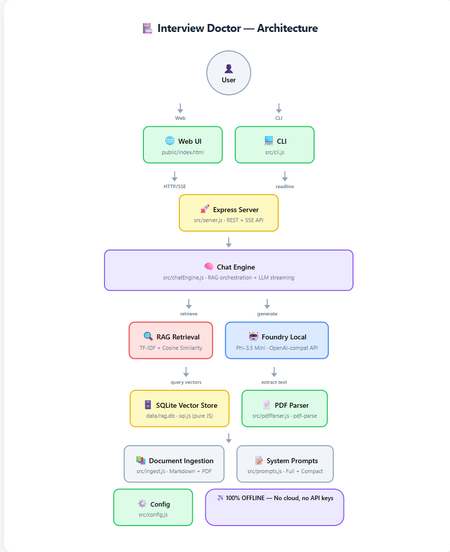
How to build a 100% offline, AI-powered interview preparation tool using Microsoft Foundry Local, Retrieval-Augmented Generation, and nothing but JavaScript. Foundry Local 100% Offline RAG + TF-IDF JavaScript / Node.js Contents Introduction What is RAG and Why Offline? Architecture Overview Setting Up Foundry Local Building the RAG Pipeline The Chat Engine Dual Interfaces: Web & CLI Testing Adapting for Your Own Use Case What I Learned Getting Started Introduction Imagine preparing for a job interview with an AI assistant that knows your CV inside and out, understands the job you're applying for, and generates tailored questions, all without ever sending your data to the cloud. That's exactly what Interview Doctor does. Interview Doctor's web UI, a polished, dark-themed interface running entirely on your local machine. In this post, I'll walk you through how I built an interview prep tool as a fully offline JavaScript application using: Foundry Local — Microsoft's on-device AI runtime SQLite — for storing document chunks and TF-IDF vectors RAG (Retrieval-Augmented Generation) — to ground the AI in your actual documents Express.js — for the web server Node.js built-in test runner — for testing with zero extra dependencies No cloud. No API keys. No internet required. Everything runs on your machine. What is RAG and Why Does It Matter? Retrieval-Augmented Generation (RAG) is a pattern that makes AI models dramatically more useful for domain-specific tasks. Instead of relying solely on what a model learned during training (which can be outdated or generic), RAG: Retrieves relevant chunks from your own documents Augments the model's prompt with those chunks as context Generates a response grounded in your actual data For Interview Doctor, this means the AI doesn't just ask generic interview questions, it asks questions specific to your CV, your experience, and the specific job you're applying for. Why Offline RAG? Privacy is the obvious benefit, your CV and job applications never leave your device. But there's more: No API costs — run as many queries as you want No rate limits — iterate rapidly during your prep Works anywhere — on a plane, in a café with bad Wi-Fi, anywhere Consistent performance — no cold starts, no API latency Architecture Overview Complete architecture showing all components and data flow. The application has two interfaces (CLI and Web) that share the same core engine: Document Ingestion — PDFs and markdown files are chunked and indexed Vector Store — SQLite stores chunks with TF-IDF vectors Retrieval — queries are matched against stored chunks using cosine similarity Generation — relevant chunks are injected into the prompt sent to the local LLM Step 1: Setting Up Foundry Local First, install Foundry Local: # Windows winget install Microsoft.FoundryLocal # macOS brew install microsoft/foundrylocal/foundrylocal The JavaScript SDK handles everything else — starting the service, downloading the model, and connecting: import { FoundryLocalManager } from "foundry-local-sdk"; import { OpenAI } from "openai"; const manager = new FoundryLocalManager(); const modelInfo = await manager.init("phi-3.5-mini"); // Foundry Local exposes an OpenAI-compatible API const openai = new OpenAI({ baseURL: manager.endpoint, // Dynamic port, discovered by SDK apiKey: manager.apiKey, }); ⚠️ Key Insight Foundry Local uses a dynamic port never hardcode localhost:5272 . Always use manager.endpoint which is discovered by the SDK at runtime. Step 2: Building the RAG Pipeline Document Chunking Documents are split into overlapping chunks of ~200 tokens. The overlap ensures important context isn't lost at chunk boundaries: export function chunkText(text, maxTokens = 200, overlapTokens = 25) { const words = text.split(/\s+/).filter(Boolean); if (words.length <= maxTokens) return [text.trim()]; const chunks = []; let start = 0; while (start < words.length) { const end = Math.min(start + maxTokens, words.length); chunks.push(words.slice(start, end).join(" ")); if (end >= words.length) break; start = end - overlapTokens; } return chunks; } Why 200 tokens with 25-token overlap? Small chunks keep retrieved context compact for the model's limited context window. Overlap prevents information loss at boundaries. And it's all pure string operations, no dependencies needed. TF-IDF Vectors Instead of using a separate embedding model (which would consume precious memory alongside the LLM), we use TF-IDF, a classic information retrieval technique: export function termFrequency(text) { const tf = new Map(); const tokens = text .toLowerCase() .replace(/[^a-z0-9\-']/g, " ") .split(/\s+/) .filter((t) => t.length > 1); for (const t of tokens) { tf.set(t, (tf.get(t) || 0) + 1); } return tf; } export function cosineSimilarity(a, b) { let dot = 0, normA = 0, normB = 0; for (const [term, freq] of a) { normA += freq * freq; if (b.has(term)) dot += freq * b.get(term); } for (const [, freq] of b) normB += freq * freq; if (normA === 0 || normB === 0) return 0; return dot / (Math.sqrt(normA) * Math.sqrt(normB)); } Each document chunk becomes a sparse vector of word frequencies. At query time, we compute cosine similarity between the query vector and all stored chunk vectors to find the most relevant matches. SQLite as a Vector Store Chunks and their TF-IDF vectors are stored in SQLite using sql.js (pure JavaScript — no native compilation needed): export class VectorStore { // Created via: const store = await VectorStore.create(dbPath) insert(docId, title, category, chunkIndex, content) { const tf = termFrequency(content); const tfJson = JSON.stringify([...tf]); this.db.run( "INSERT INTO chunks (...) VALUES (?, ?, ?, ?, ?, ?)", [docId, title, category, chunkIndex, content, tfJson] ); this.save(); } search(query, topK = 5) { const queryTf = termFrequency(query); // Score each chunk by cosine similarity, return top-K } } 💡 Why SQLite for Vectors? For a CV plus a few job descriptions (dozens of chunks), brute-force cosine similarity over SQLite rows is near-instant (~1ms). No need for Pinecone, Qdrant, or Chroma — just a single .db file on disk. Step 3: The RAG Chat Engine The chat engine ties retrieval and generation together: async *queryStream(userMessage, history = []) { // 1. Retrieve relevant CV/JD chunks const chunks = this.retrieve(userMessage); const context = this._buildContext(chunks); // 2. Build the prompt with retrieved context const messages = [ { role: "system", content: SYSTEM_PROMPT }, { role: "system", content: `Retrieved context:\n\n${context}` }, ...history, { role: "user", content: userMessage }, ]; // 3. Stream from the local model const stream = await this.openai.chat.completions.create({ model: this.modelId, messages, temperature: 0.3, stream: true, }); // 4. Yield chunks as they arrive for await (const chunk of stream) { const content = chunk.choices[0]?.delta?.content; if (content) yield { type: "text", data: content }; } } The flow is straightforward: vectorize the query, retrieve with cosine similarity, build a prompt with context, and stream from the local LLM. The temperature: 0.3 keeps responses focused — important for interview preparation where consistency matters. Step 4: Dual Interfaces — Web & CLI Web UI The web frontend is a single HTML file with inline CSS and JavaScript — no build step, no framework, no React or Vue. It communicates with the Express backend via REST and SSE: File upload via multipart/form-data Streaming chat via Server-Sent Events (SSE) Quick-action buttons for common follow-up queries (coaching tips, gap analysis, mock interview) The setup form with job title, seniority level, and a pasted job description — ready to generate tailored interview questions. CLI The CLI provides the same experience in the terminal with ANSI-coloured output: npm run cli It walks you through uploading your CV, entering the job details, and then generates streaming questions. Follow-up questions work interactively. Both interfaces share the same ChatEngine class, they're thin layers over identical logic. Edge Mode For constrained devices, toggle Edge mode to use a compact system prompt that fits within smaller context windows: Edge mode activated, uses a minimal prompt for devices with limited resources. Step 5: Testing Tests use the Node.js built-in test runner, no Jest, no Mocha, no extra dependencies: import { describe, it } from "node:test"; import assert from "node:assert/strict"; describe("chunkText", () => { it("returns single chunk for short text", () => { const chunks = chunkText("short text", 200, 25); assert.equal(chunks.length, 1); }); it("maintains overlap between chunks", () => { // Verifies overlapping tokens between consecutive chunks }); }); npm test Tests cover the chunker, vector store, config, prompts, and server API contract, all without needing Foundry Local running. Adapting for Your Own Use Case Interview Doctor is a pattern, not just a product. You can adapt it for any domain: What to Change How Domain documents Replace files in docs/ with your content System prompt Edit src/prompts.js Chunk sizes Adjust config.chunkSize and config.chunkOverlap Model Change config.model — run foundry model list UI Modify public/index.html — it's a single file Ideas for Adaptation Customer support bot — ingest your product docs and FAQs Code review assistant — ingest coding standards and best practices Study guide — ingest textbooks and lecture notes Compliance checker — ingest regulatory documents Onboarding assistant — ingest company handbooks and processes What I Learned Offline AI is production-ready. Foundry Local + small models like Phi-3.5 Mini are genuinely useful for focused tasks. You don't need vector databases for small collections. SQLite + TF-IDF is fast, simple, and has zero infrastructure overhead. RAG quality depends on chunking. Getting chunk sizes right for your use case is more impactful than the retrieval algorithm. The OpenAI-compatible API is a game-changer. Switching from cloud to local was mostly just changing the baseURL . Dual interfaces are easy when you share the engine. The CLI and Web UI are thin layers over the same ChatEngine class. ⚡ Performance Notes On a typical laptop (no GPU): ingestion takes under 1 second for ~20 documents, retrieval is ~1ms, and the first LLM token arrives in 2-5 seconds. Foundry Local automatically selects the best model variant for your hardware (CUDA GPU, NPU, or CPU). Getting Started git clone https://github.com/leestott/interview-doctor-js.git cd interview-doctor-js npm install npm run ingest npm start # Web UI at http://127.0.0.1:3000 # or npm run cli # Interactive terminal The full source code is on GitHub. Star it, fork it, adapt it — and good luck with your interviews! Resources Foundry Local — Microsoft's on-device AI runtime Foundry Local SDK (npm) — JavaScript SDK Foundry Local GitHub — Source, samples, and documentation Local RAG Reference — Reference RAG implementation Interview Doctor (JavaScript) — This project's source codeSpeed Up OpenAI Embedding By 4x With This Simple Trick!
In today’s fast-paced world of AI applications, optimizing performance should be one of your top priorities. This guide walks you through a simple yet powerful way to reduce OpenAI embedding response sizes by 75%—cutting them from 32 KB to just 8 KB per request. By switching from float32 to base64 encoding in your Retrieval-Augmented Generation (RAG) system, you can achieve a 4x efficiency boost, minimizing network overhead, saving costs and dramatically improving responsiveness. Let's consider the following scenario. Use Case: RAG Application Processing a 10-Page PDF A user interacts with a RAG-powered application that processes a 10-page PDF and uses OpenAI embedding models to make the document searchable from an LLM. The goal is to show how optimizing embedding response size impacts overall system performance. Step 1: Embedding Creation from the 10-Page PDF In a typical RAG system, the first step is to embed documents (in this case, a 10-page PDF) to store meaningful vectors that will later be retrieved for answering queries. The PDF is split into chunks. In our example, each chunk contains approximately 100 tokens (for the sake of simplicity), but the recommended chunk size varies based on the language and the embedding model. Assumptions for the PDF: - A 10-page PDF has approximately 3325 tokens (about 300 tokens per page). - You’ll split this document into 34 chunks (each containing 100 tokens). - Each chunk will then be sent to the embedding OpenAI API for processing. Step 2: The User Interacts with the RAG Application Once the embeddings for the PDF are created, the user interacts with the RAG application, querying it multiple times. Each query is processed by retrieving the most relevant pieces of the document using the previously created embeddings. For simplicity, let’s assume: - The user sends 10 queries, each containing 200 tokens. - Each query requires 2 embedding requests (since the query is split into 100-token chunks for embedding). - After embedding the query, the system performs retrieval and returns the most relevant documents (the RAG response). Embedding Response Size The OpenAI Embeddings models take an input of tokens (the text to embed) and return a list of numbers called a vector. This list of numbers represents the “embedding” of the input in the model so that it can be compared with another vector to measure similarity. In RAG, we use embedding models to quickly search for relevant data in a vector database. By default, embeddings are serialized as an array of floating-point values in a JSON document so each response from the embedding API is relatively large. The array values are 32-bit floating point numbers, or float32. Each float32 value occupies 4 bytes, and the embedding vector returned by models like OpenAI’s text-embedding-ada-002 typically consists of 1536-dimensional vectors. The challenge is the size of the embedding response: - Each response consists of 1536 float32 values (one per dimension). - 1536 float32 values result in 6144 bytes (1536 × 4 bytes). - When serialized as UTF-8 for transmission over the network, this results in approximately 32 KB per response due to additional serialization overhead (like delimiters). Optimizing Embedding Response Size One approach to optimize the embedding response size is to serialize the embedding as base64. This encoding reduces the overall size by compressing the data, while maintaining the integrity of the embedding information. This leads to a significant reduction in the size of the embedding response. With base64-encoded embeddings, the response size reduces from 32 KB to approximately 8 KB, as demonstrated below: base64 vs float32 Min (Bytes) Max (Bytes) Mean (Bytes) Min (+) Max (+) Mean (+) 100 tokens embeddings: text-embedding-3-small 32673.000 32751.000 32703.800 8192.000 (4.0x) (74.9%) 8192.000 (4.0x) (75.0%) 8192.000 (4.0x) (74.9%) 100 tokens embeddings: text-embedding-3-large 65757.000 65893.000 65810.200 16384.000 (4.0x) (75.1%) 16384.000 (4.0x) (75.1%) 16384.000 (4.0x) (75.1%) 100 tokens embeddings: text-embedding-ada-002 32882.000 32939.000 32909.000 8192.000 (4.0x) (75.1%) 8192.000 (4.0x) (75.2%) 8192.000 (4.0x) (75.1%) The source code of this benchmark can be found at: https://github.com/manekinekko/rich-bench-node (kudos to Anthony Shaw for creating the rich-bench python runner) Comparing the Two Scenarios Let’s break down and compare the total performance of the system in two scenarios: Scenario 1: Embeddings Serialized as float32 (32 KB per Response) Scenario 2: Embeddings Serialized as base64 (8 KB per Response) Scenario 1: Embeddings Serialized as Float32 In this scenario, the PDF embedding creation and user queries involve larger responses due to float32 serialization. Let’s compute the total response size for each phase: 1. Embedding Creation for the PDF: - 34 embedding requests (one per 100-token chunk). - 34 responses with 32 KB each. Total size for PDF embedding responses: 34 × 32 KB = 1088 KB = 1.088 MB 2. User Interactions with the RAG App: - Each user query consists of 200 tokens (which is split into 2 chunks of 100 tokens). - 10 user queries, requiring 2 embedding responses per query (for 2 chunks). - Each embedding response is 32 KB. Total size for user queries: Embedding responses: 20 × 32 KB = 640 KB. RAG responses: 10 × 32 KB = 320 KB. Total size for user interactions: 640 KB (embedding) + 320 KB (RAG) = 960 KB. 3. Total Size: Total size for embedding responses (PDF + user queries): 1088 KB + 640 KB = 1.728 MB Total size for RAG responses: 320 KB. Overall total size for all 10 responses: 1728 KB + 320 KB = 2048 KB = 2 MB Scenario 2: Embeddings Serialized as Base64 In this optimized scenario, the embedding response size is reduced to 8 KB by using base64 encoding. 1. Embedding Creation for the PDF: - 34 embedding requests. - 34 responses with 8 KB each. Total size for PDF embedding responses: 34 × 8 KB = 272 KB. 2. User Interactions with the RAG App: - Embedding responses for 10 queries, 2 responses per query. - Each embedding response is 8 KB. Total size for user queries: Embedding responses: 20 × 8 KB = 160 KB. RAG responses: 10 × 8 KB = 80 KB. Total size for user interactions: 160 KB (embedding) + 80 KB (RAG) = 240 KB 3. Total Size (Optimized Scenario): Total size for embedding responses (PDF + user queries): 272 KB + 160 KB = 432 KB. Total size for RAG responses: 80 KB. Overall total size for all 10 responses: 432 KB + 80 KB = 512 KB Performance Gain: Comparison Between Scenarios The optimized scenario (base64 encoding) is 4 times smaller than the original (float32 encoding): 2048 / 512 = 4 times smaller. The total size reduction between the two scenarios is: 2048 KB - 512 KB = 1536 KB = 1.536 MB. And the reduction in data size is: (1536 / 2048) × 100 = 75% reduction. How to Configure base64 encoding format When getting a vector representation of a given input that can be easily consumed by machine learning models and algorithms, as a developer, you usually call either the OpenAI API endpoint directly or use one of the official libraries for your programming language. Calling the OpenAI or Azure OpenAI APIs Using OpenAI endpoint: curl -X POST "https://api.openai.com/v1/embeddings" \ -H "Content-Type: application/json" \ -H "Authorization: Bearer YOUR_API_KEY" \ -d '{ "input": "The five boxing wizards jump quickly", "model": "text-embedding-ada-002", "encoding_format": "base64" }' Or, calling Azure OpenAI resources: curl -X POST "https://{endpoint}/openai/deployments/{deployment-id}/embeddings?api-version=2024-10-21" \ -H "Content-Type: application/json" \ -H "api-key: YOUR_API_KEY" \ -d '{ "input": ["The five boxing wizards jump quickly"], "encoding_format": "base64" }' Using OpenAI Libraries JavaScript/TypeScript const response = await client.embeddings.create({ input: "The five boxing wizards jump quickly", model: "text-embedding-3-small", encoding_format: "base64" }); A pull request has been sent to the openai SDK for Node.js repository to make base64 the default encoding when/if the user does not provide an encoding. Please feel free to give that PR a thumb up. Python embedding = client.embeddings.create( input="The five boxing wizards jump quickly", model="text-embedding-3-small", encoding_format="base64" ) NB: from 1.62 the openai SDK for Python will default to base64. Java EmbeddingCreateParams embeddingCreateParams = EmbeddingCreateParams .builder() .input("The five boxing wizards jump quickly") .encodingFormat(EncodingFormat.BASE64) .model("text-embedding-3-small") .build(); .NET The openai-dotnet library is already enforcing the base64 encoding, and does not allow setting encoding_format by the user (see). Conclusion By optimizing the embedding response serialization from float32 to base64, you achieved a 75% reduction in data size and improved performance by 4x. This reduction significantly enhances the efficiency of your RAG application, especially when processing large documents like PDFs and handling multiple user queries. For 1 million users sending 1,000 requests per month, the total size saved would be approximately 22.9 TB per month simply by using base64 encoded embeddings. As demonstrated, optimizing the size of the API responses is not only crucial for reducing network overhead but also for improving the overall responsiveness of your application. In a world where efficiency and scalability are key to delivering robust AI-powered solutions, this optimization can make a substantial difference in both performance and user experience. ■ Shoutout to my colleague Anthony Shaw for the the long and great discussions we had about embedding optimisations.