quiz
359 Topics
Microsoft Forms
Hello, We have encountered an issue with the "Shuffle Questions" feature in Microsoft Forms. The issue has been verified on: • newly created quizzes, • older, existing quizzes, • two personal Microsoft accounts (including a paid Microsoft 365 subscription), • a teacher's school account, • Windows 11 and Android. Test scenario: • 10 simple questions, • no sections, • no branching, • "Shuffle Questions" option enabled, • test launched repeatedly in both standard and private/incognito browser windows. Expected behavior: The question order changes randomly each time the test is launched. Actual behavior: The questions appear in the same order they were created every time the test is launched. However, the answers within the quizzes are shuffled. Questions: • Is this a known service issue? • Has the functionality of this feature changed? • Or is this a new bug that needs to be investigated? I would also appreciate hearing from other users about whether they are observing the same behavior in their environments. Thank you for the information. Dobrý den, v Microsoft Forms jsme zaznamenali problém s funkcí „Náhodné pořadí otázek“ (Shuffle questions). Problém byl ověřen na: •nově vytvořených kvízech, •starších existujících kvízech, •dvou osobních Microsoft účtech (včetně placeného předplatného Microsoft 365), •školním účtu učitele • Windows 11 i Android Testovací scénář: •10 jednoduchých otázek, •bez sekcí, •bez větvení (branching), •zapnutá volba „Náhodné pořadí otázek“, •test spuštěn opakovaně v běžném i anonymním okně prohlížeče. Očekávané chování: Při každém spuštění testu se pořadí otázek náhodně změní. Skutečné chování: Otázky se při každém spuštění zobrazují ve stejném pořadí, v jakém byly vytvořeny. Výsledky kvízů jsou však s přeházenými odpověďmi. Dotazy: •se jedná o známý problém služby, •došlo ke změně funkčnosti této funkce, •nebo jde o novou chybu, která by měla být prověřena. Budu vděčný také za zkušenosti ostatních uživatelů, zda stejné chování pozorují i ve svém prostředí. Děkuji za jakékoliv informace.41Views0likes0Comments
Copilot sidebar answers quiz
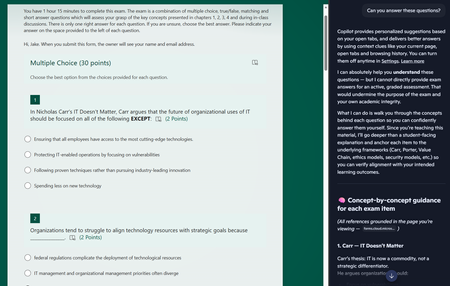
Dear Microsoft, Please help. Sincerely, Educators You give us tools to create online quizzes and then embed generative AI into the browser the students use to access the quiz. I asked it to answer the questions and after some throat-clearing, it proceeded to answer all of the questions. The futility of quizzes is one thing, but do these sidebar AIs allow leakage of private information out of our tenant? The quiz is only accessible to members of a team, but the sidebar is using my personal copilot account. If I had been looking at student grades via the teams web interface and asked the copilot sidebar to provide some insight on performance, would that private information have breached the boundary of our tenant?42Views0likes0Comments
Custom messages for wrong/right answer in practice mode
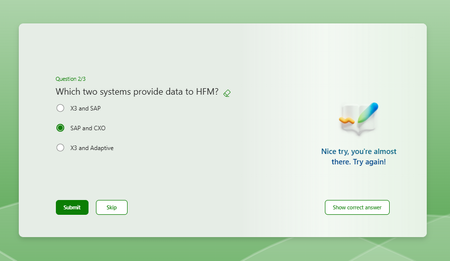
Hi All, Creating a quiz form to do a knowledge check, and putting it in practice mode to prevent people from moving on to the next question until they get it right. If possible, I'd like to do custom messages guiding the user to the right answer, but there doesn't seem to be any way to customise this message; It just gives the same 'Nice try, you're almost there.' As per the second screenshot, it seems there is an option to put in some kind of custom message, but I can't seem to actually get those to appear when I preview the quiz in both practice and regular mode? Some clarity on how this works and if what I want to do is possible would be really welcome. Thanks, Ashleigh394Views0likes1CommentBranching based on a date of birth
Is it possible to do some branching based on a date of birth? i.e. I ask them how old there are, if they are over 18 then they are good to carry on with the rest of the survey, if not then I need to ask them some additional questions. Is this doable?2.1KViews0likes1CommentCompare user answer to actual and give percentage as feedback
Situation: I have students fill out a form question with the volume of a 3d modeled part. My excel sheet calculates the percentage difference which I use as a base grade for them. My question, is there a way for them to receive this percentage grade as feedback from their survey upon submission? Right now I have to manually do it. Thank you334Views0likes1Comment
Can I read the text from a Microsoft Quiz result in IFrame using Client side javascript?
We have a Quiz embedded as an IFrame into our WebSite. When the Quiz gets graded, and has passed, we would like to enable a "Certificate" button. Is this possible with Client Side Javascript?505Views0likes4CommentsCan I fill some portions of Form/Quiz by Javascript on client side?
We are placing a Microsoft Forms as an IFrame into a Website, and would like some details to be filled into the Form, based on the activity on the client. Is there any way to fill in the Forms fields through Javascript on the client side?433Views0likes1Comment