q&a in teams
3 Topics
Teams Q & A Feature
Is there a way to mimic exactly how this Tech Community site operates in my company inside of Teams? Seems like MS offers options for Q and A during meetings but nothing in a standalone Teams Channel. I am basically trying to create a channel for a specific topic where people in our company can ask questions and get answers from Champions monitoring the channel inside of our org.Solved326Views0likes3CommentsTeams Town Hall Q&A with Large in person audiences
Is anyone else struggling to offer q&a for large broadcasts with lots of rooms dialling with in-person large audiences? Currently, for anyone in large groups watching a Town Hall together in a large room, people need to join the Town Hall themselves on their phone. This can cause disturbances as their speaker may be on, and then it does take quite a few screen swipes to get to the q&a section. This is also true for any presenters on a stage who need to view a question/moderate. Our current solution is to use slido as it provides a nice qr code that takes people straight to the section they can ask a question, with no risk of disturbance, as well as a good login method for on stage moderation for an MC. Other times we just use a separate teams chat and an ipad. I would love to be able to use the native Q&A function, especially because it locks peoples teams identity to the question. I.e no anonymous. It would be amazing if their was a separate link/qr code people could scan/follow to view just the Q&A function, or chat function. Without showing the town hall output.164Views0likes0Comments
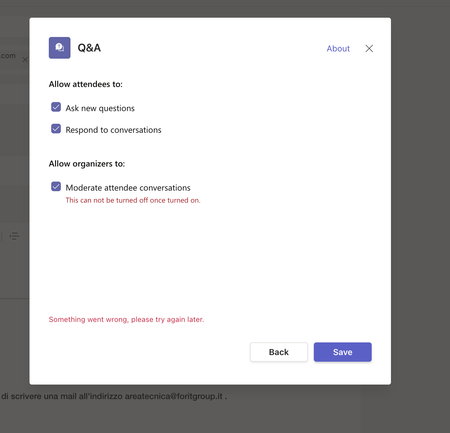
App Q&A Teams Something went wrong, please try again later.
Hi, Unfortunately, from this morning it is not possible to add the Q&A app on teams to meetings. It makes me install the app but when I try to save it gives me the following error "Something went wrong, please try again later." Friday worked perfectly. it is for us an essential tool for our meetings. I tried to delete the app and reinstall it but still when I try to add it to the single meeting from this problem and it doesn't make me save the configurations. I have tried with other accounts in my organization and with other PCs but the problem is the same. What can I do?2.8KViews0likes1Comment