pwa
47 Topics
Purview endpoint DLP cant block file upload to web.whatsapp on open in app mode chrome browser MacOS
we are using purview endpoint DLP to block file upload to web.whatsapp.com on browser for MacOS. its working fine on chrome browser when i try dirrectly upload file contain ssn pattern and its blocked by purview but if we upload using open in app mode (pwa) purview cant detect that activity and file is uploaded to web whatsapp susscessfully. try to upload senstive file to web.whatsapp.com from chrome browser and its blocked. but when i try to use "open in app" mode (pwa) dlp purview cant detect the sensitive upload to web.whatsapp.com how to detect and block file uploaded to unwanted url if user using pwa especially on chrome browser? try the same scenario on edge, purview able to detect pwa and can intercept the activity but why in chrome its not the same behaviour expected.1.3KViews1like3Comments
Solution for PWAs not appearing as separate apps on Linux taskbars
Hi everyone, I recently Installed Microsoft Edge stable on Kubuntu Linux, and I ran into some problems using Progressive Web Applications (PWAs). Launch one Edge PWA (say, Microsoft Teams). It appears normally. Launch a second PWA (say, Microsoft Outlook). Both windows — and every PWA you launch afterward — collapse into a single taskbar group under the first PWA’s icon, identified as msedge. Pinned PWA launchers never show as running. Pinning a running PWA window produces a generic page icon that launches the bare Edge browser when clicked. Launching a PWA from the application menu briefly shows the launcher’s startup placeholder in the taskbar, which then disappears and is replaced by a separate, unassociated entry. This isn’t KDE-specific. GNOME users have also reported issues. After some troubleshooting with Claude, the issues were traced to a mismatch between how the PWAs are identified in the .desktop PWA launchers created by Edge and the app ids reported to Wayland, starting in September 2025, when Wayland was used by default. Identifier Value Example (Microsoft Outlook) Window app_id (native Wayland) msedge-_<appid>-Default msedge-_lkkahpbimdkjdjjiijflmhaeameegbcm-Default Desktop entry filename msedge-<appid>-Default msedge-lkkahpbimdkjdjjiijflmhaeameegbcm-Default StartupWMClass= in that file crx__<appid> crx__lkkahpbimdkjdjjiijflmhaeameegbcm So the solution is StartupWMClass in the .desktop launcher for the PWA to the Wayland app_id. I have a simple Bash script that will do this for all currently installed PWAs as a workaround, but the automod removed that post the last time I tried to post it. The suggested fix for Microsoft This should be a small change to Edge’s desktop-entry generation on Linux: write the Wayland app_id (msedge-_<appid>-<profile>) into StartupWMClass=, or better, make the window app_id match the desktop entry basename per the freedesktop convention. No compositor-side changes are needed — the verified workaround above demonstrates that. I’ve reported this through Edge’s in-browser feedback tool (Alt+Shift+I) with the full diagnosis. If you’re affected, sending your own feedback referencing the same details is the best way to get it prioritized — the in-browser channel is what reaches the Edge team’s triage.719Views3likes1Comment
[Wayland] PWAs no longer appear as separate app windows — all group under main Edge icon
Hi, Since around 2025-09-07 to 2025-09-10, I’ve noticed that on GNOME (Wayland) all installed PWAs (even across different profiles) now appear grouped under the main Edge browser icon in the GNOME Shell dash/taskbar. Previously, each PWA would open in its own window group with its own icon. This is still the behavior in Chromium/Brave/Chrome, and can be restored there by editing the PWA’s .desktop file to set: StartupWMClass=<same value as Icon> However, Edge now seems to ignore StartupWMClass completely on Wayland, breaking workspace separation and making task switching hard. Environment: Ubuntu 25.04 GNOME 48.0 / Mutter (Wayland) Kernel 6.14.0-29 Intel Iris Xe GPU Edge (latest stable, observed post 2025-09-13) Repro steps: Install any PWA (e.g. Outlook, Teams, Spotify) from Edge Launch it (from any profile) Observe that it appears grouped under the main Edge browser icon Expected: PWA shows under its own icon and window group like in Chromium-based browsers Actual: All PWAs are bundled into the main Edge window group Editing StartupWMClass in the .desktop file no longer helps This regression makes PWAs much harder to manage on Wayland. Please route to the Linux/Wayland team if possible. Thanks!4.9KViews13likes20CommentsPWA shortcuts don't keep asociated with window - Linux
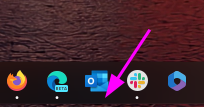
I recently upgraded to version140.0.3485.14 (Official build) beta (64-bit) and noticed that my PWA, even if they open correctly in a independent window, don't show the "running window counter" on the taskbar. So, for example, if a open Outlook, the window open and loads the app, but if a I click the icon again, it opens another window, wich is a little annoying. I tried removing the PWA from Edge, rebooting, and installing again, but didn't work. Because the only change I made is updating Edge, I think is related to this build. (too lazy to go back or install the stable release)3.2KViews10likes11Comments
Timesheet approval by project
Hi Community, Is it possible to set up timesheet approvals so that the approver can be the project manager or the person timesheeting can select the appropriate approver for each row? My use case is: I have several projects that I need to timesheet my time against. I fill in my timesheets and want to submit them for approval to the project managers that are managing each of my projects to approve. Currently, I can only see that, as an enterprise resource, I can only have 1 approver that my timesheets go to for approval. Any help on my use case would be beneficial. Thanks, Danny2.7KViews0likes9CommentsPdp relative issues
Hi Community, I am configuring a new PWA and currently trying to add a new PDP, but I'm encountering a couple of issues that I've also noticed in other tenants. Under PWA Settings > PDPs & Workflows > PDP, when I click New, I only see three options: Link, Edit New Menu, and Add Template. I decided to edit one of the existing pages. However, even after adding a few custom fields to the page, once I click Apply and then Stop Editing, the page resets. Additionally, when I try to add a new web part, I don't find the Project web part category among the available options. Any suggestions?454Views1like3Comments
Edge Android does not truly install PWA
I believe Edge Android does not truly installs PWA, instead it creates a shortcut on the home screen. If I install PWA from Chrome, the app is added to the App drawer and also shows up in Settings > Apps list. This is not the case when installing via Edge. It only shows up on the home screen and there is a edge logo at the bottom right corner of the app logo. This is not a site specific issue, I have created multiple PWAs that install perfectly on other platforms and browsers except Edge. I even tried the https://microsoftedge.github.io/Demos/pwamp/ and it also behaves in the same way.2KViews2likes2CommentsModify indentation in Project Online via REST API's
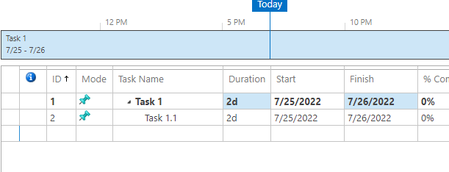
Hello community, Need assistance in updating a Task indentation in Microsoft Project Online(PWA) via REST API's. My goal is to change the task indentation from OutlinePosition 1 to OutlinePosition 1.1 and vice versa. Tried something from the article here, where he managed to indent the task while creating it, where as I need to manage the indentation while updating it. Expected Output Required Thanks in advance. Note: I'm trying to achieve this using PowerPlatform934Views0likes1Comment
New Project - Regex on Project Name - Limit Special Characters
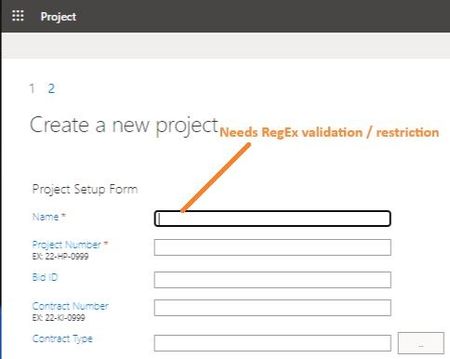
Greetings, I haven't been able to find any reference to this anywhere online... When creating a new Project in PoL/PWA, is there a way to apply RegEx to the 'Name' (Project Name) field? Basically: I would like to limit it to Alpha-Numeric, Spaces and Dashes...and definitely prevent '&' and brackets '()[]'. Either make it required or prevent 'finish' button (Create project) from functioning until it is valid. What might be a strategy to go about this validation? (Note: I am somewhat surprised this has never been discussed before...especially considering that PWA creates a sub-site & use the 'Name' field as the URL. Frankly, it is surprising that PWA even allows '&'.) Much appreciated, -TRSolved997Views0likes2CommentsAdd Syncing of PWAs between devices | sites that are installed as apps in Edge browser
I usually add a bunch of sites and social medias to Edge as PWA and install them in Edge: edge://apps/ I would like them to sync with my Microsoft account and to be available on all of my devices, other Windows and Mac devices, so I won't have to install them one by one again.Solved7.4KViews8likes19Comments