pwa
47 Topics
Solution for PWAs not appearing as separate apps on Linux taskbars
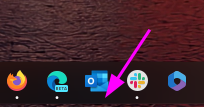
Hi everyone, I recently Installed Microsoft Edge stable on Kubuntu Linux, and I ran into some problems using Progressive Web Applications (PWAs). Launch one Edge PWA (say, Microsoft Teams). It appears normally. Launch a second PWA (say, Microsoft Outlook). Both windows — and every PWA you launch afterward — collapse into a single taskbar group under the first PWA’s icon, identified as msedge. Pinned PWA launchers never show as running. Pinning a running PWA window produces a generic page icon that launches the bare Edge browser when clicked. Launching a PWA from the application menu briefly shows the launcher’s startup placeholder in the taskbar, which then disappears and is replaced by a separate, unassociated entry. This isn’t KDE-specific. GNOME users have also reported issues. After some troubleshooting with Claude, the issues were traced to a mismatch between how the PWAs are identified in the .desktop PWA launchers created by Edge and the app ids reported to Wayland, starting in September 2025, when Wayland was used by default. Identifier Value Example (Microsoft Outlook) Window app_id (native Wayland) msedge-_<appid>-Default msedge-_lkkahpbimdkjdjjiijflmhaeameegbcm-Default Desktop entry filename msedge-<appid>-Default msedge-lkkahpbimdkjdjjiijflmhaeameegbcm-Default StartupWMClass= in that file crx__<appid> crx__lkkahpbimdkjdjjiijflmhaeameegbcm So the solution is StartupWMClass in the .desktop launcher for the PWA to the Wayland app_id. I have a simple Bash script that will do this for all currently installed PWAs as a workaround, but the automod removed that post the last time I tried to post it. The suggested fix for Microsoft This should be a small change to Edge’s desktop-entry generation on Linux: write the Wayland app_id (msedge-_<appid>-<profile>) into StartupWMClass=, or better, make the window app_id match the desktop entry basename per the freedesktop convention. No compositor-side changes are needed — the verified workaround above demonstrates that. I’ve reported this through Edge’s in-browser feedback tool (Alt+Shift+I) with the full diagnosis. If you’re affected, sending your own feedback referencing the same details is the best way to get it prioritized — the in-browser channel is what reaches the Edge team’s triage.195Views3likes1Comment
[Wayland] PWAs no longer appear as separate app windows — all group under main Edge icon
Hi, Since around 2025-09-07 to 2025-09-10, I’ve noticed that on GNOME (Wayland) all installed PWAs (even across different profiles) now appear grouped under the main Edge browser icon in the GNOME Shell dash/taskbar. Previously, each PWA would open in its own window group with its own icon. This is still the behavior in Chromium/Brave/Chrome, and can be restored there by editing the PWA’s .desktop file to set: StartupWMClass=<same value as Icon> However, Edge now seems to ignore StartupWMClass completely on Wayland, breaking workspace separation and making task switching hard. Environment: Ubuntu 25.04 GNOME 48.0 / Mutter (Wayland) Kernel 6.14.0-29 Intel Iris Xe GPU Edge (latest stable, observed post 2025-09-13) Repro steps: Install any PWA (e.g. Outlook, Teams, Spotify) from Edge Launch it (from any profile) Observe that it appears grouped under the main Edge browser icon Expected: PWA shows under its own icon and window group like in Chromium-based browsers Actual: All PWAs are bundled into the main Edge window group Editing StartupWMClass in the .desktop file no longer helps This regression makes PWAs much harder to manage on Wayland. Please route to the Linux/Wayland team if possible. Thanks!3.9KViews13likes20CommentsPWA shortcuts don't keep asociated with window - Linux
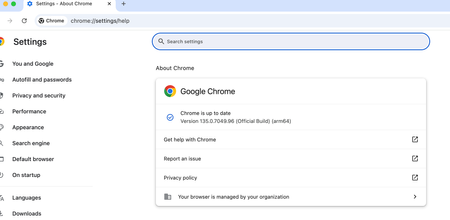
I recently upgraded to version140.0.3485.14 (Official build) beta (64-bit) and noticed that my PWA, even if they open correctly in a independent window, don't show the "running window counter" on the taskbar. So, for example, if a open Outlook, the window open and loads the app, but if a I click the icon again, it opens another window, wich is a little annoying. I tried removing the PWA from Edge, rebooting, and installing again, but didn't work. Because the only change I made is updating Edge, I think is related to this build. (too lazy to go back or install the stable release)2.7KViews10likes11Comments
Pdp relative issues
Hi Community, I am configuring a new PWA and currently trying to add a new PDP, but I'm encountering a couple of issues that I've also noticed in other tenants. Under PWA Settings > PDPs & Workflows > PDP, when I click New, I only see three options: Link, Edit New Menu, and Add Template. I decided to edit one of the existing pages. However, even after adding a few custom fields to the page, once I click Apply and then Stop Editing, the page resets. Additionally, when I try to add a new web part, I don't find the Project web part category among the available options. Any suggestions?285Views1like3Comments
Purview endpoint DLP cant block file upload to web.whatsapp on open in app mode chrome browser MacOS
we are using purview endpoint DLP to block file upload to web.whatsapp.com on browser for MacOS. its working fine on chrome browser when i try dirrectly upload file contain ssn pattern and its blocked by purview but if we upload using open in app mode (pwa) purview cant detect that activity and file is uploaded to web whatsapp susscessfully. try to upload senstive file to web.whatsapp.com from chrome browser and its blocked. but when i try to use "open in app" mode (pwa) dlp purview cant detect the sensitive upload to web.whatsapp.com how to detect and block file uploaded to unwanted url if user using pwa especially on chrome browser? try the same scenario on edge, purview able to detect pwa and can intercept the activity but why in chrome its not the same behaviour expected.778Views1like1Comment
New Project - Regex on Project Name - Limit Special Characters
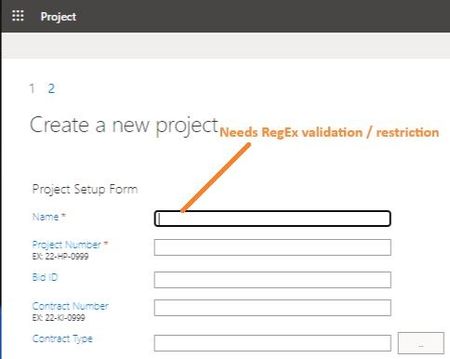
Greetings, I haven't been able to find any reference to this anywhere online... When creating a new Project in PoL/PWA, is there a way to apply RegEx to the 'Name' (Project Name) field? Basically: I would like to limit it to Alpha-Numeric, Spaces and Dashes...and definitely prevent '&' and brackets '()[]'. Either make it required or prevent 'finish' button (Create project) from functioning until it is valid. What might be a strategy to go about this validation? (Note: I am somewhat surprised this has never been discussed before...especially considering that PWA creates a sub-site & use the 'Name' field as the URL. Frankly, it is surprising that PWA even allows '&'.) Much appreciated, -TRSolved808Views0likes2Comments
Edge Android does not truly install PWA
I believe Edge Android does not truly installs PWA, instead it creates a shortcut on the home screen. If I install PWA from Chrome, the app is added to the App drawer and also shows up in Settings > Apps list. This is not the case when installing via Edge. It only shows up on the home screen and there is a edge logo at the bottom right corner of the app logo. This is not a site specific issue, I have created multiple PWAs that install perfectly on other platforms and browsers except Edge. I even tried the https://microsoftedge.github.io/Demos/pwamp/ and it also behaves in the same way.1.8KViews2likes2Comments
Delete projects
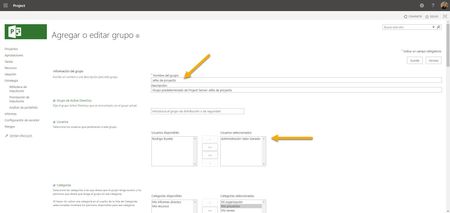
I just noticed that the permissions for deleting projects in Project Web App Online (PWA) are not working correctly. It's been a long time since I reviewed this option, but it seems to me that there have been changes that damaged this functionality. I have the following scenario: 1. An example user is associated with the “Project Managers” Group 2. The “Project Managers” Group has permissions on the “My Projects” Category 3. One of the permissions that the “Project Managers” Group has on the “My Projects” Category is “Delete project” 4. I have verified that there are no other “Deny” type permissions for that user in any group or category. There is no “Deny” 5. User cannot delete own projects from project center 6. User also cannot delete their own projects from PWA settings 7. Admin user and other users with admin permissions can delete any projectSolved1.7KViews0likes1CommentProject; Bugs, Problems, and Issues
Howdy Y'all, I am generally highly adaptable and can make the most out of almost any situation. I am a long time Primavera user and I am trying extremely hard not to lose my "stuff" while making the switch to Project/PWA/Project Desktop (*rant for another post). I have been a Project Scheduler for about 15 years now working on medium/large capital (construction) projects in Oil & Gas, Chemical, Manufacturing, and Steel industries. They all manage projects more or less the same way. I have used Project over the years off and on for small 1-off projects and struggled through it. Now that I have been using Project for almost 2 years I still get aggravated, agitated, and angry because of the bugs and problems with the software. I am sure about now you are thinking "this guy needs some training on the software". I decided to go to Microsoft directly to get answers, but they don't have classical support for Project apparently and this is the closest thing I have found to "Support" so here I am y'all. The issue that originally brought me here I managed to solve on my own while typing this rant. My Summary Tasks wouldn't (?)summarize the dates of the tasks below them when added. Yes they were auto-scheduled. See picture below. The resolution... not just saving it, but closing it to was required (and reopening obviously) to make Summary Tasks... summarize tasks. See <subject>. I am pray that this community can help me keep my sanity in the coming days. I really don't want to be defeated by this program.5.5KViews0likes3CommentsTimesheet approval by project
Hi Community, Is it possible to set up timesheet approvals so that the approver can be the project manager or the person timesheeting can select the appropriate approver for each row? My use case is: I have several projects that I need to timesheet my time against. I fill in my timesheets and want to submit them for approval to the project managers that are managing each of my projects to approve. Currently, I can only see that, as an enterprise resource, I can only have 1 approver that my timesheets go to for approval. Any help on my use case would be beneficial. Thanks, Danny2.5KViews0likes9Comments