project
750 Topics
MS Project Master file won’t allow Duration/Deadline edits
I’m troubleshooting an unusual issue with a long-standing Microsoft Project Master/consolidated file containing multiple linked subprojects. After replacing one subproject with its latest monthly version, certain fields within that subproject cannot be edited from the Master file. Specifically, I cannot edit fields such as Duration or Deadline, while other fields, such as Text and Baseline fields, can still be edited normally from the Master. I’m sensing the theme has to do with fields that require calculation. More context: This issue arrived after we migrated MPP files from a cloud server to an on-prem server. Previous month’s Cloud server MPP file works fine in the Consolidated environment The master file creates the issue when I replace the cloud-based MPP with the current month on-prem version. Troubleshooting completed: The subproject works normally when opened directly. I created a brand-new blank MPP to use as the Master file and inserted the exact same subproject. Duration and Deadline are editable through the new Master. In the new consolidated file and repeated the normal download from on-prem/replacement process. Everything works correctly. The problem therefore appears to follow the existing Master MPP, rather than the subproject. F9/recalculation does not resolve the issue. The existing Master has been used for a long time and contains multiple inserted/linked subprojects and external relationships. Important constraint: I want to avoid rebuilding the Master or use a repair method that regenerates existing task UIDs. A higher-level consolidated schedule relies on the existing UIDs.69Views0likes1Comment
MS PROJECT 2019 UPDATE and Purchasing Options
HI We are currently using Microsoft Project Professional 2019 desktop version, but we are facing challenges with its reporting limitations. Specifically, the software can only display a maximum of 75 rows in its reports. As our weekly reports often exceed this limit, we find ourselves spending considerable time on manual entries. For our monthly reports, we can manage the filtering process to avoid this limitation, but the weekly reports require a hierarchical structure to display task statuses, and unfortunately, there is no workaround for this constraint. While researching this issue, I found discussions indicating that the 2025 version of Microsoft Project can display up to 150 rows, which would help us address our challenges. I have a couple of questions: 1. Does the new version of Microsoft Project 2025 indeed support the display of up to 150 rows? 2. What is the best approach for upgrading: subscription or standalone? 3. Could you provide pricing information and tell us where we can obtain it? Thank you! Best regards, Teshome HPU PMO Office144Views0likes1Comment
Project Accelerator de Microsoft
I am running some tests with the Project Accelerator tool. I assigned a Planner Plan 1 trial license based on the documentation and previous guidance. At the beginning of February 2026 everything was working correctly, and I was able to view tasks inside the Project Accelerator application. However, as of today (February 25, 2026), the task view no longer loads, and I receive a Microsoft authentication error. It seems as if the system is now blocking access to the plan view even though the Planner Plan 1 license is still active. My question is: Have the licensing requirements changed recently?126Views0likes0Comments
Is there a way to graphically highlight all of the tasks under a summary?
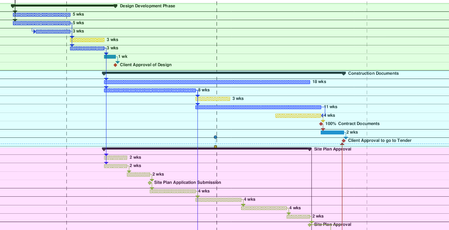
Looking to create what would essentially be a coloured background for all of the tasks in the gantt chart, under a summary. Been looking online and watching tutorials, but cant find what I am looking for. The image shows what I am trying to do (was done after the fact with a PDF reader, would prefer to do it straight in MS project).242Views0likes1CommentBaseline Resourcing Assistance
Hello, I have been transferring a 1700 line schedule from a different program into MS Project. I have got the current schedule loaded and resourced, and all is working well. I have set this now as Baseline1. As part of reporting requirements, I have been asked to report current state (Baseline1) against original state (Baseline). I manually loaded the original baseline dates into Baseline Start & Baseline Finish columns on the schedule, prior to setting Baseline1 in the hope this would force those dates to become Baseline. When I run the Visual 'Baseline Work' Report for Cumulative Actual Work vs Baseline1 Work, I get the expected result, but if I also import Baseline work that data reads as 0, as it appears the resources have not applied to the baseline to create a work calculation for measurement. How can I ensure the resources are applied to all 3 fields (Baseline, Baseline1 and Actual)? Thanks in advance, KSolved295Views0likes4CommentsProject Changing % Complete when entered
Why does MS Project change the % Complete value entered? We have a task with a Start date of 11/12/25 and Finish date of 1/20/27. The duration is 223.9 days based on a 4 day/10 hrs per day calendar (it is a long lead time material procurement task). The status date is 1/5/26 and the task has an Actual Start of 11/12/25. When I enter 10 in the % complete column and hit enter, Project changes this to 0%. When I enter 15 in the % complete column and hit enter, Project changes this to 5%. When I enter 50 in the % complete column and hit enter, Project changes this to 44%. I believe % Complete is either calculated or entered, but it seems if you enter a value in this field, Project shouldn't change it. What causes Project to change your % Complete value entered, and how do you get Project to display the desired % Complete for a task like this?455Views0likes4CommentsVisual report don’t work
Hi I am using msproject 2016 stand alone together with office365. And I get an "unknown error" when I try to use Visual Report. anyone knows how to solve this? I have read somewhere that I need to rollback MS Project to a specific build no. I don’t know if this is the solution. If so. How do I do this and to what build version? Br Rune86Views0likes0Comments
People Picker in Project Detail Pages - Not Working for Already Created Projects
Hi, I have a non-mandatory field (say, "Expert") in PDP. When I create a new project, I can select the "Expert" using People Picker. When I try to open an existing project (to assign/reassign an "Expert") the People Picker feature does not work. Custom scripting is already activated. Any insight from users, as to what configuration changes should be made, would be much appreciated. Thanks241Views0likes5Comments
Change Print Page Order
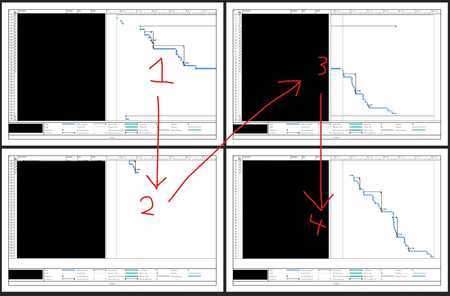
Hello, I'm looking to see if someone can help me find how to change the order that pages are printed in Project. Personally, I know this doesn't matter because you can just line them up as you like, but my job has me make PDFs of them as well and my boss would prefer the order to be different, so if possible I'd rather find a way to make it do it the way he'd like automatically than me re-arranging the PDF pages and editing the page numbers. Essentially, they want it to show the entire date line of the gantt chart first before showing the next set of rows. I've attached 2 screenshots of the print preview, one is the order it currently is (focusing on the rows first) and the 2nd is the order my boss would like (focusing on the gantt chart dates first). Is this possible and if so, how do I go about setting it up?290Views0likes3Comments