project desktop
161 Topics
Regarding the usage of PjAssignmentField in Microsoft Project
Hello, the following code is placed in the ThisAddIn class of a Project VSTO add-in. I want to execute other code when the field Text1 corresponding to the resource assigned under a task changes. The problem I am currently encountering is: When the Text1 corresponding to the resource assignment under a task changes, the message box "OK" does not pop up. However, in the "Resource Usage" view, when the Text1 of the task assignment under a resource changes, the message box "OK" does pop up. I hope experts can provide guidance. Private Sub ProjectBeforeAssignmentChange(asg As MSProject.Assignment, Field As MSProject.PjAssignmentField, NewVal As Object, ByRef Cancel As Boolean ) Handles Application.ProjectBeforeAssignmentChange If Field = MSProject.PjAssignmentField.pjAssignmentText1 Then MsgBox("OK", vbExclamation) End If End SubSolved47Views0likes2Comments
How to download MS Project Plans along custom fileds including data
I have Project plans in project online. I am opening the plan in ms project, custom fields data is getting loaded. But when i try to save the file in local desktop, schedule data is saving but custom fields data is not coming only column names are coming. How to save the file along with task level custom fields with data in local desktop118Views0likes0Comments
Generic Resources - Team Assignment Pool Yes or No?
Our On-Prem Project Server environment was set up with Generic Resources marked "No" for Team Assignment Pool. It seems we would want this to be a "Yes", so that tasks assigned to a Generic resource would be visible by Project Server users with the same role, and those users could then self-assign those tasks and provide updates. Our generic resources are meant to represent a "pool" of people in different labor categories, so that we can look at potential areas of under or over utilization. It seems that marking them as a Team Assignment Pool would reflect our intended use. For most of our generic resources, we don't plan to replace them with a specific person (such as production work). However, for some resources such as engineers, we would like them to be able to self-assign tasks and give updates in Project Server. Is there a particular reason to keep our Generic Resources marked "No" for Team Assignment Pool? Does changing to "Yes" affect their capacity, availability, or Work/Cost values?Solved333Views0likes3Comments
MS PROJECT 2019 UPDATE and Purchasing Options
HI We are currently using Microsoft Project Professional 2019 desktop version, but we are facing challenges with its reporting limitations. Specifically, the software can only display a maximum of 75 rows in its reports. As our weekly reports often exceed this limit, we find ourselves spending considerable time on manual entries. For our monthly reports, we can manage the filtering process to avoid this limitation, but the weekly reports require a hierarchical structure to display task statuses, and unfortunately, there is no workaround for this constraint. While researching this issue, I found discussions indicating that the 2025 version of Microsoft Project can display up to 150 rows, which would help us address our challenges. I have a couple of questions: 1. Does the new version of Microsoft Project 2025 indeed support the display of up to 150 rows? 2. What is the best approach for upgrading: subscription or standalone? 3. Could you provide pricing information and tell us where we can obtain it? Thank you! Best regards, Teshome HPU PMO Office284Views0likes1CommentIs there a way to graphically highlight all of the tasks under a summary?
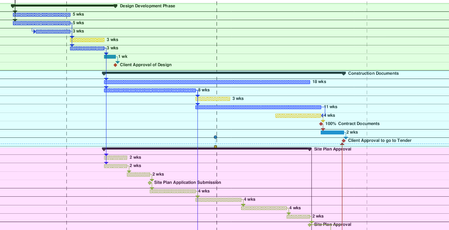
Looking to create what would essentially be a coloured background for all of the tasks in the gantt chart, under a summary. Been looking online and watching tutorials, but cant find what I am looking for. The image shows what I am trying to do (was done after the fact with a PDF reader, would prefer to do it straight in MS project).343Views0likes1CommentStart to Finish Relationship - earliest start when connecting to two predecessors
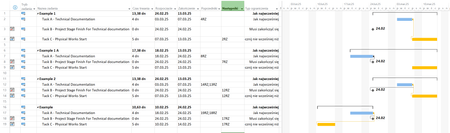
Hi I have a scenario. Three tasks Task A - Technical documentation (preparation of it) Taks B - Project Stage Finish For Technical documetation so A have to finish before B Task B have Constraint Type - Must Finish On Task B - can change its Start/Finish date Task C - Physical Works Start - Start of works for which Technical Doc. from task A is needed so A have to finish before C Task C - will move as in reality, it will also depend upon other "tings" in project which can and will change Task A is most "submissive" task It always have to be finished before Start of B and C (sorry to all Documentation designers out there) How to create proper connection between a/m taks that always will move finish of Task A before start of B and C independent of where B and C will be moved ? I've tried to use Start to Finish, but it works only if I connect one task Below a screen shoot form my MSP I'm sorry for Polish ... but can't switch it to English (entire Office suite will .. but not MSP.. ) RZ = SF Typ Ograniczenia -> Constraint Type Jak najwcześniej -> As Soon As Possible Musi zakończyć się -> Must Finish On Rozpocznij nie wcześniej niż -> Start No Earlier Than Rozpoczęcie -> START Zakończenie -> Finish Poprzedniki -> Predecessors Następniki -> Successors Example 1 and 1A - works.... but it A is connected to only one task (A or B) Example 2 - I've connected A to B and C, but A is moved beyond B Example - same problem as above but in this scenario I've moved C before B but A... stick itself for task furthrer in future I know that I can create connection like belowe Using "Standard" connection between A and B and in the moment when situation as above will happen (A will move past B), MPS will "Scream" at me with a message that he can't finish task A but that is not a solution for me.184Views0likes1Comment
Change Print Page Order
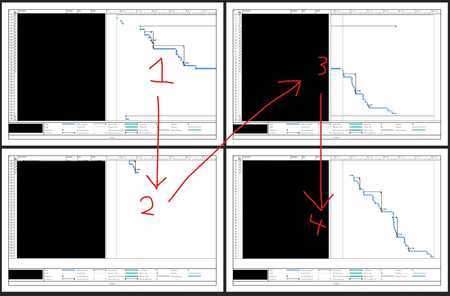
Hello, I'm looking to see if someone can help me find how to change the order that pages are printed in Project. Personally, I know this doesn't matter because you can just line them up as you like, but my job has me make PDFs of them as well and my boss would prefer the order to be different, so if possible I'd rather find a way to make it do it the way he'd like automatically than me re-arranging the PDF pages and editing the page numbers. Essentially, they want it to show the entire date line of the gantt chart first before showing the next set of rows. I've attached 2 screenshots of the print preview, one is the order it currently is (focusing on the rows first) and the 2nd is the order my boss would like (focusing on the gantt chart dates first). Is this possible and if so, how do I go about setting it up?363Views0likes3Comments
A colored column representing holidays
I am looking for ideas as to how to create a transparent, colored visual column within an MS gantt chart representing a date range that correlates with the Christmas holidays. Basically, just a vertical bar crossing all tasks that visually indicates the holiday date range (say 12/22/25- 01/02/26) so that as you scroll through all your tasks, that bar remains constant in the gantt chart. I can do a single date bar using Status Date, but have not found a way to perform a similar function for a date range. Any ideas or tricks?Solved253Views0likes1Comment
Cannot Force Checkin: Project Web App
My team got project stuck in the queue and we can't publish any other projects as 2 jobs got stuck and causing other projects to continue to be in a wait. I tried to 1) Cancel the publish job (not successful) force checkin a project (not successful either) and it continues to stay in this state for several hours "Waiting To Be Processed" Please help!!1.5KViews0likes2CommentsOpening and Viewing Option for Two MS Project Files Simultaneously on Two Screens?
Hi Can two MS Project files be opened on two different screens at the same time? This option is should be there as it is for other usual MS software like Word, Excel etc. Hope this can be fixed as will ease out while working from two parallel files simultaneously. Appreciate if this can be looked at, please asap. Looking forwardSolved163KViews1like41Comments