product bug
59 TopicsAutoSave disabled when opening SharePoint-synced files from Finder after macOS Tahoe 26.6 update
Files stored in SharePoint Online and synchronized locally through OneDrive are opened as local documents when launched from Finder. Office applications display "Saved to my Mac" and AutoSave is turned off by default. However, opening the exact same files through Word/Excel > Open > Sites, or via SharePoint "Open in Desktop App", correctly identifies them as cloud documents. In that scenario, AutoSave is enabled and collaboration/version history features work as expected. Troubleshooting already performed: OneDrive reset and re-linked SharePoint library re-synced Signed out and back into both Office and OneDrive Removed Microsoft credentials from macOS Keychain and re-authenticated Recreated local OneDrive sync relationships Verified OneDrive File Provider extensions are enabled Verified Office applications and OneDrive are fully up to date Tested with newly created files and existing files Tested "Always Keep on This Device" with no change in behavior The issue appears to be specific to the Finder-to-Office launch path after upgrading to macOS Tahoe 26.6. Before upgrading to macOS Tahoe 26.6, opening the same SharePoint-synchronized files directly from Finder correctly preserved cloud document identity and AutoSave was enabled as expected. I discussed this issue in detail with Apple Support, but they quickly dismissed it, saying that the problem is not on Apple's side and that I should contact Microsoft instead.1.8KViews10likes18Comments
HEIC codec is not working with Windows 11
My client has 350+ users, no one has this kind of issues with their windows machines. This laptop has Windows 11 v 25H2. In his team, coworkers shared some pictures over the shared drive and teams app also (remember I already checked its NOT application or file corruption issue) because same file opens everywhere except by this laptop. While opening the .HEIC file in windows the "Photos" app said there is no codec installed and give the link to download from MS store. After, moving on MS store, the codec asks us to purchase it. We proceed to buying the codec it says use only personal Microsoft ID. In my research I found that MS restricted to buy anything using any business account. The problem is not buying this codec in actual, the purpose to ask and provide further solutions. Why this particular laptop or windows 11 missing this codec? (low priority question) What is the other easiest way to fix the problem? like copy some file from healthy system and paste in somewhere. or whatever else. The client is not agree to reformat the OS and Download any Third party app from MS store, as they said to find the way in fixing this problem.284Views0likes3Comments
OneNote To Do tag changed to a radio button
After a recent update, the to-do tag still behaves like a checkbox but is styled as a radio control:. Here's why I say that. Some UI differences between radio and checkbox are: - Circle outlines convey a radio button control, and selection fills in most/all of the outline - Square outlines convey a checkbox control, and selection usually does not fill in the entire outline Radio controls are mutually exclusive by design (selecting one de-selects the others). They are not appropriate for a to-do list. I can get close to the original UI by customizing the tag, but not entirely: Is this bothering anyone else as much as me?271Views0likes2Comments
Bookings - No more notes or extra fields available
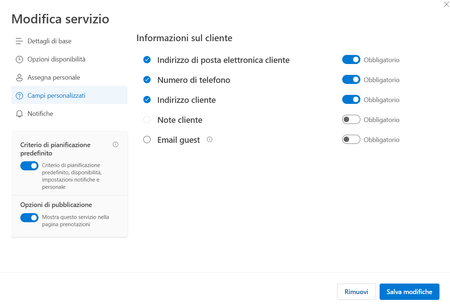
Hi there and happy new year to all. Starting from mid-december, we are facing an issue with our company Microsoft Bookings: basically the custom fields (like address, notes and so on). The book page will just ask for Name & Surname, E-mail Address and Phone Number. On our Administration back-end, the Customer Notes fileds is greyed out (you cannot enable it), and all the custom fields disappeared, you have just the standard ones. We have this issue in all our different booking pages, and all the services are affected. Any hint about this? Thanks!1.7KViews0likes5CommentsMulti-day all-day event in Bookings calendar does not block staff availability (single-day works)
I've found a reproducible issue with Microsoft Bookings staff availability blocking. Scenario: One of my staff members went on vacation. To block her availability without removing her hours, I created an all-day event directly in the Bookings calendar covering her entire vacation week. Problem: - When I create a single-day all-day event → her time slots are correctly removed from the booking page. - When I create a multi-day all-day event (covering the full week) → her time slots still appear as available on the booking page. Expected behavior: A multi-day all-day event should block availability the same way a single-day event does. Is this a known bug? Is there a fix or ETA?141Views0likes1CommentTechcommunity Follow email notification no longer working
Hello, Not sure if this is the right place to post this issue but I could not find another method to report this issue.. As an Exchange Admin in our invironment it's very usefull to stay up to date on the latest new posted in a variety of blogs on this website (Exchange Blog, M365 Blog, ...) This all went well until a few months ago where I started noticing I didn't receive any weekly updates anymore regarding new blogposts & tried to manually go check periodically, thinking it would be a temporary system. After investigation i've noticed that i'm not the only admin in our company that no longer receives these emails from mailto:email address removed for privacy reasons So I wonder if something bigger is up or if it's only my company being affected, not receiving these follow notifications anymore? Is there any other way that I should report this issue, to those managing this website so it can be investigated in detail if it's only us? Already tried to unfollow/delete follows in my profile - save - follow again, same on the respective blog pages, but this does not seem to change anything.116Views0likes2Comments
Is there an acceptable method to convert pub to docx?
Unfortunately Microsoft has decided to end Publisher. So users are forced to find methods both for archiving old files and converting current files to be able to continue working. For the first PDF will most likely be the easiest. For the second I've been trying to find a converter. This proves to be a challenge. And the results have been very unsatisfactory so far. My main publication is a brochure which is printed double-sided on A4 paper, stapled and then folded to A5 size. The publication contains 99% text boxes (with formatted text) and pictures. Here and there a shape like a horizontal line. All things that Word definitely supports. So converting it should be a no-brainer - at least I thought so. Of course Publisher can save as DOCX. Unfortunately the function only supports plain text. So the text boxes are removed, which means a lot of manual rework. Also the text isn't converted continuously. For exapmle the text that was on the first sheet in my Publisher file, ended up on page 5 in Word. Bottom line: not acceptable. Microsoft therefore don't even refer to that save function in their official communication to Publisher retirement. They suggest a workaround instead: save the file as a PDF and open it with Word. The suggestion is embarrassing enough, since it implies that Microsoft are unable to provide suitable conversion between their own formats. I tested it anyway. But the layout ends up in Word in a way that requires a lot of manual rework. Tab stops are partially removed, page margins are shifted. The pagination is also incorrect, so that some pages are half empty. Bottom line: not acceptable. Also tried some online converters. Unfortunately the results haven't been satisfying either. Most of them convert text boxes into shapes with integrated text boxes. And even worse: big text boxes are often split into several smaller boxes. In any case there still remains a lot of manual rework. Bottom line: halfway acceptable. Disappoiting Conclusion: At present, I consider it the best option to rebuild the file from scratch in Word using Copy-Paste. If someone knows a better method, would be happy to hear about it.923Views2likes2CommentsDisable incessant nagware popups
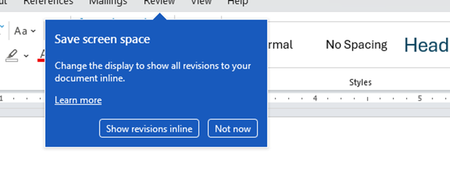
I don't know about everyone else, but I am sick and tired of the nagware pop ups in Word, Excel, PowerPoint, Outlook, etc. Every single product harasses me with pop ups trying to tell me "hey, did you know this feature was here?", "you can do this if you click that", "let me hold your hand through using products you've used for decades even though you don't want daddy Microslop to do that". This is a prime example. I keep getting the same ones again and again and again and everything I've read indicates they should only appear once. But they don't. They keep coming back like a psychotic stalker ex who wants alimony even though you were never married. How do I get this nagware to stop?!260Views1like1Comment
Bookings Page not sending confirmation emails to customers
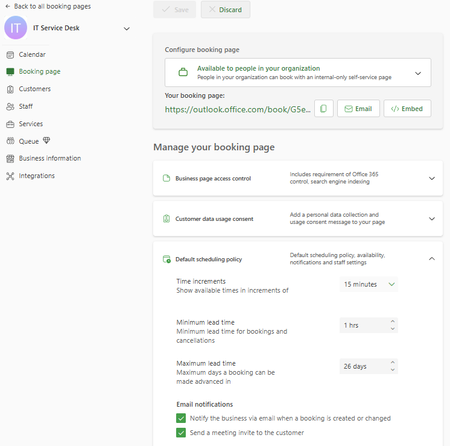
Hello, I am the main technician for my company's service desk. We have a Bookings page, but any time anyone books a time slot, they receive a message indicating that they will receive a confirmation email, but no email comes to them. In the settings, it shows the checkbox to send a confirmation email is checked. I have also looked in Exchange Admin and run a message trace and cannot find any confirmation email sent to myself or other testers. In Bookings, I have unchecked the confirmation email checkbox, saved, checked, saved, and tested - same result. Additionally, this Bookings page is only for internal users, and all of them are 'customers' with their full organization email address. In researching, I found that there was mention of the Bookings needing to have an Exchange account as a shared mailbox, which I do not believe we have - when I search the email that confirms for me that someone has booked with me, it is a long string of seemingly random letters and numbers with an internal domain address. I have also tried searching in Exchange Admin for 'IT' 'Service Desk' 'Service', and 'Desk', none of which have any results under Mailboxes (which would include shared mailboxes). Any advice/suggestions would be greatly appreciated. Screenshot:1.2KViews0likes2Comments