problem
3 Topics
Windows Defender Cannot Be Activated After Uninstalling Comodo Anti Virus– Help Needed (Windows 10)
Hello Community, I’m experiencing a problem with my Windows 10 laptop and hope to get some guidance. Official support is no longer available for my system, so I’m turning to the community for help. Problem Comodo Anti Virus /Internet Security / Internet Security Essentials had been installed on my laptop for a long time. While Comodo was active, I could not load certain websites properly, and games like League of Legends would not run. For this reason, I recently uninstalled Comodo. After the uninstallation, the previously blocked websites and games work again. Current issue: My Windows Defender Antivirus cannot be activated. In Windows Security, it shows: “Virus & threat protection: Action required” “The threat service has stopped. Start it now” Clicking “Start now” only shows a loading indicator and then an “An unexpected error has occurred” message. I have administrator rights, but Defender still cannot be activated. Steps I’ve Tried 1. Registry checks Path: HKEY_LOCAL_MACHINE\SOFTWARE\Policies\Microsoft\Windows Defender Checked entries like DisableAntiSpyware and DisableRealtimeMonitoring Modifications often failed → access denied 2. PowerShell commands Set-MpPreference -DisableRealtimeMonitoring $false → errors: “Parameter not found” or “Access denied” Other commands like Set-ItemProperty or Set-Content → errors: “UnauthorizedAccessException” or “InvalidArgument” 3. CMD / SC commands sc config WinDefend start=auto Error: “SC Open Service Error 5 – Access denied” 4. Service check Get-Service WinDefend | Select-Object Status, StartType → Status: Running, StartType: Automatic Despite the service running, Defender cannot be enabled in Windows Security 5. System restore point created (For Comodo Revomal Tool) Drive C: protection enabled Backup created as a precaution Insights / Analysis (Speculations) After uninstalling Comodo, websites and games work again → this suggests that Comodo previously installed network filters or drivers that blocked them. It is possible that remnants of Comodo (drivers, services, registry entries) are preventing Windows Defender from starting. Firewall, App & Browser protection, and Exploit protection are active → partial protection, but Defender is not functional. I am not certain if there are other causes, but based on my experience, it seems strongly related to leftover Comodo components. Has anyone experienced similar issues where Defender remains blocked after uninstalling Comodo? Are there safe methods to fully reactivate Defender without risking system stability? Should I use the official Comodo Removal Tool to remove all remnants? Are there alternative steps to try before using a removal tool? I would greatly appreciate any guidance, tips, or steps I can try to get Windows Defender working again. Thank you in advance!783Views0likes5CommentsWindows Store Library shows empty list in "All owned" section when the type Is set to "All Types"
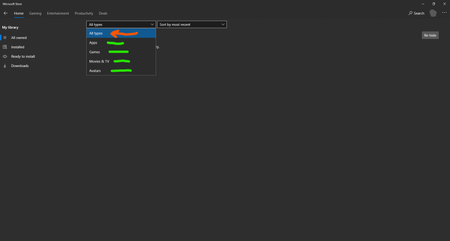
Windows Store Library shows empty list in "All owned" section when the type Is set to "All Types" when I set it specifically to "Games" or "Apps" then the list starts populating and showing me my stuff. Windows 10 build 18363.657 Feedback: https://aka.ms/AA7c2fb11KViews3likes22CommentsHow to set my VPN connection as Non-metered in Windows 10?
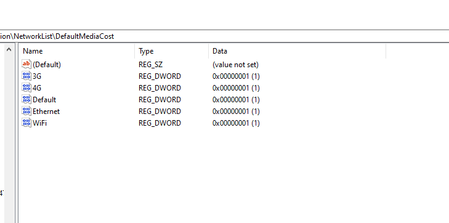
I want to explicitly tell Windows 10 1909 to consider my VPN connection as non-metered. whenever I connect to my VPN server, created from the Windows settings, apps like Mail stop showing me notifications, Store won't automatically update apps and things like that. Windows by default thinks my VPN connection is set as metered. I went to Computer\HKEY_LOCAL_MACHINE\SOFTWARE\Microsoft\Windows NT\CurrentVersion\NetworkList\DefaultMediaCost but there is no mention of my VPN connection's name I manually set them all to "1" which means Non-metered. can anyone help me set my VPN connection as Non-metered so Windows 10 can use Internet as much as it wants just like when I connect to Internet without VPN? Thanks More info on this: this is how advanced settings for WiFi looks like in Windows settings And this is how advanced settings for VPN looks like in Windows settings You see the part about "Metered Connection" is missing from VPN settings! Another thing I tried was disabling SlowLinkDetection in Registry, setting it to 0: HKEY_LOCAL_MACHINE\Software\Policies\Microsoft\Windows\System\SlowLinkDetectEnabled It didn't help. I test it simply but sending an Email to myself on phone and watch for the notification banner on Windows 10. when I'm connected directly to WIFI, the notification banner appears as soon as the mail is arrived but when I'm connected to VPN, the notification banner only appears when I manually open the Mail app in Windows 10 (UWP). I use PPTP/SSTP protocols, set them up in Windows 10 settings natively.1.9KViews0likes0Comments