problem
36 Topics
Microsoft Print to PDF not working/missing.
The Microsoft Print to PDF was not working on my PC so I tried reenabling it via Windows Features in Optional Features and it won't turn back on. It gives error code: 0x800f0922. I also tried other various methods online and none work. All end with various error codes which all result in the service not working/turning on. I even filed feedback about 2 weeks ago with no response yet. I contacted support, where I was recommended to perform a repair via ISO but was then canceled by the agent as I am on an Insider build. I am on build 26300.8687. This is a summary of my diagnostic from Gemini which I had used to try to solve my issue. Here is a summary of the diagnostic, tracking every command I executed in PowerShell and the specific roadblocks the Windows subsystem threw back. The Add-Printer Layer attempted to use modern PowerShell commands to register the printer onto both the interactive prompt port and the standard local file port. Commands Ran: PowerShell Add-Printer -Name "Microsoft Print to PDF" -DriverName "Microsoft Print to PDF" -PortName "PORTPROMPT:" Add-Printer -Name "Microsoft Print to PDF" -DriverName "Microsoft Print to PDF" -PortName "FILE:" * **Errors Faced:** * `ObjectNotFound: (MSFT_Printer:ROOT/StandardCimv2/MSFT_Printer)` * `HRESULT 0x80070002,Add-Printer` --- ## 2. The Legacy PrintUI Layer To bypass the modern PowerShell cmdlet, I tried using the legacy Windows user interface print engine via standard command prompt syntax and escaped quotes. * **Commands Ran:** ```powershell cmd /c "rundll32 printui.dll,PrintUIEntry /if /b `"Microsoft Print to PDF`" /r `"PORTPROMPT:`" /m `"Microsoft Print to PDF`"" rundll32 printui.dll,PrintUIEntry /if /b "Microsoft Print to PDF" /f "C:\Windows\System32\spool\DRIVERS\x64\3\prnms009.inf" /r "PORTPROMPT:" /m "Microsoft Print to PDF" Errors Faced: A graphical dialog box error: Operation could not be completed (error 0x00000002). The system cannot find the file specified. The Deployment Script Layer (WMI/CScript) I tried deploying the printer using Windows’ built-in visual basic administrative scripts to side-step the user interface layer completely. Command Ran: PowerShell cscript $env:windir\System32\Printing_Admin_Scripts\en-US\prnmngr.vbs -a -p "Microsoft Print to PDF" -m "Microsoft Print to PDF" -r "PORTPROMPT:" * **Errors Faced:** * `Unable to add printer Microsoft Print to PDF Error 0x80041002 Not found` * `Operation PutInstance` * `Provider Win32 Provider` * `Description The system cannot find the file specified. Win32 error code 2` Ultimately, every single command failed with an identical variation of **"File Not Found" (Error 2 / 0x80070002 / 0x80041002)**.923Views0likes4Comments
Problem where a new keyboard layout I have never selected appears in win+space
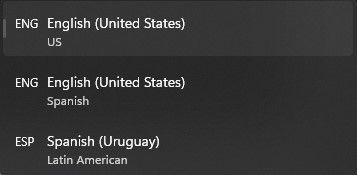
Essentially what appears in the title. In settings I have selected two keyboard languages/layouts, English (US) and Spanish (Uruguay). However, whenever I press win+space to change the layout, a third one appears that is labeled English (US) with Spanish just below it. It appears to be a mixture between the two. Whenever I fiddle with the settings it seems to disappear for a while but then it randomly comes back. This has been happening for a good while, at least half a year. Edition Windows 11 Home Version 22H2 Installed on 19-Mar-22 OS build 22579.100 Experience Windows Feature Experience Pack 1000.22579.100.01.6KViews0likes3Comments
does anyone here have problem with updating to windows insider preview10.0.22504.1010(rs_prerelease)
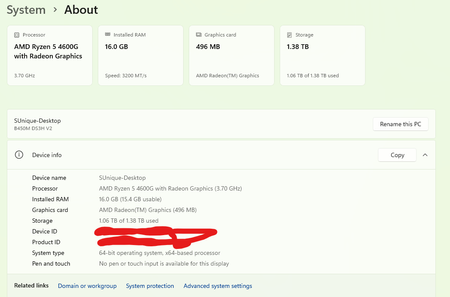
if so please if anyone knows the solution for this post it so that i can update my pc to the latest insider preview and give my opinions the below attached is my setting screen i have done this update over 10 times and my pc meets the requirements for the windows 11 GPU-1050TI CPU-Ryzen5 2600x mobo-Gigabyte B450m DSH3 RAM-corsair vengance 16GB dual channel 36000MHZ529Views0likes0Comments
Windows 11 Still Download After Leaving Insider Program
I am experiencing an issue with my Windows 10, I was on Windows 11 and I decided to roll back because my games were slower on there, after I rolled back I decided to leave the Insider Program and stop receiving Insider Preview Builds, I turned them off and left Insider Program then restarted my computer and Windows 11 Insider Preview kept downloading in Windows Updates. Does anyone know how to solve this issue?2.9KViews1like1CommentCan't fix problem with Windows Insider Program account
Hi everyone. For several days now I keep getting an error when I attempt to fix a problem with my Windows Insider account. The screen shows below information (same as attached screenshot): Your Windows Insider account requires attention to get Insider Preview builds. As soon as I hit "Fix the problem" I get a message for a split of second saying "Loading. This won't take long." and it changes to "Something went wrong. We aren't able to talk to our service right now. Please try again later." I am registered for the Insider Program and have tried several solutions that I've found on the Internet (registry keys change/add keys, start Windows Services, created new Windows profile with admin rights) - no luck. Anyone has an idea how to fix this? Thanks in advance for any replies.9.1KViews1like12CommentsUninstalling games from the Xbox app doesn't remove game shortcut from desktop
Install games from Xbox app, play it, then uninstall it, the shortcut that was made automatically on desktop will still be there, having a white placeholder icon. Expected behavior: the shortcut on desktop should be removed when the game is uninstalled from the uninstall option of the Xbox app. occurring in latest Windows 10 insider Dev build and Xbox app if you can reproduce it, add your details to this feedback: https://aka.ms/AAcirp216KViews1like3CommentsAdd the ability to search for a word in Clipboard of Windows 10
I often find myself in a situation where I have lots of Clipboard entries with texts and pictures, and I know what I'm looking for, but there is no easy way to search for it in the Clipboard other than going through each of them one by one and checking them manually. it won't even work for long clipboard entries as the Windows Clipboard only previews the first couple of lines of the item and not the entire thing, so I have to paste my entries in notepad one by one just to find what I'm looking for. if there was a mini search bar on Windows 10 Clipboard, I could type the word I'm looking for and find the correct entry fast. the search bar doesn't have to be visible at all times, it can be a responsive search bar, where we click on an icon and then the search bar appears. Please upvote this feedback in feedback hub: https://aka.ms/AAbj6m4766Views0likes0CommentsSplit Keyboard Layout is missing - insider dev build 21318
I have the new keyboard design that was introduced recently. but the Split layout Is missing. I only have: Default, Small and Traditional, No Split layout available. Windows 10 insider Dev build 21318 if you are having the same problem, please add your details to this feedback. Feedback link: https://aka.ms/AAb9lbi822Views0likes0CommentsWindows Activation troubleshooter shows "Upgrade" even when you are Downgrading edition
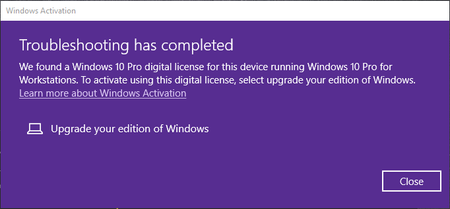
Happens on Windows 10 20H2 and also insider Beta/Dev. I have Windows 10 pro Workstation installed, but in my MSFT account I have digital license for Windows 10 pro only. so I use activation troubleshooter and it successfully finds the license and offers to convert Windows 10 edition from Pro Workstation to Pro, to activate it, but it shows by Mistake to "Upgrade" editions, even though Pro Workstation to Pro is a DOWNGRADE. so Windows needs to be aware of edition changes and show the correct term to the user. p.s Pro Workstation is more expensive than Pro and also has more features. Upvote this feedback please to get this fixed: https://aka.ms/AAb91ds672Views0likes0Comments