problem
115 Topics
MS Edge - Sidebar and copilot not working on Linux Ubuntu v24 LTS
Sidebar not syncing or accepting new app additions (+). Copilot button is dead/inactive. Sidebar settings are well configured. Using the latest version of the Ubuntu OS and MS Edge. Functionality appears to be absent as product was released without full functionality....Lame!28KViews45likes59Comments[Fixed] Edge Canary Automatically Closing - Version 80.0.316.0
Update 2: users report that the issue is back in Version 80.0.331.0 (Official build) canary (64-bit) Version 80.0.317.1 (Official build) canary (64-bit) Fixed the issue, which was originating from Sync options. I just updated my Edge insider Canary to Version 80.0.316.0 and it keeps automatically closing itself after every 2-3 minutes. I have about 4 tabs open and mostly this Microsoft tech communitySolved17KViews13likes52Comments
Critical Pen Hover & Stray Ink Issue on New Surface Pro 11 for Business with Slim Pen 2
Hello Microsoft Community and Support Staff, I am writing to report a critical and seemingly widespread issue with the pen input on the brand-new Surface Pro for Business, 13-inch (Intel model, often called Surface Pro 11 "Luna Lake"). The Core Problem: Pen Draws Without Touching the Screen When using the Surface Slim Pen 2, the device begins to register ink input while the pen is still hovering a few millimeters above the screen. It does not require any physical contact or pressure. This "hover-inking" makes handwriting completely unusable. As I write, any time I lift the pen to start a new letter or stroke, the pen continues to draw a line as it moves through the air to its next position. This results in messy, connected handwriting with unwanted "tails," completely defeating the purpose of having a premium inking device. This is Not a Defective Unit - It's a Replicable Problem Initially, I thought I had a faulty device. However, to isolate the issue, I have performed extensive testing: I have personally tested this on [3] brand-new Surface Pro 11 (Intel) devices. I have used [4] different Slim Pen 2s. The exact same hover-inking problem occurred on every single combination of device and pen. Furthermore, I have already performed all standard troubleshooting steps, including: Clean OS installation via Surface Recovery Image. Ensuring all Windows, driver, and firmware updates are installed. Running the Surface Diagnostic Toolkit (which reported no errors). However, the same issue continues to occur even after trying these methods. Additionally, it has been reported that the issue also appears on the latest Surface Pro 12-inch model with the Snapdragon X Plus, just like on the Surface Pro 11 that uses the Qualcomm Snapdragon X Elite instead of Intel’s Lunar Lake. (I do not own any Snapdragon devices myself. If you own a Snapdragon device and are experiencing the same issue, please share your feedback.)" Video Evidence: I have recorded a clear video demonstrating the problem. It shows the pen drawing while hovering on the Surface Pro 11 and makes unwanted tails on handwriting letters. Video Link: https://youtube.com/playlist?list=PLG_7BXFA-cL4evqe0RmRz--iFjDC1HVgT&si=EmEypaAqSyRozr67 Questions for Microsoft: Is this a known issue with the new Surface Pro 11 (Intel) model's firmware or drivers? What are the official steps to escalate this issue directly to the Surface engineering team for a fix? This is a major flaw in a flagship product that severely impacts its core functionality. I have submitted a formal bug report through the Feedback Hub, which can be found here: Feedback Hub Link: https://aka.ms/AAxzh27 I urge the Microsoft team to investigate this with high priority and release a firmware or software update to recalibrate the pen's Initial Activation Force (IAF). Thank you for your attention to this serious matter.1.6KViews11likes9CommentsEdge should have the ability to Resume Downloads after restarting the Edge browser or device
when I was using chrome few years ago, it also had this annoying limitation, now Edge (using latest available Edge canary) still has this problem. when you are downloading and pause your downloads, you can't restart the browser or device without losing your download progress, it will reset. this is really a fundamental problem, I've done my part which was sending feedback through Edge, if you are reading this and want the same thing, please send feedback from your browser and request this to be fixed. thank you5.5KViews7likes1Comment[solved] Why can't we use Edge://Flags on Edge Android?
Update: we can access Edge://flags on Edge Android now Edge for Android is based on Chromium, so why can't we access the Chromium flags? I tried Edge://flags , Chrome://flags , about://flags . none of them worked why Edge on Android doesn't let user access the flags to modify the settings?25KViews6likes8CommentsAdd the option to open favorite items in installed Edge apps
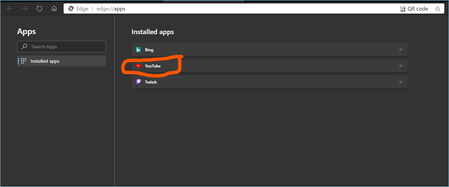
to clarify what I'm referring to: I have YouTube website installed as an app in Edge browser when I go to YouTube.com from main Edge window (Not the pinned website or PWA), and right-click on a link, I get this option which lets me open the link (in this case it's a video), in the pinned YouTube app. but when I right-click on the YouTube favorite item in the favorite bar, I don't see this option. it's missing from there. it makes sense to add the same option in favorite items right-click menu too. This is Version 82.0.449.0 (Official build) canary (64-bit) the nature of this bug prevents me to properly send it using feedback button on Edge browser, so I really hope someone from Microsoft will take this manually and let the team know about it. thank youSolved1.4KViews6likes2CommentsEdge not receiving notifications when closed
This has been going on for months, it actually never worked and despite many posts from other users, it wasn't put on the feedback list to be fixed. I tried sending several feedbacks through browser as well in the last months. I hope someone manually give this a higher priority. here is the Chrome article about this: https://developers.google.com/web/ilt/pwa/introduction-to-push-notifications "Push messaging lets developers engage users by providing timely and customized content outside the context of the web page. It is one of the most critical APIs to come to the web, giving users the ability to engage with web experiences even when the browser is closed, without the need for a native app install." Currently Edge canary is Version 81.0.406.0 (Official build) canary (64-bit) all the related flags (native notifications etc etc) are all tested and they have no effects.Solved13KViews6likes29Comments[FIXED] Win10 Build 19008 - Always and Constant High CPU usage: Speech Runtime Executable
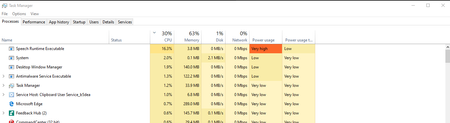
UPDATE: Fixed in build 19013 It has that much high CPU usage from the computer start to shut down. no idea why. if you have the same problem, please upvote this feedback and from the "Add similar feedback" section, add your own system details and upload a crashdump file for it (you can create it from the task manager) https://aka.ms/AA6dxnj3.5KViews4likes6Comments