powerapps
1231 Topics
Web invoke in power automate says unauthorized but can browse from browser
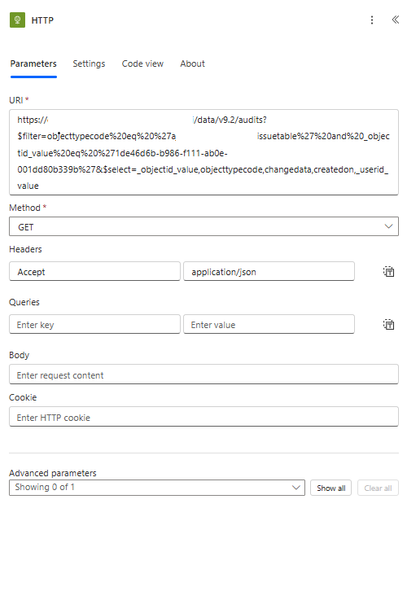
I am able to browse to this url directly from browser https://my365.crm9.dynamics.com/api/data/v9.2/audits?$filter=objecttypecode%20eq%20%27myissuetable%27%20and%20_objectid_value%20eq%20%271de46d6b-b986-f111-ab0e-001dd80b339b%27&$select=_objectid_value,objecttypecode,changedata,createdon,_userid_value but when i use the invoke http from power automate it says unauthorized. i am using the same account. What is the issue is there anything i need to do so that it works?
How to update a specific set of SharePoint list records after changing variables in Power Apps.
I have a timesheet app that captures start and end times. Within the associated SharePoint list, there are calculated fields. I have these fields included on the Power Apps form. The problem is that the calculated fields are not updating after the Patch action (updates or new saves). I tried the REFRESH action, but it is not refreshing the calculations. The only way I have found to view the updated calculations in the Power App is to filter the list to a different set of records, then back to the original. Once the filter returns to the original updated records, the new calculated results can be viewed. There has to be an easier way to do this.
Microsoft list item not loading and giving "Getting your data..." error
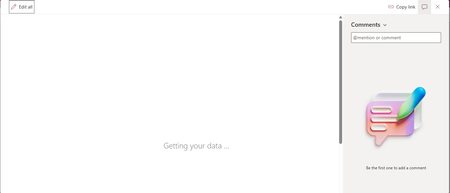
I have a Microsoft list which has a custom form using Power Apps. I am able to enter new entries into the list but when I click any previously entered list item, it shows "Getting your data..." but does not load even after long. Screenshot shown below:
Populating word template stored in Organizational Asset Library (OAL) using Power Automate
The objective is to implement an automated document generation solution that leverages the Microsoft SharePoint Organizational Asset Library (OAL) to provide users with standardized Word templates. These templates must dynamically self-populate with real-time identity data (Name, Email, Job Title, and Department, for now which can be extended) sourced from Microsoft Entra ID (formerly Azure Active Directory) upon instantiation. In other words, how to use a Word Template stored in Microsoft SharePoint Organizational Asset Library to populate with his or her own user information like Name, Email, Job Title, Department etc getting fetched from Azure Active Directory, whenever that user opens the template by going to File -> New -> Selecting Organization Tab and selecting the template. How can we populate this template using Power Automate?power apps free subscription-cancel
Hi All, I am using below id for power apps(email address removed for privacy reasons) using free subscription. with in one month i have cancelled my payment in bank. As of now i am not able to log in admin.cloud.microsoft. Microsoft authentication is not working . I can not delete and re add again. cancel subscription by bank side only enough or we need to do it in microsoft account (email address removed for privacy reasons)
Power Automate - iAuditor integration to Excel for business
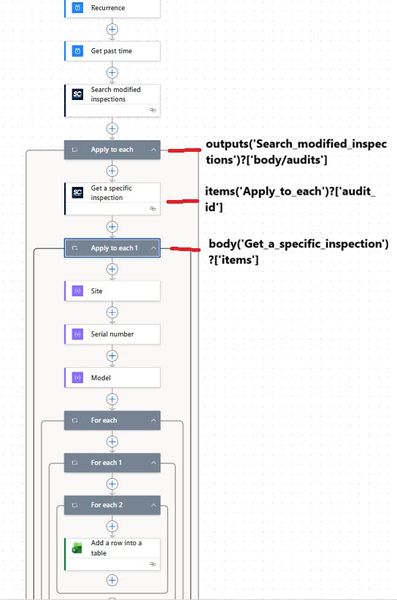
Hi all, I'm trying to build a flow in Power Automate to feed data in Excel file (located on SharePoint) used for my Power BI report but i don't know why it does not want to work. This is my flow as shown in the photo In the first "For Each" action i have " body('Site') ", second " body('Serial Number') "..... When i test this is how it looks like If i remove the second and third FOR EACH, it goes to the excel action and stops there. Does anyone have a similar flow or does anyone know what i'm doing wrong? Thank you in advance if anyone has a solution.
Could you tell me about how to trigger power automate for desktop on windows 11 free version?
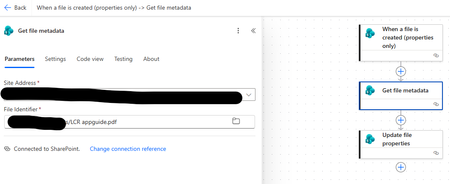
Hi, friend! I from Japan. just coming spring season right now. by the way. Could you tell me about when it executes command of power automate, but it couldn't succuss. according to the error message it doesn't know like this flow ID. but actuary on the other hand. in my hose case, like this method was succussed. if you know how to fix better, could you suggest it?Can we fill *.pdf in File Identifier on Get file metadata
Sir, I'm a rookie of Power Automate, so i'm tried to created flow to automatic fill metadata column in SharePoint Library as below. So, if i have specific file identifier, the flow was running successful, but if i have fill *.pdf then the flow was running fail. In fact, i cannot specify file identifier was uploaded in SharePoint but this flow must run automatically. My question is how to fix on this an issue? Many thanks for advice. Sonchai M. Flow Running fail
Alert when tasks are assigned to me across multiple SharePoint lists (private Teams channels)
Hello everyone, In my company we use SharePoint lists (not Planner) to manage tasks inside private Teams channels. Each project/team has its own task list, and people assign tasks to colleagues using the "Assigned To" column. My challenge: I would like to receive an automatic alert (email or Teams message) every time a task is assigned to me, regardless of which SharePoint list/site it comes from. The problem is: I don’t know in advance when someone will create a new list. Power Automate triggers (When an item is created or modified) need to be configured for each list individually. Planner/To Do integration would solve this, but Planner is not available for private Teams channels in our tenant. So, my questions are: Is there any way to catch all tasks assigned to me across multiple SharePoint lists without manually creating a flow per list? Are there any best practices for consolidating assigned tasks from multiple SharePoint lists into a single place (dashboard, notifications, central list, etc.)? Any advice, examples, or workarounds would be very welcome! Thanks in advance, Hugo Cristina