power platform
11 TopicsWhen Intent Becomes the Interface: Why Applications Are No Longer the Starting Point
For decades, enterprise software has asked people to learn how applications work. Which screen to open. Which fields to complete. Which workflow to trigger. Which report to generate. And which application to visit next. Here is a situation I keep meeting. A sales executive is preparing a renewal proposal. Customer relationships live in CRM. Contract terms sit in SharePoint. Support issues are tracked elsewhere. Revenue data comes from finance. Relevant conversations are scattered across Outlook and Teams. The executive knows what needs to be accomplished. The software requires them to figure out how. But something interesting is happening. We are beginning to separate the intent to accomplish work from the applications traditionally required to perform it. Microsoft's developments across Copilot, Cowork, Code, Copilot Studio and Microsoft IQ suggest that this could become a defining shift in enterprise software. The question is no longer simply how to make applications more intelligent. What if enterprise software started with the work, rather than the application? Enterprise Software Was Built Around Navigation Traditional enterprise applications organize business capabilities into reliable systems. ERP manages transactions. CRM manages customer relationships. HR platforms manage employee processes. These systems aren't going away. Their data models, transaction controls and business rules remain essential. But their user experiences were designed for a world where software needed explicit instructions at almost every step. People became the integration layer. We retrieved information from one system, interpreted it, entered it into another, initiated approvals and followed up when something stalled. APIs and automation improved individual steps. Generative AI introduced conversational interfaces. But the underlying model often remained unchanged. People still needed to know which application to use and how to move the result into the next step. Now the architecture itself is beginning to change. Microsoft Is Bringing Three Capabilities Together One of Microsoft's more consequential recent developments is the convergence of applications, workflows and agents in Copilot Studio. These are fundamentally different capabilities. Applications provide structured experiences for people to view information, make decisions and act. Workflows provide predictable execution for repeatable processes, business rules and integrations. Agents bring reasoning and adaptation when the next step cannot always be predetermined. Not every business process needs an agent. Not every decision should be probabilistic. And not every interaction belongs in a chat window. A purchase approval may require deterministic policy enforcement. Evaluating an unusual supplier proposal may benefit from AI reasoning. A material exception may require human judgment through a purpose-built application. Microsoft Copilot Studio is bringing these capabilities into a more unified development experience, supported by agent orchestration, workflow execution, reusable skills and connected tools. And the audience for this convergence is already enormous: Microsoft noted on a recent earnings call that more than 80% of the Fortune 500 already have active agents built with its low-code tools. This suggests a useful architectural principle: Use reasoning where the path is uncertain. Use workflows where the rules are known. Use applications where human interaction adds value. I have started calling this the Composition Rule. The breakthrough isn't replacing one with another. It is combining them deliberately. From Application-Led to Intent-Led Work Return to our sales executive preparing a renewal proposal. Instead of visiting multiple systems, the executive could begin with a request: Prepare the renewal proposal. Incorporate the latest commercial terms, outstanding support issues and account commitments. Flag anything requiring approval. The system must interpret the request, retrieve authoritative information, apply business rules, assemble the deliverable and recognize where human judgment is necessary. Different Microsoft capabilities can contribute to that experience. Microsoft 365 Copilot Cowork enables delegation of complex, multi-step work across connected productivity experiences. Work IQ provides context from Microsoft 365 collaboration. Fabric IQ contributes business semantics and relationships across enterprise data. Foundry IQ supports reusable enterprise knowledge and retrieval. Together, they form the context layer I explored in The Context Advantage and intent-led work is where that investment begins to pay out. Dynamics 365 and Power Platform connect intelligence to operational records, business processes and actions. Copilot Studio enables agents to use tools and workflows, while applications can provide structured experiences for human review. These are complementary building blocks, not necessarily one automatically integrated execution path. Bringing them together requires deliberate solution architecture, connectors, permissions and orchestration. The executive receives a proposal, supporting evidence and decisions requiring attention. The underlying systems remain important. But navigating them is no longer necessarily the executive's responsibility. In traditional enterprise architecture, applications organize capabilities and users navigate between them. In an intent-led architecture, the desired outcome becomes the organizing principle. Applications, workflows, agents and enterprise services are composed around that intent. The application remains important. But it is no longer necessarily the primary unit of the user experience. When Software Can Be Assembled Another development deserves attention. Microsoft's Copilot Code and Copilot Studio capabilities are making it easier to create software experiences from natural-language requirements. Copilot Managed Runtime provides Microsoft-hosted infrastructure for running and governing supported applications. These capabilities are at different stages of availability, but their direction is significant. Traditionally, an enterprise application begins with a development project: requirements, design, engineering, testing, deployment and maintenance. That remains essential for complex, mission-critical systems. But not every business need justifies a conventional development cycle. A procurement manager may need a focused interface for comparing supplier proposals. A finance team may need a temporary application for reviewing reconciliation exceptions. Increasingly, some experiences can be generated, connected to governed data and shared with colleagues. The distance between recognizing a business need and creating a useful software experience may shrink dramatically. But faster creation also raises important questions. Who owns the generated application? How is it tested? Which identities and permissions does it use? How is it maintained or retired? Microsoft Copilot Managed Runtime, currently in preview, addresses part of this challenge through managed hosting, Microsoft Entra authentication and application governance capabilities. The ability to generate software is becoming easier. The ability to operate that software responsibly remains an engineering discipline. Software creation may become democratized. Software accountability cannot become optional. Reasoning Is Not Execution There is one distinction I find myself drawing on whiteboards more often than any other as AI moves deeper into enterprise processes. Large language models are useful when tasks require interpretation, synthesis and adaptation. But enterprises also depend on predictability. An invoice approval threshold shouldn't change because a model reasons differently. A financial transaction must preserve the integrity of the system recording it. Consider an insurance claim. An agent interprets submitted documentation and identifies missing information. A workflow applies established eligibility rules and routes the claim. A human reviewer examines complex exceptions through an application presenting the relevant evidence. The model contributes interpretation. The workflow contributes repeatability. The application supports human judgment. And the system of record preserves the authoritative transaction. This requires business capabilities to be accessible beyond application screens. APIs, Model Context Protocol (MCP) tools, Power Platform connectors and reusable services become building blocks through which intelligent workflows can operate across systems. Microsoft Copilot Studio supports this direction through workflow triggers, agent handoffs, connected tools and evaluation capabilities. Microsoft Foundry provides complementary capabilities for agent development, evaluation, tracing and operational monitoring. The quality of the experience increasingly depends on how well these capabilities can be composed - not simply on how intelligent the underlying model is. For enterprise architects, this introduces a more useful question than where to deploy another agent: Which parts of this process should be intelligent, which must be deterministic and which require human judgment? That is the Composition Rule at work. A New Architecture, Not Another Generation of Sprawl The counterargument comes up in almost every architecture conversation I am part of. If every employee can generate applications and every department can assemble workflows, enterprises could recreate decades of software fragmentation at unprecedented speed. A hundred individually useful applications don't necessarily create a coherent enterprise architecture. The answer isn't to prevent experimentation. It is to establish reusable foundations. Common identity through Microsoft Entra. Trusted business semantics through Fabric IQ. Approved connectors and MCP tools. Shared engineering standards. Managed execution environments. Clear ownership and lifecycle controls. Microsoft Agent 365 adds an enterprise control plane for discovering, securing and governing agents across supported environments. These capabilities address different parts of the challenge. They do not eliminate the need for enterprise architecture. The more accessible software creation becomes, the more important shared foundations become. Otherwise, we risk making software easier to build while making the enterprise harder to operate. When the Business Need Comes First I don't expect enterprise applications to disappear. Organizations will continue to need ERP, CRM, finance, HR and industry-specific platforms. Systems of record remain indispensable. But the relationship between people and applications is beginning to evolve. Today, enterprise users learn which application performs which function. Tomorrow, more experiences may begin with a desired result, with intelligence coordinating underlying capabilities and presenting the appropriate interface when needed. Sometimes that interface will be a conversation. Sometimes a generated application. Sometimes a familiar enterprise screen. And sometimes a workflow will complete a defined step without another interaction. Microsoft's convergence of Copilot, Copilot Studio, Microsoft IQ, Power Platform and managed execution infrastructure makes this architectural possibility increasingly tangible. We may be moving from a world where people navigate software to accomplish work toward one where software is assembled around the work people need to accomplish. That won't happen overnight. It requires strong architecture, trusted data, explicit execution boundaries and deliberate engineering choices. But it raises a question worth asking before the next enterprise software investment: Are we designing another application people must learn to operate or a capability that understands the work they are trying to accomplish? References Microsoft Copilot Studio Blog: “Build apps, workflows, and agents together” The Official Microsoft Blog: “Introducing the new Copilot with Home, Code and Autopilot” (September 25, 2026) Microsoft Copilot Studio Blog: “Microsoft Copilot Managed Runtime: Enterprise code execution for Microsoft 365” Microsoft 365 Blog: “Powering Frontier Transformation with Copilot and agents” (Copilot Cowork) Microsoft IQ Microsoft Agent 365 Microsoft FY26 Q2 earnings conference call — more than 80% of the Fortune 500 with active agents built using Microsoft's low-code tools Ashok Karania Articles on Microsoft Tech Community — “The Context Advantage”; “When AI Stops Waiting for Instructions”; “Beyond Tokens: Rethinking AI Economics with Microsoft Foundry” Image Credit: OpenAI34Views0likes0CommentsPartner Case Study | Appfie and Plopsa
What does it take to keep a theme park running smoothly when thousands of guests are buying tickets, moving through gates, and making purchases every hour? While visitors experience the rides and attractions, a different kind of choreography is happening behind the scenes—one where finance teams work to keep every transaction accurate, aligned, and moving at speed. For teams smoothing out these back-end operations, having the option to deploy AI-powered, no-code or low-code solutions can be a game changer. And for Microsoft partner Appfie, this kind of operational challenge is an opportunity to rethink how work gets done. With their focus on no-code and low-code solutions, Appfie helps organizations replace fragmented processes with centralized, scalable systems built on Microsoft Power Platform. To support this work, Appfie taps into the Microsoft AI Cloud Partner Program for access to funding, tools, and direct collaboration with Microsoft experts to accelerate early-stage prototyping and align stakeholders faster. In addition, they highlight their Solutions Partner designations to establish credibility with customers and stand out from the competition in Microsoft Marketplace. By combining these program benefits with a mentorship-led delivery approach, Appfie empowers their customers to move quickly from idea to implementation while building internal capability along the way. This model proved especially effective when Studio Plopsa NV, the amusement park company, sought a faster, more consistent way to manage their core financial processes. Keeping every transaction on track across multiple parks Based in Belgium, Plopsa operates eight amusement parks across Europe, including in Belgium, Germany, and the Netherlands. The company is owned by family entertainment giant Studio 100, and their parks feature characters and locales from Studio 100 properties. Naturally, tracking financial transactions across ticket sales, events, souvenirs, food, and more is a monumental task. At the center of this effort was Plopsa’s main cash register process, a critical function that supports daily operations across all parks. As the business grew, managing this process in a consistent way became increasingly complex. This was especially true as the company was working with legacy technology—including, in some instances, pen and paper. Each location contributed to a shared financial picture, but without a centralized system, maintaining alignment across parks required additional effort and coordination. The lack of centralized data management also meant processes could vary from one park to another, creating inconsistencies in how data was handled and limiting visibility for the finance team. This fragmentation introduced friction into an otherwise smooth operational environment. Plopsa needed a solution that could be delivered quickly and that avoided disruptions to their fast-moving business. They weren’t looking for a lengthy transformation, but rather a way to modernize a core process and create a system that could deliver consistency, centralization, and speed. Their search for a solution led them to Appfie. Continue reading here111Views0likes0CommentsThree Tiers, One Platform: Building Agents Together with the Build-Along Series
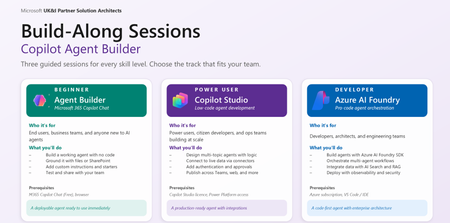
The Agentic Opportunity Every partner has agent ambition, but a single workshop format cannot serve every builder. Business makers want a fast win without writing code. Citizen developers want to orchestrate real processes across enterprise systems. Pro developers want a code-first surface with evaluations, tracing, and managed identity. Run the wrong session for the wrong audience, and engagement collapses - too abstract for one group, too constrained for another. The Agent Build-Along Series solves that by meeting builders exactly where they are, across three tiers of the Microsoft platform stack. Behind the series sits a self-serve GitHub repository - a curated library of build-along sessions with easy-to-follow, step-by-step instructions, scoped to specific industry scenarios and business functions. Partners pick the scenario that fits the room, clone the assets, and run the session. No bespoke content build, no facilitator guesswork. A Self-Serve Repository for Build-Along Sessions Diagram illustrating three tiers of agent building The repo at Agent Build-Along Github is a self-serve catalog of ready-to-run workshops. Every session is curated for a specific industry and business function, with easy-to-follow instructions a facilitator can pick up and deliver. Pick the combination that matches the room and run the session - the content, scenario, and assets are already there. Sessions are organised across three axes so partners can find the right fit fast: Industry - Financial Services, Healthcare, Retail, Manufacturing, Public Sector, Energy, Professional Services Business function - Sales, Marketing, Finance, HR, Operations, IT, Customer Service Workload - Agent Builder, Copilot Studio and Azure AI Foundry Each session in the repo includes a real-world scenario, step-by-step build instructions, sample data, prompts and configuration, and a facilitator narrative. Clone, brief the room, build the agent - that is the loop. Three Tiers - Meet Builders Where They Are The pyramid is intentional. Builders start where their skills are today and move up as confidence grows. The tier defines platform, audience, duration, and approach - content stays consistent. Tier Platform Audience Duration Approach 1 - Foundation Microsoft 365 Copilot Agent Builder Business makers, end users, departmental teams 60 min No-code 2 - Extend Copilot Studio Citizen developers, power users, ops teams 90 min Low-code 3 - Pro-Code Azure AI Foundry Pro developers, architects, AI engineers 180+ min Code-first Tier 1 - M365 Copilot Agent Builder Author your first agent - no code required. Microsoft 365 Copilot Agent Builder virtual workshop overview, What your customers will build A custom agent scoped to a real workplace scenario Grounded with knowledge sources (SharePoint sites, files, web URLs) Configured with custom instructions and conversation starters Tested in the preview pane and shared with a team Session flow Define → Ground → Refine → Test & Share Prerequisites Microsoft 365 Copilot licence (or Copilot Chat free) Modern browser (Edge / Chrome) A workplace scenario in mind, or use our template Outcome Attendees leave with a working agent they can use immediately, plus a repeatable pattern for future use cases. This is the right entry point for departmental teams who want to operationalise Copilot without engineering involvement. Tier 2 - Copilot Studio Orchestrate multi-step agents across enterprise systems. Microsoft Copilot Studio virtual workshop overview What your customers will build A copilot with generative answers and authored topics Custom actions that call APIs and Power Platform connectors Knowledge sources spanning SharePoint, Dataverse, public web, and enterprise data Channel deployment to Microsoft Teams and a public web embed Session flow Design → Connect → Author → Publish Prerequisites M365 Copilot license with access to Copilot Studio Familiarity with Power Platform helpful, not required A multi-step workflow or process in mind Outcome Attendees leave with a published copilot running in Teams or on the web, plus a pattern for connecting copilots to enterprise systems. This is where citizen developers and ops teams turn manual processes into orchestrated, agent-driven workflows. Tier 3 - Azure AI Foundry Ship a code-first agent with evaluations and observability. What your customers will build A code-first agent with custom tools and function calling Grounding via Azure AI Search and the customer's own data Model selection from the Foundry catalog, with optional fine-tuning Evaluations, tracing, and managed-identity deployment Session flow Provision → Build → Evaluate → Deploy Prerequisites Azure subscription with Azure AI Foundry access VS Code, plus Python or .NET familiarity Sample data or a use case ready to ground on Outcome Attendees leave with a deployed agent - code, evaluations, and tracing in place - plus reusable SDK templates. This is the right tier for architects and AI engineers shipping agents into production with the governance bar enterprise customers expect. How the Repository Works The repo removes the heaviest lift in running these workshops: content creation. Every session is curated against the same three axes - industry, business function, tier - and shipped with step-by-step instructions a facilitator can follow with minimum prep. Industry/Business Function × Tier → Ready-to-run Build-Along Each session in the repo ships with: A real-world scenario grounded in the chosen industry and business function Step-by-step build instructions tuned to the selected tier Sample data the agent can ground against Prompts, conversation starters, and configuration snippets Facilitator narrative so anyone can run the session Need an enterprise agent that can handle integrate with CRM data? There is a curated Copilot Studio session with a deal-desk scenario and sample CRM data. Need a pro-code health care agent? Choose the Foundry session with a patient-flow scenario and a grounded dataset. Same repo, different curated paths - at the right depth for the room. What Attendees Walk Away With Agent-Builder - A working agent in Microsoft 365 Copilot, ready to share with colleagues. Copilot Studio - A published copilot running in Teams or on the web, connected to enterprise systems. Foundry - A deployed Foundry agent with evaluations, tracing, and SDK templates for the next build. In all cases attendees leave with assets - not slides - and the confidence to build the next one without facilitation. Next Steps - Host a Build-Along Pick your tier - Start where your skills are today. Move up the pyramid as confidence grows. Drive Registration – Socialise your Build-Along session to maximise attendance. Show up and build. Bring a real scenario. Customers leave with a working agent to share. Where to Next Browse the self-serve repository of Build-Along sessions - curated by industry and business function, with step-by-step instructions ready to run: Agent Build Along.1.4KViews0likes1CommentNew eligible workloads for the Solutions Partner designation for Business Applications
The pathway to attaining and renewing the Solutions Partner designation for Business Applications has been widened thanks to the addition of two new eligible workloads: Microsoft Dynamics 365 Contact Center and Copilot Studio. Contact Center has been added across both performance and customer success metrics, while Copilot Studio has been added to performance. A Business Applications designation demonstrates your capabilities delivering solutions on Dynamics 365 and Power Platform, so if you don't already hold this designation, we encourage you to pursue it now. Partners approaching their renewal window can start preparing for renewal today. Visit the Business Applications dashboard in Partner Center to view how this addition has affected your progress toward attaining or renewing the designation. Go to the Business Applications dashboard to learn more.261Views1like0CommentsPartner Case Study | Cognizant
Cognizant, a 2025 Microsoft Partner of the Year award winner and global services company, is redefining enterprise transformation across industries. By democratizing AI and embedding intelligent automation, Cognizant helps organizations modernize systems, reduce costs, and accelerate growth. Their unique approach—combining deep Microsoft expertise, strategic change management, and a culture of innovation—delivers measurable results, including millions in savings, productivity boosts, and record-setting employee engagement. Organizations across industries face mounting technical debt, fragmented legacy systems, and the urgent need to consolidate onto modern, scalable platforms. Three Cognizant clients—one in healthcare, one in financial services, and one in retail—faced similar pressures. Regulatory compliance and governance added further complexity, especially in healthcare and finance. Cognizant’s clients needed a forward-looking technology roadmap to streamline operations, unlock data-driven insights, and support automation for better employee and customer experiences. Cognizant’s approach: Empowerment through Microsoft intelligent automation Using Microsoft Power Platform, Copilot agents, and robust governance frameworks, Cognizant delivers solutions that are secure, scalable, and tailored to each client’s needs. Ongoing training, upskilling, and community-building ensure sustained adoption and a strong digital culture. An essential part of that digital culture is Cognizant’s belief that innovation with AI should be accessible to employees at every level—not just technical teams. “At Cognizant, intelligent automation is more than a technology capability—it’s a strategic enabler for business transformation,” said Chakradhar Gooty Agraharam, Global Intelligent Automation Leader at Cognizant. “By combining Microsoft Power Platform, Microsoft Dynamics 365, and Copilot innovations with our deep industry expertise, we help clients accelerate automation at scale, unlock new efficiencies, and deliver measurable outcomes. Our partnership with Microsoft empowers us to lead with innovation, speed, and precision—driving hyper automation strategies that redefine what’s possible for enterprises worldwide.” For their healthcare, financial services, and retail engagements, Cognizant selected solutions that met each client's immediate needs while supporting long-term scalability. They implemented strong governance frameworks—using the Microsoft Power Platform Center of Excellence Starter Kit alongside their own methodologies—to maintain regulatory compliance and secure operations. By empowering clients to adopt Microsoft intelligent automation tools, including Copilot agents, Microsoft Power Automate, and Power Platform, Cognizant helped their clients streamline processes, unlock insights, and enhance both employee and customer experiences. Continue reading here Explore all case studies or submit your own Subscribe to case studies tag to follow all new case study posts. Don't forget to follow this blog to receive email notifications of new stories!334Views1like0CommentsPartner Case Study | Epiq
Epiq wanted to streamline both external and internal operations using Power Platform. This includes management of class action lawsuits for its clients as well as employee onboarding processes. Power Apps and Power Automate were used to create a system that automates much of Epiq’s onboarding process. AI-driven agents built using Copilot Studio help manage a variety of tasks, including questions from class action claimants. AI-driven agents have helped manage thousands of claimants, including almost 50,000 messages for one of Epiq’s largest class action lawsuits. Meanwhile, Epiq’s onboarding system is saving approximately 2,000 hours of onboarding work each month and over USD$500,000 annually. Read full story here Explore all case studies or submit your own Subscribe to case studies tag to follow all new case study posts.148Views0likes0CommentsPower Platform FastTrack Recognized Solution Architect - Nominations now open!
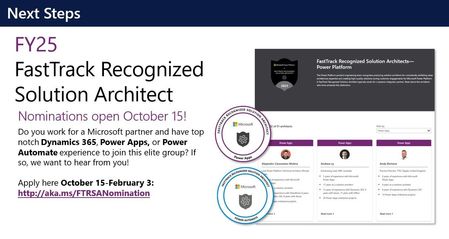
https://nam10.safelinks.protection.outlook.com/?url=http%3A%2F%2Faka.ms%2FFTRSANomination&data=05%7C01%7Calicia.sobiek%40concentrix.com%7Ca7efad24294a4590f66908dbb31233aa%7C599e51d62f8c43478e591f795a51a98c%7C0%7C0%7C638300663191195091%7CUnknown%7CTWFpbGZsb3d8eyJWIjoiMC4wLjAwMDAiLCJQIjoiV2luMzIiLCJBTiI6Ik1haWwiLCJXVCI6Mn0%3D%7C3000%7C%7C%7C&sdata=z7zfnot%2BI%2B4Ppu2PqLFIbYePwDtohSFWGUkaLH9Flkg%3D&reserved=0 The Microsoft Business Applications & Platform engineering team confers the designation FastTrack Recognized Solution Architect to practicing enterprise solution architects who consistently exhibit deep architecture expertise and create high-quality solutions for customers. They typically work for systems integrator partners, who may nominate solution architects to recognize their expertise. Systems integrator partners may nominate their solution architects who meet the below requirements. A panel of solution architects from Power CAT will then assess the candidate based on the architecture related artifacts and solution quality of the candidate’s projects. https://nam10.safelinks.protection.outlook.com/?url=http%3A%2F%2Faka.ms%2FFTRSANomination&data=05%7C01%7Calicia.sobiek%40concentrix.com%7Ca7efad24294a4590f66908dbb31233aa%7C599e51d62f8c43478e591f795a51a98c%7C0%7C0%7C638300663191195091%7CUnknown%7CTWFpbGZsb3d8eyJWIjoiMC4wLjAwMDAiLCJQIjoiV2luMzIiLCJBTiI6Ik1haWwiLCJXVCI6Mn0%3D%7C3000%7C%7C%7C&sdata=z7zfnot%2BI%2B4Ppu2PqLFIbYePwDtohSFWGUkaLH9Flkg%3D&reserved=0 submit your nominations here!13KViews2likes0Comments