posture management
32 TopicsPart 3: DSPM for AI: Governing Data Risk in an Agent‑Driven Enterprise
Why Agent Security Alone Is Not Enough? Foundry‑level controls are designed to prevent unsafe behavior and bound autonomy at runtime. But even the strongest preventive controls cannot answer key governance questions on their own: Where is sensitive data being used in AI prompts and responses? Which agents are interacting with high‑risk data—and how often? Are agents oversharing, drifting from expected behavior, or creating compliance exposure over time? How do we demonstrate control, auditability, and accountability for AI systems to regulators and leadership? These are not theoretical concerns. With agents acting continuously and autonomously, risk no longer shows up as a single event—it shows up as patterns, trends, and posture. DSPM for AI exists to make those patterns visible. At its core, DSPM for AI provides a centralized, risk‑centric view of how data is used, exposed, and governed across AI applications and agents. It shifts the conversation from individual incidents to organizational posture. DSPM for AI answers a simple but critical question: “Given how our AI systems are actually being used, what is our current data risk—and where should we intervene?” Unlike traditional DSPM, DSPM for AI expands visibility into: Prompts and responses Agent interactions with enterprise data Oversharing patterns Agent‑driven risk signals Trends across first‑party and third‑party AI usage What DSPM for AI Brings into Focus? 1. AI Interaction Visibility DSPM for AI treats AI prompts, responses, and agent activity as first‑class security telemetry. This allows security teams to see: Sensitive data being submitted to AI systems High‑risk interactions involving regulated information Repeated exposure patterns rather than one‑off events In short, AI conversations become auditable security signals, not blind spots. 2. Oversharing and Exposure Risk One of the most common AI risks is unintentional oversharing—especially when agents retrieve or combine data across systems. DSPM for AI makes it possible to: Identify where sensitive data exists but is poorly labeled Detect when unlabeled or over‑shared data is being accessed via AI Prioritize remediation based on actual usage, not static classification This ties directly back to the Sensitive Data Leakage patterns discussed earlier—but at an organizational scale. 3. Agent‑Level Risk Context DSPM for AI extends posture management beyond users to agents themselves. Security teams can: Inventory agents operating in the environment View agent activity trends Identify agents exhibiting higher‑risk behavior patterns This enables a powerful shift: agents can be assessed, reviewed, and governed just like digital workers. 4. Bridging Security, Compliance, and Audit DSPM for AI connects operational security with governance outcomes. Through integration with audit logs, retention, and compliance workflows, organizations gain: Evidence for investigations and regulatory inquiries Consistent compliance posture across human and agent activity A defensible, repeatable governance model for AI systems This is where AI risk becomes explainable, reportable, and manageable—not just prevented. How DSPM for AI Complements Azure AI Foundry? If Azure AI Foundry provides the control plane that enforces safe agent behavior, DSPM for AI provides the visibility plane that measures how that behavior translates into risk over time. Think of it this way: Foundry controls prevent and constrain DSPM for AI observes, measures, and prioritizes Together, they enable continuous governance Without DSPM, security teams are left guessing whether controls are effective at scale. With DSPM, risk becomes quantifiable and actionable. Why This Matters for Security Leaders? For security leaders, agentic AI introduces a familiar challenge in an unfamiliar form: Risk is non‑deterministic Behavior changes over time Impact can span multiple systems instantly DSPM for AI gives leaders the ability to: Monitor AI risk like any other enterprise workload Prioritize remediation where it matters most Move from reactive investigations to proactive governance This is not about slowing innovation—it’s about making AI adoption defensible. Closing: From Secure Agents to Governed AI Securing agents is necessary—but it is not sufficient on its own. As AI systems increasingly act on behalf of the organization, governance must shift from individual controls to continuous posture management. DSPM for AI provides the missing link between prevention and accountability, turning fragmented AI activity into a coherent risk narrative. Together, Azure AI Foundry and DSPM for AI enable organizations to not only build and deploy agents safely, but to operate AI systems with clarity, confidence, and control at scale. In the agentic era, security prevents incidents—but governance determines trust.Announcing public preview of custom graphs in Microsoft Sentinel
Security attacks span identities, devices, resources, and activity, making it critical to understand how these elements connect to expose real risk. In November, we shared how Sentinel graph brings these signals together into a relationship-aware view to help uncover hidden security risks. We’re excited to announce the public preview of custom graphs in Sentinel, available starting April 1 st . Custom graphs let defenders model relationships that are unique to their organization, then run graph analytics to surface blast radius, attack paths, privilege chains, chokepoints, and anomalies that are difficult to spot in tables alone. In this post, we’ll cover what custom graphs are, how they work, and how to get started so the entire team can use them. Custom graphs Security data is inherently connected: a sign-in leads to a token, a token touches a workload, a workload accesses data, and data movement triggers new activity. Graphs represent these relationships as nodes (entities) and edges (relationships), helping you answer questions like: “Who received the phishing email, who clicked, and which clicks were allowed by the proxy?” or “Show me users who exported notebooks, staged files in storage, then uploaded data to personal cloud storage- the full, three‑phase exfiltration chain through one identity.” With custom graphs, security teams can build, query, and visualize tailored security graphs using data from the Sentinel data lake and non-Microsoft sources, powered by Fabric. By uncovering hidden patterns and attack paths, graphs provide the relationship context needed to surface real risk. This context strengthens AI‑powered agent experiences, speeds investigations, clarifies blast radius, and helps teams move from noisy, disconnected alerts to confident decisions. In the words of our preview customers: “We ingested our Databricks management-plane telemetry into the Sentinel data lake and built a custom security graph. Without writing a single detection rule, the graph surfaced unusual patterns of activity and overprivileged access that we escalated for investigation. We didn't know what we were looking for, the graph surfaced the risk for us by revealing anomalous activity patterns and unusual access combinations driven by relationships, not alerts.” – SVP, Security Solutions | Financial Services organization Use cases Sentinel graph offers embedded, Microsoft managed, security graphs in Defender and Microsoft Purview experiences to help you at every stage of defense, from pre-breach to post-breach and across assets, activities, and threat intelligence. See here for more details. The new custom graph capability gives you full control to create your own graphs combining data from Microsoft sources, non-Microsoft sources, and federated sources in the Sentinel data lake. With custom graphs you can: Understand blast radius – Trace phishing campaigns, malware spread, OAuth abuse, or privilege escalation paths across identities, devices, apps, and data, without stitching together dozens of tables. Reconstruct real attack chains – Model multi-step attacker behavior (MITRE techniques, lateral movement, before/after malware) as connected sequences so investigations are complete and explainable, not a set of partial pivots. Reconstruct these chains from historical data in the Sentinel data lake. Figure 2: Drill into which specific MITRE techniques each IP is executing and in which tactic category Spot hidden risks and anomalies – Detect structural outliers like users with unusually broad access, anomalous email exfiltration, or dangerous permission combinations that are invisible in flat logs. Figure 3: OAuth consent chain – a single compromised user consented four dangerous permissions Creating custom graph Using the Sentinel VS Code extension, you can generate graphs to validate hunting hypotheses, such as understanding attack paths and blast radius of a phishing campaign, reconstructing multi‑step attack chains, and identifying structurally unusual or high‑risk behavior, making it accessible to your team and AI agents. Once persisted via a schedule job, you can access these custom graphs from the ready-to-use section in the graphs section in the Defender portal. Figure 4: Use AI-assisted vibe coding in Visual Studio Code to create tailored security graphs powered by Sentinel data lake and Fabric Graphs experience in the Microsoft Defender portal After creating your custom graphs, you can access them in the Graphs section of the Microsoft Defender portal under Sentinel. From there, you can perform interactive, graph-based investigations, for example, using a graph built for phishing analysis to quickly evaluate the impact of a recent incident, profile the attacker, and trace paths across Microsoft telemetry and third-party data. The graph experience lets you run Graph Query Language (GQL) queries, view the graph schema, visualize results, see results in a table, and interactively traverse to the next hop with a single click. Figure 5: Query, visualize, and traverse custom graphs with the new graph experience in Sentinel Billing Custom graph API usage for creating graph and querying graph is billed according to the Sentinel graph meter. Get started To use custom graphs, you’ll need Microsoft Sentinel data lake enabled in your tenant, since the lake provides the scalable, open-format foundation that custom graphs build on. Use the Sentinel data lake onboarding flow to provision the data lake if it isn’t already enabled. Ensure the required connectors are configured to populate your data lake. See Manage data tiers and retention in Microsoft Sentinel | Microsoft Learn. Create and persist a custom graph. See Get started with custom graphs in Microsoft Sentinel (preview) | Microsoft Learn. Run adhoc graph queries and visualize graph results. See Visualize custom graphs in Microsoft Sentinel graph (preview) | Microsoft Learn. [Optional] Schedule jobs to write graph query results to the lake tier and analytics tier using notebooks. See Exploring and interacting with lake data using Jupyter Notebooks - Microsoft Security | Microsoft Learn. Learn more Earlier posts (Sentinel graph general availability) RSAC 2026 announcement roundup Custom graphs documentation Custom graph billingMicrosoft Purview securing data and enabling apps and agents across your AI stack
As agentic AI moves from experimentation to enterprise execution, it fundamentally reshapes the data risk landscape—because AI apps and autonomous agents can access, reason over, and act on sensitive information at unprecedented speed and scale. This blog explains how Microsoft Purview extends security, compliance, and risk management across the AI stack (from data and prompts to copilots, custom agents, and even third‑party AI services) with capabilities like DSPM, sensitivity labels, DLP, insider risk, and audit/eDiscovery. It also highlights recent innovations such as inline DLP for Copilot Studio agents, upcoming DLM insights and policy recommendations for Copilot/AI app interactions, and expanded protections for Copilot web search and network/browser enforcement through partners.Microsoft Purview Data Security Investigations is now generally available
Every data security investigation starts with the same question: What data security risks are buried in this data? Exposed credentials in thousands of files across a data estate. Evidence of fraud hidden in vendor communications. Sensitive documents accidentally shared to a large group. Finding these risks manually — reviewing content file by file, message by message — is no longer viable when organizations are managing 220 zettabytes of data[1] and facing over 12,000 confirmed breaches annually[2]. That's why we built Microsoft Purview Data Security Investigations, now generally available. Microsoft Purview Data Security Investigations enables data security teams to identify investigation-relevant data, investigate that data with AI-powered deep content analysis, and mitigate risk — all within one unified solution. Teams can quickly analyze data at scale to surface sensitive data and security risks, then collaborate securely to address them. By streamlining complex, time‑consuming investigative workflows, admins can resolve investigations in hours instead of weeks or months. Proactive and reactive investigation scenarios Organizations are using Data Security Investigations to tackle diverse data security challenges — from reactive incident response to proactive risk assessment. Some of our top use cases from preview include: Data breach and leak: Understand severity, sensitivity, and significance of data that has been leaked or breached, including risks buried in impacted data, to take action and mitigate its impact to the organization. Credentials exposure: Proactively scan thousands of SharePoint sites to identify files containing credentials like passwords, which can give a threat actor prolonged access to an organization's environment. Internal fraud and bribery: Uncover suspicious communications tied to vendor payments or client interactions, uncovering hard-to-find patterns in large volumes of emails and messages. Sensitive data exposure in Teams: Determine who accessed classified documents after accidental sharing — and whether that data was further distributed. Inappropriate content investigations: Quickly find what was posted, where, and by whom, even when teams only know a timeframe or channel name. Investigations that once took weeks — or weren’t possible at all — can now be completed in hours. By eliminating manual effort and surfacing hidden risks across sprawling data estates, Data Security Investigations empowers teams to investigate more efficiently and confidently, making deep, scalable investigations a reality. What Microsoft Purview Data Security Investigations does – and what’s new Since launching public preview, we've listened closely to customer feedback and made significant enhancements to help teams investigate faster, mitigate more effectively, and manage costs with confidence. Data Security Investigations addresses three critical stages of an investigation: Identify impacted data Data Security admins can efficiently identify relevant data by searching their Microsoft 365 data estate to locate emails, Teams messages, Copilot prompts and responses, and documents. Investigators can also launch pre-scoped investigations from a Microsoft Defender XDR incident or a Microsoft Purview Insider Risk Management case. We’ve recently added a new integration that allows admins to launch a Data Security Investigation from Microsoft Purview Data Security Posture Management as well. This capability can help a data security admin investigate an objective, such as preventing data exfiltration. Investigate using deep content analysis Once the investigation is scoped, the solution's generative AI capabilities allow admins to gain deeper insights into the data, analyzing across 95+ languages to uncover critical sensitive data and security risks. Teams can quickly answer three questions: What data security risks exist within the data? Why do they matter? And what actions can be taken to mitigate them? To help answer these questions, two new investigative capabilities, AI search and AI context input, as well as enhancements to existing features were added in November. Data Security Investigations help admins scale their impact and accelerate investigations with the following features: AI search: Using a new AI-powered natural language search experience, admins can find key risks using keywords, metadata, and semantic embeddings — making it easier to locate investigation-relevant content across large data estates. Categorization: By automatically classifying investigation data into meaningful categories, admins can quickly understand incident severity, what types of content is at risk, and trends within an investigation. Vector search: Using semantic search, admins can find contextually related content — even when exact keywords don't match. Risk examination: Using deep content analysis, admins can examine content for sensitive data and security risks, providing a risk score, recommended mitigation steps, and AI-generated rationale for each analyzed asset. AI context input: Admins can now add investigation-specific context before analysis, resulting in more efficient, higher-quality insights tailored to the specific incident. AI search in action, finding credentials present in the dataset being investigated. Mitigate identified risks Investigators can use Data Security Investigations to securely collaborate with partner teams to mitigate identified risks, simplifying tasks that have traditionally been time consuming and complex. In September, we launched an integration with the Microsoft Sentinel graph, the data risk graph, allowing admins to visualize correlations between investigation data, users, and their activities. This automatically combines unified audit logs, Entra audit logs, and threat intelligence, which would otherwise need to be manually correlated, saving time, providing critical context, and allowing investigators to understand all nodes in their investigation. At the start of January 2026, we launched a new mitigation action, purge, that helps admins quickly and efficiently delete sensitive or overshared content directly within the investigation workflow in the product interface. This reduces exposure immediately and keeps incidents from escalating or recurring. Built-in cost management tools To help customers predict and manage costs associated with using Data Security Investigations, we recently released a lightweight cost estimator and usage dashboard. The in-product cost estimator is now available to help analysts model and forecast both storage and compute unit costs based on specific use cases, enabling more accurate budget planning. Additionally, the usage dashboard provides granular breakdowns of billed storage and compute unit usage, empowering data security admins to identify cost-saving opportunities and optimize resource allocation. For detailed guidance on managing costs, see https://aka.ms/DSIcostmanagementtips. Refined business model for general availability These cost management tools are designed to support our updated business model, which offers greater flexibility and transparency. Customers need the freedom to scale investigations without overcommitting resources. To better align with how customers investigate data risk at scale, we refined the Data Security Investigations business model as part of general availability. The product now uses two consumptive meters: Data Security Investigations Storage Meter – For storing investigation-related data, charged by GB Data Security Investigations Compute Meter – For the computational capacity required to complete AI-powered data analysis and actions, charged by Compute Units (CUs) Monthly charges are determined by the amount of data stored and the number of CUs consumed per hour. This pay-as-you-go model ensures customers only pay for what they need when they need it, providing the flexibility, scalability, and cost efficiency needed for both urgent incident response and proactive data security hygiene assessments. Find more information on pricing at aka.ms/purviewpricing. Get started today As data security threats evolve, so must the way we investigate them. Microsoft Purview Data Security Investigations is now generally available, giving organizations a modern, AI-powered approach to uncovering and mitigating risk — without the complexity of disconnected tools or manual workflows. Whether investigating an active breach or proactively hunting for hidden risks, Data Security Investigations gives data security teams the speed and precision needed to act decisively in today's threat landscape. Join for a live Ask Me Anything with the people behind the product on Thursday February 5th at 10am PST, more details here: aka.ms/PurviewDSIAMA2 Learn more about Data Security Investigations at aka.ms/DSIdocs View pricing details at aka.ms/purviewpricing Try Data Security Investigations today! Visit the product https://purview.microsoft.com/dsi and find setup instructions at aka.ms/DSIsetup [1] Worldwide IDC Global DataSphere Forecast, 2025–2029 [2] 2025-dbir-data-breach-investigations-report.pdfEmpowering organizations with integrated data security: What’s new in Microsoft Purview
Today, data moves across clouds, apps, and devices at an unprecedented speed, often outside the visibility of siloed legacy tools. The rise of autonomous agents, generative AI, and distributed data ecosystems means that traditional perimeter-based security models are no longer sufficient. Even though companies are spending more than $213 billion globally, they still face several persistent security challenges: Fragmented tools don’t integrate together well and leave customers lacking full visibility of their data security risks The growing use of AI in the workplace is creating new data risks for companies to manage The shortage of skilled cybersecurity professionals is making it difficult to accomplish data security objectives Microsoft is a global leader in cloud, productivity, and security solutions. Microsoft Purview benefits from this breadth of offerings, integrating seamlessly across Microsoft 365, Azure, Microsoft Fabric, and other Microsoft platforms — while also working in harmony with complementary security tools. Unlike fragmented point solutions, Purview delivers an end-to-end data security platform built into the productivity and collaboration tools organizations already rely on. This deep understanding of data within Microsoft environments, combined with continually improving external data risk detections, allows customers to simplify their security stack, increase visibility, and act on data risks more quickly. At Ignite, we’re introducing the next generation of data security — delivering advanced protection and operational efficiency, so security teams can move at business speed while maintaining control of their data. Go beyond visibility into action, across your data estate Many customers today lack a comprehensive view of how to holistically address data security risks and properly manage their data security posture. To help customers strengthen data security across their data estate, we are excited to announce the new, enhanced Microsoft Purview Data Security Posture Management (DSPM). This new AI-powered DSPM experience unifies current Purview DSPM and DSPM for AI capabilities to create a central entry point for data security insights and controls, from which organizations can take action to continually improve their data security posture and prioritize risks. The new capabilities in the enhanced DSPM experience are: Outcome-Based workflows: Choose a data security objective and see related metrics, risk patterns, a recommended action plan and its impact - going from insight to action. Expanded coverage and remediation on Data Risk Assessments: Conduct item-level analysis with new remediation actions like bulk disabling of overshared SharePoint links. Out-of-box posture reports: Uncover data protection gaps and track security posture improvements with out-of-box reports that provide rich context on label usage, auto-labeling effectiveness, posture drift through label transitions, and DLP policy activities. AI Observability: Surface an organization’s agent inventory with assigned agent risk level and agent posture metrics based on agentic interactions with the organization’s data. New Security Copilot Agent: Accelerate the discovery and analysis of sensitive data to uncover hidden risks across files, emails, and messages. Gain visibility of non-Microsoft data within your data estate: Enable a unified view of data risks by gaining visibility into Salesforce, Snowflake, Google Cloud Platform, and Databricks – available through integrations with external partners via Microsoft Sentinel. These DSPM enhancements will be available in Public Preview within the upcoming weeks. Learn more in our blog dedicated to the announcement of the new Microsoft Purview DSPM. Together, these innovations reflect a larger shift: data security is no longer about silos—it’s about unified visibility and control everywhere data lives and having a comprehensive understanding of the data estate to detect and prevent data risks. Organizations trust Microsoft for their productivity and security platforms, but their footprint spans across third-party data environments too. That’s why Purview continues to expand protection beyond Microsoft environments. In addition to bringing in 3rd party data into DSPM, we are also expanding auto-labeling to three new Data Map sources, adding to the data sources we previously announced. Currently in public preview, the new sources include Snowflake, SQL Server, and Amazon S3. Once connected to Purview, admins gain an “at-a-glance” view of all data sources and can automatically apply sensitivity labels, enforcing consistent security policies without manual effort. This helps organizations discover sensitive information at scale, reduce the risk of data exposure, and ensure safer AI adoption all while simplifying governance through centralized policy management and visibility across their entire data estate. Enable AI adoption and prevent data oversharing As organizations adopt more autonomous agents, new risks emerge, such as unsupervised data access and creation, cascading agent interactions, and unclear data activity accountability. Besides AI Observability in DSPM providing details on the inventory and risk level of the agents, Purview is expanding its industry-leading data security and compliance capabilities to secure and govern agents that inherit users’ policies and controls, as well as agents that have their own unique IDs, policies, and controls. This includes agent types across Microsoft 365 Copilot, Copilot Studio, Microsoft Foundry, and third-party platforms. Key enhancements include: Extension of Purview Information Protection and Data Loss Prevention policies to autonomous agents: Scope autonomous agents with an Agent ID into Purview policies that work for users across Microsoft 365 apps, including Exchange, SharePoint, and Teams. Microsoft Purview Insider Risk Management for Agents: With dedicated indicators and behavioral analytics to flag specific risky agent activities, enable proactive investigation by assigning risk levels to each agent. Extension of Purview data compliance capabilities to agent interactions: Microsoft Purview Communication Compliance, Data Lifecycle Management, Audit, and eDiscovery extend to agent interactions, supporting responsible use, secure retention, and agentic accountability. Purview SDK embedded in Agent Framework SDK: Purview SDK embedded in Agent Framework SDK enables developers to integrate enterprise-grade security, compliance, and governance into AI agents. It delivers automatic data classification, prevents sensitive data leaks and oversharing, and provides visibility and control for regulatory compliance, empowering secure adoption of AI agents in complex environments. Purview integration with Foundry: Purview is now enabled within Foundry, allowing Foundry admins to activate Microsoft Purview on their subscription. Once enabled, interaction data from all apps and agents flows into Purview for centralized compliance, governance, and posture management of AI data. Azure AI Search honors Purview labels and policies: Azure AI Search now ingests Microsoft Purview sensitivity labels and enforces corresponding protection policies through built-in indexers (SharePoint, OneLake, Azure Blob, ADLS Gen2). This ensures secure, policy-aligned search over enterprise data, enabling agentic RAG scenarios where only authorized documents are returned or sent to LLMs, preventing oversharing and aligning with enterprise data protection standards. Extension of Purview Data Loss Prevention policies to Copilot Mode in Edge for Business: This week, Microsoft Edge for Business introduced Copilot Mode, transforming the browser into a proactive, agentic partner. This is AI-assisted browsing will honor the user’s existing DLP protections, such as endpoint DLP policies that prevent pasting to sensitive service domains, or summarizing sensitive page content. Learn more in our blog dedicated to the announcements of Microsoft Purview for Agents. New capabilities in Microsoft Purview, now in public preview, to help prevent data oversharing and leakage through AI include: Expansion of Microsoft Purview Data Loss Prevention (DLP) for Microsoft 365 Copilot: Previously, we introduced DLP for Microsoft 365 Copilot to prevent labeled files & emails from being used as grounding data for responses, therefore reducing the risk of oversharing. Today, we are expanding DLP for Microsoft 365 Copilot to safeguard prompts containing sensitive data. This real-time control helps organizations mitigate data leakage and oversharing risks by preventing Microsoft 365 Copilot, Copilot Chat, and Microsoft 365 Copilot agents from returning a response when prompts contain sensitive data or using that sensitive data for grounding in Microsoft 365 or the web. For example, if a user searches, “Can you tell me more about my customer based on their address: 1234 Main Street,” Copilot will both inform the user that organizational policies prevent it from responding to their prompt, as well as block any web queries to Bing for “1234 Main Street.” Enhancements to inline data protection in Edge for Business: Earlier this year, we introduced inline data protection in Edge for Business to prevent sensitive data from being leaked to unmanaged consumer AI apps, starting with ChatGPT, Google Gemini, and DeepSeek. We are not only making this capability generally available for the initial set of AI apps, but also expanding the capability to 30+ new apps in public preview and supporting file upload activity in addition to text. This addresses potential data leakage that can occur when employees send organizational files or data to consumer AI apps for help with work-related tasks, such as document creation or code reviews. Inline data protection for the network: For user activity outside of the browser, we are also enabling inline data protection at the network layer. Earlier this year, we introduced integrations with supported secure service edge (SSE) providers to detect when sensitive data is shared to unmanaged cloud locations, such as consumer AI apps or personal cloud storage, even if sharing occurs outside of the Edge browser. In addition to the discovery of sensitive data, these integrations now support protection controls that block sensitive data from leaving a user device and reaching an unmanaged cloud service or application. These capabilities are now generally available through the Netskope and iboss integrations, and inline data discovery is available in public preview through the Palo Alto Networks integration. Extension of Purview protection to on-device AI: Purview DLP policies now extend to the Recall experience in Copilot+ PC devices to prevent sensitive organizational data from being undesirably captured and retained. Admins can now block Recall snapshots based on sensitivity label or the presence of Purview sensitive information types (SITs) in a document open on the device, or simply honor and display the sensitivity labels of content captured in the Recall snapshot library. For example, a DLP policy can be configured to prevent recall from taking snapshots of any documents labeled “Highly Confidential,” or a product design file that contains intellectual property. Learn more in the Windows IT Pro blog. Best-in-class data security for Microsoft environments Microsoft Purview sets the standard for data security within its own ecosystem. Organizations benefit from unified security policies and seamless compliance controls that are purpose-built for Microsoft environments, ensuring sensitive data remains secure without compromising productivity. We also are constantly investing in expanding protections and controls to Microsoft collaboration tools including SharePoint, Teams, Fabric, Azure and across Microsoft 365. On-demand classification adds meeting transcript coverage and new enhancements: To help organizations protect sensitive data sitting in data-at-rest, on-demand classification now extends to meeting transcripts, enabling the discovery and classification of sensitive information shared in existing recorded meeting transcripts. Once classified, admins can set up DLP or Data Lifecycle Management (DLM) policies to properly protect and retain this data according to organizational policies. This is now generally available, empowering organizations to strengthen data security, streamline compliance, and ensure even sensitive information in data-at-rest is discovered, protected, and governed more effectively. In addition, on-demand classification for endpoints is also generally available, giving organizations even broader coverage across their data estate. New usage posture and consumption reports: We’re introducing new usage posture and consumption reports, now in public preview. Admins can quickly identify compliance gaps, optimize Purview seat assignments, and understand how consumptive features are driving spend. With granular insights by feature, policy, and user type, admins can analyze usage trends, forecast costs, and toggle consumptive features on and off directly, all from a unified dashboard. The result: stronger compliance, easier cost management, and better alignment of Purview investments to your organization’s needs. Enable DLP and Copilot protection with extended SharePoint permissions: Extended SharePoint permissions, now generally available, make it simple to protect and manage files in SharePoint by allowing library owners to apply a default sensitivity label to an entire document library. When this is enabled, the label is dynamically enforced across all unprotected files in the library, both new and existing, within the library. Downloaded files are automatically encrypted, and access is managed based on SharePoint site membership, giving organizations powerful, scalable access control. With extended SharePoint permissions, teams can consistently apply labels at scale, automate DLP policy enforcement, and confidently deploy Copilot, all without the need for manually labeling files. Whether for internal teams, external partners, or any group where permissions need to be tightly controlled, extended SharePoint permissions streamline protection and compliance in SharePoint. Network file filtering via Entra GSA integration: We are integrating Purview with Microsoft Entra to enable file filtering at the network layer. These filtering controls help prevent sensitive content from being shared to unauthorized services based on properties such as sensitivity labels or presence of Purview sensitive information types (SITs) within the file. For example, Entra admins can now create a file policy to block files containing credit card numbers from passing through the network. Learn more here. Expanded protection scenarios enabled by Purview endpoint DLP: We are introducing several noteworthy enhancements to Purview endpoint DLP to protect an even broader range of exfiltration or leakage scenarios from organizational devices, without hindering user productivity. These enhancements, initially available on Windows devices, include: Extending protection to unsaved files: Files no longer need to be saved to disk to be protected under a DLP policy. With this improvement, unsaved files will undergo a point-in-time evaluation to detect the presence of sensitive data and apply the appropriate protections. Expanded support for removable media: Admins can now prevent data exfiltration to broader list of removable media devices, including iPhones, Android devices, and CD-ROMs. Protection for Outlook attachments downloaded to removable media or network shares: Admins can now prevent exfiltration of email attachments when users attempt to drag and drop them into USB devices, network shares, and other removable media. Expanded capability support for macOS: In addition to the new endpoint DLP protections introduced above, we are also expanding the following capabilities, already available for Windows devices, to devices running on macOS: Expanded file type coverage to 110+ file types, blanket protections for non-Office or PDF file types, addition of “allow” and “off” policy actions, device-based policy scoping to scope policies to specific devices or device groups (or apply exclusions), and integration with Power Automate. Manageability and alert investigation improvements in Purview DLP: Lastly, we are also introducing device manageability and alert investigation improvements in Purview DLP to simplify the day-to-day experience for admins. These improvements include: Reporting and troubleshooting improvements for devices onboarded to endpoint DLP: We are introducing additional tools for admins to build confidence in their Purview DLP protections for endpoint devices. These enhancements, designed to maximize reliability and enable better troubleshooting of potential issues, include near real-time reporting of policy syncs initiated on devices and policy health insights into devices’ compliance status and readiness to receive policies. Enhancements to always-on diagnostics: Earlier this year, we introduced always-on diagnostics to automatically collect logs from Windows endpoint devices, eliminating the need to reproduce issues when submitting an investigation request or raising a support ticket. This capability is expanding so that admins now have on-demand access to diagnostic logs from users’ devices without intervening in their operations. This further streamlines the issue resolution process for DLP admins while minimizing end user disruption. Simplified DLP alert investigation, including easier navigation to crucial alert details in just 1 click, and the ability to aggregate alerts originating from a single user for more streamlined investigation and response. For organizations who manage Purview DLP alerts within their broader incident management process in Microsoft Defender, we are pleased to share that alert severities will now be synced between the Purview portal and the Defender portal. Expanding enterprise-grade data security to small and medium businesses (SMBs): Purview is extending its reach beyond large enterprises by introducing a new add-on for Microsoft 365 Business Premium, bringing advanced data security and compliance capabilities to SMBs. The Microsoft Purview suite for Business Premium brings the same enterprise-grade protection, such as sensitivity labeling, data loss prevention, and compliance management, to organizations with up to 300 users. This enables SMBs to operate with the same level of compliance and data security as large enterprises, all within a simplified, cost-effective experience built for smaller teams. Stepping into the new era of technology with AI-powered data security Globally, there is a shortage of skilled cybersecurity professionals. Simultaneously, the volume of alerts and incidents is ever growing. By infusing AI into data security solutions, admins can scale their impact. By reducing manual workloads, they enhance operational effectiveness and strengthen overall security posture – allowing defenders to stay ahead. In 2025, 82% of organizations have developed plans to use GenAI to fortify their data security programs. With its cutting-edge generative AI-powered investigative capabilities, Microsoft Purview Data Security Investigations (DSI) is transforming and scaling how data security admins analyze incident-related data. Since being released into public preview in April, the product has made a big impact with customers like Toyota Motors North America. "Data Security Investigations eliminates manual work, automating investigations in minutes. It’s designed to handle the scale and complexity of large data sets by correlating user activity with data movement, giving analysts a faster, more efficient path to meaningful insights,” said solution architect Dan Garawecki. This Ignite, we are introducing several new capabilities in DSI, including: DSI integration with DSPM: View proactive, summary insights and launch a Data Security Investigation directly from DSPM. This integration brings the full power of DSI analysis to your fingertips, enabling admins to drill into data risks surfaced in DSPM with speed and precision. Enhancements in DSI AI-powered deep content analysis capabilities: Admins can now add context before AI analysis for higher-quality, more efficient investigations. A new AI-powered natural language search function lets admins locate specific files using keywords, metadata, and embeddings. Vector search and content categorization enhancements allow admins to better identify risky assets. Together, these enhancements equip admins with sharper, faster tools for identifying buried data risks – both proactively and reactively. DSI cost transparency report and in-product estimator: To help customers manage pay-as-you-go billing, DSI is adding a new lightweight in-product cost estimator and transparency report. We are also expanding Security Copilot in Microsoft Purview with AI-powered capabilities that strengthen both the protection and investigation of sensitive data by introducing the Data Security Posture Agent and Data Security Triage Agent. Data Security Posture Agent: Available in preview, the new Data Security Posture Agent uses LLMs to help admins answer “Is this happening?” across thousands of files—delivering fast, intent-driven discovery and risk profiling, even when explicit keywords are absent. Integrated with Purview DSPM, it surfaces actionable insights and improves compliance, helping teams reduce risk and respond to threats before they escalate. Data Security Triage Agent: Alongside this, the Data Security Triage Agent, now generally available, enables analysts to efficiently triage and remediate the most critical alerts, automating incident response and surfacing the threats that matter most. Together, these agentic capabilities convert high-volume signals into consistent, closed-loop action, accelerate investigations and remediation, reduce policy-violation dwell time, and improve audit readiness, all natively integrated within Microsoft 365 and Purview so security teams can scale outcomes without scaling headcount. To make the agents easily accessible and help teams get started more quickly, we are excited to announce that Security Copilot will be available to all Microsoft 365 E5 customers. Rollout starts today for existing Security Copilot customers with Microsoft 365 E5 and will continue in the upcoming months for all Microsoft 365 E5 customers. Customers will receive advanced notice before activation. Learn more: https://aka.ms/SCP-Ignite25 Data security that keeps innovating alongside you As we look ahead, Microsoft Purview remains focused on empowering organizations with scalable solutions that address the evolving challenges of data security. While we deliver best-in-class security for Microsoft, we recognize that today’s organizations rarely operate in a single cloud, many businesses rely on a diverse mix of platforms to power their operations and innovation. That’s why we have been extending Purview’s capabilities beyond Microsoft environments, helping customers protect data across their entire digital estate. In a world where data is the lifeblood of innovation, securing it must be more than a checkbox—it must be a catalyst for progress. As organizations embrace AI, autonomous agents, and increasingly complex digital ecosystems, Microsoft Purview empowers them to move forward with confidence. By unifying visibility, governance, and protection across the entire data estate, Purview transforms security from a fragmented challenge into a strategic advantage. The future of data security isn’t just about defense—it’s about enabling bold, responsible innovation at scale. Let’s build that future together.Security as the core primitive - Securing AI agents and apps
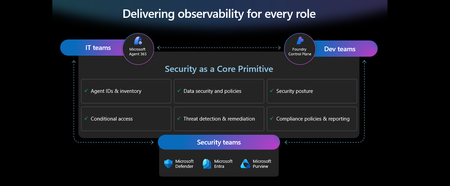
This week at Microsoft Ignite, we shared our vision for Microsoft security -- In the agentic era, security must be ambient and autonomous, like the AI it protects. It must be woven into and around everything we build—from silicon to OS, to agents, apps, data, platforms, and clouds—and throughout everything we do. In this blog, we are going to dive deeper into many of the new innovations we are introducing this week to secure AI agents and apps. As I spend time with our customers and partners, there are four consistent themes that have emerged as core security challenges to secure AI workloads. These are: preventing agent sprawl and access to resources, protecting against data oversharing and data leaks, defending against new AI threats and vulnerabilities, and adhering to evolving regulations. Addressing these challenges holistically requires a coordinated effort across IT, developers, and security leaders, not just within security teams and to enable this, we are introducing several new innovations: Microsoft Agent 365 for IT, Foundry Control Plane in Microsoft Foundry for developers, and the Security Dashboard for AI for security leaders. In addition, we are releasing several new purpose-built capabilities to protect and govern AI apps and agents across Microsoft Defender, Microsoft Entra, and Microsoft Purview. Observability at every layer of the stack To facilitate the organization-wide effort that it takes to secure and govern AI agents and apps – IT, developers, and security leaders need observability (security, management, and monitoring) at every level. IT teams need to enable the development and deployment of any agent in their environment. To ensure the responsible and secure deployment of agents into an organization, IT needs a unified agent registry, the ability to assign an identity to every agent, manage the agent’s access to data and resources, and manage the agent’s entire lifecycle. In addition, IT needs to be able to assign access to common productivity and collaboration tools, such as email and file storage, and be able to observe their entire agent estate for risks such as over-permissioned agents. Development teams need to build and test agents, apply security and compliance controls by default, and ensure AI models are evaluated for safety guardrails and security vulnerabilities. Post deployment, development teams must observe agents to ensure they are staying on task, accessing applications and data sources appropriately, and operating within their cost and performance expectations. Security & compliance teams must ensure overall security of their AI estate, including their AI infrastructure, platforms, data, apps, and agents. They need comprehensive visibility into all their security risks- including agent sprawl and resource access, data oversharing and leaks, AI threats and vulnerabilities, and complying with global regulations. They want to address these risks by extending their existing security investments that they are already invested in and familiar with, rather than using siloed or bolt-on tools. These teams can be most effective in delivering trustworthy AI to their organizations if security is natively integrated into the tools and platforms that they use every day, and if those tools and platforms share consistent security primitives such as agent identities from Entra; data security and compliance controls from Purview; and security posture, detections, and protections from Defender. With the new capabilities being released today, we are delivering observability at every layer of the AI stack, meeting IT, developers, and security teams where they are in the tools they already use to innovate with confidence. For IT Teams - Introducing Microsoft Agent 365, the control plane for agents, now in preview The best infrastructure for managing your agents is the one you already use to manage your users. With Agent 365, organizations can extend familiar tools and policies to confidently deploy and secure agents, without reinventing the wheel. By using the same trusted Microsoft 365 infrastructure, productivity apps, and protections, organizations can now apply consistent and familiar governance and security controls that are purpose-built to protect against agent-specific threats and risks. gement and governance of agents across organizations Microsoft Agent 365 delivers a unified agent Registry, Access Control, Visualization, Interoperability, and Security capabilities for your organization. These capabilities work together to help organizations manage agents and drive business value. The Registry powered by the Entra provides a complete and unified inventory of all the agents deployed and used in your organization including both Microsoft and third-party agents. Access Control allows you to limit the access privileges of your agents to only the resources that they need and protect their access to resources in real time. Visualization gives organizations the ability to see what matters most and gain insights through a unified dashboard, advanced analytics, and role-based reporting. Interop allows agents to access organizational data through Work IQ for added context, and to integrate with Microsoft 365 apps such as Outlook, Word, and Excel so they can create and collaborate alongside users. Security enables the proactive detection of vulnerabilities and misconfigurations, protects against common attacks such as prompt injections, prevents agents from processing or leaking sensitive data, and gives organizations the ability to audit agent interactions, assess compliance readiness and policy violations, and recommend controls for evolving regulatory requirements. Microsoft Agent 365 also includes the Agent 365 SDK, part of Microsoft Agent Framework, which empowers developers and ISVs to build agents on their own AI stack. The SDK enables agents to automatically inherit Microsoft's security and governance protections, such as identity controls, data security policies, and compliance capabilities, without the need for custom integration. For more details on Agent 365, read the blog here. For Developers - Introducing Microsoft Foundry Control Plane to observe, secure and manage agents, now in preview Developers are moving fast to bring agents into production, but operating them at scale introduces new challenges and responsibilities. Agents can access tools, take actions, and make decisions in real time, which means development teams must ensure that every agent behaves safely, securely, and consistently. Today, developers need to work across multiple disparate tools to get a holistic picture of the cybersecurity and safety risks that their agents may have. Once they understand the risk, they then need a unified and simplified way to monitor and manage their entire agent fleet and apply controls and guardrails as needed. Microsoft Foundry provides a unified platform for developers to build, evaluate and deploy AI apps and agents in a responsible way. Today we are excited to announce that Foundry Control Plane is available in preview. This enables developers to observe, secure, and manage their agent fleets with built-in security, and centralized governance controls. With this unified approach, developers can now identify risks and correlate disparate signals across their models, agents, and tools; enforce consistent policies and quality gates; and continuously monitor task adherence and runtime risks. Foundry Control Plane is deeply integrated with Microsoft’s security portfolio to provide a ‘secure by design’ foundation for developers. With Microsoft Entra, developers can ensure an agent identity (Agent ID) and access controls are built into every agent, mitigating the risk of unmanaged agents and over permissioned resources. With Microsoft Defender built in, developers gain contextualized alerts and posture recommendations for agents directly within the Foundry Control Plane. This integration proactively prevents configuration and access risks, while also defending agents from runtime threats in real time. Microsoft Purview’s native integration into Foundry Control Plane makes it easy to enable data security and compliance for every Foundry-built application or agent. This allows Purview to discover data security and compliance risks and apply policies to prevent user prompts and AI responses from safety and policy violations. In addition, agent interactions can be logged and searched for compliance and legal audits. This integration of the shared security capabilities, including identity and access, data security and compliance, and threat protection and posture ensures that security is not an afterthought; it’s embedded at every stage of the agent lifecycle, enabling you to start secure and stay secure. For more details, read the blog. For Security Teams - Introducing Security Dashboard for AI - unified risk visibility for CISOs and AI risk leaders, coming soon AI proliferation in the enterprise, combined with the emergence of AI governance committees and evolving AI regulations, leaves CISOs and AI risk leaders needing a clear view of their AI risks, such as data leaks, model vulnerabilities, misconfigurations, and unethical agent actions across their entire AI estate, spanning AI platforms, apps, and agents. 90% of security professionals, including CISOs, report that their responsibilities have expanded to include data governance and AI oversight within the past year. 1 At the same time, 86% of risk managers say disconnected data and systems lead to duplicated efforts and gaps in risk coverage. 2 To address these needs, we are excited to introduce the Security Dashboard for AI. This serves as a unified dashboard that aggregates posture and real-time risk signals from Microsoft Defender, Microsoft Entra, and Microsoft Purview. This unified dashboard allows CISOs and AI risk leaders to discover agents and AI apps, track AI posture and drift, and correlate risk signals to investigate and act across their entire AI ecosystem. For example, you can see your full AI inventory and get visibility into a quarantined agent, flagged for high data risk due to oversharing sensitive information in Purview. The dashboard then correlates that signal with identity insights from Entra and threat protection alerts from Defender to provide a complete picture of exposure. From there, you can delegate tasks to the appropriate teams to enforce policies and remediate issues quickly. With the Security Dashboard for AI, CISOs and risk leaders gain a clear, consolidated view of AI risks across agents, apps, and platforms—eliminating fragmented visibility, disconnected posture insights, and governance gaps as AI adoption scales. Best of all, there’s nothing new to buy. If you’re already using Microsoft security products to secure AI, you’re already a Security Dashboard for AI customer. Figure 5: Security Dashboard for AI provides CISOs and AI risk leaders with a unified view of their AI risk by bringing together their AI inventory, AI risk, and security recommendations to strengthen overall posture Together, these innovations deliver observability and security across IT, development, and security teams, powered by Microsoft’s shared security capabilities. With Microsoft Agent 365, IT teams can manage and secure agents alongside users. Foundry Control Plane gives developers unified governance and lifecycle controls for agent fleets. Security Dashboard for AI provides CISOs and AI risk leaders with a consolidated view of AI risks across platforms, apps, and agents. Added innovation to secure and govern your AI workloads In addition to the IT, developer, and security leader-focused innovations outlined above, we continue to accelerate our pace of innovation in Microsoft Entra, Microsoft Purview, and Microsoft Defender to address the most pressing needs for securing and governing your AI workloads. These needs are: Manage agent sprawl and resource access e.g. managing agent identity, access to resources, and permissions lifecycle at scale Prevent data oversharing and leaks e.g. protecting sensitive information shared in prompts, responses, and agent interactions Defend against shadow AI, new threats, and vulnerabilities e.g. managing unsanctioned applications, preventing prompt injection attacks, and detecting AI supply chain vulnerabilities Enable AI governance for regulatory compliance e.g. ensuring AI development, operations, and usage comply with evolving global regulations and frameworks Manage agent sprawl and resource access 76% of business leaders expect employees to manage agents within the next 2–3 years. 3 Widespread adoption of agents is driving the need for visibility and control, which includes the need for a unified registry, agent identities, lifecycle governance, and secure access to resources. Today, Microsoft Entra provides robust identity protection and secure access for applications and users. However, organizations lack a unified way to manage, govern, and protect agents in the same way they manage their users. Organizations need a purpose-built identity and access framework for agents. Introducing Microsoft Entra Agent ID, now in preview Microsoft Entra Agent ID offers enterprise-grade capabilities that enable organizations to prevent agent sprawl and protect agent identities and their access to resources. These new purpose-built capabilities enable organizations to: Register and manage agents: Get a complete inventory of the agent fleet and ensure all new agents are created with an identity built-in and are automatically protected by organization policies to accelerate adoption. Govern agent identities and lifecycle: Keep the agent fleet under control with lifecycle management and IT-defined guardrails for both agents and people who create and manage them. Protect agent access to resources: Reduce risk of breaches, block risky agents, and prevent agent access to malicious resources with conditional access and traffic inspection. Agents built in Microsoft Copilot Studio, Microsoft Foundry, and Security Copilot get an Entra Agent ID built-in at creation. Developers can also adopt Entra Agent ID for agents they build through Microsoft Agent Framework, Microsoft Agent 365 SDK, or Microsoft Entra Agent ID SDK. Read the Microsoft Entra blog to learn more. Prevent data oversharing and leaks Data security is more complex than ever. Information Security Media Group (ISMG) reports that 80% of leaders cite leakage of sensitive data as their top concern. 4 In addition to data security and compliance risks of generative AI (GenAI) apps, agents introduces new data risks such as unsupervised data access, highlighting the need to protect all types of corporate data, whether it is accessed by employees or agents. To mitigate these risks, we are introducing new Microsoft Purview data security and compliance capabilities for Microsoft 365 Copilot and for agents and AI apps built with Copilot Studio and Microsoft Foundry, providing unified protection, visibility, and control for users, AI Apps, and Agents. New Microsoft Purview controls safeguard Microsoft 365 Copilot with real-time protection and bulk remediation of oversharing risks Microsoft Purview and Microsoft 365 Copilot deliver a fully integrated solution for protecting sensitive data in AI workflows. Based on ongoing customer feedback, we’re introducing new capabilities to deliver real-time protection for sensitive data in M365 Copilot and accelerated remediation of oversharing risks: Data risk assessments: Previously, admins could monitor oversharing risks such as SharePoint sites with unprotected sensitive data. Now, they can perform item-level investigations and bulk remediation for overshared files in SharePoint and OneDrive to quickly reduce oversharing exposure. Data Loss Prevention (DLP) for M365 Copilot: DLP previously excluded files with sensitivity labels from Copilot processing. Now in preview, DLP also prevents prompts that include sensitive data from being processed in M365 Copilot, Copilot Chat, and Copilot agents, and prevents Copilot from using sensitive data in prompts for web grounding. Priority cleanup for M365 Copilot assets: Many organizations have org-wide policies to retain or delete data. Priority cleanup, now generally available, lets admins delete assets that are frequently processed by Copilot, such as meeting transcripts and recordings, on an independent schedule from the org-wide policies while maintaining regulatory compliance. On-demand classification for meeting transcripts: Purview can now detect sensitive information in meeting transcripts on-demand. This enables data security admins to apply DLP policies and enforce Priority cleanup based on the sensitive information detected. & bulk remediation Read the full Data Security blog to learn more. Introducing new Microsoft Purview data security capabilities for agents and apps built with Copilot Studio and Microsoft Foundry, now in preview Microsoft Purview now extends the same data security and compliance for users and Copilots to agents and apps. These new capabilities are: Enhanced Data Security Posture Management: A centralized DSPM dashboard that provides observability, risk assessment, and guided remediation across users, AI apps, and agents. Insider Risk Management (IRM) for Agents: Uniquely designed for agents, using dedicated behavioral analytics, Purview dynamically assigns risk levels to agents based on their risky handing of sensitive data and enables admins to apply conditional policies based on that risk level. Sensitive data protection with Azure AI Search: Azure AI Search enables fast, AI-driven retrieval across large document collections, essential for building AI Apps. When apps or agents use Azure AI Search to index or retrieve data, Purview sensitivity labels are preserved in the search index, ensuring that any sensitive information remains protected under the organization’s data security & compliance policies. For more information on preventing data oversharing and data leaks - Learn how Purview protects and governs agents in the Data Security and Compliance for Agents blog. Defend against shadow AI, new threats, and vulnerabilities AI workloads are subject to new AI-specific threats like prompt injections attacks, model poisoning, and data exfiltration of AI generated content. Although security admins and SOC analysts have similar tasks when securing agents, the attack methods and surfaces differ significantly. To help customers defend against these novel attacks, we are introducing new capabilities in Microsoft Defender that deliver end-to-end protection, from security posture management to runtime defense. Introducing Security Posture Management for agents, now in preview As organizations adopt AI agents to automate critical workflows, they become high-value targets and potential points of compromise, creating a critical need to ensure agents are hardened, compliant, and resilient by preventing misconfigurations and safeguarding against adversarial manipulation. Security Posture Management for agents in Microsoft Defender now provides an agent inventory for security teams across Microsoft Foundry and Copilot Studio agents. Here, analysts can assess the overall security posture of an agent, easily implement security recommendations, and identify vulnerabilities such as misconfigurations and excessive permissions, all aligned to the MITRE ATT&CK framework. Additionally, the new agent attack path analysis visualizes how an agent’s weak security posture can create broader organizational risk, so you can quickly limit exposure and prevent lateral movement. Introducing Threat Protection for agents, now in preview Attack techniques and attack surfaces for agents are fundamentally different from other assets in your environment. That’s why Defender is delivering purpose-built protections and detections to help defend against them. Defender is introducing runtime protection for Copilot Studio agents that automatically block prompt injection attacks in real time. In addition, we are announcing agent-specific threat detections for Copilot Studio and Microsoft Foundry agents coming soon. Defender automatically correlates these alerts with Microsoft’s industry-leading threat intelligence and cross-domain security signals to deliver richer, contextualized alerts and security incident views for the SOC analyst. Defender’s risk and threat signals are natively integrated into the new Microsoft Foundry Control Plane, giving development teams full observability and the ability to act directly from within their familiar environment. Finally, security analysts will be able to hunt across all agent telemetry in the Advanced Hunting experience in Defender, and the new Agent 365 SDK extends Defender’s visibility and hunting capabilities to third-party agents, starting with Genspark and Kasisto, giving security teams even more coverage across their AI landscape. To learn more about how you can harden the security posture of your agents and defend against threats, read the Microsoft Defender blog. Enable AI governance for regulatory compliance Global AI regulations like the EU AI Act and NIST AI RMF are evolving rapidly; yet, according to ISMG, 55% of leaders report lacking clarity on current and future AI regulatory requirements. 5 As enterprises adopt AI, they must ensure that their AI innovation aligns with global regulations and standards to avoid costly compliance gaps. Introducing new Microsoft Purview Compliance Manager capabilities to stay ahead of evolving AI regulations, now in preview Today, Purview Compliance Manager provides over 300 pre-built assessments for common industry, regional, and global standards and regulations. However, the pace of change for new AI regulations requires controls to be continuously re-evaluated and updated so that organizations can adapt to ongoing changes in regulations and stay compliant. To address this need, Compliance Manager now includes AI-powered regulatory templates. AI-powered regulatory templates enable real-time ingestion and analysis of global regulatory documents, allowing compliance teams to quickly adapt to changes as they happen. As regulations evolve, the updated regulatory documents can be uploaded to Compliance Manager, and the new requirements are automatically mapped to applicable recommended actions to implement controls across Microsoft Defender, Microsoft Entra, Microsoft Purview, Microsoft 365, and Microsoft Foundry. Automated actions by Compliance Manager further streamline governance, reduce manual workload, and strengthen regulatory accountability. Introducing expanded Microsoft Purview compliance capabilities for agents and AI apps now in preview Microsoft Purview now extends its compliance capabilities across agent-generated interactions, ensuring responsible use and regulatory alignment as AI becomes deeply embedded across business processes. New capabilities include expanded coverage for: Audit: Surface agent interactions, lifecycle events, and data usage with Purview Audit. Unified audit logs across user and agent activities, paired with traceability for every agent using an Entra Agent ID, support investigation, anomaly detection, and regulatory reporting. Communication Compliance: Detect prompts sent to agents and agent-generated responses containing inappropriate, unethical, or risky language, including attempts to manipulate agents into bypassing policies, generating risky content, or producing noncompliant outputs. When issues arise, data security admins get full context, including the prompt, the agent’s output, and relevant metadata, so they can investigate and take corrective action Data Lifecycle Management: Apply retention and deletion policies to agent-generated content and communication flows to automate lifecycle controls and reduce regulatory risk. Read about Microsoft Purview data security for agents to learn more. Finally, we are extending our data security, threat protection, and identity access capabilities to third-party apps and agents via the network. Advancing Microsoft Entra Internet Access Secure Web + AI Gateway - extend runtime protections to the network, now in preview Microsoft Entra Internet Access, part of the Microsoft Entra Suite, has new capabilities to secure access to and usage of GenAI at the network level, marking a transition from Secure Web Gateway to Secure Web and AI Gateway. Enterprises can accelerate GenAI adoption while maintaining compliance and reducing risk, empowering employees to experiment with new AI tools safely. The new capabilities include: Prompt injection protection which blocks malicious prompts in real time by extending Azure AI Prompt Shields to the network layer. Network file filtering which extends Microsoft Purview to inspect files in transit and prevents regulated or confidential data from being uploaded to unsanctioned AI services. Shadow AI Detection that provides visibility into unsanctioned AI applications through Cloud Application Analytics and Defender for Cloud Apps risk scoring, empowering security teams to monitor usage trends, apply Conditional Access, or block high-risk apps instantly. Unsanctioned MCP server blocking prevents access to MCP servers from unauthorized agents. With these controls, you can accelerate GenAI adoption while maintaining compliance and reducing risk, so employees can experiment with new AI tools safely. Read the Microsoft Entra blog to learn more. As AI transforms the enterprise, security must evolve to meet new challenges—spanning agent sprawl, data protection, emerging threats, and regulatory compliance. Our approach is to empower IT, developers, and security leaders with purpose-built innovations like Agent 365, Foundry Control Plane, and the Security Dashboard for AI. These solutions bring observability, governance, and protection to every layer of the AI stack, leveraging familiar tools and integrated controls across Microsoft Defender, Microsoft Entra, and Microsoft Purview. The future of security is ambient, autonomous, and deeply woven into the fabric of how we build, deploy, and govern AI systems. Explore additional resources Learn more about Security for AI solutions on our webpage Learn more about Microsoft Agent 365 Learn more about Microsoft Entra Agent ID Get started with Microsoft 365 Copilot Get started with Microsoft Copilot Studio Get started with Microsoft Foundry Get started with Microsoft Defender for Cloud Get started with Microsoft Entra Get started with Microsoft Purview Get started with Microsoft Purview Compliance Manager Sign up for a free Microsoft 365 E5 Security Trial and Microsoft Purview Trial 1 Bedrock Security, 2025 Data Security Confidence Index, published Mar 17, 2025. 2 AuditBoard & Ascend2, Connected Risk Report 2024; as cited by MIT Sloan Management Review, Spring 2025. 3 KPMG AI Quarterly Pulse Survey | Q3 2025. September 2025. n= 130 U.S.-based C-suite and business leaders representing organizations with annual revenue of $1 billion or more 4 First Annual Generative AI study: Business Rewards vs. Security Risks, , Q3 2023, ISMG, N=400 5 First Annual Generative AI study: Business Rewards vs. Security Risks, Q3 2023, ISMG, N=400
Transforming Security Analysis into a Repeatable, Auditable, and Agentic Workflow
Author(s): Animesh Jain, Vinay Yadav Shaped by investigations into the strategic question of what it takes for Windows to achieve world-leading security—and the practical engineering needed to explore agentic workflows at scale and their interfaces. Our work in Windows Servicing & Delivery (WSD) is shaped by two guiding prompts from leadership: "what does it take for Windows to achieve world-leading security", and "how do we responsibly integrate AI into systems as large and high-churn as Windows?". Reasoning models open new possibilities on both fronts. As we continue experimenting, one issue repeatedly surfaces as the bottleneck for scalable security assurance: variant vulnerabilities. They are subtle, recurring, and easy to miss—making them an ideal proving ground for the enterprise-grade workflow we present here. Security Analysis at Windows Scale Security analysis shouldn’t be an afterthought—it should be a continuous, auditable, and intelligence-driven process built directly into the engineering workflow. This work introduces an agentic security analysis pipeline that uses reasoning models and tool-based agents to detect variant vulnerabilities across large, fast-changing codebases. By combining automation with explainability, it transforms security validation from a manual, point-in-time task into a repeatable and trustworthy part of every build. Why are variants the hard part? Security flaws rarely occur in isolation. Once a vulnerability is fixed, its logical or structural pattern often reappears elsewhere in the codebase—hidden behind different variables, layers, or call paths. These recurring patterns are variants—the quiet echoes of known issues that can persist across millions of lines of code. Finding them manually is slow, repetitive, and incomplete. As engineering velocity increases, so does the likelihood of variant drift—the same vulnerability class re-emerging in a slightly altered form. Each missed variant carries a downstream cost: regression, re-servicing, or, in the worst cases, re-exploitation. Modern large systems like Windows are too large, too interconnected, and ship too frequently for manual vulnerability discovery to keep pace. Traditional static analyzers and deterministic class-based scanners struggle to generalize these patterns or create too much noise, while targeted fuzzing campaigns often fail to trigger the nuanced runtime conditions that expose them. To stay ahead, automation must evolve. We need systems that reason—not just scan—systems capable of understanding relationships between code regions and applying logical analogies instead of brute-force enumeration. Reasoning Models: A Turning Point in Security Research Recent advances in AI reasoning have demonstrated that large language models can uncover vulnerabilities previously missed by deterministic tools. For example, Google’s Big Sleep agent surfaced an exploitable SQLite flaw (CVE-2025-6965) that bypassed traditional fuzzers due to configuration-sensitive logic. Similarly, an o-series reasoning model helped identify a critical Linux SMB logoff use-after-free (CVE-2025-37899), proving that reasoning-driven automation can detect complex, context-dependent flaws in mature kernel code. These breakthroughs show what’s possible when systems can form, test, and refine hypotheses about software behavior. The challenge now is scaling that intelligence into repeatable, auditable, enterprise-grade workflows—where every result is traceable, reviewable, and integrated into the developer’s daily workflow. A Framework for Agentic Security Analysis To address this challenge, we’ve developed an agentic security analysis framework that applies reasoning models within structured, enterprise grade workflow pattern. It combines large language model agents, specialized analysis tools, and structured artifact generation to make vulnerability discovery continuous, explainable, and auditable. It is interfaced as a first-class Azure DevOps (ADO) pipeline and can be integrated natively into enterprise CI/CD processes. For security analysis, it continuously reasons over large, evolving codebases to identify and validate variant vulnerabilities earlier in the release cycle. Together, these components form a repeatable workflow that helps surface variant patterns with greater consistency and clarity. Core Technical Pillars Scale – Autonomous Code Reasoning Long-context models extend analysis across massive, evolving codebases. They infer analogies, relationships, and behavioral patterns between code regions, enabling scalable reasoning that adapts as systems grow. Tool–Agent Collaboration Specialized agents coordinate to perform semantic search, graph traversal, and both static and dynamic interpretation. This distributed reasoning approach ensures resilience and precision across diverse enterprise environments. Structured Artifact Generation Every step produces versioned, auditable artifacts that document the reasoning process. These artifacts help provide reproducibility, compliance, and transparency—critical for enterprise governance and regulated industries. Together, these pillars enable scalable, explainable, and repeatable vulnerability discovery across large software ecosystems such as Windows. Every stage—from reasoning to validation—is logged and traceable, designed to make each discovery reproducible and reviewable. Inside the framework Agent-Led, Human-Reviewed The system is agent-led from start to finish and human-reviewed only at decision boundaries. Agents form hypotheses from recent fixes or vulnerability classes, test them against context, perform validation passes, and generate evidence-backed reports for reviewer confirmation. The workflow mirrors how seasoned security engineers operate—only faster and continuously. n tasks based on templatized prompts. Tool Specialists as Agents Each analytical tool functions as a domain-specific agent—performing semantic search, file inspection, or function-graph traversal. These agents collaborate through structured orchestration, maintaining specialization without sacrificing coherence. Agentic Patterns and Orchestration The framework employs reusable reasoning patterns—reflective reasoning, actor–validator loops, and parallel tool dialogues—for accuracy and scale. A central conductor agent governs task coordination, context flow, and artifact persistence across runs. Auditability Through Artifacts Every investigation yields a transparent chain of artifacts: Analysis Notes – summarize candidate issues Critique Notes – document reasoning and counter-evidence Synthesis Reports – provide developer-ready summaries, diffs, call graphs, and exploitability insights Agentic Conversation Logs - provides conversation logs so developers can backtrack on reasoning and get more context This structure makes each discovery fully traceable and auditable. CI/CD-Native Integration The interface operates as a first-class Azure DevOps pipeline, attachable to pull requests, nightly builds, or release triggers. Each run publishes versioned artifacts and validation notes directly into the developer workflow—making reasoning-driven security a seamless part of software delivery. What It Can Do Today Seeded Variant Hunts: Start from a recent fix or known pattern to enumerate analogous cases, analyze helper functions, and test reachability. Evidence-First Reporting: Every finding includes reproducible evidence—code snippets, diffs, and caller graphs—delivered within the PR or work item. Scalable Coverage: Runs across servicing branches, producing consistent and auditable validation artifacts. Improved Precision: A reasoning-based validation pass has significantly reduced false positives in internal testing. Case Study: CVE-2025-55325 During a sweep of “*_DEFAULTS” deserializers, the agentic pipeline independently identified GetPoolDefaults trusting a user-controlled size field and copying that many bytes from a caller buffer. The missing runtime bounds check—guarded only by an assertion in debug builds—enabled a potential read access violation and information disclosure. The mitigation mirrored a hardened sibling helper: enforcing runtime bounds on Size versus BytesAvailable/Version before allocation and copy. The finding was later validated by the servicing teams, confirming it matched an issue already under active investigation—illustrating how the automated reasoning process can independently surface real-world vulnerabilities that align with expert analysis. Beyond Variant Analysis The underlying architecture of this framework extends naturally beyond variant detection: Net-new vulnerability discovery through cross-binary pattern matching Model-assisted fuzzing & static analysis orchestrated through CI/CD integration Regression detection via historical code comparisons Security Development Lifecycle (SDL) enforcement and reproducibility checks The agentic patterns and tooling can support net-new vulnerability discovery through cross-binary pattern matching, regression detection using historical code comparisons, reproducibility checks aligned with SDL requirements, and model-assisted fuzzing orchestrated through CI/CD processes. These capabilities open the door to applying reasoning-driven workflows across a broader range of security & validation tasks. The Road Ahead Looking ahead, this trajectory naturally leads toward autonomous cybersecurity pipelines powered by reasoning agents that apply reflective analysis, validation loops, and structured tool interactions to complex codebases. By structuring each step as an auditable artifact, the approach supports security & validation analysis that is both explainable and repeatable. These agents could help validate security posture, analyze historical and real-time signals, and detect anomalous patterns early in the lifecycle. References Google Cloud Blog – Big Sleep and AI-Assisted Vulnerability Discovery “A summer of security: empowering cyber defenders with AI.” https://blog.google/technology/safety-security/cybersecurity-updates-summer-2025 The Hacker News – Google AI ‘Big Sleep’ Stops Exploitation of Critical SQLite Flaw https://thehackernews.com/2025/07/google-ai-big-sleep-stops-exploitation.html NIST National Vulnerability Database – CVE-2025-6965 (SQLite) https://nvd.nist.gov/vuln/detail/CVE-2025-6965 Sean Heelan – “Reasoning Models and the ksmbd Use-After-Free” https://simonwillison.net/2025/May/24/sean-heelan The Cyber Express – AI Finds CVE-2025-37899 Zero-Day in Linux SMB Kernel https://thecyberexpress.com/cve-2025-37899-zero-day-in-linux-smb-kernel NIST National Vulnerability Database – CVE-2025-37899 (Linux SMB Use-After-Free) https://nvd.nist.gov/vuln/detail/CVE-2025-37899 NIST National Vulnerability Database – CVE-2025-55325 (Windows Storage Management Provider Buffer Over-read) https://nvd.nist.gov/vuln/detail/CVE-2025-55325 NVD Microsoft Security Response Center – Vulnerability Details for CVE-2025-55325 https://msrc.microsoft.com/update-guide/vulnerability/CVE-2025-55325Introducing Microsoft Security Store
Security is being reengineered for the AI era—moving beyond static, rulebound controls and after-the-fact response toward platform-led, machine-speed defense. We recognize that defending against modern threats requires the full strength of an ecosystem, combining our unique expertise and shared threat intelligence. But with so many options out there, it’s tough for security professionals to cut through the noise, and even tougher to navigate long procurement cycles and stitch together tools and data before seeing meaningful improvements. That’s why we built Microsoft Security Store - a storefront designed for security professionals to discover, buy, and deploy security SaaS solutions and AI agents from our ecosystem partners such as Darktrace, Illumio, and BlueVoyant. Security SaaS solutions and AI agents on Security Store integrate with Microsoft Security products, including Sentinel platform, to enhance end-to-end protection. These integrated solutions and agents collaborate intelligently, sharing insights and leveraging AI to enhance critical security tasks like triage, threat hunting, and access management. In Security Store, you can: Buy with confidence – Explore solutions and agents that are validated to integrate with Microsoft Security products, so you know they’ll work in your environment. Listings are organized to make it easy for security professionals to find what’s relevant to their needs. For example, you can filter solutions based on how they integrate with your existing Microsoft Security products. You can also browse listings based on their NIST Cybersecurity Framework functions, covering everything from network security to compliance automation — helping you quickly identify which solutions strengthen the areas that matter most to your security posture. Simplify purchasing – Buy solutions and agents with your existing Microsoft billing account without any additional payment setup. For Azure benefit-eligible offers, eligible purchases contribute to your cloud consumption commitments. You can also purchase negotiated deals through private offers. Accelerate time to value – Deploy agents and their dependencies in just a few steps and start getting value from AI in minutes. Partners offer ready-to-use AI agents that can triage alerts at scale, analyze and retrieve investigation insights in real time, and surface posture and detection gaps with actionable recommendations. A rich ecosystem of solutions and AI agents to elevate security posture In Security Store, you’ll find solutions covering every corner of cybersecurity—threat protection, data security and governance, identity and device management, and more. To give you a flavor of what is available, here are some of the exciting solutions on the store: Darktrace’s ActiveAI Security SaaS solution integrates with Microsoft Security to extend self-learning AI across a customer's entire digital estate, helping detect anomalies and stop novel attacks before they spread. The Darktrace Email Analysis Agent helps SOC teams triage and threat hunt suspicious emails by automating detection of risky attachments, links, and user behaviors using Darktrace Self-Learning AI, integrated with Microsoft Defender and Security Copilot. This unified approach highlights anomalous properties and indicators of compromise, enabling proactive threat hunting and faster, more accurate response. Illumio for Microsoft Sentinel combines Illumio Insights with Microsoft Sentinel data lake and Security Copilot to enhance detection and response to cyber threats. It fuses data from Illumio and all the other sources feeding into Sentinel to deliver a unified view of threats across millions of workloads. AI-driven breach containment from Illumio gives SOC analysts, incident responders, and threat hunters unified visibility into lateral traffic threats and attack paths across hybrid and multi-cloud environments, to reduce alert fatigue, prioritize threat investigation, and instantly isolate workloads. Netskope’s Security Service Edge (SSE) platform integrates with Microsoft M365, Defender, Sentinel, Entra and Purview for identity-driven, label-aware protection across cloud, web, and private apps. Netskope's inline controls (SWG, CASB, ZTNA) and advanced DLP, with Entra signals and Conditional Access, provide real-time, context-rich policies based on user, device, and risk. Telemetry and incidents flow into Defender and Sentinel for automated enrichment and response, ensuring unified visibility, faster investigations, and consistent Zero Trust protection for cloud, data, and AI everywhere. PERFORMANTA Email Analysis Agent automates deep investigations into email threats, analyzing metadata (headers, indicators, attachments) against threat intelligence to expose phishing attempts. Complementing this, the IAM Supervisor Agent triages identity risks by scrutinizing user activity for signs of credential theft, privilege misuse, or unusual behavior. These agents deliver unified, evidence-backed reports directly to you, providing instant clarity and slashing incident response time. Tanium Autonomous Endpoint Management (AEM) pairs realtime endpoint visibility with AI-driven automation to keep IT environments healthy and secure at scale. Tanium is integrated with the Microsoft Security suite—including Microsoft Sentinel, Defender for Endpoint, Entra ID, Intune, and Security Copilot. Tanium streams current state telemetry into Microsoft’s security and AI platforms and lets analysts pivot from investigation to remediation without tool switching. Tanium even executes remediation actions from the Sentinel console. The Tanium Security Triage Agent accelerates alert triage, enabling security teams to make swift, informed decisions using Tanium Threat Response alerts and real-time endpoint data. Walkthrough of Microsoft Security Store Now that you’ve seen the types of solutions available in Security Store, let’s walk through how to find the right one for your organization. You can get started by going to the Microsoft Security Store portal. From there, you can search and browse solutions that integrate with Microsoft Security products, including a dedicated section for AI agents—all in one place. If you are using Microsoft Security Copilot, you can also open the store from within Security Copilot to find AI agents - read more here. Solutions are grouped by how they align with industry frameworks like NIST CSF 2.0, making it easier to see which areas of security each one supports. You can also filter by integration type—e.g., Defender, Sentinel, Entra, or Purview—and by compliance certifications to narrow results to what fits your environment. To explore a solution, click into its detail page to view descriptions, screenshots, integration details, and pricing. For AI agents, you’ll also see the tasks they perform, the inputs they require, and the outputs they produce —so you know what to expect before you deploy. Every listing goes through a review process that includes partner verification, security scans on code packages stored in a secure registry to protect against malware, and validation that integrations with Microsoft Security products work as intended. Customers with the right permissions can purchase agents and SaaS solutions directly through Security Store. The process is simple: choose a partner solution or AI agent and complete the purchase in just a few clicks using your existing Microsoft billing account—no new payment setup required. Qualifying SaaS purchases also count toward your Microsoft Azure Consumption Commitment (MACC), helping accelerate budget approvals while adding the security capabilities your organization needs. Security and IT admins can deploy solutions directly from Security Store in just a few steps through a guided experience. The deployment process automatically provisions the resources each solution needs—such as Security Copilot agents and Microsoft Sentinel data lake notebook jobs—so you don’t have to do so manually. Agents are deployed into Security Copilot, which is built with security in mind, providing controls like granular agent permissions and audit trails, giving admins visibility and governance. Once deployment is complete, your agent is ready to configure and use so you can start applying AI to expand detection coverage, respond faster, and improve operational efficiency. Security and IT admins can view and manage all purchased solutions from the “My Solutions” page and easily navigate to Microsoft Cost Management tools to track spending and manage subscriptions. Partners: grow your business with Microsoft For security partners, Security Store opens a powerful new channel to reach customers, monetize differentiated solutions, and grow with Microsoft. We will showcase select solutions across relevant Microsoft Security experiences, starting with Security Copilot, so your offerings appear in the right context for the right audience. You can monetize both SaaS solutions and AI agents through built-in commerce capabilities, while tapping into Microsoft’s go-to-market incentives. For agent builders, it’s even simpler—we handle the entire commerce lifecycle, including billing and entitlement, so you don’t have to build any infrastructure. You focus on embedding your security expertise into the agent, and we take care of the rest to deliver a seamless purchase experience for customers. Security Store is built on top of Microsoft Marketplace, which means partners publish their solution or agent through the Microsoft Partner Center - the central hub for managing all marketplace offers. From there, create or update your offer with details about how your solution integrates with Microsoft Security so customers can easily discover it in Security Store. Next, upload your deployable package to the Security Store registry, which is encrypted for protection. Then define your license model, terms, and pricing so customers know exactly what to expect. Before your offer goes live, it goes through certification checks that include malware and virus scans, schema validation, and solution validation. These steps help give customers confidence that your solutions meet Microsoft’s integration standards. Get started today By creating a storefront optimized for security professionals, we are making it simple to find, buy, and deploy solutions and AI agents that work together. Microsoft Security Store helps you put the right AI‑powered tools in place so your team can focus on what matters most—defending against attackers with speed and confidence. Get started today by visiting Microsoft Security Store. If you’re a partner looking to grow your business with Microsoft, start by visiting Microsoft Security Store - Partner with Microsoft to become a partner. Partners can list their solution or agent if their solution has a qualifying integration with Microsoft Security products, such as a Sentinel connector or Security Copilot agent, or another qualifying MISA solution integration. You can learn more about qualifying integrations and the listing process in our documentation here.
Refining Attack Paths: Prioritizing Real-World, Exploitable Threats
Introduction Cybersecurity teams today face an overwhelming volume of potential threats, alerts, and hypothetical scenarios. The digital landscape is vast, dynamic, and ever-shifting, especially as organizations increasingly operate across complex cloud infrastructures. When every signal is treated with equal weight, security practitioners risk drowning in noise, losing sight of what truly matters: the most urgent, externally sourced threats poised to leave a meaningful impact. Our goal is simple: reducing risk. That’s why our focus stays on the core problem — not just listing misconfigurations but showing how attackers could actually exploit them. Over the past year, we’ve evolved our exposure management strategy so that security issues, from Defender (https://learn.microsoft.com/en-us/defender) are no longer viewed in isolation, but connected through attack paths to tell a complete story. It’s time to rethink how risk is defined and how defenses are prioritized, as this directly shapes the proactive security steps that follow. We’re excited to share important updates to our platform that bring more clarity and focus on how organizations understand, respond to, and mitigate real-world risks. This post will walk you through the key changes to attack paths, including enhancements for cloud environments, and explain what this means for security teams. What Is an attack path? An attack path represents how an attacker could move through your environment — from an entry point, across misconfigurations or vulnerabilities, toward critical assets. It highlights exploitable sequences across your cloud and on-prem architecture, showing how risks connect. Historically, attack paths also included many potential or low-probability scenarios, which, while thorough, sometimes distracted teams from urgent threats. Cloud Attack Paths: Enhanced Visibility and Precision The most significant changes in this release center on cloud environments, where the attack surface is vast and interconnected. Here’s what cloud security teams can expect: attack paths now surface only the most urgent, exploitable, and externally initiated threats, dramatically reducing informational noise and boosting operational efficiency. This change means that security teams can focus their efforts where it matters, defending the cloud assets most likely to be targeted and exploited in real attacks. The streamlined interface ensures that critical risks rise to the top, enabling rapid response and reducing the cognitive load on analysts. Under the Hood: How This New Model Exposes Real-World Cloud Risks This change is more than attack path triage refinement. It's a structural shift in how cloud threats are discovered and prioritized. Behind the scenes, we’ve expanded our detection logic to analyze a broad spectrum of cloud resource exposures across storage accounts, containers, serverless environments, unprotected repositories, unmanaged APIs, and even AI agents. These components often fall outside traditional scanning scopes, where scanning tools typically focus on virtual machines, known CVEs and perimeter services, yet they represent high-value entry points for attackers. By anchoring attack paths to externally observable signals—like exposed endpoints, misconfigured access controls, or leaked credentials—we ensure that each surfaced path begins with a demonstrable, exploitable weakness that an attacker could realistically use as a foothold. To support the passive analysis of cloud configurations, that is, inspecting resource metadata and configuration settings without sending traffic to the asset, we’ve launched an active scanning mechanism to validate the actual reachability of identified exposures. While passive analysis helps map potential misconfigurations across resources, active scans confirm whether exposures are truly reachable from an external attacker’s perspective. This dual-layered approach reduces noise and false positives, ensuring that the attack paths we surface reflect real-world, actionable threats, not just theoretical risks. On-Premises Attack Path Update: End Game Asset Termination While our main update is cloud-centric, we’ve also introduced a significant configuration change for on-premises attack paths. Attack routes are now configured to terminate automatically upon reaching any of the following asset types: Domain Admins Enterprise Admins Domain Controllers These assets are classified as “End Game”—if an adversary compromises any of them, they effectively gain full control over your domain. This automatic termination ensures consistency and clarity, helping defenders visualize high-impact scenarios and prioritize accordingly. Why This Matters: Operational Impact For security professionals, time and attention are precious resources. The difference between a theoretical risk and an actionable threat can mean the difference between prevention and breach. By sharpening the focus of attack paths, we empower defenders to: Respond more quickly to genuine risks. Allocate resources to the threats most likely to result in compromise. Reduce fatigue and cognitive overload. Build a clear, reliable process for detecting and responding to threats. This evolution isn’t just about filtering noise—it’s about enabling security teams to make strategic decisions with confidence, clarity, and speed. Looking Ahead: Future Research and Exploratory Experiences While this update narrows focus to urgent threats, we recognize the value of long-term planning. In future releases, we’ll introduce exploratory tools that allow teams to simulate scenarios like: What happens if this user is compromised? Which assets would be at risk if this service is breached? These tools will support strategic planning while keeping the main interface focused on real-time risk. Stay Focused, Stay Secure The attack path experience has always been about empowering defenders with the context and clarity needed to protect what matters most. With this update—especially the sharpened focus on cloud attack paths—we’re taking a step forward in helping organizations cut through the noise, visualize real risk, and act with purpose. Security teams can now stay focused on the most urgent, externally sourced threats—without losing sight of the broader strategic picture. As we move forward, research and community input will be vital in shaping the next generation of attack path intelligence, ensuring our solutions remain both actionable and adaptable. Stay tuned for more updates, and as always, stay focused—stay secure. To learn more: https://learn.microsoft.com/en-us/security-exposure-management/whats-new#refined-attack-path-experience