posture management
32 TopicsStep by Step: 2-Tier PKI Lab
Purpose of this blog Public Key Infrastructure (PKI) is the backbone of secure digital identity management, enabling encryption, digital signatures, and certificate-based authentication. However, neither setting up a PKI nor management of certificates is something most IT pros do on a regular basis and given the complexity and vastness of the subject it only makes sense to revisit the topic from time to time. What I have found works best for me is to just set up a lab and get my hands dirty with the topic that I want to revisit. One such topic that I keep coming back to is PKI - be it for creating certificate templates, enrolling clients, or flat out creating a new PKI itself. But every time I start deploying a lab or start planning a PKI setup, I end up spending too much time sifting through the documentations and trying to figure out why my issuing certificate authority won't come online! To make my life easier I decided to create a cheatsheet to deploy a simple but secure 2-tier PKI lab based on industry best practices that I thought would be beneficial for others like me, so I decided to polish it and make it into a blog. This blog walks through deploying a two-tier PKI hierarchy using Active Directory Certificate Services (AD CS) on Windows Server: an offline Root Certification Authority (Root CA) and an online Issuing Certification Authority (Issuing CA). We’ll cover step-by-step deployment and best practices for securing the root CA, conducting key ceremonies, and maintaining Certificate Revocation Lists (CRLs). Overview: Two-Tier PKI Architecture and Components In a two-tier PKI, the Root CA sits at the top of the trust hierarchy and issues a certificate only to the subordinate Issuing CA. The Root CA is kept offline (disconnected from networks) to protect its private key and is typically a standalone CA (not domain-joined). The Issuing CA (sometimes called a subordinate or intermediate CA) is kept online to issue certificates to end-entities (users, computers, services) and is usually an enterprise CA integrated with Active Directory for automation and certificate template support. Key components: Offline Root CA: A standalone CA, often on a workgroup server, powered on only when necessary (initial setup, subordinate CA certificate signing, or periodic CRL publishing). By staying offline, it is insulated from network threats. Its self-signed certificate serves as the trust anchor for the entire PKI. The Root CA’s private key must be rigorously protected (ideally by a Hardware Security Module) because if the root is compromised, all certificates in the hierarchy are compromised. Online Issuing CA: An enterprise subordinate CA (domain-joined) that handles day-to-day certificate issuance for the organization. It trusts the Root CA (via the root’s certificate) and is the one actually responding to certificate requests. Being online, it must also be secured, but its key is kept online for operations. Typically, the Issuing CA publishes certificates and CRLs to Active Directory and/or HTTP locations for clients to download. The following diagram shows the simplified view of this implementations: The table below summarizes the roles and differences: Aspect Offline Root CA Online Issuing CA Role Standalone Root CA (workgroup) Enterprise Subordinate CA (domain member) Network Connectivity Kept offline (powered off or disconnected when not issuing) Online (running continuously to serve requests) Usage Signs only one certificate (the subordinate CA’s cert) and CRLs Issues end-entity certificates (users, computers, services) Active Directory Not a member of AD domain; doesn’t use templates or auto-enrollment Integrated with AD DS; uses certificate templates for streamlined issuance Security Extremely high: physically secured, limited access, often protected by HSM Very High: server hardened, but accessible on network; HSM recommended for private key CRL Publication Manual. Admin must periodically connect, generate, and distribute CRL. Delta CRLs usually disabled. Automatic. Publishes CRLs to configured CDP locations (AD DS, HTTP) at scheduled intervals. Validity Period Longer (e.g. 5-10+ years for the CA certificate) to reduce frequency of renewal. Shorter (e.g. 2 years) to align with organizational policy; renewed under the root when needed. In this lab setup, we will create a Contoso Root CA (offline) and a Contoso Issuing CA (online) as an example. This mirrors real-world best practices which is to "deploy a standalone offline root CA and an online enterprise subordinate CA”. Deploying the Offline Root CA Setting up the offline Root CA involves preparing a dedicated server, installing AD CS, configuring it as a root CA, and then securing it. We’ll also configure certificate CDP/AIA (CRL Distribution Point and Authority Information Access) locations so that issued certificates will point clients to the correct locations to fetch the CA’s certificate and revocation list. Step 1: Prepare the Root CA Server (Offline) Provision an isolated server: Install a Windows Server OS (e.g., Windows Server 2022) on the machine designated to be the Root CA. Preferably on a portable enterprise grade physical server that can be stored in a safe. Do not join this server to any domain – it should function in a Workgroup to remain independent of your AD forest. System configuration: Give the server a descriptive name (e.g., ROOTCA) and assign a static IP (even though it will be offline, a static IP helps when connecting it temporarily for management). Install the latest updates and security patches while it’s still able to go online. Lock down network access: Once setup is complete, disable or unplug network connections. If the server must remain powered on for any reason, ensure all unnecessary services/ports are disabled to minimize exposure. In practice, you will keep this server shut down or physically disconnected except when performing CA maintenance. Step 2: Install the AD CS Role on the Root CA Add the Certification Authority role: On the Root CA server, open Server Manager and add the Active Directory Certificate Services role. During the wizard, select the Certification Authority role service (no need for web enrollment or others on the root). Proceed through the wizard and complete the installation. You can also install the CA role and management tools via PowerShell: Install-WindowsFeature AD-Certificate -IncludeManagementToolsThis Role Services: Choose Certification Authority. Setup Type: Select Standalone CA (since this root CA is not domain-joined). CA Type: Select Root CA. Private Key: Choose “Create a new private key.” Cryptography: If using an HSM, select the HSM’s Cryptographic Service Provider (CSP) here; otherwise use default. Choose a strong key length (e.g., 2048 or 4096 bits) and a secure hash algorithm (SHA-256 or higher). CA Name: Provide a common name for the CA (e.g., “Contoso Root CA”). This name will appear in issued certificates as the Issuer. Avoid using a machine DNS name here for security – pick a name without revealing the server’s actual hostname. Validity Period: Set a long validity (e.g., 10 years) for the root CA’s self-signed certificate. A decade is common for enterprise roots, reducing how often you must touch the offline CA for renewal. Database: Specify locations for the CA database and logs (the defaults are fine for a lab). Review settings and complete the configuration. This process will generate the root CA’s key pair and self-signed certificate, establishing the Root CA.Post-install configuration: After the binary installation, click Configure Active Directory Certificate Services (a notification in Server Manager). In the configuration wizard: You can also perform this configuration via PowerShell in one line: Install-AdcsCertificationAuthority ` -CAType StandaloneRootCA ` -CryptoProviderName "YourHSMProvider" ` -HashAlgorithmName SHA256 -KeyLength 2048 ` -CACommonName "Contoso Root CA" ` -ValidityPeriod Years -ValidityPeriodUnits 10 This would set up a standalone Root CA named "Contoso Root CA" with a 2048-bit key on an HSM provider, valid for 10 years. Step 3: Integrate an HSM (Optional but Recommended) If your lab has a Hardware Security Module, use it to secure the Root CA’s keys. Using an HSM provides a dedicated, tamper-resistant storage for CA private keys and can further protect against key compromise. To integrate: Install the HSM vendor’s software and drivers on the Root CA server. Initialize the HSM and create a security world or partition as per the vendor instructions. Before or during the CA configuration (Step 2 above), ensure the HSM is ready to generate/store the key. When running the AD CS configuration, select the HSM’s CSP/KSP for the cryptographic provider so that the CA’s private key is generated on the HSM. Secure any HSM admin tokens or smartcards. For a root CA, you might employ M of N key splits – requiring multiple key custodians to collaborate to activate the HSM or key – as part of the key ceremony (discussed later). (If an HSM is not available, the root key will be stored on the server’s disk. At minimum, protect it with a strong admin passphrase when prompted, and consider enabling the option to require administrator interaction (e.g., a password) whenever the key is accessed.) Step 4: Configure CA Extensions (CDP/AIA) It’s critical to configure how the Root CA publishes its certificate and revocation list, since the root is offline and cannot use Active Directory auto-publishing. Open the Certification Authority management console (certsrv.msc), right-click the CA name > Properties, and go to the Extensions tab. We will set the CRL Distribution Points (CDP) and Authority Information Access (AIA) URLs: CRL Distribution Point (CDP): This is where certificates will tell clients to fetch the CRL for the Root CA. By default, a standalone CA might have a file:// path or no HTTP URL. Click Add and specify an HTTP URL that will be accessible to all network clients, such as: http://<IssuingCA_Server>/CertEnroll/<CaName><CRLNameSuffix><DeltaCRLAllowed>.crl For example, if your issuing CA’s server name is ISSUINGCA.contoso.local, the URL might be http://issuingca.contoso.local/CertEnroll/Contoso%20Root%20CA.crl This assumes the Issuing CA (or another web server) will host the Root CA’s CRL in the CertEnroll directory. Check the boxes for “Include in the CDP extension of issued certificates” and “Include in all CRLs. Clients use this to find Delta CRLs” (you can uncheck the delta CRL publication on the root, as we won’t use delta CRLs on an offline root). Since the root CA won’t often revoke its single issued cert (the subordinate CA), delta CRLs aren’t necessary. Note: If your Active Directory is in use and you want to publish the Root CA’s CRL to AD, you can also add an ldap:///CN=... path and check “Publish in Active Directory”. However, publishing to AD from an offline CA must be done manually using the following command when the root is temporarily connected. certutil -dspublish Many setups skip LDAP for offline roots and rely on HTTP distribution. Authority Information Access (AIA): This is where the Root CA’s certificate will be published for clients to download (to build certificate chains). Add an HTTP URL similarly, for example: http://<IssuingCA_Server>/CertEnroll/<ServerDNSName>_<CaName><CertificateName>.crt This would point to a copy of the Root CA’s certificate that will be hosted on the issuing CA web server. Check “Include in the AIA extension of issued certificates”. This way, any certificate signed by the Root CA (like your subordinate CA’s cert) contains a URL where clients can fetch the Root CA’s cert if they don’t already have it. After adding these, remove any default entries that are not applicable (e.g., LDAP if the root isn’t going to publish to AD, or file paths that won’t be used by clients). These settings ensure that certificates issued by the Root CA (in practice, just the subordinate CA’s certificate) will carry the correct URLs for chain building and revocation checking. Step 5: Back Up the Root CA and Issue the Subordinate Certificate With the Root CA configured, we need to issue a certificate for the Issuing CA (subordinate). We’ll perform that in the next section from the Issuing CA’s side via a request file. Before taking the root offline, ensure you: Back up the CA’s private key and certificate: In the Certification Authority console, or via the CA Backup wizard, export the Root CA’s key pair and CA certificate. Protect this backup (store it offline in a secure location, e.g., on encrypted removable media in a safe). This backup is crucial for disaster recovery or if the Root CA needs to be migrated or restored. Save the Root CA Certificate: You will need the Root CA’s public certificate (*.crt) to distribute to other systems. Have it exported (Base-64 or DER format) for use on the Issuing CA and for clients. Initial CRL publication: Manually publish the first CRL so that it can be distributed. Open an elevated Command Prompt on the Root CA and run: certutil -crl This generates a new CRL file (in the CA’s configured CRL folder, typically %windir%\system32\CertSrv\CertEnroll). Take that CRL file and copy it to the designated distribution point (for example, to the CertEnroll directory on the Issuing CA’s web server, as per the HTTP URL configured). If using Active Directory for CRL distribution, you would also publish it to AD now (e.g., certutil -dspublish -f RootCA.crl on a domain-connected machine). In most lab setups, copying to an HTTP share is sufficient. With these tasks done, the Root CA is ready. At this point, disconnect or power off the Root CA and store it securely – it should remain offline except when it’s absolutely needed (like publishing a new CRL or renewing the subordinate CA’s certificate in the far future). Keeping the root CA offline maximizes its security by minimizing exposure to compromise. Best Practices for Securing the Root CA: The Root CA is the trust anchor, so apply stringent security practices: Physical security: Store the Root CA machine in a locked, secure location. If it’s a virtual machine, consider storing it on a disconnected hypervisor or a USB drive locked in a safe. Only authorized PKI team members should have access. An offline CA should be treated like crown jewels – offline CAs should be stored in secure locations. Minimal exposure: Keep the Root CA powered off and disconnected when not in use. It should not be left running or connected to any network. Routine operations (like issuing end-entity certs) should never involve the root. Admin access control: Limit administrative access on the Root CA server. Use dedicated accounts for PKI administration. Enable auditing on the CA for any changes or issuance events. No additional roles or software: Do not use the Root CA server for any other function (no web browsing, no email, etc.). Fewer installed components means fewer potential vulnerabilities. Protect the private key: Use an HSM if possible; if not, ensure the key is at least protected by a strong password and consider splitting knowledge of that password among multiple people (so no single person can activate the CA). Many organizations opt for an offline root key ceremony (see below) to generate and handle the root key with multiple witnesses and strict procedures. Keep system time and settings consistent: If the Root CA is powered off for long periods, ensure its clock is accurate whenever it is started (to avoid issuing a CRL or certificate with a wrong date). Don’t change the server name or CA name after installation (doing so invalidates issued certs). Periodic health checks: Even though offline, plan to turn on the Root CA at a secure interval (e.g., semi-annually or annually) to perform tasks like CRL publishing and system updates. Make sure to apply OS security updates during these maintenance windows, as offline does not mean immune to vulnerabilities (especially if it ever connects to a network for CRL publication or uses removable media). Deploying the Online Issuing CA Next, set up the Issuing CA server which will actually issue certificates to end entities in the lab. This server will be domain-joined (if using AD integration) and will obtain its CA certificate from the Root CA we just configured. Step 1: Prepare the Issuing CA Server Provision the server: Install Windows Server on a new machine (or VM) that will be the Issuing CA. Join this server to the Active Directory domain (e.g., Contoso.local). Being an enterprise CA, it needs domain membership to publish templates and integrate with AD security groups. Rename the server to something descriptive like ISSUINGCA for clarity. Assign a static IP and ensure it can communicate on the network. IIS for web enrollment (optional): If you plan to use the Web Enrollment or Certificate Enrollment Web Services, ensure IIS is installed. (The AD CS installation wizard can add it if you include those role services.) For this guide, we will include the Web Enrollment role so that the CertEnroll directory is set up for hosting certificate and CRL files. Step 2: Install AD CS Role on Issuing CA On the Issuing CA server, add the Active Directory Certificate Services role via Server Manager or PowerShell. This time, select both Certification Authority and Certification Authority Web Enrollment role services (Web Enrollment will set up the HTTP endpoints for certificate requests if needed). For example, using PowerShell: Install-WindowsFeature AD-Certificate, ADCS-Web-Enrollment -IncludeManagementTools After installation, launch the AD CS configuration wizard: Role Services: Choose Certification Authority (and Web Enrollment if prompted). Setup Type: Select Enterprise CA (since this CA will integrate with AD DS). CA Type: Select Subordinate CA (this indicates it will get its cert from an existing root CA). Private Key: Choose “Create a new private key” (we’ll generate a new key pair for this CA). Cryptography: If using an HSM here as well, select the HSM’s CSP/KSP for the issuing CA’s key. Otherwise, choose a strong key length (2048+ bits, SHA256 or better for hash). CA Name: Provide a name (e.g., “Contoso Issuing CA”). This name will appear as the Issuer on certificates it issues. Certificate Request: The wizard will ask how you want to get the subordinate CA’s certificate. Choose “Save a certificate request to file”. Specify a path, e.g., C:\CertRequest\issuingCA.req. The wizard will generate a request file that we need to take to the Root CA for signing. (Since our Root CA is offline, this file transfer might be via secure USB or a network share when the root is temporarily online.) CA Database: Choose locations or accept defaults for the certificate DB and logs. Finish the configuration wizard, which will complete pending because the CA doesn’t have a certificate yet. The AD CS service on this server won’t start until we import the issued cert from the root. Step 3: Integrate HSM on Issuing CA (Optional) If available, repeat the HSM setup on the Issuing CA: install HSM drivers, initialize it, and generate/secure the key for the subordinate CA on the HSM. Ensure you chose the HSM provider during the above configuration so that the issuing CA’s private key is stored in the HSM. Even though this CA is online, an HSM still greatly enhances security by protecting the private key from extraction. The issuing CA’s HSM may not require multiple custodians to activate (as it needs to run continuously), but should still be physically secured. Step 4: Obtain the Issuing CA’s Certificate from the Root CA Now we have a pending request (issuingCA.req) for the subordinate CA. To get its certificate: Transport the request to the Root CA: Copy the request file to the offline Root CA (via secure means – e.g., formatted new USB stick). Start up the Root CA (in a secure, offline setting) and open the Certification Authority console. Submit the request on Root CA: Right-click the Root CA in the CA console -> All Tasks -> Submit new request, and select the .req file. The request will appear in the Pending Requests on the root. Issue the subordinate CA certificate: Find the pending request (it will list the Issuing CA’s name). Right-click and choose All Tasks > Issue. The subordinate CA’s certificate is now issued by the Root CA. Export the issued certificate: Still on the Root CA, go to Issued Certificates, find the newly issued subordinate CA cert (you can identify it by the Request ID or by the name). Right-click it and choose Open or All Tasks > Export to get the certificate in a file form. If using the console’s built-in “Export” it might only allow binary; alternatively use the certutil command: certutil -dup <RequestID> .\ContosoIssuingCA.cer or simply open and copy to file. Save the certificate as issuingCA.cer. Also make sure you have a copy of the Root CA’s certificate (if not already done). Publish Root CA cert and CRL as needed: Before leaving the Root CA, you may also want to ensure the Root’s own certificate and latest CRL are available to the issuing CA and clients. If not already done in Step 5 of root deployment, export the Root CA cert (DER format) and copy the CRL file. You might use certutil -crl again if some time has passed since initial CRL. Now take the issuingCA.cer file (and root cert/CRL files) and move them back to the Issuing CA server. Step 5: Install the Issuing CA’s Certificate and Complete Configuration On the Issuing CA server (which is still waiting for its CA cert): Install the subordinate CA certificate: In Server Manager or the Certification Authority console on the Issuing CA, there should be an option to “Install CA Certificate” (if the AD CS configuration wizard is still open, it will prompt for the file; or otherwise, in the CA console right-click the CA name > All Tasks > Install CA Certificate). Provide the issuingCA.cer file obtained from the root. This will install the CA’s own certificate and start the CA service. The Issuing CA is now operational as a subordinate CA. Alternatively, use PowerShell: certutil -installcert C:\CertRequest\issuingCA.cer This installs the cert and associates it with the pending key. Trust the Root CA certificate: Because the Issuing CA is domain-joined, when you install the subordinate cert, it might automatically place the Root CA’s certificate in the Trusted Root Certification Authorities store on that server (and possibly publish it to AD). If not, you should manually install the Root CA’s certificate into the Trusted Root CA store on the Issuing CA machine (using the Certificates MMC or certutil -addstore -f Root rootCA.cer). This step prevents any “chain not trusted” warnings on the Issuing CA and ensures it trusts its parent. In an enterprise environment, you would also distribute the root certificate to all client machines (e.g., via Group Policy) so that they trust the whole chain. Import Root CRL: Copy the Root CA’s CRL (*.crl file) to the Issuing CA’s CRL distribution point location (e.g., C:\Windows\System32\CertSrv\CertEnroll\ if that’s the directory served by the web server). This matches the HTTP URL we configured on the root. Place the CRL file there and ensure it is accessible (the Issuing CA’s IIS might need to serve static .crl files; often, if Web Enrollment is installed, the CertEnroll folder is under C:\Inetpub\wwwroot\CertEnroll). At this point, the subordinate CA and any client hitting the HTTP URL can retrieve the root’s CRL. The subordinate CA is now fully established. It holds a certificate issued by the Root CA (forming a complete chain of trust), and it’s ready to issue end-entity certificates. Step 6: Configure Issuing CA Settings and Start Services Start the Certificate Services: If the CA service (CertSvc) isn’t started automatically, start or restart it. On PowerShell: Restart-Service certsvc The CA should show as running in the CA console with the name “Contoso Issuing CA” (or your chosen name). Configure Certificate Templates: Because this is an Enterprise CA, it can utilize certificate templates stored in Active Directory to simplify issuing common cert types (user auth, computer auth, web server SSL, etc.). By default, some templates (e.g., User, Computer) are available but not issued. In the Certification Authority console under Certificate Templates, you can choose which templates to issue (e.g., right-click > New > Certificate Template to Issue, then select templates like “User” or “Computer”). This lab guide doesn’t require specific templates but know that only Enterprise CAs can use templates. Templates define the policies and settings (cryptography, enrollment permissions, etc.) for issued certificates. Ensure you enable only the templates needed and configure their permissions appropriately (e.g., allow the appropriate groups to enroll). Set CRL publishing schedule: The Issuing CA will automatically publish its own CRL (for certificates it issues) at intervals. You can adjust the CRL and Delta CRL publication interval in the CA’s Properties > CRL Period. A common practice is a small base CRL period (e.g., 1 week or 2 weeks) for issuing CAs, because they may revoke user certs more frequently; and enable Delta CRLs (published daily) for timely revocation information. Make sure the CDP/AIA for the Issuing CA itself are properly configured too (the wizard usually sets LDAP and HTTP locations, but verify in the Extensions tab). In a lab, the default settings are fine. Web Enrollment (if installed): You can verify the web enrollment by browsing to http://<IssuingCA>/certsrv. This web UI allows browser-based certificate requests. It’s a legacy interface mostly, but for testing it can be used if your clients aren’t domain-joined or if you want a manual request method. In modern use, the Certificate Enrollment Web Service/Policy roles or auto-enrollment via Group Policy are preferred for remote and automated enrollment. At this stage, your PKI is operational: the Issuing CA trusts the offline Root CA and can issue certificates. The Root CA can be kept offline with confidence that the subordinate will handle all regular work. Validation and Testing of the PKI It’s important to verify that the PKI is configured correctly: Check CA status: On the Issuing CA, open the Certification Authority console and ensure no errors. Verify that the Issuing CA’s certificate shows OK (no red X). On the Root CA (offline most of the time), you can use the Pkiview.msc snap-in (Microsoft PKI Health Tool) on a domain-connected machine to check the health of the PKI. This tool will show if the CDPs/AIA are reachable and if certificates are properly published. Trust chain on clients: On a domain-joined client PC, the Root CA certificate should be present in the Trusted Root Certification Authorities store (if the Issuing CA was installed as Enterprise CA, it likely published the root cert to AD automatically; you can also distribute it via Group Policy or manually). The Issuing CA’s certificate should appear in the Intermediate Certification Authorities store. This establishes the chain of trust. If not, import the root cert into the domain’s Group Policy for Trusted Roots. A quick test: on a client, run certutil -config "ISSUINGCA\\Contoso Issuing CA" -ping to see if it can contact the CA (or use the Certification Authority MMC targeting the issuing CA). Enroll a test certificate: Try to enroll for a certificate from the Issuing CA. For instance, from a domain-joined client, use the Certificates MMC (in Current User or Computer context) and initiate a certificate request for a User or Computer certificate (depending on templates issued). If auto-enrollment is configured via Group Policy for a template, you can simply log on a client and see if it automatically receives a certificate. Alternatively, use the web enrollment page or certreq command to submit a request. The request should be approved and a certificate issued by "Contoso Issuing CA". After enrollment, inspect the issued certificate: it should chain up to "Contoso Root CA" without errors. Ensure that the certificate’s CDP points to the URL we set (and try to browse that URL to see the CRL file), and that the AIA points to the root cert location. Revocation test (optional): To test CRL behavior, you could revoke a test certificate on the Issuing CA (using the CA console) and publish a new CRL. On the client, after updating the CRL, the revoked certificate should show as revoked. For the Root CA, since it shouldn’t issue end-entity certs, you wouldn’t normally revoke anything except potentially the subordinate CA’s certificate (which would be a drastic action in case of compromise). By issuing a test certificate and validating the chain and revocation, you confirm that your two-tier PKI lab is functioning correctly. Maintaining the PKI: CRLs, Key Ceremonies, and Security Procedures Deploying the PKI is only the beginning. Proper maintenance and operational procedures are crucial to ensure the PKI remains secure and reliable over time. Periodic CRL Updates for the Offline Root: The Root CA’s CRL has a defined validity period (set during configuration, often 6 or 12 months for offline roots). Before the CRL expires, the Root CA must be brought online (in a secure environment) to issue a new CRL. It’s recommended to schedule CRL updates periodically (e.g., semi-annually) to prevent the CRL from expiring. An expired CRL can cause certificate chain validation to fail, potentially disrupting services. Typically, organizations set the offline root CRL validity so that publishing 1-2 times a year is sufficient. When the time comes: Start the Root CA (ensuring the system clock is correct). Run certutil -crl to issue a fresh CRL. Distribute the new CRL: copy it to the HTTP CDP location (overwrite the old file) and, if applicable, use certutil -dspublish -f RootCA.crl to update it in Active Directory. Verify that the new CRL’s next update date is extended appropriately (e.g., another 6 months out). Clients and the Issuing CA will automatically pick up the new CRL when checking for revocation. (The Issuing CA, if configured, might cache the root CRL and need a restart or certutil -setreg ca\CRLFlags +CRLF_REVCHECK_IGNORE_OFFLINE tweak if the root CRL expires unexpectedly. Keeping the schedule prevents such issues.) Issuing CA CRL and OCSP: The Issuing CA’s CRLs are published automatically as it is online. Ensure the IIS or file share hosting the CRL is accessible. Optionally, consider setting up an Online Responder (OCSP) for real-time status checking, especially if CRLs are large or you need faster revocation information. OCSP is another AD CS role service that can be configured on the issuing CA or another server to answer certificate status queries. This might be beyond a simple lab, but it’s worth mentioning for completeness. Key Ceremonies and Documentation: For production environments (and good practice even in labs), formalize the process of handling CA keys in a Key Ceremony. A key ceremony is a carefully controlled process for activities like generating the Root CA’s key pair, installing the CA, and signing subordinate certificates. It often involves multiple people to ensure no single person has unilateral control (principle of dual control) and to witness the process. Best practices for a Root CA key ceremony include: Advance Planning: Create a step-by-step script of the ceremony tasks. Include who will do what, what materials are needed (HSMs, installation media, backup devices, etc.), and the order of operations. Multiple trusted individuals present: Roles might include a Ceremony Administrator (leads the process), a Security Officer (responsible for HSM or key material handling), an Auditor (to observe and record), etc. This prevents any one person from manipulating the process and increases trust. Secure environment: Conduct the ceremony in a secure location (e.g., a locked room) free of recording devices or unauthorized personnel. Ensure the Root CA machine is isolated (no network), and ideally that BIOS/USB access controls are in place to prevent any malware. Generate keys with proper controls: If using an HSM, initialize and generate the key with the required number of key custodians each providing part of the activation material (e.g., smartcards or passphrases). Immediately back up the HSM partition or key to secure media (requiring the same custodians to restore). Sign subordinate CA certificate: As part of the ceremony, once the root key is ready, sign the subordinate’s request. This might also be a witnessed step. Document every action: Write down each command run, each key generated, serial numbers of devices used, and have all participants sign an acknowledgment of the outcomes. Also record the fingerprints of the generated Root CA certificate and any subordinate certificate to ensure they are exactly as expected. Secure storage: After the ceremony, store the Root CA machine (if it’s a laptop or VM) and HSM tokens in a tamper-evident bag or safe. The idea is to make it evident if someone tries to access the root outside of an authorized ceremony. While a full key ceremony might be overkill for a small lab, understanding these practices is important. Even in a lab, you can simulate some aspects (for learning), like documenting the procedure of taking the root online to sign the request and then locking it away. These practices greatly increase the trust in a production PKI by ensuring transparency and accountability for critical operations. Backup and Recovery Plans: Both CAs’ data should be regularly backed up: For the Root CA: since it’s rarely online, backup after any change. Typically, you’d back up the CA’s private key and certificate once (right after setup or any renewal). Store this securely offline (separate from the server itself). Also back up the CA database if it ever issues more than one cert (for root it might not issue many). For the Issuing CA: schedule automated backups of the CA database and private key. You can use the built-in certutil -backup or Windows Server Backup (which is aware of the AD CS database). Keep backups secure and test restoration procedures. Having a documented recovery procedure for the CA is crucial for continuity. Also consider backup of templates and any scripts. Maintain spare hardware or VMs in case you need to restore the CA on new hardware (especially for the root, having a procedure to restore on a new machine if the original is destroyed). Security maintenance: Apply OS updates to the CAs carefully. For the offline root, patch it offline if possible (offline servicing or connecting it briefly to a management network). For the issuing CA, treat it as a critical infrastructure server: limit its exposure (firewall it so only required services are reachable), monitor its event logs (enable auditing for Certificate Services events, which can log each issuance and revocation), and employ anti-malware tools with caution (whitelisting the CA processes to avoid interference). Also, periodically review the CA’s configuration and certificate templates to ensure they meet current security standards (for example, deprecate any weak cryptography or adjust validity periods if needed). By following these maintenance steps and best practices, your two-tier PKI will remain secure and trustworthy over time. Remember that PKI is not “set and forget” – it requires operational diligence, but the payoff is a robust trust infrastructure for your organization’s security. Additional AD CS Features and References Active Directory Certificate Services provides more capabilities than covered in this basic lab. Depending on your needs, you might explore: Certificate Templates: We touched on templates; they are a powerful feature on Enterprise CAs to enforce standardized certificate settings. Administrators can create custom templates for various use cases (SSL, S/MIME email, code signing) and control enrollment permissions. Understanding template versions and permissions is key for enterprise deployments. (Refer to Microsoft’s documentation on Certificate template concepts in Windows Server for details on how templates work and can be customized.) Web Services for Enrollment: In scenarios with remote or non-domain clients, AD CS offers the Certificate Enrollment Web Service (CES) and Certificate Enrollment Policy Web Service (CEP) role services. These allow clients to fetch enrollment policy information and request certificates over HTTP or HTTPS, even when not connected directly to the domain. They work with the certificate templates to enable similar auto-enrollment experiences over the web. See Microsoft’s guides on the Certificate Enrollment Web Service overview and Certificate Enrollment Policy Web Service overview for when to use these. Network Device Enrollment Service (NDES): This AD CS role service implements the Simple Certificate Enrollment Protocol (SCEP) to allow devices like routers, switches, and mobile devices to obtain certificates from the CA without domain credentials. NDES acts as a proxy (Registration Authority) between devices and the CA, using one-time passwords for authentication. If you need to issue certificates to network equipment or MDM-managed mobile devices, NDES is the solution. Microsoft Docs provide a Network Device Enrollment Service(NDES) overview and even details on using a policy module with NDES for advanced scenarios (like customizing how requests are processed or integrating with custom policies). Online Responders (OCSP): As mentioned, an Online Responder can be configured to answer revocation status queries more efficiently than CRLs, especially useful if your CRLs grow large or you have high-volume certificate validation (VPNs, etc.). AD CS’s Online Responder role service can be installed on a member server and configured with the OCSP Response Signing certificate from your Issuing CA. Monitoring and Auditing: Windows Servers have options to audit CA events. Enabling auditing can log events such as certificate issuance, revocation, or changes to the CA configuration. These logs are important in enterprise PKI to track who did what (for compliance and security forensics). Also, tools like the PKI Health Tool (pkiview.msc) and PowerShell cmdlets (like Get-CertificationAuthority, Get-CertificationAuthorityCertificate) can help monitor the health and configuration of your CAs. Conclusion By following this guide, you have set up a secure two-tier PKI environment consisting of an offline Root CA and an online Issuing CA. This design, which uses an offline root, is considered a security best practice for enterprise PKI deployments because it reduces the risk of your root key being compromised. With the offline Root CA acting as a hardened trust anchor and the enterprise Issuing CA handling day-to-day certificate issuance, your lab PKI can issue certificates for various purposes (HTTPS, code signing, user authentication, etc.) in a way that models real-world deployments. As you expand this lab or move to production, always remember that PKI security is as much about process as technology. Applying strict controls to protect CA keys, keeping software up to date, and monitoring your PKI’s health are all part of the journey. For further reading and official guidance, refer to these Microsoft documentation resources: 📖 AD CS PKI Design Considerations: PKI design considerations using Active Directory Certificate Services in Windows Server helps in planning a PKI deployment (number of CAs, hierarchy depth, naming, key lengths, validity periods, etc.). This is useful to read when adapting this lab design to a production environment. It also covers configuring CDP/AIA and why offline roots usually don’t need delta CRLs. 📖 AD CS Step-by-Step Guides: Microsoft’s Test Lab Guide Test Lab Guide: Deploying an AD CS Two-Tier PKI Hierarchy walk through a similar scenario.Secure your AI transformation with Microsoft Security
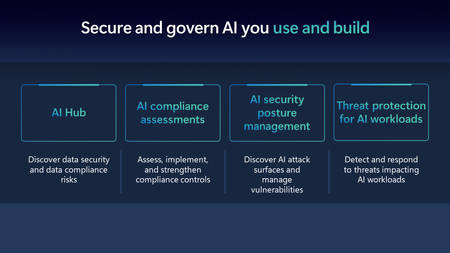
Microsoft Security is at the forefront of AI security to support our customers on their AI journey by being the first security solution provider to offer threat protection for AI workloads and providing comprehensive security to secure and govern AI usage and applications.Unlock Proactive Defense: Microsoft Security Exposure Management Now Generally Available
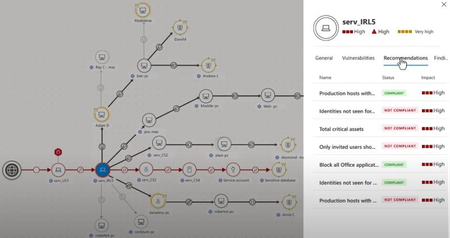
As the digital landscape grows increasingly interconnected, defenders face a critical challenge: the data and insights from various security tools are often siloed or, at best, loosely integrated. This fragmented approach makes it difficult to gain a holistic view of threats or assess their potential impact on critical assets. In a world where a single compromised asset can trigger a domino effect across connected resources, thinking in graphs has become essential for defenders. This approach breaks down silos, allowing them to visualize relationships between assets, vulnerabilities, and threats, ultimately enabling proactive risk management and strengthening their stance against attackers. Traditional vulnerability management is no longer sufficient. While patching every potential weakness might seem like a solution, it's neither practical nor effective. Instead, modern security strategies must focus on the exposures that are easiest for attackers to exploit, prioritizing vulnerabilities that present the greatest risk. This shift marks the evolution of vulnerability management into what we now call exposure management. Earlier this year, we launched Microsoft Security Exposure Management in public preview, introducing defenders to powerful foundational capabilities for holistic exposure management. Backed by extensive threat research and Microsoft’s vast visibility into security signals, these tools provide coverage for commonly observed attack techniques. Exposure Management includes Attack Surface Management, Attack Path Analysis, and Unified Exposure Insights— solutions that offer security teams unmatched visibility and insight into their risk landscape. Attack Surface Management offers a complete, continuous view of an organization’s attack surface, enabling teams to fully explore assets, uncover interdependencies, and monitor exposure across the entire digital estate. Central to this is the identification of critical assets, which are often prime targets for attackers. By highlighting these key assets, security teams can prioritize their efforts and better understand which areas require the most protection. By giving security teams a clear map of their exposure points, Attack Surface Management empowers a more informed and comprehensive defense strategy. Attack Path Analysis takes this a step further, guiding teams in visualizing and prioritizing high-risk attack paths across diverse environments, with a specific focus on critical assets. This capability allows for targeted, effective remediation of vulnerabilities that impact these key assets, helping to significantly reduce exposure and the likelihood of a breach by focusing on the most impactful pathways an attacker might exploit. Unified Exposure Insights gives decision-makers a clear view of an organization's threat exposure, helping security teams address key questions about their posture. Through Security Initiatives, teams focus on priority areas like cloud security and ransomware, supported by actionable metrics to track progress, prioritize risks, and align remediation with business goals for proactive risk management. Exposure Management translates vulnerabilities and exposures into more understandable language about risk and actionable initiatives related to our environment, which helps stakeholders and leadership grasp the impact more clearly. - Bjorn Pauwels Cyber Security Architect Atlas Copco Throughout the public preview, we collaborated closely with customers and industry experts, refining Microsoft Security Exposure Management based on real-world usage and feedback. This partnership revealed that the biggest challenges extended beyond deploying the right tools; they involved enhancing organizational maturity, evolving processes, and fostering a proactive security mindset. These insights drove strategic enhancements to features and user experience, ensuring the solution effectively supports organizations aiming to shift from reactive to proactive threat management. For example, several organizations created a 'RiskOps' role specifically to champion cross-domain threat exposure reduction, breaking down silos and unifying teams around common security goals. Security Operations (SecOps) teams now report significantly streamlined processes by leveraging asset criticality in incident prioritization, helping them address the most impactful threats faster than previously possible. Likewise, vulnerability management teams are using enhanced attack map and path analysis features to refine patching strategies, focusing more precisely on vulnerabilities most likely to lead to real risks. These examples underscore Exposure Management's ability to drive practical, measurable improvements across diverse teams, empowering them to stay ahead of evolving threats with a targeted, collaborative approach to risk management. Exposure Management enables organizations to zero in on their most critical exposures and act quickly. By breaking down silos and connecting security insights across the entire digital estate, organizations gain a holistic view of their risk posture. This comprehensive visibility is crucial for making faster, more informed decisions—reducing exposure before attackers can exploit it. We are excited to announce the general availability of Microsoft Security Exposure Management This release includes several new capabilities designed to help you build and enhance a Continuous Threat Exposure Management (CTEM) program, ensuring that you stay ahead of threats by continuously identifying, prioritizing, and mitigating risks across your digital landscape. Global rollout started 19 Nov, 2024 so keep an eye out for Exposure Management in your Defender portal, https://security.microsoft.com Cyber Asset Attack Surface Management To help you establish a comprehensive, single source of truth for your assets, we are expanding our signal collection beyond Microsoft solutions to include third-party integrations. The new Exposure connectors gallery offers a range of connectors to popular security vendors. Data collected through these connectors is normalized within our exposure graph, enhancing your device inventory, mapping relationships, and revealing new attack paths for comprehensive attack surface visibility. Additional insights like asset criticality, internet exposure and business application or operational affiliation are incorporated from the connected tools to enrich the context that Exposure Management can apply on the collected assets. This integrated data can be visualized through the Attack Map tool or explored using advanced hunting queries via KQL (Kusto Query Language). External data connectors to non-Microsoft security tools are currently in public preview, we are continuously working to add more connectors for leading market solutions, ensuring you have the broadest possible visibility across your security ecosystem. Discover more about data connectors in our documentation. Extended Attack Path Analysis Attack Path Analysis provides organizations with a crucial attacker’s-eye perspective, revealing how adversaries might exploit vulnerabilities and move laterally across both cloud and on-premise environments. By identifying and visualizing potential paths – from initial access points, such as internet-exposed devices, to critical assets – security teams gain valuable insight into the paths attackers could take, including hybrid attack paths that traverse cloud and on-prem infrastructure. Microsoft Security Exposure Management addresses the challenge of fragmented visibility by offering defenders an integrated view of their most critical assets and the likely routes attackers might exploit. This approach moves beyond isolated vulnerabilities, allowing teams to see their environment as a connected landscape of risks across hybrid infrastructures, ultimately enhancing their ability to secure critical assets and discover potential entry points. We are excited to update on our solution’s latest enhancement, which includes a high-level overview experience, offering a clear understanding of top attack scenarios, entry points, and common target types. Additionally, Exposure Management highlights chokepoints with a dedicated experience – these chokepoints are assets that appear in multiple attack paths, enabling cost-effective mitigation. Chokepoints also support blast radius querying, showing how attackers might exploit these assets to reach critical targets. In addition, we are adding support for new adversarial techniques including: DACL Support: We now include Discretionary Access Control Lists (DACLs) in our attack path analysis, through which more extensive attack paths are uncovered, particularly those that exploit misconfigurations or excessive permissions within access control lists. Hybrid Attack Paths: Our expanded analysis now identifies hybrid attack paths, capturing routes that originate on-premises and extend into cloud environments, providing defenders with a more complete view of potential threats across both infrastructures. In essence, attack path management allows defenders to transform isolated vulnerabilities into actionable insights across hybrid infrastructures. This comprehensive perspective enables security teams to shift from reactive to proactive defense, strengthening resilience by focusing on the most critical threats across their entire environment. Unified Exposure Insights With Microsoft Security Exposure Management, organizations can transform raw technical data into actionable insights that bridge the gap between cybersecurity teams and business decision-makers. By offering clear, real-time metrics, this platform answers key questions such as "How secure are we?", "What risks do we face?", and "Where should we focus first to reduce our exposure?" These insights not only provide a comprehensive view of your security posture but also guide prioritization and remediation efforts. To help your organization embrace a proactive security mindset, we introduced Security Initiatives—a strategic framework to focus your teams on critical aspects of your attack surface. These initiatives help teams to scope, discover, prioritize, and validate security findings while ensuring effective communication with stakeholders. Now, we are enhancing these capabilities to offer even greater visibility and control. The expanded initiative catalog now features new programs targeting high-priority areas like SaaS security, IoT, OT, and alongside existing domain and threat-focused initiatives. Each initiative continues to provide real-time metrics, expert-curated recommendations, and progress tracking, empowering security teams to drive maturity across their security programs. With this expanded toolset, organizations can further align their security efforts with evolving risks, ensuring a continuous, dynamic response to the threat landscape. SaaS Security Initiative (Powered by Microsoft Defender for Cloud Apps): Effective SaaS posture management is essential for proactively preventing SaaS-related attacks. The SaaS Security initiative delivers a comprehensive view of your SaaS security coverage, health, configuration, and performance and consolidates all best-practice recommendations for configuring SaaS apps into measurable metrics to help security teams efficiently manage and prioritize critical security controls. To optimize this initiative, activate key application connectors in Defender for Cloud Apps, including Microsoft 365, Salesforce, ServiceNow, GitHub, Okta, Citrix ShareFile, DocuSign, Dropbox, Google Workspace, NetDocuments, Workplace (preview), Zendesk, Zoom (preview), and Atlassian. For more information, check out https://aka.ms/Ignite2024MDA OT Security Initiative (Powered by Microsoft Defender for IoT): The convergence of Operational Technology (OT) and Information Technology (IT) has transformed industries worldwide, but it has also introduced significant new security challenges, particularly for industrial operations and critical infrastructure. The modern threat landscape, now accelerated by the growing capabilities of AI, demands specialized security solutions for these sensitive environments. The OT Security Initiative addresses these challenges by providing practitioners with a comprehensive solution to identify, monitor, and mitigate risks within OT environments, ensuring both operational reliability and safety. By leveraging Microsoft Defender for Endpoint discovery, the initiative offers unified visibility across enterprise and OT networks, empowering organizations to identify unprotected OT assets, assess their risk levels, and implement security measures across all physical sites. Enterprise IoT Security Initiative (Powered by Microsoft Defender for IoT): This initiative delivers comprehensive visibility into the risks associated with IoT devices within the enterprise, enabling organizations to assess their resilience against these emerging threats. As IoT devices frequently connect to endpoints, one another, or the internet, they become prime targets for cyberattacks. Therefore, businesses must continuously monitor the security of these devices, tracking their distribution, configuration, connectivity, exposure, and behavior to prevent the introduction of hidden vulnerabilities. By leveraging this initiative, organizations can proactively manage IoT risks and safeguard their digital landscape. Proactively understand how system updates affect scores The new versioning feature offers proactive notifications about upcoming version updates, giving users advanced visibility into anticipated metric changes and their impact on related initiatives. A dedicated side panel provides comprehensive details about each update, including the expected release date, release notes, current and updated metric values, and any changes to related initiative scores. Additionally, users can share direct feedback on the updates within the platform, fostering continuous improvement and responsiveness to user needs. Exposure History With the new history-reasoning feature, users can investigate metric changes by reviewing detailed asset exposure updates. In the initiative's history tab, selecting a specific metric now reveals a list of assets where exposure has been either added or removed, providing clearer insight into exposure shifts over time. Unified Role-Based Access Control (URBAC) Support We are excited to introduce the capability to manage user privileges and access to Microsoft Security Exposure Management through custom roles within the Microsoft Defender XDR Unified Role-Based Access Control (URBAC) system. This enhancement ensures higher productivity and efficient access control on a single, centralized platform. The unified RBAC permissions model offers administrators an alternative to Entra ID directory roles, allowing for more granular permission management and customization. This model complements Entra ID global roles by enabling administrators to implement access policies based on the principle of least privilege, thereby assigning users only the permissions they need for their daily tasks. We recommend maintaining three custom roles that align with organizational posture personas: Posture Reader: Users with read-only access to Exposure Management data. Posture Contributor: Users with read and manage permissions, enabling them to handle security initiatives and metrics, as well as manage posture recommendations. Posture Admin: Users who likely already hold higher-level permissions within the Microsoft Defender portal and can now perform sensitive posture-related actions within Exposure Management experiences. To learn more about the Microsoft XDR Unified RBAC permissions model, click here. For more information on Microsoft Security Exposure Management access management with unified RBAC, click here. How to get Microsoft Security Exposure Management Exposure Management is available in the Microsoft Defender portal at https://security.microsoft.com. Access to the exposure management blade and features in the Microsoft Defender portal is available with any of the following licenses: Microsoft 365 E5 or A5 Microsoft 365 E3 Microsoft 365 E3 with the Microsoft Enterprise Mobility + Security E5 add-on Microsoft 365 A3 with the Microsoft 365 A5 security add-on Microsoft Enterprise Mobility + Security E5 or A5 Microsoft Defender for Endpoint (Plan 1 and 2) Microsoft Defender for Identity Microsoft Defender for Cloud Apps Microsoft Defender for Office 365 (Plans 1 and 2) Microsoft Defender Vulnerability Management Integration of data from the above tools, as well as other Microsoft security tools like Microsoft Defender for Cloud, Microsoft Defender Cloud Security Posture Management, and Microsoft Defender External Attack Surface Management, is available with these licenses. Integration of non-Microsoft security tools will incur a consumption-based cost based on the number of assets in the connected security tool. The external connectors are currently in public preview, with plans to reach general availability (GA) by the end of Q1 2025. Pricing will be announced before billing for external connectors begins at GA. Learn More The threat landscape is constantly shifting, and the attack surface continues to grow, leaving organizations exposed. Outpacing threat actors through patching alone is no longer feasible. Now is the time to evolve your vulnerability management strategy to be smarter, more dynamic, and more powerful — focused on exposures and built on a proactive mindset. By adopting a Continuous Threat Exposure Management (CTEM) process, you can stay ahead of attackers. Microsoft Security Exposure Management equips you with the tools to scope, discover, prioritize, validate, and mobilize your teams, empowering you to defend your organization with precision and confidence. Embrace the future of cybersecurity resilience—contact us today to learn more, sign up for a demo, or speak with our team about how Microsoft Security Exposure Management can transform your defense strategy. Don’t wait to secure your organization. Get started today. Explore overview and core scenarios on our website Learn about capabilities and scenarios in blog posts written by our engineering and research teamsAccelerate AI adoption with next-gen security and governance capabilities
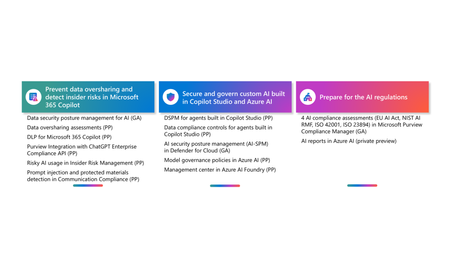
Generative AI adoption is accelerating across industries, and organizations are looking for secure ways to harness its potential. Today, we are excited to introduce new capabilities designed to drive AI transformation with strong security and governance tools.How to deploy Microsoft Purview DSPM for AI to secure your AI apps
Microsoft Purview Data Security Posture Management (DSPM for AI) is designed to enhance data security for the following AI applications: Microsoft Copilot experiences, including Microsoft 365 Copilot. Enterprise AI apps, including ChatGPT enterprise integration. Other AI apps, including all other AI applications like ChatGPT consumer, Microsoft Copilot, DeepSeek, and Google Gemini, accessed through the browser. In this blog, we will dive into the different policies and reporting we have to discover, protect and govern these three types of AI applications. Prerequisites Please refer to the prerequisites for DSPM for AI in the Microsoft Learn Docs. Login to the Purview portal To begin, start by logging into Microsoft 365 Purview portal with your admin credentials: In the Microsoft Purview portal, go to the Home page. Find DSPM for AI under solutions. 1. Securing Microsoft 365 Copilot Be sure to check out our blog on How to use the DSPM for AI data assessment report to help you address oversharing concerns when you deploy Microsoft 365 Copilot. Discover potential data security risks in Microsoft 365 Copilot interactions In the Overview tab of DSPM for AI, start with the tasks in “Get Started” and Activate Purview Audit if you have not yet activated it in your tenant to get insights into user interactions with Microsoft Copilot experiences In the Recommendations tab, review the recommendations that are under “Not Started”. Create the following data discovery policy to discover sensitive information in AI interactions by clicking into it. Detect risky interactions in AI apps - This public preview Purview Insider Risk Management policy helps calculate user risk by detecting risky prompts and responses in Microsoft 365 Copilot experiences. Click here to learn more about Risky AI usage policy. With the policies to discover sensitive information in Microsoft Copilot experiences in place, head back to the Reports tab of DSPM for AI to discover any AI interactions that may be risky, with the option to filter to Microsoft Copilot Experiences, and review the following for Microsoft Copilot experiences: Total interactions over time (Microsoft Copilot) Sensitive interactions per AI app Top unethical AI interactions Top sensitivity labels references in Microsoft 365 Copilot Insider Risk severity Insider risk severity per AI app Potential risky AI usage Protect sensitive data in Microsoft 365 Copilot interactions From the Reports tab, click on “View details” for each of the report graphs to view detailed activities in the Activity Explorer. Using available filters, filter the results to view activities from Microsoft Copilot experiences based on different Activity type, AI app category and App type, Scope, which support administrative units for DSPM for AI, and more. Then drill down to each activity to view details including the capability to view prompts and response with the right permissions. To protect the sensitive data in interactions for Microsoft 365 Copilot, review the Not Started policies in the Recommendations tab and create these policies: Information Protection Policy for Sensitivity Labels - This option creates default sensitivity labels and sensitivity label policies. If you've already configured sensitivity labels and their policies, this configuration is skipped. Protect sensitive data referenced in Microsoft 365 Copilot - This guides you through the process of creating a Purview Data Loss Prevention (DLP) policy to restrict the processing of content with specific sensitivity labels in Copilot interactions. Click here to learn more about Data Loss Prevention for Microsoft 365 Copilot. Protect sensitive data referenced in Copilot responses - Sensitivity labels help protect files by controlling user access to data. Microsoft 365 Copilot honors sensitivity labels on files and only shows users files they already have access to in prompts and responses. Use Data assessments to identify potential oversharing risks, including unlabeled files. Stay tuned for an upcoming blog post on using DSPM for AI data assessments! Use Copilot to improve your data security posture - Data Security Posture Management combines deep insights with Security Copilot capabilities to help you identify and address security risks in your org. Once you have created policies from the Recommendations tab, you can go to the Policies tab to review and manage all the policies you have created across your organization to discover and safeguard AI activity in one centralized place, as well as edit the policies or investigate alerts associated with those policies in solution. Note that additional policies not from the Recommendations tab will also appear in the Policies tab when DSPM for AI identifies them as policies to Secure and govern all AI apps. Govern the prompts and responses in Microsoft 365 Copilot interactions Understand and comply with AI regulations by selecting “Guided assistance to AI regulations” in the Recommendations tab and walking through the “Actions to take”. From the Recommendations tab, create a Control unethical behavior in AI Purview Communications Compliance policy to detect sensitive information in prompts and responses and address potentially unethical behavior in Microsoft Copilot experiences and ChatGPT for Enterprise. This policy covers all users and groups in your organization. To retain and/or delete Microsoft 365 Copilot prompts and responses, setup a Data Lifecycle policy by navigating to Microsoft Purview Data Lifecycle Management and find Retention Policies under the Policies header. You can also preserve, collect, analyze, review, and export Microsoft 365 Copilot interactions by creating an eDiscovery case. 2. Securing Enterprise AI apps Please refer to this amazing blog on Unlocking the Power of Microsoft Purview for ChatGPT Enterprise | Microsoft Community Hub for detailed information on how to integrate with ChatGPT for enterprise, the Purview solutions it currently supports through Purview Communication Compliance, Insider Risk Management, eDiscovery, and Data Lifecycle Management. Learn more about the feature also through our public documentation. 3. Securing other AI Microsoft Purview DSPM for AI currently supports the following list of AI sites. Be sure to also check out our blog on the new Microsoft Purview data security controls for the browser & network to secure other AI apps. Discover potential data security risks in prompts sent to other AI apps In the Overview tab of DSPM for AI, go through these three steps in “Get Started” to discover potential data security risk in other AI interactions: Install Microsoft Purview browser extension For Windows users: The Purview extension is not necessary for the enforcement of data loss prevention on the Edge browser but required for Chrome to detect sensitive info pasted or uploaded to AI sites. The extension is also required to detect browsing to other AI sites through an Insider Risk Management policy for both Edge and Chrome browser. Therefore, Purview browser extension is required for both Edge and Chrome in Windows. For MacOS users: The Purview extension is not necessary for the enforcement of data loss prevention on macOS devices, and currently, browsing to other AI sites through Purview Insider Risk Management is not supported on MacOS, therefore, no Purview browser extension is required for MacOS. Extend your insights for data discovery – this one-click collection policy will setup three separate Purview detection policies for other AI apps: Detect sensitive info shared in AI prompts in Edge – a Purview collection policy that detects prompts sent to ChatGPT consumer, Micrsoft Copilot, DeepSeek, and Google Gemini in Microsoft Edge and discovers sensitive information shared in prompt contents. This policy covers all users and groups in your organization in audit mode only. Detect when users visit AI sites – a Purview Insider Risk Management policy that detects when users use a browser to visit AI sites. Detect sensitive info pasted or uploaded to AI sites – a Purview Endpoint Data loss prevention (eDLP) policy that discovers sensitive content pasted or uploaded in Microsoft Edge, Chrome, and Firefox to AI sites. This policy covers all users and groups in your org in audit mode only. With the policies to discover sensitive information in other AI apps in place, head back to the Reports tab of DSPM for AI to discover any AI interactions that may be risky, with the option to filter by Other AI Apps, and review the following for other AI apps: Total interactions over time (other AI apps) Total visits (other AI apps) Sensitive interactions per AI app Insider Risk severity Insider risk severity per AI app Protect sensitive info shared with other AI apps From the Reports tab, click on “View details” for each of the report graphs to view detailed activities in the Activity Explorer. Using available filters, filter the results to view activities based on different Activity type, AI app category and App type, Scope, which support administrative units for DSPM for AI, and more. To protect the sensitive data in interactions for other AI apps, review the Not Started policies in the Recommendations tab and create these policies: Fortify your data security – This will create three policies to manage your data security risks with other AI apps: 1) Block elevated risk users from pasting or uploading sensitive info on AI sites – this will create a Microsoft Purview endpoint data loss prevention (eDLP) policy that uses adaptive protection to give a warn-with-override to elevated risk users attempting to paste or upload sensitive information to other AI apps in Edge, Chrome, and Firefox. This policy covers all users and groups in your org in test mode. Learn more about adaptive protection in Data loss prevention. 2) Block elevated risk users from submitting prompts to AI apps in Microsoft Edge – this will create a Microsoft Purview browser data loss prevention (DLP) policy, and using adaptive protection, this policy will block elevated, moderate, and minor risk users attempting to put information in other AI apps using Microsoft Edge. This integration is built-in to Microsoft Edge. Learn more about adaptive protection in Data loss prevention. 3) Block sensitive info from being sent to AI apps in Microsoft Edge - this will create a Microsoft Purview browser data loss prevention (DLP) policy to detect inline for a selection of common sensitive information types and blocks prompts being sent to AI apps while using Microsoft Edge. This integration is built-in to Microsoft Edge. Once you have created policies from the Recommendations tab, you can go to the Policies tab to review and manage all the policies you have created across your organization to discover and safeguard AI activity in one centralized place, as well as edit the policies or investigate alerts associated with those policies in solution. Note that additional policies not from the Recommendations tab will also appear in the Policies tab when DSPM for AI identifies them as policies to Secure and govern all AI apps. Conclusion Microsoft Purview DSPM for AI can help you discover, protect, and govern the interactions from AI applications in Microsoft Copilot experiences, Enterprise AI apps, and other AI apps. We recommend you review the Reports in DSPM for AI routinely to discover any new interactions that may be of concern, and to create policies to secure and govern those interactions as necessary. We also recommend you utilize the Activity Explorer in DSPM for AI to review different Activity explorer events while users interacting with AI, including the capability to view prompts and response with the right permissions. We will continue to update this blog with new features that become available in DSPM for AI, so be sure to bookmark this page! Follow-up Reading Check out this blog on the details of each recommended policies in DSPM for AI: Microsoft Purview – Data Security Posture Management (DSPM) for AI | Microsoft Community Hub Address oversharing concerns with Microsoft 365 blueprint - aka.ms/Copilot/Oversharing Microsoft Purview data security and compliance protections for Microsoft 365 Copilot and other generative AI apps | Microsoft Learn Considerations for deploying Microsoft Purview AI Hub and data security and compliance protections for Microsoft 365 Copilot and Microsoft Copilot | Microsoft Learn Commonly used properties in Copilot audit logs - Audit logs for Copilot and AI activities | Microsoft Learn Supported AI sites by Microsoft Purview for data security and compliance protections | Microsoft Learn Where Copilot usage data is stored and how you can audit it - Microsoft 365 Copilot data protection and auditing architecture | Microsoft Learn Downloadable whitepaper: Data Security for AI Adoption | Microsoft Public roadmap for DSPM for AI - Microsoft 365 Roadmap | Microsoft 365Enterprise-grade controls for AI apps and agents built with Azure AI Foundry and Copilot Studio
AI innovation is moving faster than ever, and more AI projects are moving beyond experimentation into deployment, to drive tangible business impact. As organizations accelerate innovation with custom AI applications and agents, new risks emerge across the software development lifecycle and AI stack related to data oversharing and leaks, new vulnerabilities and threats, and non-compliance with stringent regulatory requirements Through 2025, poisoning of software supply chains and infrastructure technology stacks will constitute more than 70% of malicious attacks against AI used in the enterprise 1 , highlighting potential threats that originate early in development. Today, the average cost of a data breach is $4.88 million, but when security issues are caught early in the development process, that number drops dramatically to just $80 per incident 2 . The message is very clear; security can’t be an afterthought anymore. It must be a team sport across the organization, embedded from the start and throughout the development lifecycle. That's why developers and security teams should align on processes and tools that bring security into every stage of the AI development lifecycle and give security practitioners visibility into and the ability to mitigate risks. To address these growing challenges and help customers secure and govern their AI workloads across development and security teams, we are: Enabling Azure AI Foundry and Microsoft Copilot Studio to provide best-in-class foundational capabilities to secure and govern AI workloads Deeply integrating and embedding industry-leading capabilities from Microsoft Purview, Microsoft Defender, and Microsoft Entra into Azure AI Foundry and Microsoft Copilot Studio This week, 3,000 developers are gathering in Seattle for the annual Microsoft Build conference, with many more tuning in online, to learn practical skills for accelerating their AI apps and agents' innovation. To support their AI innovation journey, today we are excited to announce several new capabilities to help developers and organizations secure and govern AI apps and agents. New Azure AI Foundry foundational capabilities to secure and govern AI workloads Azure AI Foundry enhancements for AI security and safety With 70,000 customers, 100 trillion tokens processed this quarter, and 2 billion enterprise search queries each day, Azure AI Foundry has grown beyond just an application layer—it's now a comprehensive platform for building agents that can plan, take action, and continuously learn to drive real business outcomes. To help organizations build and deploy AI with confidence, we’re introducing new security and safety capabilities and insights for developers in Azure AI Foundry Introducing Spotlighting to detect and block prompt injection attacks in real time As AI systems increasingly rely on external data sources, a new class of threats has emerged. Indirect prompt injection attacks embed hidden instructions in documents, emails, and web content, tricking models into taking unauthorized actions without any direct user input. These attacks are difficult to detect and hard to prevent using traditional filters alone. To address this, Azure AI Content Safety is introducing Spotlighting, now available in preview. Spotlighting strengthens the Prompt Shields guardrail by improving its ability to detect and handle potential indirect prompt injections, where hidden adversarial instructions are embedded in external content. This new capability helps prevent the model from inadvertently acting on malicious prompts that are not directly visible to the user. Enable Spotlighting in Azure AI Content Safety to detect potential indirect prompt injection attacks New capabilities for task adherence evaluation and task adherence mitigation to ensure agents remain within scope As developers build more capable agents, organizations face growing pressure to help confirm those agents act within defined instructions and policy boundaries. Even small deviations can lead to tool misuse, broken workflows, or risks like unintended exposure of sensitive data. To solve this, Azure AI Foundry now includes task adherence for agents, now in preview and powered by two components: a real-time evaluation and a new control within Azure AI Content Safety. At the core is a real-time task adherence evaluation API, part of Azure AI Content Safety. This API assesses whether an agent’s behavior is aligned with its assigned task by analyzing the user’s query, system instructions, planned tool calls, and the agent’s response. The evaluation framework is built on Microsoft’s Agent Evaluators, which measure intent resolution, tool selection accuracy, completeness of response, and overall alignment to the original request. Developers can run this scoring logic locally using the Task Adherence Evaluator in the Azure AI Evaluation SDK, with a five-point scale that ranges from fully nonadherent to fully adherent. This gives teams a flexible and transparent way to inspect task-level behavior before it causes downstream issues. Task adherence is enforced through a new control in Azure AI Content Safety. If an agent goes off-task, the control can block tool use, pause execution, or trigger human review. In Azure AI Agent Service, it is available as an opt-in feature and runs automatically. Combined with real-time evaluation, this control helps to ensure that agents stay on task, follow instructions, and operate according to enterprise policies. Learn more about Prompt Shields in Azure AI Content Safety. Azure AI Foundry continuous evaluation and monitoring of agentic systems Maintaining high performance and compliance for AI agents after deployment is a growing challenge. Without ongoing oversight, issues like performance degradation, safety risks, or unintentional misuse of resources can slip through unnoticed. To address this, Azure AI Foundry introduces continuous evaluation and monitoring of agentic systems, now in preview, provides a single pane of glass dashboard to track key metrics such as performance, quality, safety, and resource usage in real time. Continuous evaluation runs quality and safety evaluations at a sampled rate of production usage with results made available in the Azure AI Foundry Monitoring dashboard and published to Application Insights. Developers can set alerts to detect drift or regressions and use Azure Monitor to gain full-stack visibility into their AI systems. For example, an organization using an AI agent to assist with customer-facing tasks can monitor groundedness and detect a decline in quality when the agent begins referencing irrelevant information, helping teams to act before it potentially negatively affects trust of users. Azure AI Foundry evaluation integrations with Microsoft Purview Compliance Manager, Credo AI, and Saidot for streamlined compliance AI regulations and standards introduce new requirements for transparency, documentation, and risk management for high-risk AI systems. As developers build AI applications and agents, they may need guidance and tools to help them evaluate risks based on these requirements and seamlessly share control and evaluation insights with compliance and risk teams. Today, we are announcing previews for Azure AI Foundry evaluation tool’s integration with a compliance management solution, Microsoft Purview Compliance Manager, and AI governance solutions, Credo AI and Saidot. These integrations help define risk parameters, run suggested compliance evaluations, and collect evidence for control testing and auditing. For example, for a developer who’s building an AI agent in Europe may be required by their compliance team to complete a Data Protection Impact Assets (DPIA) and Algorithmic Impact Assessment (AIA) to meet internal risk management and technical documentation requirements aligned with emerging AI governance standards and best practices. Based on Purview Compliance Manager’s step-by-step guidance on controls implementation and testing, the compliance teams can evaluate risks such as potential bias, cybersecurity vulnerabilities, or lack of transparency in model behavior. Once the evaluation is conducted in Azure AI Foundry, the developer can obtain a report with documented risk, mitigation, and residual risk for compliance teams to upload to Compliance Manager to support audits and provide evidence to regulators or external stakeholders. Assess controls for Azure AI Foundry against emerging AI governance standards Learn more about Purview Compliance Manager. Learn more about the integration with Credo AI and Saidot in this blogpost. Leading Microsoft Entra, Defender and Purview value extended to Azure AI Foundry and Microsoft Copilot Studio Introducing Microsoft Entra Agent ID to help address agent sprawl and manage agent identity Organizations are rapidly building their own AI agents, leading to agent sprawl and a lack of centralized visibility and management. Security teams often struggle to keep up, unable to see which agents exist and whether they introduce security or compliance risks. Without proper oversight, agent sprawl increases the attack surface and makes it harder to manage these non-human identities. To address this challenge, we’re announcing the public preview of Microsoft Entra Agent ID, a new capability in the Microsoft Entra admin center that gives security admins visibility and control over AI agents built with Copilot Studio and Azure AI Foundry. With Microsoft Entra Agent ID, an agent created through Copilot Studio or Azure AI Foundry is automatically assigned an identity with no additional work required from the developers building them. This is the first step in a broader initiative to manage and protect non-human identities as organizations continue to build AI agents. : Security and identity admins can gain visibility into AI agents built in Copilot Studio and Azure AI Foundry in the Microsoft Entra Admin Center This new capability lays the foundation for more advanced capabilities coming soon to Microsoft Entra. We also know that no one can do it alone. Security has always been a team sport, and that’s especially true as we enter this new era of protecting AI agents and their identities. We’re energized by the momentum across the industry; two weeks ago, we announced support for the Agent-to-Agent (A2A) protocol and began collaborating with partners to shape the future of AI identity workflows. Today, we’re also excited to announce new partnerships with ServiceNow and Workday. As part of this, we’ll integrate Microsoft Entra Agent ID with the ServiceNow AI Platform and the Workday Agent System of Record. This will allow for automated provisioning of identities for future digital employees. Learn more about Microsoft Entra Agent ID. Microsoft Defender security alerts and recommendations now available in Azure AI Foundry As more AI applications are deployed to production, organizations need to predict and prevent potential AI threats with natively integrated security controls backed by industry-leading Gen AI and threat intelligence for AI deployments. Developers need critical signals from security teams to effectively mitigate security risks related to their AI deployments. When these critical signals live in separate systems outside the developer experience, this can create delays in mitigation, leaving opportunities for AI apps and agents to become liabilities and exposing organizations to various threats and compliance violations. Now in preview, Microsoft Defender for Cloud integrates AI security posture management recommendations and runtime threat protection alerts directly into the Azure AI Foundry portal. These capabilities, previously announced as part of the broader Microsoft Defender for Cloud solution, are extended natively into Azure AI Foundry enabling developers to access alerts and recommendations without leaving their workflows. This provides real-time visibility into security risks, misconfigurations, and active threats targeting their AI applications on specific Azure AI projects, without needing to switch tools or wait on security teams to provide details. Security insights from Microsoft Defender for Cloud help developers identify and respond to threats like jailbreak attacks, sensitive data leakage, and misuse of system resources. These insights include: AI security posture recommendations that identify misconfigurations and vulnerabilities in AI services and provide best practices to reduce risk Threat protection alerts for AI services that notify developers of active threats and provide guidance for mitigation, across more than 15 detection types For example, a developer building an AI-powered agent can receive security recommendations suggesting the use of Azure Private Link for Azure AI Services resources. This reduces the risk of data leakage by handling the connectivity between consumers and services over the Azure backbone network. Each recommendation includes actionable remediation steps, helping teams identify and mitigate risks in both pre- and post-deployment phases. This helps to reduce risks without slowing down innovation. : Developers can view security alerts on the Risks + alerts page in Azure AI Foundry : Developers can view recommendations on the Guardrails + controls page in Azure AI Foundry This integration is currently in preview and will be generally available in June 2025 in Azure AI Foundry. Learn more about protecting AI services with Microsoft Defender for Cloud. Microsoft Purview capabilities extended to secure and govern data in custom-built AI apps and agents Data oversharing and leakage are among the top concerns for AI adoption, and central to many regulatory requirements. For organizations to confidently deploy AI applications and agents, both low code and pro code developers need a seamless way to embed security and compliance controls into their AI creations. Without simple, developer-friendly solutions, security gaps can quickly become blockers, delaying deployment and increasing risks as applications move from development to production. Today, Purview is extending its enterprise-grade data security and compliance capabilities, making it easier for both low code and pro code developers to integrate data security and compliance into their AI applications and agents, regardless of which tools or platforms they use. For example, with this update, Microsoft Purview DSPM for AI becomes the one place data security teams can see all the data risk insights across Microsoft Copilots, agents built in Agent Builder and Copilot Studio, and custom AI apps and agents built in Azure AI Foundry and other platforms. Admins can easily drill into security and compliance insights for specific AI apps or agents, making it easier to investigate and take action on potential risks. : Data security admins can now find data security and compliance insights across Microsoft Copilots, agents built with Agent Builder and Copilot Studio, and custom AI apps and agents in Microsoft Purview DSPM for AI In the following sections, we will provide more details about the updates to Purview capabilities in various AI workloads. 1. Microsoft Purview data security and compliance controls can be extended to any custom-built AI application and agent via the new Purview SDK or the native Purview integration with Azure AI Foundry. The new capabilities make it easy and effortless for security teams to bring the same enterprise-grade data security compliance controls available today for Microsoft 365 Copilot to custom AI applications and agents, so organizations can: Discover data security risks, such as sensitive data in user prompts, and data compliance risks, such as harmful content, and get recommended actions to mitigate risks proactively in Microsoft Purview Data Security Posture Management (DSPM) for AI. Protect sensitive data against data leakage and insider risks with Microsoft Purview data security policies. Govern AI interactions with Audit, Data Lifecycle Management, eDiscovery, and Communication Compliance. Microsoft Purview SDK Microsoft Purview now offers Purview SDK, a set of REST APIs, documentation, and code samples, currently in preview, enabling developers to integrate Purview's data security and compliance capabilities into AI applications or agents within any integrated development environment (IDE). : By embedding Purview APIs into the IDE, developers help enable their AI apps to be secured and governed at runtime For example, a developer building an AI agent using an AWS model can use the Purview SDK to enable their AI app to automatically identify and block sensitive data entered by users before it’s exposed to the model, while also providing security teams with valuable signals that support compliance. With Purview SDK, startups, ISVs, and partners can now embed Purview industry-leading capabilities directly into their AI software solutions, making these solutions Purview aware and easier for their customers to secure and govern data in their AI solutions. For example, Infosys Vice President and Delivery Head of Cyber Security Practice, Ashish Adhvaryu indicates, “Infosys Cyber Next platform integrates Microsoft Purview to provide enhanced AI security capabilities. Our solution, the Cyber Next AI assistant (Cyber Advisor) for the SOC analyst, leverages Purview SDK to drive proactive threat mitigation with real-time monitoring and auditing capabilities. This integration provides holistic AI-assisted protection, enhancing cybersecurity posture." Microsoft partner EY (previously known as Ernst and Young) has also leveraged the new Purview SDK to embed Purview value into their GenAI initiatives. “We’re not just building AI tools, we are creating Agentic solutions where trust, security, and transparency are present from the start, supported by the policy controls provided through the Purview SDK. We’re seeing 25 to 30 percent time savings when we build secure features using the Purview SDK,” noted Sumanta Kar, Partner, Innovation and Emerging Tech at EY. Learn more about the Purview SDK. Microsoft Purview integrates natively with Azure AI Foundry Organizations are developing an average of 14 custom AI applications. The rapid pace of AI innovation may leave security teams unaware of potential data security and compliance risks within their environments. With the update announced today, Azure AI Foundry signals are now directly integrated with Purview Data Security Posture Management for AI, Insider Risk Management, and data compliance controls, minimizing the need for additional development work. For example, for AI applications and agents built with Azure AI Foundry models, data security teams can gain visibility into AI usage and data risks in Purview DSPM for AI, with no additional work from developers. Data security teams can also detect, investigate, and respond to both malicious and inadvertent user activities, such as a departing employee leveraging an AI agent to retrieve an anomalous amount of sensitive data, with Microsoft Purview Insider Risk Management (IRM) policies. Lastly, user prompts and AI responses in Azure AI apps and agents can now be ingested into Purview compliance tools as mentioned above. Learn more about Microsoft Purview for Azure AI Foundry. 2. Purview data protections extended to Copilot Studio agents grounded in Microsoft Dataverse data Coming to preview in June, Purview Information Protection extends auto-labeling and label inheritance coverage to Dataverse to help prevent oversharing and data leaks. Information Protection makes it easier for organizations to automatically classify and protect sensitive data at scale. A common challenge is that sensitive data often lands in Dataverse from various sources without consistent labeling or protection. The rapid adoption of agents built using Copilot Studio and grounding data from Dataverse increases the risk of data oversharing and leakage if data is not properly protected. With auto-labeling, data stored in Dataverse tables can be automatically labeled based on policies set in Microsoft Purview, regardless of its source. This reduces the need for manual labeling effort and protects sensitive information from the moment it enters Dataverse. With label inheritance, AI agent responses grounded in Dataverse data will automatically carry and honor the source data’s sensitivity label. If a response pulls from multiple tables with different labels, the most restrictive label is applied to ensure consistent protection. For example, a financial advisor building an agent in Copilot Studio might connect multiple Dataverse tables, some labeled as “General” and others as “Highly Confidential.” If a response pulls from both, it will inherit the most restrictive label, in this case, "Highly Confidential,” to prevent unauthorized access and ensure appropriate protections are applied across both maker and users of the agent. Together, auto-labeling and label inheritance in Dataverse support a more secure, automated foundation for AI. : Sensitivity labels will be automatically applied to data in Dataverse : AI-generated responses will inherit and honor the source data’s sensitivity labels Learn more about protecting Dataverse data with Microsoft Purview. 3. Purview DSPM for AI can now provide visibility into unauthenticated interactions with Copilot Studio agents As organizations increasingly use Microsoft Copilot Studio to deploy AI agents for frontline customer interactions, gaining visibility into unauthenticated user interactions and proactively mitigating risks becomes increasingly critical. Building on existing Purview and Copilot Studio integrations, we’ve extended DSPM for AI and Audit in Copilot Studio to provide visibility into unauthenticated interactions, now in preview. This gives organizations a more comprehensive view of AI-related data security risks across authenticated and unauthenticated users. For example, a healthcare provider hosting an external, customer-facing agent assistant must be able to detect and respond to attempts by unauthenticated users to access sensitive patient data. With these new capabilities in DSPM for AI, data security teams can now identify these interactions, assess potential exposure of sensitive data, and act accordingly. Additionally, integration with Purview Audit provides teams with seamless access to information needed for audit requirements. : Gain visibility into all AI interactions, including those from unauthenticated users Learn more about Purview for Copilot Studio. 4. Purview Data Loss Prevention extended to more Microsoft 365 agent scenarios To help organizations prevent data oversharing through AI, at Ignite 2024, we announced that data security admins could prevent Microsoft 365 Copilot from using certain labeled documents as grounding data to generate summaries or responses. Now in preview, this control also extends to agents published in Microsoft 365 Copilot that are grounded by Microsoft 365 data, including pre-built Microsoft 365 agents, agents built with the Agent Builder, and agents built with Copilot Studio. This helps ensure that files containing sensitive content are used appropriately by AI agents. For example, confidential legal documents with highly specific language that could lead to improper guidance if summarized by an AI agent, or "Internal only” documents that shouldn’t be used to generate content that can be shared outside of the organization. : Extend data loss prevention (DLP) policies to Microsoft 365 Copilot agents to protect sensitive data Learn more about Data Loss Prevention for Microsoft 365 Copilot and agents. The data protection capabilities we are extending to agents in Agent Builder and Copilot Studio demonstrate our continued investment in strengthening the Security and Governance pillar of the Copilot Control System (CSS). CCS provides integrated controls to help IT and security teams secure, manage, and monitor Copilot and agents across Microsoft 365, spanning governance, management, and reporting. Learn more here. Explore additional resources As developers and security teams continue to secure AI throughout its lifecycle, it’s important to stay ahead of emerging risks and ensure protection. Microsoft Security provides a range of tools and resources to help you proactively secure AI models, apps, and agents from code to runtime. Explore the following resources to deepen your understanding and strengthen your approach to AI security: Learn more about Security for AI solutions on our webpage Learn more about Microsoft Purview SDK Get started with Azure AI Foundry Get started with Microsoft Entra Get started with Microsoft Purview Get started with Microsoft Defender for Cloud Get started with Microsoft 365 Copilot Get started with Copilot Studio Sign up for a free Microsoft 365 E5 Security Trial and Microsoft Purview Trial 1 Predicts 2025: Navigating Imminent AI Turbulence for Cybersecurity, Jeremy D'Hoinne, Akif Khan, Manuel Acosta, Avivah Litan, Deepak Seth, Bart Willemsen, 10 February 2025 2 IBM. "Cost of a Data Breach 2024: Financial Industry." IBM Think, 13 Aug. 2024, https://www.ibm.com/think/insights/cost-of-a-data-breach-2024-financial-industry; Cser, Tamas. "The Cost of Finding Bugs Later in the SDLC." Functionize, 5 Jan. 2023, https://www.functionize.com/blog/the-cost-of-finding-bugs-later-in-the-sdlcMicrosoft Purview Data Security Investigations is now generally available
Every data security investigation starts with the same question: What data security risks are buried in this data? Exposed credentials in thousands of files across a data estate. Evidence of fraud hidden in vendor communications. Sensitive documents accidentally shared to a large group. Finding these risks manually — reviewing content file by file, message by message — is no longer viable when organizations are managing 220 zettabytes of data[1] and facing over 12,000 confirmed breaches annually[2]. That's why we built Microsoft Purview Data Security Investigations, now generally available. Microsoft Purview Data Security Investigations enables data security teams to identify investigation-relevant data, investigate that data with AI-powered deep content analysis, and mitigate risk — all within one unified solution. Teams can quickly analyze data at scale to surface sensitive data and security risks, then collaborate securely to address them. By streamlining complex, time‑consuming investigative workflows, admins can resolve investigations in hours instead of weeks or months. Proactive and reactive investigation scenarios Organizations are using Data Security Investigations to tackle diverse data security challenges — from reactive incident response to proactive risk assessment. Some of our top use cases from preview include: Data breach and leak: Understand severity, sensitivity, and significance of data that has been leaked or breached, including risks buried in impacted data, to take action and mitigate its impact to the organization. Credentials exposure: Proactively scan thousands of SharePoint sites to identify files containing credentials like passwords, which can give a threat actor prolonged access to an organization's environment. Internal fraud and bribery: Uncover suspicious communications tied to vendor payments or client interactions, uncovering hard-to-find patterns in large volumes of emails and messages. Sensitive data exposure in Teams: Determine who accessed classified documents after accidental sharing — and whether that data was further distributed. Inappropriate content investigations: Quickly find what was posted, where, and by whom, even when teams only know a timeframe or channel name. Investigations that once took weeks — or weren’t possible at all — can now be completed in hours. By eliminating manual effort and surfacing hidden risks across sprawling data estates, Data Security Investigations empowers teams to investigate more efficiently and confidently, making deep, scalable investigations a reality. What Microsoft Purview Data Security Investigations does – and what’s new Since launching public preview, we've listened closely to customer feedback and made significant enhancements to help teams investigate faster, mitigate more effectively, and manage costs with confidence. Data Security Investigations addresses three critical stages of an investigation: Identify impacted data Data Security admins can efficiently identify relevant data by searching their Microsoft 365 data estate to locate emails, Teams messages, Copilot prompts and responses, and documents. Investigators can also launch pre-scoped investigations from a Microsoft Defender XDR incident or a Microsoft Purview Insider Risk Management case. We’ve recently added a new integration that allows admins to launch a Data Security Investigation from Microsoft Purview Data Security Posture Management as well. This capability can help a data security admin investigate an objective, such as preventing data exfiltration. Investigate using deep content analysis Once the investigation is scoped, the solution's generative AI capabilities allow admins to gain deeper insights into the data, analyzing across 95+ languages to uncover critical sensitive data and security risks. Teams can quickly answer three questions: What data security risks exist within the data? Why do they matter? And what actions can be taken to mitigate them? To help answer these questions, two new investigative capabilities, AI search and AI context input, as well as enhancements to existing features were added in November. Data Security Investigations help admins scale their impact and accelerate investigations with the following features: AI search: Using a new AI-powered natural language search experience, admins can find key risks using keywords, metadata, and semantic embeddings — making it easier to locate investigation-relevant content across large data estates. Categorization: By automatically classifying investigation data into meaningful categories, admins can quickly understand incident severity, what types of content is at risk, and trends within an investigation. Vector search: Using semantic search, admins can find contextually related content — even when exact keywords don't match. Risk examination: Using deep content analysis, admins can examine content for sensitive data and security risks, providing a risk score, recommended mitigation steps, and AI-generated rationale for each analyzed asset. AI context input: Admins can now add investigation-specific context before analysis, resulting in more efficient, higher-quality insights tailored to the specific incident. AI search in action, finding credentials present in the dataset being investigated. Mitigate identified risks Investigators can use Data Security Investigations to securely collaborate with partner teams to mitigate identified risks, simplifying tasks that have traditionally been time consuming and complex. In September, we launched an integration with the Microsoft Sentinel graph, the data risk graph, allowing admins to visualize correlations between investigation data, users, and their activities. This automatically combines unified audit logs, Entra audit logs, and threat intelligence, which would otherwise need to be manually correlated, saving time, providing critical context, and allowing investigators to understand all nodes in their investigation. At the start of January 2026, we launched a new mitigation action, purge, that helps admins quickly and efficiently delete sensitive or overshared content directly within the investigation workflow in the product interface. This reduces exposure immediately and keeps incidents from escalating or recurring. Built-in cost management tools To help customers predict and manage costs associated with using Data Security Investigations, we recently released a lightweight cost estimator and usage dashboard. The in-product cost estimator is now available to help analysts model and forecast both storage and compute unit costs based on specific use cases, enabling more accurate budget planning. Additionally, the usage dashboard provides granular breakdowns of billed storage and compute unit usage, empowering data security admins to identify cost-saving opportunities and optimize resource allocation. For detailed guidance on managing costs, see https://aka.ms/DSIcostmanagementtips. Refined business model for general availability These cost management tools are designed to support our updated business model, which offers greater flexibility and transparency. Customers need the freedom to scale investigations without overcommitting resources. To better align with how customers investigate data risk at scale, we refined the Data Security Investigations business model as part of general availability. The product now uses two consumptive meters: Data Security Investigations Storage Meter – For storing investigation-related data, charged by GB Data Security Investigations Compute Meter – For the computational capacity required to complete AI-powered data analysis and actions, charged by Compute Units (CUs) Monthly charges are determined by the amount of data stored and the number of CUs consumed per hour. This pay-as-you-go model ensures customers only pay for what they need when they need it, providing the flexibility, scalability, and cost efficiency needed for both urgent incident response and proactive data security hygiene assessments. Find more information on pricing at aka.ms/purviewpricing. Get started today As data security threats evolve, so must the way we investigate them. Microsoft Purview Data Security Investigations is now generally available, giving organizations a modern, AI-powered approach to uncovering and mitigating risk — without the complexity of disconnected tools or manual workflows. Whether investigating an active breach or proactively hunting for hidden risks, Data Security Investigations gives data security teams the speed and precision needed to act decisively in today's threat landscape. Join for a live Ask Me Anything with the people behind the product on Thursday February 5th at 10am PST, more details here: aka.ms/PurviewDSIAMA2 Learn more about Data Security Investigations at aka.ms/DSIdocs View pricing details at aka.ms/purviewpricing Try Data Security Investigations today! Visit the product https://purview.microsoft.com/dsi and find setup instructions at aka.ms/DSIsetup [1] Worldwide IDC Global DataSphere Forecast, 2025–2029 [2] 2025-dbir-data-breach-investigations-report.pdf