pnp powershell
16 Topics
Rename-pnpFile gives me access denied with admin rights
Hello! I have problems renaming my files. I'm using these commands: #this is one command i tried connect-pnponline -url "https://contoso.sharepoint.com/sites/Clients" -interactive -validateconnection $file = Get-PnPFile -Url "/sites/Clients/folder/subfolder/IT_testi_password.txt" Rename-PnPFile -SiteRelativeUrl $file -TargetFileName "renamedfile.txt" -Force -Verbose # this is another connect-pnponline -url "https://contoso.sharepoint.com/sites/Clients" -interactive -validateconnection Rename-PnPFile -SiteRelativeUrl "/sites/Clients/folder/subfolder/IT_testi_password.txt" -TargetFileName "renamed.txt" -Force -Verbose I tried those commands too with overwrite but I only get access denied (I dont know what is checking to say me that because i can put everything in the source and it says me same ) the error: #I'm putting this error to show that i can put anything i want Line | 4 | Rename-PnPFile -SiteRelativeUrl "asrfeqrew" -TargetFileName "workingc … | ~~~~~~~~~~~~~~~~~~~~~~~~~~~~~~~~~~~~~~~~~~~~~~~~~~~~~~~~~~~~~~~~~~~~~ | Access denied. PS /Users/user> #and this one is a common one Rename-PnPFile: /Users/user/Desktop/project/Scripts/Untitled-1.ps1:4:1 Line | 4 | Rename-PnPFile -SiteRelativeUrl "/sites/Clients/folder/subfolder/IT_testi_password.txt" -T … | ~~~~~~~~~~~~~~~~~~~~~~~~~~~~~~~~~~~~~~~~~~~~~~~~~~~~~~~~~~~~~~~~~~~~~ | Access denied. I'm using visual studio with a mac and have Sharepoint administrator right, also i can rename the same file via web. Can someone help me with this problem?2.1KViews0likes4CommentsError when invoke PnP Template from legacy team site to modern team site
Hi , we have a legacy team site, which has a document library with 2013 workflows migrated in it. We want to create a test document library same columns under modern team site and perform some test on them. While deploying the exported template we are getting following error which seems like causing due to legacy and modern site difference. is there any work around that we can just move the document library to modern site with out any items in it? Error: Invoke-PnPSiteTemplate : Referenced content type 0x0120D520 not available in site or in template After some research, found this article but not sure how to use the fix in my case? https://techcommunity.microsoft.com/t5/sharepoint-developer/pnp-provisioning-framework-referenced-co... Thanks627Views0likes0Commentsget warning WARNING: Parameter 'Web' is obsolete. The -Web parameter will be removed in a future
hi, While using a pnp script I got a warning as below. Can you advise how to remove the warning WARNING: Parameter 'Web' is obsolete. The -Web parameter will be removed in a future release. thanks1.8KViews0likes3Comments
Dynamically copy Sharepoint lists' content with circular lookups to the another site
Hello! For about two weeks I've been researching for a solution to move a couple of sites from one site to another. I've come up with two Powershell scripts, first, to create an exact copy of a source site's structure and second, to move all of the items, including lookup fields, to that site. The idea is to get all of the source list's items, populate the gaps between items with "dummies" or, better to be called, just empty records, upload it to the csv file and then, from the csv file to the destination site. At the end delete the dummies, directly from the list. It may sound dumb but I'm new into Powershell and Microsoft services at all. Scripts use PnP Powershell and work with Sharepoint Online sites. My problem is with multi lookup fields. I do not know how to correctly write them into the CSV file so they can be later uploaded in to hashtable and then, to the destination list. Also, maybe there is easier way to do such a thing, so I'd be glad if you could help me to find it out. Scripts: Script #1 - create a template, based on the source site's lists, and upload it to the specified site Connect-PnPOnline -Url https://myenvironment.sharepoint.com/sites/source_site -Interactive $template = "C:\Users\myuser\...\temp.xml" Get-PnPSiteTemplate -Out $template -ListsToExtract "list1", "list2", "list3" -Handlers Lists Connect-PnPOnline -Url https://myenvironment.sharepoint.com/sites/destination_site -Interactive Invoke-PnPSiteTemplate -Path $template Script #2 - copy the source site's items to the destiniation site's newly created lists Connect-PnPOnline -Url $source_site -Interactive $source_site = "https://myenvironment.sharepoint.com/sites/source_site" $destination_site = "https://myenvironment.sharepoint.com/sites/destnation_site" $source_list = read-host "Set the destination list: " $csv_path = "C:\Users\myuser\...\temp.csv" $fields = @(Get-PnPField -List $source_list -ReturnTyped | Where-Object { $_.Hidden -eq $false -and $_.ReadOnlyField -eq $false -and $_.InternalName -ne "Attachments" -and $_.InternalName -ne "ContentType" -or $_.InternalName -eq "ID"}).InternalName $dummies = 1..((Get-PnPListItem -List $source_list).Length*2) $list_items = Get-PnPListItem -List $source_list -Fields $fields $object_array = @() $list_items | ForEach-Object { $object = New-Object PSCustomObject $fields_values = Get-PnPProperty -ClientObject $_ -Property FieldValuesAsText ForEach($field in $fields) { if((Get-PnPField -List $source_list -Identity $field).TypeAsString -eq "Lookup") { Get-PnPListItem -List $source_list -Fields $field | Out-Null $lookup = [Microsoft.SharePoint.Client.FieldLookupValue]$_[$field] $object | Add-Member Noteproperty $field $lookup.LookupId } else { $object | Add-Member Noteproperty $field $fields_values[$field] } } $object_array += $object } for($i=1; $i -le $dummies.Length; $i++) { if($object_array.ID -notcontains $i){ $object = New-Object PSCustomObject ForEach($field in $fields) { if($field -eq "ID") { $object | Add-Member Noteproperty $field $i } else { $object | Add-Member Noteproperty $field 0 } } $object_array += $object } } $object_array = $object_array | Sort-Object -Property ID $object_array | Export-CSV $csv_path -NoTypeInformation -Encoding UTF8 $csv_table = Import-Csv $csv_path | Select * -ExcludeProperty ID Connect-PnPOnline -Url $destination_site -Interactive foreach($row in $csv_table) { $item_values = @{} $row.psobject.properties | Foreach {$item_values[$_.Name] = $_.Value} Add-PnPListItem -List $source_list -Values $item_values } $fields_to_delete = Get-PnPListItem -List $source_list foreach($element in $fields_to_delete) { if($element["Title"] -eq "0"){Remove-PnPListItem -List $source_list -Identity $element["ID"] -Force} } Thanks for help!998Views0likes0Comments
Copy-PnPFile Not Working Value cannot be null.\r\nParameter name: Null value for source item at
I'm tying to use Copy-PnPFile command to copy all files and folders from site collection A document library to another site collection B/folder but it's not working. Following is the command I'm using: Copy-PnPFile -SourceUrl "/sites/AshTest/Docs" -TargetUrl "/sites/ADM-AshTest/TestDocs/Docs" -Force Error, please let me know what can be done to make it work. Copy-PnPFile : {"odata.error":{"code":"-2147467261, System.ArgumentNullException","message":{"lang":"en-US","value":"Value cannot be null.\r\nParameter name: Null value for source item at https://tenant.sharepoint.com/sites/AshTest/Docs"}}} At line:1 char:1 + Copy-PnPFile -SourceUrl "/sites/AshTest/Docs" -TargetUrl "/sites/ADM- ... + ~~~~~~~~~~~~~~~~~~~~~~~~~~~~~~~~~~~~~~~~~~~~~~~~~~~~~~~~~~~~~~~~~~~~~ + CategoryInfo : WriteError: (:) [Copy-PnPFile], HttpRequestException + FullyQualifiedErrorId : EXCEPTION,PnP.PowerShell.Commands.Files.CopyFile3KViews0likes4CommentsContent editor web part losing table format and images inside a table on editing the modernized page
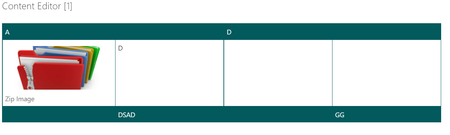
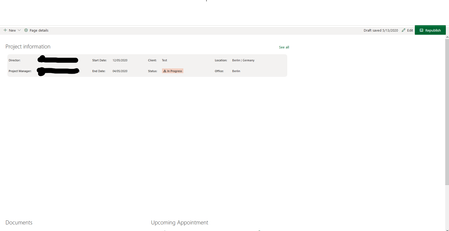
Problem Area Page Transformation: Error during the use of page transformation from PnP PowerShell Expected or Desired Behavior Content in the tables having custom formatting for the table and images added within the table cells in the content editor web part in the classic web part pages should be modernized properly. PnP PowerShell Online Version Details: Name: SharePointPnPPowerShellOnline Version: 3.29.2101.0 Observed Behavior Content in the content editor web parts having tables with formatting and images within the table are migrated properly but when we edit the page and save the modernized page, it is losing its table format along with the inline images in the table. Classic Web part page Modernized page Edit and save the modernized page You can notice, it is losing the image on save and for other cases it is also losing formatting in the tables which has highly customized formatting. Steps to Reproduce Create a classic web part page -> add content editor web part -> Insert tables -> apply custom formatting -> add images in the table cell -> save the page Then use the below script to modernize the page: ConvertTo-PnPPage -Identity $page.FieldValues["ID"] -Overwrite -DisablePageComments -AddTableListImageAsImageWebPart: $false -ClearCache -SkipItemLevelPermissionCopyToClientSidePage -TakeSourcePageName:$TakeSourcePageName -LogType File -LogFolder $LogOutputFolder -LogVerbose -LogSkipFlush -KeepPageCreationModificationInformation -CopyPageMetadata820Views0likes0Comments
Add-PnPClientSideWebPart : One or more errors occurred.
Why is this happening? Does not matter what kind of web part, this one a document library, I still get the same kind of error message. Using the latest version of PnP for SharePoint Online. I can create a page with PnP, add a Text part and so on... https://github.com/pnp/PnP-PowerShell/issues/2913 Add-PnPClientSideWebPart -Page $Page -DefaultWebPartType List -Section 1 -Column 1 -WebPartProperties @{isDocumentLibrary="true";selectedListId="a4140c74-b780-417c-89c1-381e24a6e699"} Add-PnPClientSideWebPart : One or more errors occurred. At line:1 char:1 + Add-PnPClientSideWebPart -Page $Page -DefaultWebPartType List -Sectio ... + ~~~~~~~~~~~~~~~~~~~~~~~~~~~~~~~~~~~~~~~~~~~~~~~~~~~~~~~~~~~~~~~~~~~~~ + CategoryInfo : WriteError: (:) [Add-PnPClientSideWebPart], AggregateException + FullyQualifiedErrorId : EXCEPTION,SharePointPnP.PowerShell.Commands.WebParts.AddClientSideWebPart2.2KViews0likes1CommentEmpty space between Sections when creating Webparts via PnP
Hey, I am still in the process of creating a script that automatically makes various adjustments when a new site is created. Among other things 3 webparts should be added. 1 list with a custom JSON formatting, 1 group calendar and "Highlight Content". This all works very well in itself, but I have a big empty gap within the first sections. As soon as I click on Edit in the GUI the gap is gone. Do I have an error in the script or do I have to add a separate command at the end that it renders the page again? Here is an extract from the script and the result #Add needed Webparts $list = Get-PnPList -Identity $ListName $views = Get-PnPProperty -ClientObject $list -Property Views foreach ($view in $views) { if ($view.Title -eq $ViewName) { $viewID = $view.id } } Add-PnPClientSidePageSection -Page $page -SectionTemplate TwoColumn Add-PnPClientSideWebPart -Page $page -DefaultWebPartType “List” -Section 1 -Column 1 -WebPartProperties @{isDocumentLibrary="false";selectedListId=$list.Id; selectedViewId=$viewID; hideCommandBar="true"; webpartHeightKey="4"} Add-PnPClientSideWebPart -Page $page -DefaultWebPartType "GroupCalendar" -Section 2 -Column 2 -WebPartProperties @{title=”Upcoming Appointment”;showPerPage="3"; selectedGroupId=$groupID; accessType="private"} $JSONMostRecent = '{"query":{"contentLocation":4,"contentTypes":[1],"sortType":1,"filters":[{"filterType":1,"value":"","values":[]}],"documentTypes":[99],"advancedQueryText":""},"templateId":1,"maxItemsPerPage":8,"hideWebPartWhenEmpty":false,"sites":[],"queryMode":"Basic","layoutId":"Card","dataProviderId":"List","webId":"$($web.id)","siteId":"$($site.id)","lastListId":"$($list.id)","listId":"$($list.id)","listTitle":"Documents","caml":"<View Scope=\"RecursiveAll\"><Query><Where><Eq><FieldRef Name=\"FSObjType\" /><Value Type=\"Integer\">0</Value></Eq></Where><OrderBy><FieldRef Name=\"Modified\" Ascending=\"false\" /></OrderBy></Query><ViewFields><FieldRef Name=\"Editor\" /><FieldRef Name=\"FileLeafRef\" /><FieldRef Name=\"File_x0020_Type\" /><FieldRef Name=\"ID\" /><FieldRef Name=\"Modified\" /><FieldRef Name=\"Title\" /><FieldRef Name=\"UniqueID\" /><FieldRef Name=\"_ShortcutUrl\" /></ViewFields><RowLimit Paged=\"false\">8</RowLimit></View>"}' Add-PnPClientSideWebPart -Page $page -DefaultWebPartType "ContentRollup" -Section 2 -Column 1 -WebPartProperties $JSONMostRecent Many thanks for your answers and advice. Best regards1.7KViews0likes1CommentTime is offset with pnp provisioning
I have an issue while I use pnp provisioning engine : When the provisioning is performed the time on the event dates of my list are offsetted by one hour (I presume because my site is UTC+1). And then when I apply the provisioning template, this offset is not set to the target. So I have a Time offset between my two sites. On my source site In my provisioning template xml On my target site763Views0likes0CommentsProgramatically change the new menu in modern libraries
I am creating a lot of document libraries with code in our enterprise and each library should have different content types. Unfortunately after updating the content types with CSOM, the default Word, Excel and PowerPoint templates disappear from the New-Menu in a modern library. Instead the content types are shown. Because I am not able to change the edit menu in hundreds of libraries back to the default, I would like to archive this within my software. I already found how to do thishttps://cann0nf0dder.wordpress.com/2019/03/24/programmatically-change-the-new-menu-in-sharepoint-online-using-powershell/l here, but would like to do it from withint C# (REST or CSOM) Any ideas how I could archive that?2.9KViews0likes1Comment