pivot table
27 Topics
Pivot Table StDev calculates different value then the STDEV formula
Hi, I'm using Excel 2013 15.0.5153.1000 32-Bit and a pivot table to calculate StDev and compare quickly to the StDev calculated by the excel formulas. I noticed that sometimes the Pivot Table StDev function gives a different value compared to the StDev calculated by the excel formula. When i found this i compared the StDev of the pivot table with every existing stdev formula from excel to see if i can get a match with one of the 6 formulas. In the attached file you can see this comparison with both StdDev and StdDevp function of the pivot table. 12 times out of 50 the StDev doesn't match. The error is very small, only the last few decimals are different. Column J contains the values StdDev and StdDevp calculated by the pivot table, in columns K:P you can see the values calculated by the excel formulas. On rows 8, 10, 15, 16, 24 and 26 you can see that the StDev value from the pivot table doesn't match with any value calculated by the excel formulas. (Same thing for the StdDevp only the row numbers are different). I'm curious if anybody knows the reason for this. Did anybody met this issue before? I can't find anything on the internet regarding this.6.1KViews0likes5Comments
Pivot Table Values not matching Source values (Max Date)
My pivot table is changing the value of the source data to a different number, even though the cells are formatted exactly the same. I have a table containing dates of calls with timestamps for individual cases with unique ID's. I have formatted the date/time data to Number values, with 10 decimal places to get the full number without rounding. I created a pivot table pulling the max date value for each ID from these fields. It's important that the number result include the timestamp, because there are some ID's with multiple calls on the same day, and I need the very latest call. The results of the max call date (number) in the pivot table for the exact call in the table from which the data is being pulled is a different number. See below example: Source info value: 7/3/18 4:48 PM (m/d/yy 12:00 am) Result when formatted as Number: 43284.7004137731 Result when max date calculated in pivot table: 43284.7004166667 I've done thorough troubleshooting from the formatting angle, so I know it's not a formatting selection issue. For example, I opened the data results from the pivot table, and the data is formatted as "mm/dd/7777 24:00" so I tried re-formatting the original data to the 8-digit, military time format but it did not impact the original number value result. I can confirm this because in my source data table I am concatenating the date value with the case ID's in a separate field to create their unique ID's to perform a final search. So for example, the above is "ABCDEFG43284.7004137731" and even after changing the formatting to match the results value from the pivot table, the number value did not change. Please help!Solved17KViews0likes9Comments
Named Range, Pivot Table failure
Hello, I've come across a problem that I've not seen before and I can't find a fix anywhere. My source data is 31 columns wide and is bound under a Dynamic Named Range using the OFFSET, COUNTA formula. When I test the range on the source it's fine and goes from A1 to AE3483 without any problems; however, when I apply the range to a pivot table, it stops at column AB. As a consequence, data in the final columns does not appear in the list for my pivot table and I cannot use it. (For this task I must use a Dynamic Range as the source data is constantly being updated and I want to be able to easily refresh my pivot tables without having to manually adjust the ranges - because there are many) Can anyone offer some advice into why the pivot table isn't counting across all columns? Here is an example of the formula being used: =OFFSET('Dash Source'!$A$1:$A$500000,0,0,COUNTA('Dash Source'!$A$1:$A$500000),COUNTA('Dash Source'!1:1))2.8KViews0likes3CommentsGetPivotData deactivation in Excel for Mac (Version 15.13.3)
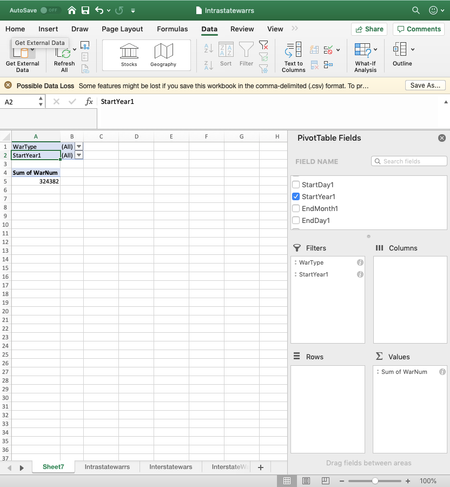
Good morning community! I recently had Excel for Mac installed and I'm looking where to deactivate the "GetPivotData" function (basically, because it's annoying). I used to know how to do it in Windows based computers but I can't seem to find the right place in my Mac to deactivate it. In Excel for Windows, you can customize options in the "File" tab. However, that doesn't seem to be the case for Mac (I tried to attach an image of my screen but it's not letting me post it). Any and every helpful reply is appreciated 🙂 Diana1.7KViews0likes1CommentGrouping Date/Time Data in a Pivot Table not working
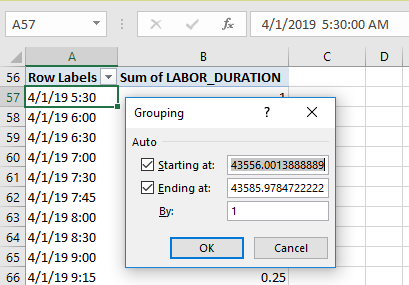
I am trying to follow the instructions as outlined here to group by hours: https://www.extendoffice.com/documents/excel/4822-excel-pivot-table-group-by-hour.html The issue is that when I right click and choose group, I don't see the date/time format although it shows in my Pivot table. How can I convert the data properly? Thanks in advance for the assistance.5.1KViews0likes5Comments
Running count of matching numbers (or text)
Hello! I fear this may be a simple question, but I don't know how to phrase it correctly to find an answer. I cannot figure out how to calculate a running count for a row of items that have duplicates. I've attached an example. I'm trying to calculate the highlighted row. I'm trying to get pivot tables to do it for me, but using the Running count function I just get a bunch of 1s. Any help is appreciated!Solved1.8KViews0likes3Comments
How to Count Unique Values within a Pivot Table?
In a pivot table (attached), I would like to add a column to show a count of unique names. Effectively for a small batch with only one territory, it is easy to do a =COUNTA for the names listed. But how can I do this for multiple names in multiple territories within a pivot table? (~20,000 lines to analyze) Pivot Setup: Territory (Country1) is in Rows Name (Aaron, Adrian, etc) is in Rows Count (5,3, etc) is in Values Thank you! Jim1.6KViews0likes1Comment