partners
5 TopicsAzure NetApp Files: The Data Backbone for NVIDIA AI Model Training, Inference, and Microsoft Foundry
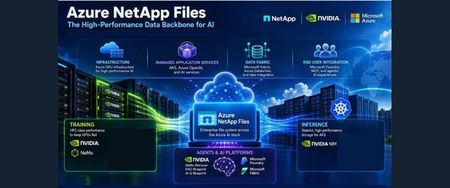
Azure NetApp Files provides a unified data foundation for enterprise AI, connecting data mobility, model training, inference, and agentic workflows. This article explores how caching, replication, high-throughput storage, low-latency checkpointing, and rapid dataset cloning help bring data closer to GPU compute and support efficient experimentation. It also examines persistent storage for containerized inference on Azure Kubernetes Service and integration with NVIDIA’s AI stack, Microsoft Foundry, and Microsoft Fabric. Two reference use cases illustrate its role in supporting domain-specific model training and modernizing AI inference while reducing infrastructure complexity.33Views0likes0CommentsMore EDA Job Sets per Volume: Azure NetApp Files Raises the Performance Bar
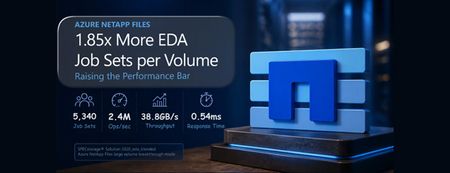
Azure NetApp Files raises the performance ceiling for cloud-based electronic design automation (EDA) with a new independently published SPECstorage® Solution 2020 EDA_BLENDED result for a single large volume in breakthrough mode: 5,340 job sets, 2.4 million operations per second, 38,776 MB/s peak throughput, and 0.54 ms overall response time. Delivering 1.85 times the job sets, operations, and throughput of the previous single-volume result while preserving sub-millisecond latency through most load points, the result enables more concurrent simulations, shorter regression cycles, and better utilization of compute and tool licenses without dataset sharding. Combined with proven linear scale-out and generally available Azure NetApp Files cache volumes that provide on-demand access to on-premises data, it gives EDA teams a practical foundation for high-performance cloud deployment and bursting.344Views0likes0CommentsBoost performance with NFS nconnect on Azure NetApp Files datastores for Azure VMware Solution
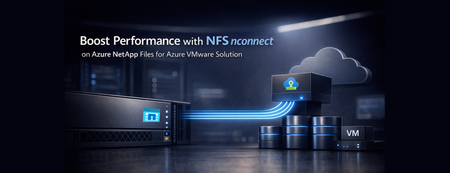
Azure VMware Solution now supports nconnect=4 with Azure NetApp Files datastores each ESXi host opens up to four parallel TCP connections to a single NFS datastore, raising throughput and lowering latency under load. Supported on both Gen 1 and Gen 2 private clouds, it makes Azure VMware Solution with Azure NetApp Files an even stronger home for databases and other storage‑intensive workloads.559Views0likes0CommentsFrom Scale to Breakthrough: Azure NetApp Files Sets a New Cloud Benchmark for EDA Performance
This article spotlights the newest leap in Azure NetApp Files: large volume breakthrough mode performance – independently validated by SPECstorage® Solution 2020 benchmarks. Azure NetApp Files is setting a new record for enterprise-scale Electronic Design Automation (EDA) workloads in the cloud. Backed by benchmark results at enterprise scale, it further reduces the traditional tradeoff between massive scale and uncompromising storage performance. For EDA teams, this means storage can keep pace with design cycles – enabling faster iteration, supporting cloud-first workflows, and reducing time spent waiting on infrastructure.583Views0likes0CommentsSecure, Keyless Application Access with Managed Identities - Now GA in Azure Files SMB
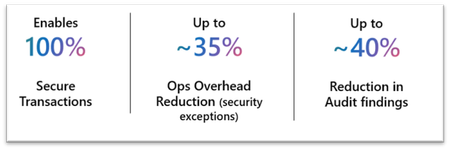
As enterprises modernize applications and strengthen their security posture, identity is central to how applications access shared storage. Traditional identity models relying on account keys, stored credentials, or domain‑joined infrastructure add operational overhead and introduce security risks such as credential leakage, lack of identity attribution, and excessive privilege if shared keys are compromised. Today, we are excited to announce the General Availability (GA) of Managed Identity support for Azure Files over SMB, enabling applications and virtual machines to securely access Azure Files without secrets, passwords, or key distribution. Managed Identity support enables customers to meet modern enterprise security standards without reliance on storage account keys, streamlining how organizations securely enable file‑based application access and reducing the operational overhead of filing internal exceptions. New storage accounts can support secure, identity‑based SMB access out of the box, while existing deployments can get secure by enabling Managed Identity authentication. From web application workloads such as WordPress, to databases on Azure Kubernetes Service (AKS), to CI/CD pipelines, applications require secure access. In a world where security is foundational, continued reliance on key-based access conflicts with Zero Trust principles and least privilege access. What’s New In GA AKS Workload Identity Support AKS Workload Identity (preview) extends the traditional managed identity model for Kubernetes by shifting the identity from the node to pods. Instead of inheriting the identity of the underlying cluster, each Kubernetes pod can use its own federated identity, mapped directly to a Microsoft Entra ID principal. This feature enables: Pod-level identity isolation, rather than cluster-level Least-privilege access with secure RBAC Seamless scaling and redeployment, without identity reconfiguration No secrets, no key rotation, no credential injection When combined with Azure Files over SMB, Workload Identity allows AKS workloads to access shared file storage securely and natively per pod, using the same identity-driven model as cluster level managed identities. Now available with AKS 1.35, for customers specifically in the financial services industries, AKS Workload Identity enables per‑application, least‑privilege access to Azure Files without credentials, improving isolation and auditability. This allows regulated, stateful workloads to run securely on AKS while meeting strict compliance and regulatory requirements. Co-existence of Application Identities and end-user identity access Azure Files now enables both Managed Identity and end‑user access on the same storage account, with users and applications independently authenticated via Entra ID and authorized through a shared permissions model. This unified access model eliminates the need for duplicate storage or credentials, enabling secure collaboration, troubleshooting, and automation on shared data without compromising governance or compliance. This supports scenarios such as: Developers accessing the same file share as an application for debugging Admins managing content used by automated workflows Hybrid environments with user-driven and app-driven access Simplified Storage Account enablement via the Azure portal We have now added a dedicated Managed Identity property that makes enabling identity‑based SMB access simple and transparent via the Azure portal for new as well as existing storage accounts. With a single configuration at the storage account level, customers can allow applications to authenticate to Azure Files using Managed Identities. This portal experience supports incremental adoption, making it easy to modernize authentication while maintaining compatibility with existing user access and governance models. Get Started with Managed Identities with SMB Azure Files Start using Managed Identities with Azure Files today at no additional cost. This feature is supported on HDD and SSD SMB shares across all billing models. Refer to our documentation for complete set-up guidance. Whether provisioning new storage or enhancing existing deployments, this capability provides secure, enterprise‑grade access with a streamlined configuration experience. For any questions, reach out to the team at azurefiles@microsoft.com.1.2KViews0likes0Comments