outlook groups
4 TopicsUsing PowerShell to Work with Microsoft 365 Groups, Conversations, Threads, and Posts
When launched in 2015, Outlook groups were an email-based collaboration platform. Now called Microsoft 365 Groups, the few Outlook groups that host email-based discussions have a distinctive Graph API to create and manage the conversations, topics, and posts which make up their discussions. This article reviews how to use PowerShell to fetch these objects and how to create new conversations and reply to posts (using the Outlook Groups APIs, of course). https://office365itpros.com/2026/09/30/outlook-group-graph-api/114Views0likes0CommentsComparing Outlook Groups to Shared Mailboxes (2022 Edition)
Outlook groups and shared mailboxes both help small teams work with shared email. The decision as to which to use depends on the exact needs the team has. Some recent changes made by Microsoft to allow users to create new folders and rules in group mailboxes might tilt the decision towards group mailboxes, but shared mailboxes still offer lots of potential. https://practical365.com/outlook-groups-vs-shared-mailboxes/876Views1like0CommentsOutlook Groups Gain Support for Folders and Rules
Outlook Groups now boast support for folders and rules. In other words, group owners and members (if allowed) can create new folders and move and copy items from the inbox to those folders. They can also create rules to process inbound email arriving into the group inbox. It’s all well and good, but there are a few points to understand about how things work. https://office365itpros.com/2022/11/14/outlook-groups-folders-rules/1.2KViews0likes0Comments
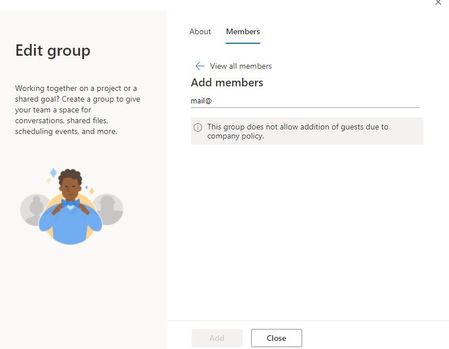
Outlook: All Guests suddenly Members + No new Guests allowed
With the re-design of Outlook Groups settings pan arriving for us, two things happened across all Outlook Groups: 1) All former guests are listed as members (not in Teams) 2) I can only add Members - i.e. no new Guests invitations are allowed in Outlook (even for admins) but the same issue does NOT exist in Teams The first one, though without much affect, is very troubling since we educated our staff to understand the difference between members and guests... We did click through the myriad of settings in the admin-section but cannot find anything. A list of possible triggers would be much appreciated.807Views0likes0Comments