outlook experience
27 Topics
Copilot for Sales not prompting to add opportunity from email in outlook
Hi, We have Microsoft Copilot for Sales connected to Salesforce CRM. When an email is received from a sender who does not exist in Salesforce, Copilot correctly prompts us to create a new contact. After the contact is created and associated with an account, I can manually create or edit opportunity records without issue. I have verified the Salesforce configuration, permissions, and access assigned to the CopilotForSalesIntegrationProfile used by the Sales Agent. I have also confirmed that all required opportunity fields are configured in the Copilot for Sales forms. The issue is that Copilot is not prompting users to create an opportunity based on incoming emails. My understanding is that Copilot for Sales should be able to identify opportunity-related intent in an email and prompt for opportunity creation, with relevant information from the email prepopulated into the opportunity record. Has anyone experienced this behavior and found a resolution? Any guidance or recommendations would be appreciated. Thank you.
Sales CoPilot - Email Attachments dont appear in timeline when saving the email to D365 from Outlook
Hi Currently having some trouble seeing attachments associated to the email in the Timeline related to the record I am saving the email to. Has anyone else experiences this? is this a product limitation or is there a setting that needs to be turned on somewhere? Thanks in advance AysenSolved
Endless spinner in Copilot Sales Outlook App after login to Salesforce
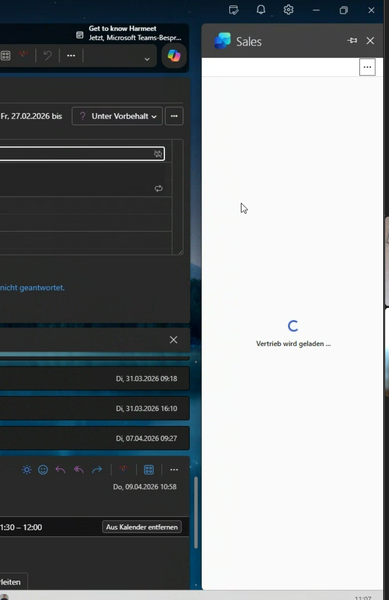
We are experiencing an issue with the Copilot Sales App in Outlook. Users are launching the app and authenticate to Salesforce successfully. Then, a message saying "Sales is loading..." is shown with a spinner and nothing happens, no matter how long you wait. This only happens to some users and not to all users. Sometimes it happens to users who were previously able to load the app fine.Copilot for Sales required field error on custom object
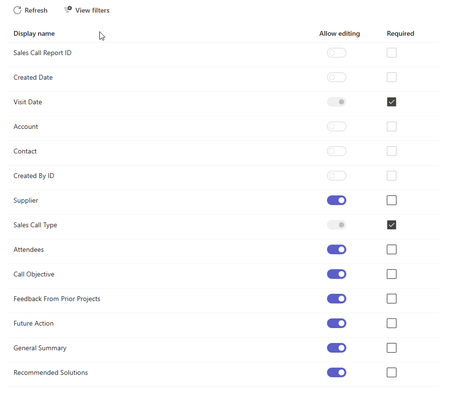
I am getting the following error when trying to create a custom object record in copilot for sales. There’s a new required field in this form, and your Copilot for Sales admin will have to update the settings to match before you can save this here. Send these error details to your admin, and ask them to match the required fields in Copilot for Sales to the ones in [Dynamics 365/Salesforce], then try again. The two required fields are already added. The only other field required is the contact field and that is greyed out in the teams settings. If is a rather siple object so not sure what is the problem.What features are included in the free version of Copilot for Sales?
Copilot for Sales is an add-in that can be operated with Outlook, but compared to what is described on the Microsoft training site (URL below), it seems that there are fewer functions available. Are only the functions included in the free version available? https://learn.microsoft.com/ja-jp/training/modules/boost-sales-performance/Cannot see added fields when saving an email through the Outlook add in
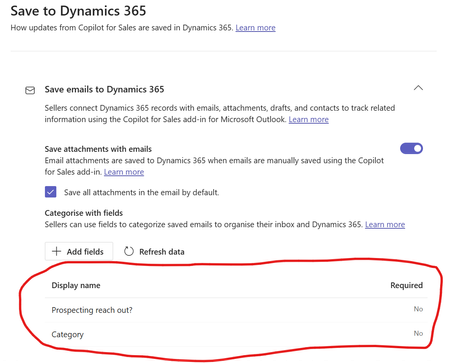
Hi there, We have selected fields in the Copilot for Sales Settings panel that should allow us to set those fields when we are saving an email in Outlook. This should add those fields in the Outlook add in save panel here: However, our fields don't show up. It's worth noting that this works flawlessly in Save meetings to Dynamcs 365. Here's how it looks: Does anyone have any idea why this works for appointments and not meetings? Many thanks.
MissingSalesCopilotCustomization error with Outlook add-in signed into D365 Sales
Just a few days ago, users started seeing an error with the Copilot for Sales add-in for Outlook. The error details mention "Missing Sales Copilot Customization". This occurs only when signed into production D365 Sales org; if I switch my user (admin user) to our sandbox org I have no issue. There must have been a changed in the last few days with an update. Any help is appreciated. "errorCodeName": "Microsoft.SalesProductivity.ServiceFramework.SPServiceCustomErrorCode.MissingSalesCopilotCustomization", "message": "Copy the error details here, then share them with your admin or Microsoft support and ask if they can help you resolve this issue.", "title": "Something went wrong", "properties": {}, "troubleshootingLink": null, "sessionId": "71a1cf8b-9782-4cd8-b31a-4167d061c744", "activityId": "bfbeaa87-0421-461c-b1cf-d6bd7d454a22"
Copilot for Sales configuration error with Outlook
Hello - I am having a challenge from Outlook to Copilot for Sales. Steps I am taking: 1. in Outlook, click on Copilot for Sales add in 2. click on save email to Dynamics 365. 3. Get an error message (attached below) Please advise. I am following the steps in the docs site Fix mailbox errors in Dynamics 365 - Copilot for Sales | Microsoft Learn but following the steps is not resolving the issue.