outage
4 Topics
Azure Key Vault Replication: Why Paired Regions Alone Don’t Guarantee Business Continuity
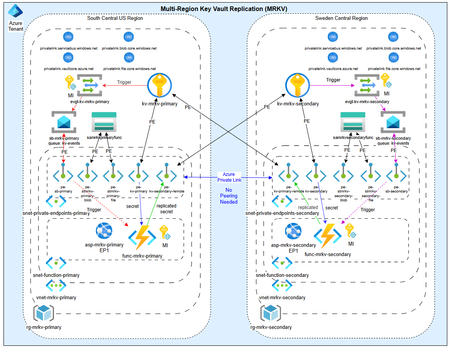
As customers modernize toward multi‑region architectures in Azure, one question comes up repeatedly: “If my region goes down, will Azure Key Vault continue to work without disruption?” The short answer: it depends on what you mean by “work.” Azure Key Vault provides strong durability and availability guarantees, but those guarantees are often misunderstood—especially when customers assume paired‑region replication equals full disaster recovery. In reality, Azure Key Vault replication is designed for survivability, not uninterrupted write access or customer‑controlled failover. This post explains: How Azure Key Vault replication actually works (per Microsoft Learn) Why paired‑region failover does not equal business continuity Two reference architectures that implement true multi‑region Key Vault availability, with Terraform How Azure Key Vault Replication Works (Per Microsoft Learn) Azure Key Vault includes multiple layers of Microsoft‑managed redundancy. In‑Region and Zone Resiliency Vault contents are replicated within the region. In regions that support availability zones, Key Vault is zone‑resilient by default. This protects against localized hardware or zone failures. Paired‑Region Replication If a Key Vault is deployed in a region with an Azure‑defined paired region, its contents are asynchronously replicated to that paired region. This replication is automatic and cannot be configured, observed, or tested by customers. Microsoft‑Managed Regional Failover If Microsoft declares a full regional outage, requests are automatically routed to the paired region. After failover, the vault operates in read‑only mode: ✅ Read secrets, keys, and certificates ✅ Perform cryptographic operations ❌ Create, update, rotate, or delete secrets, keys, or certificates This is a critical distinction. Paired‑region replication preserves access — not operational continuity. Why Paired‑Region Replication Is Not Business Continuity From a reliability and DR perspective, several limitations matter: Failover is Microsoft‑initiated, not customer‑controlled No write operations during regional failover No secret rotation or certificate renewal No way to test DR Accidental deletions replicate No point‑in‑time recovery without backups Microsoft Learn explicitly states that critical workloads may require custom multi‑region strategies beyond built‑in replication. For many customers, this means Azure Key Vault becomes a single‑region dependency in an otherwise multi‑region application design. The Multi‑Region Key Vault Pattern The two GitHub repositories below implement a common architectural shift: Multiple independent Key Vaults deployed in separate regions, with customer‑controlled replication and failover. Instead of relying on invisible platform replication, the vaults become first‑class, region‑scoped resources, aligned with application failover. Solution 1: Private, Locked‑Down Multi‑Region Key Vault Replication Repository: 👉 https://github.com/jclem2000/KeyVault-MultiRegion-Replication-Private Architecture Highlights Independent Key Vault per region Private Endpoints only No public network exposure Terraform‑based deployment Controlled replication using Event Based synchronization What This Enables ✅ Full read/write access during regional outages ✅ Continued secret rotation and certificate renewal ✅ Customer‑defined failover and RTO ✅ DR testing and validation ✅ Strong alignment with zero‑trust and regulated environments Trade‑offs Higher operational complexity Requires automation and application awareness of multiple vaults Solution 2: Low‑Cost Public Multi‑Region Key Vault Replication Repository: 👉 https://github.com/jclem2000/KeyVault-MultiRegion-Replication-Public Architecture Highlights Independent Key Vault per region Public endpoints Minimal networking dependencies Terraform‑based Controlled replication using Event Based synchronization Optimized for simplicity and cost What This Enables ✅ Full read/write availability in any region ✅ Clear and testable DR posture ✅ Lower cost than private endpoint designs ✅ Suitable for many non‑regulated workloads Trade‑offs Public exposure (mitigated via firewall rules, RBAC, and conditional access) Not appropriate for all compliance requirements Requires automation and application awareness of multiple vaults Azure Native Replication vs Customer‑Managed Multi‑Region Vaults Capability Azure Paired Region Multi‑Region Vaults Read access during outage ✅ ✅ Write access during outage ❌ ✅ Secret rotation during outage ❌ ✅ Customer‑controlled failover ❌ ✅ DR testing ❌ ✅ Isolation from accidental deletion ❌ ✅ Predictable RTO ❌ ✅ Azure Key Vault’s native replication optimizes for platform durability. The multi‑region pattern optimizes for application continuity. When to Use Each Approach Paired‑Region Replication Is Often Enough When: Secrets are mostly static Read‑only access during outages is acceptable RTO is flexible You prefer Microsoft‑managed recovery Multi‑Region Vaults Are Recommended When: Secrets or certificates rotate frequently Applications must remain writable during outages Deterministic failover is required DR testing is mandatory Regulatory or operational isolation is needed Closing Thoughts Azure Key Vault behaves exactly as documented on Microsoft Learn—but it’s important to be clear about what those guarantees mean. Paired‑region replication protects your data, not your ability to operate. If your application is designed to survive a regional outage, Key Vault must follow the same multi‑region design principles as the application itself. The reference architectures above show how to extend Azure’s native durability model into true operational resilience, without waiting for a platform‑level failover decision.722Views0likes1CommentThe Importance of Validation HostPools in AVD Deployments: Lessons from the CrowdStrike Global Issue
In the rapidly evolving world of IT, ensuring the stability and reliability of virtual desktop environments is crucial. Azure Virtual Desktop (AVD) deployments offer a flexible and scalable solution for organizations, but with this flexibility comes the need for rigorous testing and validation. This article explores the importance of validation host pools in AVD deployments, particularly for testing updates before pushing them to production, and draws parallels to the recent global issue caused by CrowdStrike. The Role of Validation Host Pools in AVD are a critical component in the deployment and maintenance of AVD environments. These pools allow organizations to test updates and changes in a controlled environment before they are applied to the production environment. This process helps in identifying potential issues that could disrupt user experience or cause downtime. Key Benefits of Validation Host Pools: Early Detection of Issues: By testing updates in a validation host pool, IT teams can identify and resolve issues before they impact the production environment. Minimized Downtime: Validation helps in ensuring that updates do not introduce errors that could lead to downtime, thus maintaining business continuity. Improved User Experience: Regular testing in a validation environment ensures that end-users experience fewer disruptions and maintain productivity. The CrowdStrike Global Issue: A Case Study: Recently, a faulty software update from CrowdStrike led to a massive global outage, affecting millions of Windows computers. This incident underscores the importance of thorough testing and validation before deploying updates to production environments. What Happened: A software update for CrowdStrike’s Falcon Sensor caused Windows computers to crash, leading to widespread disruptions across various sectors, including airlines, banks, and emergency services. The issue was traced back to a logic error in the update, which was not detected before the update was pushed to production. Lessons Learned: Critical Need for Validation: The CrowdStrike incident highlights the necessity of having robust validation processes in place. If the update had been thoroughly tested in a validation environment, the issue could have been identified and rectified before causing widespread disruption. Continuous Monitoring: Even after deploying updates, continuous monitoring in a validation environment can help in quickly identifying and mitigating any unforeseen issues. To implement Validation Host Pools in AVD, follow these steps: Create a Host Pool: Use the Azure portal, PowerShell, or Azure CLI to create a new host pool or configure an existing one as a validation environment. Define the Validation Environment: In the Azure portal, select the host pool, go to properties, and enable the validation environment setting. Regular Testing: Ensure that the validation host pool is used regularly for testing updates and changes. This should mimic the production environment as closely as possible. The recent CrowdStrike global issue serves as a stark reminder of the importance of validation host pools in AVD deployments. By implementing and maintaining a robust validation environment, organizations can significantly reduce the risk of disruptions and ensure a seamless user experience. As the IT landscape continues to evolve, the role of validation host pools will only become more critical in maintaining the stability and reliability of virtual desktop environments.1.6KViews0likes1Comment
External monitoring shows outage in multiple regions & service types. Azure shows no outage.
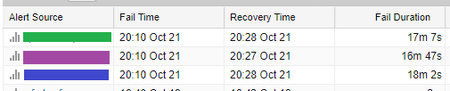
I'm using a service called Monitis to monitor the uptime of some of my web-based resources. Basically, it pings the services from three geographic locations (West US, East US, and Mid US) and raises an alert if two or more them encounter ping times of more than 10 seconds for an extended period of time. On Saturday, three of my resources, all based in Azure, registered an 18-minute outage from all three ping locations at the same time: (The times above are in the Japan time zone. This equates to 4:10-4:28am Pacific, Oct. 21) Of these, [green] is the hostname for two identical web apps, one in West US and one in East US, balanced using traffic manager. The error in Monitis includes the IP address for the East US service, so it seems that the hostname was resolving to the US East service when Monitis tried to ping it. [purple] is a Web app in North Central US scaled out to two S1 instances [blue] is a VM in East US I've checked the monitoring charts within Azure for the two web apps and neither shows any downtime during the specified time period. Both show requests coming in and going out during the time period and no instance restarts. [green] has a slight rise in activity during the time period, but nothing out of the ordinary. The VM says that it has been up since September, and doesn't show anything unusual in the System event log during this time period. All three of these resources are unrelated to each other and have no interdependencies. My questions: 1. Is there any way to find out what happened here? As stated above, Azure indicates no interruption in activity, but it very much seems that there was an interruption. 2. Why would Monitis show an 18-minute outage on multiple types of services in multiple Azure regions? If there was an interruption in Azure's network infrastructure during that time, there's no sign of it in the https://azure.microsoft.com/en-us/status/history/. It's also strange that the web apps both seem to report receiving and serving requests during the supposed outage. 3. The service marked in [green] is set up in Traffic manager with an identical service in US-West, so presumably Monitis should have been redirected to the US-West service when the US-East service became inaccessible, but it seems like this didn't happen. Can you think of why this didn't work? It would make sense if Azure thought that the service was healthy the whole time, but how can I handle a situation with one region becoming inaccessible if traffic manager doesn't redirect the traffic? Thank you for any insight or help you can give.915Views0likes0Comments