onenote
22 Topics
Nav button for channel "Notes" tab only shows pages for a section; can no longer see all sections
Has anyone noticed that the Notes tab within a standard channel will not allow you to see any other sections of a team's notebook? For example, if you create 3 new channels and click on the Notes tab in each one, it will create a corresponding section in the team's notebook. You used to be able to click on the navigation button from any Notes tab to expose all the sections of the notebook. Right now, all the navigation button does is show you all the pages of the section linked to that channel. In order to see all the sections of the team's notebook, you need to either launch it from OneNote for the Web or the OneNote desktop app. Did Microsoft purposely remove that capability recently? I haven't seen any communication from them about it.400Views0likes0Comments
OneNote tab disappeared from MS Teams on IOS
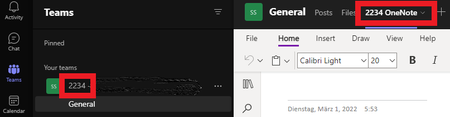
Hi all, I've an issue with MS Teams, I use to work with MS Teams for my projects and I have created a OneNote for every project. So when I create my Teams I can attache the OneNote tab to work with the tool on my computer AND my Ipad when I'm on the construction site. The problem is this one : I can't find OneNote in MS Teams anymore. I know they it should be available because I can see it in my desktop version of MS Teams (see screenshot attached) But on IOS, the OneNote Tabl is not available anymore (it was and still on old projects) an when I click on "add an app" I'm not able to find OneNote in the list. Any solution???2KViews0likes2Comments
OneNote Notebook upload to Teams
Everyone in our group has their own OneNote notebook. When they leave our group, we are trying to download their notebook so everyone in the rest of the group can access it. (1) Is it possible to download an entire notebook (instead of page by page) using Microsoft OneNote on a Mac? (2) Is there a way to upload that downloaded notebook to Teams? Or upload a link to the notebook, or some other way of being able to click on and access the notebook through Teams? I know a new tab can be created in Teams to upload a Onenote notebook but this would require many many tabs since each tab represents only one notebook. Is there a way to consolidate OneNote notebooks all into one tab? Or a way to upload the notebook / link to it from within a folder in a specific tab (i.e. if we had a folder for each person in the group and could put the notebook there)? Thanks!Solved3.7KViews1like5Commentsselect an existing notebook for meetings.
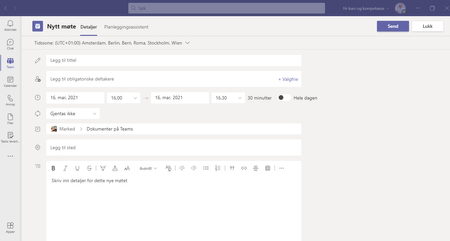
Hi, In a world of collaboration. When we prepare for meeting in a shared OneNote notebook in Teams. How do I share that note book when i Invite someone into a meeting. From Outlook From Teams. Selecting "Meeting Notes" in outlook gives med list over Notbooks on my OneDrive, even for shared notes. I can browse, and add a new notebook where i would like to have it. But not browse on Teams and select the notebook where I have prepared my meeting. Booking a meeting in Teams do no not have an "Neeting notes" option, so I guess inserting a link is the solution? Best Regards - Geir1.4KViews0likes3CommentsOneNote issue
Hello, I am not sure if this is the right place to be posting this - But I've been thrown around to a lot of different people yesterday and today and still have no resolution and I desperately need this fixed. So I have numerous lectures on my one note...Starting a few days ago, OneNote has moved the highlighting and notes I made on a few lectures all the way down to the bottom of the page into a blank space. In addition - on the same few lectures - every time I try to re-highlight and then switch to "A" to type in a note it immediately erases the highlighting. Does anyone have any idea how to fix this problem so it doesn't keep happening? I have already tried uninstalling and reinstalling Microsoft office, restarting the computer, and doing the office 365 repair...Nothing has worked. HELP!1.2KViews0likes1CommentChannels and onenote sections
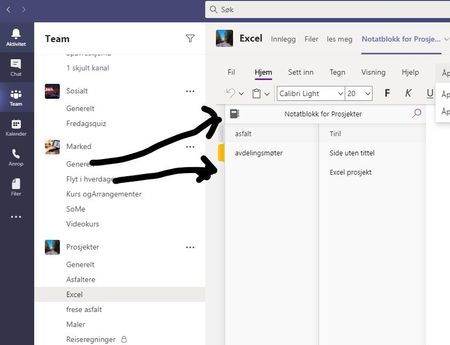
Hi, Is there any association with Teams channels and OneNote secrtions when I add OneNote to a Team? I was sure it was, but when I add a OneNote to at Team/Channel now, it is not. Or is there no connection association? So OneNote is independent from the channels Please see the picture for illustration. Best regards - GeirSolved8.2KViews0likes4Comments
Onenote does not work for external users in Teams
Hi, although we have been using Onenote integration in Teams quite happily for some time, we have encountered an issue - content od Onenote card in a team is not working for external users. That happens even in teams where we are pretty sure that external users were previously able to view content of particular Onenote card. NB, it seems that internal/company users have no difficulties in viewing it. Actually, I think it works even faster now. Do you know what could be the problem? Here is a screenshot of the bug and the error log: "SessionId: d8d9de8f-3728-4d91-bed8-f455a00aa935 Thu, 24 Sep 2020 08:21:19 GMT MissingProperties" Best Petr2.3KViews0likes2Comments